2013 NISSAN PATHFINDER Interior light
[x] Cancel search: Interior lightPage 210 of 506
●Delete:
Deletes the last inputted character with one
touch. Touch and hold the “Delete” key to
delete all of the characters.
● OK:
Completes the character input.
Touch screen maintenance
If you clean the display screen, use a dry, soft
cloth. If additional cleaning is necessary, use a
small amount of neutral detergent with a soft
cloth. Never spray the screen with water or de-
tergent. Dampen the cloth first, and then wipe the
screen.
HOW TO SELECT MENUS ON THE
SCREEN
Vehicle functions are viewed on the center dis-
play screen in menus. Whenever a menu selec-
tion is made or menu item is highlighted, different
areas on the screen provide you with important
information. See the following for details.
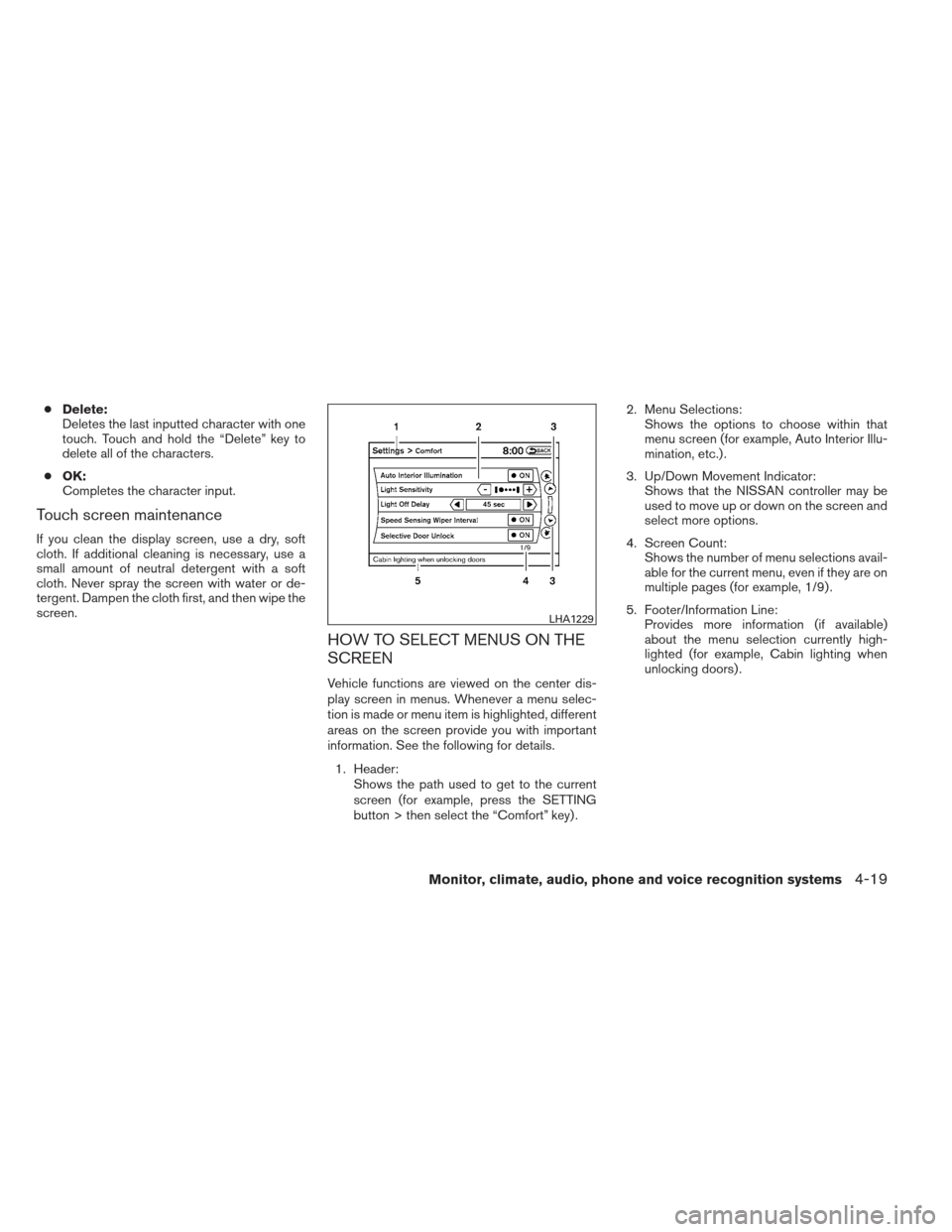
1. Header: Shows the path used to get to the current
screen (for example, press the SETTING
button > then select the “Comfort” key) . 2. Menu Selections:
Shows the options to choose within that
menu screen (for example, Auto Interior Illu-
mination, etc.) .
3. Up/Down Movement Indicator: Shows that the NISSAN controller may be
used to move up or down on the screen and
select more options.
4. Screen Count: Shows the number of menu selections avail-
able for the current menu, even if they are on
multiple pages (for example, 1/9) .
5. Footer/Information Line: Provides more information (if available)
about the menu selection currently high-
lighted (for example, Cabin lighting when
unlocking doors) .
LHA1229
Monitor, climate, audio, phone and voice recognition systems4-19
Page 219 of 506
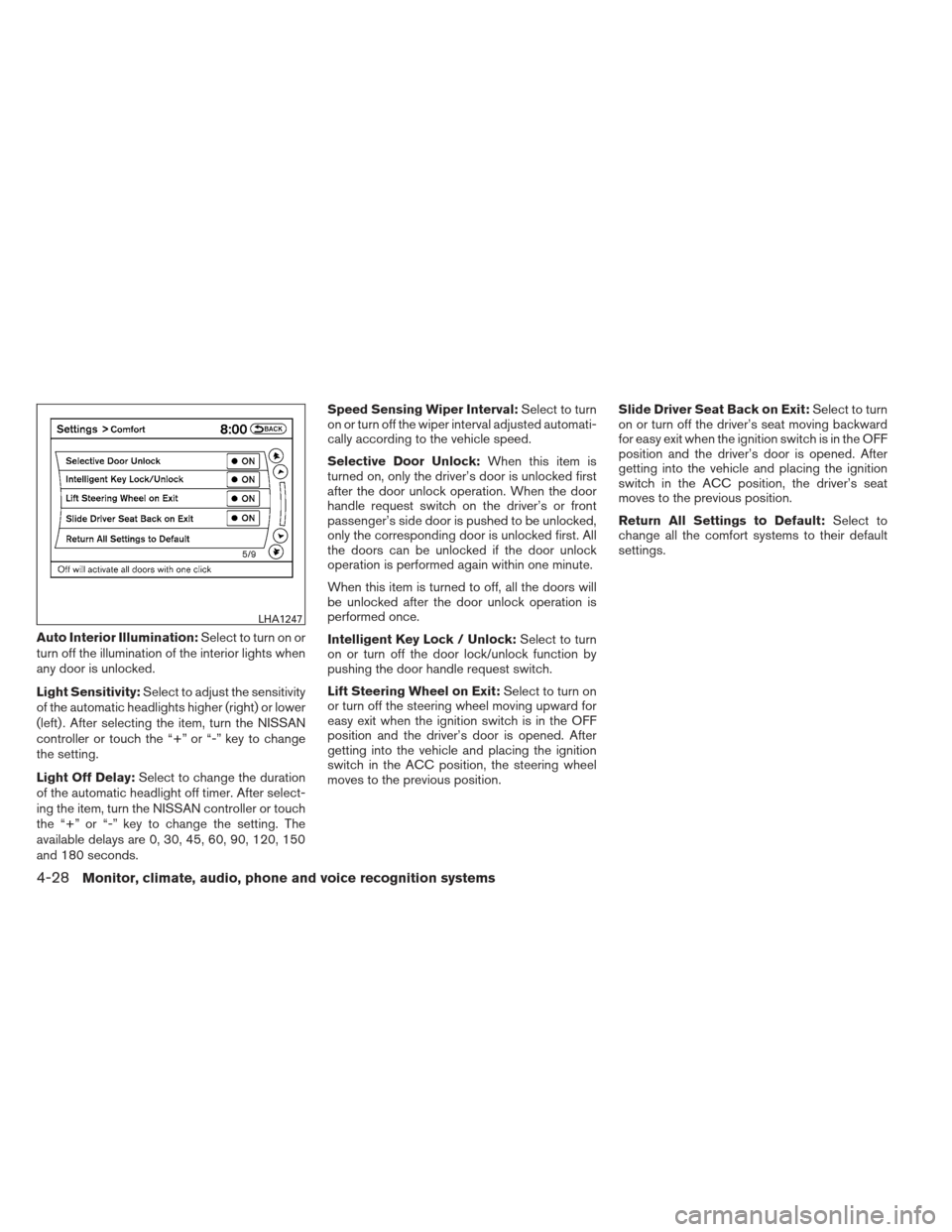
Auto Interior Illumination:Select to turn on or
turn off the illumination of the interior lights when
any door is unlocked.
Light Sensitivity: Select to adjust the sensitivity
of the automatic headlights higher (right) or lower
(left) . After selecting the item, turn the NISSAN
controller or touch the “+” or “-” key to change
the setting.
Light Off Delay: Select to change the duration
of the automatic headlight off timer. After select-
ing the item, turn the NISSAN controller or touch
the “+” or “-” key to change the setting. The
available delays are 0, 30, 45, 60, 90, 120, 150
and 180 seconds. Speed Sensing Wiper Interval:
Select to turn
on or turn off the wiper interval adjusted automati-
cally according to the vehicle speed.
Selective Door Unlock: When this item is
turned on, only the driver’s door is unlocked first
after the door unlock operation. When the door
handle request switch on the driver’s or front
passenger’s side door is pushed to be unlocked,
only the corresponding door is unlocked first. All
the doors can be unlocked if the door unlock
operation is performed again within one minute.
When this item is turned to off, all the doors will
be unlocked after the door unlock operation is
performed once.
Intelligent Key Lock / Unlock: Select to turn
on or turn off the door lock/unlock function by
pushing the door handle request switch.
Lift Steering Wheel on Exit: Select to turn on
or turn off the steering wheel moving upward for
easy exit when the ignition switch is in the OFF
position and the driver’s door is opened. After
getting into the vehicle and placing the ignition
switch in the ACC position, the steering wheel
moves to the previous position. Slide Driver Seat Back on Exit:
Select to turn
on or turn off the driver’s seat moving backward
for easy exit when the ignition switch is in the OFF
position and the driver’s door is opened. After
getting into the vehicle and placing the ignition
switch in the ACC position, the driver’s seat
moves to the previous position.
Return All Settings to Default: Select to
change all the comfort systems to their default
settings.
LHA1247
4-28Monitor, climate, audio, phone and voice recognition systems
Page 242 of 506
1. Press the AUTO button on. (The indicator onthe button will illuminate and AUTO will be
displayed.)
2. Operate the driver’s side temperature con- trol buttons.
● Adjust the temperature display to about
75°F (24°C) for normal operation.
● The temperature of the passenger compart-
ment will be maintained automatically. Air
flow distribution and fan speed are also con-
trolled automatically.
● A visible mist may be seen coming from the
ventilators in hot, humid conditions as the air
is cooled rapidly. This does not indicate a
malfunction.
3. You can individually set driver’s and front passenger’s side temperature using each
temperature control button. When the DUAL
button or passenger’s side temperature but-
ton is pressed, the DUAL indicator will come
on. To turn off the passenger’s side tempera-
ture control, press the DUAL button.
Heating (A/C OFF)
The air conditioner does not activate. When you
need to heat only, use this mode.
1. Press the A/C button. (A/C OFF will be displayed and A/C indicator will turn off.) 2. Operate the temperature control buttons to
set the desired temperature.
● The temperature of the passenger compart-
ment will be maintained automatically. Air
flow distribution and fan speed are also con-
trolled automatically.
● Do not set the temperature lower than the
outside air temperature. Otherwise the sys-
tem may not work properly.
● Not recommended if windows fog up.
Dehumidified defrosting or defogging
1. Press thefront defroster button on.
(The indicator light on the button will come
on.)
2. Operate the temperature control buttons to set the desired temperature.
● To quickly remove ice from the outside of the
windows, use the fan speed control dial to
set the fan speed to maximum.
● As soon as possible after the windshield is
clean, press the AUTO button to return to
the automatic mode. ●
When the
front defroster button is
pressed, the air conditioner will automati-
cally be turned on at outside temperatures
above 36°F (2°C) . The air recirculate mode
automatically turns off, allowing outside air
to be drawn into the passenger compart-
ment to further improve the defogging per-
formance.
MANUAL OPERATION
Fan speed control
Turn thefan speed control dial to manually
control the fan speed.
Press the AUTO button to return to automatic
control of the fan speed.
Air recirculation
Press theair recirculation button to recir-
culate interior air inside the vehicle. The
indicator light on the button will come on.
The air recirculation cannot be activated when
the air conditioner is in the
front defrosting
mode or the
front defrosting and foot out-
let mode.
Monitor, climate, audio, phone and voice recognition systems4-51
Page 246 of 506
AUTOMATIC OPERATION
Cooling and/or dehumidified heating
(AUTO)
This mode may be used all year round as the
system automatically works to keep a constant
temperature. Air flow distribution and fan speed
are also controlled automatically.1. Press the AUTO button on. (The indicator on the button will illuminate and AUTO will be
displayed.)
2. Turn the temperature control dial to the left or right to set the desired temperature.
● Adjust the temperature display to about
75°F (24°C) for normal operation.
● The temperature of the passenger compart-
ment will be maintained automatically. Air
flow distribution and fan speed are also con-
trolled automatically.
● A visible mist may be seen coming from the
vents in hot, humid conditions as the air is
cooled rapidly. This does not indicate a mal-
function.
3. You can individually set driver’s and front passenger’s side temperature using each
temperature control dial. When the DUAL
button or passenger’s side temperature dial
is turned, the DUAL indicator will come on. To turn off the passenger’s side temperature
control, press the DUAL button.
Heating (A/C OFF)
The air conditioner does not activate. When you
need to heat only, use this mode.
1. Press the A/C button. (A/C OFF will be displayed and A/C indicator will turn off.)
2. Turn the temperature control dial to set the desired temperature.
● The temperature of the passenger compart-
ment will be maintained automatically. Air
flow distribution and fan speed are also con-
trolled automatically.
● Do not set the temperature lower than the
outside air temperature. Otherwise, the sys-
tem may not work properly.
● Not recommended if windows fog up.
Dehumidified defrosting or defogging
1. Press thefront defroster button on.
(The indicator light on the button will come
on.)
2. Turn the temperature control dial to set the desired temperature. ●
To quickly remove ice from the outside of the
windows, use the fan speed control dial to
set the fan speed to maximum.
● As soon as possible after the windshield is
clean, press the AUTO button to return to
the automatic mode.
● When the
front defroster button is
pressed, the air conditioner will automati-
cally be turned on at outside temperatures
above 36°F (2°C) . The air recirculate mode
automatically turns off, allowing outside air
to be drawn into the passenger compart-
ment to further improve the defogging per-
formance.
MANUAL OPERATION
Fan speed control
Turn thefan speed control dial to manually
control the fan speed.
Press the AUTO button to return to automatic
control of the fan speed.
Air recirculation
Press theair recirculation button to recir-
culate interior air inside the vehicle. The
indicator light on the button will come on.
Monitor, climate, audio, phone and voice recognition systems4-55
Page 426 of 506
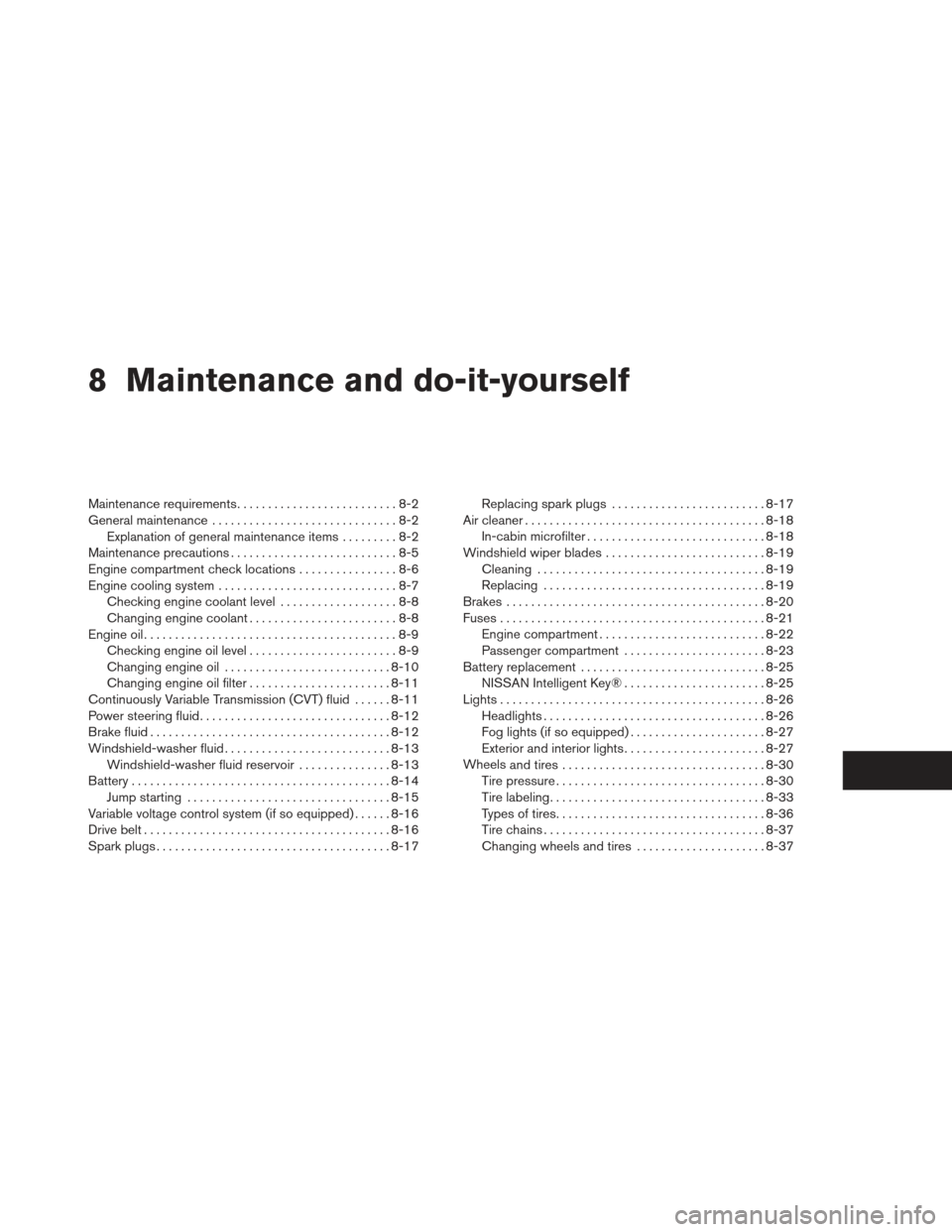
8 Maintenance and do-it-yourself
Maintenance requirements..........................8-2
General maintenance ..............................8-2
Explanation of general maintenance items .........8-2
Maintenance precautions ...........................8-5
Engine compartment check locations ................8-6
Engine cooling system .............................8-7
Checking engine coolant level ...................8-8
Changing engine coolant ........................8-8
Engine oil .........................................8-9
Checking engine oil level ........................8-9
Changing engine oil ........................... 8-10
Changing engine oil filter .......................8-11
Continuously Variable Transmission (CVT) fluid ......8-11
Power steering fluid ............................... 8-12
Brake fluid ....................................... 8-12
Windshield-washer fluid ........................... 8-13
Windshield-washer fluid reservoir ...............8-13
Battery .......................................... 8-14
Jump starting ................................. 8-15
Variable voltage control system (if so equipped) . . ....8-16
Drive belt ........................................ 8-16
Spark plugs ...................................... 8-17Replacing spark plugs
......................... 8-17
Air cleaner ....................................... 8-18
In-cabin microfilter ............................. 8-18
Windshield wiper blades .......................... 8-19
Cleaning ..................................... 8-19
Replacing .................................... 8-19
Brakes .......................................... 8-20
Fuses ........................................... 8-21
Engine compartment ........................... 8-22
Passenger compartment .......................8-23
Battery replacement .............................. 8-25
NISSAN Intelligent Key® .......................8-25
Lights ........................................... 8-26
Headlights .................................... 8-26
Fog lights (if so equipped) ......................8-27
Exterior and interior lights .......................8-27
Wheels
and tires ................................. 8-30
Tire pressure . . . ............................... 8-30
Tire labeling ................................... 8-33
Types of tires .................................. 8-36
Tire chains .................................... 8-37
Changing wheels and tires .....................8-37
Page 452 of 506
Fog may temporarily form inside the lens of the
exterior lights in the rain or in a car wash. A
temperature difference between the inside and
the outside of the lens causes the fog. This is not
a malfunction. If large drops of water collect
inside the lens, contact a NISSAN dealer.
FOG LIGHTS (if so equipped)
Replacing the fog light bulb
If replacement is required, see your NISSAN
dealer.
CAUTION
●High pressure halogen gas is sealed
inside the halogen bulb. The bulb may
break if the glass envelope is scratched
or the bulb is dropped.
● When handling the bulb, do not touch
the glass envelope.
● Use the same number and wattage as
originally installed as shown in the
chart.
● Do not leave the bulb out of the fog light
for a long period of time as dust, mois-
ture and smoke may enter the fog light
body and affect the performance of the
fog light.
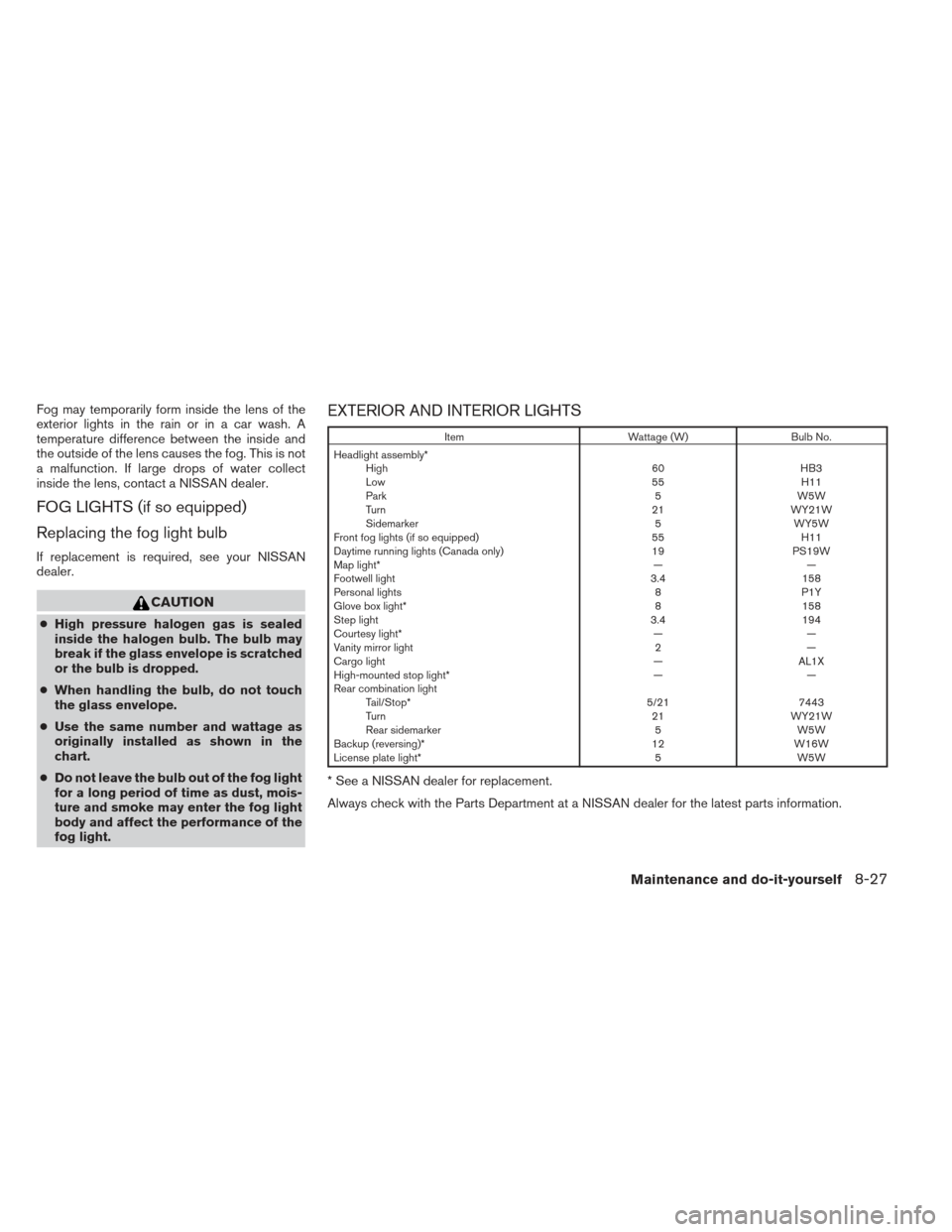
EXTERIOR AND INTERIOR LIGHTS
Item Wattage (W)Bulb No.
Headlight assembly* High 60HB3
Low 55H11
Park 5W5W
Turn 21WY21W
Sidemarker 5WY5W
Front fog lights (if so equipped) 55H11
Daytime running lights (Canada only) 19PS19W
Map light* ——
Footwell light 3.4158
Personal lights 8P1Y
Glove box light* 8158
Step light 3.4194
Courtesy light* ——
Vanity mirror light 2—
Cargo light —AL1X
High-mounted stop light* ——
Rear combination light Tail/Stop* 5/217443
Turn 21WY21W
Rear sidemarker 5W5W
Backup (reversing)* 12W16W
License plate light* 5W5W
* See a NISSAN dealer for replacement.
Always check with the Parts Department at a NISSAN dealer for the latest parts information.
Maintenance and do-it-yourself8-27
Page 499 of 506
Child restraint with top tether strap.......1-34
Child safety rear door lock ............3-7
Chimes, audible reminders ...........2-17
Cleaningexteriorandinterior...........7-2
Clock (models with navigation system) . . .4-11, 4-26
Clockset .................4-11,4-26
C.M.V.S.S. certification label ..........9-10
Cold weather driving ..............5-32
Compact disc (CD) player ........4-83,4-91
Console box ...................2-48
Continuously Variable Transmission (CVT). . .5-14 Continuously Variable Transmission
(CVT) fluid ..................8-11
Driving with Continuously Variable
Transmission (CVT) .............5-14
Controlpanelbuttons..............4-16 Brightness/contrast button ......4-15,4-30
Enterbutton...............4-4,4-16
Setting button .............4-9,4-23
Without navigation system ..........4-4
Controls Audiocontrols(steeringwheel)......4-112
Heater and air conditioner controls .4-50, 4-55
Rear seat air conditioner ..........4-52
Coolant Capacities and recommended
fuel/lubricants .................9-2
Changing engine coolant ...........8-8
Checking engine coolant level ........8-8
Engine coolant temperature gauge .....2-5
Corrosionprotection ...............7-6
Cruise control ..................5-19
Cupholders...................2-46 D
Daytime running light system (Canada only) . .2-34
Defroster switch Rear window and outside mirror defroster
switch.....................2-31
Digital Versatile Disc (DVD) player .......4-95
Dimensionsandweights.............9-8
Dimmer switch for instrument panel ......2-35
Display controls
(seecontrolpanelbuttons) ........4-4,4-16
Distance to empty .............4-7,4-20
Door locks .....................3-5
Drive belt .....................8-16
Drive positioner, Automatic ...........3-35
Driving Cold weather driving ............5-32
Driving with Continuously Variable
Transmission (CVT) .............5-14
Precautions when starting and driving ....5-2
E
Economy - fuel ..................5-22
Emission control information label .......9-10
Emission control system warranty .......9-30
Engine Before starting the engine ..........5-13
Block heater .................5-33
Capacities and recommended
fuel/lubricants .................9-2
Changing engine coolant ...........8-8
Changing engine oil .............8-10
Changing engine oil filter ..........8-11 Checking engine coolant level
........8-8
Checking engine oil level ...........8-9
Engine compartment check locations ....8-6
Engine coolant temperature gauge .....2-5
Engine cooling system ............8-7
Engine oil ...................8-9
Engine oil and oil filter recommendation . . .9-5
Engine oil viscosity ..............9-5
Engine serial number ............
9-10
Engine specifications .............9-7
Starting the engine .............5-13
Enterbutton.................4-4,4-16
Eventdatarecorders ..............9-32
Exhaust gas (Carbon monoxide) .........5-2
Extended storage switch ............8-24
Eyeglass case ..................2-45
F
Flashers (See hazard warning flasher switch) . .6-2
Flat tire .......................6-3
Floor mat positioning aid .............7-5
Fluid Brake fluid ..................8-12
Capacities and recommended
fuel/lubricants .................9-2
Continuously Variable Transmission
(CVT)fluid..................8-11
Engine coolant .................8-7
Engine oil ...................8-9
Power steering fluid .............8-12
Windshield-washer fluid ...........8-13
F.M.V.S.S. certification label ...........9-10
Foglightswitch .................2-36
10-2
Page 500 of 506
Front air bag system
(See supplemental restraint system)......1-56
Frontseats.....................1-2
Fuel Capacities and recommended
fuel/lubricants .................9-2
Fuel economy ................5-22
Fuel-filler door and cap ...........3-27
Fuel gauge ...................2-5
Fueloctanerating...............9-4
Fuel recommendation .............9-3
Loosefuelcapwarning........2-26,3-28
Fuses.......................8-21
Fusiblelinks ...................8-22
G
Garage door opener, HomeLink® Universal
Transceiver ................2-59,2-63
Gascap .....................3-27
Gauge Engine coolant temperature gauge .....2-5
Fuel gauge ...................2-5
Odometer ...................2-4
Speedometer .................2-4
Tachometer ..................2-4
Trip odometer .................2-4
Generalmaintenance...............8-2
Glovebox.....................2-48
Gloveboxlock..................2-48 H
Hands-free phone system,
Bluetooth®...............4- 127, 4-141
Hazard warning flasher switch ..........6-2
Headlight and turn signal switch ........2-32
Headlight control switch ............2-32
Headlights ....................8-26
Heated seats ............2-37,2-38,2-41
Heated steering wheel .............2-39
Heater Heater and air conditioner
controls................4-50,4-55
Heater operation ...........4-51,4-55
Rear seat air conditioner ..........4-52
Hill start assist system ..............5-31
HomeLink® Universal Transceiver ....2-59,2-63
Hood release ...................3-22
Hook Luggagehook................2-49
Horn .......................2-37
I
Ignition Switch Push-Button Ignition Switch ........5-10
Image viewer ...................4-31
Immobilizer system .........2-28,3-4,5-13
Important vehicle information label .......9-10
In-cabin microfilter ................8-18
Increasing fuel economy .............5-22
Indicator lights and audible reminders
(See warning/indicator lights and audible
reminders)....................2-10 Inside automatic anti-glare mirror
........3-32
Inside mirror ...................3-32
Instrument brightness control ..........2-35
Instrument panel ...............0-6,2-2
Instrument panel dimmer switch ........2-35
Intelligent Key system Key operating range ..............3-9
Key operation ................3-10
Mechanical key ................3-3
Remote keyless entry operation.......3-13
Troubleshooting guide ............3-18
Warning signals ...............3-18
Interiorlight....................2-57
iPod® Player ..............
4-103, 4-105
ISOFIX child restraints .............1-32
J
Jump starting ...................6-9
K
Keyfob battery replacement ...........8-25
Keyless entry With Intelligent Key system
(See Intelligent Key system) .........3-13
Keys, For Intelligent Key system .......3-2,3-7
L
Labels Air conditioner specification label .....9-11
C.M.V.S.S. certification label ........9-10
10-3