2013 NISSAN ALTIMA navigation
[x] Cancel search: navigationPage 13 of 413
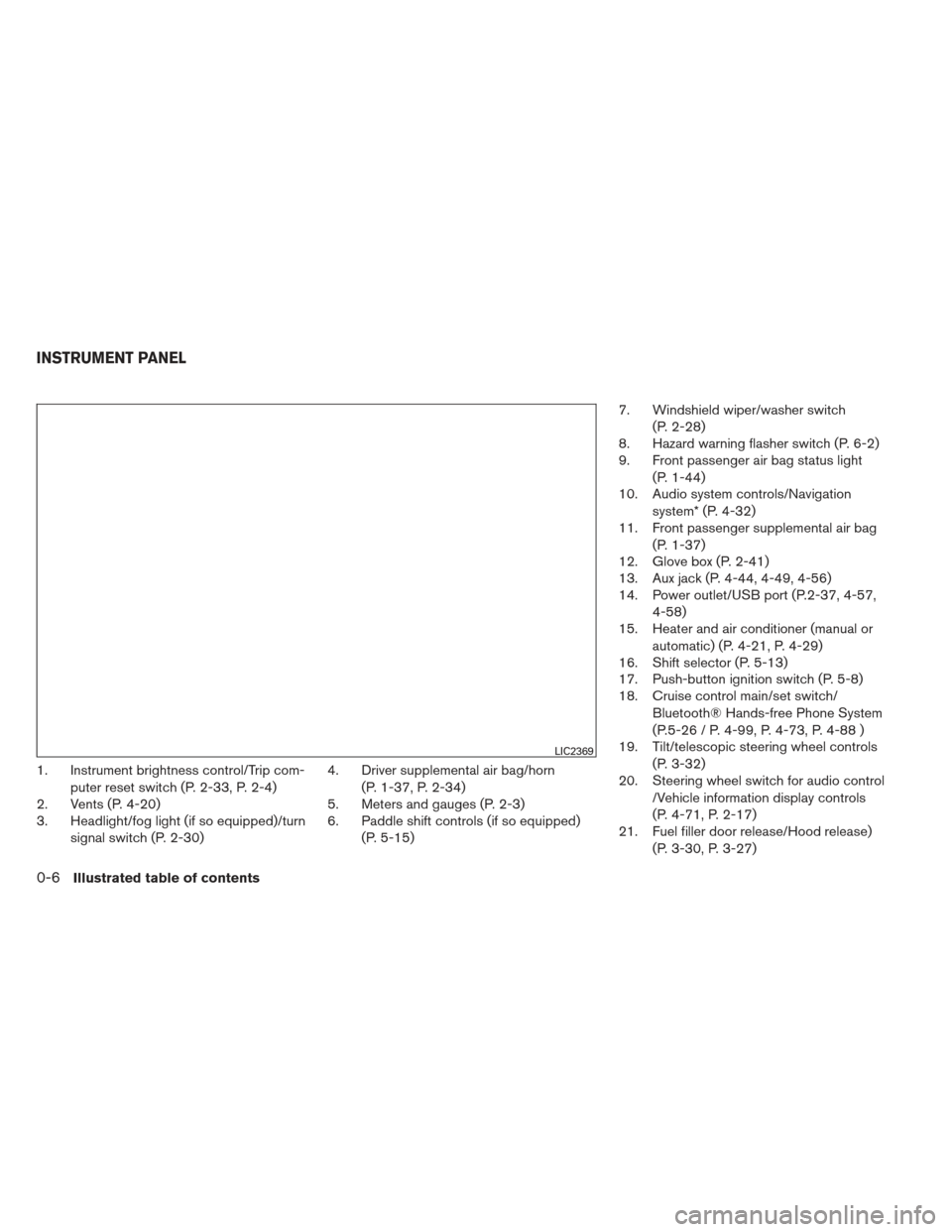
1. Instrument brightness control/Trip com-puter reset switch (P. 2-33, P. 2-4)
2. Vents (P. 4-20)
3. Headlight/fog light (if so equipped)/turn
signal switch (P. 2-30) 4. Driver supplemental air bag/horn
(P. 1-37, P. 2-34)
5. Meters and gauges (P. 2-3)
6. Paddle shift controls (if so equipped)
(P. 5-15) 7. Windshield wiper/washer switch
(P. 2-28)
8. Hazard warning flasher switch (P. 6-2)
9. Front passenger air bag status light
(P. 1-44)
10. Audio system controls/Navigation
system* (P. 4-32)
11. Front passenger supplemental air bag
(P. 1-37)
12. Glove box (P. 2-41)
13. Aux jack (P. 4-44, 4-49, 4-56)
14. Power outlet/USB port (P.2-37, 4-57,
4-58)
15. Heater and air conditioner (manual or
automatic) (P. 4-21, P. 4-29)
16. Shift selector (P. 5-13)
17. Push-button ignition switch (P. 5-8)
18. Cruise control main/set switch/
Bluetooth® Hands-free Phone System
(P.5-26 / P. 4-99, P. 4-73, P. 4-88 )
19. Tilt/telescopic steering wheel controls
(P. 3-32)
20. Steering wheel switch for audio control
/Vehicle information display controls
(P. 4-71, P. 2-17)
21. Fuel filler door release/Hood release)
(P. 3-30, P. 3-27)
LIC2369
INSTRUMENT PANEL
0-6Illustrated table of contents
Page 14 of 413
22. Vehicle Dynamic Control OFF switch(P. 2-37)
Trunk opener (P. 3-27)
Heated steering wheel switch
(if so equipped) (P. 2-36)
Warning system switch
(if so equipped) (P. 2-36)
* Refer to the Navigation System Owner’s manual
(if so equipped)
See the page number indicated in paren-
theses for operating details.
Illustrated table of contents0-7
Page 73 of 413
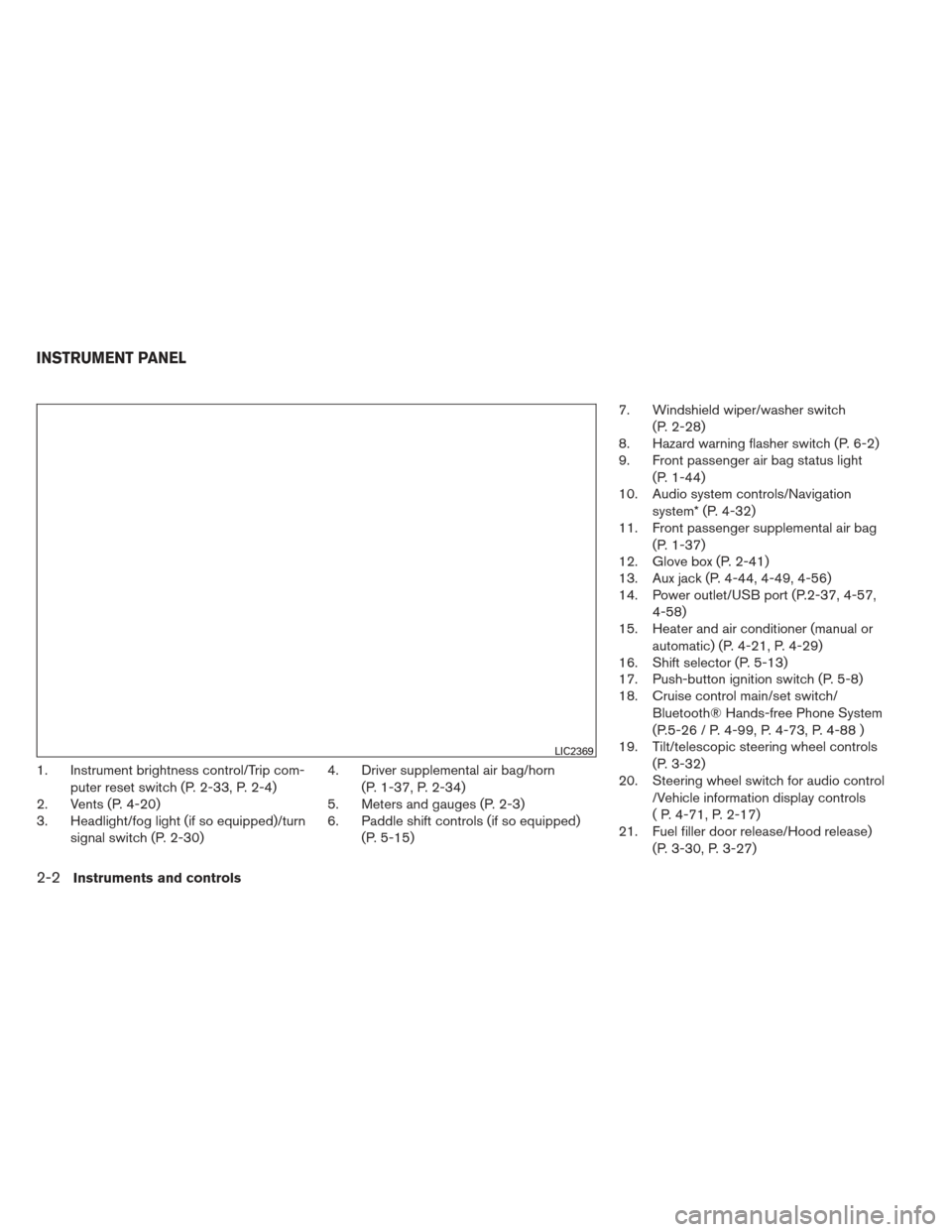
1. Instrument brightness control/Trip com-puter reset switch (P. 2-33, P. 2-4)
2. Vents (P. 4-20)
3. Headlight/fog light (if so equipped)/turn
signal switch (P. 2-30) 4. Driver supplemental air bag/horn
(P. 1-37, P. 2-34)
5. Meters and gauges (P. 2-3)
6. Paddle shift controls (if so equipped)
(P. 5-15) 7. Windshield wiper/washer switch
(P. 2-28)
8. Hazard warning flasher switch (P. 6-2)
9. Front passenger air bag status light
(P. 1-44)
10. Audio system controls/Navigation
system* (P. 4-32)
11. Front passenger supplemental air bag
(P. 1-37)
12. Glove box (P. 2-41)
13. Aux jack (P. 4-44, 4-49, 4-56)
14. Power outlet/USB port (P.2-37, 4-57,
4-58)
15. Heater and air conditioner (manual or
automatic) (P. 4-21, P. 4-29)
16. Shift selector (P. 5-13)
17. Push-button ignition switch (P. 5-8)
18. Cruise control main/set switch/
Bluetooth® Hands-free Phone System
(P.5-26 / P. 4-99, P. 4-73, P. 4-88 )
19. Tilt/telescopic steering wheel controls
(P. 3-32)
20. Steering wheel switch for audio control
/Vehicle information display controls
( P. 4-71, P. 2-17)
21. Fuel filler door release/Hood release)
(P. 3-30, P. 3-27)
LIC2369
INSTRUMENT PANEL
2-2Instruments and controls
Page 74 of 413
22. Vehicle Dynamic Control OFF switch(P. 2-37)
Trunk opener (P. 3-27)
Heated steering wheel switch
(if so equipped) (P. 2-36)
Warning system switch
(if so equipped) (P. 2-36)
* Refer to the Navigation System Owner’s manual
(if so equipped)
See the page number indicated in paren-
theses for operating details.
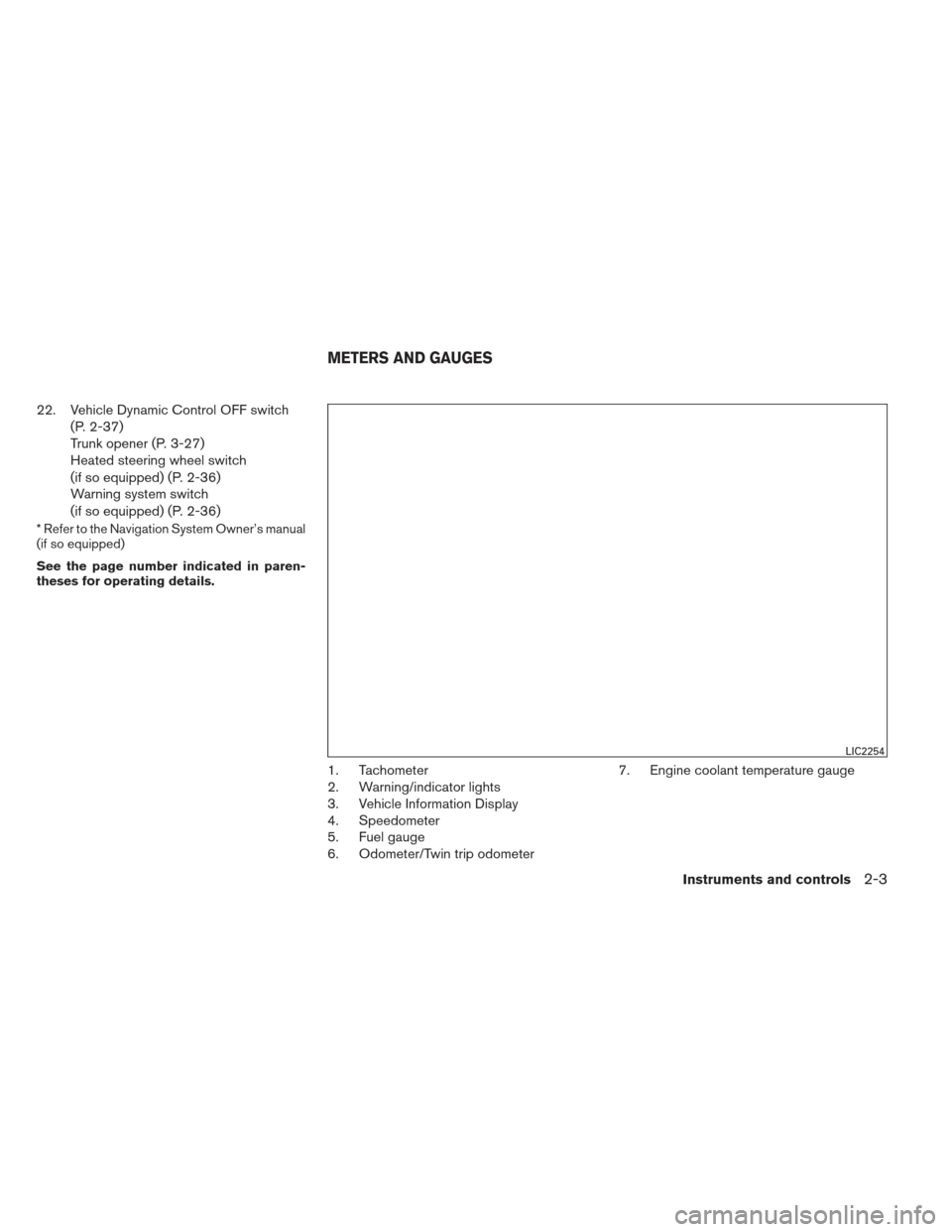
1. Tachometer
2. Warning/indicator lights
3. Vehicle Information Display
4. Speedometer
5. Fuel gauge
6. Odometer/Twin trip odometer 7. Engine coolant temperature gauge
LIC2254
METERS AND GAUGES
Instruments and controls2-3
Page 88 of 413
The vehicle information display is located to the
left of the speedometer. It displays such items as:● Vehicle settings
● Trip computer information
● Cruise control system information
● NISSAN Intelligent Key® operation informa-
tion
● Indicators and warnings (if so equipped)
● Tire Pressure information (if so equipped)
● Audio information
● Navigation information (if so equipped)HOW TO USE THE VEHICLE
INFORMATION DISPLAY
The vehicle information display can be changed
using the buttons
and ENTER located on
the steering wheel.
1.
— select/enter the Vehicle informa-
tion menu items or to change from one dis-
play screen to the next (i.e. trip, TPMS, Fuel
economy)
2.
— navigate through the items in ve-
hicle information
ENTER — change or select an item in the
vehicle information display 3.
— go back to the previous menu
The ENTER and
buttons also control audio
and control panel functions. For additional infor-
mation see, “Steering wheel switch for audio
control” in “Monitor, climate, audio, phone and
voice recognition systems” section.
STARTUP DISPLAY
When the vehicle in placed in the ON or ACC
position the screens that display in the vehicle
information include:
● Active system status (if so equipped)
● Trip computer
● Tire pressure information (if so equipped)
● Fuel economy
● Warnings
Warnings will only display if there are any pres-
ent, for more information on warnings and indica-
tors see, “Vehicle information display warnings
and indicators” in this section.
To control what items display in the vehicle infor-
mation display, see “Main menu selection” in this
section.
LIC2205LIC2245
VEHICLE INFORMATION DISPLAY
Instruments and controls2-17
Page 89 of 413
SETTINGS
The setting mode allows you to change the infor-
mation displayed in the vehicle information dis-
play:● Driver Assistance (if so equipped)
● Main Menu Selection
● Body Color
● Maintenance
● Alarms
● Vehicle Settings
● Language
● Unit
● Welcome Effects
● Factory Reset
Driver Assistance (if so equipped)
To change the status, warnings or turn on or off
any of the systems/warnings displayed in the
“Driver Assistance” menu:
Use the
button to select and the ENTER
button to change a menu item:
● Driving Aids (if so equipped)
● Parking Aids (if so equipped) Driving Aids (if so equipped)
To change the status, warnings or turn on or off
any of the systems/warnings displayed in the
“Driving Aids” menu.
Use the
button to select and the ENTER
button to change a menu item:
● Lane
● Blind Spot
Parking Aids (if so equipped)
To turn on or off the system displayed in the
“Parking Aids” menu use the
button to
select and the ENTER button to enable/disable
“Moving Object”.
For additional information, see “Moving Object
Detection (MOD)” in the “Monitor, climate, audio,
phone and voice recognition systems” section.
Main Menu Selection
The items that display can be enabled/disabled
when the ignition switch is placed in the ON
position. To change the items that display.
Use the
button to select and the ENTER
button to change a menu item:
● Trip Computer
● Audio ●
Navigation (if so equipped)
● Fuel Economy
● Tire Pressures (if so equipped)
Trip Computer
The trip computer can be enabled/disabled to
display in the vehicle information display when
the ignition switch is placed in the ON position.
From the “Main Menu Selection” select “Trip
Computer” to display in the vehicle information
display when the ignition is placed in the ON
position.
Audio
The audio can be enabled/disabled to display in
the vehicle information display when the ignition
switch is placed in the ON position to display the
radio information in the vehicle information dis-
play.
From the “Main Menu Selection” select “Audio” to
display in the vehicle information display when
the ignition is placed in the ON position.
Navigation (if so equipped)
The navigation can be enabled/disabled to dis-
play in the vehicle information display when the
ignition switch is placed in the ON position.
2-18Instruments and controls
Page 91 of 413
WARNING
The tire replacement indicator is not a
substitute for regular tire checks, includ-
ing tire pressure checks. See “Changing
Wheels and Tires” in “Maintenance & Do-
It-Yourself” section. Many factors includ-
ing tire inflation, alignment, driving habits
and road conditions affect tire wear and
when tires should be replaced. Setting the
tire replacement indicator for a certain
driving distance does not mean your tires
will last that long. Use the tire replace-
ment indicator as a guide only and always
perform regular tire checks. Failure to per-
form regular tire checks, including tire
pressure checks could result in tire fail-
ure. Serious vehicle damage could occur
and may lead to a collision, which could
result in serious personal injury or death.
Other
This indicator appears when the customer set
distance comes for checking or replacing main-
tenance items other than the engine oil, oil filter
and tires. Other maintenance items can include
such things as air filter or tire rotation. You can set
or reset the distance for checking or replacing
the items.
Alarms
This setting allows the customer to set alarms for
outside temperature and a timer alert. 1. Press the
button.
2. Use the
button until “Settings” is se-
lected, and press ENTER.
3. Select “Alarms” using the
buttons and
press ENTER.
Outside Temperature
This setting allows the customer to
enable/disable the alert for low outside tempera-
ture in the vehicle information display.
1. Use the
buttons to select “Outside
Temperature”.
2. Press the ENTER button to turn ON/OFF the outside temperature in the vehicle infor-
mation display.
Timer Alert
This setting allows the customer to set an alert to
notify the driver that the set time has been
reached.
1. Use the
buttons to select “Timer
Alert”.
2. Press the ENTER button. 3. To change the timer amount, use the
buttons and the ENTER button to save the
selected time amount.
Navigation (if so equipped)
This setting allows the customer to
enable/disable the alert for navigation in the ve-
hicle information display.
1. Use the
buttons to select “Naviga-
tion”.
2. Press the ENTER button to turn ON/OFF the alert.
Vehicle Settings
The vehicle settings allows the customer to
change settings for interior lights, intelligent key
settings, unlock settings and other vehicle set-
tings.
The vehicle settings can be changed using
the
,, and the ENTER buttons.
Auto Room Lamp
The interior lights can be set to be ON or OFF if
any door is unlocked. From the Vehicle Settings
menu, select “Auto Room Light”. Use the ENTER
button to turn this feature ON or OFF.
2-20Instruments and controls
Page 92 of 413
Light Sensitivity (if so equipped)
The light sensitivity can be set to illuminate earlier
based on the brightness outside the vehicle.
From the Vehicle Settings menu, select “Light
Sensitivity”. Use the ENTER button to change the
sensitivity.
Light Off Delay (if so equipped)
The duration of the automatic headlights can be
changed from 0 to 180 seconds. From the Ve-
hicle Settings menu, select “Light Off Delay”. Use
the ENTER button to change the duration.
Wiper with Speed
The wiper with speed can be set to be ON or
OFF. From the Vehicle Settings menu, select
“Wiper with Speed”. Use the ENTER button to
turn this feature ON or OFF.
I-Key Door Lock (if so equipped)
From the Vehicle Settings menu, select “I-Key
Door Lock”. When this item is turned on, the
request switch on the door is activated. When
this item is turned off, the request switch on the
door is deactivated. Use the ENTER button to
activate this function.
Selective-Unlock
When this item is turned on, only the driver’s door
is unlocked first after the door unlock operation.When the door handle request switch on the
driver’s or front passenger’s side door is pushed
to be unlocked, only the corresponding door is
unlocked first. All the doors can be unlocked if the
door unlock operation is performed again within
1 minute. When this item is turned to off, all the
doors will be unlocked after the door unlock
operation is performed once. From the Vehicle
Settings menu, select “Selective Unlock”. Use
the ENTER button to activate this function.
Auto Door Unlock
The auto door unlock function automatically un-
locks all the doors when the shift selector is
placed in P (park) position. From the Vehicle
Settings menu, select “Auto Door Unlock”. Use
the ENTER button to enable/disable this func-
tion.
Answer back horn
When the answer back horn is on the horn will
chirp and the hazard indicators will flash once
when locking the vehicle with the Intelligent Key.
Remote Start (if so equipped)
The remote start function can be turned on or off.
If the setting is OFF the vehicle cannot be started
using the intelligent key. From the Vehicle Set-
tings menu, select “Remote Start”. Use the EN-
TER button to enable/disable.Battery Saver
The battery saver automatically turns off the
headlights after a period of time when the ignition
switch is placed in the OFF position when the
headlight switch is in the
,orposi-
tion.
Language
The language of the vehicle information display
can be changed to:
● US English
● French
● Spanish
Use the
,, and the ENTER buttons to
select and change the language of the vehicle
information display. The language of the center
display/navigation can be changed indepen-
dently of the vehicle information display. For ve-
hicles not equipped with Navigation see “SET-
TING button:” and vehicles equipped with
Navigation see, “System” in the “Monitor, climate,
audio, phone and voice recognition systems”
section of this manual.
Instruments and controls2-21