2013 NISSAN ALTIMA steering
[x] Cancel search: steeringPage 63 of 413
If you have any questions about your air bag
system, please contact NISSAN or your NISSAN
dealer. If you are considering modification of your
vehicle due to a disability, you may also contact
NISSAN. Contact information is contained in the
front of this Owner’s Manual.
When a front air bag inflates, a fairly loud noise
may be heard, followed by the release of smoke.
This smoke is not harmful and does not indicate a
fire. Care should be taken to not inhale it, as it may
cause irritation and choking. Those with a history
of a breathing condition should get fresh air
promptly.
Front air bags, along with the use of seat belts,
help to cushion the impact force on the face and
chest of the front occupants. They can help save
lives and reduce serious injuries. However, an
inflating front air bag may cause facial abrasions
or other injuries. Front air bags do not provide
restraint to the lower body.
Even with NISSAN advanced air bags, seat belts
should be correctly worn and the driver and pas-
senger seated upright as far as practical away
from the steering wheel or instrument panel. The
front air bags inflate quickly in order to help
protect the front occupants. Because of this, the
force of the front air bag inflating can increase the
risk of injury if the occupant is too close to, or is
against, the front air bag module during inflation.The front air bags deflate quickly after a collision.
The front air bags operate only when the
ignition switch is placed in the ON position.
After placing the ignition switch in the ON
position, the supplemental air bag warning
light illuminates. The supplemental air bag
warning light will turn off after about 7 sec-
onds if the system is operational.
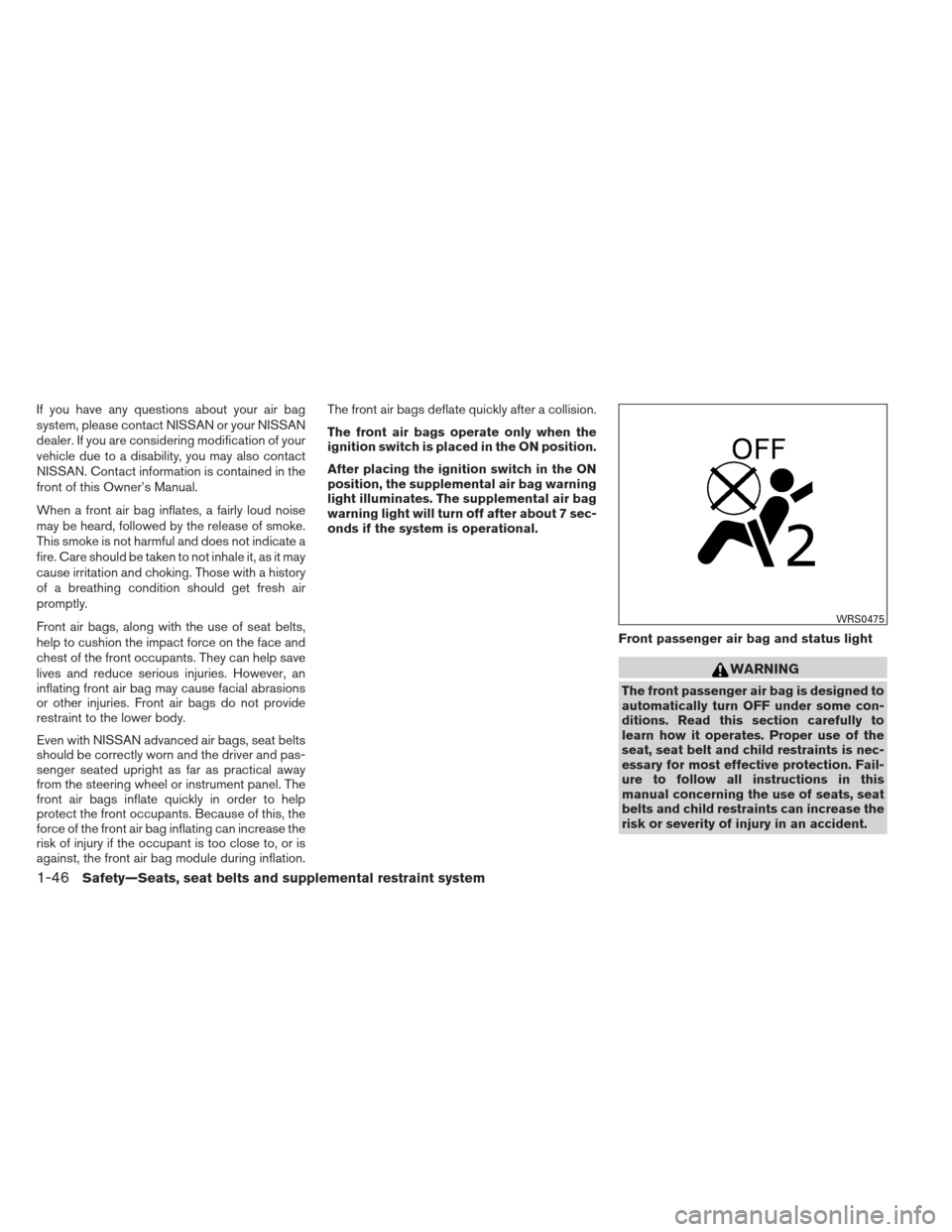
Front passenger air bag and status light
WARNING
The front passenger air bag is designed to
automatically turn OFF under some con-
ditions. Read this section carefully to
learn how it operates. Proper use of the
seat, seat belt and child restraints is nec-
essary for most effective protection. Fail-
ure to follow all instructions in this
manual concerning the use of seats, seat
belts and child restraints can increase the
risk or severity of injury in an accident.
WRS0475
1-46Safety—Seats, seat belts and supplemental restraint system
Page 65 of 413
classification sensor. Other conditions could also
result in air bag inflation, such as if a child is
standing on the seat, or if two children are on the
seat, contrary to the instructions in this manual.
Always be sure that you and all vehicle occupants
are seated and restrained properly.
Using the passenger air bag status light, you can
monitor when the front passenger air bag is au-
tomatically turned OFF with the seat occupied.
The light will not illuminate when the front pas-
senger seat is unoccupied.
If an adult occupant is in the seat but the passen-
ger air bag status light is illuminated (indicating
that the air bag is OFF) , it could be that the
person is a small adult, or is not sitting on the seat
properly or not using the seat belt properly.
If a child restraint must be used in the front seat,
the passenger air bag status light may or may not
be illuminated, depending on the size of the child
and the type of child restraint being used. If the air
bag status light is not illuminated (indicating that
the air bag might inflate in a crash) , it could be
that the child restraint or seat belt is not being
used properly. Make sure that the child restraint is
installed properly, the seat belt is used properly
and the occupant is positioned properly. If the air
bag status light is not illuminated, reposition the
occupant or child restraint in a rear seat.If the passenger air bag status light will not illu-
minate even though you believe that the child
restraint, the seat belts and the occupant are
properly positioned, the system may be sensing
an unoccupied seat (in which case the air bag is
OFF) . Your NISSAN dealer can check that the
system is OFF by using a special tool. However,
until you have confirmed with your dealer that
your air bag is working properly, reposition the
occupant or child restraint in a rear seat.
The NISSAN Advanced Air Bag System and
passenger air bag status light will take a few
seconds to register a change in the passenger
seat status. For example, if a large adult who is
sitting in the front passenger seat exits the ve-
hicle, the passenger air bag status light will go
from OFF to ON for a few seconds and then to
OFF. This is normal system operation and does
not indicate a malfunction.
If a malfunction occurs in the front passenger air
bag system, the supplemental air bag warning
light
, located in the meter and gauges area
of the instrument panel, will blink. Have the sys-
tem checked by a NISSAN dealer. Other supplemental front-impact air bag
precautions
WARNING
●
Do not place any objects on the steer-
ing wheel pad or on the instrument
panel. Also, do not place any objects
between any occupant and the steering
wheel or instrument panel. Such ob-
jects may become dangerous projec-
tiles and cause injury if the front air
bags inflate.
● Do not place objects with sharp edges
on the seat. Also, do not place heavy
objects on the seat that will leave per-
manent impressions in the seat. Such
objects can damage the seat or occu-
pant classification sensors (weight sen-
sors) . This can affect the operation of
the air bag system and result in serious
personal injury.
● Do not use water or acidic cleaners (hot
steam cleaners) on the seat. This can
damage the seat or occupant classifica-
tion sensors. This can also affect the
operation of the air bag system and
result in serious personal injury.
1-48Safety—Seats, seat belts and supplemental restraint system
Page 66 of 413
●Immediately after inflation, several
front air bag system components will be
hot. Do not touch them; you may se-
verely burn yourself.
● No unauthorized changes should be
made to any components or wiring of
the supplemental air bag system. This is
to prevent accidental inflation of the
supplemental air bag or damage to the
supplemental air bag system.
● Do not make unauthorized changes to
your vehicle’s electrical system, sus-
pension system or front end structure.
This could affect proper operation of
the front air bag system.
● Tampering with the front air bag system
may result in serious personal injury.
Tampering includes changes to the
steering wheel and the instrument
panel assembly by placing material
over the steering wheel pad and above
the instrument panel or by installing
additional trim material around the air
bag system.
● Removing or modifying the front pas-
senger seat may affect the function of
the air bag and result in serious per-
sonal injury. ●
Modifying or tampering with the front
passenger seat may result in serious
personal injury. For example, do not
change the front seats by placing mate-
rial on the seat cushion or by installing
additional trim material, such as seat
covers, on the seat that are not specifi-
cally designed to assure proper air bag
operation. Additionally, do not stow any
objects under the front passenger seat
or the seat cushion and seatback. Such
objects may interfere with the proper
operation of the occupant classifica-
tion sensor (weight sensor) .
● No unauthorized changes should be
made to any components or wiring of
the seat belt system. This may affect the
front air bag system. Tampering with
the seat belt system may result in seri-
ous personal injury. ●
Work on and around the front air bag
system should be done by a NISSAN
dealer. Installation of electrical equip-
ment should also be done by a NISSAN
dealer. The Supplemental Restraint
System (SRS) wiring harnesses* should
not be modified or disconnected. Unau-
thorized electrical test equipment and
probing devices should not be used on
the air bag system.
● A cracked windshield should be re-
placed immediately by a qualified re-
pair facility. A cracked windshield could
affect the function of the supplemental
air bag system.
*The SRS wiring harness connectors are
yellow and orange for easy identification.
When selling your vehicle, we request that you
inform the buyer about the front air bag system
and guide the buyer to the appropriate sections
in this Owner’s Manual.
Safety—Seats, seat belts and supplemental restraint system1-49
Page 71 of 413
2 Instruments and controls
Instrument panel...................................2-2
Meters and gauges ................................2-3
Speedometer and odometer . . ...................2-4
Tachometer ....................................2-4
Engine coolant temperature gauge ...............2-5
Fuel gauge ....................................2-5
Compass display (if so equipped) ...................2-6
Compass display ...............................2-7
Warning/indicator lights and audible reminders ......2-10
Checking bulbs ............................... 2-10
Warning lights ................................ 2-10
Indicator lights ................................ 2-14
Audible reminders ............................. 2-16
Vehicle Information Display ........................2-17
How to use the vehicle information display .......2-17
Startup display ................................ 2-17
Settings ...................................... 2-18
Vehicle information display warnings and
indicators ..................................... 2-23
Security systems ................................. 2-26
Vehicle security system ......................... 2-26
NISSAN vehicle immobilizer system .............2-27
Windshield wiper and washer switch ...............2-28Switch operation
.............................. 2-28
Rear window and outside mirror (if so equipped)
defroster switch .................................. 2-29
Headlight and turn signal switch ....................2-30
Xenon headlights (if so equipped) ...............2-30
Headlight control switch ........................ 2-31
Daytime running light system (Canada only) ......2-33
Instrument brightness control ...................2-33
Turn signal switch ............................. 2-34
Fog light switch (if so equipped) ................2-34
Horn ............................................ 2-34
Heated seats (if so equipped) ......................2-35
Heated steering wheel (if so equipped) .............2-36
Warning systems switch (if so equipped) ............2-36
Vehicle Dynamic Control (VDC) off switch ...........2-37
P ower
outlet ..................................... 2-37
Storage ......................................... 2-38
Map pockets .................................. 2-38
Seatback pockets (if so equipped) ..............2-39
Sunglasses holder ............................. 2-39
Cup holders . . . ............................... 2-40
Glove box .................................... 2-41
Console box .................................. 2-41
Page 73 of 413
1. Instrument brightness control/Trip com-puter reset switch (P. 2-33, P. 2-4)
2. Vents (P. 4-20)
3. Headlight/fog light (if so equipped)/turn
signal switch (P. 2-30) 4. Driver supplemental air bag/horn
(P. 1-37, P. 2-34)
5. Meters and gauges (P. 2-3)
6. Paddle shift controls (if so equipped)
(P. 5-15) 7. Windshield wiper/washer switch
(P. 2-28)
8. Hazard warning flasher switch (P. 6-2)
9. Front passenger air bag status light
(P. 1-44)
10. Audio system controls/Navigation
system* (P. 4-32)
11. Front passenger supplemental air bag
(P. 1-37)
12. Glove box (P. 2-41)
13. Aux jack (P. 4-44, 4-49, 4-56)
14. Power outlet/USB port (P.2-37, 4-57,
4-58)
15. Heater and air conditioner (manual or
automatic) (P. 4-21, P. 4-29)
16. Shift selector (P. 5-13)
17. Push-button ignition switch (P. 5-8)
18. Cruise control main/set switch/
Bluetooth® Hands-free Phone System
(P.5-26 / P. 4-99, P. 4-73, P. 4-88 )
19. Tilt/telescopic steering wheel controls
(P. 3-32)
20. Steering wheel switch for audio control
/Vehicle information display controls
( P. 4-71, P. 2-17)
21. Fuel filler door release/Hood release)
(P. 3-30, P. 3-27)
LIC2369
INSTRUMENT PANEL
2-2Instruments and controls
Page 74 of 413
22. Vehicle Dynamic Control OFF switch(P. 2-37)
Trunk opener (P. 3-27)
Heated steering wheel switch
(if so equipped) (P. 2-36)
Warning system switch
(if so equipped) (P. 2-36)
* Refer to the Navigation System Owner’s manual
(if so equipped)
See the page number indicated in paren-
theses for operating details.
1. Tachometer
2. Warning/indicator lights
3. Vehicle Information Display
4. Speedometer
5. Fuel gauge
6. Odometer/Twin trip odometer 7. Engine coolant temperature gauge
LIC2254
METERS AND GAUGES
Instruments and controls2-3
Page 81 of 413
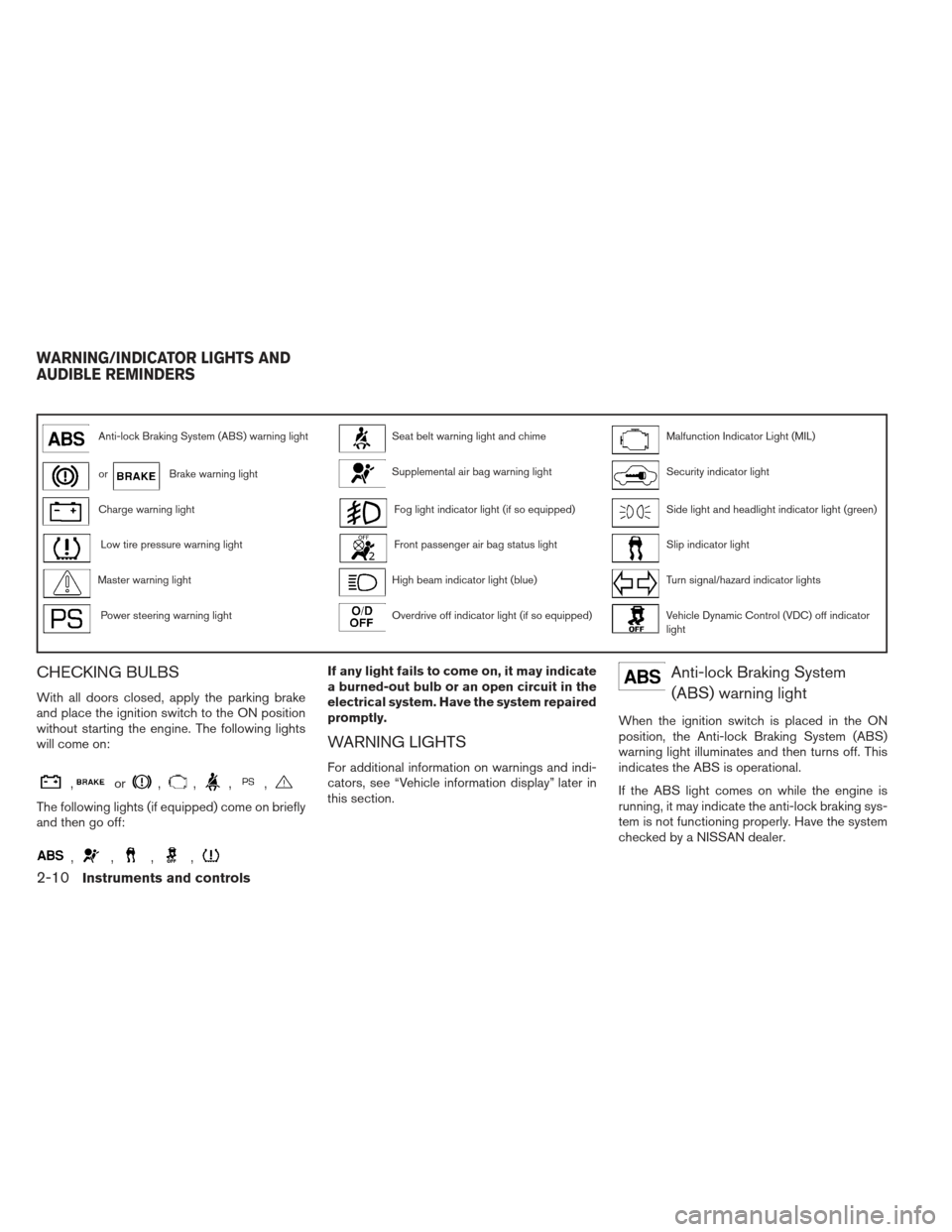
Anti-lock Braking System (ABS) warning lightSeat belt warning light and chimeMalfunction Indicator Light (MIL)
orBrake warning lightSupplemental air bag warning lightSecurity indicator light
Charge warning lightFog light indicator light (if so equipped)Side light and headlight indicator light (green)
Low tire pressure warning lightFront passenger air bag status lightSlip indicator light
Master warning lightHigh beam indicator light (blue)Turn signal/hazard indicator lights
Power steering warning lightOverdrive off indicator light (if so equipped)Vehicle Dynamic Control (VDC) off indicator
light
CHECKING BULBS
With all doors closed, apply the parking brake
and place the ignition switch to the ON position
without starting the engine. The following lights
will come on:
,or,,,,
The following lights (if equipped) come on briefly
and then go off:
,,,,
If any light fails to come on, it may indicate
a burned-out bulb or an open circuit in the
electrical system. Have the system repaired
promptly.
WARNING LIGHTS
For additional information on warnings and indi-
cators, see “Vehicle information display” later in
this section.
Anti-lock Braking System(ABS) warning light
When the ignition switch is placed in the ON
position, the Anti-lock Braking System (ABS)
warning light illuminates and then turns off. This
indicates the ABS is operational.
If the ABS light comes on while the engine is
running, it may indicate the anti-lock braking sys-
tem is not functioning properly. Have the system
checked by a NISSAN dealer.
WARNING/INDICATOR LIGHTS AND
AUDIBLE REMINDERS
2-10Instruments and controls
Page 83 of 413
The low tire pressure warning light warns of low
tire pressure or indicates that the TPMS is not
functioning properly.
After the ignition switch is placed in the ON
position, this light illuminates for about 1 second
and turns off.
Low tire pressure warning:
If the vehicle is being driven with low tire
pressure, the warning light will illuminate.
A “Tire Pressure Low - Add Air” warning
also appears in the vehicle information dis-
play.
When the low tire pressure warning light
illuminates, you should stop and adjust the
tire pressure of all 4 tires to the recom-
mended COLD tire pressure shown on the
Tire Load and Information label located in
the driver’s door opening. The low tire pres-
sure warning light does not automatically
turn off when the tire pressure is adjusted.
After the tire is inflated to the recom-
mended pressure, the vehicle must be
driven at speeds above 16 MPH (25 km/h)
to activate the TPMS and turn off the low
tire pressure warning light. Use a tire pres-
sure gauge to check the tire pressure.The “Tire Pressure Low - Add Air” warning is
active as long as the low tire pressure warning
light remains illuminated.
For additional information, see “Vehicle informa-
tion display” in this section and “Tire Pressure
Monitoring System (TPMS)” in the “Starting and
driving” section and in the “In case of emergency”
section.
TPMS malfunction:
If the TPMS is not functioning properly, the low
tire pressure warning light will flash for approxi-
mately 1 minute when the ignition switch is
placed in the ON position. The light will remain on
after the 1 minute. Have the system checked by a
NISSAN dealer. The “Tire Pressure Low - Add
Air” warning does not appear if the low tire pres-
sure warning light illuminates to indicate a TPMS
malfunction.
For additional information, see “Tire Pressure
Monitoring System (TPMS)” in the “Starting and
driving” section and “Tire pressure” in the “Start-
ing and driving” section.WARNING
●Radio waves could adversely affect elec-
tric medical equipment. Those who use a
pacemaker should contact the electric
medical equipment manufacturer for the
possible influences before use.
●
If the light does not illuminate with the
ignition switch in the ON position, have
the vehicle checked by a NISSAN dealer
as soon as possible.
●
If the light illuminates while driving,
avoid sudden steering maneuvers or
abrupt braking, reduce vehicle speed,
pull off the road to a safe location and
stop the vehicle as soon as possible.
Driving with under-inflated tires may per-
manently damage the tires and increase
the likelihood of tire failure. Serious ve-
hicle damage could occur and may lead
to an accident and could result in serious
personal injury. Check the tire pressure
for all four tires. Adjust the tire pressure
to the recommended COLD tire pressure
shown on the Tire placard located in the
driver’s door opening to turn the low tire
pressure warning light OFF. If the light
still comes on while driving after adjust-
ing the tire pressure, a tire may be flat. If
you have a flat tire, replace it with a spare
tire as soon as possible.
2-12Instruments and controls