2013 NISSAN ALTIMA radio
[x] Cancel search: radioPage 141 of 413
WARNING
●Radio waves could adversely affect elec-
tric medical equipment. Those who use a
pacemaker should contact the electric
medical equipment manufacturer for the
possible influences before use.
●The Intelligent Key transmits radio waves
when the buttons are pressed. The FAA
advises the radio waves may affect air-
craft navigation and communication sys-
tems. Do not operate the Intelligent Key
while on an airplane. Make sure the but-
tons are not operated unintentionally
when the unit is stored for a flight.
The Intelligent Key can operate all the door locks
using the remote controller function. The operat-
ing environment and/or conditions may affect the
Intelligent Key operation.
Be sure to read the following before using the
Intelligent Key.
CAUTION
●Be sure to carry the Intelligent Key with
you when operating the vehicle.
● Never leave the Intelligent Key in the
vehicle when you leave the vehicle. The Intelligent Key is always communicating with
the vehicle as it receives radio waves. The Intel-
ligent Key transmits weak radio waves. Environ-
mental conditions may interfere with the opera-
tion of the Intelligent Key under the following
operating conditions:
● When operating near a location where
strong radio waves are transmitted, such as
a TV tower, power station and broadcasting
station.
● When in possession of wireless equipment,
such as a cellular telephone, transceiver,
and CB radio.
● When the Intelligent Key is in contact with or
covered by metallic materials.
● When any type of radio wave remote control
is used nearby.
● When the Intelligent Key is placed near an
electric appliance such as a personal com-
puter.
● When the vehicle is parked near a parking
meter.
In such cases, correct the operating conditions
before using the Intelligent Key function or use
the mechanical key. Although the life of the battery varies depending
on the operating conditions, the battery’s life is
approximately 2 years. If the battery is dis-
charged, replace it with a new one.
When the Intelligent Key battery is low, an indi-
cator illuminates in the Vehicle Information Dis-
play. See “Vehicle Information Display” in the
“Instruments and controls” section.
Since the Intelligent Key is continuously receiving
radio waves, if the key is left near equipment
which transmits strong radio waves, such as sig-
nals from a TV and personal computer, the bat-
tery life may become shorter.
For information regarding replacement of a bat-
tery, see “Battery replacement” in the “Mainte-
nance and do-it-yourself” section.
As many as 4 Intelligent Keys can be registered
and used with one vehicle. For information about
the purchase and use of additional Intelligent
Keys, contact a NISSAN dealer.
NISSAN INTELLIGENT KEY®
WITHOUT DOOR AND TRUNK
REQUEST SWITCHES
3-18Pre-driving checks and adjustments
Page 142 of 413
CAUTION
Listed below are conditions or occur-
rences which will damage the Intelligent
Key:
●Do not allow the Intelligent Key, which
contains electrical components, to
come into contact with water or salt
water. This could affect the system
function.
● Do not drop the Intelligent Key.
● Do not strike the Intelligent Key sharply
against another object.
● Do not change or modify the Intelligent
Key.
● Wetting may damage the Intelligent
Key. If the Intelligent Key gets wet, im-
mediately wipe until it is completely dry.
● Do not place the Intelligent Key for an
extended period in an area where tem-
peratures exceed 140°F (60°C) .
● Do not attach the Intelligent Key with a
key holder that contains a magnet.
● Do not place the Intelligent Key near
equipment that produces a magnetic
field, such as a TV, audio equipment and
personal computers. If an Intelligent Key is lost or stolen, NISSAN
recommends erasing the ID code of that Intelli-
gent Key from the vehicle. This may prevent the
unauthorized use of the Intelligent Key to operate
the vehicle. For information regarding the erasing
procedure, contact a NISSAN dealer.
OPERATING RANGE
The Intelligent Key functions can only be used
when the Intelligent Key is within the specified
operating range.
When the Intelligent Key battery is discharged or
strong radio waves are present near the operat-
ing location, the Intelligent Key system’s operat-
ing range becomes narrower, and the Intelligent
Key may not function properly.
The operating range is within 33 ft (10 m) of the
vehicle.
HOW TO USE THE REMOTE
KEYLESS ENTRY FUNCTION
The remote keyless entry function can operate all
door locks using the remote keyless function of
the Intelligent Key. The remote keyless function
can operate at a distance of 33 ft (10 m) away
from the vehicle. The operating distance de-
pends upon the conditions around the vehicle.
The remote keyless entry function will not func-
tion under the following conditions: ●
When the Intelligent Key is not within the
operational range.
● When the doors or the trunk are open or not
closed securely.
● When the Intelligent Key battery is dis-
charged.
CAUTION
When locking the doors using the Intelli-
gent Key, be sure not to leave the key in
the vehicle.
Pre-driving checks and adjustments3-19
Page 148 of 413
Thebutton will be on the NISSAN Intelli-
gent Key® if the vehicle has remote engine start.
This feature allows the engine to start from out-
side the vehicle.
The following features may be affected when the
remote start feature is used:
● Vehicles with manual or automatic climate
control systems will default to the last used
heating or cooling mode.
● Vehicle equipped with heated seats may
have this feature come on during a remote
start. See “Heated seats” in the “Instruments
and controls” section for more information. Laws in some local communities may restrict the
use of remote starters. For example, some laws
require a person using remote start to have the
vehicle in view. Check local regulations for any
requirements.
Other conditions may affect the function of the
Remote Engine Start feature. See “Conditions
the remote start will not work” in this section for
additional information.
Other conditions can affect the performance of
the Intelligent Key transmitter. See “NISSAN In-
telligent Key® System” in this section for addi-
tional information.REMOTE ENGINE START
OPERATING RANGE
The remote engine start function can only be
used when the Intelligent Key is within the speci-
fied operating range from the vehicle.
When the Intelligent Key battery is discharged or
strong radio waves are present near the operat-
ing location, the Intelligent Key operating range
becomes narrower, and the Intelligent Key may
not function properly.
The remote engine start operating range is ap-
proximately 197 ft (60 m) from the vehicle.
REMOTE STARTING THE VEHICLE
To use the remote start feature to start the engine
perform the following:
1. Aim the Intelligent Key at the vehicle.
2. Press the
LOCK button to lock all
doors.
3. Within 5 seconds press and hold the
remote start button until the turn signal lights
illuminate. If the vehicle is not within view
press and hold the
remote start but-
ton for about 2 seconds.
The following events will occur when the engine
starts: ● The parking lights will turn on and remain on
as long as the engine is running.
● The doors will be locked and the climate
control system may come on.
● The engine will continue to run for 10 min-
utes. Repeat the steps to extend the time for
an additional 10 minutes. See “Extending
engine run time” in this section.
Depress the brake and place the ignition switch
in the ON position before driving. For further
instructions see “Driving the vehicle” in the
“Starting and driving” section.
LPD2078
REMOTE ENGINE START (if so
equipped)
Pre-driving checks and adjustments3-25
Page 160 of 413
4 Monitor, climate, audio, phone and voice
recognition systems
Control panel buttons — color screen with
Navigation System (if so equipped)..................4-4
How to use the touch screen ....................4-5
How to use the BACK button ....................4-7
How to use the MENU button ....................4-7
button.................................. 4-11
RearView Monitor (if so equipped) ..................4-11
How to read the displayed lines .................4-12
How to park with predicted course lines
(Navigation System only) .......................4-13
Difference between predicted and actual
distances ..................................... 4-14
Moving Object Detection (MOD)
(if so equipped) ............................... 4-16
Adjusting the screen ........................... 4-18
Operating tips ................................. 4-19
Vents . .......................................... 4-20
Heater and air conditioner (manual)
(if so equipped) .................................. 4-21
Controls ...................................... 4-22
Heater operation .............................. 4-23
Air conditioner operation .......................4-24
Air flow charts ................................. 4-25Heater and air conditioner (automatic)
(if so equipped)
.................................. 4-29
Automatic operation ........................... 4-30
Manual operation .............................. 4-30
Operating tips ................................. 4-31
Servicing air conditioner ........................... 4-32
Audio system .................................... 4-32
Radio ........................................ 4-32
FM radio reception ............................ 4-32
AM radio reception ............................ 4-33
Satellite radio reception (if so equipped) . . . ......4-33
Audio operation precautions ....................4-33
FM/AM radio with compact disc (CD) player
(if so equipped) ............................... 4-41
FM/AM/SAT radio with compact disc (CD)
player (Type A) (if so equipped) .................4-46
FM/AM/SAT radio with compact disc (CD)
player (Type B) (if so equipped) .................4-51
USB interface (models without Navigation
System) (if so equipped) .......................4-57
USB interface (models with Navigation
System) ...................................... 4-58
iPod®* player operation without Navigation
System (if so equipped) ........................ 4-60
Page 161 of 413
iPod®* player operation with Navigation
System (if so equipped)........................ 4-62
Bluetooth® streaming audio without
Navigation System (Type A) (if so equipped) ......4-65
Bluetooth® streaming audio without
Navigation System (Type B) (if so equipped) ......4-66
Bluetooth® streaming audio with Navigation
System (if so equipped) ........................ 4-67
Pandora® audio (United States only) (if so
equipped) .................................... 4-68
CD care and cleaning .......................... 4-70
Steering wheel switch for audio control ..........4-71
Antenna ...................................... 4-72
Car phone or CB radio . . .......................... 4-73
Bluetooth® Hands-Free Phone System without
Navigation System (Type A) (if so equipped) .........4-73
Regulatory Information ......................... 4-75
Using the system .............................. 4-75
Control buttons ............................... 4-77
Getting started ................................ 4-78
List of voice commands ........................ 4-80
Voice Adaptation (VA) mode ....................4-84
Manual control ................................ 4-86
Troubleshooting guide ......................... 4-87Bluetooth® Hands-Free Phone System without
Navigation System (Type B) (if so equipped) . . .
......4-88
Regulatory Information ......................... 4-89
Using the system .............................. 4-90
Control buttons ............................... 4-91
Connecting procedure ......................... 4-92
Voice commands .............................. 4-93
Making a call .................................. 4-94
Receiving a call ............................... 4-95
During a call .................................. 4-95
Ending a call .................................. 4-96
Text messaging ................................ 4-96
Bluetooth® settings ........................... 4-98
Manual control ................................ 4-99
Bluetooth® Hands-Free Phone System with Navigation System (if so equipped) .................4-99
Regulatory Information ........................ 4-101
V
oice commands ............................. 4-101
Connecting procedure ........................ 4-102
Vehicle phonebook ........................... 4-103
Making a call ................................. 4-104
Receiving a call .............................. 4-104
During a call ................................. 4-105
Page 178 of 413
4. Adjust the level using the TUNE-SCROLLknob and then press the ENTER/SETTING
button to apply the adjustment.
● Do not adjust the Brightness or Contrast of
the RearView Monitor while the vehicle is
moving.
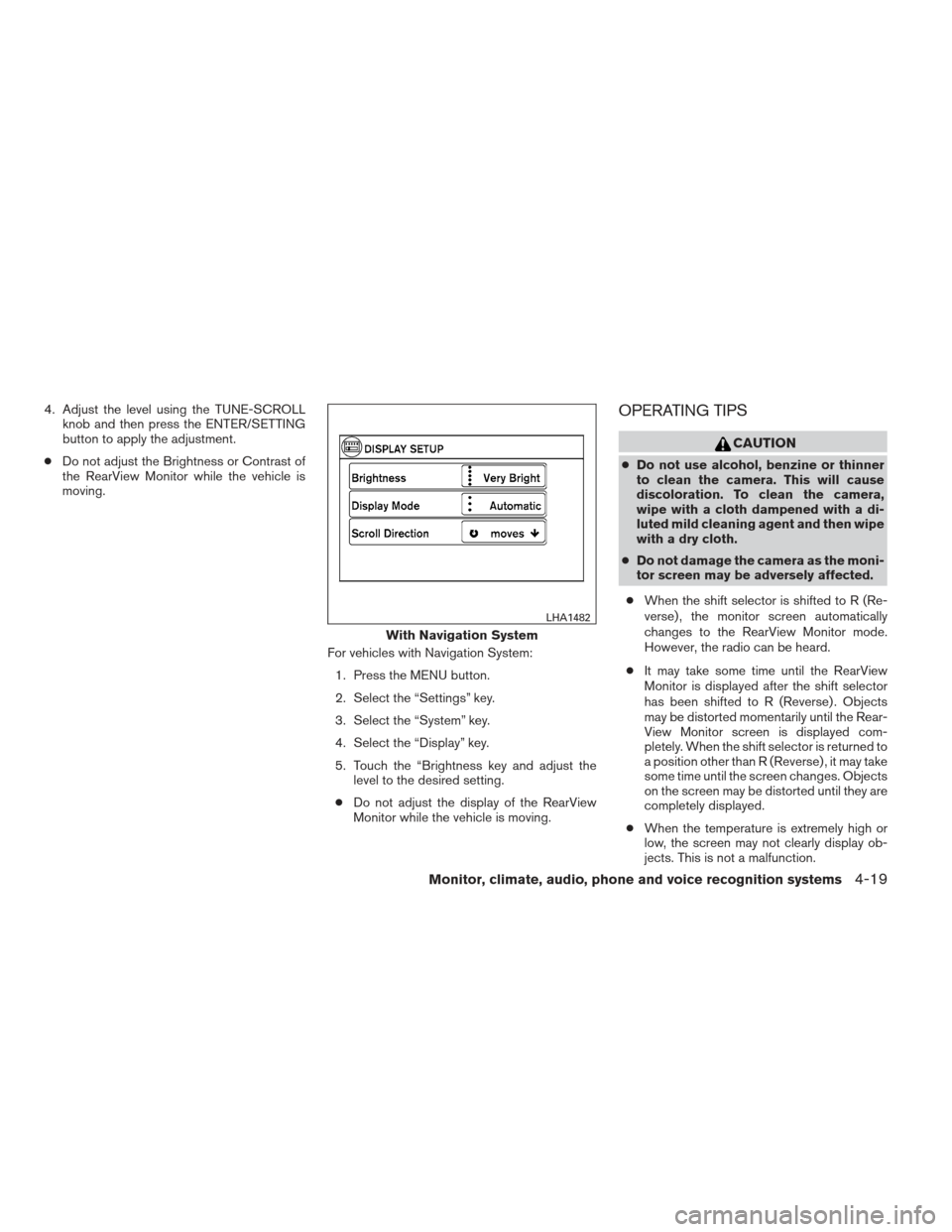
For vehicles with Navigation System:1. Press the MENU button.
2. Select the “Settings” key.
3. Select the “System” key.
4. Select the “Display” key.
5. Touch the “Brightness key and adjust the level to the desired setting.
● Do not adjust the display of the RearView
Monitor while the vehicle is moving.OPERATING TIPS
CAUTION
●Do not use alcohol, benzine or thinner
to clean the camera. This will cause
discoloration. To clean the camera,
wipe with a cloth dampened with a di-
luted mild cleaning agent and then wipe
with a dry cloth.
● Do not damage the camera as the moni-
tor screen may be adversely affected.
● When the shift selector is shifted to R (Re-
verse) , the monitor screen automatically
changes to the RearView Monitor mode.
However, the radio can be heard.
● It may take some time until the RearView
Monitor is displayed after the shift selector
has been shifted to R (Reverse) . Objects
may be distorted momentarily until the Rear-
View Monitor screen is displayed com-
pletely. When the shift selector is returned to
a position other than R (Reverse) , it may take
some time until the screen changes. Objects
on the screen may be distorted until they are
completely displayed.
● When the temperature is extremely high or
low, the screen may not clearly display ob-
jects. This is not a malfunction.
With Navigation System
LHA1482
Monitor, climate, audio, phone and voice recognition systems4-19
Page 191 of 413
The air conditioner system in your NISSAN ve-
hicle is charged with a refrigerant designed with
the environment in mind.
This refrigerant does not harm the earth’s
ozone layer.
Special charging equipment and lubricant is re-
quired when servicing your NISSAN air condi-
tioner. Using improper refrigerants or lubricants
will cause severe damage to your air conditioner
system. See “Air conditioner system refrigerant
and oil recommendations” in the “Technical and
consumer information” section of this manual.
A NISSAN dealer is able to service your “environ-
mentally friendly” air conditioning system.
WARNING
The air conditioner system contains re-
frigerant under high pressure. To avoid
personal injury, any air conditioner ser-
vice should be done only by an experi-
enced technician with proper equipment.
RADIO
With the ignition placed in the ACC or ON posi-
tion, press the PWR (power)/VOL (volume) knob
to turn the radio on. If you listen to the radio with
the engine not running, the ignition should be
placed in the ACC position.
Radio reception is affected by station signal
strength, distance from radio transmitter, build-
ings, bridges, mountains and other external influ-
ences. Intermittent changes in reception quality
normally are caused by these external influences.
Using a cellular phone in or near the ve-
hicle may influence radio reception quality.
Radio reception
Your NISSAN radio system is equipped with
state-of-the-art electronic circuits to enhance ra-
dio reception. These circuits are designed to
extend reception range, and to enhance the qual-
ity of that reception.
However, there are some general characteristics
of both FM and AM radio signals that can affect
radio reception quality in a moving vehicle, even
when the finest equipment is used. These char-
acteristics are completely normal in a given re-
ception area and do not indicate any malfunction
in your NISSAN radio system.Reception conditions will constantly change be-
cause of vehicle movement. Buildings, terrain,
signal distance and interference from other ve-
hicles can work against ideal reception. De-
scribed below are some of the factors that can
affect your radio reception.
Some cellular phones or other devices may
cause interference or a buzzing noise to come
from the audio system speakers. Storing the de-
vice in a different location may reduce or elimi-
nate the noise.
FM RADIO RECEPTION
Range: FM range is normally limited to 25 – 30 mi
(40 – 48 km) , with monaural (single channel) FM
having slightly more range than stereo FM. Exter-
nal influences may sometimes interfere with FM
station reception even if the FM station is within
25 mi (40 km) . The strength of the FM signal is
directly related to the distance between the
transmitter and receiver. FM signals follow a line-
of-sight path, exhibiting many of the same char-
acteristics as light. For example, they will reflect
off objects.
Fade and drift: As your vehicle moves away from
a station transmitter, the signals will tend to fade
and/or drift.
SERVICING AIR CONDITIONER AUDIO SYSTEM
4-32Monitor, climate, audio, phone and voice recognition systems
Page 192 of 413
Static and flutter: During signal interference from
buildings, large hills or due to antenna position
(usually in conjunction with increased distance
from the station transmitter) , static or flutter can
be heard. This can be reduced by adjusting the
treble control to reduce treble response.
Multipath reception: Because of the reflective
characteristics of FM signals, direct and reflected
signals reach the receiver at the same time. The
signals may cancel each other, resulting in mo-
mentary flutter or loss of sound.
AM RADIO RECEPTION
AM signals, because of their low frequency, can
bend around objects and skip along the ground.
In addition, the signals can be bounced off the
ionosphere and bent back to earth. Because of
these characteristics, AM signals are also sub-
ject to interference as they travel from transmitter
to receiver.
Fading: Occurs while the vehicle is passing
through freeway underpasses or in areas with
many tall buildings. It can also occur for several
seconds during ionospheric turbulence even in
areas where no obstacles exist.
Static: Caused by thunderstorms, electrical
power lines, electric signs and even traffic lights.
SATELLITE RADIO RECEPTION (if so
equipped)
When the satellite radio is used for the first time
or the battery has been replaced, the satellite
radio may not work properly. This is not a mal-
function. Wait more than 10 minutes with satellite
radio ON and the vehicle outside of any metal or
large building for satellite radio to receive all of
the necessary data.
No satellite radio reception is available and “NO
SAT” is displayed when the SAT band option is
selected unless optional satellite receiver and
antenna are installed and a SiriusXM Satellite
Radio service subscription is active. Satellite ra-
dio is not available in Alaska, Hawaii and Guam.
Satellite radio performance may be affected if
cargo carried on the roof blocks the satellite radio
signal.
If possible, do not put cargo over the satellite
antenna.
A build up of ice on the satellite radio antenna can
affect satellite radio performance. Remove the
ice to restore satellite radio reception.
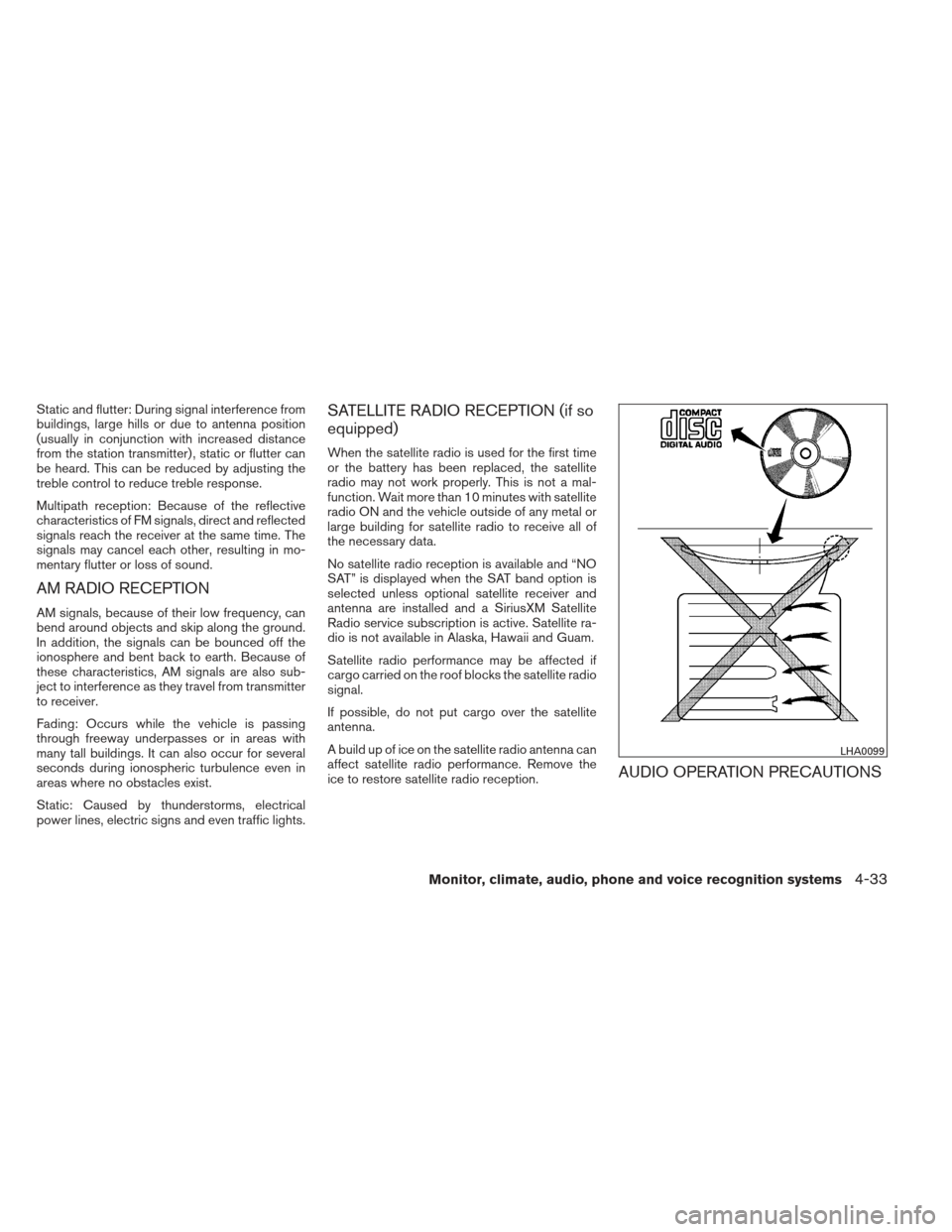
AUDIO OPERATION PRECAUTIONS
LHA0099
Monitor, climate, audio, phone and voice recognition systems4-33