Page 277 of 714

3-162 Features and controls
3
To permanently set the non-display mode1. Turn the ignition switch to the “ON” position.
2. Put the selector lever in the “R” (REVERSE) position.
3. Press and hold down the switch (1) (for about 15 sec-
onds).
While you keep the switch pressed, the orange indicator
(2) comes on. When the image goes off, the non-display
mode setting is completed.
To change the language of warning text (3)1. Turn the ignition switch to the “ON” position.
2. Put the selector lever in the “R” (REVERSE) position.
3. Press and hold down the switch (1) to enter language
selection mode (for 6 to 11 seconds).
In this mode, the image appears and the green indicator
(2) comes on.
4. Press the switch until the desired language appears on the
display.
Each time you press the switch, the language will change
to the next one. When the warning text flashes, setting is
completed.
CAUTION
!�For safety reasons, do not perform the following
operations with the engine running.
CAUTION
!�For safety reasons, do not perform the following
operations with the engine running.
BK0150600US.book 162 ページ 2012年3月30日 金曜日 午前10時43分
Page 280 of 714

Features and controls
3-165
3
Rheostat meter illumination button
N00554900153
Each time you press this button, there is a sound and the bright-
ness of the instruments changes.NOTE�You can adjust to 8 different levels respectively for when
the front side-marker and parking lights are illuminated
and when they are not.
�If the vehicle is equipped with the automatic light control,
when the light switch is in a position other than the “OFF”
position, the meter illumination switches automatically to
the adjusted brightness, depending on the brightness out-
side the vehicle.
�The brightness level of the instruments is stored when the
ignition switch is turned off.
�If you press and hold the button for longer than about 1
second when the front side-marker and parking lights are
illuminated, the brightness level changes to the maximum
level. Pressing and holding the button for longer than
about 1 second again returns the brightness level to the
previous level.
1- Brightness display
2- Rheostat illumination button
BK0150600US.book 165 ページ 2012年3月30日 金曜日 午前10時43分
Page 282 of 714
Features and controls
3-167
3
NOTE�The fuel units, temperature units, display language, and
other settings can be changed.
Refer to “Changing the function settings (With ignition
switch in the “ON” position)” on page 3-184.
�The display screen is different depending on whether the
ignition switch in the “OFF” or “ON” position.
Refer to “Information screen (With ignition switch in the
“OFF” position)” on page 3-168.
Refer to “Warning display list (With ignition switch in the
“OFF” position)” on page 3-200.
Refer to “Information screen (With ignition switch turned
from “OFF” to “ON”)” on page 3-172.
Refer to “Information screen (With ignition switch in the
“ON” position)” on page 3-174.
Refer to “Warning display list (With ignition switch in the
“ON” position)” on page 3-203.Multi-information meter switch
N00555100152
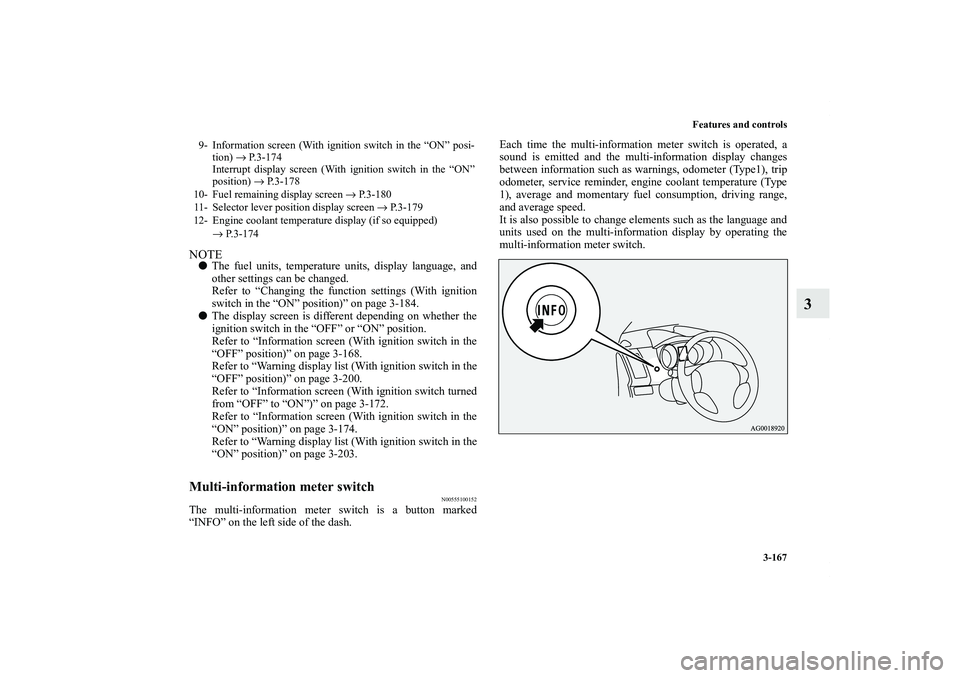
The multi-information meter switch is a button marked
“INFO” on the left side of the dash.Each time the multi-information meter switch is operated, a
sound is emitted and the multi-information display changes
between information such as warnings, odometer (Type1), trip
odometer, service reminder, engine coolant temperature (Type
1), average and momentary fuel consumption, driving range,
and average speed.
It is also possible to change elements such as the language and
units used on the multi-information display by operating the
multi-information meter switch.9- Information screen (With ignition switch in the “ON” posi-
tion) → P.3-174
Interrupt display screen (With ignition switch in the “ON”
position) → P.3-178
10- Fuel remaining display screen → P.3-180
11- Selector lever position display screen → P.3-179
12- Engine coolant temperature display (if so equipped)
→ P.3-174
BK0150600US.book 167 ページ 2012年3月30日 金曜日 午前10時43分
Page 288 of 714

Features and controls
3-173
3
System check screenWhen the ignition switch is turned to the “ON” position, the
system check screen is displayed for about 4 seconds. If there
in no fault, the information screen is displayed.
If there is a fault, the screen changes to warning display.
Refer to “Warning display list (With ignition switch in the
“ON” position)” on page 3-203.NOTE�The system check screen display varies depending on
your equipment.
Service reminderWhen the time for periodic inspection arrives, the warning dis-
play is displayed for a few seconds after the screen that is ini-
tially displayed when the ignition switch is turned “ON”.
Refer to “Service reminder” on page 3-181.
Ty p e 1
Ty p e 2Drive mode indicator display screen
(if so equipped)
N00555900033
Shows the 4WD drive status.
Refer to “Drive mode-selector” on page 3-115.S-AWC control mode display screen
(if so equipped)
N00561900025
Shows the S-AWC operation status.
Refer to “S-AWC control mode-selector” on page 3-119.“!” Warning display screen (With ignition switch
in the “ON” position)
N00555200081
This is displayed when you press the multi-information meter
switch and switch the warning display screen.
Ty p e 1 Ty p e 2
BK0150600US.book 173 ページ 2012年3月30日 金曜日 午前10時43分
Page 300 of 714

Features and controls
3-185
3
3. Press and hold the multi-information meter switch (for
about 2 seconds or more) to switch from the setting mode
screen to the menu screen.
NOTE�To return the menu screen to the function setting screen,
press and hold the multi-information meter switch (for
about 2 seconds or more).
�If no operations are made within about 15 seconds of the
menu screen being displayed, the display returns to the
function setting screen.
4. Select the item to change on the menu screen and change
to the desired setting. For further details on the operation
methods, refer to the following sections .
Refer to “Changing the reset mode for average fuel con-
sumption and average speed” on page 3-186.
Refer to “Changing the fuel consumption display unit” on
page 3-187.
Refer to “Changing the temperature unit” on page 3-189.
Refer to “Changing the display language” on page 3-190.
Refer to “Changing the language on Mitsubishi Multi-
Communication System or Bluetooth
® 2.0 interface to
match the multi-information display (if so equipped)” on
page 3-191.
Refer to “Operation sound setting” on page 3-192.
Refer to “Changing the time until “REST REMINDER” is
displayed” on page 3-193.
Refer to “Changing the turn signal sound” on page 3-194.
Refer to “Changing the momentary fuel consumption dis-
play (Type 2)” on page 3-195.
Refer to “Returning to the factory settings” on page 3-
196.
CAUTION
!�For safety, stop the vehicle before operating.
While driving, even if you operate the multi-infor-
mation meter switch, the function setting screen is
not displayed.Type 1
Type 2
BK0150600US.book 185 ページ 2012年3月30日 金曜日 午前10時43分
Page 306 of 714

Features and controls
3-191
3
3. Press and hold the multi-information meter switch (for
about 2 seconds or more) to display “LANGUAGE” (lan-
guage setting).
4. Lightly press the multi-information meter switch to select
the desired language.
5. Press and hold the multi-information meter switch (for
about 2 seconds or more) to change the setting to the
selected language.NOTE�If the battery is disconnected, the memory of the language
setting is erased and is automatically set to ENGLISH.
�If “---” is selected in the language setting, a warning mes-
sage is not displayed when there is a warning display or
interrupt display.Changing the language on Mitsubishi Multi-Communi-
cation System or Bluetooth
® 2.0 interface to match the
multi-information display
(if so equipped)
N00529800259
The language used in Mitsubishi Multi-Communication Sys-
tem (if so equipped) or Bluetooth
® 2.0 interface (if so
equipped) can be changed automatically to the same language
as that shown in the multi-information display.
1. Press and hold the multi-information meter switch (for
about 2 seconds or more) to switch from the setting mode
screen to the menu screen. Refer to “Changing the func-
tion settings (With ignition switch in the “ON” position)”
on page 3-184. 2. Lightly press the multi-information meter switch to select
“ ” (language cooperative control).
3. Every time the multi-information meter switch is pressed
for about 2 seconds or more, the setting will change as fol-
lows: A or 1 (language cooperation: enabled) → M, 2 or
P (language cooperation: disabled) → A or 1 (language
cooperation: enabled). The setting is changed to the
selected condition.
Type 1
Type 2
BK0150600US.book 191 ページ 2012年3月30日 金曜日 午前10時43分
Page 308 of 714
Features and controls
3-193
3
NOTE�If the battery is disconnected, the memory of the operation
sound setting is erased and is automatically set to “ON”
(operation sound on).
�The operation sound setting only deactivates the operation
sound of the multi-information meter switch and rheostat
meter illumination button. The warning display and other
sounds cannot be deactivated.
Changing the time until “REST REMINDER” is dis-
played
N00557500147
The time until the display appears can be changed.
1. Press and hold the multi-information meter switch (for
about 2 seconds or more) to switch from the setting mode
screen to the menu screen.
Refer to “Changing the function settings (With ignition
switch in the “ON” position)” on page 3-184.
2. Lightly press the multi-information meter switch to select
“ALARM” (rest time setting).Type 1
Type 2
BK0150600US.book 193 ページ 2012年3月30日 金曜日 午前10時43分
Page 309 of 714

3-194 Features and controls
3
3. Press and hold the multi-information meter switch (for
about 2 seconds or more) to display “ALARM” (rest time
setting).
4. Lightly press the multi-information meter switch to select
the time until the display appears.
5. Press and hold the multi-information meter switch (for
about 2 seconds or more) to change the setting to the
selected time.NOTE�If the battery is disconnected, the memory of the unit set-
ting is erased and is automatically set to the “OFF”.
�The drive time is reset when the ignition switch is in the
“OFF” position.
Changing the turn signal sound
N00563500054
It is possible to change the turn signal sound.
1. Press and hold the multi-information meter switch for
about 2 seconds or more to switch from the setting mode
screen to the menu screen.
Refer to “Changing the function settings (With ignition
switch in the “ON” position)” on page 3-184.
2. Lightly press the multi-information meter switch to select
. (changing the turn signal sound)
Ty p e 1 Ty p e 2
Ty p e 1
Ty p e 2
BK0150600US.book 194 ページ 2012年3月30日 金曜日 午前10時43分
