Page 144 of 706
Features and controls
3-51
3
�If you lose your F.A.S.T.-key, please contact an authorized
Mitsubishi Motors dealer for a replacement.
�If you wish to obtain an additional F.A.S.T.-key, please
contact an authorized Mitsubishi Motors dealer. A maxi-
mum of four F.A.S.T.-key can be programmed for your
vehicle.
�To use the new remote control transmitters, it is necessary
to register the key with both the electronic immobilizer
and keyless entry system.
Also refer to “Electronic immobilizer (Anti-theft starting
system): Customer F.A.S.T.-key programming” on page
3-43.General information
N00562000052
Your F.A.S.T.-key operates on a radio frequency subject to
Federal Communications Commission (FCC) Rules (For vehi-
cles sold in U.S.A.) and Industry Canada Rules (For vehicles
sold in Canada). This device complies with Part 15 of the FCC
Rules and RSS-Gen of the Industry Canada Rules.
Operation is subject to the following two conditions.
�This device may not cause harmful interference.
�This device must accept any interference received, includ-
ing interference that may cause undesired operation.
Procedure for replacing the remote control trans-
mitter battery
N00562100053
1. Before replacing the battery, remove static electricity from
your body by touching a metal grounded object.
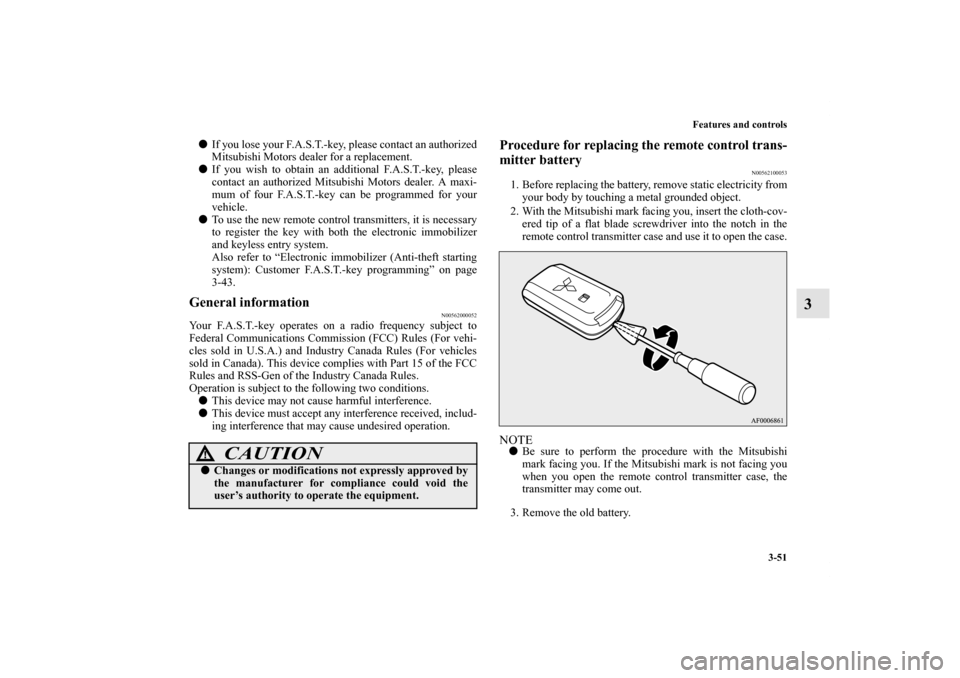
2. With the Mitsubishi mark facing you, insert the cloth-cov-
ered tip of a flat blade screwdriver into the notch in the
remote control transmitter case and use it to open the case.NOTE�Be sure to perform the procedure with the Mitsubishi
mark facing you. If the Mitsubishi mark is not facing you
when you open the remote control transmitter case, the
transmitter may come out.
3. Remove the old battery.
CAUTION
!�Changes or modifications not expressly approved by
the manufacturer for compliance could void the
user’s authority to operate the equipment.
BK0151000US.book 51 ページ 2012年3月29日 木曜日 午後6時8分
Page 145 of 706
3-52 Features and controls
3
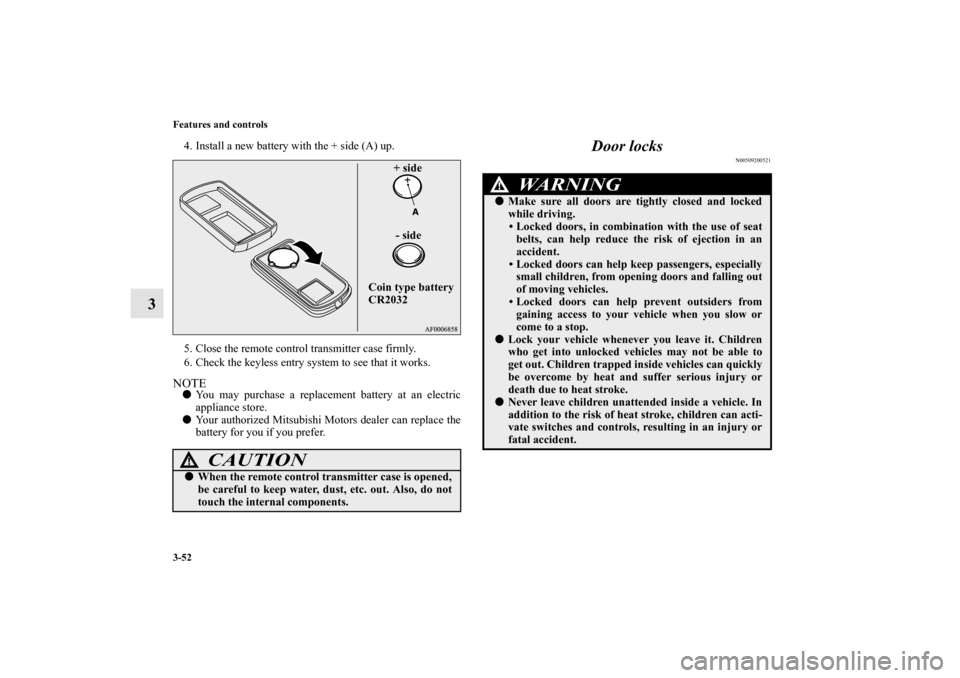
4. Install a new battery with the + side (A) up.
5. Close the remote control transmitter case firmly.
6. Check the keyless entry system to see that it works.NOTE�You may purchase a replacement battery at an electric
appliance store.
�Your authorized Mitsubishi Motors dealer can replace the
battery for you if you prefer.
Door locks
N00509200521
CAUTION
!�When the remote control transmitter case is opened,
be careful to keep water, dust, etc. out. Also, do not
touch the internal components.
Coin type battery
CR2032+ side
- side
WA R N I N G
!�Make sure all doors are tightly closed and locked
while driving.
• Locked doors, in combination with the use of seat
belts, can help reduce the risk of ejection in an
accident.
• Locked doors can help keep passengers, especially
small children, from opening doors and falling out
of moving vehicles.
• Locked doors can help prevent outsiders from
gaining access to your vehicle when you slow or
come to a stop.
�Lock your vehicle whenever you leave it. Children
who get into unlocked vehicles may not be able to
get out. Children trapped inside vehicles can quickly
be overcome by heat and suffer serious injury or
death due to heat stroke.�Never leave children unattended inside a vehicle. In
addition to the risk of heat stroke, children can acti-
vate switches and controls, resulting in an injury or
fatal accident.
BK0151000US.book 52 ページ 2012年3月29日 木曜日 午後6時8分
Page 161 of 706
3-68 Features and controls
3
NOTE�If the UNLOCK button on the remote control transmitter,
or the driver’s or front passenger’s door lock/unlock
switch is pressed when all doors and the rear hatch are
closed and no door is opened within approximately 30
seconds, re-arming will automatically occur.
�The amount of time after unlocking until the vehicle
relocks automatically can be adjusted. See an authorized
Mitsubishi Motors dealer for details. On a vehicle
equipped with a Mitsubishi Multi-Communication Sys-
tem, the functions can be adjusted on the screen. For
details, refer to a separate operation manual.
�Once the system has been disarmed, it cannot be rearmed
except by repeating the arming procedure.
Testing the theft-alarm system
N00510600118
Use the following procedure to test the system:
1. Lower the driver’s window.
2. Arm the system as explained in “Armed stage”.
3. Make sure that the theft-alarm indicator comes on and
flashes for approximately 20 seconds.
4. Wait a few seconds and then unlock the driver’s side door
by using the inside door lock knob and open the door.
5. Check to be sure that the horn (the siren for vehicles
equipped with the interior alarm sensor) sounds intermit-
tently and the headlights blink on and off when the door is
opened.
6. Disarm the system by unlocking all doors and the rear
hatch by using the keyless entry system or the F.A.S.T.-
key operation.
BK0151000US.book 68 ページ 2012年3月29日 木曜日 午後6時8分
Page 329 of 706
3-236 Features and controls
3
Welcome light
N00563200093
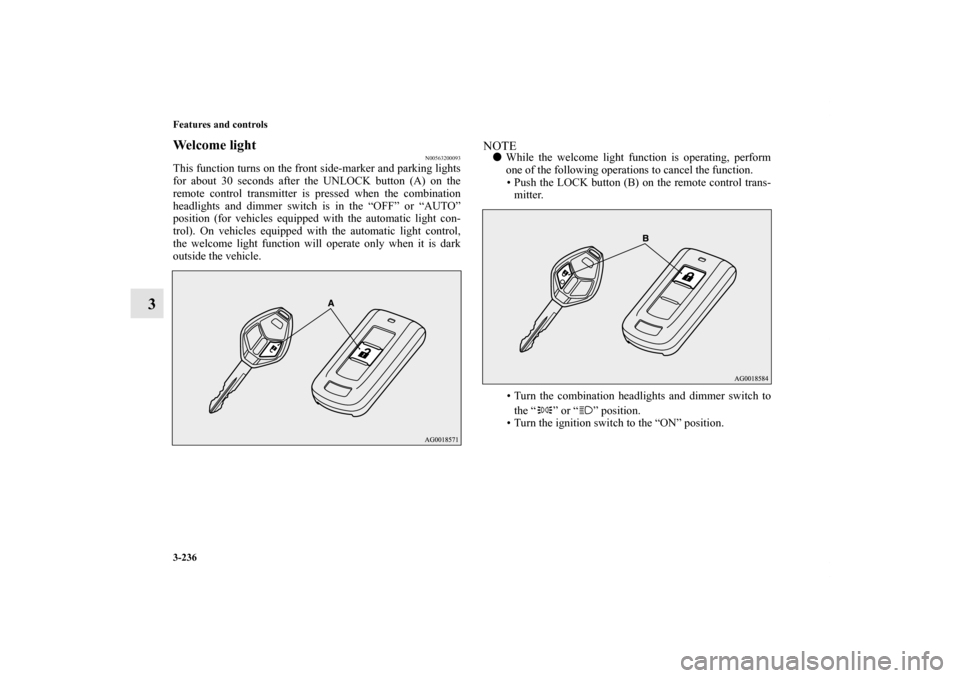
This function turns on the front side-marker and parking lights
for about 30 seconds after the UNLOCK button (A) on the
remote control transmitter is pressed when the combination
headlights and dimmer switch is in the “OFF” or “AUTO”
position (for vehicles equipped with the automatic light con-
trol). On vehicles equipped with the automatic light control,
the welcome light function will operate only when it is dark
outside the vehicle.
NOTE�While the welcome light function is operating, perform
one of the following operations to cancel the function.
• Push the LOCK button (B) on the remote control trans-
mitter.
• Turn the combination headlights and dimmer switch to
the “ ” or “ ” position.
• Turn the ignition switch to the “ON” position.
BK0151000US.book 236 ページ 2012年3月29日 木曜日 午後6時8分
Page 383 of 706
3-290 Features and controls
3
Dome light (Front)/Reading lights
N00525800134
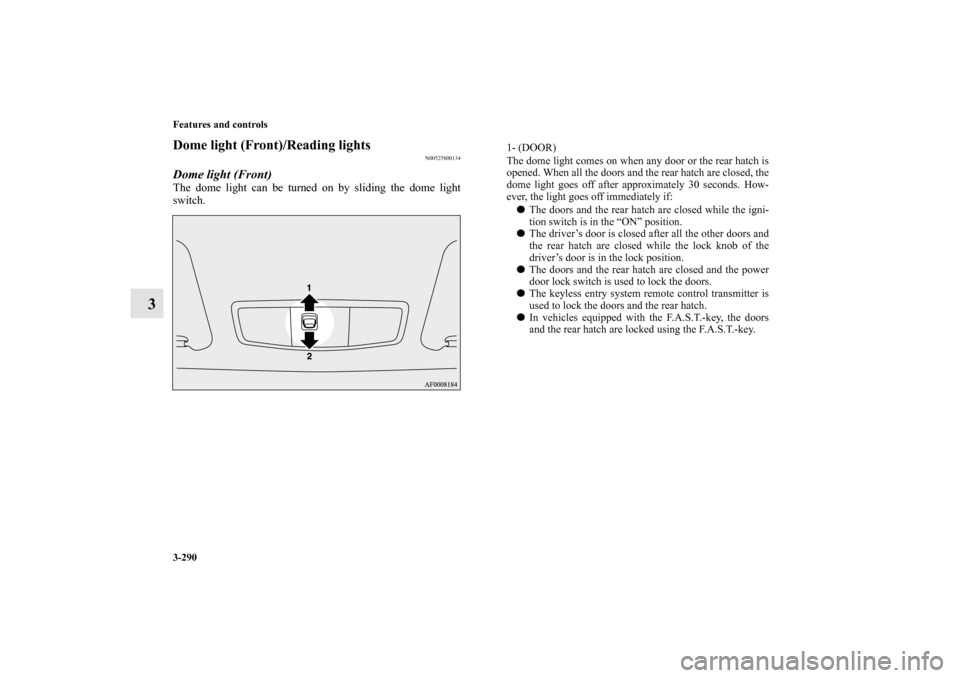
Dome light (Front)The dome light can be turned on by sliding the dome light
switch.
1- (DOOR)
The dome light comes on when any door or the rear hatch is
opened. When all the doors and the rear hatch are closed, the
dome light goes off after approximately 30 seconds. How-
ever, the light goes off immediately if:
�The doors and the rear hatch are closed while the igni-
tion switch is in the “ON” position.
�The driver’s door is closed after all the other doors and
the rear hatch are closed while the lock knob of the
driver’s door is in the lock position.
�The doors and the rear hatch are closed and the power
door lock switch is used to lock the doors.
�The keyless entry system remote control transmitter is
used to lock the doors and the rear hatch.
�In vehicles equipped with the F.A.S.T.-key, the doors
and the rear hatch are locked using the F.A.S.T.-key.
BK0151000US.book 290 ページ 2012年3月29日 木曜日 午後6時8分
Page 385 of 706
3-292 Features and controls
3
Dome light (Rear)
(if so equipped)
N00525400387
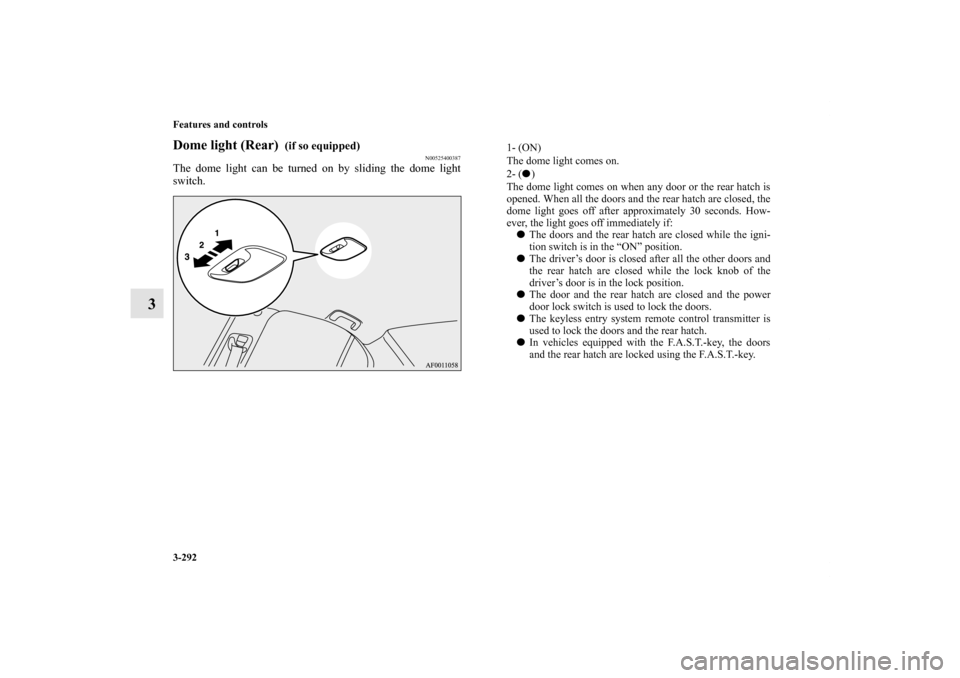
The dome light can be turned on by sliding the dome light
switch.
1- (ON)
The dome light comes on.
2- (�)
The dome light comes on when any door or the rear hatch is
opened. When all the doors and the rear hatch are closed, the
dome light goes off after approximately 30 seconds. How-
ever, the light goes off immediately if:
�The doors and the rear hatch are closed while the igni-
tion switch is in the “ON” position.
�The driver’s door is closed after all the other doors and
the rear hatch are closed while the lock knob of the
driver’s door is in the lock position.
�The door and the rear hatch are closed and the power
door lock switch is used to lock the doors.
�The keyless entry system remote control transmitter is
used to lock the doors and the rear hatch.
�In vehicles equipped with the F.A.S.T.-key, the doors
and the rear hatch are locked using the F.A.S.T.-key.
BK0151000US.book 292 ページ 2012年3月29日 木曜日 午後6時8分
Page 414 of 706
5
Comfort controls
Vents. . . . . . . . . . . . . . . . . . . . . . . . . . . . . . . . . . . .5- 2
Manual air conditioning with MAX A/C mode
(if so equipped) . . . . . . . . . . . . . . . . . . . . . . . . . .5- 6
Manual air conditioning without MAX A/C mode
(if so equipped) . . . . . . . . . . . . . . . . . . . . . . . . . .5- 16
Automatic air conditioning with Fahrenheit scale
(if so equipped) . . . . . . . . . . . . . . . . . . . . . . . . . .5- 25
Automatic air conditioning with Celsius scale
(if so equipped) . . . . . . . . . . . . . . . . . . . . . . . . . .5- 35
Important air conditioning operating tips . . . . . . .5- 45
Air purifier . . . . . . . . . . . . . . . . . . . . . . . . . . . . . . .5- 46
AM/FM electronically tuned radio with CD player
(RBDS and MP3 compatible)
(if so equipped) . . . . . . . . . . . . . . . . . . . . . . . . . .5- 46
AM/FM electronically tuned radio with 6 CD
autochanger (RBDS and MP3 compatible)
(if so equipped) . . . . . . . . . . . . . . . . . . . . . . . . . .5- 74
To play tracks from USB device
(if so equipped) . . . . . . . . . . . . . . . . . . . . . . . . . .5-104
To play tracks from a Bluetooth® device
(vehicles with Bluetooth® 2.0 interface) . . . . . .5-121To use the external audio input function
(if so equipped) . . . . . . . . . . . . . . . . . . . . . . . . . 5- 125
Steering wheel audio remote control switch
(if so equipped) . . . . . . . . . . . . . . . . . . . . . . . . . 5- 127
Error codes . . . . . . . . . . . . . . . . . . . . . . . . . . . . . . 5- 130
Error codes (SIRIUS Satellite Radio)
(if so equipped) . . . . . . . . . . . . . . . . . . . . . . . . . 5- 132
Error codes (iPod) . . . . . . . . . . . . . . . . . . . . . . . . . 5- 134
Error codes (USB memory device) . . . . . . . . . . . . 5- 136
Handling of compact discs (CD) . . . . . . . . . . . . . . 5- 138
Antenna . . . . . . . . . . . . . . . . . . . . . . . . . . . . . . . . . 5- 141
Digital clock (if so equipped) . . . . . . . . . . . . . . . . 5- 141
General information about your radio . . . . . . . . . . 5- 142
BK0151000US.book 1 ページ 2012年3月29日 木曜日 午後6時8分
Page 540 of 706
Comfort controls
5-127
5 Steering wheel audio remote control switch
(if so equipped)
N00714800455
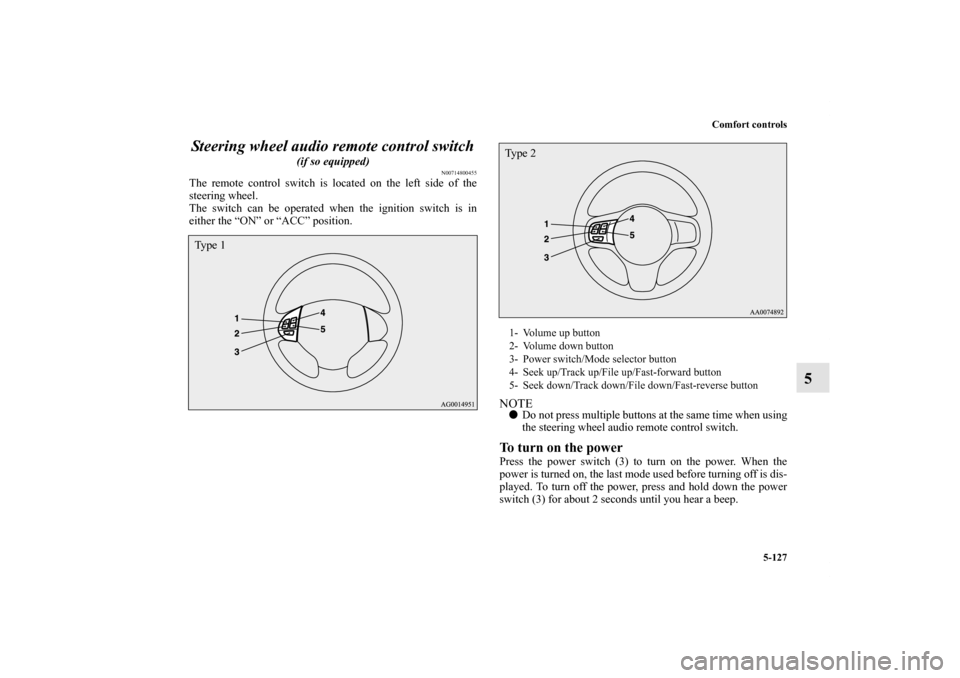
The remote control switch is located on the left side of the
steering wheel.
The switch can be operated when the ignition switch is in
either the “ON” or “ACC” position.
NOTE�Do not press multiple buttons at the same time when using
the steering wheel audio remote control switch.To turn on the powerPress the power switch (3) to turn on the power. When the
power is turned on, the last mode used before turning off is dis-
played. To turn off the power, press and hold down the power
switch (3) for about 2 seconds until you hear a beep.
Ty p e 1
1- Volume up button
2- Volume down button
3- Power switch/Mode selector button
4- Seek up/Track up/File up/Fast-forward button
5- Seek down/Track down/File down/Fast-reverse buttonTy p e 2
BK0151000US.book 127 ページ 2012年3月29日 木曜日 午後6時8分