Page 327 of 722

3-232 Features and controls
3Information screen display
N00558300025
Brake warning display
N00558400084
Ty p e 1
Ty p e 2
This warning is displayed if the vehicle is being driven with the
parking brake still applied. The warning light in the instrument
cluster only comes on when the parking brake is applied.Ty p e 1
Ty p e 2
When the ignition switch is turned to the “ON” position, if the
brake fluid is low, this warning is displayed.
The warning light in the instrument cluster also illuminates.
CAUTION
!�If a vehicle is driven without releasing the parking
brake, the brakes will overheat, resulting in ineffec-
tive braking and possible brake failure.
If this warning is displayed while driving, release the
parking brake.
CAUTION
!�If this warning stays on and does not go out while
driving, there is a danger of ineffective braking. If
this happens, park the vehicle in a safe place, and
contact an authorized Mitsubishi Motors dealer or a
repair facility of your choice.�If the brake warning display, brake warning light,
and the Anti-lock braking system warning light are
illuminated at the same time, the braking force dis-
tribution function will not operate, so the vehicle
may be destabilized during sudden braking. Avoid
sudden braking and high-speed driving. Park the
vehicle in a safe place, and contact an authorized
Mitsubishi Motors dealer or a repair facility of your
choice.
BK0150800US.book 232 ページ 2012年3月29日 木曜日 午後2時38分
Page 328 of 722

Features and controls
3-233
3
Charging system warning display
N00558600057
Ty p e 1
Ty p e 2
If there is a fault in the charging system, the warning display is
displayed on the information screen in the multi-information
display. The warning light in the instrument cluster also illumi-
nates.
�The vehicle should be brought to a halt in the follow-
ing manner when brake performance is deterio-
rated.
• Confirm that the vehicle slows down when you
press down on the brake pedal harder than usual.
In some cases, the brake pedal may go all the way
to the floor.
• Should the brakes fail, use engine braking to
reduce your speed and slowly apply the parking
brake.
Depress the brake pedal to illuminate the stop
lights to alert the vehicles behind you.CAUTION
!
CAUTION
!�If warnings are displayed while the engine is run-
ning, park your vehicle in a safe place as soon as
possible and contact an authorized Mitsubishi
Motors dealer or a repair facility of your choice to
have the system checked.
BK0150800US.book 233 ページ 2012年3月29日 木曜日 午後2時38分
Page 329 of 722
3-234 Features and controls
3
Oil pressure warning display
N00558700045
Ty p e 1
Ty p e 2
If the engine oil pressure drops while the engine is running, the
warning display is displayed on the information screen in the
multi-information display.
NOTE�The oil pressure warning display does not show the
amount of oil. The oil level must be checked using the
dipstick.
CAUTION
!�If the vehicle is driven while the engine oil is low, or
the oil level is normal but the warning is displayed,
the engine may overheat and damage may result.�If the warning is displayed while the engine is run-
ning, park your vehicle in a safe place as soon as
possible and check the engine oil level.�If this warning display comes on when the engine oil
level is proper, have your vehicle checked at an
authorized Mitsubishi Motors dealer or a repair
facility of your choice.
BK0150800US.book 234 ページ 2012年3月29日 木曜日 午後2時38分
Page 330 of 722
Features and controls
3-235
3 Combination headlights and dimmer switch
N00522500677
HeadlightsNOTE�Do not leave the headlights and other lights on for a long
period of time when the engine is not running. The battery
will run down.
�When it rains, or when the vehicle has been washed, the
inside of the lens sometimes becomes foggy. This is the
same as when window glass mists up on a humid day, and
does not indicate a problem. When the light is switched
on, the heat will dry out the fog. However, if water col-
lects inside the light, have it checked by an authorized
Mitsubishi Motors dealer or a repair facility of your
choice.
Type 1Rotate the switch to operate the lights.OFF All lights off
Parking, tail, front and rear side-marker lights, license
plate and instrument panel lights on
Headlights and other lights on
BK0150800US.book 235 ページ 2012年3月29日 木曜日 午後2時38分
Page 333 of 722
3-238 Features and controls
3
NOTE�The sensitivity of the automatic on/off control can be
adjusted.
For further information, please contact your authorized
Mitsubishi Motors dealer or a repair facility of your
choice.
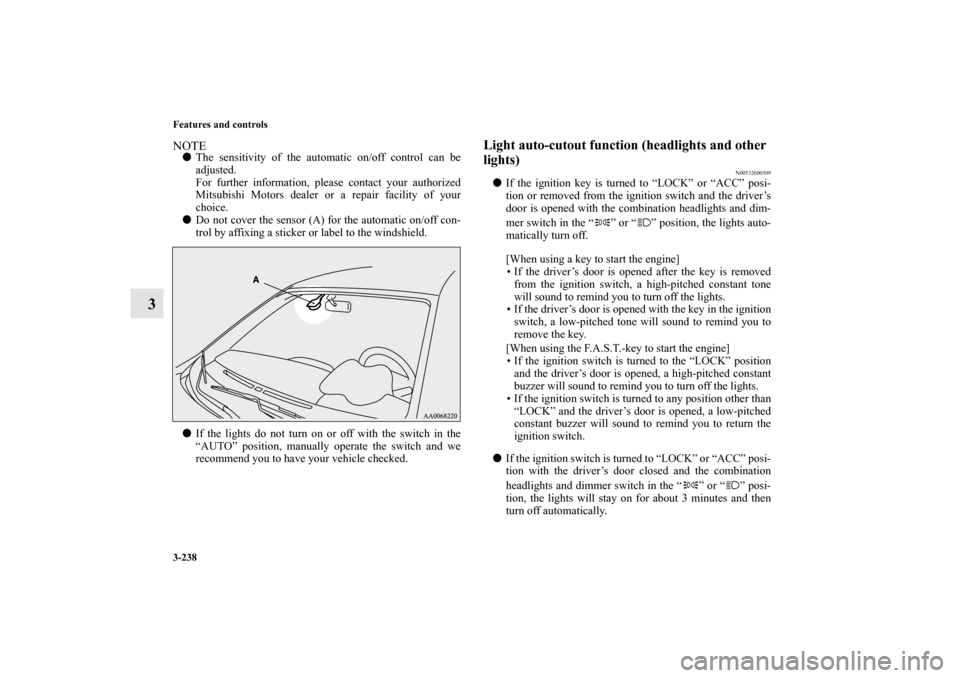
�Do not cover the sensor (A) for the automatic on/off con-
trol by affixing a sticker or label to the windshield.
�If the lights do not turn on or off with the switch in the
“AUTO” position, manually operate the switch and we
recommend you to have your vehicle checked.
Light auto-cutout function (headlights and other
lights)
N00532600509
�If the ignition key is turned to “LOCK” or “ACC” posi-
tion or removed from the ignition switch and the driver’s
door is opened with the combination headlights and dim-
mer switch in the “ ” or “ ” position, the lights auto-
matically turn off.
[When using a key to start the engine]
• If the driver’s door is opened after the key is removed
from the ignition switch, a high-pitched constant tone
will sound to remind you to turn off the lights.
• If the driver’s door is opened with the key in the ignition
switch, a low-pitched tone will sound to remind you to
remove the key.
[When using the F.A.S.T.-key to start the engine]
• If the ignition switch is turned to the “LOCK” position
and the driver’s door is opened, a high-pitched constant
buzzer will sound to remind you to turn off the lights.
• If the ignition switch is turned to any position other than
“LOCK” and the driver’s door is opened, a low-pitched
constant buzzer will sound to remind you to return the
ignition switch.
�If the ignition switch is turned to “LOCK” or “ACC” posi-
tion with the driver’s door closed and the combination
headlights and dimmer switch in the “ ” or “ ” posi-
tion, the lights will stay on for about 3 minutes and then
turn off automatically.
BK0150800US.book 238 ページ 2012年3月29日 木曜日 午後2時38分
Page 334 of 722

Features and controls
3-239
3
NOTE�The light auto-cutout function can be deactivated.
See your authorized Mitsubishi Motors dealer for details.
For vehicles equipped with the Mitsubishi Multi-Commu-
nication System, adjustments can be made using screen
operations. For further details, refer to the separate
owner’s manual.When you want to keep the lights on: If the combination headlights and dimmer switch is turned to
the “ ” or “ ” position again after the engine is turned off,
the about 3 minutes auto-cutout function described above will
not work. The lights (the parking lights, tail lights and license
plate lights) will stay on and will not turn off automatically. NOTE�When the engine is started using the key, if the driver’s
door is opened and the key is removed, the headlight
reminder buzzer intermittently emits a high-pitched
sound. If the key is still in the ignition the key reminder
buzzer intermittently emits a low-pitched sound.
The buzzer stops when the driver’s door is closed. (A
warning is also displayed in the multi-information dis-
play.)�When the engine is started using the keyless operation
function, if the driver’s door is opened and the ignition
switch is in the “LOCK” position, the headlight reminder
buzzer intermittently emits a high-pitched sound. If the
ignition switch is in any position other than “LOCK”, the
ignition switch on reminder buzzer intermittently emits a
low-pitched sound.
The buzzer stops when the driver’s door is closed. (A
warning is also displayed in the multi-information dis-
play.)
BK0150800US.book 239 ページ 2012年3月29日 木曜日 午後2時38分
Page 337 of 722

3-242 Features and controls
3
NOTE�While the welcome light function is operating, perform
one of the following operations to cancel the function.
• Push the LOCK button (B) on the remote control trans-
mitter.
• Turn the combination headlights and dimmer switch to
the “ ” or “ ” position.
• Turn the ignition switch to the “ON” position.
�It is possible to modify functions as follows:
• The headlights can be set to come on in the low beam
setting.
• The welcome light function can be deactivated.
For details, consult a Mitsubishi Motors dealer.
Coming home light
N00547300054
This function turns on the headlights in the low beam setting
for about 30 seconds after the ignition switch is turned to the
“LOCK” position.
1. Turn the combination headlights and dimmer switch to the
“OFF” or “AUTO” position (for vehicles equipped with
the automatic light control).
2. Turn the ignition switch to the “LOCK” position. Also, if
a key was used to start the engine, remove the key from
the ignition switch.
3. Within 60 seconds of turning the ignition switch to the
“LOCK” position, pull the turn signal lever toward you.
BK0150800US.book 242 ページ 2012年3月29日 木曜日 午後2時38分
Page 338 of 722
Features and controls
3-243
3
4. The headlights will come on in the low beam setting for
about 30 seconds. After the headlights go off, the head-
lights can be turned on again in the low beam setting for
about 30 seconds by pulling the turn signal lever toward
you within 60 seconds of turning the ignition switch to the
“LOCK” position. To turn on the headlights again after 60
seconds of turning the ignition switch to the “LOCK”
position, repeat the process from step 1.NOTE�While the coming home light function is operating, per-
form one of the following operations to cancel the func-
tion.
• Pull the turn signal lever toward you.
• Turn the combination headlights and dimmer switch to
the “ ” or “ ” position.
• Turn the ignition switch to the “ON” position.
�It is possible to modify functions as follows:
• The time that the headlights remain on can be changed.
• The coming home light function can be deactivated.
For details, consult a Mitsubishi Motors dealer.
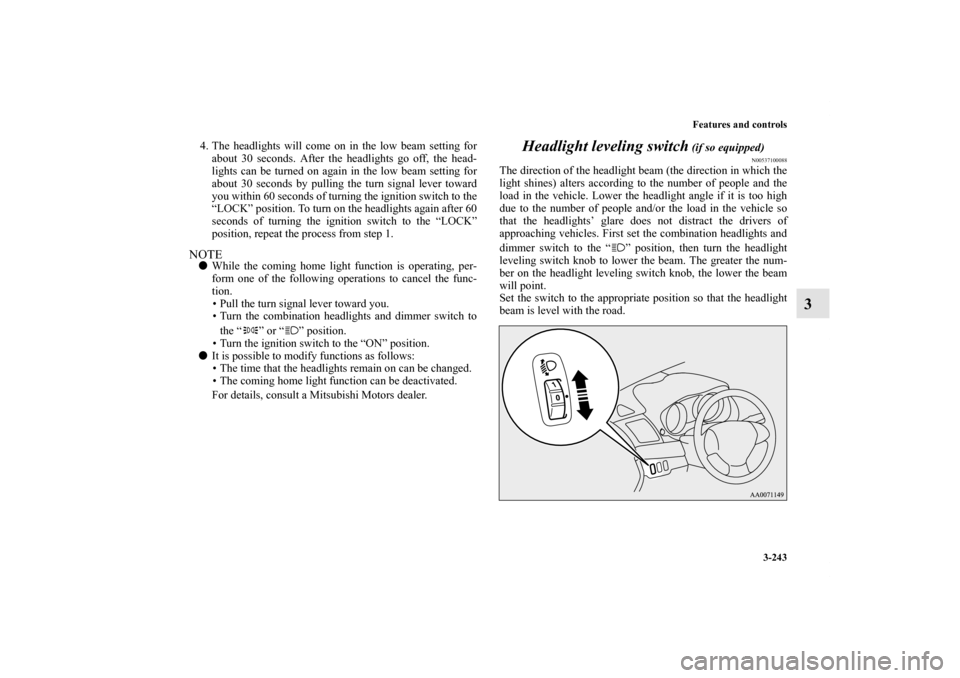
Headlight leveling switch
(if so equipped)
N00537100088
The direction of the headlight beam (the direction in which the
light shines) alters according to the number of people and the
load in the vehicle. Lower the headlight angle if it is too high
due to the number of people and/or the load in the vehicle so
that the headlights’ glare does not distract the drivers of
approaching vehicles. First set the combination headlights and
dimmer switch to the “ ” position, then turn the headlight
leveling switch knob to lower the beam. The greater the num-
ber on the headlight leveling switch knob, the lower the beam
will point.
Set the switch to the appropriate position so that the headlight
beam is level with the road.
BK0150800US.book 243 ページ 2012年3月29日 木曜日 午後2時38分

