Page 297 of 626
3-210 Features and controls
3
Coming home light
N00547300083
This function turns on the headlights in the low beam setting
for about 30 seconds after the ignition switch is turned to the
“LOCK” position.
1. Turn the combination headlights and dimmer switch to the
“OFF” or “AUTO” position (for vehicles equipped with
the automatic light control).
2. Turn the ignition switch to the “LOCK” position. Also, if
a key was used to start the engine, remove the key from
the ignition switch.
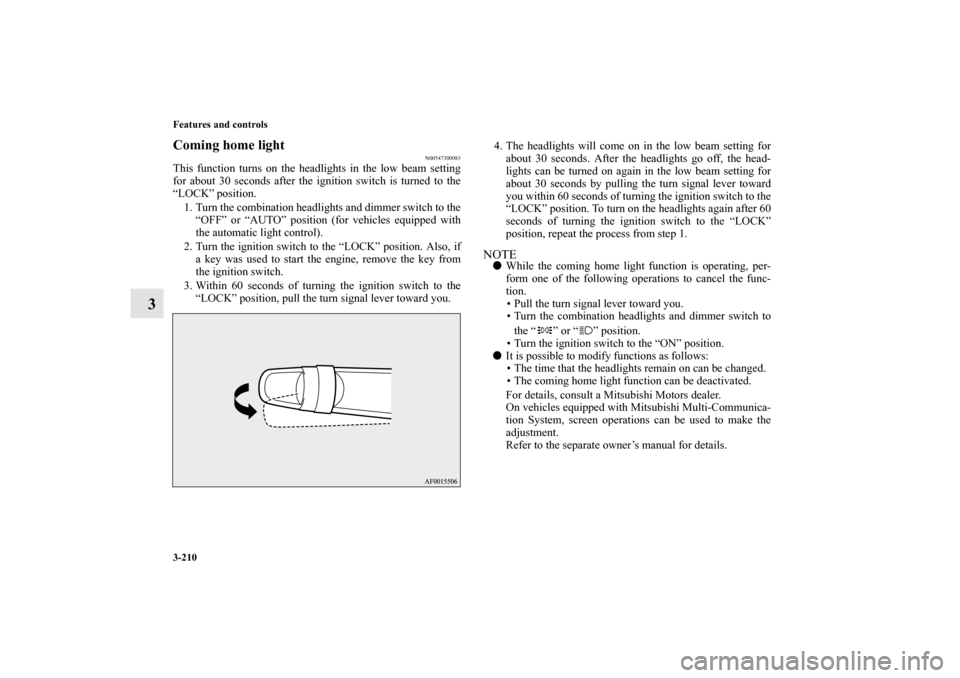
3. Within 60 seconds of turning the ignition switch to the
“LOCK” position, pull the turn signal lever toward you.4. The headlights will come on in the low beam setting for
about 30 seconds. After the headlights go off, the head-
lights can be turned on again in the low beam setting for
about 30 seconds by pulling the turn signal lever toward
you within 60 seconds of turning the ignition switch to the
“LOCK” position. To turn on the headlights again after 60
seconds of turning the ignition switch to the “LOCK”
position, repeat the process from step 1.
NOTE�While the coming home light function is operating, per-
form one of the following operations to cancel the func-
tion.
• Pull the turn signal lever toward you.
• Turn the combination headlights and dimmer switch to
the “ ” or “ ” position.
• Turn the ignition switch to the “ON” position.
�It is possible to modify functions as follows:
• The time that the headlights remain on can be changed.
• The coming home light function can be deactivated.
For details, consult a Mitsubishi Motors dealer.
On vehicles equipped with Mitsubishi Multi-Communica-
tion System, screen operations can be used to make the
adjustment.
Refer to the separate owner’s manual for details.
BK0150900US.book 210 ページ 2012年5月7日 月曜日 午後12時9分
Page 308 of 626

Features and controls
3-221
3
NOTE�It is possible to modify functions as follows:
• Intelligent washer can be deactivated.
• The wipers can be set to operate again after about 6 sec-
onds.
For details, consult a Mitsubishi Motors dealer.
On vehicles equipped with Mitsubishi Multi-Communica-
tion System, screen operations can be used to make the
adjustment.
Refer to the separate owner’s manual for details.
Precautions to observe when using wipers and
washers
N00523500212
NOTE�Do not use the wipers when the windshield is dry. This
could scratch the glass and wear the wiper blades prema-
turely.
�Before using the wipers in cold weather, check to be sure
that the wiper blades are not frozen to the windshield.
Using the wipers while the blades are frozen could cause
the wiper motor to burn out.
�If the wipers become blocked by ice or other deposits on
the glass, the motor may still burn out even if the wiper
switch is OFF. If deposits form on the windshield, park
your vehicle in a safe place, turn off the engine, and clean
the glass so that the wipers can operate smoothly.
�Avoid using the washer for more than 20 seconds at a
time. Do not operate the washer when the washer fluid
reservoir is empty or the pump may fail.
�During cold weather, add a recommended washer solution
that will not freeze in the washer fluid reservoir. Other-
wise the washer may not work or may be damaged.
CAUTION
!�If the washer is used in cold weather, the washer
fluid sprayed onto the glass might freeze, blocking
your view. Heat the glass with the defroster before
using the washer.
BK0150900US.book 221 ページ 2012年5月7日 月曜日 午後12時9分
Page 317 of 626

3-230 Features and controls
3
Entering the passcode
If a passcode has been set and the security function is enabled,
the voice guide will say “Hands-free system is locked. State the
passcode to continue” when the SPEECH button is pressed to
enter voice recognition mode. Say the 4-digit passcode number
to enter the passcode.
If the entered passcode is wrong, the voice guide will say “<4-
digit passcode>, Incorrect passcode. Please try again.” Enter
the correct passcode. NOTE�You can reenter the passcode as many times as you want.
�If you have forgotten your passcode, say “Cancel” to quit
the voice input mode and then check with an authorized
Mitsubishi Motors dealer.
Disabling the passcode
Use the following procedure to turn off the security function by
disabling the passcode. NOTE�System must be unlocked to disable the passcode.
1. Press the SPEECH button.
2. Say “Setup.”
3. Say “Passcode.”
4. The voice guide will say “Passcode is enabled. Would you
like to disable it?” Answer “Yes.”
Answer “No” to cancel the disabling of the passcode and
return to the main menu.
5. When the disabling of the passcode is completed, the
voice guide will say “Passcode is disabled” and the sys-
tem will return to the main menu.
Speaker enrollment function
N00564700011
The Bluetooth
® 2.0 interface can use the speaker enrollment
function to create a voice model for one person per language.
This makes it easier for the Bluetooth
® 2.0 interface to recogn-
ise voice commands said by you.
You can turn a voice model registered with the speaker enroll-
ment function on and off whenever you want.
Speaker enrollment
N00564800054
It takes about 2 to 3 minutes to complete the speaker enroll-
ment process.
To ensure the best results, run through the process while in the
driver’s seat, in an environment that is as quiet as possible
(when there is no rain or strong winds and the vehicle windows
are closed). Please turn off your phone while in speaker enroll-
ment to prevent interruption of the process.
Use the following procedure for speaker enrollment.
1. Stop your vehicle in a safe area, put the gearshift lever in
the “N” (Neutral) position (manual transaxle), or the gear-
shift lever in the “P” (PARK) position (Twin Clutch SST)
and pull the parking brake lever.NOTE�Speaker enrollment is not possible unless the vehicle is
parked. Make sure you park the vehicle in a safe area
before attempting speaker enrollment.
2. Press the SPEECH button.
3. Say “Voice training.”
BK0150900US.book 230 ページ 2012年5月7日 月曜日 午後12時9分
Page 337 of 626
3-250 Features and controls
3USB input terminal
(if so equipped)
N00566700015
You can connect your USB memory device or iPod* to play
music files stored in the USB memory device or iPod.
The following explains how to connect and remove a USB
memory device or iPod.
Refer to the following sections for details on how to play music
files:
Refer to “To play tracks from USB device” on page 5-82.
*: “iPod” is a registered trademark of Apple Inc. in the United
States and other countries.
How to connect a USB memory device
N00566800074
1. Park your vehicle in a safe place and turn the ignition
switch to the “LOCK” position.
2. Open the USB input terminal cover (A) in the glove com-
partment.
BK0150900US.book 250 ページ 2012年5月7日 月曜日 午後12時9分
Page 339 of 626
3-252 Features and controls
3
NOTE�Do not connect the USB memory device to the USB input
terminal directly.
The USB memory device may be damaged.
�When closing the glove compartment, be careful not to
trap the USB connector cable.
5. To remove the USB connector cable, turn the ignition
switch to the “LOCK” position first and perform the
installation steps in reverse.
How to connect an iPod
N00566900046
1. Park your vehicle in a safe place and turn the ignition
switch to the “LOCK” position.
2. Open the USB input terminal cover (A) in the glove com-
partment.
BK0150900US.book 252 ページ 2012年5月7日 月曜日 午後12時9分
Page 341 of 626
3-254 Features and controls
3
5. To remove the Dock connector, turn the ignition switch to
the “LOCK” position first and perform the installation
steps in reverse.
Types of connectable devices and supported file
specifications
N00567000015
Device types
N00567100087
Devices of the following types can be connected.
*: “iPod touch,” “iPod classic,” “iPod” and “iPod nano” are
registered trademarks of Apple Inc. in the United States and
other countries.Model name
Condition
USB memory deviceStorage capacity of 256 Mbytes
or more
iPod touch* F/W Ver.1.1.1 or later
iPod classic* F/W Ver.1.0 or later
iPod (fifth generation)* F/W Ver.1.2.2 or later
iPod nano (fifth generation)* F/W Ver.1.2 or later
iPod nano (second generation)* F/W Ver.1.1.2 or later
Models other than USB mem-
ory devices and iPodsDigital audio player supporting
mass storage class
BK0150900US.book 254 ページ 2012年5月7日 月曜日 午後12時9分
Page 342 of 626
Features and controls
3-255
3
NOTE�Depending on the type of the USB memory device or
other device connected, the connected device may not
function properly or the available functions may be lim-
ited.
�It is recommended to use an iPod with firmware updated
to the latest version.
�You can charge your iPod by connecting it to the USB
input terminal when the ignition switch is in the “ACC” or
“ON” position.
�Do not keep your USB memory device or iPod in your
vehicle.
�It is recommended that you back up the files in case of
data damage.
�Do not connect to the USB input terminal any device
(hard disk, card reader, memory reader, etc.) other than
the connectable devices specified in the previous section.
The device and/or data may be damaged. If any of these
devices was connected by mistake, remove it after turning
the ignition switch to the “LOCK” position.
File specifications
N00567200017
You can play music files of the following specifications that
are saved in a USB memory device or other device supporting
mass storage class.Item
Condition
File format MP3, WMA, AAC, WAV
Maximum number of levels
(including the root)Level 8
Number of folders 700
Number of files 65,535
BK0150900US.book 255 ページ 2012年5月7日 月曜日 午後12時9分
Page 347 of 626
3-260 Features and controls
3
Dome light (Front)/Reading lights
N00525800017
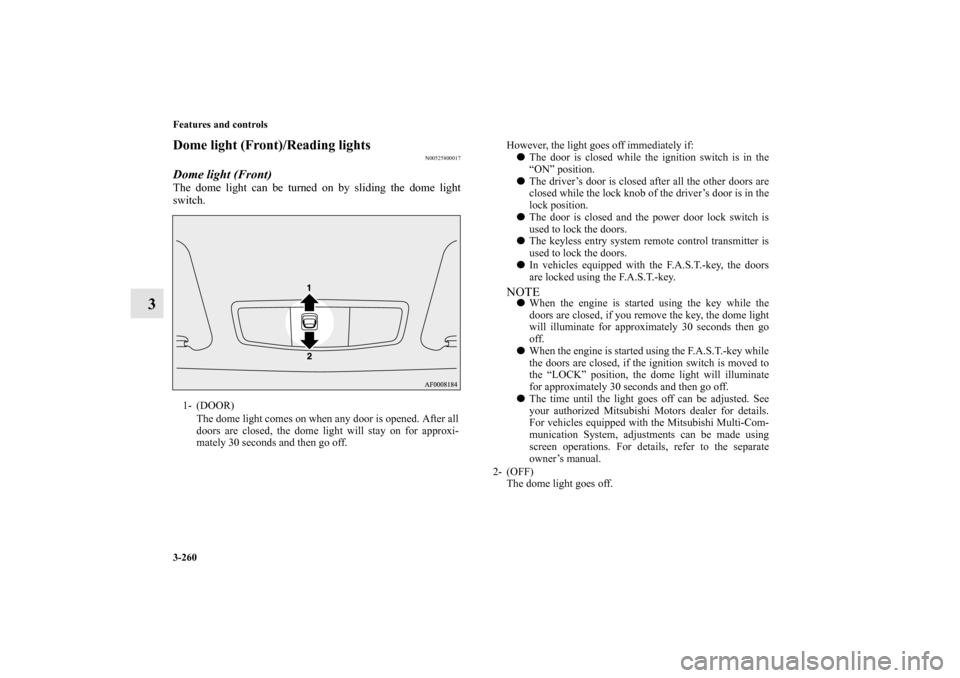
Dome light (Front)The dome light can be turned on by sliding the dome light
switch.1- (DOOR)
The dome light comes on when any door is opened. After all
doors are closed, the dome light will stay on for approxi-
mately 30 seconds and then go off.
However, the light goes off immediately if:
�The door is closed while the ignition switch is in the
“ON” position.
�The driver’s door is closed after all the other doors are
closed while the lock knob of the driver’s door is in the
lock position.
�The door is closed and the power door lock switch is
used to lock the doors.
�The keyless entry system remote control transmitter is
used to lock the doors.
�In vehicles equipped with the F.A.S.T.-key, the doors
are locked using the F.A.S.T.-key.NOTE�When the engine is started using the key while the
doors are closed, if you remove the key, the dome light
will illuminate for approximately 30 seconds then go
off.
�When the engine is started using the F.A.S.T.-key while
the doors are closed, if the ignition switch is moved to
the “LOCK” position, the dome light will illuminate
for approximately 30 seconds and then go off.
�The time until the light goes off can be adjusted. See
your authorized Mitsubishi Motors dealer for details.
For vehicles equipped with the Mitsubishi Multi-Com-
munication System, adjustments can be made using
screen operations. For details, refer to the separate
owner’s manual.
2- (OFF)
The dome light goes off.
BK0150900US.book 260 ページ 2012年5月7日 月曜日 午後12時9分