2013 MINI Coupe seats
[x] Cancel search: seatsPage 118 of 292

Storage compartmentsVehicle equipment
This chapter describes all series equipment as
well as country-specific and special equipment
offered for this model series.Therefore, it also
describes equipment that may not be found in
your vehicle, for instance due to the selected
special equipment or the country version. This
also applies to safety-related functions and sys‐
tems.
Notes No loose objects in the passenger com‐partment
Do not stow any objects in the passenger com‐
partment without securing them; otherwise,
they may present a danger to occupants for in‐
stance during braking and avoidance maneu‐
vers. ◀
No non-slip mats on the dashboard
Do not use non-slip materials, such as
non-slip mats, on the dashboard, or it could be
damaged by the substances in the materials. ◀
Storage compartments
Interior▷Glove compartment, refer to page 118.▷Center armrest, refer to page 119.▷Storage compartment on the passenger
side, refer to page 119.▷Compartments in the center console.▷Compartments in the doors.▷Compartments next to the rear seats.▷MINI Coupe, MINI Roadster: rear storage
shelf behind the seats, refer to page 120.▷Nets on the back of the front seat backrests
and in the front passenger footwell.▷Cupholder, refer to page 114.
Cargo area
▷Net on the cargo area floor and on the side
trim.▷Lashing eyes, refer to page 129.▷MINI Coupe, MINI Roadster: storage com‐
partment in the cargo area, refer to
page 116.
Glove compartment
Opening
Press the button to open the lid.
The light in the glove compartment switches
on.
Closing Fold up the cover.
Close the glove compartment again im‐
mediately
Close the glove compartment immediately after
use while driving; otherwise, injury may occur
during accidents. ◀
Seite 118ControlsStorage compartments118
Online Edition for Part no. 01 40 2 919 017 - II/13
Page 119 of 292
MINI Convertible, MINI Roadster:
locking
Lock the glove compartment using the
integrated key of the remote control, refer to
page 30.
Ventilation
Depending on the vehicle's equipment, the
glove compartment can be ventilated and, if
the cooling function is switched on, cooled.
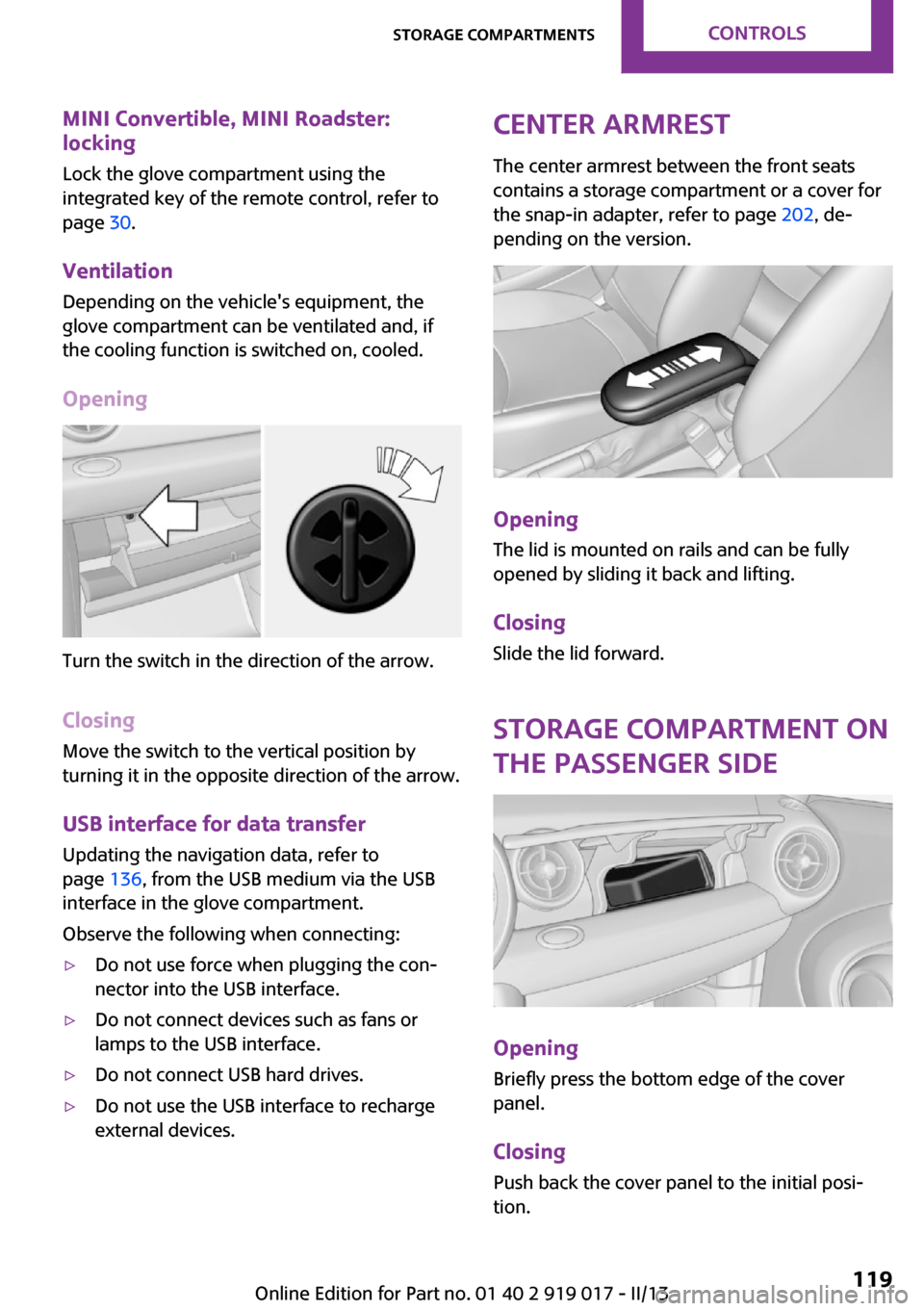
Opening
Turn the switch in the direction of the arrow.
ClosingMove the switch to the vertical position by
turning it in the opposite direction of the arrow.
USB interface for data transfer
Updating the navigation data, refer to
page 136, from the USB medium via the USB
interface in the glove compartment.
Observe the following when connecting:
▷Do not use force when plugging the con‐
nector into the USB interface.▷Do not connect devices such as fans or
lamps to the USB interface.▷Do not connect USB hard drives.▷Do not use the USB interface to recharge
external devices.Center armrest
The center armrest between the front seats
contains a storage compartment or a cover for
the snap-in adapter, refer to page 202, de‐
pending on the version.
Opening
The lid is mounted on rails and can be fully
opened by sliding it back and lifting.
ClosingSlide the lid forward.
Storage compartment on
the passenger side
Opening
Briefly press the bottom edge of the cover
panel.
ClosingPush back the cover panel to the initial posi‐
tion.
Seite 119Storage compartmentsControls119
Online Edition for Part no. 01 40 2 919 017 - II/13
Page 120 of 292
Close the storage compartment again im‐
mediately after use.
Close the storage compartment again immedi‐
ately after use while driving; otherwise, injury
may occur during accidents. ◀
MINI Convertible, MINI Roadster The storage compartment cannot be locked.
MINI Coupe, MINI Road‐
ster: rear storage shelf
behind the seats
This space can be used to store briefcases, for
example.
No heavy objects
Only transport light and small objects on
the rear storage shelf; otherwise, braking ma‐
neuvers and swerving may lead to a safety haz‐
ard due to objects flying about the passenger
compartment. Only transport heavy luggage in
the cargo area if it has been appropriately se‐
cured. ◀
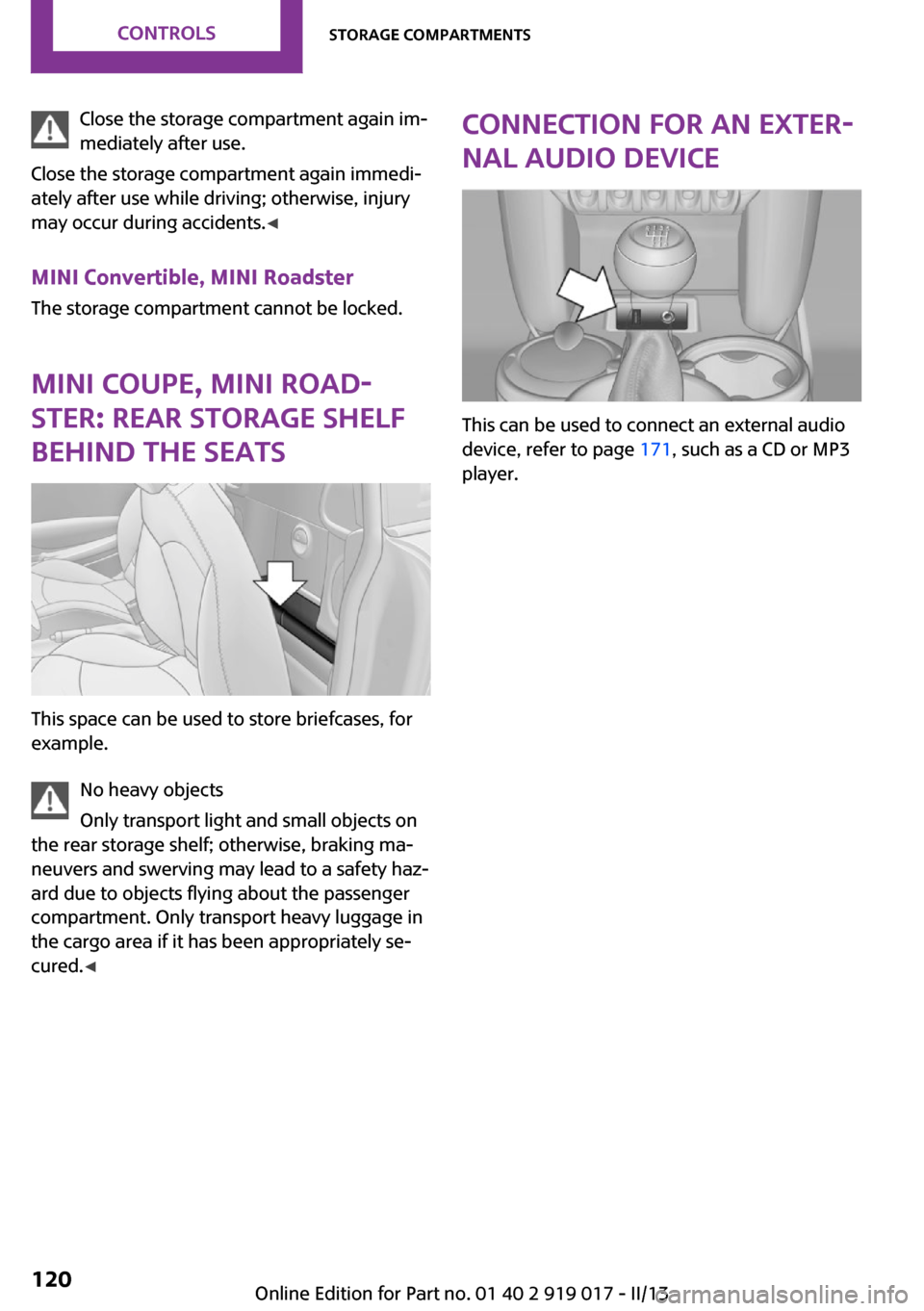
Connection for an exter‐
nal audio device
This can be used to connect an external audio
device, refer to page 171, such as a CD or MP3
player.
Seite 120ControlsStorage compartments120
Online Edition for Part no. 01 40 2 919 017 - II/13
Page 280 of 292
Everything from A to ZIndexA
ABS, Antilock Brake Sys‐ tem 101
Acoustic signal, refer to Check Control 82
Activated charcoal filter with automatic climate con‐
trol 112
Adaptive Light Control 87
Additional telephone 192
Additives, engine oil 239
Airbags 90
Airbags, indicator/warning light 92
Air circulation, refer to Recir‐ culated air mode 109, 111
Air conditioner 108
Air conditioning 108
Air conditioning mode– Air conditioner 108– Automatic climate con‐
trol 110
Air distribution
– Automatic 111– Individual 109– Manual 109, 112
Air drying, refer to Cooling
function 112
Air flow rate 108, 111
Air pressure, refer to Tire infla‐ tion pressure 222
Air supply
– Air conditioner 108– Automatic climate con‐
trol 110
Alarm system 39
Always Open Timer 77
AM/FM station 160
Ambient lighting 89
Announcement, navigation,
refer to Spoken instruc‐
tions 149
Antifreeze, washer fluid 69
Antilock Brake System, ABS 101
Anti-slip control, refer to Dy‐ namic Stability Control
DSC 101
Anti-theft protection 31
Appointments 208
Approved engine oils 239
Ashtray 114
Assistance, roadside 254
Assistance when driving off, refer to Hill drive-off assis‐
tant 103
Assistance with starting en‐ gine, refer to Jump-start‐
ing 254
Audio playback 169
Audio playback, Blue‐ tooth 175
Automatic– Air distribution 111– Air flow rate 111
Automatic car wash 259
Automatic climate control
– Automatic air distribu‐
tion 111
Automatic, cruise control 105
Automatic headlamp con‐ trol 85
Automatic rear spoiler 103
Automatic transmission with
Steptronic
– Kickdown 71– Overriding selector lever
lock 72
AUTO program with auto‐
matic climate control 111
AUX-IN port 171
Average fuel consumption 76
Average fuel consumption– Setting the units 78
Average speed 76
Average speed, refer to Com‐ puter 75
B Backrest curvature, refer to Lumbar support 54
Backrests, refer to Seats 53
Backup lamps, bulb replace‐ ment 247
Balance 158
Bass 158
Battery
– Disposal 39– Remote control 30
Battery, refer to Vehicle bat‐
tery 252
Battery replacement
– Remote control 39
Belts, refer to Safety belts 55
Belt tensioners, refer to Safety belts 55
Bi-xenon headlamps 245
Black and white map dis‐ play 152
Blower, refer to Air flow rate 108, 111
Bluetooth audio 175
Bluetooth connection, activat‐ ing/deactivating 183, 193
Bluetooth hands-free sys‐ tem 182
Brake assistant 101
Brake discs, breaking in 124
Brake fluid, refer to Service re‐ quirements 81
Seite 280ReferenceEverything from A to Z280
Online Edition for Part no. 01 40 2 919 017 - II/13
Page 281 of 292

Brake force distribution, elec‐tronic 101
Brake pads, breaking in 124
Brakes– Handbrake 66
Brakes, MINI maintenance
system 241
Brakes, service require‐ ments 81
Brake system, MINI mainte‐ nance system 241
Braking, notes 126
Breakdown assistance, Road‐ side Assistance 254
Breaking in 124
Brightness on the Control Dis‐ play 80
Button for starting the engine, refer to Start/Stop button 64
C
Calendar 208
California Proposition 65 Warning 7
Car battery, refer to Vehicle battery 252
Car care products 260
Care, displays 263
Care, vehicle 260
Cargo area
– Comfort Access 38– Emergency activation, refer
to Unlocking manually 36– Emergency unlocking 37– Opening from the out‐
side 35
Cargo area lamp, refer to Inte‐
rior lamps 88
Cargo area tailgate, refer to Tailgate 35
Carpet, care 262
Car phone, refer to Tele‐ phone 182, 192
Car wash 259
CBC, Cornering Brake Con‐ trol 101
CBS Condition Based Serv‐
ice 241
CD 168
CD/DVD drives, care 263
CD player 168
Center console, refer to Around the center con‐
sole 16
Central locking– Comfort Access 37– From the inside 35– From the outside 32
Central locking system
– Concept 31– From the outside 31
Central screen, see Control
Display 18
Changes, technical, refer to Safety 7
Changing wheels/tires 231
Check Control 82
Children, transporting 59
Child restraint fixing system LATCH 61
Child restraint fixing sys‐ tems 59
Child restraint fixing systems, mounting 59
Child seat, mounting 59
Child seats, refer to Transport‐ ing children safely 59
Chrome parts, care 262
Circulation of air, refer to Re‐ circulated air
mode 109, 111
Cleaning, displays 263
Cleaning, refer to Care 259
Climate 108
Climate mode
– Ventilation 113
Clock 74
Clock
– 12h/24h format 79– Setting the time and date 79
Closing
– From the inside 35– From the outside 32Clutch, breaking in 124
Cockpit 12
Cold start, refer to Starting the engine 65
Combination instrument, refer to Displays 14
Combination switch, refer to Turn signal/high beams/
headlamp flasher 67
Combination switch, refer to Washer/wiper system 67
Comfort Access– In the car wash 39– Replacing the battery 39
Comfort area, refer to Around
the center console 16
Compact wheel, inflation pres‐ sure 226
Compartment for remote con‐ trol, refer to Ignition lock 64
Computer 75
Computer, displaying informa‐ tion 75
Condition Based Service CBS 241
Confirmation signals for vehi‐ cle locking/unlocking 33
Connecting, mobile phone, re‐ fer to Pairing the mobile
phone 182, 193
Consumption, refer to Aver‐ age fuel consumption 76
Contacts 189, 205
Control Display 18
Control Display, care 263
Control Display, settings 80
Controls and displays 12
Control systems, driving stabil‐ ity 101
Convenient operation
– Windows 32
Convertible top 42
Convertible top
– Manual 47– Mechanical 47
Coolant temperature 75
Seite 281Everything from A to ZReference281
Online Edition for Part no. 01 40 2 919 017 - II/13
Page 284 of 292

HHalogen headlamps, bulb re‐ placement 245
Hand car wash, care 260
Hands-free microphone 16
Hazard warning system 16
HD Radio 161
Head airbags 90
Headlamp control, auto‐ matic 85
Headlamp courtesy delay fea‐ ture 86
Headlamp flasher 67, 86
Headlamp flasher, indicator lamp 15
Headlamps 85
Headlamps, care 260
Headlamps, cleaning, washer fluid 69
Head restraints 56
Head restraints– Adjusting the height 56– Removing 56
Heatable
– Windshield 112
Heating
– Rear window 109, 112– Seats 55– Windshield 112
Height adjustment
– Seats 53
High beams 86
High beams, bulb replace‐ ment 245
High beams, indicator lamp 15
Hill drive-off assistant 103
Hills 126
Holder for remote control, re‐ fer to Ignition lock 64
Homepage 6
Hood 236
Hood, closing 237
Hood, opening 237
Hood, unlocking 237
Horn 12
House number, entering for
navigation 139
Hydraulic brake assistant 101
I
Ice warning, refer to External temperature warning 74
Icy roads, refer to External temperature warning 74
Identification marks, run-flat tires 232
Identification marks, tires 228
iDrive– Changing settings 80– Changing the date and
time 79– Changing the language 80– Changing the units of meas‐
ure and display format 78– Setting the brightness 80
Ignition 64
Ignition key position 1, refer to Radio ready state 64
Ignition key position 2, refer to Ignition on 64
Ignition key, refer to Remote control with integrated
key 30
Ignition lock 64
Ignition, switched off 65
Ignition, switched on 64
Indicator and warning lamps 15
Indicator and warning lamps
– Tire Pressure Monitor
TPM 97
Individual air distribution 109
Inflation pressure monitor, re‐ fer to Flat Tire Monitor 93
Inflation pressure monitor, re‐ fer to Tire Pressure Monitor
TPM 95
Inflation pressure, refer to Tire inflation pressure 222
Information on the navigation data 136
Initializing– Refer to Setting the time and
date 79
Initializing, Flat Tire Monitor
FTM 94
Instrument cluster, refer to Displays 14
Instrument lighting 88
Instruments, refer to Cock‐ pit 12
Integrated key 30
Interactive map 143
Interior lamps 88
Interior lamps
– Remote control 33
Interior mirror 57
Interior temperature, setting
– Air conditioner 108– Automatic climate con‐
trol 110
Internet page 6
Intersection, entering for navi‐ gation 139
J
Jump-starting 254
K Keyless Go, refer to Comfort Access 37
Keyless opening and closing, refer to Comfort Access 37
Key Memory, refer to Personal Profile 31
Key, refer to Remote control with integrated key 30
Kickdown
– Automatic transmission with
Steptronic 71
Knocking control 220
L Lamp and bulb replacement, bulb replacement 244
Seite 284ReferenceEverything from A to Z284
Online Edition for Part no. 01 40 2 919 017 - II/13
Page 287 of 292
Rear fog lamps, indicatorlamp 15
Rear lamps, refer to Tail lamps 247
Rear spoiler 103
Rearview mirror, refer to Mir‐ rors 57
Rear window de‐ froster 109, 112
Recirculated air mode 109, 111
Recommended tire brands 231
Redialing 188, 200
Releasing, refer to Unlock‐ ing 38
Remaining range for service, refer to Service require‐
ments 81
Remaining range, refer to Range 76
Reminders 210
Remote control– Battery replacement 39– Comfort Access 37– Malfunctions 33, 39– Tailgate 33
Remote control, removing
from the ignition lock 64
Remote control, service data 241
Remote inquiry 187, 199
Replacement remote con‐ trol 30
Replacing wheels/tires 231
Reporting safety defects 9
Reserve warning, refer to Fuel gauge 75
Reservoir for washer fluid, re‐ fer to Washer fluid reser‐
voir 69
Restraining systems
– Refer to Safety belts 55
Restraint systems for chil‐
dren 59
Retreaded tires 231
Reverse gear, manual trans‐
mission 70
Road, avoiding 147
Road detour 147
Roadside Assistance 254
Roadside parking lamp, bulb replacement 246
Roadside parking lamps 86
RON gasoline quality 220
RON, refer to Fuel quality 220
Route 148
Route criteria, route 147
Route, displaying 148
Route section, bypassing 148
RPM, refer to Engine data 266
Rubber seals, care 262
Run-flat tires 232
Run-flat tires– Flat tire 94
Run-flat tires, tire inflation
pressure 222
Running lights, refer to Park‐ ing lamps/low beams 85
S Safe braking 126
Safety 7
Safety belts 55
Safety belts
– Damage 56
Safety belts, care 262
Safety belts, indicator/warning lamp 56
Safety belts, reminder 56
Safety systems
– Safety belts 55
Safety systems, airbags 90
Satellite radio 162
Saving fuel 131
Scale, changing during navi‐ gation 151
Screen, see Control Display 18
Seat adjustment
– Manual 53
Seat belts
– Refer to Safety belts 55Seat heating 55
Seats– Adjusting 53– Heating 55– Sitting safely 53
Selector lever, automatic
transmission with Step‐
tronic 71
Selector lever lock, overrid‐ ing 72
Selector lever lock, refer to Changing selector lever posi‐
tions, Shiftlock 71
Selector lever positions, auto‐ matic transmission with
Steptronic 71
Service and warranty 7
Service data in the remote control 241
Service interval display, refer to Condition Based Service
CBS 241
Service interval display, refer to Service requirements 81
Service requirements 81
Service requirements, CBS Condition Based Service 241
Settings
– Changing on the Control Dis‐
play 80– Language 80
Settings and information 77
Settings, configuring, refer to Personal Profile 31
Setting the clock, 12h/24h for‐ mat 79
Shifting
– Automatic transmission with
Steptronic 71
Shifting, manual transmis‐
sion 70
Shift lever
– Automatic transmission with
Steptronic 71
Shift paddles on the steering
wheel 72
Seite 287Everything from A to ZReference287
Online Edition for Part no. 01 40 2 919 017 - II/13