2013 MINI 3 door oil
[x] Cancel search: oilPage 185 of 233
If the oil level reaches the minimum level or an
overfilling is detected, a check control message
is displayed.
During the measurement, the idle speed is in‐
creased somewhat.
Requirements▷Vehicle is on level road.▷Manual transmission: shift lever in neutral
position, clutch and accelerator pedals not
depressed.▷Automatic transmission: selector lever in
transmission position N or P and accelera‐
tor pedal not depressed.▷Engine is running and is at operating tem‐
perature.
Performing a detailed measurement
In order to perform a detailed measurement of
the engine oil level:
Confirm message regarding oil level display.
The oil level is checked and displayed via a
scale.
Duration: approx. 1 minute.
Adding engine oil
General information Switch off the ignition and safely park the vehi‐
cle before engine oil is added.
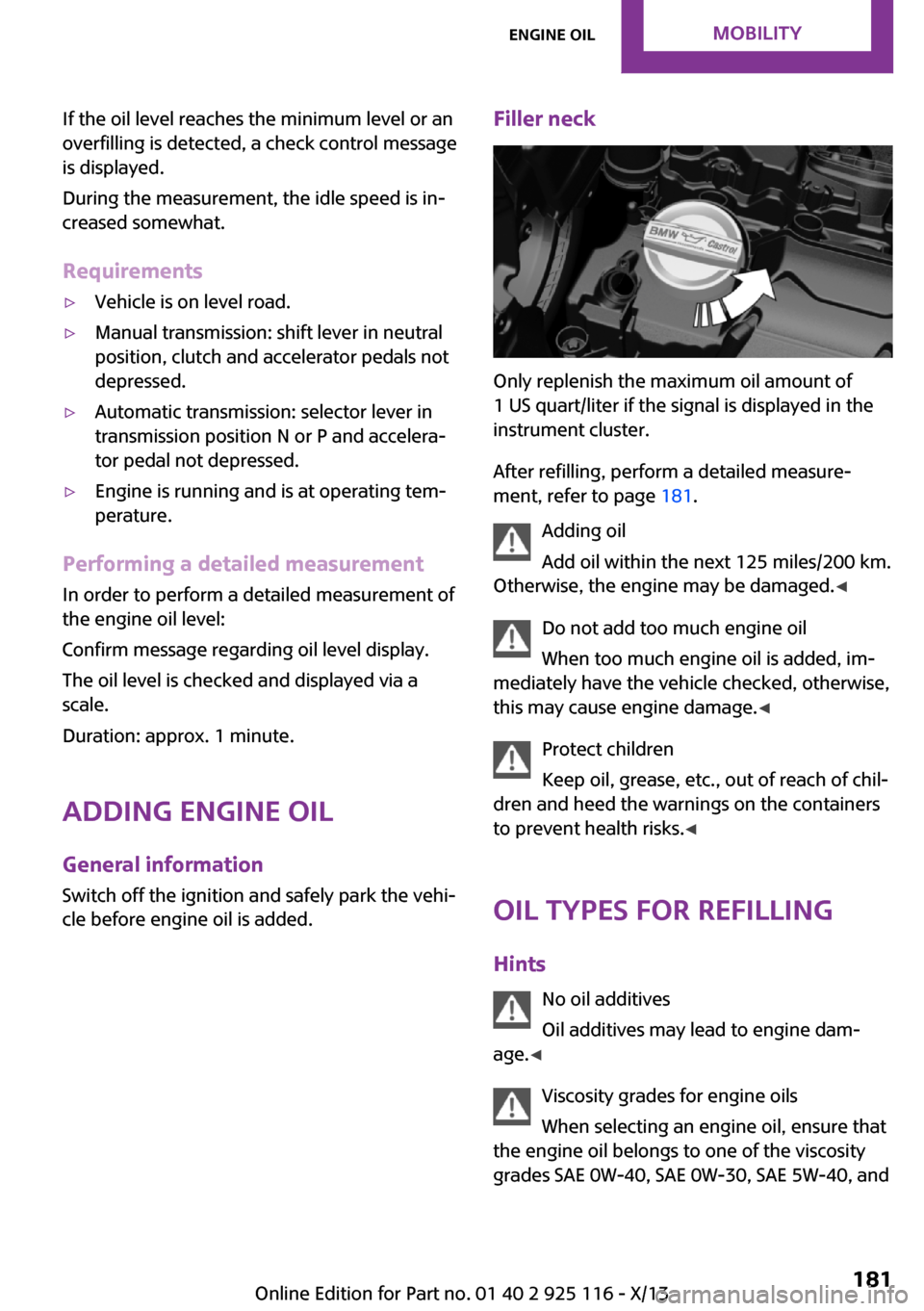
Filler neck
Only replenish the maximum oil amount of
1 US quart/liter if the signal is displayed in the
instrument cluster.
After refilling, perform a detailed measure‐
ment, refer to page 181.
Adding oil
Add oil within the next 125 miles/200 km.
Otherwise, the engine may be damaged. ◀
Do not add too much engine oil
When too much engine oil is added, im‐
mediately have the vehicle checked, otherwise,
this may cause engine damage. ◀
Protect children
Keep oil, grease, etc., out of reach of chil‐
dren and heed the warnings on the containers
to prevent health risks. ◀
Oil types for refilling
Hints No oil additives
Oil additives may lead to engine dam‐
age. ◀
Viscosity grades for engine oils
When selecting an engine oil, ensure that
the engine oil belongs to one of the viscosity
grades SAE 0W-40, SAE 0W-30, SAE 5W-40, and
Seite 181Engine oilMobility181
Online Edition for Part no. 01 40 2 925 116 - X/13
Page 186 of 233

SAE 5W-30 or malfunctions or engine damage
may occur.◀
The engine oil quality is critical for the life of the
engine.
Some types of oils in some cases are not availa‐
ble in all countries.
Approved oil types
Gasoline engineBMW Longlife-01BMW Longlife-01 FEDiesel engineBMW Longlife-04
Additional information about the approved
types of oils can be requested from the service
center.
Alternative oil types
If the approved engine oils are not available, up
to 1 US quart/liter of an oil with the following
specification can be added:
Gasoline engineAPI SM or superior grade specificationDiesel engineAPI ILSAC GF-5Seite 182MobilityEngine oil182
Online Edition for Part no. 01 40 2 925 116 - X/13
ENGINE Oil change
The manufacturer of your vehicle
recommends having the engine oil changed
by your service center.
Page 187 of 233

CoolantVehicle equipment
All standard, country-specific and optional
equipment that is offered in the model series is
described in this chapter. Therefore, equipment
is also described that is not available in a vehi‐
cle, e. g., because of the selected optional
equipment or country variant. This also applies
for safety-related functions and systems.
General information Danger of burns from hot engine
Do not open the cooling system while the
engine is hot; otherwise, escaping coolant may
cause burns. ◀
Suitable additives
Only use suitable additives; otherwise,
engine damage may occur. The additives are
harmful to your health. ◀
Coolant consists of water and additives.
Not all commercially available additives are
suitable for your vehicle. Ask your service cen‐
ter for suitable additives.
Coolant levelChecking
There are yellow Min and Max marks in the
coolant reservoir.1.Let the engine cool.2.Turn the coolant reservoir lid counterclock‐
wise to unscrew and open it.3.The coolant level is correct when it is be‐
tween these two marks.
Adding engine oil
1.Let the engine cool.2.Turn the coolant reservoir lid counterclock‐
wise to unscrew and open it.3.If the coolant is low, slowly add coolant up
to the specified level; do not overfill.4.Turn the cap.5.Have the cause of the coolant loss elimi‐
nated as soon as possible.
Disposal
Comply with the relevant environmen‐
tal protection regulations when dispos‐
ing of coolant and coolant additives.
Seite 183CoolantMobility183
Online Edition for Part no. 01 40 2 925 116 - X/13
Page 188 of 233

MaintenanceVehicle equipment
All standard, country-specific and optional
equipment that is offered in the model series is
described in this chapter. Therefore, equipment
is also described that is not available in a vehi‐
cle, e. g., because of the selected optional
equipment or country variant. This also applies
for safety-related functions and systems.
MINI maintenance system
The maintenance system indicates required
maintenance measures, and thereby provides
support in maintaining road safety and the op‐
erational reliability of the vehicle.
Condition Based Service
CBS
Sensors and special algorithms take into ac‐
count the driving conditions of your vehicle.
Based on this, Condition Based Service deter‐
mines the maintenance requirements.
The system makes it possible to adapt the
amount of maintenance you need to your user
profile.
Detailed information on service requirements,
refer to page 60, can be displayed on the radio.
Service data in the remote control
Information on the required maintenance is continuously stored in the remote control. Yourservice center will read out this data and sug‐
gest the right array of service procedures for
your vehicle.
Therefore, hand your service specialist the re‐
mote control that you used most recently.Storage periods
Storage periods during which the vehicle bat‐
tery was disconnected are not taken into ac‐
count.
If this occurs, have a service center update the
time-dependent maintenance procedures, such
as checking brake fluid and, if necessary,
changing the engine oil and the microfilter/acti‐
vated-charcoal filter.
Service and Warranty In‐
formation Booklet for
US models and Warranty
and Service Guide Book‐
let for Canadian models
Please consult your Service and Warranty Infor‐
mation Booklet for US models and Warranty
and Service Guide Booklet for Canadian models
for additional information on service require‐
ments.
Maintenance and repair should be performed
by your service center. Make sure to have regu‐
lar maintenance procedures recorded in the ve‐
hicle's Service and Warranty Information Book‐
let for US models, and in the Warranty and
Service Guide Booklet for Canadian models.
These entries are proof of regular maintenance.
Socket for OBD Onboard
Diagnosis
Note Socket for Onboard Diagnosis
The socket for onboard diagnostics may
only be used by the service center or a work‐ shop that operates in accordance with theSeite 184MobilityMaintenance184
Online Edition for Part no. 01 40 2 925 116 - X/13
Page 207 of 233

CareVehicle equipmentAll standard, country-specific and optional
equipment that is offered in the model series is
described in this chapter. Therefore, equipment
is also described that is not available in a vehi‐
cle, e. g., because of the selected optional
equipment or country variant. This also applies
for safety-related functions and systems.
Car washes
Hints Steam jets or high-pressure washers
When using steam jets or high-pressure
washers, hold them a sufficient distance away
and use a maximum temperature of
140 ℉/60 ℃.
If the vehicle has a glass sunroof, ensure that a
distance of at least 31.5 inches/80 cm is main‐
tained. Holding them too close or using exces‐
sively high pressures or temperatures can
cause damage or preliminary damage that may
then lead to long-term damage.
Follow the user's manual for the high-pressure
washer. ◀
Cleaning sensors/cameras with high-pres‐
sure washers
When using high-pressure washers, do not
spray the exterior sensors and cameras, e.g.,
Park Distance Control, for extended periods of
time and only from a distance of at least
12 in/30 cm. ◀▷Regularly remove foreign items such as
leaves in the area below the windshield
when the hood is raised.▷Wash your vehicle frequently, particularly in
winter.Intense soiling and road salt can damage
the vehicle.
Automatic car washes
Hints
▷Give preference to cloth car washes or
those that use soft brushes in order to
avoid paint damage.▷Make sure that the wheels and tires are not
damaged by the transport mechanisms.▷Fold in the exterior mirrors; otherwise, they
may be damaged, depending on the width
of the vehicle.▷Unscrew the rod antenna.▷Deactivate the rain sensor, refer to
page 50, to avoid unintentional wiper acti‐
vation.▷In some cases, an unintentional alarm can
be triggered by the interior motion sensor
of the alarm system. Follow the instructions
on avoiding an unintentional alarm, refer to
page 28.
Guide rails in car washes
Avoid car washes with guide rails higher
than 4 in/10 cm; otherwise, the vehicle body
could be damaged. ◀
Before driving into a car wash In order to ensure that the vehicle can roll in a
car wash, take the following steps:
Manual transmission:
1.Drive into the car wash.2.Shift to neutral.3.Switch the engine off.4.Switch on the ignition.Seite 203CareMobility203
Online Edition for Part no. 01 40 2 925 116 - X/13
Page 208 of 233

Automatic transmission:1.Drive into the car wash.2.Engage transmission position N.3.Switch the engine off.
In this way, the ignition remains switched
on, and a Check-Control message is dis‐
played.
Do not turn off the ignition in the car
wash
Do not turn off the ignition in the car wash;
otherwise, the transmission position P is
engaged and damages can result. ◀
To start the engine:
1.Depress the brake pedal.2.Press the Start/Stop button.
Pressing the Start/Stop button without stepping
on the brake turns the ignition off.
The vehicle cannot be locked from the outside
when in transmission position N. A signal is
sounded when an attempt is made to lock the
vehicle.
Headlamps
▷Do not rub dry and do not use abrasive or
caustic cleansers.▷Soak areas that have been soiled, e.g., due
to insects, with shampoo and wash off with
water.▷Thaw ice with de-icing spray; do not use an
ice scraper.
After washing the vehicle
After washing the vehicle, apply the brakes
briefly to dry them; otherwise, braking action
can be reduced and corrosion of the brake
discs can occur.
Completely remove all residues on the win‐
dows, to minimize loss of visibility due to
smearing and to reduce wiper noises and wiper
blade wear.
Vehicle care
Car care products MINI recommends using cleaning and care
products from MINI, since these have been
tested and approved.
Car care and cleaning products
Follow the instructions on the container.
When cleaning the interior, open the doors or
windows.
Only use products intended for cleaning vehi‐
cles.
Cleansers can contain substances that are dan‐
gerous and harmful to your health. ◀
Vehicle paint
Regular care contributes to driving safety and
value retention. Environmental influences in
areas with elevated air pollution or natural con‐
taminants, such as tree resin or pollen can af‐
fect the vehicle's paintwork. Tailor the fre‐
quency and extent of your car care to these
influences.
Aggressive substances such as spilled fuel, oil,
grease or bird droppings must be removed im‐
mediately to prevent the finish from being al‐
tered or discolored.
Leather care Remove dust from the leather often, using a
cloth or vacuum cleaner.
Otherwise, particles of dust and road grime
chafe in pores and folds, and lead to increased
wear and premature degradation of the leather
surface.
To guard against discoloration, such as from
clothing, provide leather care roughly every
two months.
Clean light-colored leather more frequently be‐
cause soiling on such surfaces is substantially
more visible.Seite 204MobilityCare204
Online Edition for Part no. 01 40 2 925 116 - X/13
Page 224 of 233

Everything from A to Z
Index
A
ABS, Antilock Brake Sys‐
tem 86
ACC, Active Cruise Control 90
Acceleration Assistant, refer to
Launch Control 55
Activated-charcoal filter 109
Active cruise control, ACC 90
Additives, oil 181
Adjusting the headlamps 69
Adjustments, seats/head re‐
straints 32
Adjustments, steering
wheel 39
After washing vehicle 204
Airbags 71
Airbags, indicator/warning
light 72
Air circulation, refer to Recir‐
culated-air mode 105, 108
Air conditioner 104
Air, dehumidifying, refer to
Cooling function 105, 108
Air distribution,
manual 105, 107
Air flow, air conditioner 105
Air flow, automatic climate
control 107
Air pressure, tires 166
Air vents, refer to Ventila‐
tion 109
Alarm system 27
Alarm triggering 27
Alarm, unintentional 28
All around the center con‐
sole 14
All around the headliner 15
All around the steering
wheel 12
All-season tires, refer to Win‐
ter tires 172
Alternating-code hand-held
transmitter 111
Alternative oil types 182
Antifreeze, washer fluid 51
Antilock Brake System,
ABS 86
Anti-slip control, refer to
DSC 86
Appendix
Approved axle load 210
Approved engine oils 182
Ash tray 115
Assistance, Roadside Assis‐
tance 198
Assistance when driving
off 89
Assist system, refer to Intelli‐
gent Safety 79
AUTO intensity 107
Automatic car wash 203
Automatic climate con‐
trol 106
Automatic cruise control with
Stop & Go 90
Automatic Curb Monitor 37
Automatic deactivation, front
passenger airbags 73
Automatic headlamp con‐
trol 67
Automatic locking 27
Automatic recirculated-air
control 108
Automatic transmission with
Steptronic 52
AUTO program, automatic cli‐
mate control 107
AUTO program, intensity 107
Auto Start/Stop function 46
Average fuel consumption 64
Average speed 64
Axle loads, weights 210
B
Backrest curvature, refer to
Lumbar support 33
Balance 138
Band-aids, refer to First aid
kit 198
Bar for tow-starting/
towing 201
Bass 138
Battery replacement, vehicle
battery 196
Battery, vehicle 196
Belts, safety belts 34
Beverage holder, cu‐
pholder 119
Bluetooth, refer to Hands-free
system 152
Bonus range, GREEN
mode 132
Bottle holder, refer to Cu‐
pholder 119
Brake assistant 86
Brake discs, breaking in 124
Brake pads, breaking in 124
Braking, hints 125
Breakdown assistance 198
Breaking in 124
Bug light 188
Bulb replacement 187
Bulb replacement, front 188
Bulb replacement, rear 190
Bulb replacement, side 193
Bulbs and lamps 187
Button, RES 92
Button, Start/Stop 44
Bypassing, refer to Jump-
starting 198
Seite 220ReferenceEverything from A to Z220
Online Edition for Part no. 01 40 2 925 116 - X/13
212
Page 226 of 233

Disposal, coolant 183
Disposal, vehicle battery 197
Distance control, refer to PDC 98
Distance covered, setting units 65
Door lock, refer to Remote control 20
Drive mode, GREEN mode 131
Drive mode lock, manually unlocking 54
Drive-off assistant 89
Drive-off assistant, refer to DSC 86
Driving Dynamics Control 88
Driving instruction, GREEN mode 133
Driving instructions, breaking in 124
Driving mode 88
Driving notes, general 124
Driving stability control sys‐ tems 86
Driving tips 124
DSC Dynamic Stability Con‐ trol 86
DTC Dynamic Traction Con‐ trol 87
Dynamic Damping Control 87
Dynamic Stability Control DSC 86
Dynamic Traction Control DTC 87
E Electronic displays, instrument cluster 57
Electronic Stability Program ESP, refer to DSC 86
Emergency detection, remote control 21
Emergency release, fuel filler flap 162 Emergency service, refer to
Roadside Assistance 198
Emergency start function, en‐ gine start 21
Emergency unlocking, door lock 24
Energy Control 60
Engine, automatic Start/Stop function 46
Engine, automatic switch- off 46
Engine compartment 178
Engine compartment, working in 178
Engine coolant 183
Engine idling when driving, coasting 133
Engine oil 180
Engine oil, adding 181
Engine oil additives 181
Engine oil change 182
Engine oil filler neck 181
Engine oil temperature 59
Engine oil types, alterna‐ tive 182
Engine oil types, ap‐ proved 182
Engine start during malfunc‐ tion 21
Engine start, jump-start‐ ing 198
Engine start, refer to Starting the engine 45
Engine stop 45
Engine temperature 59
Entering a car wash 203
Equipment, interior 110
ESP Electronic Stability Pro‐ gram, refer to DSC 86
Exchanging wheels/tires 171
Exhaust system 125
Exterior mirror, automatic dimming feature 38
Exterior mirrors 37
External start 198 External temperature dis‐
play 59
External temperature warn‐ ing 59
Eyes for securing cargo 128
F
Fader 138
Failure message, refer to Check Control 57
False alarm, refer to Uninten‐ tional alarm 28
Fan, refer to Air flow 105, 107
Fault displays, refer to Check Control 57
Filler neck for engine oil 181
Fine wood, care 205
First aid kit 198
Fitting for towing, refer to Tow fitting 201
Flat tire, changing wheels 193
Flat Tire Monitor FTM 77
Flat tire, repairing 173
Flat tire, Tire Pressure Monitor TPM 74
Flat tire, warning lamp 75, 78
Flooding 125
Floor carpet, care 206
Floor mats, care 206
Fogged up windows 105
Fold-out position, windshield wipers 51
Foot brake 125
Formats, setting 65
Front airbags 71
Front fog lamps 69
Front passenger airbags, auto‐ matic deactivation 73
Front passenger airbags, indi‐ cator lamp 73
FTM Flat Tire Monitor 77
Fuel 164
Fuel cap 162
Fuel consumption, current 60 Seite 222ReferenceEverything from A to Z222
Online Edition for Part no. 01 40 2 925 116 - X/13