2013 MERCEDES-BENZ S-CLASS SEDAN oil
[x] Cancel search: oilPage 320 of 536

G
WARNING
Overfilling of the fuel tank may create
pressure in the system which could cause a
gas discharge. This could cause the gasoline
to spray back out when removing the fuel
pump nozzle, which could cause personal
injury. G
WARNING
Hybrid vehicles: be sure to read the "HYBRID"
supplement. Otherwise, you could fail to
recognize dangers. G
WARNING
Do not fill diesel tanks with gasoline. Do not
mix diesel fuel with gasoline. Otherwise the
fuel
system and engine could be damaged. In
addition, the vehicle could catch fire.
! Do not use gasoline to refuel vehicles with
a diesel engine. Do not use diesel to refuel
vehicles with a gasoline engine. Even a
small quantity of the wrong fuel will
damage the fuel system and engine.
! Do not switch on the ignition if you
accidentally refuel with the wrong fuel.
Otherwise, the fuel will enter the fuel lines.
Notify a qualified specialist workshop and
have the fuel tank and fuel lines drained
completely. Gasoline
Fuel grade !
You should only refuel with unleaded
premium-grade gasoline as this avoids
damaging the catalytic converter.
If engine running problems are apparent,
have the cause checked immediately and
repaired. Excess unburned fuel can
otherwise enter the catalytic converter,
leading to overheating and possibly
causing a fire.
! Use
a filter when refueling from a fuel can.
Otherwise, the fuel lines and/or injection system could be blocked by particles from
the fuel can.
i Only
refuel with premium-grade unleaded
gasoline with a specified minimum octane
number of 91 (average value of 96 RON/
86 MON).
You will usually find information about the
fuel grade on the pump. If you cannot find
the label on the pump, ask the staff for
assistance.
You can find more information under "Fuel"
(Y page 525), or by contacting an
authorized Mercedes-Benz Service Center
or visiting http://www.mbusa.com (USA
only). Diesel
Fuel grade !
Only refuel with ULTRA-LOW SULFUR
DIESEL FUEL (ULSD, 15 ppm SULFUR
MAXIMUM). Using other diesel fuels could
result
in increased wear and damage to the
engine and/or exhaust system.
Never refuel with marine diesel or heating
oil.
Do not mix these fuels with diesel fuels and
do not use any special additives, as this
may result in damage.
! Use a filter when adding fuel from a fuel
can. Otherwise, the fuel lines and/or the
fuel injection system could be blocked by
particles from the fuel can.
i Usually, you will find information about
the fuel grade on the pump. If you cannot
find the label on the gasoline pump, ask the
gas station staff.
You can find more information under “Fuel”
(Y page 525), or by contacting an
authorized Mercedes-Benz Service Center
or visiting http://www.mbusa.com (USA
only). 318
Refueling
Driving and parking
Page 321 of 536

Low outside temperatures
!
Do not use gasoline to refuel vehicles with
a diesel engine. Never mix diesel with
gasoline or kerosene, as this may result in
damage to the engine or fuel system.
Diesel fuel with improved cold flow properties
is available during the winter months. Further
information on fuel properties can be
obtained from oil companies, e.g. at gas
stations. Refueling
Fuel filler flap The fuel filler flap is unlocked or locked
automatically when you open or close the
vehicle
with the SmartKey or using KEYLESS-
GO.
The position of the fuel filler cap is displayed
in the instrument cluster 8. The arrow
next to the filling pump indicates the side of
the vehicle. :
To open the fuel filler flap
; To insert the fuel filler cap
= Tire pressure table
? Fuel type
Opening X
Switch off the engine.
X Remove the SmartKey from the ignition
lock. KEYLESS-GO: open the driver’s door. This
switches the ignition to position
0, which
corresponds to having removed the
SmartKey. The driver’s door can be closed
again.
X Press the fuel filler flap in the direction of
arrow :.
The fuel filler flap opens slightly.
X Open the fuel filler flap.
X Turn the fuel filler cap counter-clockwise
and remove it.
X Insert the fuel filler cap into the holder
bracket on the inside of filler flap ;.
X Completely insert the pump nozzle into the
filler neck and refuel.
X Only fill the tank until the pump nozzle
switches off.
! Overfilling
the fuel tank could damage the
fuel system.
Closing X
Replace the fuel filler cap and turn it
clockwise. The fuel filler cap audibly
engages.
X Close the fuel filler flap.
i If you drive with the fuel filler cap open,
the reserve fuel warning lamp flashes. In
addition, the ; Check Engine warning
lamp may light up. A message appears in
the multifunction display
(Y page 407).
For further information on warning and
indicator lamps in the instrument cluster,
see ( Y page 427).
i Close the fuel filler flap before locking the
vehicle. A locking pin otherwise prevents
the fuel filler flap from closing after the
vehicle has been locked. Refueling
319
Driving and parking Z
Page 377 of 536
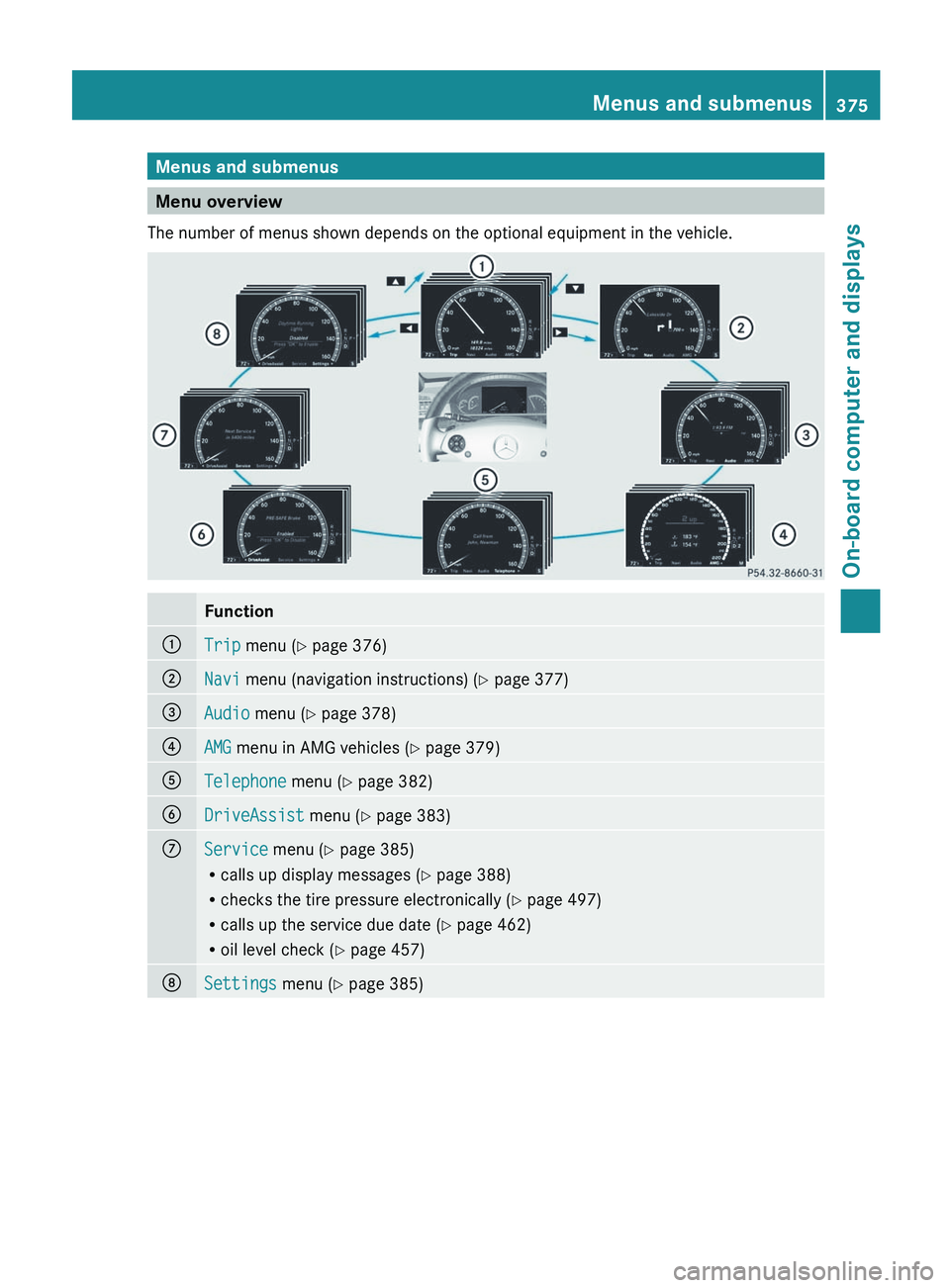
Menus and submenus
Menu overview
The number of menus shown depends on the optional equipment in the vehicle. Function
:
Trip menu (Y page 376)
;
Navi menu (navigation instructions) (Y page 377)
=
Audio menu (Y page 378)
?
AMG menu in AMG vehicles (
Y page 379)A
Telephone menu (Y page 382)
B
DriveAssist menu (Y page 383)
C
Service menu (Y page 385)
R
calls up display messages
(Y page 388)
R checks the tire pressure electronically ( Y page 497)
R calls up the service due date (Y page 462)
R oil level check ( Y page 457)D
Settings menu (Y page 385) Menus and submenus
375
On-board computer and displays Z
Page 382 of 536

:
Gear indicator
; Upshift indicator
= Engine oil temperature
? Coolant temperature
Upshift indicator UP ; indicates that the
engine has reached the overrevving range
when in the manual gearshift program.
Upshift indicator UP ; fades out other
messages until you have shifted up.
When the engine oil temperature is below
80 †, the oil temperature is shown in blue.
Avoid
driving at full engine output during this
time.
i S 63 AMG: additionally, the status of the
ECO start/stop function (Y page 306) will
be displayed.
RACETIMER Displaying and starting RACETIMER
G
WARNING
The RACETIMER feature is only for use on
roads and in conditions where high speed
driving
is permitted. Racing on public roads is
prohibited under all circumstances. The driver
is and must always remain responsible for
following posted speed limits.
You can use the RACETIMER to store lap
times. When RACETIMER is displayed, you cannot
adjust the volume using the
W and X
buttons on the steering wheel.
X Press = or ; on the steering wheel
to select the AMG menu.
X Press the 9 button repeatedly until the
RACETIMER is shown. :
Gear indicator
; Seconds indicator
= RACETIMER
? Lap
You can start the RACETIMER when the
engine is running or if the SmartKey is in
position 2 in the ignition lock.
X To start:
press the W button to start the
RACETIMER.
X To display the intermediate time: press
the X button to show the intermediate
time.
The intermediate time is displayed for five
seconds.
X To stop:
press the W button to stop the
RACETIMER.
The RACETIMER interrupts timing when you
stop the vehicle and turn the SmartKey to
position 1
in the ignition lock. When you turn
the SmartKey to position 2 or 3 and then
press the W button, timing is continued.
Storing the lap time and starting a new lap
It is possible to store a maximum of sixteen
laps. 380
Menus and submenus
On-board computer and displays
Page 387 of 536

X
Press a.
The current selection is displayed.
X To activate/deactivate: press a
again.
When ATTENTION ASSIST (Y page 356) is
activated, the À symbol appears in the
multifunction
display when the ignition is on.
Activating/deactivating Blind Spot
Assist You can use the
Blind Spot Assist
function to activate or deactivate Blind Spot
Assist (Y page 360) or Active Blind Spot
Assist (Y page 364).
X Press = or ; on the steering wheel
to select the DriveAssist menu.
X Press 9
or : to select Blind Spot
Assist.
X Press a.
The current selection is displayed.
X To activate/deactivate: press a
again.
Activating/deactivating Lane Keeping
Assist You can use the
Lane Keeping Assist
function
to activate/deactivate Lane Keeping
Assist (Y page 362) or Active Lane Keeping
Assist (Y page 367).
X Press the = or ; button on the
steering wheel to select the DriveAssist
menu.
X Press the 9 or : button to select
Lane Keeping Assist.
X Press a.
The current selection is displayed.
X To activate/deactivate: press a
again.
If Lane Keeping Assist or Active Lane keeping
Assist is activated, the multifunction display
shows the à symbol when the ignition is
switched on. Service menu
In the Service menu you can:
R call up display messages
(Y page 388)
R check the tire pressure electronically
(Y page 497)
R call up the service due date (Y page 462)
R check the oil level ( Y page 457) Settings menu
Introduction The Settings menu can be used for:
R
switching the daytime running lamps on/
off
R switching Adaptive Highbeam Assist on/
off
R showing or hiding the additional
speedometer
R selecting the units for speed and distance
R switching the belt adjustment on/off
R activating/deactivating the radar sensor
system
Switching the daytime running lamps
on/off This function is not available in Canada.
If
you have activated the Daytime Running
Light function and the light switch is in the
$ or c position, the daytime running
lamps are switched on automatically when
the engine is running.
In the dark, the following also light up:
R the parking lamps
R the tail lamps
R the license plate lamp
R the side marker lamps
If you turn the light switch to a different
position, the corresponding lights are
switched on. If you switch off the daytime
running lamps at night, make sure that the
light switch is set to L or c.
The factory setting is On. Menus and submenus
385
On-board computer and displays Z
Page 408 of 536

Display messages Possible causes/consequences and
M Solutions? The engine fan is defective.
X
At coolant temperatures under 248 ‡ (120 † ), drive to the next
qualified specialist workshop.
X Avoid subjecting the engine to heavy loads, e.g. driving in
mountainous terrain, and stop-and-go traffic. # The battery is not being charged.
Possible causes are:
R
a defective alternator
R a torn poly-V-belt
R a malfunction in the electronics
X Pull over and stop the vehicle safely and switch off the engine,
paying attention to road and traffic conditions.
X Open the hood.
X Check whether the poly-V-belt is torn.
If the poly-V-belt is torn:
! Do
not continue driving. The engine could otherwise overheat.
X Consult a qualified specialist workshop.
If the poly-V-belt is not damaged:
X Visit a qualified specialist workshop. 4
Check Engine Oil
at Next Refueling Vehicles with an oil dipstick: the oil level has dropped to the
minimum level.
X
Check the engine oil level at the latest when next refueling
(Y page 457).
X If necessary, add engine oil ( Y page 459).
X If engine oil needs to be added more often than usual, have the
engine checked at a qualified specialist workshop. 4
Check Engine Oil
Level
(Add 1 quart)
(USA only)Check
Engine Oil Level
(Add 1 Liter)
(Canada only) Vehicles without an oil dipstick: the engine oil level is too low.
X
Check the oil level (Y page 457).
X If necessary, add engine oil ( Y page 457).
X If engine oil needs to be added more often than usual, have the
engine checked at a qualified specialist workshop. Information on approved engine oils can be obtained from any qualified specialist workshop
or on the Internet at
http://www.mbusa.com (USA only).406
Display messages
On-board computer and displays
Page 409 of 536

!
The oil level is too low. Avoid long journeys with too little engine oil. There is a risk of
engine damage.
The display messages and the corresponding symbol that indicate that the oil level is too
low must not be ignored. Display messages Possible causes/consequences and
M Solutions4
Engine Oil Level
Low Stop Vehicle
Turn Engine Off Vehicles without an oil dipstick: the engine oil level is too low.
There is a risk of engine damage.
X
Pull over and stop the vehicle safely and switch off the engine,
paying attention to road and traffic conditions.
X Apply the parking brake.
X Add engine oil ( Y page 459) and check the oil level
(Y page 457). 4
Engine Oil Level
Too High Vehicles without an oil dipstick: you have added too much engine
oil. There is a risk of damage to the engine or to the catalytic
converter.
X
Have the excess oil siphoned off at a qualified specialist
workshop. Observe the legal requirements. 4
Engine Oil Level
Cannot Be Measured Vehicles without an oil dipstick: the measuring system is
defective.
X
Visit a qualified specialist workshop. 8
Reserve Fuel The fuel level has dropped into the reserve range.
X
Refuel at the nearest gas station. C There is only a very small amount of fuel in the fuel tank.
X
Refuel at the nearest gas station without fail. 8
Gas Cap Loose The fuel system pressure is too low. The fuel filler cap is not closed
correctly or the fuel system is leaking.
X
Check that the fuel filler cap is correctly closed.
If the fuel filler cap is not correctly closed:
X Close the fuel filler cap.
If the fuel filler cap is correctly closed:
X Visit a qualified specialist workshop. 8
Ultra Low-sulfur
Diesel Fuel Only Vehicles with a diesel engine: the fuel level has fallen below the
reserve range.
X
Refuel at the nearest gas station.
X Only use commercially available vehicular ULTRA-LOW SULFUR
HIGHWAY DIESEL FUEL (ULSD, 15 ppm SULFUR MAXIMUM). Display messages
407On-board computer and displays Z
Page 412 of 536

Display messages Possible causes/consequences and
M SolutionsG
Risk of accident
AIRMATIC is defective. A warning tone also sounds.
X Do not drive faster than 50 mph (80 km/h).
X Make only slight steering movements. Otherwise, the front
fender
or the tires could be damaged if the steering movement
is too large.
X Listen for scraping sounds.
X Pull over and stop the vehicle safely, paying attention to road
and traffic conditions, and select a higher vehicle level.
Depending on the malfunction, it may be possible to raise the
vehicle.
X Visit a qualified specialist workshop. ¨
Malfunction G
Risk of accident
The AIRMATIC function is restricted. The vehicle's handling
characteristics may be affected.
X Do not drive faster than 50 mph (80 km/h).
X Visit a qualified specialist workshop. ABC
Malfunction Stop
Vehicle The ABC (Active Body Control) vehicle level is too low.
X
Pull over and stop the vehicle safely as soon as possible, paying
attention to road and traffic conditions.
After
a few seconds, the vehicle level is adjusted and the display
message disappears. The vehicle is leaking oil.
The display message is shown continuously.
X
Pull over and stop the vehicle safely as soon as possible, paying
attention
to road and traffic conditions. Do not continue driving
under any circumstances.
X Notify a qualified specialist workshop or breakdown service. The display message is shown continuously.
ABC is malfunctioning.
X
Do not drive faster than 50 mph (80 km/h).
X Make only slight steering movements. Otherwise, the front
fender
or the tires could be damaged if the steering movement
is too large.
X Listen for scraping sounds.
X Visit a qualified specialist workshop.410
Display messages
On-board computer and displays