2013 MERCEDES-BENZ S-CLASS SEDAN climate control
[x] Cancel search: climate controlPage 267 of 536
turning
cVd the COMAND controller and
press W to confirm.
The main area is active.
X Select the Automatic Locking function
by sliding XVY or turning cVd the
COMAND controller and press W to
confirm.
Activating/deactivating the trunk lid
opening height restriction X
To activate/deactivate the trunk lid
opening height restriction: select
Vehicle
in the main function bar by sliding
XVY and turning cVd the COMAND
controller and press W to confirm.
The main area is active.
X Select the Trunk Opening-height
Restriction function by sliding XVY or
turning cVd the COMAND controller and
press W to confirm. Automatic climate control
Introduction to automatic climate
control You can operate automatic climate control
using COMAND or the buttons on the upper
section of the center console
(Y page 291).
Several special automatic climate control
functions can only be adjusted using
COMAND.
You can access the automatic climate control
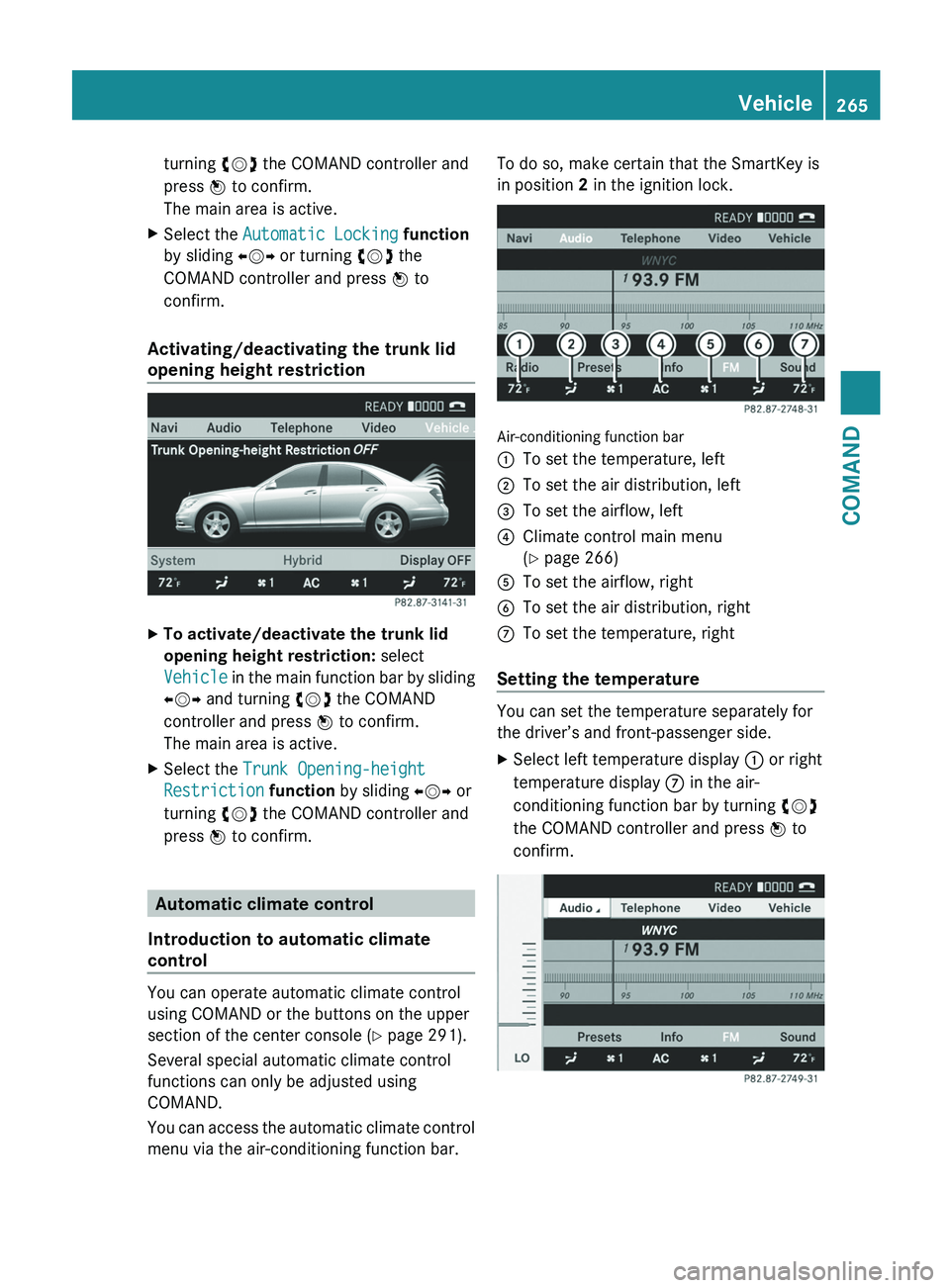
menu via the air-conditioning function bar. To do so, make certain that the SmartKey is
in position 2 in the ignition lock.
Air-conditioning function bar
:
To set the temperature, left
; To set the air distribution, left
= To set the airflow, left
? Climate control main menu
(Y page 266)
A To set the airflow, right
B To set the air distribution, right
C To set the temperature, right
Setting the temperature You can set the temperature separately for
the driver’s and front-passenger side.
X
Select left temperature display : or right
temperature display C in the air-
conditioning function bar by turning cVd
the COMAND controller and press W to
confirm. Vehicle
265
COMAND Z
Page 268 of 536

X
To adjust the temperature: slide ZVÆ or
turn cVd the COMAND controller.
X To confirm the selection: press W the
COMAND controller.
Setting the air distribution You can set the air distribution separately for
the driver’s and front-passenger side.
X
Select left air distribution ; or right air
distribution B by turning cVd the
COMAND controller and press W to
confirm. ¯
Directs air through the defroster vents
P Directs air through the center and side
air vents
O Directs air through the footwell vents
S Directs air through the center, side and
footwell vents
a Directs air through the defroster and
footwell vents
_ Directs air through the defroster,
center, side and footwell vents
b Directs air through the defroster,
center and side air vents
W Controls air distribution automatically
X To adjust the air distribution: turn cVd
the COMAND controller.
X To confirm the selection: press W the
COMAND controller. Setting the airflow You can set the airflow separately for the
driver’s and front-passenger side.
X
Select left airflow = or right airflow A by
turning cVd the COMAND controller and
press W to confirm. X
To adjust the airflow: slide ZVÆ or turn
cVd the COMAND controller.
X To confirm the selection: press W the
COMAND controller.
Climate control main menu COMAND allows you to set additional
functions
which cannot be selected using the
control panel in the center console. Call up
these functions using the climate control
main menu.
X To open the climate control main
menu: select the AC climate control
symbol in the air-conditioning function bar
by turning cVd the COMAND controller
and press W to confirm.
The climate control menu opens. 266
Vehicle
COMAND
Page 269 of 536

Climate control main menu
You can:
R
switch cooling with dehumidification on or
off (Æ)
R control climate control centrally ( Mono)
R adjust the Footwell Temperature
R set the Airflow for the air vents
R operate the Rear air conditioning from the
front
Switching cooling with air
dehumidification on/off
Cooling is operational when the engine is
running, and cools according to the selected
interior temperature for the vehicle. Cooling
also dehumidifies the air inside the vehicle
and, thereby, prevents the windows from
fogging up. G
WARNING
If you switch off cooling with
dehumidification, the vehicle will not be
cooled and the air not dehumidified in warm
weather
conditions. The windows can mist up
faster. This could result in your no longer
being able to observe the traffic conditions
properly and you may cause an accident.
i Condensation may collect on the
underside of the vehicle when the cooler is
operating.
X Select the climate control main menu in the
air-conditioning function bar by turning cVd the COMAND controller and press
W to confirm.
The climate control menu opens.
X To switch on: select Æ and press W.
X To switch off: select Æ and press W.
A tick appears. Controlling climate control centrally
You can use the
Mono function to set all the
air-conditioning zones in the vehicle to the
same settings. If the Mono function is
switched on and you adjust climate control
on the driver’s side, these changes will also
be made in all the air-conditioning zones.
X Select the climate control main menu in the
air-conditioning function bar by turning
cVd the COMAND controller and press
W to confirm.
The climate control menu opens.
X Select Mono and press W.
A tick appears when the function is
selected. The Mono function is automatically switched
off if you: Vehicle
267
COMAND Z
Page 270 of 536

R
change settings for automatic climate
control on the front-passenger side using
COMAND
R press
one of the rocker switches to operate
automatic climate control on the front-
passenger side
R press one of the rocker switches on the
rear-compartment control panel
Adjusting the footwell temperature
You can use the Footwell Temperature
function to set the temperature difference
between the footwell and the rest of the
vehicle interior.
i This setting is quite effective in automatic
mode, especially at low outside
temperatures.
The greater the value you set, the higher the
temperature in the footwell.
X Select the climate control main menu in the
air-conditioning function bar by turning
cVd the COMAND controller and press
W to confirm.
The climate control menu opens.
X Select Footwell Temperature and press
W.
A scale appears. X
To change the temperature difference:
slide ZVÆ or turn cVd.
X To confirm your selection: press W.Setting the blower settings for the air
vents
This
function allows you to determine the way
the air is blown through the air vents in
automatic mode.
You can select:
R Focused (high blower setting)
R Medium (standard setting)
R Diffuse (low blower setting)
i This setting is quite effective in automatic
mode, especially at high outside
temperatures.
If the vehicle has become very warm and the
automatic air conditioning is cooling the
interior, the blower settings are briefly
canceled.
X Select the climate control main menu in the
air-conditioning function bar by turning
cVd the COMAND controller and press
W to confirm.
The climate control menu opens.
X Select Airflow and press W.
A menu appears.
The
current setting is indicated by a # dot. X
To change the airflow: slide ZVÆ or turn
cVd.
X To confirm your selection: press W.
Operating the rear-compartment air-
conditioning system from the front
The rear-compartment air-conditioning
system is operated in the same way as 268
Vehicle
COMAND
Page 271 of 536

climate control for the driver and front
passenger.
Switching on operation of the rear-
compartment air conditioning from the
front
X
Select the climate control main menu in the
air-conditioning function bar by turning
cVd the COMAND controller and press
W to confirm.
The climate control menu opens.
X Select Rear Y and press W.
Rear appears in the main menu on the air-
conditioning function bar. The rear-
compartment air-conditioning system can
be controlled from the front.
Main menu for the rear-compartment air-
conditioning system
In the main menu for the rear-compartment
air-conditioning system, you can:
R switch back to front-compartment climate
control operation
R switch off the rear-compartment air
conditioning
R switch automatic mode for the rear-
compartment air conditioning on/off
X To open the main menu: select the
climate control main menu in the air
conditioning function bar and press W.The current setting is indicated by a # dot. To switch back to operation of the rear-
compartment air-conditioning system from
the front:
X
In the climate control main menu, select
Front Climate Control and press W.
The
air-conditioning function bar shows the
climate control settings for the driver and
front passenger.
To switch off the rear-compartment air
conditioning:
X In the climate control main menu, select
Rear Climate Control OFF and press
W.
To switch on automatic mode for the rear-
compartment air conditioning:
X In the climate control main menu, select
Rear Automatic and press W.
Automatic
mode for the rear-compartment
air-conditioning system is switched on. Seats
Lumbar supports The lumbar support in the backrest of the
driver's and front-passenger seats can be
adjusted
to provide optimum support for your
back.
X To select the seat: press the T
function button.
The main area of the COMAND display is
active. A scale appears. Vehicle
269
COMAND Z
Page 291 of 536

Useful information ............................
290
Overview of climate control sys-
tems ................................................... 290
Operating the climate control sys-
tem ..................................................... 292
Setting the air vents ......................... 298 289Climate control
Page 292 of 536

Useful information
i This Operator's Manual describes all
models and all standard and optional
equipment of your vehicle available at the
time of publication of the Operator's
Manual. Country-specific differences are
possible.
Please note that your vehicle may
not be equipped with all features
described. This also applies to safety-
related systems and functions.
i Please read the information on qualified
specialist workshops (Y page 31). Overview of climate control systems
Important safety notes
G
WARNING
Severe conditions (e.g. strong air pollution)
may require replacement of the filter before
its
scheduled replacement interval. A clogged
filter will reduce the air volume to the interior
and the windows could fog up, impairing
visibility and endangering you and others.
Have a blocked filter replaced at a Mercedes-
Benz Center as soon as possible. G
WARNING
Follow the recommended settings for heating
and cooling given on the following pages.
Otherwise, the windows could fog up,
impairing visibility and endangering you and
others.
The automatic climate control controls the
temperature and the humidity in the vehicle
interior and filters undesirable substances
from the air.
The automatic climate control is only
operational when the engine is running 16
.
Optimum operation is only achieved if you
drive with the side windows and sliding
sunroof/panorama roof with power tilt/
sliding panel closed. You can also set some automatic climate
control
functions via COMAND (Y page 265).
i Ventilate the vehicle for a brief period
during warm weather, e.g. using the
convenience opening feature ( Y page 93).
This will speed up the cooling process and
the desired vehicle interior temperature
will be reached more quickly.
i The integrated filter can filter out most
particles of dust and completely filters out
pollen. A clogged filter reduces the amount
of air supplied to the vehicle interior. For
this reason, you should always observe the
interval for replacing the filter, which is
specified in the Service Booklet. As it
depends on environmental conditions, e.g.
heavy air pollution, the interval may be
shorter than stated in the Service Booklet.
i It is possible that the blower may be
activated automatically 40 minutes after
the SmartKey is removed. The vehicle is
then ventilated for 30 minutes to dry the
air-conditioning system.
16 The residual heat function can only be activated/deactivated if the ignition is switched off.290
Overview of climate control systems
Climate control
Page 293 of 536

Automatic climate control panel
Front control panel
: Sets climate control to automatic mode, left (Y page 293)
; Sets the temperature, left ( Y page 294)
= Sets the airflow, left ( Y page 295)
? Defrosts the windshield ( Y page 296)
A Activates/deactivates air-recirculation mode (Y page 297)
B Switches climate control on /off( Y page 292)
C Switches the residual heat function on/off( Y page 298)
D Switches the rear window defroster on/off ( Y page 297)
E Sets the airflow, right ( Y page 295)
F Sets the temperature, right ( Y page 294)
G Sets climate control to automatic mode, right (Y page 293)
Rear control panel
H Sets the temperature, left ( Y page 294)
I Sets the air distribution, left (Y page 295)
J Sets the airflow ( Y page 295)
K OFF Switches rear-compartment climate control off (Y page 292)
AUTO Sets rear-compartment climate control to automatic mode
(Y page 293)
MAN Sets rear-compartment climate control to manual mode
(Y page 293)
L Sets the air distribution, right (Y page 295)
M Sets the temperature, right ( Y page 294) Overview of climate control systems
291
Climate control Z