2013 MERCEDES-BENZ R-CLASS FAMILY TOURER alarm
[x] Cancel search: alarmPage 81 of 364
instance, and lock it using the
&button on
the SmartKey.
When locking or unlockin gwith KEYLESS-GO,
the distance between the SmartKey and the
corresponding door handle must not be
greater than 3 ft (1 m). X
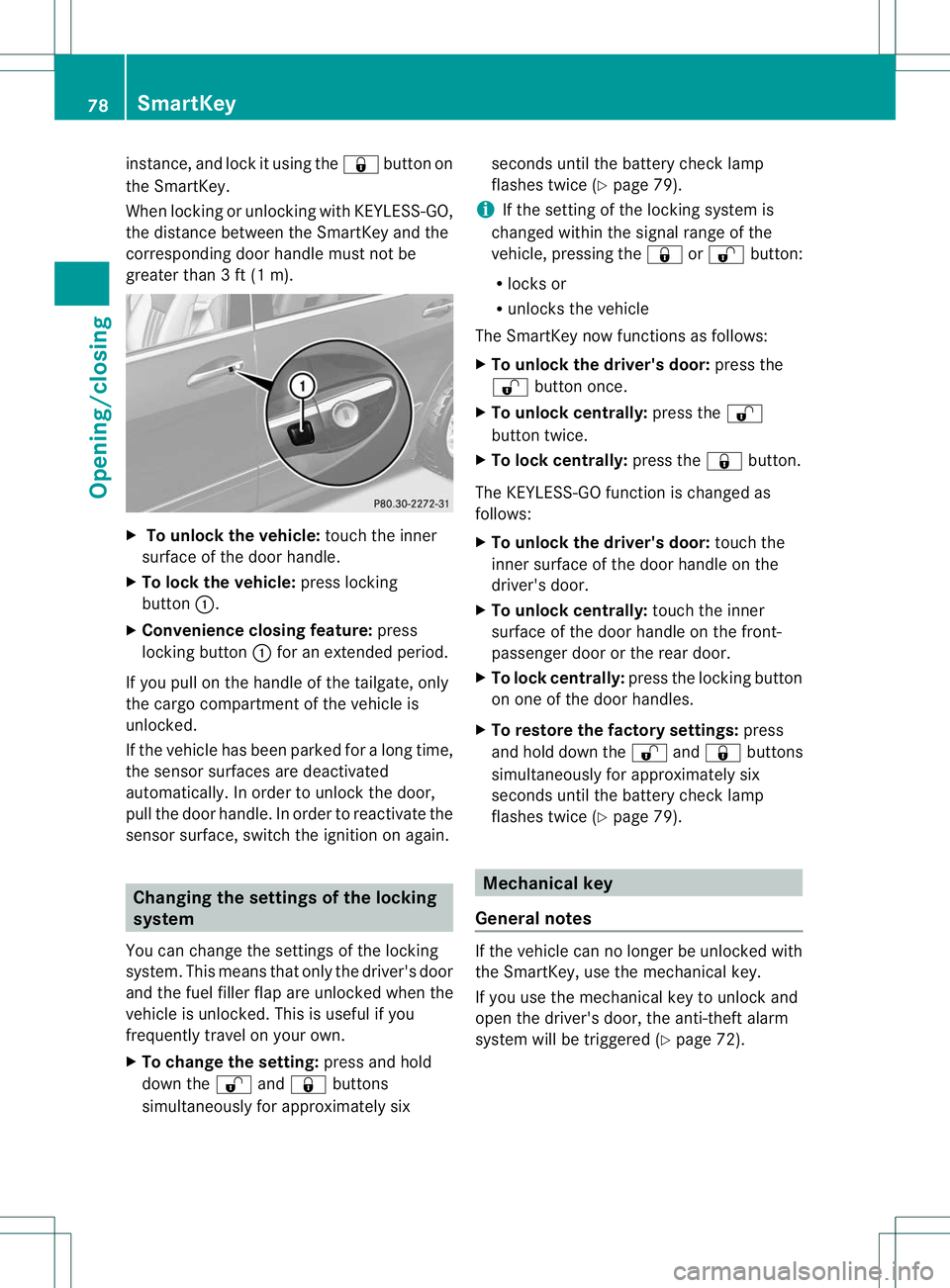
To unlock the vehicle: touch the inner
surface of the door handle.
X To lock the vehicle: press locking
button :.
X Convenience closing feature: press
locking button :for an extended period.
If you pull on the handle of the tailgate, only
the cargo compartment of the vehicle is
unlocked.
If the vehicle has been parked for a long time,
the sensor surfaces are deactivated
automatically. In order to unloc kthe door,
pull the door handle. In order to reactivate the
sensor surface, switch the ignition on again. Changing the settings of the locking
system
You can change the settings of the locking
system. This means that only the driver's door
and the fuel filler flap are unlocked when the
vehicle is unlocked. This is useful if you
frequently travel on your own.
X To change the setting: press and hold
down the %and& buttons
simultaneously for approximately six seconds until the battery check lamp
flashes twice (Y
page 79).
i If the setting of the locking system is
changed within the signal range of the
vehicle, pressing the &or% button:
R locks or
R unlocks the vehicle
The SmartKey now functions as follows:
X To unlock the driver's door: press the
% button once.
X To unlock centrally: press the%
button twice.
X To lock centrally: press the&button.
The KEYLESS-GO function is changed as
follows:
X To unlock the driver's door: touch the
inner surface of the door handle on the
driver's door.
X To unlock centrally: touch the inner
surface of the door handle on the front-
passenger door or the rear door.
X To lock centrally: press the locking button
on one of the door handles.
X To restore the factory settings: press
and hold down the %and& buttons
simultaneously for approximately six
seconds until the battery check lamp
flashes twice (Y page 79). Mechanical key
General notes If the vehicle can no longer be unlocked with
the SmartKey, use the mechanical key.
If you use the mechanical key to unlock and
open the driver's door, the anti-theft alarm
system will be triggered (Y
page 72).78
SmartKeyOpening/closing
Page 82 of 364

There are several ways to turn off the alarm:
X
To turn the alarm off with the
SmartKey: press the%or& button
on the SmartKey.
or
X Insert the SmartKey into the ignition lock.
or
X To deactivate the alarm with KEYLESS-
GO: press the Start/Stop button in the
ignition lock. The SmartKey must be in the
vehicle.
or
X Lock or unlock the vehicle using KEYLESS-
GO. The SmartKey must be outside the
vehicle.
If you unlock the vehicle using the mechanical
key, the fuel filler flap will not be unlocked
automatically.
X To unlock the fuel filler flap: insert the
SmartKey into the ignition lock.
Removing the mechanical key X
Push release catch :in the direction of
the arrow and at the same time remove
mechanical key ;from the SmartKey. SmartKey battery
Important safety notes G
WARNING
Batteries contain toxic and caustic
substances .For this reason, keep batteries
out of the reach of children.
If a battery has been swallowed, seek medical
help immediately. G
WARNING
The SmartKey batteries contain perchlorate
material, which may require special handling
and regard for the environment. Observe
government disposal guidelines. California
residents, see www.dtsc.ca.gov/
HazardousWaste/Perchlorate/
index.cfm.
Mercedes-Benz recommends that you have
the batteries replaced at a qualified specialist
workshop.
Checking the battery X
Press the &or% button.
The battery is working properly if battery
check lamp :lights up briefly.
The battery is discharged if battery check
lamp :does not light up briefly.
X Changing the battery (Y page 80) SmartKey
79Opening/closing Z
Page 86 of 364

Unsecured or improperly positioned cargo
increases a child's risk of injury in the event
of
R
strong braking maneuvers
R sudden changes of direction
R an accident Unlocking and opening doors from
the inside
You can open a door from inside the vehicle
even if it has been locked. You can only open
the rear doors from inside the vehicle if they
are not secured by the child-proof locks
(Y page 67).
If the vehicle was previously locked with the
SmartKey or with KEYLESS-GO, opening the
vehicle from the inside will activate the anti-
theft alarm system. Switch off the alarm
(Y page 72). X
Front door: pull door handle ;.
If the door is locked, locking knob :pops
up. The door is unlocked and can be
opened.
X Rear door: pull up locking knob :on the
relevant rear door.
The rear door is unlocked and can be
opened. Centrally locking and unlocking the
vehicle from the inside
You can centrally lock or unlock the vehicle
from the inside. The buttons are located on
both front doors. X
To unlock: press button :.
X To lock: press button ;.
If the front-passenger door is closed, the
vehicle locks.
You cannot unlock the vehicle centrally from
the inside if the vehicle has been locked with
the SmartKey or KEYLESS-GO.
The central locking/unlocking button does
not lock or unlock the fuel filler flap.
You can open a front door from inside the
vehicle even if it has been locked.
If the vehicle has been locked using the
locking button for the central locking, or has
been locked automatically, and a door is
opened from the inside:
R the vehicle will be fully unlocked if it had
previously been fully unlocked
R only the door which has been opened form
the inside is unlocked if only the driver's
door had been previously unlocked Automatic locking feature
The vehicle is locked automatically when the
ignition is switched on and the wheels are
turning. Doors
83Opening/closing Z
Page 87 of 364

You could therefore be locked out if:
R
the vehicle is being pushed.
R the vehicle is being towed.
R the vehicle is being tested on a
dynamometer.
You can switch the automatic locking
function on and off using the on-board
computer (Y page 209). Unlocking the driver's door
(mechanical key)
If the vehicle can no longer be unlocked with
the SmartKey, use the mechanical key.
If you use the mechanical key to unlocka nd
open the driver's door, the anti-thef talarm
system will be triggered ( Ypage 72).
X Take the mechanical key out of the
SmartKey (Y page 78).
X Insert the mechanical key into the lock of
the driver's door as far as it will go. X
Turn the mechanical key counter-clockwise
as far as it will go to position 1and hold
it in this position.
X Pull the door handle beyond the first
resistance.
The locking knob pops up.
The door is unlocked.
X Turn the mechanical key back and remove
it.
X Pull the door handle again.
X Insert the mechanical key into the
SmartKey. Locking the vehicle
If the vehicle can no longer be locked with the
SmartKey, you can lock it by taking the
following steps.
X Close the front-passenger door, the rear
door on the front-passenger side and the
tailgate.
X Open the driver’s door and the rear door on
the driver’s side.
X Press the locking button on the driver’s
door (Y page 83).
The locking knobs in the front-passenger
door and in the rear doors drop down.
X Press down the locking knobs in the front-
passenger and rear doors manually, if
necessary (Y page 83).
X Close the driver's door fro mthe outside.
X Press down the locking knob of the driver's
door by reaching in through the open rear
door.
i Make sure that you have the SmartKey on
your person and that it has not been left in
the vehicle.
X Close the rear door on the driver’s side.
X Make sure that the doors and the tailgate
are locked.
i If you lock the vehicle as described above,
the fuel filler flap is not locked. The anti-
theft alarm system is not armed. 84
DoorsOpening/closing
Page 280 of 364

Stolen vehicle recovery service
If your vehicle has been stolen:
X
Notify the police.
The police will issue a numbered incident
report.
X This number will be forwarded to the
Mercedes-Benz Customer Assistance
Center together with your PIN.
The Mercedes-Benz Customer Assistance
Center then attempts to locate the mbrace
system. The Mercedes-Benz Customer
Assistance Center contacts you and the
local law enforcement agency if the vehicle
is located. However, only the law
enforcement agency is informed of the
location of the vehicle.
i If the anti-theft alarm system is activated
for longer than 30 seconds, the Mercedes-
Benz Customer Assistance center is
automatically informed. Garage door opener
Important safety notes G
WARNING
Before programming the integrated remote
control to a garage door opener or gate
operator, make sure people and objects are
out of the way of the device to prevent
potential harm or damage. When
programming a garage door opener, the door
moves up or down. When programming a gate
operator, the gate opens or closes.
Do not use the integrated remote control with
any garage door opener that lacks safety stop
and reverse features as required by U.S.
federal safety standards (this includes any
garage door opener model manufactured
before April 1, 1982). A garage door that
cannot detect an object - signaling the door
to stop and reverse - does not meet current
U.S. federal safety standards.
When programming a garage door opener,
park vehicle outside the garage. Do not run the engine while programming the
integrated remote control. Inhalation of
exhaust gas is hazardous to your health. All
exhaust gas contains carbon monoxide (CO),
and inhaling it can cause unconsciousness
and possible death. All exhaust gas contains
carbon monoxide (CO), and inhaling it can
cause unconsciousness and possible death.
The HomeLink ®
garage door opener
integrated in the rear-view mirror allows you
to operate up to three different door and gate
systems.
i Certain garage door drives are
incompatible with the integrated garage
door opener. If you have difficulty
programming the integrated garage door
opener, contact an authorized Mercedes-
Benz Center.
Alternatively, you can call the following
telephone assistance services:
R USA: Mercedes-Benz Customer
Assistance Center at
1-800-FOR-MERCedes
R Canada: Customer Service at
1-800-387-0100
R HomeLink ®
hotline 1-800-355-3515
(free of charge)
More information on HomeLink ®
and/or
compatible products is also available
online at http://www.homelink.com.
i USA only:
This device complies with part 15 of the
FCC Rules. Operation is subject to the
following two conditions:
1. This device may not cause harmful
interference, and
2. this device must accept any interference
received, including interference that may
cause undesired operation.
Any unauthorized modification to this
device could void the user's authority to
operate the equipment.
FCC ID: CB2HMIHL4 Features
277Stowage and features Z