2013 MERCEDES-BENZ M-Class ESP
[x] Cancel search: ESPPage 115 of 458

also automatically moved to the previously
set position.
The last positio nofthe steering wheel is
stored when you switch off the ignition or
when you store the settingw ith the memory
function (Y page 116).
Crash-responsive EASY-EXIT feature If the crash-responsive EASY-EXIT feature is
triggered in an accident, the steering column
will move upwards when the driver's door is
opened. This occurs irrespective of the
position of the SmartKey in the ignition lock.
This makes it easier to exit the vehicle and
rescue the occupants.
The crash-responsive EASY-EXIT feature is
only operational if the EASY-EXIT/ENTRY
feature is activated in the on-board computer
(Y page 277). Mirrors
Rear-view mirror
X
Anti-glare mode: flick anti-glare lever 0002
forwards or back. Exterior mirrors
Adjusting the exterior mirrors G
WARNING
The exterior mirror on the front-passenger
side reduces the size of the image. Visible
objects are actually closer than they appear. This means that you could misjudge the
distance fro
mroad users traveling behind,
e.g. when changing lane. There is a risk of an
accident.
For this reason, always make sure of the
actual distance from the road users traveling
behind by glancing over your shoulder. X
Make sure that the SmartKey is in position
1or 2in the ignition lock.
X Press button 0002for the left-hand exterior
mirror or button 0003for the right-hand
exterior mirror.
The indicator lamp in the corresponding
button lights up in red.
The indicator lamp goes out again after
some time. You can adjust the selected
mirror using adjustment button 001Fas long
as the indicator lamp is lit.
X Press adjustmen tbutton 001Fup, down, or
to the left or right until you have adjusted
the exterior mirror to the correct position.
You should have a good overview of traffic
conditions.
The convex exterio rmirrors provide a larger
field of vision.
The exterior mirrors are heated automatically
if the rear window defroster is switched on
and the outside temperature is low. Mirrors
113Seats, steering wheel and mirrors Z
Page 123 of 458

automatically if there is fog, snow or other
causes of poor visibility due to the weather
conditions such as spray. There is a risk of an
accident.
In such situations, tur nthe light switch to
000D.
The automatic headlamp feature is only an
aid. The driver is responsible for the vehicle's
lighting at all times. 00050011
Left-hand standing lamps
00060013 Right-hand standing lamps
00070016 Parking lamps, license plate and
instrumentc luster lighting
000C0006 Automatic headlamp mode,
controlled by the light sensor
000D000D Low-beam/high-beam headlamps
001D0010 Rear fog lamp
0006 is the favored light switch setting. The
light setting is automatically selected
according to the brightnes softhe ambient
light (exception: poor visibility due to weather
conditions such as fog, snow or spray):
R SmartKey in position 1in the ignition lock:
the parking lamps are switched on or off
automatically depending on the brightness
of the ambient light.
R With the engine running: if you have
activated the daytime running lamps
function via the on-board computer, the
daytime running lamps or the low-beam
headlamps and parking lamps are switched
on or off automatically depending on the
brightness of the ambient light. X
To switch on automatic headlamp
mode: turn the light switch to 0006.
Only for Canada:
The daytime running lamps improve the
visibility of your vehicle during the day. The
daytime running lamps function is required by
law in Canada. It cannot therefore be
deactivated.
When the engine is running and the vehicle is
stationary: if you move the selector lever from
a drive position to P, the daytime running
lamps/low-beam headlamps go out after
three minutes.
When the engine is running, the vehicle is
stationary and in high ambient light: if you
turn the light switch to 0016, you turn on the
daytime running lamps and parking lamps.
If the engine is running and you turn the light
switch to 000D, the manual settings take
precedence over the daytime running lamps.
USA only:
The daytime running lamps improve the
visibility of your vehicle during the day. To do
this, the daytime running lamps function must
be switched on using the on-board computer
(Y page 274).
If the engine is running and you turn the light
switch to 0016or000D, the manual settings
take precedence over the daytime running
lamps.
i In the USA, the daytime running lamps are
deactivated upon delivery from the factory.
Low-beam headlamps G
WARNING
When the light switch is set to 0006, the low-
beam headlamps may not be switched on
automatically if there is fog, snow or other
causes of poor visibility due to the weather
conditions such as spray. There is a risk of an
accident.
In such situations, turn the light switch to
000D. Exterior lighting
121Lights and windshield wipers Z
Page 125 of 458

00050011
Left-hand standing lamps
00060013 Right-hand standing lamps
00070016 Parking lamps, license plate and
instrument cluster lighting
000C0006 Automatic headlamp mode,
controlled by the lights ensor
000D000D Low-beam/high-beam headlamps
001D0010 Rear fog lamp
X To switch on: turn light switch to 0016.
The green 0016indicator lamp in the
instrument cluster lights up.
Standing lamps 00050011
Left-hand standing lamps
00060013 Right-hand standing lamps
00070016 Parking lamps, license plate and
instrument cluster lighting
000C0006 Automatic headlamp mode,
controlled by the light sensor
000D000D Low-beam/high-beam headlamps
001D0010 Rear fog lamp Switching on the standing lamps ensures the
corresponding side of the vehicle is
illuminated.
X
To switch on the standing lamps: the
SmartKey is not in the ignition lock or it is
in position 0.
X Turn the light switch to 0011(left-hand side
of the vehicle) or 0013(right-hand side of
the vehicle). Combination switch
Turn signal 0002
High-beam headlamps
0003 Turn signal, right
001F High-beam flasher
001E Turn signal, left
X To indicate briefly: press the combination
switch briefly to the pressure point in the
direction of arrow 0003or001E.
The corresponding turn signal flashes three
times.
X To indicate: press the combination switch
beyond the pressure point in the direction
of arrow 0003or001E. Exterior lighting
123Lights and windshield wipers Z
Page 126 of 458

High-beam headlamps
0002
High-beam headlamps
0003 Turn signal, right
001F High-beam flasher
001E Turn signal, left
X To switch on the high-beam headlamps:
turn the SmartKey in the ignition lock to
position 2or start the engine.
X Turn the light switch to 000Dor0006.
X Press the combination switch beyond the
pressure point in the direction of
arrow 0002.
In the 0006position, the high-beam
headlamps are only switched on when it is
dark and the engine is running.
The blue 000Cindicator lamp in the
instrument cluster lights up when the high-
beamh eadlamps are switched on.
X To switch off the high-beam
headlamps: move the combination switch
back to its normal position.
The blue 000Cindicator lamp in the
instrument cluster goes out.
i Vehicles with Adaptive Highbeam Assist:
when Adaptive Highbeam Assist is active,
it controls activation of the high-beam
headlamps (Y page 125). High-beam flasher 0002
High-beam headlamps
0003 Turn signal, right
001F High-beam flasher
001E Turn signal, left
X To switch on: turn the SmartKey in the
ignition lock to position 1or 2or start the
engine.
X Pull the combination switch in the direction
of arrow 001F. Hazard warning lamps
X
To switch on the hazard warning lamps:
press button 0002.
All turn signals flash. If you now switch on
a turn signal using the combination switch,
only the turn signal lamp on the
corresponding side of the vehicle will flash.
X To switch off the hazard warning
lamps: press button 0002.124
Exterior lightingLights and windshield wipers
Page 130 of 458
X
To switc hon:set the switch to center
position 001D.
X To switch off: set the switch to the 001D
position.
The interior lighting automatically switches
on if you:
R unlock the vehicle
R open a door
R remove the SmartKey from the ignition
lock.
The interior light is activated for a short while
when the SmartKey is removed from the
ignition lock. You can activate this delayed
switch-off using the on-board computer
(Y page 276).
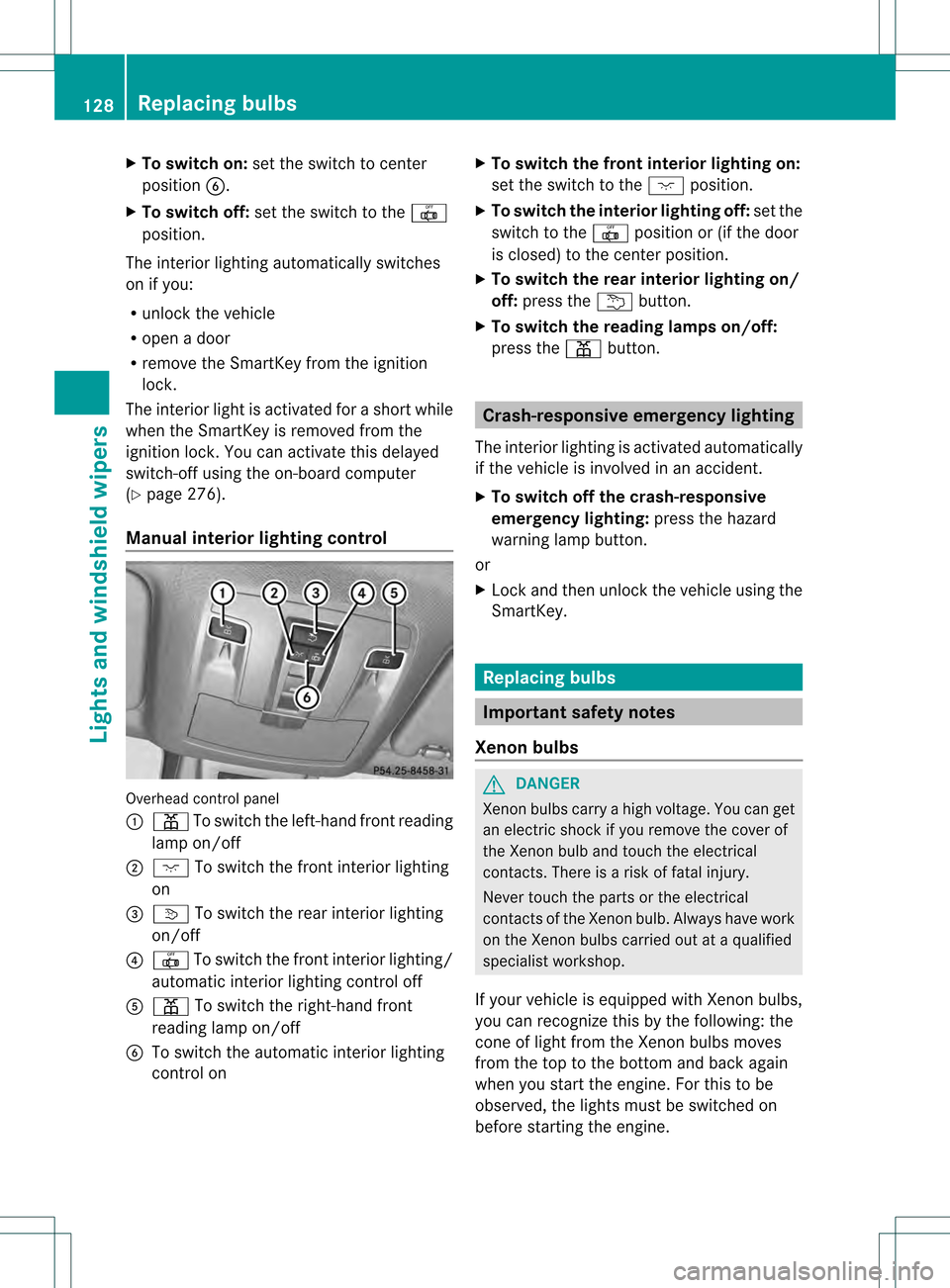
Manual interior lighting control Overhead control panel
0002
0015 To switch the left-hand fron treading
lamp on/off
0003 0006 To switch the front interior lighting
on
001F 0003 To switch the rear interior lighting
on/off
001E 001D To switch the fron tinterior lighting/
automatic interio rlighting control off
001C 0015 To switch the right-han dfront
reading lamp on/off
001D To switch the automatic interior lighting
control on X
To switch the front interio rlighting on:
set the switch to the 0006position.
X To switch the interior lighting off: set the
switch to the 001Dposition or (if the door
is closed) to the center position.
X To switch the rea rinterior lighting on/
off: press the 0002button.
X To switch the reading lamps on/off:
press the 0015button. Crash-responsive emergency lighting
The interior lighting is activated automatically
if the vehicle is involved in an accident.
X To switch off the crash-responsive
emergency lighting: press the hazard
warning lamp button.
or
X Lock and then unlock the vehicle using the
SmartKey. Replacing bulbs
Important safety notes
Xenon bulbs G
DANGER
Xenon bulbs carry a high voltage. You can get
an electric shock if you remove the cover of
the Xenon bulb and touch the electrical
contacts. There is a risk of fatal injury.
Never touch the parts or the electrical
contacts of the Xenon bulb. Always have work
on the Xenon bulbs carried out at a qualified
specialist workshop.
If your vehicle is equipped with Xenon bulbs,
you can recognize this by the following: the
cone of light from the Xenon bulbs moves
from the top to the bottom and back again
when you start the engine. For this to be
observed, the lights must be switched on
before starting the engine. 128
Replacing bulbsLights and windshield wipers
Page 135 of 458

!
Intermittent wiping with rain sensor: due
to optical influences and the windshield
becoming dirty in dry weather conditions,
the windshield wipers may be activated
inadvertently. This could then damage the
windshield wiper blades or scratch the
windshield.
For this reason, you should always switch
off the windshield wipers in dry weather. Combination switch
0005
0008 Windshield wiper off
0006 0001 Intermittent wipe, low (rain sensor
set to low sensitivity)
0007 0002 Intermittent wipe, high (rain sensor
set to high sensitivity)
000C 0018 Continuous wipe, slow
000D 0012 Continuous wipe, fast
001D 0007 Single wipe
0011 0008 To wipe with washer fluid
X Switch on the ignition.
X Turn the combination switch to the
corresponding position.
In the 0001or0002 position, the appropriate
wiping frequency is set automatically
according to the intensity of the rain. In
the 0002 position, the rain sensor is more
sensitive than in the 0001position, causing
the windshield wipers to wipe more
frequently.
If the wiper blades are worn, the windshield
will no longer be wiped properly.T his could
prevent you from observing the traffic
conditions, thereby causing an accident. Replace the wiper blades twice a year, ideally
in spring and fall. Switching the rear window wiper on/
off
Combination switch
0002
0001 Rear window wiper switch
0006 0007 To wipe with washer fluid
0007 ITo switch on intermittent wiping
000C 0To switch off intermittent wiping
000D 000E To wipe with washer fluid
X Turn the SmartKey to position 1or 2in the
ignition lock (Y page 157).
X Turn switch 0002on the combination switch
to the corresponding position.
When the rear window wiper is switched on,
the icon appears in the instrumentc luster. Replacing the wiper blades
Important safety notes G
WARNING
If the windshield wipers begin to move while
you are changing the wiper blades, you could
be trapped by the wiper arm. There is a risk
of injury.
Always switch off the windshield wipers and
ignition before changing the wiper blades.
! Neve ropen the hood/tailgate if a wiper
arm has been folded away from the
windshield/rear window. Windshield wipers
133Lights and windshield wipers Z
Page 158 of 458
Useful information
i This Operator's Manual describes all
models and all standard and optional
equipment of your vehicle available at the
time of publication of the Operator's
Manual. Country-specific differences are
possible. Please note that your vehicle may
not be equipped with all features
described. This also applies to safety-
related systems and functions.
i Read the information on qualified
specialist workshops: (Y page 27).Notes on breaking-in
anew vehicle Important safety notes
New and replaced brake pads and discs only
reach their optimum braking effect after
several hundred kilometers of driving.
Compensate for this by applying greater force
to the brake pedal. The first 1,000miles (1,500 km)
The more you look after the engine when it is
new, the more satisfied you will be with its
performance in the future.
R You should therefore drive at varying
vehicle and engine speeds for the first
1,000 miles (1,500 km).
R Avoid heavy loads, e.g .driving at full
throttle, during this period.
R Change gearing ood time, before the
tachometer needle is 0001of the way to the
red area of the tachometer.
R Do not manually shift to a lower gear to
brake the vehicle.
R If possible, do not depress the accelerator
pedal past the point of resistance
(kickdown).
R Only select shift ranges 3,2or 1when
driving slowly, e.g. in mountainous terrain. After 1,000 miles (1,500 km), you can
increase the engine speed gradually and
accelerate the vehicle to full speed.
Additional breaking-in notes for AMG
vehicles:
R
do not drive faster than 85 mph
(140 km/h) for the first 1,000 miles
(1,500 km).
R only allow the engine to reach a maximum
engine speed of 4,500 rpm briefly.
R change gear in good time.
R ideally, drive for the first 1,000 miles
(1,500km) in drive program C.
i You should also observe these notes on
running in if the engine or parts of the drive
train on your vehicle have been replaced.
i Always observe the respective speed
limits. Driving
Important safety notes
G
WARNING
Objects in the driver's footwell can restric tthe
pedal travel or obstruct adepressed pedal.
The operating and road safety of the vehicle
is jeopardized. There is a risk of an accident.
Make sure that all objects in the vehicle are
stowed correctly, and that they cannot enter
the driver's footwell. Install the floormats
securely and as specified in order to ensure
sufficien tclearance for the pedals. Do not use
loose floormats. G
WARNING
Unsuitable footwear can hinde rcorrect usage
of the pedals, e.g.:
R shoes with thick soles
R shoes with high heels
R slippers
There is a risk of an accident. 156
DrivingDriving and parking
Page 160 of 458

i
The SmartKey can be turned in the
ignition lock even if it is not the correct
SmartKey for the vehicle. The ignition is not
switched on. The engine cannot be started.
KEYLESS-GO General notes
R
Do not keep the KEYLESS-GO key:
-with electronic devices, e.g. a mobile
phone or another SmartKey
- with metallic objects, e.g. coins or metal
foil
- inside metallic objects, e.g. a metal case
This can impair the functionality of the
KEYLESS-GO key.
Do not keep the KEYLESS-GO key in the
temperature-controlled cup holder
(Y page 344). Otherwise, the KEYLESS-GO
key will not be recognized.
Vehicles with KEYLESS-GO are equipped with
aS martKey featuring an integrated KEYLESS-
GO function and a detachable Start/Stop
button.
The Start/Stop button must be inserted in the
ignition lock and the SmartKey with the
integrated KEYLESS-GO function must be in
the vehicle.
Pressing the Start/Stop button several times
in succession corresponds to the different
key positions in the ignitio nlock. This is only
the case if you are not depressing the brake
pedal.
If you depress the brake pedal and press the
Start/Stop button, the engine starts
immediately.
The Start/Stop button can be removed from
the ignition lock. Then, you can insert the
SmartKey into the ignition lock.
i You do not have to remove the Start/Stop
button from the ignition lock when you
leave the vehicle. You should, however,
always take the SmartKey with you when
leaving the vehicle. As long as the
SmartKey is in the vehicle: R
the vehicle can be started using the
Start/Stop button and
R electrically powered equipment can be
operated.
i The engine can be turned off while the
vehicle is in motion by pressing and holding
the Start/Stop button for approximately
three seconds. This function operates
independently of the ECO start/stop
automatic engine switch-off function.
Key positions with KEYLESS-GO As soon as the ignition is switched on, all the
indicator lamps in the instrument cluster light
up. If an indicator lamp does not go out after
starting the engine or lights up while driving,
see (Y
page 318).
X Insert Start/Stop button 0002into ignition
lock 0003.
i When you insert Start/Stop button 0002
into ignition lock 0003, the system needs
approximately two seconds recognition
time. You can then use Start/Stop
button 0002.
Activating power supply
X If Start/Stop button 0002has not yet been
pressed, this corresponds to the SmartKey
being removed from the ignition.
X Press Start/Stop button 0002once.
The power supply is switched on. You can
now activate the windshield wipers, for
example. 158
DrivingDriving and parking