2013 MERCEDES-BENZ GLK-CLASS SUV steering
[x] Cancel search: steeringPage 219 of 380
Outside temperature display
You should pay special attention to road
conditions when temperatures are around
freezing point.
The outside temperature display is in the
multifunction display ( Y page 218).
Changes in the outside temperature are
displayed after a short delay. Speedometer with segments
The segments in the speedometer indicate
which speed range is available.
R Cruise control activated ( Y page 169):
The segments light up from the stored
speed to the maximum speed.
R DISTRONIC PLUS activated (Y page 171):
One or two segments in the set speed
range light up.
R DISTRONIC PLUS detects a vehicle
in front:
The segments between the speed of the
vehicle in front and the stored speed light
up. Operating the on-board computer
Overview The on-board computer is activated as soon
as you turn the
SmartKey
to position 1 in the
ignition lock.
You can control the multifunction display and
the settings in the on-board computer using
the buttons on the multifunction steering
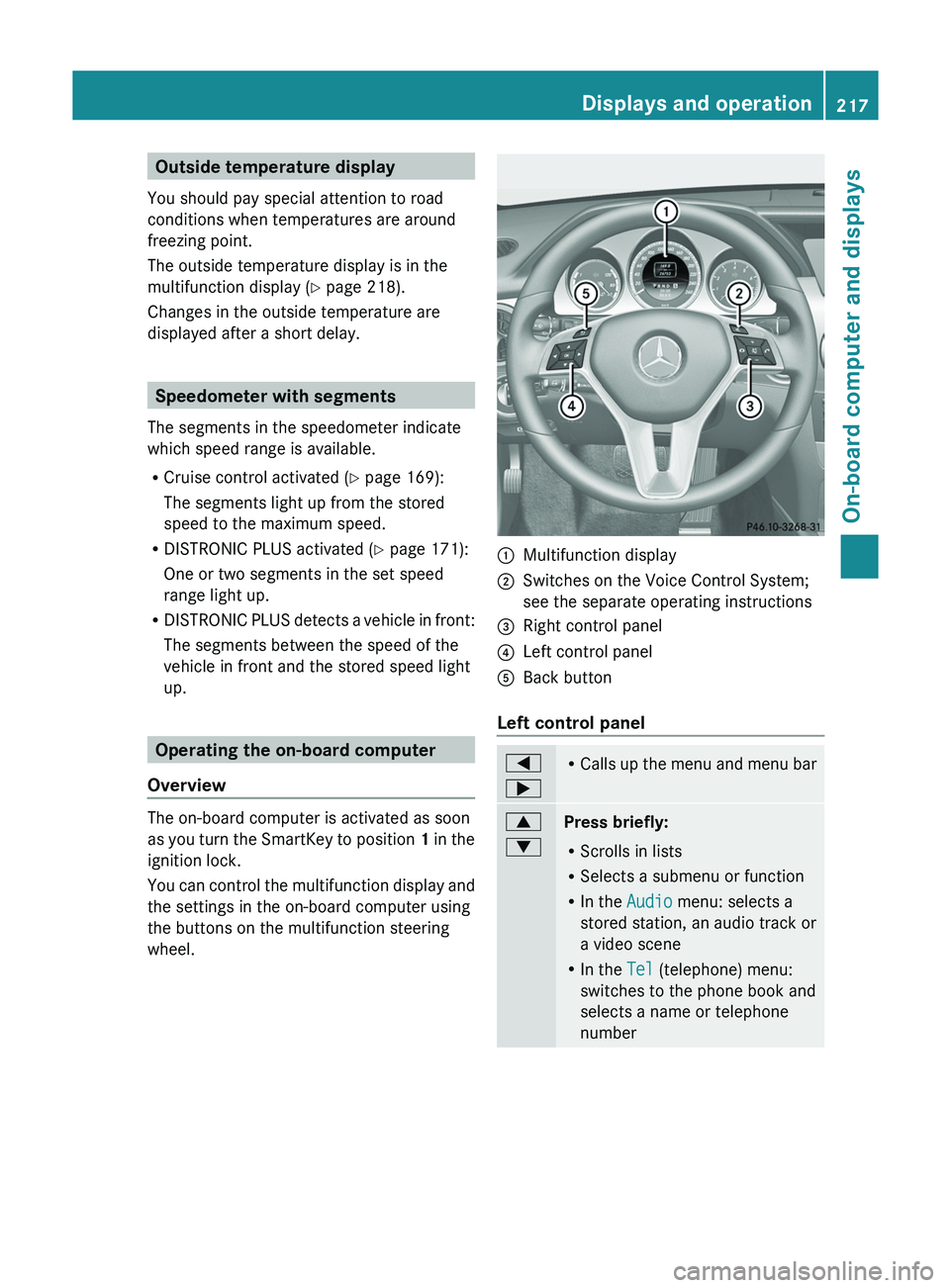
wheel. 0043
Multifunction display
0044 Switches on the Voice Control System;
see the separate operating instructions
0087 Right control panel
0085 Left control panel
0083 Back button
Left control panel 0059
0065 R
Calls up the menu and
menu bar 0063
0064
Press briefly:
R
Scrolls in lists
R Selects a submenu or function
R In the Audio menu: selects a
stored station, an audio track or
a video scene
R In the Tel (telephone) menu:
switches to the phone book and
selects a name or telephone
number Displays and operation
217
On-board computer and displays Z
Page 220 of 380
0063
0064
Press and hold:
R
In the Audio menu: selects the
previous/next station or selects
an audio track or a video scene
using rapid scrolling
R In the Tel (Telephone) menu:
starts rapid scrolling of the
phone book if it is open 0076 R
Confirms a selection/display
message
R In the Tel (Telephone) menu:
switches to the telephone book
and starts dialing the selected
number
R In the Audio menu: stops the
station search function at the
desired station Right control panel
0076 R
Rejects or ends a call
R Exits phone book/redial
memory 0061 R
Makes or accepts a call
R Switches to the redial memory 0081
0082 R
Adjusts the volume 0063 R
Mute Back button
0038
Press briefly:
R
Back
R Switches off the Voice Control
System; see the separate
operating instructions
R Hides display messages/calls
up the last Trip menu function
used
R Exits the telephone book/redial
memory 0038
Press and hold:
R
Calls up the standard display in
the Trip menu Multifunction display
Values and settings as well as display
messages are shown in the multifunction
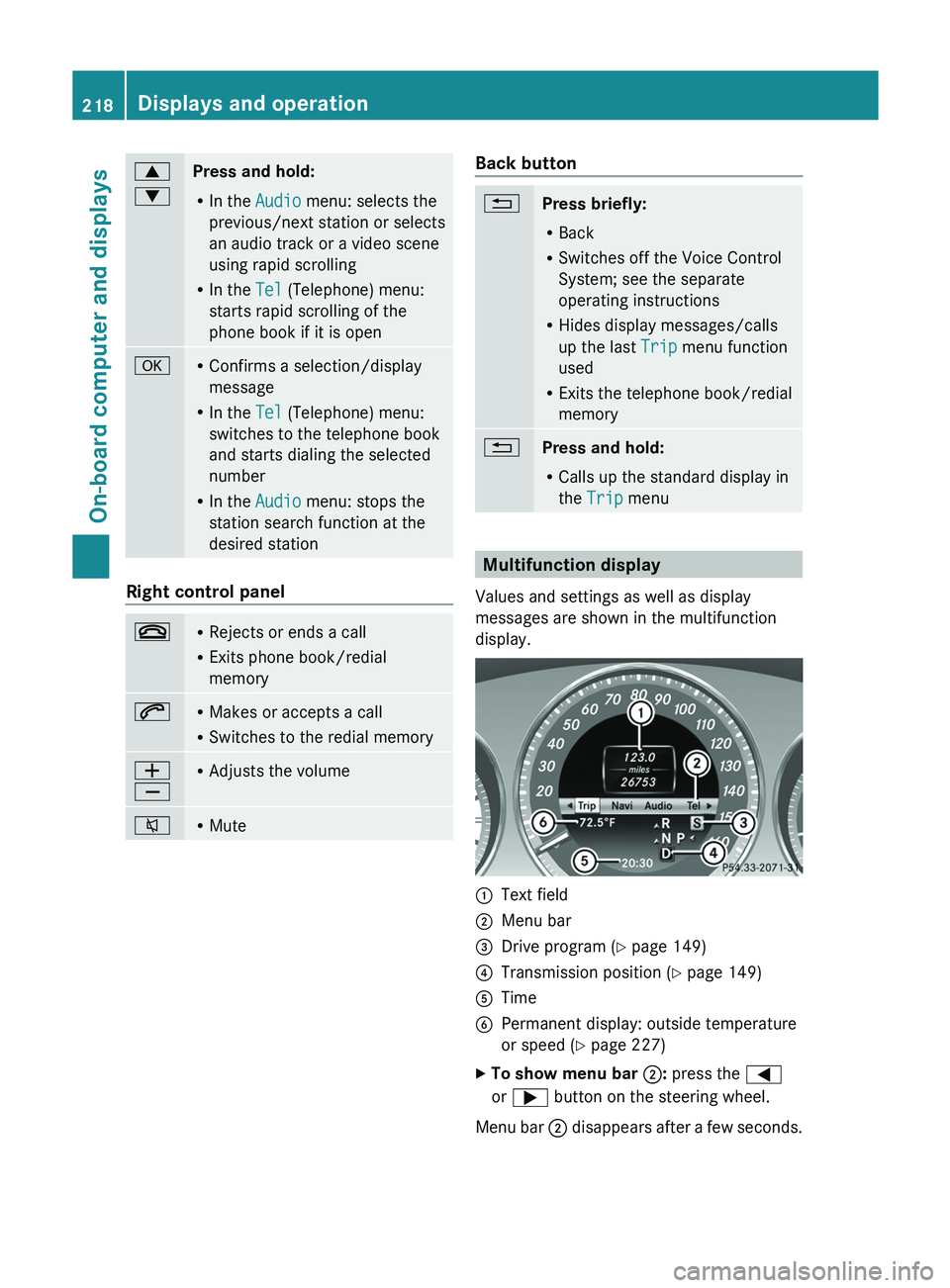
display. 0043
Text field
0044 Menu bar
0087 Drive program (Y page 149)
0085 Transmission position ( Y page 149)
0083 Time
0084 Permanent display: outside temperature
or speed ( Y page 227)
X To show menu bar 0044: press the 0059
or 0065 button on the steering wheel.
Menu bar 0044 disappears after a few
seconds.218
Displays and operation
On-board computer and displays
Page 221 of 380

Text field 0043 shows the selected menu or
submenu as well as display messages.
i
You can set the time using the audio
system or COMAND, see the separate
operating instructions.
The following messages may appear in the
multifunction display:
CRUISE Cruise control (
Y page 169)
00C5 Rear window wiper ( Y page 121)
00CE Adaptive Highbeam Assist
(Y page 114)
00AD ATTENTION ASSIST (Y page 197)
00A7 ECO start/stop function
(Y page 144)
00B0 Lane Keeping Assist (Y page 200) or
Active Lane Keeping Assist
( Y
page 205)
00D9 HOLD function ( Y page 179)
00C7 PRE-SAFE ®
Brake (Y page 69) Menus and submenus
Menu overview
Operating the on-board computer
(Y page 217).
Depending on the equipment installed in the
vehicle, you can call up the following menus:
R Trip menu (Y page 219)
R Navi menu (navigation instructions)
(Y page 221)
R Audio menu (Y page 222)
R Tel menu (telephone) ( Y page 223)
R DriveAssist menu (assistance)
(Y page 224)
R Serv menu (Y page 226)
R Sett. menu (settings) (Y page 226)
The Audio, Navi and
Tel menus differ
slightly
in vehicles with an audio system and in
vehicles with COMAND. The examples given
in this Operator's Manual apply to vehicles
equipped with COMAND. Trip menu
Standard display X
Press and hold the 0038 button on the
steering wheel until the Trip menu with
trip odometer 0043 and odometer 0044 is
shown.
Trip computer "From Start" or "From
Reset" Example: trip computer "From Start"
0043
Distance
0044 Time
0087 Average speed
0085 Average fuel consumption
X Press the 0059 or 0065 button on the
steering wheel to select the Trip menu.
X Press the 0063 or 0064 button to select
From Start or From Reset.
The values in the From Start submenu are
calculated from the start of a journey,
whereas the values in the From Reset
submenu are calculated from
the
last time the
submenu was reset ( Y page 220).
The From Start trip computer is
automatically reset if:
R the ignition has been switched off for more
than four hours.
R 999 hours have been exceeded.
R 9999 miles have been exceeded. Menus and submenus
219
On-board computer and displays Z
Page 222 of 380
The From Reset trip computer is
automatically reset if the value exceeds
9,999 hours or 99,999 miles.
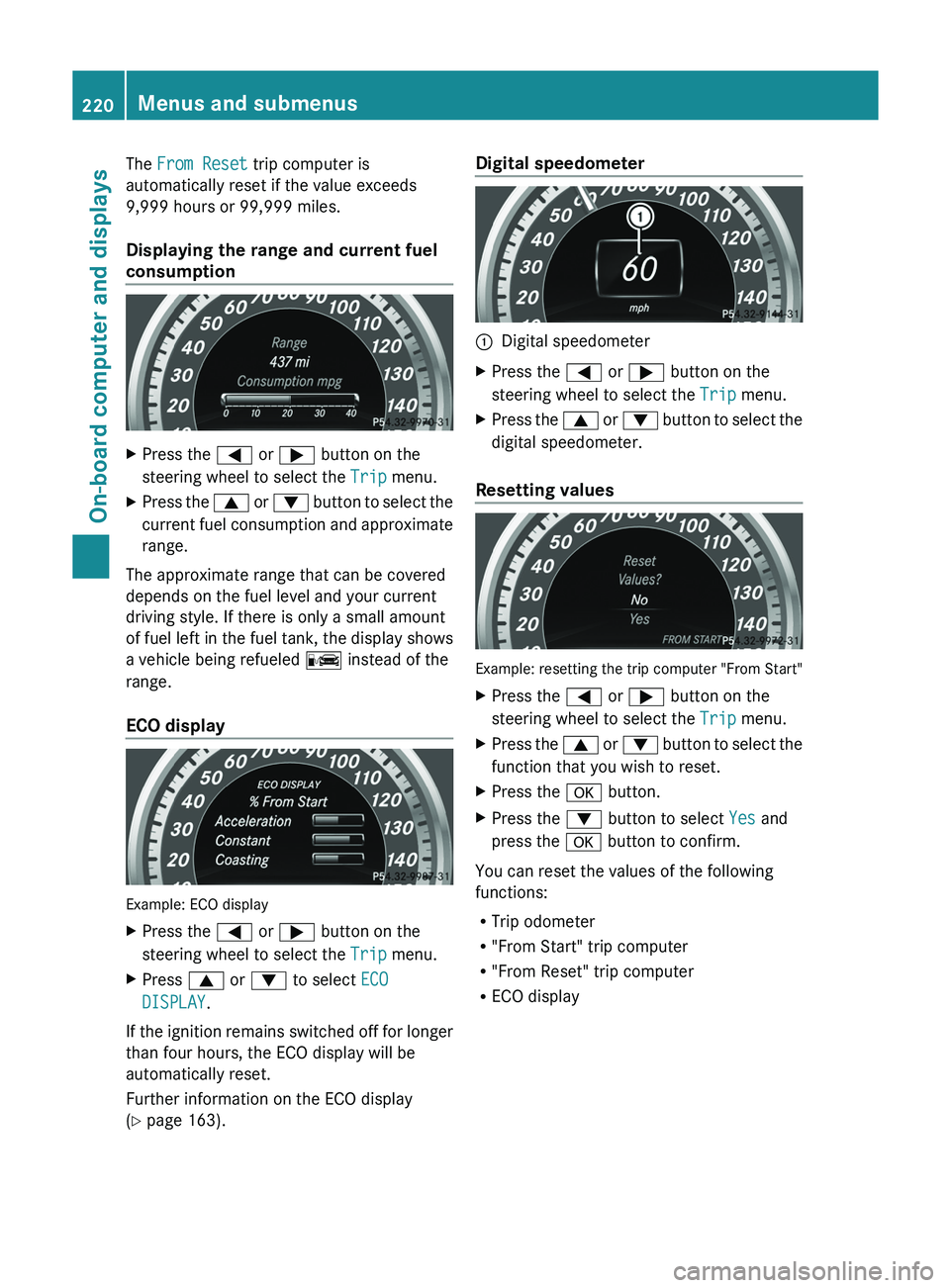
Displaying the range and current fuel
consumption
X
Press the 0059 or 0065 button on the
steering wheel to select the Trip menu.
X Press the 0063
or 0064
button to
select the
current fuel consumption and approximate
range.
The approximate range that can be covered
depends on the fuel level and your current
driving style. If there is only a small amount
of fuel left in the
fuel tank, the display shows
a vehicle being refueled 00A8 instead of the
range.
ECO display Example: ECO display
X
Press the 0059 or 0065 button on the
steering wheel to select the Trip menu.
X Press 0063 or 0064 to select ECO
DISPLAY.
If the ignition remains switched off for longer
than four hours, the ECO display will be
automatically reset.
Further information on the ECO display
(Y page 163). Digital speedometer
0043
Digital speedometer
X Press the 0059 or 0065 button on the
steering wheel to select the Trip menu.
X Press the 0063 or 0064 button to
select the
digital speedometer.
Resetting values Example: resetting the trip computer "From Start"
X
Press the 0059 or 0065 button on the
steering wheel to select the Trip menu.
X Press the 0063 or 0064 button to
select the
function that you wish to reset.
X Press the 0076 button.
X Press the 0064 button to select Yes and
press the 0076 button to confirm.
You can reset the values of the following
functions:
R Trip odometer
R "From Start" trip computer
R "From Reset" trip computer
R ECO display220
Menus and submenus
On-board computer and displays
Page 223 of 380

Navigation system menu
Displaying navigation instructions In the
Navi menu, the multifunction display
shows navigation instructions. For more
information, see the separate operating
instructions.
X Switch on the audio system with Becker ®
MAP PILOT or COMAND; see the separate
operating instructions.
X Press the 0059 or 0065 button on the
steering wheel to select the Navi menu.
Route guidance not active 0043
Direction of travel
0044 Current road
Route guidance active No change of direction announced
0043
Distance to the destination
0044 Distance to the next change of direction
0087 Current road
0085 "Follow the road's course" symbol Change of direction announced without a
lane recommendation 0043
Road into which the change of direction
leads
0044 Distance to change of direction and visual
distance display
0087 Change-of-direction symbol
When a change of direction is announced, you
will see symbol 0087 for
the change of direction
and distance graphic 0044. The distance
indicator shortens towards the top of the
display as you approach the point of the
announced change of direction.
Change of direction announced with a
lane recommendation 0043
Road into which the change of direction
leads
0044 Distance to change of direction and visual
distance display
0087 New lane during a change of direction
0085 Uninterrupted lane
0083 Lane recommendation
0084 Change-of-direction symbol
On multilane roads, the system can display
lane recommendation
0083 for the
next change
of direction. During the change of direction,
additional lanes may be displayed.
Lane recommendations are only displayed if
the relevant data is available on the digital
map. Menus and submenus
221
On-board computer and displays Z
Page 224 of 380

Other status indicators of the
navigation system
R
004B: you have reached the
destination or an
intermediate destination.
R New Route... or Calculating Route:
calculating a new route
R Off Map or Off Mapped Road : the vehicle
position is outside the area of the digital
map (off-map position).
R No Route : no route could be calculated to
the selected destination. Audio menu
Selecting a radio station i
SIRIUS XM satellite radio functions like a
normal radio.
For more information on satellite radio
operation, see the separate operating
instructions.
i For information on switching waveband
and storing stations; see the separate
operating instructions.
X Switch on the audio system or COMAND
and select Radio (see the separate
operating instructions).
X Press the 0059 or 0065 button on the
steering wheel to select the Audio menu. 0043
Waveband
0044 Station frequency with memory position X
To select a stored station: briefly press
the 0063 or 0064 button.
X To select a station from the station
list: press and briefly hold the 0063
or 0064 button.
If no station list is received:
X To select a station using the station
search: press and briefly hold the 0063
or 0064 button.
Operating an audio player or audio
media Audio data from various audio devices or
media can be played, depending on the
equipment installed in the vehicle.
X
Switch on the audio system or COMAND
and select the audio player
or medium, see
the separate operating instructions.
X Press the 0059 or 0065 button on the
steering wheel to select the Audio menu. Example: CD/DVD changer display
0043
Current title
X To select the next/previous track:
briefly press the 0063 or 0064 button.
X To select a track from the track list
(rapid scrolling): press and hold the
0063 or 0064 button until
desired track has
been reached.
If you press and hold 0063
or 0064, the rapid
scrolling speed is increased. Not all audio
drives or data carriers support this function.
If track information is stored on the audio
device or medium, the multifunction display
will
show the number and name of the track.
The current track does not appear in audio
AUX mode (Auxiliary audio mode: external
audio source connected). 222
Menus and submenus
On-board computer and displays
Page 225 of 380
Video DVD operation
X
Switch on COMAND and select video DVD;
see the separate operating instructions.
X Press the 0059 or 0065 button on the
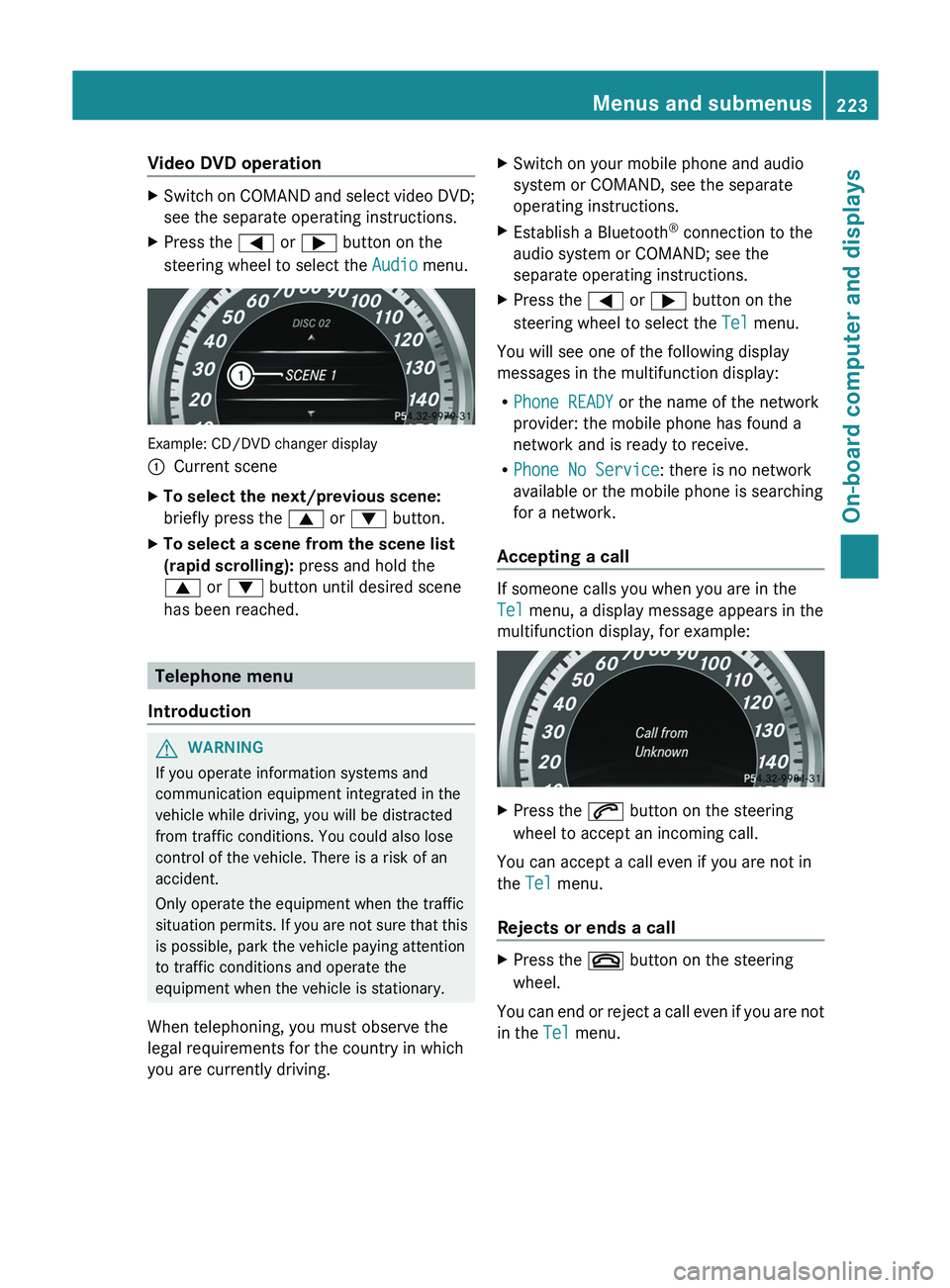
steering wheel to select the Audio menu. Example: CD/DVD changer display
0043
Current scene
X To select the next/previous scene:
briefly press the 0063 or 0064 button.
X To select a scene from the scene list
(rapid scrolling): press and hold the
0063 or 0064 button until desired scene
has been reached. Telephone menu
Introduction G
WARNING
If you operate information systems and
communication equipment integrated in the
vehicle while driving, you will be distracted
from traffic conditions. You could also lose
control of the vehicle. There is a risk of an
accident.
Only operate the equipment when the traffic
situation permits. If you are
not sure that this
is possible, park the vehicle paying attention
to traffic conditions and operate the
equipment when the vehicle is stationary.
When telephoning, you must observe the
legal requirements for the country in which
you are currently driving. X
Switch on your mobile phone and audio
system or COMAND, see the separate
operating instructions.
X Establish a Bluetooth ®
connection to the
audio system or COMAND; see the
separate operating instructions.
X Press the 0059 or 0065 button on the
steering wheel to select the Tel menu.
You will see one of the following display
messages in the multifunction display:
R Phone READY or the name of the network
provider: the mobile phone has found a
network and is ready to receive.
R Phone No Service: there is no network
available or the mobile phone is searching
for a network.
Accepting a call If someone calls you when you are in the
Tel menu, a display message appears in the
multifunction display, for example:
X
Press the 0061 button on the steering
wheel to accept an incoming call.
You can accept a call even if you are not in
the Tel menu.
Rejects or ends a call X
Press the 0076 button on the steering
wheel.
You can end or reject a call even if you are not
in the Tel menu. Menus and submenus
223
On-board computer and displays Z
Page 226 of 380

Dialing a number from the phone book
X
Press the 0059 or 0065 button on the
steering wheel to select the Tel menu.
X Press the 0063, 0064 or 0076 button to
switch to the phone book.
X Press the 0063 or 0064 button to select the
desired name.
or
X To begin rapid scrolling: press and hold
the 0063 or 0064 button for longer than
one second.
Rapid scrolling stops when you
release the
button or reach the end of the list.
X If only one telephone number is stored
for a name: press
the 0061
or 0076 button
to start dialing.
or
X If there is more than one number for a
particular name: press the 0061 or 0076
button to display the numbers.
X Press the 0063
or 0064 button to
select the
number you want to dial.
X Press the 0061 or 0076 button to start
dialing.
or
X To exit the telephone book: press the
0076 or 0038 button.
Redialing The on-board computer saves the last names
or numbers dialed in the redial memory.
X
Press the 0059 or 0065 button on the
steering wheel to select the Tel menu.
X Press the 0061 button to switch to the
redial memory.
X Press the 0063
or 0064
button to
select the
desired name or number.
X Press the 0061 or 0076 button to start
dialing.
or
X If you do not want to make a call: press
the 0076 or 0038 button. Assistance menu
Introduction In the
DriveAssist menu, you have the
following options:
R Showing the distance display
(Y page 224)
R Activating/deactivating PRE-SAFE ®
Brake
(Y page 225)
R Activating/deactivating ATTENTION
ASSIST (Y page 225)
R Activating/deactivating Blind Spot Assist
or Active Blind Spot Assist (
Y page 225)
R Activating/deactivating Lane Keeping
Assist or Active Lane Keeping Assist
(Y page 225)
showing the distance display This function is only available with
DISTRONIC PLUS.
X
Press the 0059 or 0065 button on the
steering wheel to select the DriveAssist
menu.
X Press the 0063 or 0064 button to select
Distance Display.
X Press the 0076 button.
The DISTRONIC PLUS distance display
(Y page 176) appears in the multifunction
display.
If the Sensors Deactivated message
appears, the radar sensor system is
deactivated.
X Switch on the radar sensor system
(Y page 229).224
Menus and submenus
On-board computer and displays