2013 MERCEDES-BENZ G-CLASS SUV tire pressure
[x] Cancel search: tire pressurePage 194 of 364
There will be either no or only a weak course-
correcting brake application if:
R
there are vehicles or obstacles, e.g. crash
barriers, located on both sides of your
vehicle.
R a vehicle approaches you
too closely at the
side.
R you have adopted a sporty driving style with
high cornering speeds.
R you clearly brake or accelerate.
R a driving safety system intervenes, e.g.
ESP ®
.
R ESP ®
is switched off.
R the LOW RANGE off-road gear is activated.
R a loss of tire pressure has been detected.
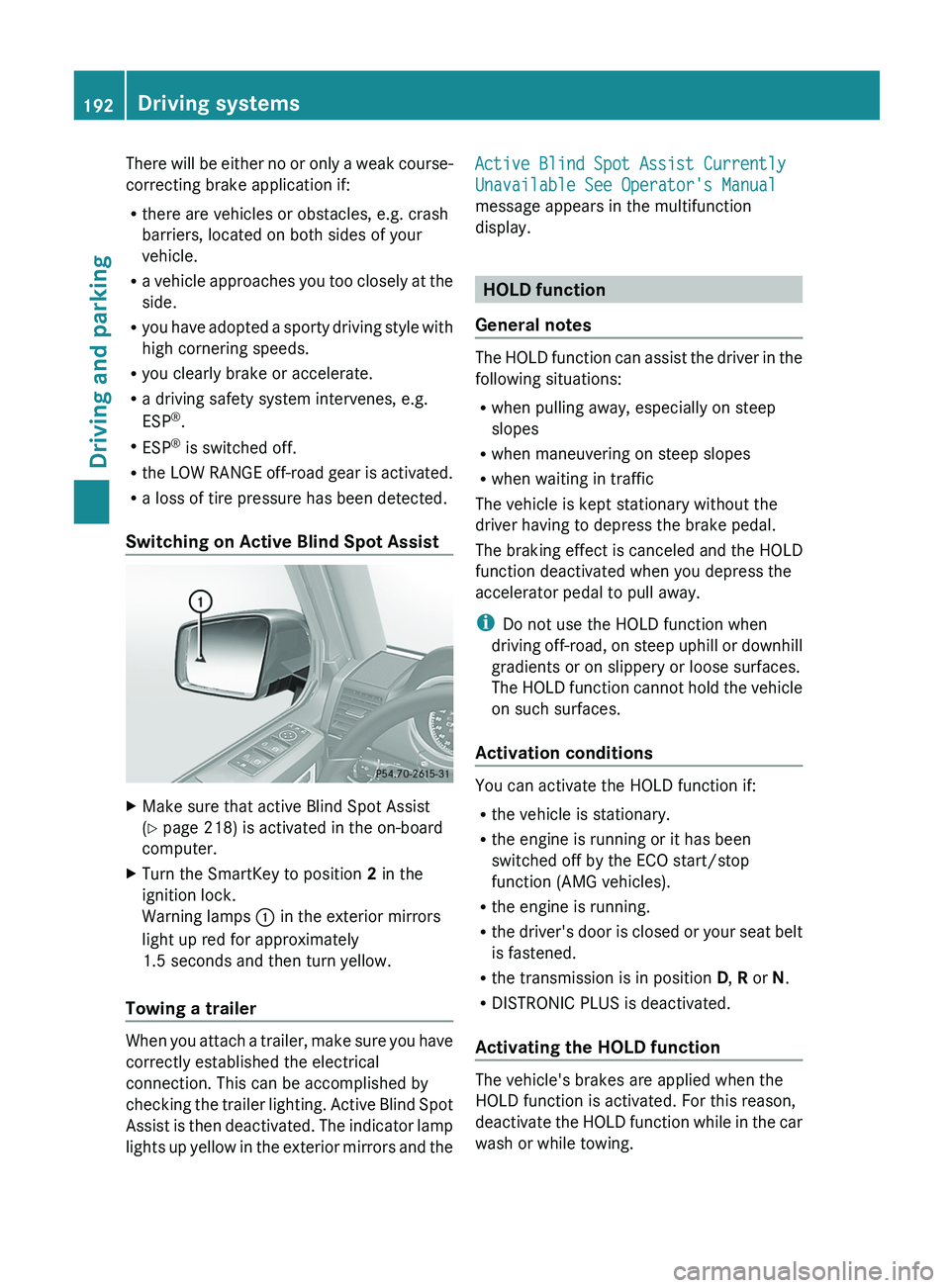
Switching on Active Blind Spot Assist X
Make sure that active Blind Spot Assist
(Y page 218) is activated in the on-board
computer.
X Turn the SmartKey to position 2 in the
ignition lock.
Warning lamps 0043 in the exterior mirrors
light up red for approximately
1.5 seconds and then turn yellow.
Towing a trailer When you attach a trailer, make sure you have
correctly established the electrical
connection. This can be accomplished by
checking the trailer lighting.
Active Blind Spot
Assist is then deactivated. The indicator lamp
lights up yellow in the exterior mirrors and the Active Blind Spot Assist Currently
Unavailable See Operator's Manual
message appears in the multifunction
display.
HOLD function
General notes The HOLD function can assist the driver in the
following situations:
R
when pulling away, especially on steep
slopes
R when maneuvering on steep slopes
R when waiting in traffic
The vehicle is kept stationary without the
driver having to depress the brake pedal.
The braking effect is
canceled and the HOLD
function deactivated when you depress the
accelerator pedal to pull away.
i Do not use the HOLD function when
driving off-road, on steep uphill or downhill
gradients or on slippery or loose surfaces.
The HOLD function cannot hold the vehicle
on such surfaces.
Activation conditions You can activate the HOLD function if:
R
the vehicle is stationary.
R the engine is running or it has been
switched off by the ECO start/stop
function (AMG vehicles).
R the engine is running.
R the driver's
door is
closed or your seat belt
is fastened.
R the transmission is in position D, R or N.
R DISTRONIC PLUS is deactivated.
Activating the HOLD function The vehicle's brakes are applied when the
HOLD function is activated. For this reason,
deactivate the HOLD
function
while in the car
wash or while towing. 192
Driving systems
Driving and parking
Page 207 of 364
R
The bumpers of your vehicle are not
suitable for installing detachable trailer
couplings.
R Do not install hired trailer couplings or
other detachable trailer couplings on the
bumpers of your vehicle.
R If you do not
need the ball coupling, remove
the ball coupling from the ball coupling
recess. This reduces the risk of damage to
the ball coupling.
i When towing a trailer, set the tire
pressure on the rear axle of the towing
vehicle for a maximum load; see the tire
pressure table in the fuel filler flap
(Y page 322).
You will find installation dimensions and loads
in the technical data (Y page 358).
The maximum permissible trailer drawbar
noseweight on the ball coupling for up to 3
persons is 562 lbs (255 kg). The maximum
permissible trailer drawbar noseweight for
more than 3 persons and the maximum load
in the trunk can be found in the trailer
drawbar noseweight table ( Y page 358).
However, the actual noseweight must not
exceed the value given on the trailer tow hitch
or trailer identification plates. The lowest
weight applies.
i When towing a trailer, set the tire
pressure on the rear axle of the towing
vehicle for a maximum load; see the tire
pressure table in the fuel filler flap
(Y page 322).
Please note that when towing a trailer,
PARKTRONIC ( Y page 194) and Blind Spot
Assist (Y page 186) are only available with
limitations, or not at all.
i On vehicles without level control, the
height of the ball coupling will alter
according to the load placed on the vehicle.
If necessary, use a trailer with a height-
adjustable drawbar. Driving tips X
On long and steep downhill gradients,
select shift range 1, 2
or 3 (Y page 150) in
good time.
i This also applies if you have activated
cruise control or SPEEDTRONIC.
X If necessary, shift the transfer case to LOW
RANGE(Y page 199).
This will use the braking effect of the
engine, so that less
braking will be required
to maintain the speed. which relieves the
load on the brake system and prevents the
brakes from overheating and wearing too
quickly. If you need additional braking,
depress the brake pedal repeatedly rather
than continuously.
The maximum permissible speed for vehicle/
trailer combinations depends on the type of
trailer. Before beginning the journey, check
the trailer's documents to see what the
maximum permitted speed is. Observe the
legally prescribed maximum speed in the
relevant country.
For certain Mercedes-Benz vehicles, the
maximum permissible rear axle load is
increased when towing a trailer. Refer to the
"Technical data" section to find out whether
this applies to your vehicle. If you utilize any
of the added maximum rear axle load when
towing a trailer, the vehicle/trailer
combination may not exceed a maximum
speed of 60 mph (100 km/h) for reasons
concerning the operating permit. This also
applies in countries in which the permissible
maximum speed for vehicle/trailer
combinations is above 60 mph (100 km/h).
When towing a trailer,
your vehicle's handling
characteristics will be different in comparison
to when driving without a trailer and it will
consume more fuel.
On long and steep downhill gradients, you
must select shift range 1, 2 or 3 in good time.
i This also applies if you have activated
cruise control or DISTRONIC PLUS. Towing a trailer
205
Driving and parking Z
Page 220 of 364
Assistance menu
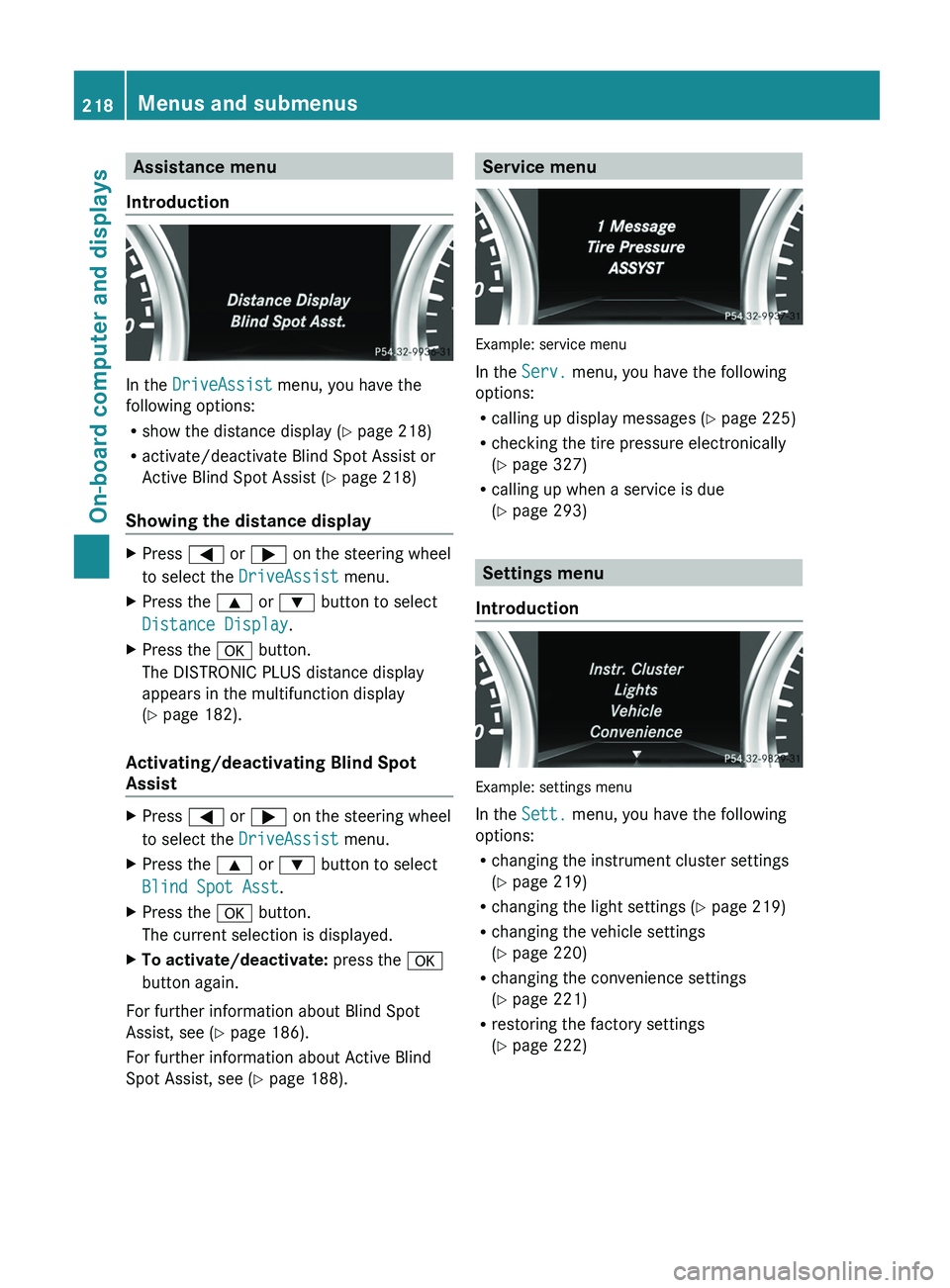
Introduction In the
DriveAssist menu, you have the
following options:
R show the distance display ( Y page 218)
R activate/deactivate Blind Spot Assist or
Active Blind Spot Assist (
Y page 218)
Showing the distance display X
Press 0059 or 0065 on the steering wheel
to select the DriveAssist menu.
X Press the 0063 or 0064 button to select
Distance Display.
X Press the 0076 button.
The DISTRONIC PLUS distance display
appears in the multifunction display
(Y page 182).
Activating/deactivating Blind Spot
Assist X
Press 0059 or 0065 on the steering wheel
to select the DriveAssist menu.
X Press the 0063 or 0064 button to select
Blind Spot Asst.
X Press the 0076 button.
The current selection is displayed.
X To activate/deactivate: press the 0076
button again.
For further information about Blind Spot
Assist, see (Y page 186).
For further information about Active Blind
Spot Assist, see (Y page 188). Service menu
Example: service menu
In the
Serv. menu, you have the following
options:
R calling up display messages ( Y page 225)
R checking the tire pressure electronically
(Y
page 327)
R calling up when a service is due
(Y page 293) Settings menu
Introduction Example: settings menu
In the
Sett. menu, you have the following
options:
R changing the instrument cluster settings
(Y page 219)
R changing the light settings (Y page 219)
R changing the vehicle settings
(
Y page 220)
R changing the convenience settings
(Y page 221)
R restoring the factory settings
(Y page 222)218
Menus and submenus
On-board computer and displays
Page 244 of 364

Display messages Possible causes/consequences and
0050 SolutionsCruise Control and
SPEEDTRONIC
Inoperative Cruise control and SPEEDTRONIC are malfunctioning.
X
Visit a qualified specialist workshop. Limit
--- mph While depressing the accelerator pedal beyond the pressure point
(kickdown), SPEEDTRONIC cannot be activated.
Cruise Control
--- mph A condition for activating cruise control has not been fulfilled.
You have tried to store a speed below
20 mph (30 km/h), for
example.
X If conditions permit, drive faster than 20 mph (30 km/h
) and
store the speed.
X Check the activation conditions for cruise control
(Y page 169). Tires
Display messages Possible causes/consequences and
0050 SolutionsTire pressure will
be displayed after
driving a few
minutes The tire pressure monitor is measuring the tire pressure.
X
Drive on.
The tire pressures appear
in the multifunction display after you
have been driving for a few minutes. Tire Press.
Monitor
Inoperative The tire pressure monitor is faulty.
X
Visit a qualified specialist workshop. Tire Pressure
Monitor
Inoperative No
Wheel Sensors The wheels mounted do not have a suitable tire pressure sensor.
The tire pressure monitor is deactivated.
X
Mount wheels with suitable tire pressure sensors.
The tire pressure monitor
is activated automatically after driving
for a few minutes. 242
Display messages
On-board computer and displays
Page 245 of 364
Display messages Possible causes/consequences and
0050 SolutionsCheck Tires The tire pressure in one or more tires has dropped significantly.
The wheel position is displayed in the multifunction display.
A warning tone also sounds.
G WARNING
With tire pressures which are too low, there is a risk of the
following hazards:
R they may burst, especially as the load and vehicle speed
increase.
R they may wear
excessively
and/or unevenly, which may greatly
impair tire traction.
R the driving characteristics, as well as steering and braking, may
be greatly impaired.
There is a risk of an accident.
X Stop the vehicle without making any sudden steering or braking
maneuvers. Pay attention to
the traffic conditions as you do so.
X Secure the vehicle against rolling away ( Y page 156).
X If there is a flat tire, inspect the tires ( Y page 304).
X Check the tire pressure (Y page 325).
X If necessary, correct the tire pressure. Warning Tire
Malfunction The tire pressure in one or more tires has dropped suddenly. The
wheel position is shown in the multifunction display.
G WARNING
If you drive with a flat tire, there is a risk of the following hazards:
R A flat tire affects the ability to steer or brake the vehicle.
R You could lose control of the vehicle.
R Continued driving with
a
flat tire will cause excessive heat build-
up and possibly a fire.
There is a risk of an accident.
X Stop the vehicle without making any sudden steering or braking
maneuvers. Pay attention to
the traffic conditions as you do so.
X Secure the vehicle against rolling away ( Y page 156).
X If there is a flat tire, inspect the tires ( Y page 304).Correct Tire
Pressure The tire pressure is too low in at least one of the tires, or the tire
pressure difference between the wheels is too great.
X
Check the tire pressures at the next opportunity (Y page 325).
X If necessary, correct the tire pressure.
X Restart the tire pressure monitor (Y page 327). Display messages
243
On-board computer and displays Z
Page 246 of 364

Display messages Possible causes/consequences and
0050 SolutionsTirePress.
Sensor(s) Missing There is no signal from the tire pressure sensor of one or several
wheels. The pressure of the affected tire is not displayed in the
multifunction display.
X
Have the faulty tire pressure sensor replaced at a qualified
specialist workshop. Tire Press.
Monitor Currently
Unavailable Due to a source of radio interference, no signals can be received
from the wheel sensors. The tire pressure monitor is temporarily
malfunctioning.
X
Drive on.
The tire pressure
monitor
restarts automatically as soon as the
problem has been solved. 0077
Tire Pressure
Warning Tire
Failure The tire pressure in one or more tires has dropped suddenly.
A warning tone also sounds.
G WARNING
If you drive with a flat tire, there is a risk of the following hazards:
R A flat tire affects the ability to steer or brake the vehicle.
R You could lose control of the vehicle.
R Continued driving with
a
flat tire will cause excessive heat build-
up and possibly a fire.
There is a risk of an accident.
X Stop the vehicle without making any sudden steering or braking
maneuvers. Pay attention to
the traffic conditions as you do so.
X Secure the vehicle against rolling away ( Y page 156).
X If there is a flat tire, inspect the tires ( Y page 304).244
Display messages
On-board computer and displays
Page 247 of 364
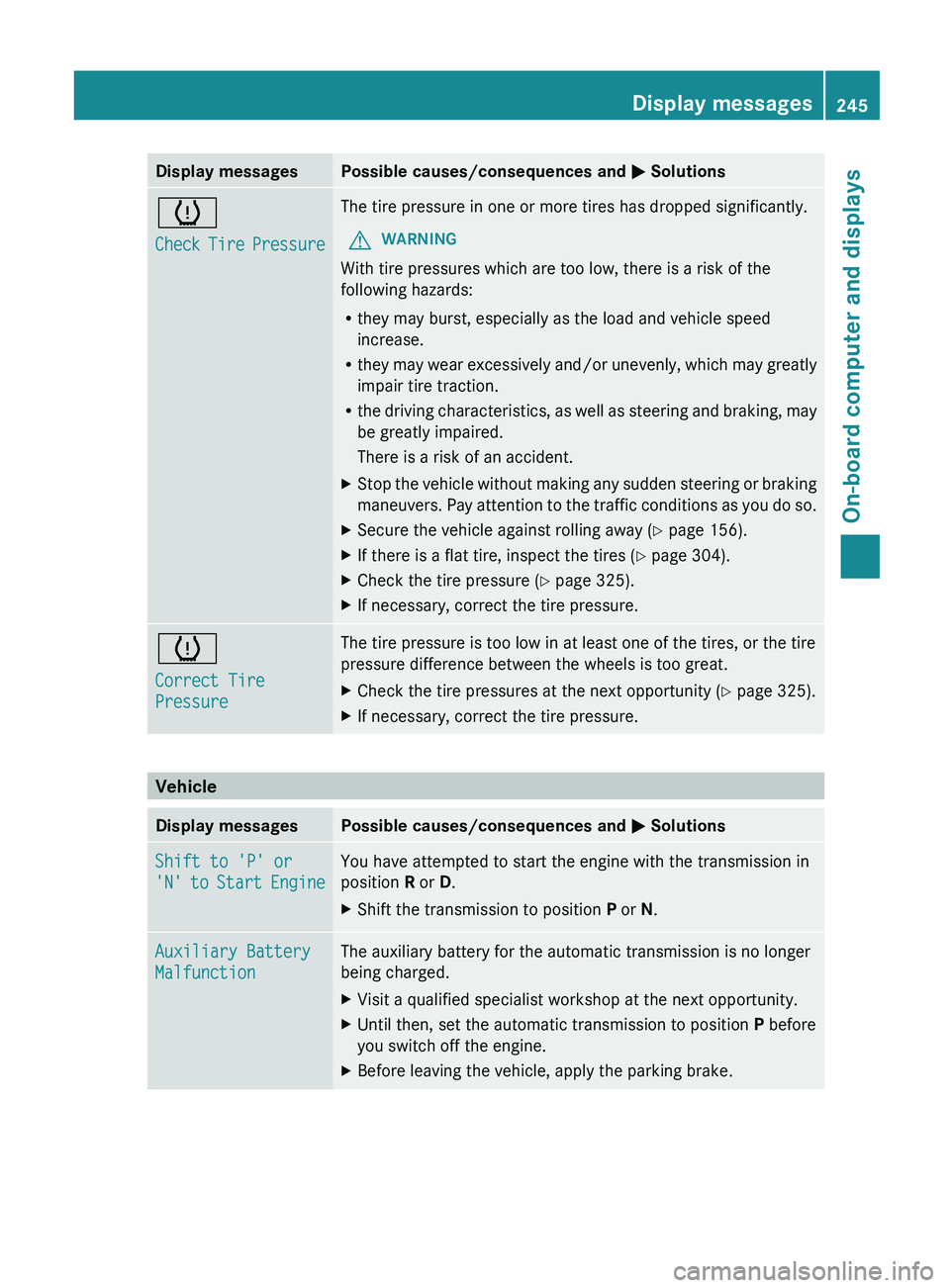
Display messages Possible causes/consequences and
0050 Solutions0077
Check Tire Pressure The tire pressure in one or more tires has dropped significantly.
G WARNING
With tire pressures which are too low, there is a risk of the
following hazards:
R they may burst, especially as the load and vehicle speed
increase.
R they may wear
excessively
and/or unevenly, which may greatly
impair tire traction.
R the driving characteristics, as well as steering and braking, may
be greatly impaired.
There is a risk of an accident.
X Stop the vehicle without making any sudden steering or braking
maneuvers. Pay attention to
the traffic conditions as you do so.
X Secure the vehicle against rolling away ( Y page 156).
X If there is a flat tire, inspect the tires ( Y page 304).
X Check the tire pressure (Y page 325).
X If necessary, correct the tire pressure. 0077
Correct Tire
Pressure The tire pressure is too low in at least one of the tires, or the tire
pressure difference between the wheels is too great.
X
Check the tire pressures at the next opportunity (Y page 325).
X If necessary, correct the tire pressure. Vehicle
Display messages Possible causes/consequences and
0050 SolutionsShift to 'P' or
'N' to Start
Engine You have attempted to start the engine with the transmission in
position R or D.
X
Shift the transmission to position P or N.Auxiliary Battery
Malfunction The auxiliary battery for the automatic transmission is no longer
being charged.
X
Visit a qualified specialist workshop at the next opportunity.
X Until then, set the automatic transmission to position P before
you switch off the engine.
X Before leaving the vehicle, apply the parking brake. Display messages
245
On-board computer and displays Z
Page 249 of 364
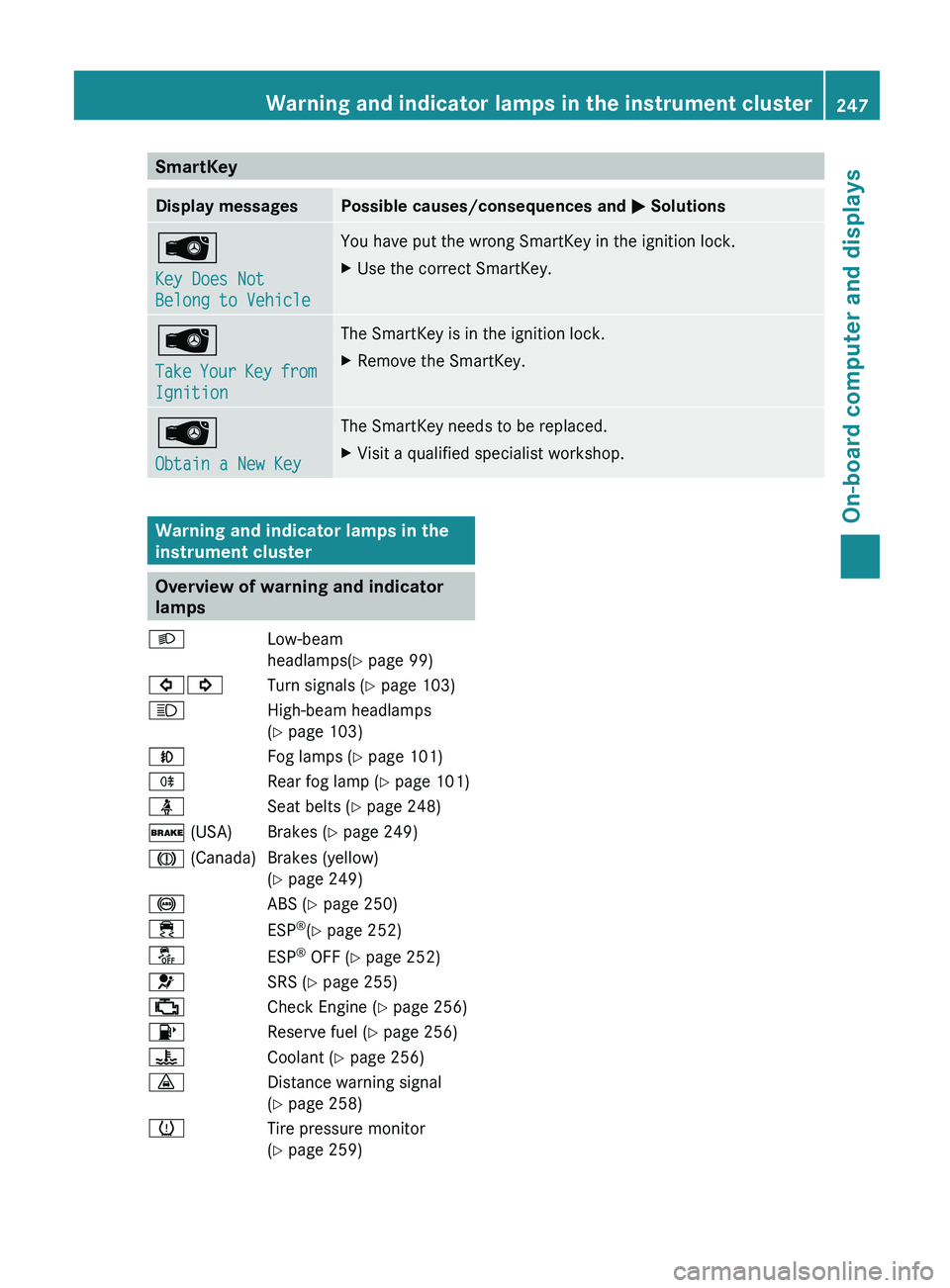
SmartKey
Display messages Possible causes/consequences and
0050 Solutions00AF
Key Does Not
Belong to Vehicle You have put the wrong SmartKey in the ignition lock.
X
Use the correct SmartKey. 00AF
Take Your Key
from
Ignition The SmartKey is in the ignition lock.
X
Remove the SmartKey. 00AF
Obtain a New Key The SmartKey needs to be replaced.
X
Visit a qualified specialist workshop. Warning and indicator lamps in the
instrument cluster
Overview of warning and indicator
lamps
0058 Low-beam
headlamps(Y page 99)
003E003D Turn signals (Y
page 103)
0057 High-beam headlamps
(
Y page 103)
005A Fog lamps (Y page 101)
005E Rear fog lamp (Y page 101)
00E9 Seat belts (Y page 248)
0027 (USA) Brakes (Y page 249)
004D (Canada) Brakes (yellow) (Y page 249)
0025 ABS (Y page 250)
00E5 ESP®
(Y page 252)
00BB ESP®
OFF (Y page 252)
0075 SRS (Y page 255)
00B9 Check Engine (Y page 256)
00B6 Reserve fuel (Y page 256)
00AC Coolant (Y page 256)
00BA Distance warning signal
(Y page 258)
0077 Tire pressure monitor
(Y page 259) Warning and indicator lamps in the instrument cluster
247
On-board computer and displays Z