2013 MERCEDES-BENZ E-Class SEDAN lamp adjust
[x] Cancel search: lamp adjustPage 113 of 420

X
Make sure that the SmartKey is in position
1 or 2 in the ignition lock.
X To switch on: press button : repeatedly
until the desired heating level is set.
X To switch off: press button : repeatedly
until all the indicator lamps go out.
i If the battery voltage is too low, the seat
heating may switch off.
Problems with the seat heating The seat heating has switched off
prematurely or cannot be switched on. The
vehicle's electrical system voltage is too low
because too many electrical consumers are
switched on.
X
Switch off electrical consumers that you do
not need, such as the rear window
defroster or interior lighting. Switching the seat ventilation on/off
Activating/deactivating The three blue indicator lamps in the buttons
indicate the ventilation level you have
selected.
X
Make sure that the SmartKey is in position
2 in the ignition lock.
X To switch on: press button : repeatedly
until the desired ventilation level is set.
X To switch off: press button : repeatedly
until all the indicator lamps go out. i
If the battery voltage is too low, the seat
ventilation may switch off.
i You can open the side windows and the
sliding sunroof using the "Convenience
opening" feature ( Y page 94). The seat
ventilation of the driver's seat
automatically
switches to the highest level.
Problems with the seat ventilation The seat ventilation has switched off
prematurely or cannot be switched on. The
vehicle's electrical system voltage is too low
because too many electrical consumers are
switched on.
X
Switch off electrical consumers that you do
not need, such as the rear window
defroster or interior lighting. Steering wheel
Important safety notes
G
WARNING
Do not adjust the steering wheel while driving.
Adjusting the steering wheel while driving
could cause the driver to lose control of the
vehicle.
The electrical steering wheel adjustment
feature can be operated at any time.
Therefore, do not leave children unattended
in the vehicle, or with access to an unlocked
vehicle. A child's unsupervised access to a
vehicle could result in an accident and/or
serious personal injury. Steering wheel
111
Seats, steering wheel and mirrors Z
Page 114 of 420

Adjusting the steering wheel
:
To adjust the steering wheel height
; To adjust the steering wheel position
(fore-and-aft adjustment)
i Further related subjects:
R EASY-ENTRY/EXIT feature
(Y page 112)
R Storing settings
(Y page 116) Steering wheel heating
Activating/deactivating X
Make sure that the SmartKey is in position
2 in the ignition lock.
X To switch on/off: turn the lever in the
direction of arrow : or ;.
Indicator lamp = lights up or goes out.
Vehicles without KEYLESS-GO: when you
remove the SmartKey from the ignition lock,
the steering wheel heating is deactivated. Vehicles with KEYLESS-GO: when you switch
off
the ignition and open the driver's door, the
steering wheel heating is deactivated.
i The steering wheel heating may switch off
temporarily if:
R the temperature of the vehicle interior is
above 86 ‡ (30 †)
R the temperature of the steering wheel is
above 95 ‡ (35 †)
Indicator lamp = remains on.
Problems with the steering wheel
heating If steering wheel heating indicator lamp
=
is
flashing, the steering wheel heating has
switched off automatically. The vehicle's
electrical system voltage is too low because
too many electrical consumers are switched
on.
X Switch off electrical consumers that you do
not need, such as the rear window
defroster or interior lighting.
Once
the battery is sufficiently charged, the
steering wheel heating will switch back on
automatically. EASY-ENTRY/EXIT feature
Important safety notes G
WARNING
Make sure that nobody can become trapped
when you activate the EASY-ENTRY/EXIT
feature.
If there is a risk of someone becoming
trapped, stop the adjustment procedure. To
halt the procedure:
R press the steering column adjustment
button.
R press one of the memory function position
buttons.
The steering column stops moving
immediately. 112
Steering wheel
Seats, steering wheel and mirrors
Page 116 of 420

Exterior mirrors
Adjusting the exterior mirrors G
WARNING
The exterior mirrors reduce the size of the
image. Objects are actually closer than they
appear.
You could misjudge the distance from
vehicles driving behind and cause an
accident, e.g. when changing lane. For this
reason, make sure of the actual distance from
the vehicle driving behind by glancing over
your shoulder. X
Make sure that the SmartKey is in position
1 or 2 in the ignition lock.
X Press button : for the left-hand exterior
mirror or button ; for the right-hand
exterior mirror.
The indicator lamp in the corresponding
button lights up in red.
The indicator lamp goes out again after
some time. You can adjust the selected
mirror using adjustment button = as long
as the indicator lamp is lit.
X Press adjustment button = up, down, or
to the left or right until you have adjusted
the exterior mirror to the correct position.
You should have a good overview of traffic
conditions.
The convex exterior mirrors provide a larger
field of vision.
The
exterior mirrors are heated automatically
if the rear window defroster is switched on
and the outside temperature is low. Folding the exterior mirrors in or out
electrically This function is only available in vehicles for
Canada.
X
Make sure that the SmartKey is in position
1 or 2 in the ignition lock.
X Briefly press button :.
Both exterior mirrors fold in or out.
i Make sure that the exterior mirrors are
always folded out fully while driving. They
could otherwise vibrate.
i If you are driving faster than 9 mph
(15 km/h
) you can no longer fold in the
exterior mirrors.
Setting the exterior mirrors This function is only available in vehicles for
Canada.
If the battery has been disconnected or
completely discharged, the exterior mirrors
must be reset. The exterior mirrors will
otherwise
not fold in when you select the Fold
in mirrors when locking function in the on-
board computer ( Y page 241).
X Make sure that the SmartKey is in
position 1 in the ignition lock.
X Briefly press button :.
Folding the exterior mirrors in or out
automatically This function is only available in vehicles for
Canada.114
Mirrors
Seats, steering wheel and mirrors
Page 117 of 420
If the "Fold in mirrors when locking" function
is activated in the on-board computer
(Y page 241):
R
the
exterior mirrors fold in automatically as
soon as you lock the vehicle from the
outside.
R the exterior mirrors fold out again
automatically as soon as you unlock the
vehicle and then open the driver's or front-
passenger door.
i If the exterior mirrors have been folded in
manually, they do not fold out.
Exterior mirror out of position If an exterior mirror has been pushed out of
position, proceed as follows:
X
Vehicles without electrically folding
exterior
mirrors: move the exterior mirror
into the correct position manually.
X Vehicles with electrically folding
exterior
mirrors (only for Canada): press
and hold mirror-folding button : until you
hear a click and then the mirrors engage in
position (Y page 114).
The mirror housing is engaged again and
you can adjust the exterior mirrors as usual
(Y page 114). Automatic anti-glare mirrors
G
WARNING
If incident light from headlamps is prevented
from striking the sensor in the rear-view
mirror,
for instance, by luggage piled too high
in the vehicle, the mirror's automatic anti-
glare function will not operate.
Incident light could then blind you. This may
distract you from the traffic conditions and,
as a result, you may cause an accident. The rear-view mirror and the exterior mirror
on
the driver's side automatically go into anti-
glare mode if the following conditions are met
simultaneously:
R the ignition is switched on and
R incident light from headlamps strikes the
sensor in the rear-view mirror.
The mirrors do not go into anti-glare mode if
reverse gear is engaged or if the interior
lighting is switched on. Parking position for the exterior
mirror on the front-passenger side
Setting
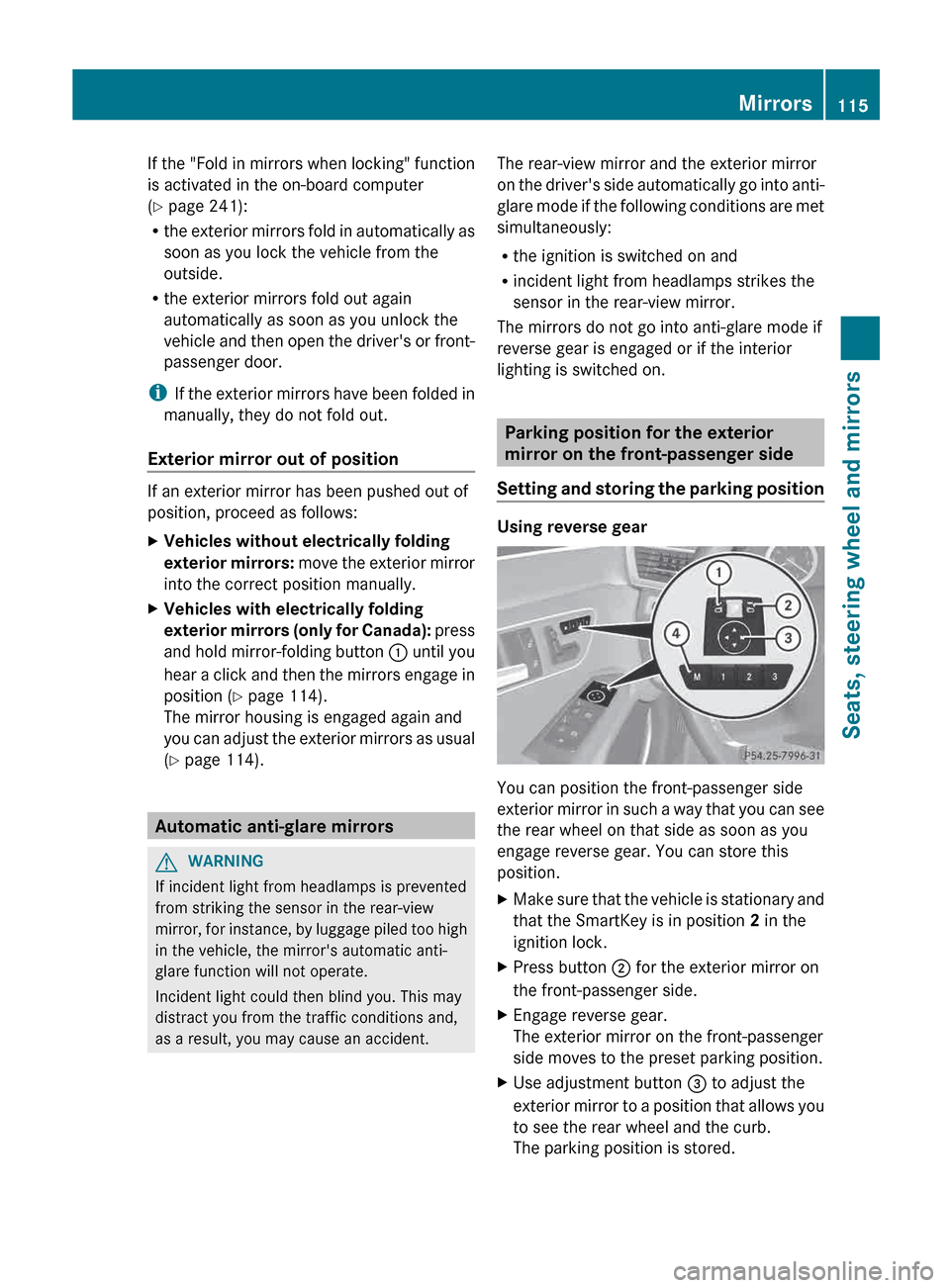
and storing the parking position Using reverse gear
You can position the front-passenger side
exterior
mirror in such a way that you can see
the rear wheel on that side as soon as you
engage reverse gear. You can store this
position.
X Make sure that the vehicle is stationary and
that the SmartKey is in position 2 in the
ignition lock.
X Press button ; for the exterior mirror on
the front-passenger side.
X Engage reverse gear.
The exterior mirror on the front-passenger
side moves to the preset parking position.
X Use adjustment button = to adjust the
exterior
mirror to a position that allows you
to see the rear wheel and the curb.
The parking position is stored. Mirrors
115
Seats, steering wheel and mirrors Z
Page 146 of 420

3-zone automatic climate control: press
button
I(Y page 141).
The indicator lamp above the à button
goes out.
or
X Press the airflow button.
Dual-zone
automatic climate control: press
button G(Y page 139).
3-zone automatic climate control: press
button H(Y page 141).
The indicator lamp above the à button
goes out. Adjusting the climate mode settings
You can select the following climate mode
settings in automatic mode:
FOCUS high airflow that is set slightly cooler
MEDIUM medium airflow, standard setting
DIFFUSE low airflow that is set slightly warmer and with less draft
X Turn the SmartKey to position 2 in the
ignition lock.
X Press the à button.
X Press button G
up or down and select the
desired level ( Y page 141)Setting the temperature
Climate control Different temperatures can be set for the
driver's and front-passenger sides.
X
Turn the SmartKey to position 2 in the
ignition lock.
X To increase/reduce: press switch E or
H up or down ( Y page 139).
Only change the temperature setting in
small increments. Start at
72 ‡ (22 † ).3-zone automatic climate control
Automatic climate control zones
You
can select different temperature settings
for the driver's and front-passenger sides as
well as for the rear compartment.
X Turn the SmartKey to position 2 in the
ignition lock.
X To increase/reduce the temperature in
the front compartment: press switch F
or J up or down ( Y page 141).
Only change the temperature setting in
small increments. Start at
72 ‡ (22 † ).
X To increase/reduce the temperature in
the rear compartment using the front
control panel: press the á button.
The indicator lamp above the á button
goes out.
X Press switch F or J up or down
(Y page 141).
Only change the temperature setting in
small increments. Start at
72 ‡ (22 † ).
X To increase/reduce the temperature in
the rear compartment using the rear
control panel: press button K or
O(Y page 141).
Only change the temperature setting in
small increments. Start at
72 ‡ (22 † ).144
Operating the climate control systems
Climate control
Page 201 of 420

RACE START is deactivated when the vehicle
reaches a speed of approximately
30 mph
(Canada: 50 km/h). Drive program S+ is
activated. SPORT handling mode remains
activated.
RACE START is deactivated immediately if
you release the accelerator pedal during
RACE START or if any of the activation
conditions are no longer fulfilled. The RACE
START Not Possible See Operator's
Manual message appears in the multifunction
display.
i If RACE START is used repeatedly within
a short period of time, it is only available
again after the vehicle has been driven a
certain distance. AIRMATIC
Vehicle level Important safety notes
Your vehicle regulates its height
automatically.
All-round level control ensures
the best possible suspension and constant
ground clearance, even with a laden vehicle.
When you drive fast, the vehicle is lowered
automatically to improve driving safety and to
reduce fuel consumption.
The following vehicle levels are possible:
R normal
R raised: the vehicle is raised by about
0.80 in (20 mm) when compared with the
normal level
R lowered: the vehicle is lowered by about
0.40 in (10 mm) when compared with the
normal level
The "Normal" and "Raised" vehicle levels can
be set manually.
The "Lowered” vehicle level is set
automatically:
R at speeds above 70 mph (113 km/h)
R if you have selected "Sports tuning"
(Y page 200) Setting the vehicle level G
WARNING
To help avoid personal injury, keep hands and
feet away from wheel housing area, and stay
away from under the vehicle when lowering
the vehicle chassis.
Select the "Normal" setting for normal road
surfaces and "Raised" for driving with snow
chains or on particularly poor road surfaces.
Your selection remains stored even if you
remove the SmartKey from the ignition lock.
Setting raised level X
Start the engine.
If indicator lamp ; is not lit:
X Press button :.
Indicator lamp ; lights up. The vehicle
height is adjusted to raised level.
The Vehicle Rising message appears in
the display.
The "Raised level" setting is canceled if you:
R drive
at speeds above 75 mph (120 km/h)
R drive for about three minutes at speeds
above 50 mph (80 km/h).
The "Raised level" remains active when you
are not driving within these speed ranges.
Setting the normal level
X Start the engine. Driving systems
199
Driving and parking Z
Page 202 of 420

If indicator lamp ; is lit:
X
Press button :.
Indicator lamp ; goes out. The vehicle is
adjusted to normal level.
Suspension tuning General notes
The
electronically controlled damping system
works continuously. This improves driving
safety and ride comfort.
The damping is tuned individually to each
wheel and depends on:
R your driving style, e.g. sporty
R the road surface condition, e.g. bumps
R your individual selection, i.e. sports or
comfort
Your selection remains stored even if you
remove the SmartKey from the ignition lock.
Sports tuning The firmer suspension tuning in Sport mode
ensures even better contact with the road.
Select this mode when employing a sporty
driving style, e.g. on winding country roads.
X
Press button :.
Indicator lamp ; lights up. Sports
suspension tuning is selected.
The AIRMATIC SPORT message appears in
the multifunction display. Comfort tuning
In Comfort mode, the driving characteristics
of your vehicle are more comfortable.
Therefore, select this mode if you favor a
more comfortable driving style. Select
comfort mode also when driving fast on
straight roads, e.g. on straight stretches of
freeway.
X
Press button :.
Indicator
lamp = lights up. Comfort tuning
is selected.
The AIRMATIC COMFORT message appears
in the multifunction display. AMG adaptive sport suspension
system
General notes i
AMG
adaptive sport suspension system is
available for the E 63 AMG model.
Rear axle level control The vehicle automatically sets the vehicle
level at the rear axle. Rear axle level control
ensures the best possible suspension and
that the ground clearance remains constant
even when the vehicle is loaded. This
improves driving safety and fuel
consumption.
Suspension tuning
General notes
The
electronically controlled damping system
works continuously. This improves driving
safety and ride comfort.
The damping is tuned individually to each
wheel and depends on:
R your driving style, e.g. sporty
R the road surface condition, e.g. bumps
R your individual selection of Sport, Sport +
or Comfort200
Driving systems
Driving and parking
Page 214 of 420

Switching on Night View Assist Plus
Activation conditions
You can only activate Night View Assist Plus
if:
R
the
SmartKey is in position 2 in the ignition
lock.
R it is dark.
R the light switch is in the à or L
position.
R reverse gear has not been engaged.
Switching on Night View Assist Plus X
Make sure that COMAND is switched on.
X Press button :.
The
Night View Assist Plus display appears
in the COMAND display.
You can read about how to adjust the
brightness of the COMAND display in the
COMAND operating instructions.
i The infrared lamps switch on
automatically from a speed of about
6 mph (10 km/h
). This means that you do
not have the full visual range while the
vehicle is stationary and cannot check
whether Night View Assist Plus is working. Pedestrian recognition G
WARNING
Pedestrian recognition may be impaired or
inoperative if:
R pedestrians are partially or entirely
obscured by objects, e.g. parked vehicles.
R the
silhouette of the pedestrian in the Night
View Assist Plus display is incomplete or
interrupted, e.g. by powerful light
reflections.
R pedestrians do not contrast with the
surroundings.
R pedestrians are not standing upright, for
example, if they are sitting, crouching or
lying down. :
Night View Assist Plus display
; Pedestrian recognized
= Framing
? Symbol for active pedestrian recognition
i Animals
are not recognized by pedestrian
recognition.
Night View Assist Plus is able to recognize
pedestrians by typical characteristics, e.g. a
silhouette in the shape of a person.
Pedestrian recognition is then switched on
automatically if:
R Night View Assist Plus is activated.
R you are driving faster than 6 mph
(10 km/h).
R the surroundings are dark, e.g. when
driving outside built-up areas without
street lighting.212
Driving systems
Driving and parking