2013 MERCEDES-BENZ CLS-Class warning lights
[x] Cancel search: warning lightsPage 120 of 376

Automatic interior lighting control
Front overhead control panel
:
u To switch the rear interior lighting
on/off
; | To switch the automatic interior
lighting control on/off
= p To switch the right-hand reading
lamp on/off
? c To switch the front interior lighting
on/off
A p To switch the left-hand reading lamp
on/off
X To activate/deactivate: press the |
button.
When the automatic interior lighting
control
is activated, the button is flush with
the overhead control panel.
The interior lighting automatically switches
on if you:
R unlock the vehicle
R open a door
R remove
the SmartKey from the ignition lock
The interior light is activated for a short while
when the SmartKey is removed from the
ignition lock. You can activate this delayed
switch-off using the on-board computer
(Y page 222). Manual interior lighting control
Front overhead control panel
:
u To switch the rear interior lighting
on/off.
; | To switch the automatic interior
lighting control on/off
= p To switch the right-hand reading
lamp on/off
? c To switch the front interior lighting
on/off
A p
To switch the left-hand reading lamp
on/off
X To switch the front interior lighting on/
off: press the c button.
X To switch the rear interior lighting on/
off: press the u button.
X To switch the reading lamps on/off:
press the p button. Crash-responsive emergency lighting
The
interior lighting is activated automatically
if the vehicle is involved in an accident.
X To switch off the crash-responsive
emergency lighting: press the hazard
warning lamp button.
or
X Lock and then unlock the vehicle using the
SmartKey.118
Interior lighting
Lights and windshield wipers
Page 121 of 376
Replacing bulbs
Important safety notes
Xenon bulbs G
DANGER
Xenon bulbs carry a high voltage. You could
get an electric shock and be seriously or even
fatally injured if you touch the electric
contacts on Xenon bulbs. Therefore, never
remove the cover from Xenon bulbs.
Do not change the Xenon bulbs yourself, but
have them replaced at a qualified workshop.
Bulbs and lamps are an important aspect of
vehicle safety. You must therefore make sure
that these function correctly at all times.
Have the headlamp setting checked regularly.
LED lamps You can neither replace Xenon bulbs nor LED
bulbs.
Have LED bulbs changed at a qualified
specialist workshop.
Bulbs and lamps are an important aspect of
vehicle safety. You must therefore make sure
that these function correctly at all times.
Have the headlamp setting checked regularly.
Other bulbs G
WARNING
Bulbs and lamps can become very hot. For
this reason, allow them to cool down before
changing them. Otherwise, you could burn
yourself when you touch them.
Keep bulbs out of the reach of children.
Otherwise, they could, for example, damage
the bulbs and injure themselves.
Never use a bulb which has been dropped.
Such a bulb may explode and injure you.
Halogen bulbs are pressurized and could
explode when you change them, especially if
they are very hot. You should therefore wear
eye protection and gloves when you are
changing them. There are bulbs other than Xenon and LED
bulbs that you cannot replace. Replace only
the
bulbs listed (Y page 119). Have the bulbs
that you cannot replace yourself changed at
a qualified specialist workshop.
If you require assistance changing bulbs,
consult a qualified specialist workshop.
Do not touch the glass tube of new bulbs with
your bare hands. Even minor contamination
can burn into the glass surface and reduce
the service life of the bulbs. Always use a lint-
free cloth or only touch the base of the bulb
when installing.
Only use bulbs of the correct type.
If the new bulb still does not light up, consult
a qualified specialist workshop.
Bulbs and lamps are an important aspect of
vehicle safety. You must therefore make sure
that these function correctly at all times.
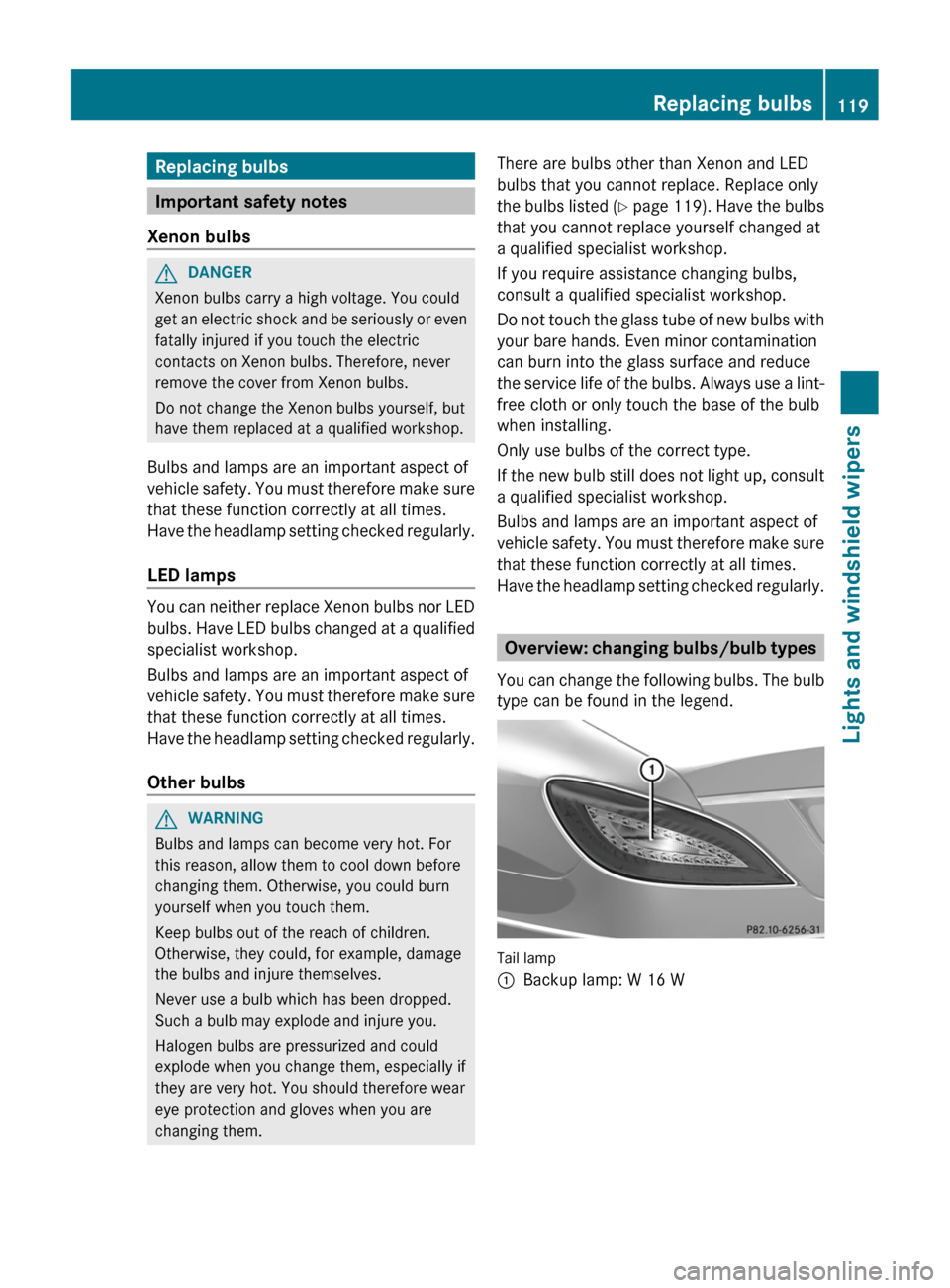
Have the headlamp setting checked regularly. Overview: changing bulbs/bulb types
You
can change the following bulbs. The bulb
type can be found in the legend. Tail lamp
:
Backup lamp: W 16 W Replacing bulbs
119
Lights and windshield wipers Z
Page 122 of 376

Changing the rear bulbs
Backup lamp Lamp cluster
X
Switch off the lights.
X Open the trunk.
X Reach up into the side paneling and pull
downwards until the lamp cluster is easily
accessible.
X Press the detent of connector ; and pull
out connector ;.
X Use a suitable tool to loosen and remove
four nuts :.
X Remove the entire lamp cluster.
X Turn bulb holder = counter-clockwise and
pull it out.
X Pull out the bulb.
X Insert the new bulb into bulb holder =.
X Insert bulb holder =
into the lamp and turn
it clockwise.
X Re-insert the lamp cluster.
X Tighten four nuts :.
X Push in connector ; until it engages.
X Insert the side paneling. Windshield wipers
Switching the windshield wipers on/
off
G
WARNING
The windshield will not longer be wiped
properly if the wiper blades are worn. This
could prevent you from observing the traffic
conditions, thereby causing an accident.
Replace
the wiper blades twice a year, ideally
in spring and fall.
! Do not operate the windshield wipers
when the windshield is dry, as this could
damage the wiper blades. Moreover, dust
that has collected on the windshield can
scratch the glass if wiping takes place when
the windshield is dry.
If it is necessary to switch on the windshield
wipers in dry weather conditions, always
use washer fluid when operating the
windshield wipers.
! If the windshield wipers leave smears on
the windshield after the vehicle has been
washed in an automatic car wash, wax or
other residues may be the reason for this.
Clean the windshield using washer fluid
after washing the vehicle in an automatic
car wash.
! Intermittent wiping with rain sensor: due
to optical influences and the windshield
becoming dirty in dry weather conditions,
the windshield wipers may be activated
inadvertently. This could then damage the
windshield wiper blades or scratch the
windshield.
For this reason, you should always switch
off the windshield wipers in dry weather. 120
Windshield wipers
Lights and windshield wipers
Page 123 of 376

Combination switch
1
$ Windshield wipers off
2 Ä Intermittent wipe, low (rain sensor
set to low sensitivity)
3 Å Intermittent wipe, high (rain sensor
set to high sensitivity)
4 ° Continuous wipe, slow
5 ¯ Continuous wipe, fast
B í Single wipe/ î To wipe the
windshield using washer fluid
X Switch on the ignition.
X Turn the combination switch to the
corresponding position.
In the Ä
or Å position, the appropriate
wiping frequency is set automatically
according to the intensity of the rain. In
the Å position, the rain sensor is more
sensitive than in the Ä position, causing
the windshield wipers to wipe more
frequently. Replacing the wiper blades
Important safety notes G
WARNING
For safety reasons, switch off the windshield
wipers and remove the SmartKey from the
ignition
lock before changing the wiper blades
(vehicles with KEYLESS-GO: make sure that
the on-board electronics are in state 0).
Otherwise, the wiper motor could be switched
on suddenly and cause injury. !
Never
open the hood if a windshield wiper
arm has been folded away from the
windshield.
Never fold a windshield wiper arm without
a wiper blade back onto the windshield.
Hold the windshield wiper arm firmly when
you change the wiper blade. If you release
the windshield wiper arm without a wiper
blade and it falls onto the windshield, the
windshield may be damaged by the force of
the impact.
Mercedes-Benz recommends that you have
the wiper blades changed at a qualified
specialist workshop.
! To avoid damaging the wiper blades,
make sure that you touch only the wiper
arm of the wiper.
Replacing the wiper blades Removing the wiper blades
X
Remove the SmartKey from the ignition
lock or turn it to position 0 (KEYLESS-GO).
X Fold the wiper arm away from the
windshield until it engages. X
Firmly press release knob : and pull the
wiper
blade upwards from the wiper arm in
the direction of the arrow. Windshield wipers
121
Lights and windshield wipers Z
Page 130 of 376

Information about using 3-zone
automatic climate control
The following contains instructions and
recommendations to enable you to get the
most out of your automatic climate control.
R Activate
climate control using the à and
¿ buttons. The indicator lamps above
the à and ¿ buttons light up.
R In automatic mode, you can also use the
ñ button to set a climate mode
(FOCUS/MEDIUM/DIFFUSE). The
MEDIUM level is recommended.
R Set the temperature to 72 ‡ (22 †).
R Only use the "defrosting" function briefly
until the windshield is clear again.
R Only use "air-recirculation" mode briefly,
e.g. if there are unpleasant outside odors
or when in a tunnel. The windows could
otherwise fog up, since no fresh air is drawn
into the vehicle in air-recirculation mode.
R Use the ZONE function to adopt the
temperature settings on the driver's side
for the front-passenger side and the rear
compartment as well. The indicator lamp
above the á button goes out.
R Use the residual heat function if you want
to heat or ventilate the vehicle interior
when the ignition is switched off. The
"residual heat" function can only be
activated or deactivated with the ignition
switched off. Operating the climate control
systems
Activating/deactivating climate
control
Points to observe before use G
WARNING
When the climate control system is
deactivated, the outside air supply and
circulation are also deactivated. Only choose
this setting for a short time. Otherwise the windows could fog up, impairing visibility and
endangering you and others.
i Switch on climate control primarily using
the à button ( Y page 129).
Activating/deactivating X
Turn the SmartKey to position 2 in the
ignition lock.
X To switch on: press the à button.
The
indicator lamp in the à button lights
up. Airflow and air distribution are set to
automatic mode.
or
X Press the ^ button.
The
indicator lamp in the ^ button goes
out. The previously selected settings are
restored.
X To switch off: press the ^ button.
The
indicator lamp in the ^ button lights
up. Activating/deactivating cooling with
air dehumidification
Points to observe before use G
WARNING
If you switch off the cooling function, the
vehicle will not be cooled when weather
conditions
are warm. The windows can fog up
more quickly. This may prevent you from
observing the traffic conditions, thereby
causing an accident.
The cooling with air dehumidification function
is only available when the engine is running.
The air inside the vehicle is cooled and
dehumidified according to the temperature
selected.
Condensation may drip from the underside of
the vehicle when it is in cooling mode. This is
normal and not a sign that there is a
malfunction. 128
Operating the climate control systems
Climate control
Page 131 of 376

i
The cooling with air dehumidification
function uses refrigerant R134a. This
coolant does not contain
chlorofluorocarbons, and therefore does
not damage the ozone layer.
Activating/deactivating X
To activate: press the ¿ button.
The indicator lamp in the ¿ button lights
up.
X To deactivate: press the ¿ button.
The
indicator lamp in the ¿ button goes
out. The cooling with air dehumidification
function has a delayed switch-off feature.
Problems with the cooling with air
dehumidification function When you press the
¿ button, the
indicator lamp in the button flashes three
times
or remains off. You can no longer switch
on the cooling with air dehumidification
function.
X Visit a qualified specialist workshop. Setting climate control to automatic
G
WARNING
If you switch off the cooling function, the
vehicle will not be cooled when weather
conditions
are warm. The windows can fog up
more quickly. Window fogging may impair
visibility and endanger you and others.
In automatic mode, the set temperature is
maintained automatically at a constant level.
The system automatically regulates the
temperature of the dispensed air, the airflow
and the air distribution.
Automatic mode will achieve optimal
operation if cooling with air dehumidification
is also activated. If desired, cooling with air
dehumidification can be deactivated. X
Turn the SmartKey to position 2 in the
ignition lock.
X Set the desired temperature.
X To activate: press the à button.
The
indicator lamp in the à button lights
up. Automatic air distribution and airflow
are activated.
i 3-zone automatic climate control: when
automatic mode is activated, you can
select a climate mode setting
(Y page 129).
X To switch off: press the _ button.
or
X Press the I or K button.
The
indicator lamp in the à button goes
out. Adjusting the climate mode settings
You can select the following climate mode
settings in automatic mode:
FOCUS high airflow that is set slightly cooler
MEDIUM medium airflow, standard setting
DIFFUSE low airflow that is set slightly warmer and with less draft
X Turn the SmartKey to position 2 in the
ignition lock.
X Press the à button.
X Press the ñ button repeatedly until the
desired climate mode appears in the
display. Operating the climate control systems
129
Climate control Z
Page 134 of 376

X
To activate: press the Ù button.
The indicator lamp in the button lights up.
X To activate: press off-road button Ù
again.
The
indicator lamp goes out. The previously
selected settings are restored.
When you activate MAX COOL, climate
control switches to the following functions:
R maximum cooling
R maximum airflow
R air-recirculation mode on Defrosting the windows
Windows fogged up on the inside X
Activate the ¿ cooling with air
dehumidification function.
X Activate automatic mode Ã.
X If the windows continue to fog up, activate
the defrosting function
(Y page 131).
i You should only select this setting until
the windshield is clear again.
Windows fogged up on the outside X
Press the _ button repeatedly until the
P or O symbol appears in the
display.
i You should only select this setting until
the windshield is clear again. Rear window defroster
Activating/deactivating G
WARNING
Clear all windows of ice or snow before setting
off. Otherwise, impaired visibility could
endanger you and others.
The
rear window defroster has a high current
draw. You should therefore switch it off as
soon as the rear window is clear. Otherwise, the rear window defroster switches off
automatically after several minutes.
If the battery voltage is too low, the rear
window defroster may switch off.
X
Turn the SmartKey to position 2 in the
ignition lock.
X Press the ¤ button.
The
indicator lamp in the ¤ button lights
up or goes out.
Problems with the rear window
defroster The rear window defroster has deactivated
prematurely or cannot be activated.
X
Switch off any consumers that are not
required, e.g. reading lamps or interior
lighting.
When the battery is sufficiently charged,
the rear window defroster is activated
again automatically. Activating/deactivating air-
recirculation mode
G
WARNING
At low outside temperatures, only switch over
to air-recirculation mode for brief periods.
Otherwise, the windows could fog up, thus
impairing visibility and endangering yourself
and others. This may prevent you from
observing the traffic conditions and thereby
cause an accident.
You can deactivate the flow of fresh air if
unpleasant odors are entering the vehicle
from outside. The air already inside the
vehicle will then be recirculated.
The
operation of air-recirculation mode is the
same for all control panels. 132
Operating the climate control systems
Climate control
Page 135 of 376

X
Turn the SmartKey to position 2 in the
ignition lock.
X To activate: press the g button.
The indicator lamp in the g button lights
up.
i In
the event of high pollution levels 1
or at
high outside temperatures, air-
recirculation mode is automatically
activated. When air-recirculation mode is
activated automatically, the indicator lamp
above the g button does not light up.
Outside air is added after about
30 minutes.
X To deactivate: press the g button.
The
indicator lamp in the g button goes
out.
i Air-recirculation mode deactivates
automatically:
R after approximately five minutes at
outside temperatures below
approximately
41 ‡ (5 †)
R after approximately five minutes if
cooling with air dehumidification is
deactivated
R after approximately 30 minutes at
outside temperatures above
approximately 41 ‡ (5 †) Activating/deactivating the residual
heat function
The
residual heat function is only available in
vehicles for Canada with automatic climate
control.
It is possible to make use of the residual heat
of the engine to continue heating the
stationary vehicle for up to 30 minutes after
the engine has been switched off. The heating
time depends on the temperature that has
been set. X
To activate: press the Ì button.
The
indicator lamp in the Ì button lights
up.
i The blower will run at a low speed
regardless of the airflow setting.
i If you activate the residual heat function
at high temperatures, only the ventilation
will be activated. The blower runs at
medium speed.
X To deactivate: press the Ì button.
The
indicator lamp in the Ì button goes
out.
i It is possible that the residual heat
function
may be activated automatically an
hour after the SmartKey is removed. The
vehicle is then ventilated for 30 minutes to
dry the air-conditioning system.
Residual heat is deactivated automatically:
R after approximately 30 minutes
R when the ignition is switched on
R if the battery voltage drops Setting the air vents
Important safety notes
G
WARNING
Very hot or very cold air can flow from the air
vents. This could cause burns or frostbite to
bare skin in the immediate vicinity of the
vents. Keep bare skin away from these air
vents.
If necessary, direct the airflow away to
a different area of the vehicle interior.
In order to ensure the direct flow of fresh air
through the air vents into the vehicle interior,
please observe the following notes:
R keep the air inlet between the windshield
and the hood free of blockages, such as ice,
snow or leaves.
R never cover the air vents or air intake grilles
in the vehicle interior.
1 Automatic climate control only. Setting the air vents
133
Climate control Z