2013 MERCEDES-BENZ CLA wipers
[x] Cancel search: wipersPage 121 of 352
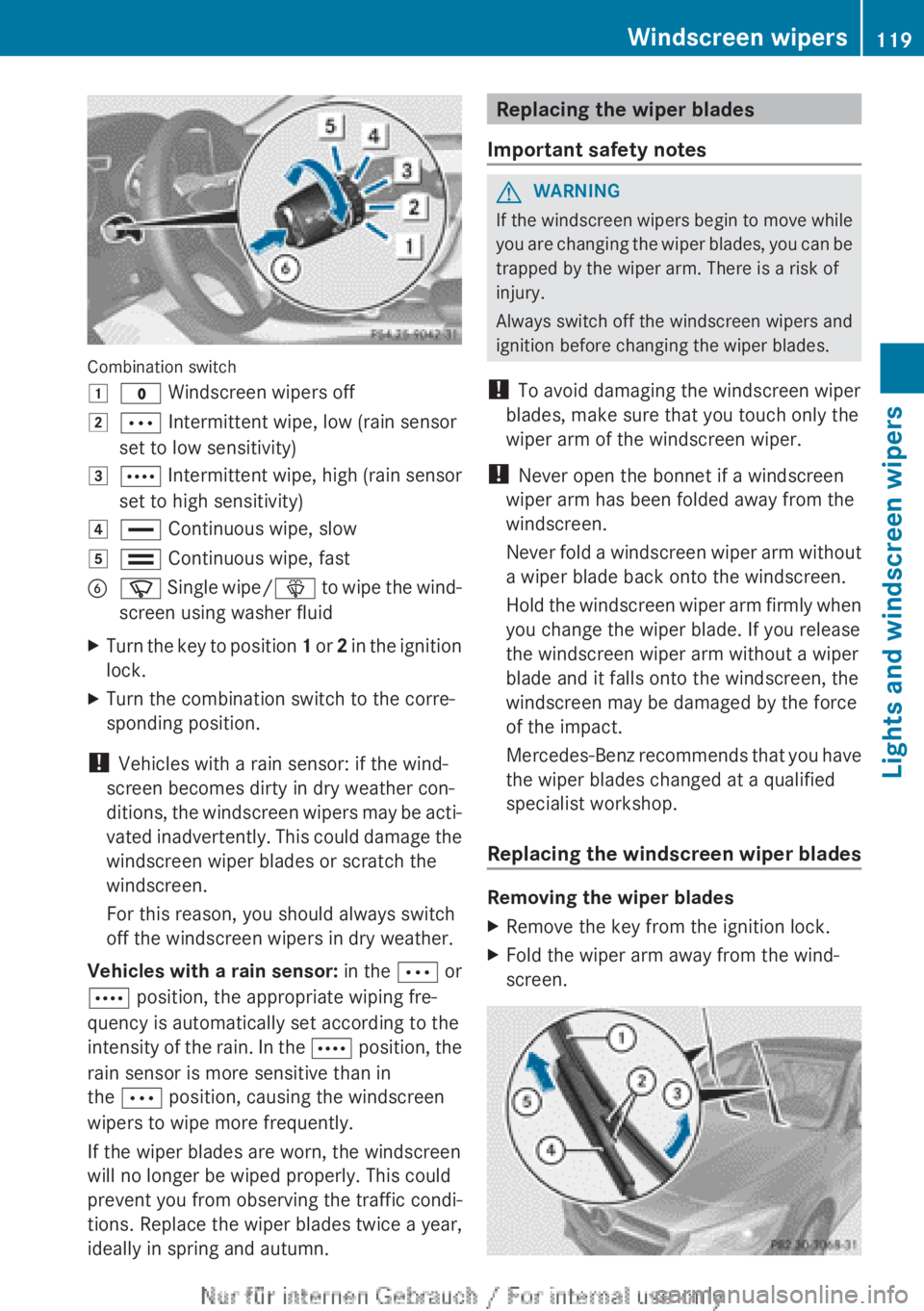
Combination switch
1$ Windscreen wipers off2Ä Intermittent wipe, low (rain sensor
set to low sensitivity)3Å Intermittent wipe, high (rain sensor
set to high sensitivity)4° Continuous wipe, slow5¯ Continuous wipe, fastBí Single wipe/ î to wipe the wind-
screen using washer fluidXTurn the key to position 1 or 2 in the ignition
lock.XTurn the combination switch to the corre-
sponding position.
! Vehicles with a rain sensor: if the wind-
screen becomes dirty in dry weather con-
ditions, the windscreen wipers may be acti-
vated inadvertently. This could damage the
windscreen wiper blades or scratch the
windscreen.
For this reason, you should always switch
off the windscreen wipers in dry weather.
Vehicles with a rain sensor: in the Ä or
Å position, the appropriate wiping fre-
quency is automatically set according to the
intensity of the rain. In the Å position, the
rain sensor is more sensitive than in
the Ä position, causing the windscreen
wipers to wipe more frequently.
If the wiper blades are worn, the windscreen
will no longer be wiped properly. This could
prevent you from observing the traffic condi-
tions. Replace the wiper blades twice a year,
ideally in spring and autumn.
Replacing the wiper blades
Important safety notesGWARNING
If the windscreen wipers begin to move while
you are changing the wiper blades, you can be
trapped by the wiper arm. There is a risk of
injury.
Always switch off the windscreen wipers and
ignition before changing the wiper blades.
! To avoid damaging the windscreen wiper
blades, make sure that you touch only the
wiper arm of the windscreen wiper.
! Never open the bonnet if a windscreen
wiper arm has been folded away from the
windscreen.
Never fold a windscreen wiper arm without
a wiper blade back onto the windscreen.
Hold the windscreen wiper arm firmly when
you change the wiper blade. If you release
the windscreen wiper arm without a wiper
blade and it falls onto the windscreen, the
windscreen may be damaged by the force
of the impact.
Mercedes-Benz recommends that you have
the wiper blades changed at a qualified
specialist workshop.
Replacing the windscreen wiper blades
Removing the wiper blades
XRemove the key from the ignition lock.XFold the wiper arm away from the wind-
screen.Windscreen wipers119Lights and windscreen wipersZ
Page 122 of 352
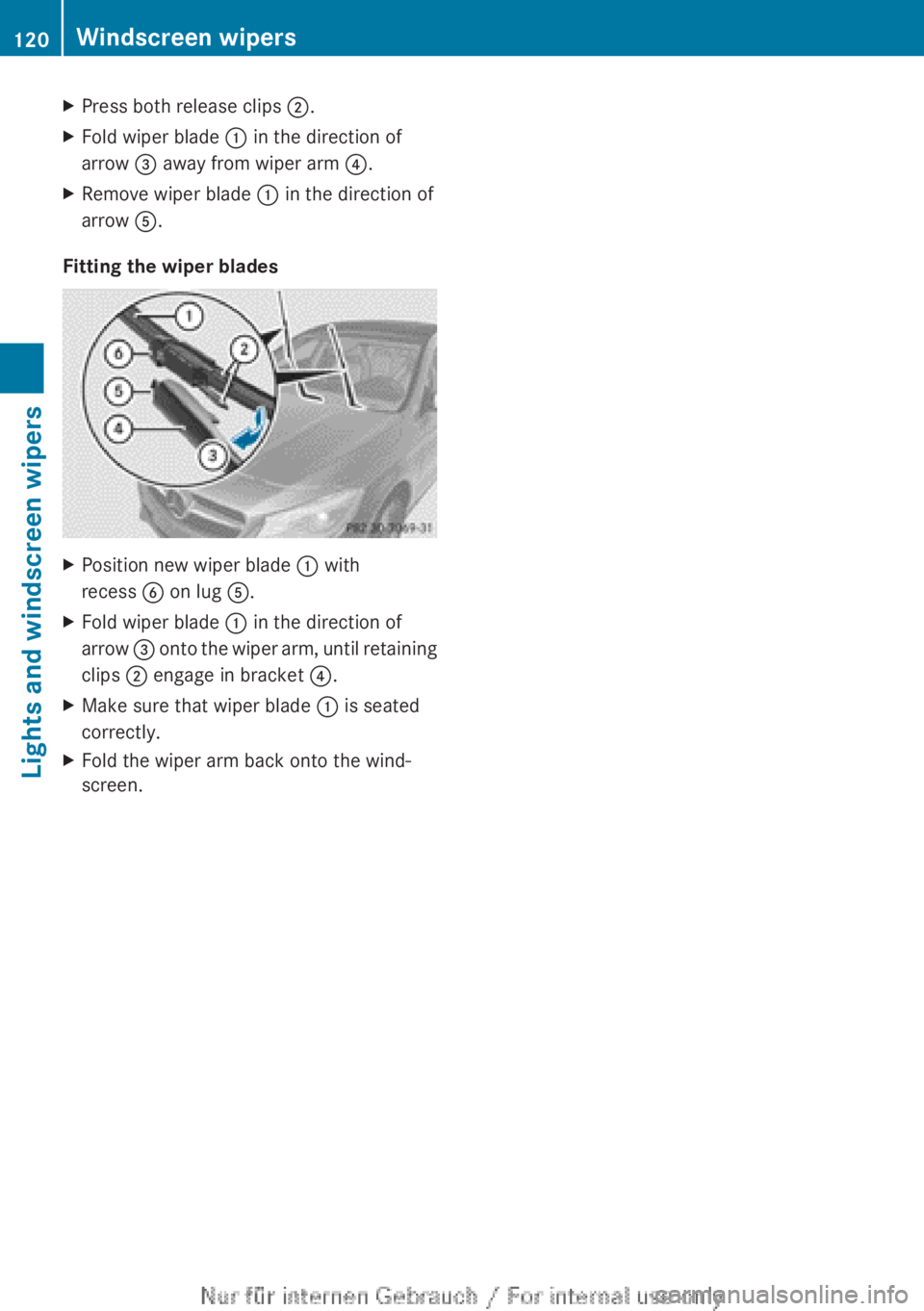
XPress both release clips ;.XFold wiper blade : in the direction of
arrow = away from wiper arm ?.XRemove wiper blade : in the direction of
arrow A.
Fitting the wiper blades
XPosition new wiper blade : with
recess B on lug A.XFold wiper blade : in the direction of
arrow = onto the wiper arm, until retaining
clips ; engage in bracket ?.XMake sure that wiper blade : is seated
correctly.XFold the wiper arm back onto the wind-
screen.120Windscreen wipersLights and windscreen wipers
Page 123 of 352
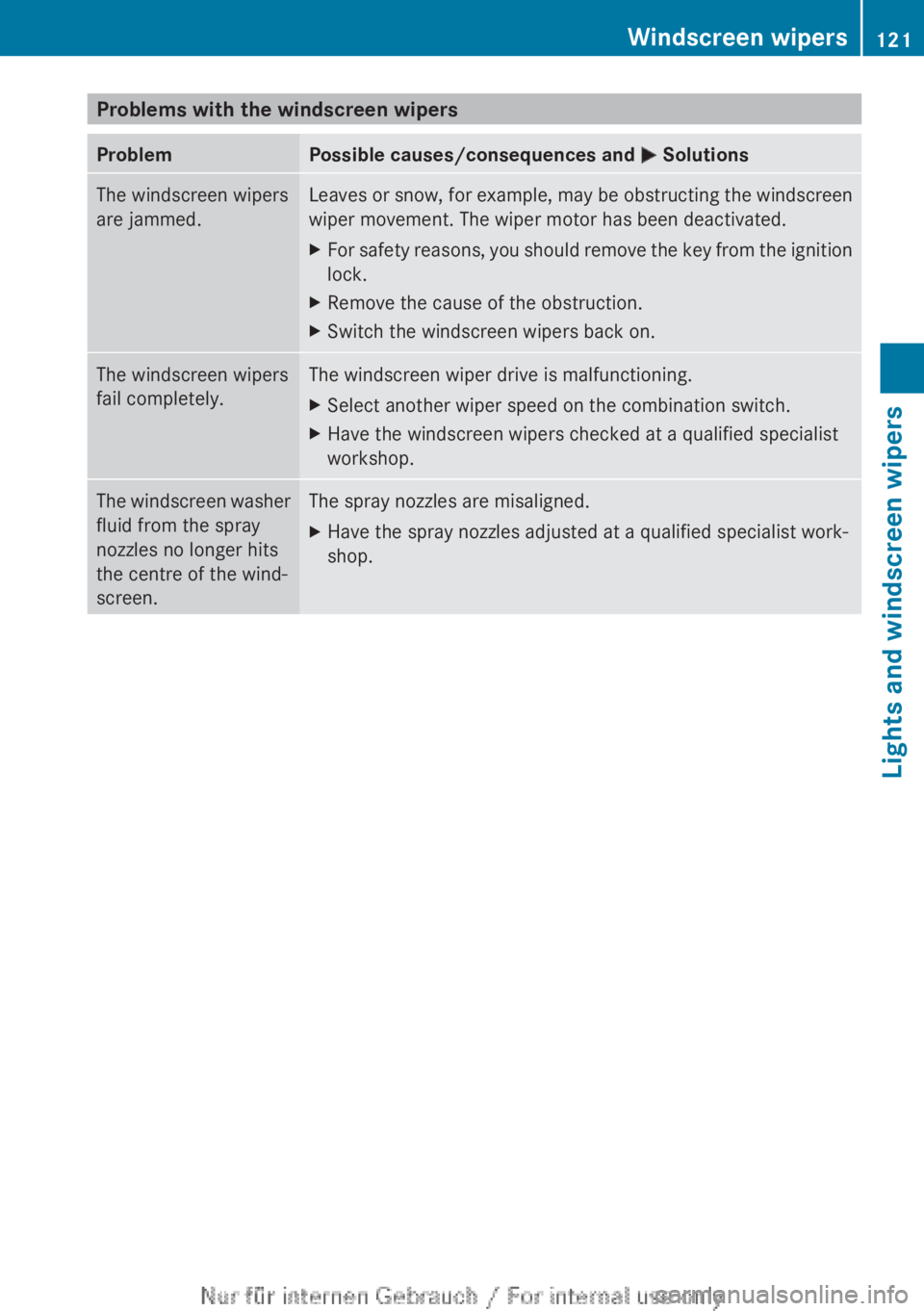
Problems with the windscreen wipersProblemPossible causes/consequences and M SolutionsThe windscreen wipers
are jammed.Leaves or snow, for example, may be obstructing the windscreen
wiper movement. The wiper motor has been deactivated.XFor safety reasons, you should remove the key from the ignition
lock.XRemove the cause of the obstruction.XSwitch the windscreen wipers back on.The windscreen wipers
fail completely.The windscreen wiper drive is malfunctioning.XSelect another wiper speed on the combination switch.XHave the windscreen wipers checked at a qualified specialist
workshop.The windscreen washer
fluid from the spray
nozzles no longer hits
the centre of the wind-
screen.The spray nozzles are misaligned.XHave the spray nozzles adjusted at a qualified specialist work-
shop.Windscreen wipers121Lights and windscreen wipersZ
Page 134 of 352
The temperature setting for the driver's
side is adopted for the front-passenger
side.
Demisting the windscreen
You can use this function to defrost the wind-
screen or to demist the inside of the wind-
screen and the side windows.
i You should only select the "Windscreen
demisting" function until the windscreen is
clear again.
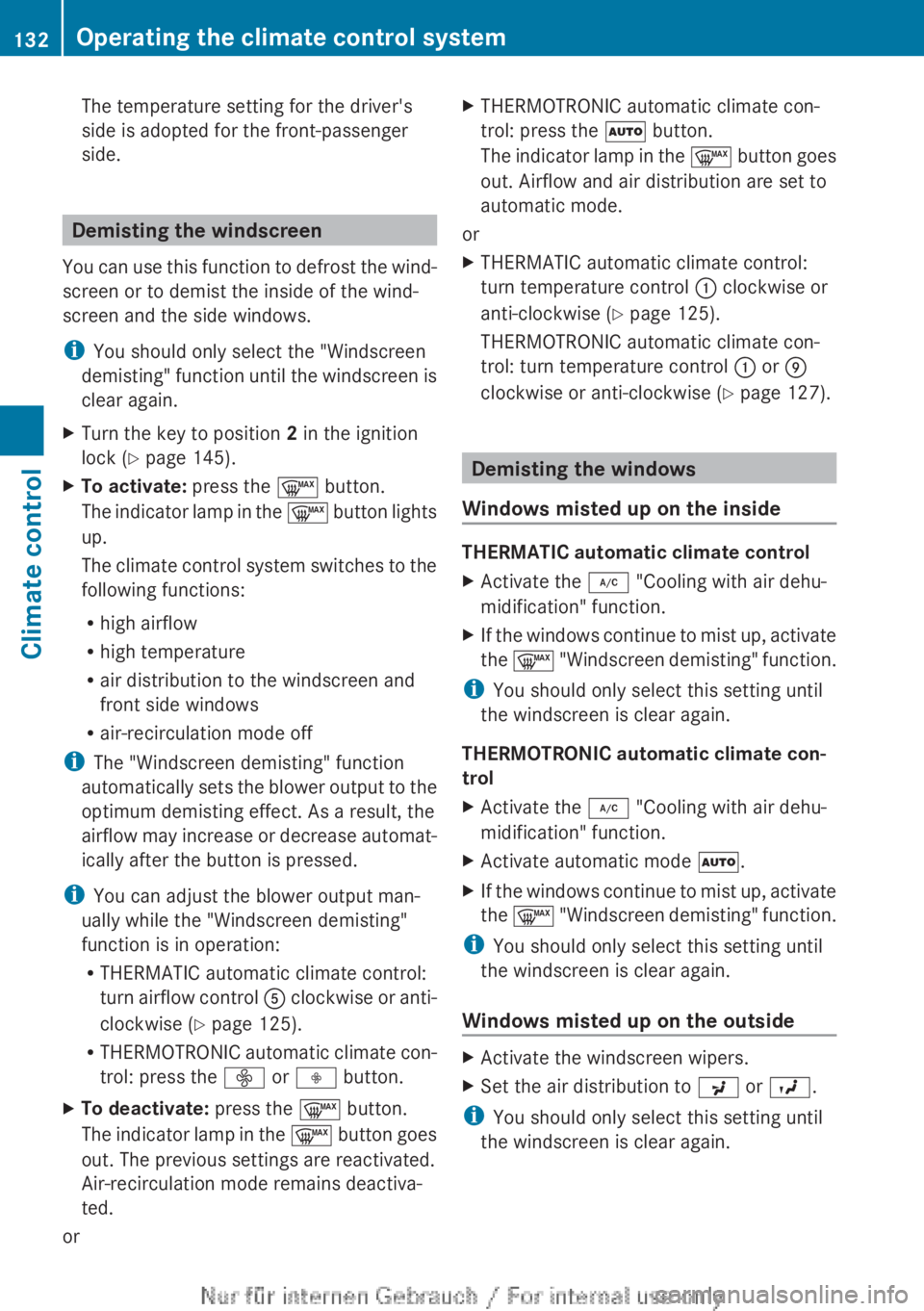
XTurn the key to position 2 in the ignition
lock ( Y page 145).XTo activate: press the ¬ button.
The indicator lamp in the ¬ button lights
up.
The climate control system switches to the
following functions:
R high airflow
R high temperature
R air distribution to the windscreen and
front side windows
R air-recirculation mode off
i The "Windscreen demisting" function
automatically sets the blower output to the
optimum demisting effect. As a result, the
airflow may increase or decrease automat-
ically after the button is pressed.
i You can adjust the blower output man-
ually while the "Windscreen demisting"
function is in operation:
R THERMATIC automatic climate control:
turn airflow control A clockwise or anti-
clockwise ( Y page 125).
R THERMOTRONIC automatic climate con-
trol: press the ó or ô button.
XTo deactivate: press the ¬ button.
The indicator lamp in the ¬ button goes
out. The previous settings are reactivated.
Air-recirculation mode remains deactiva-
ted.
or
XTHERMOTRONIC automatic climate con-
trol: press the à button.
The indicator lamp in the ¬ button goes
out. Airflow and air distribution are set to
automatic mode.
or
XTHERMATIC automatic climate control:
turn temperature control : clockwise or
anti-clockwise ( Y page 125).
THERMOTRONIC automatic climate con-
trol: turn temperature control : or E
clockwise or anti-clockwise ( Y page 127).
Demisting the windows
Windows misted up on the inside
THERMATIC automatic climate control
XActivate the ¿ "Cooling with air dehu-
midification" function.XIf the windows continue to mist up, activate
the ¬ "Windscreen demisting" function.
i
You should only select this setting until
the windscreen is clear again.
THERMOTRONIC automatic climate con-
trol
XActivate the ¿ "Cooling with air dehu-
midification" function.XActivate automatic mode Ã.XIf the windows continue to mist up, activate
the ¬ "Windscreen demisting" function.
i
You should only select this setting until
the windscreen is clear again.
Windows misted up on the outside
XActivate the windscreen wipers.XSet the air distribution to P or O .
i
You should only select this setting until
the windscreen is clear again.
132Operating the climate control systemClimate control
Page 147 of 352
GWARNING
If the parking brake has not been fully
released when driving, the parking brake can:
R overheat and cause a fire
R lose its hold function.
There is a risk of fire and an accident. Release
the parking brake fully before driving off.
! Warm up the engine quickly. Do not use
the engine's full performance until it has
reached operating temperature.
Only set the automatic transmission to the
respective drive positions when the vehicle
is stationary.
Where possible, avoid spinning the drive
wheels when pulling away on slippery
roads. Otherwise, you could damage the
drive train.
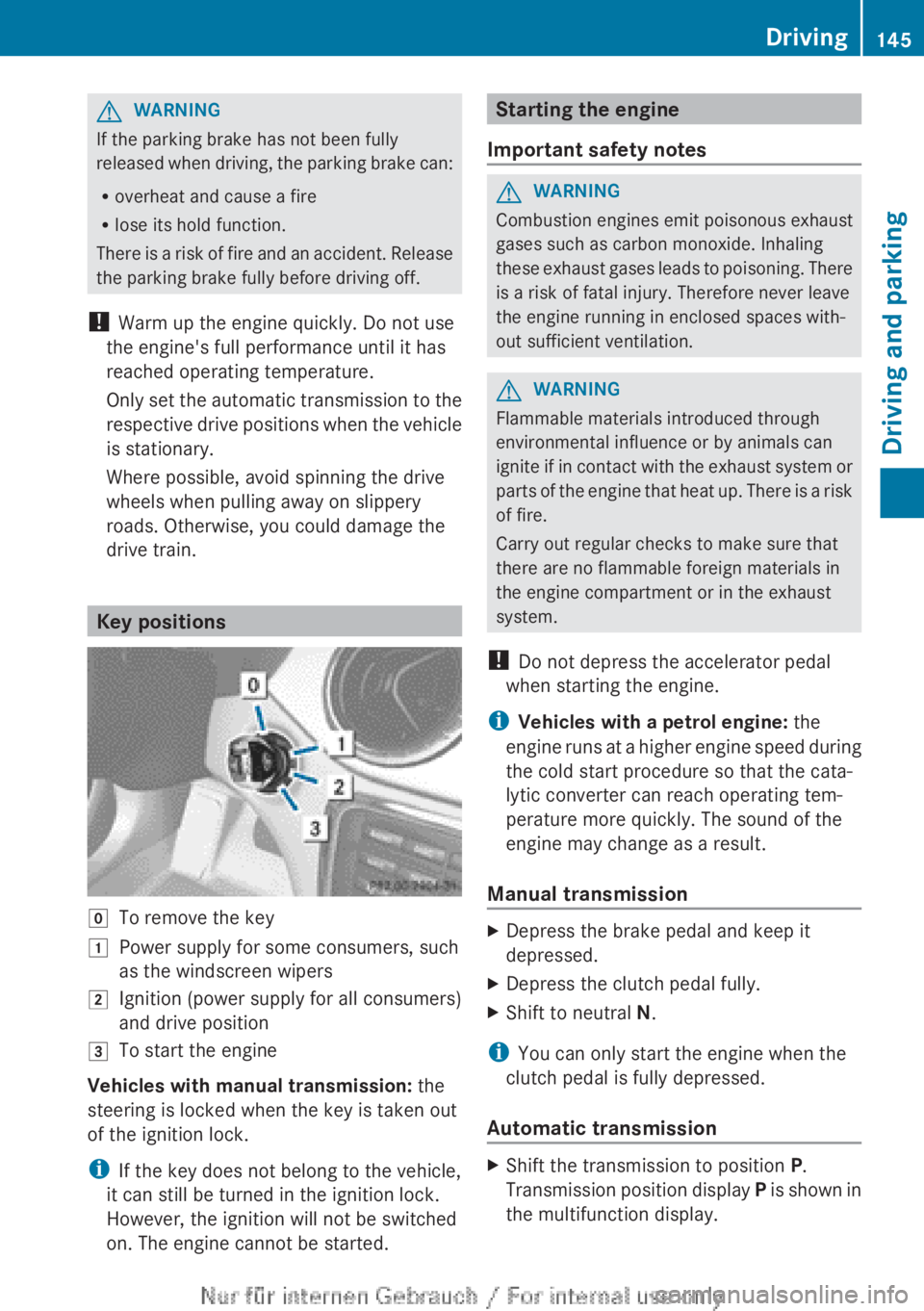
Key positions
gTo remove the key1Power supply for some consumers, such
as the windscreen wipers2Ignition (power supply for all consumers)
and drive position3To start the engine
Vehicles with manual transmission: the
steering is locked when the key is taken out
of the ignition lock.
i If the key does not belong to the vehicle,
it can still be turned in the ignition lock.
However, the ignition will not be switched
on. The engine cannot be started.
Starting the engine
Important safety notesGWARNING
Combustion engines emit poisonous exhaust
gases such as carbon monoxide. Inhaling
these exhaust gases leads to poisoning. There
is a risk of fatal injury. Therefore never leave
the engine running in enclosed spaces with-
out sufficient ventilation.
GWARNING
Flammable materials introduced through
environmental influence or by animals can
ignite if in contact with the exhaust system or
parts of the engine that heat up. There is a risk
of fire.
Carry out regular checks to make sure that
there are no flammable foreign materials in
the engine compartment or in the exhaust
system.
! Do not depress the accelerator pedal
when starting the engine.
i Vehicles with a petrol engine: the
engine runs at a higher engine speed during
the cold start procedure so that the cata-
lytic converter can reach operating tem-
perature more quickly. The sound of the
engine may change as a result.
Manual transmission
XDepress the brake pedal and keep it
depressed.XDepress the clutch pedal fully.XShift to neutral N.
i
You can only start the engine when the
clutch pedal is fully depressed.
Automatic transmission
XShift the transmission to position P.
Transmission position display P is shown in
the multifunction display.Driving145Driving and parkingZ
Page 256 of 352
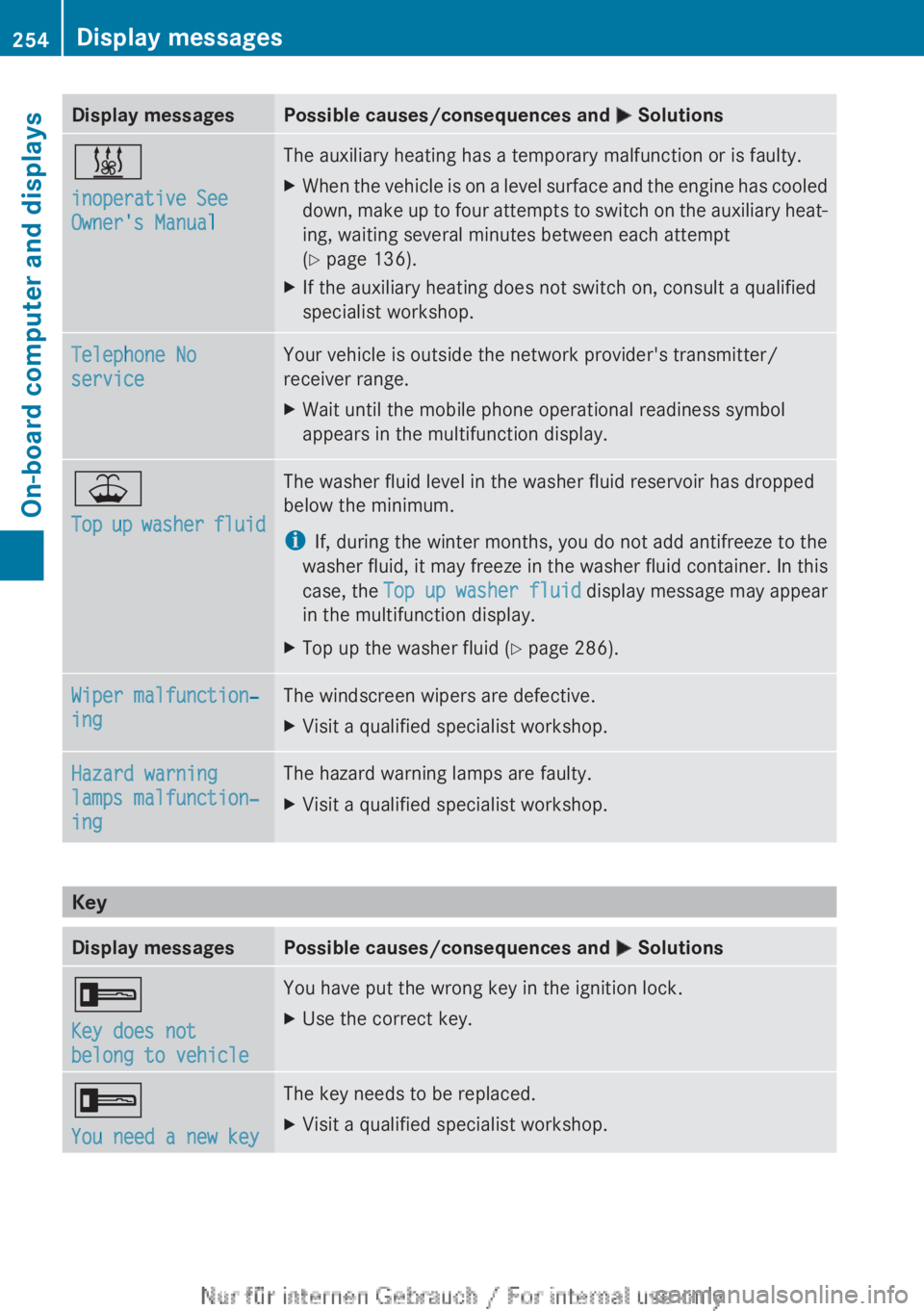
Display messagesPossible causes/consequences and M Solutions&
inoperative See
Owner's ManualThe auxiliary heating has a temporary malfunction or is faulty.XWhen the vehicle is on a level surface and the engine has cooled
down, make up to four attempts to switch on the auxiliary heat-
ing, waiting several minutes between each attempt
( Y page 136).XIf the auxiliary heating does not switch on, consult a qualified
specialist workshop.Telephone No
serviceYour vehicle is outside the network provider's transmitter/
receiver range.XWait until the mobile phone operational readiness symbol
appears in the multifunction display.¥
Top up washer fluidThe washer fluid level in the washer fluid reservoir has dropped
below the minimum.
i If, during the winter months, you do not add antifreeze to the
washer fluid, it may freeze in the washer fluid container. In this
case, the Top up washer fluid display message may appear
in the multifunction display.XTop up the washer fluid ( Y page 286).Wiper malfunction‐
ingThe windscreen wipers are defective.XVisit a qualified specialist workshop.Hazard warning
lamps malfunction‐
ingThe hazard warning lamps are faulty.XVisit a qualified specialist workshop.
Key
Display messagesPossible causes/consequences and M Solutions+
Key does not
belong to vehicleYou have put the wrong key in the ignition lock.XUse the correct key.+
You need a new keyThe key needs to be replaced.XVisit a qualified specialist workshop.254Display messagesOn-board computer and displays
Page 285 of 352
Raising the active bonnet increases the clear-
ance to hard components, such as the engine.
If the active bonnet has been triggered, it is
raised at the rear in the area around the hinge
by approximately 60 mm.
For the drive to the workshop, reset the trig-
gered active bonnet yourself. If the active
bonnet has been triggered, pedestrian pro-
tection may be limited.
ResettingGWARNING
Certain components in the engine compart-
ment could be very hot, e.g. the engine, the
radiator and parts of the exhaust system.
There is a risk of injury when accessing the
engine compartment.
As far as possible, allow the engine to cool
down and only touch the following compo-
nents.
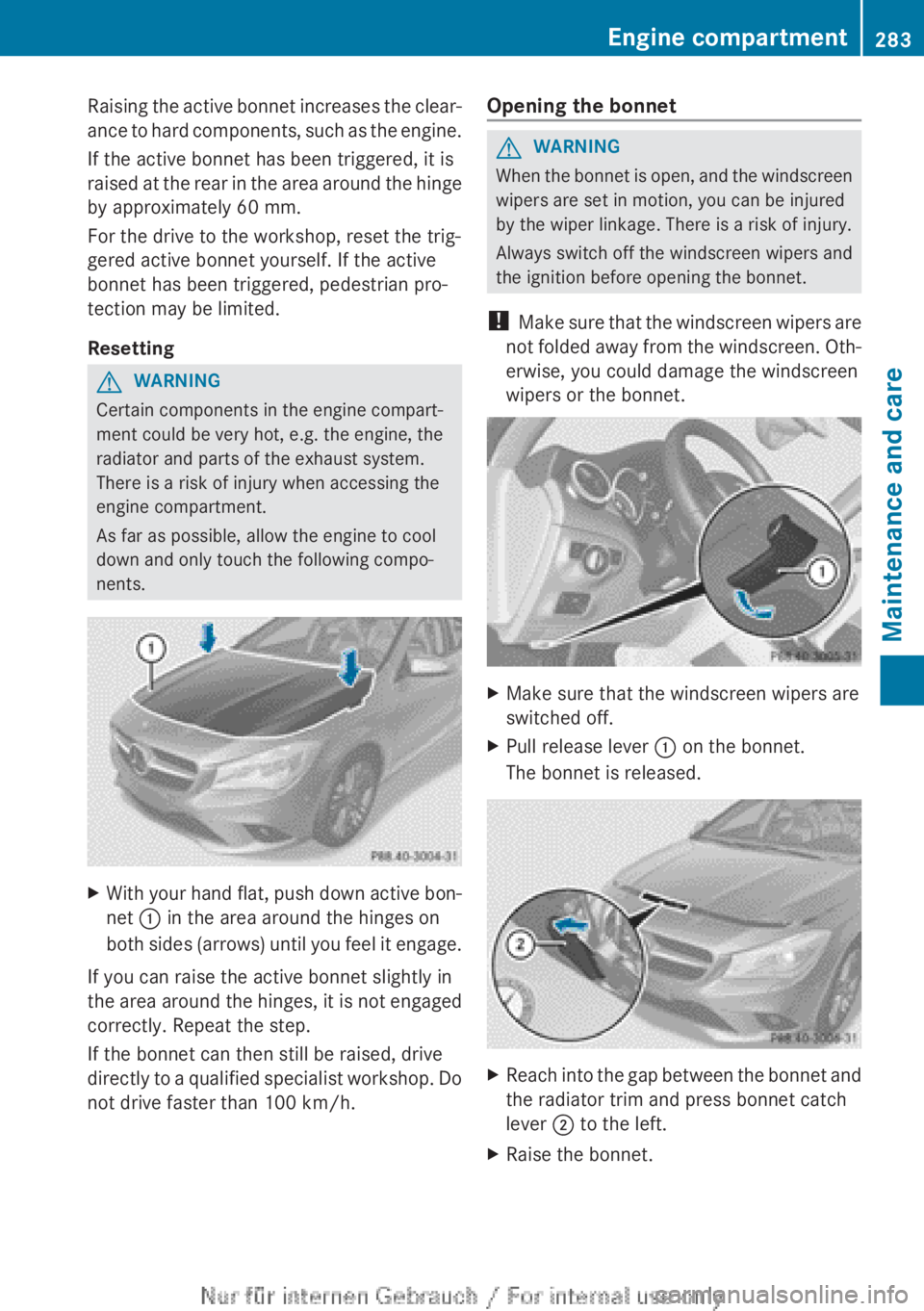
XWith your hand flat, push down active bon-
net : in the area around the hinges on
both sides (arrows) until you feel it engage.
If you can raise the active bonnet slightly in
the area around the hinges, it is not engaged
correctly. Repeat the step.
If the bonnet can then still be raised, drive
directly to a qualified specialist workshop. Do
not drive faster than 100 km/h.
Opening the bonnetGWARNING
When the bonnet is open, and the windscreen
wipers are set in motion, you can be injured
by the wiper linkage. There is a risk of injury.
Always switch off the windscreen wipers and
the ignition before opening the bonnet.
! Make sure that the windscreen wipers are
not folded away from the windscreen. Oth-
erwise, you could damage the windscreen
wipers or the bonnet.
XMake sure that the windscreen wipers are
switched off.XPull release lever : on the bonnet.
The bonnet is released.XReach into the gap between the bonnet and
the radiator trim and press bonnet catch
lever ; to the left.XRaise the bonnet.Engine compartment283Maintenance and careZ
Page 292 of 352
XRemove impurities immediately, where
possible, whilst avoiding rubbing too hard.XSoak insect remains with insect remover
and rinse off the treated areas afterwards.XSoak bird droppings with water and rinse
off the treated areas afterwards.XRemove coolant, brake fluid, tree resin,
oils, fuels and greases by rubbing gently
with a cloth soaked in petroleum ether or
lighter fluid.XUse tar remover to remove tar stains.XUse silicone remover to remove wax.
The following cannot always be completely
repaired:
R scratches
R corrosive deposits
R areas affected by corrosion
R damage caused by inadequate care
In such cases, visit a qualified specialist work-
shop.
Care and treatment of matt paintwork
! Never polish the vehicle or the light alloy
wheels. Polishing makes the paintwork
shiny.
! The following may cause the paint to
become shiny and thus reduce the matt
effect:
R Vigorous rubbing with unsuitable mate-
rials.
R Frequent use of car washes.
R Washing the vehicle in direct sunlight.
! Never use paint cleaner, buffing or pol-
ishing products, or gloss preserver, e.g.
wax. These products are only suitable for
high-gloss surfaces. Their use on vehicles
with matt finish leads to considerable sur-
face damage (shiny, spotted areas).
Always have paintwork repairs carried out
at a qualified specialist workshop.
! Do not use wash programs with a hot wax
treatment under any circumstances.
Observe these notes if your vehicle has a
clear matt finish. This will help you to avoid
damage to the paintwork due to incorrect
treatment.
These notes also apply to light-alloy wheels
with a clear matt finish.
i The vehicle should preferably be washed
by hand using a soft sponge, car shampoo
and plenty of water.
i Use only insect remover and car shampoo
from the range of recommended and
approved Mercedes-Benz care products.
Cleaning the windowsGWARNING
If the windscreen wipers are set in motion
when cleaning the windscreen or wiper
blades, you could become trapped. There is a
danger of injury.
Always switch off the windscreen wipers and
the ignition before cleaning the windscreen or
wiper blades.
! Only fold the windscreen wipers away
from the windscreen when vertical. Other-
wise, you will damage the bonnet.
! Do not use dry cloths, abrasive products,
solvents or cleaning agents containing sol-
vents to clean the inside of the windows.
Do not touch the insides of the windows
with hard objects, e.g. an ice scraper or
ring. There is otherwise a risk of damaging
the windows.
! Clean the water drainage channels of the
windscreen and the rear window at regular
intervals. Deposits such as leaves, petals
and pollen may under certain circumstan-
ces prevent water from draining away. This
can lead to corrosion damage and damage
to electronic components.
XClean the inside and outside of the win-
dows with a damp cloth and a cleaning
agent that is recommended and approved
by Mercedes-Benz.290CareMaintenance and care