2013 MERCEDES-BENZ CL CLASS tow
[x] Cancel search: towPage 60 of 496

XAdjust the seat and move the backrest to
an almost vertical position ( Y page 96).XPull the seat belt smoothly through belt
sash guide :.XWithout twisting it, guide the shoulder
section of the seat belt across the middle
of your shoulder and the lap section across
your hips.XEngage belt tongue ; in buckle =.XIf necessary, pull upwards on the shoulder
section of the seat belt to tighten the belt
across your body.
All seat belts except the driver's seat belt are
equipped with a special seat belt retractor to
securely fasten child restraint systems in the
vehicle. For further information about special
seat belt retractors, see ( Y page 61).
For more information about releasing the seat
belt with release button ?, see "Releasing
seat belts" ( Y page 58).
Releasing seat belts
XPress release button ?(Y page 57) and
guide belt tongue ; back towards belt
sash guide :.
!
Make sure that the seat belt is fully rolled
up. Otherwise, the seat belt or belt tongue
will be trapped in the door or in the seat
mechanism. This could damage the door,
the door trim panel and the seat belt.
Damaged seat belts can no longer fulfill
their protective function and must be
replaced. Visit a qualified specialist
workshop.
Belt warning for the driver and front
passenger
Regardless of whether the driver's and front-
passenger seat belts have already been
fastened, the 7 seat belt warning lamp will
light up for six seconds each time the engine
is started. It then goes out if the driver and
the front passenger have fastened their seat
belts.
If the driver's seat belt is not fastened when
the engine is started, an additional warning
tone will sound. The warning tone goes out
after approximately six seconds or once the
driver's seat belt is fastened.
If after six seconds the driver's or front-
passenger seat belt is not fastened and the
doors are closed, the 7 seat belt warning
lamp will remain lit:
R until the driver's or front passenger's seat
belt is fastened
R once the vehicle has exceeded a speed of
15 mph (25 km/h), in addition a warning
tone will sound with increasing intensity for
up to 60 seconds or until the driver's or
front-passenger seat belt is fastened.
If the driver or front passenger unfastens their
seat belt during the journey, the 7 seat
belt warning lamp lights up and the warning
tone sounds again.
The warning tone ceases after 60 seconds
even if the driver or front passenger has still
not fastened their seat belt. The 7 seat
belt warning lamp stops flashing, but remains
lit.
After the vehicle has come to a stop, the
warning tone will be reactivated and the
7 seat belt warning lamp will flash again
once the vehicle has exceeded a speed of
15 mph (25 km/h).
The 7 seat belt warning lamp will not go
out until:
R both the driver and the front passenger
have fastened their seat belts.
or
R the vehicle is stationary and a door is open.
i For more information on the 7 seat
belt warning lamp, see "Warning and
indicator lamps in the instrument cluster,
seat belt" ( Y page 389).58Occupant safetySafety
Page 61 of 496

Emergency Tensioning Devices, seat
belt force limiters
The seat belts are equipped with ETDs and
seat belt force limiters.
The ETDs tighten the seat belts in an accident,
pulling them close against the body.
The ETDs do not correct incorrect seat
positions or incorrectly fastened seat belts.
The ETDs do not pull vehicle occupants back
towards the backrest.
Seat belt force limiters, when triggered, help
to reduce the peak force exerted by the seat
belt on the vehicle occupant.
The seat belt force limiters for the front seats
are synchronized with the front air bags.
These take on a part of the deceleration force.
Thus, the force exerted on the occupant is
distributed over a greater area.
The ETDs can only be activated when:
R the ignition is switched on.
R the restraint systems are operational; see
"SRS warning lamp" ( Y page 44).
R the belt tongue is engaged in the buckle on
each of the lap-shoulder belts in the front.
R the front-passenger seat is occupied and
the belt tongue is engaged in the buckle on
the front-passenger side.
The ETDs on the seats in the rear
compartment are triggered independently of
the lock status of the seat belts.
The ETDs are triggered depending on the type
and severity of an accident:
R if, in the event of a head-on or rear-end
collision, the vehicle decelerates or
accelerates rapidly in a longitudinal
direction during the initial stages of the
impact
R if, in the event of a side impact, on the side
opposite the impact the vehicle
decelerates or accelerates rapidly in a
lateral direction
R if, in certain situations where the vehicle
overturns, the system determines that it
can provide additional protection
If the air bags are deployed, you will hear a
bang, and a small amount of powder may also
be released. Only in rare cases will the bang
affect your hearing. The powder that is
released generally does not constitute a
health hazard. The 6 SRS warning lamp
lights up.GWARNING
Pyrotechnic ETDs that were activated must be
replaced.
For your safety, when disposing of the
pyrotechnic ETDs always follow our safety
instructions. These are available at any
authorized Mercedes-Benz Center.
! If the front-passenger seat is not
occupied, do not engage the seat belt
tongue in the buckle on the front-
passenger seat. Otherwise, the Emergency
Tensioning Device could be triggered in the
event of an accident.
Automatic comfort-fit feature
The front seat belts have an automatic
comfort-install feature. The automatic
comfort-install feature reduces the retraction
force of the seat belts. This results in
increased seat belt comfort.
Children in the vehicle
Child restraint systems
Important safety notes
We recommend that all infants and children
be properly secured in an infant or child
restraint system at all times while the vehicle
is in motion.
The use of seat belts and infant and child
restraint systems is required by law in all 50
states, the District of Columbia, the U.S.
territories and all Canadian provinces.
Infants and children must always be seated in
an appropriate infant or child restraint system
recommended for the size and weight of the
Children in the vehicle59SafetyZ
Page 69 of 496
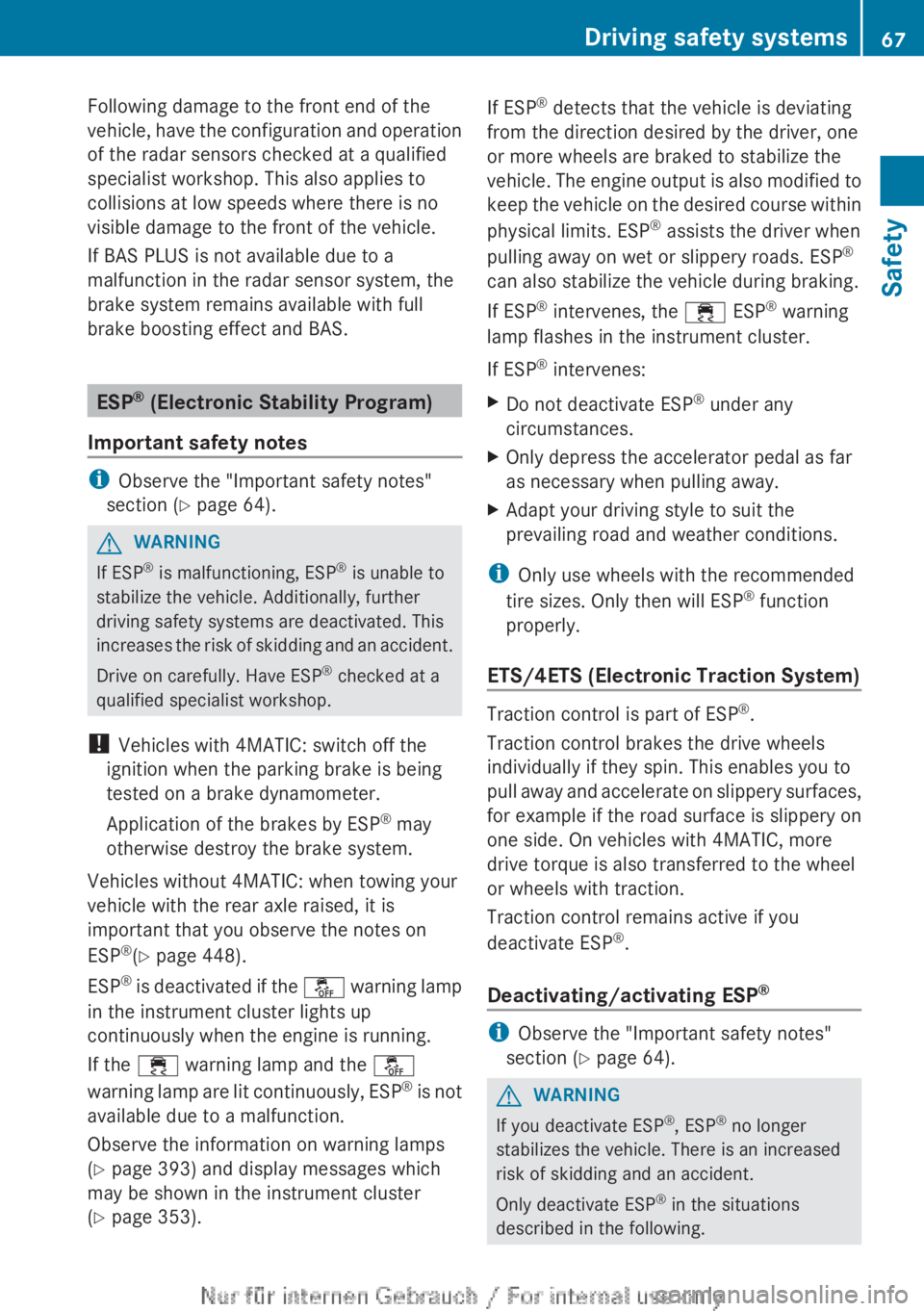
Following damage to the front end of the
vehicle, have the configuration and operation
of the radar sensors checked at a qualified
specialist workshop. This also applies to
collisions at low speeds where there is no
visible damage to the front of the vehicle.
If BAS PLUS is not available due to a
malfunction in the radar sensor system, the
brake system remains available with full
brake boosting effect and BAS.
ESP ®
(Electronic Stability Program)
Important safety notes
i Observe the "Important safety notes"
section ( Y page 64).
GWARNING
If ESP ®
is malfunctioning, ESP ®
is unable to
stabilize the vehicle. Additionally, further
driving safety systems are deactivated. This
increases the risk of skidding and an accident.
Drive on carefully. Have ESP ®
checked at a
qualified specialist workshop.
! Vehicles with 4MATIC: switch off the
ignition when the parking brake is being
tested on a brake dynamometer.
Application of the brakes by ESP ®
may
otherwise destroy the brake system.
Vehicles without 4MATIC: when towing your
vehicle with the rear axle raised, it is
important that you observe the notes on
ESP ®
(Y page 448).
ESP ®
is deactivated if the å warning lamp
in the instrument cluster lights up
continuously when the engine is running.
If the ÷ warning lamp and the å
warning lamp are lit continuously, ESP ®
is not
available due to a malfunction.
Observe the information on warning lamps
( Y page 393) and display messages which
may be shown in the instrument cluster
( Y page 353).
If ESP ®
detects that the vehicle is deviating
from the direction desired by the driver, one
or more wheels are braked to stabilize the
vehicle. The engine output is also modified to
keep the vehicle on the desired course within
physical limits. ESP ®
assists the driver when
pulling away on wet or slippery roads. ESP ®
can also stabilize the vehicle during braking.
If ESP ®
intervenes, the ÷ ESP®
warning
lamp flashes in the instrument cluster.
If ESP ®
intervenes:XDo not deactivate ESP ®
under any
circumstances.XOnly depress the accelerator pedal as far
as necessary when pulling away.XAdapt your driving style to suit the
prevailing road and weather conditions.
i Only use wheels with the recommended
tire sizes. Only then will ESP ®
function
properly.
ETS/4ETS (Electronic Traction System)
Traction control is part of ESP ®
.
Traction control brakes the drive wheels
individually if they spin. This enables you to
pull away and accelerate on slippery surfaces,
for example if the road surface is slippery on
one side. On vehicles with 4MATIC, more
drive torque is also transferred to the wheel
or wheels with traction.
Traction control remains active if you
deactivate ESP ®
.
Deactivating/activating ESP ®
i
Observe the "Important safety notes"
section ( Y page 64).
GWARNING
If you deactivate ESP ®
, ESP ®
no longer
stabilizes the vehicle. There is an increased
risk of skidding and an accident.
Only deactivate ESP ®
in the situations
described in the following.
Driving safety systems67SafetyZ
Page 84 of 496

Unlocking and opening doors from
the inside
You can open a door from inside the vehicle
even if it has been locked.
Open the door only when the traffic
conditions permit.
If the vehicle has been opened with the
SmartKey or KEYLESS-GO key, opening from
inside triggers the anti-theft alarm system.
Switch off the alarm ( Y page 70).XPull door handle ;.
If the door is locked, locking knob : pops
up. The door is unlocked and can be
opened.
i When a door is opened, the side window
on that side opens slightly. When the door
is closed, the side window closes again.
! The side windows will not open/close if
the battery is discharged or if the side
windows have iced up. It will then not be
possible to close the door. Do not attempt
to force the door closed. You could
otherwise damage the door or the side
window.
Centrally locking and unlocking the
vehicle from the inside
You can centrally lock or unlock the vehicle
from the inside. This feature may be useful if,
for example, you wish to unlock the front-
passenger door from the inside or lock the
vehicle before you pull away.
The locking or unlocking buttons of the
central locking do not lock or unlock the fuel
filler flap.XTo lock: press button ;.
The vehicle locks when all front-passenger
doors are closed.XTo unlock: press button :.
You can open a locked door from inside the
vehicle. Open the door only when the traffic
conditions permit.
If the vehicle has been locked with the central
locking button:
R and the SmartKey is restored to the factory
settings, the entire vehicle is unlocked if a
door is opened from inside the vehicle.
R and the SmartKey is set to individual
settings, only the door that is opened from
inside the vehicle is unlocked.
If the vehicle has been locked centrally with
the SmartKey or with KEYLESS-GO, it does
not unlock if you use the unlocking button of
the central locking.
Automatic locking feature
The vehicle locks automatically when the
ignition is switched on and the wheels of the
vehicle are moving at a speed of more than
9 mph (15 km/h). You may therefore lock
yourself out if the vehicle is being pushed,
towed, or located on a test rig.
You can switch off the automatic locking
function via COMAND .
82DoorsOpening and closing
Page 116 of 496

You can assign the following predefined
functions to the h programmable button:
R ECO : you can activate or deactivate the ECO
start/stop function.
R Massage, Driver's Seat : you can switch
the massage function for the driver's seat
on and off.
R Massage, Front Passenger's Seat :
you can switch the massage function for
the front-passenger seat on and off.
R Massage, Driver's and Front
Passenger's Seat : you can switch the
massage function for the driver's and front-
passenger seats on and off.
R Display OFF : you can switch the
COMAND display off or on.
R Tow-away Alarm : you can arm or
deactivate the tow-away alarm.
R Interior Motion Sensor : you can arm or
deactivate the interior motion sensor.
R Tow-away Alarm and Interior Motion
Sensor : you can arm or deactivate the tow-
away alarm and the interior motion sensor.
R Repeat Navigation Command : you can
have the most recent recommendation by
the navigation system repeated.XTo assign the programmable button:
select Vehicle by sliding VÆ and turning
cVd the COMAND controller and press
W to confirm.XSelect System and press W to confirm.XSelect Favorites Button and press W to
confirm.
The list of predefined functions appears.
The # dot in front of the list entry indicates
the current setting.XTo change the setting: turn cVd the
COMAND controller and select the desired
function.XTo store the setting and exit the menu:
press W the COMAND controller.Telephone keypad:Telephone keypad;Folding cover114At a glanceCOMAND
Page 118 of 496
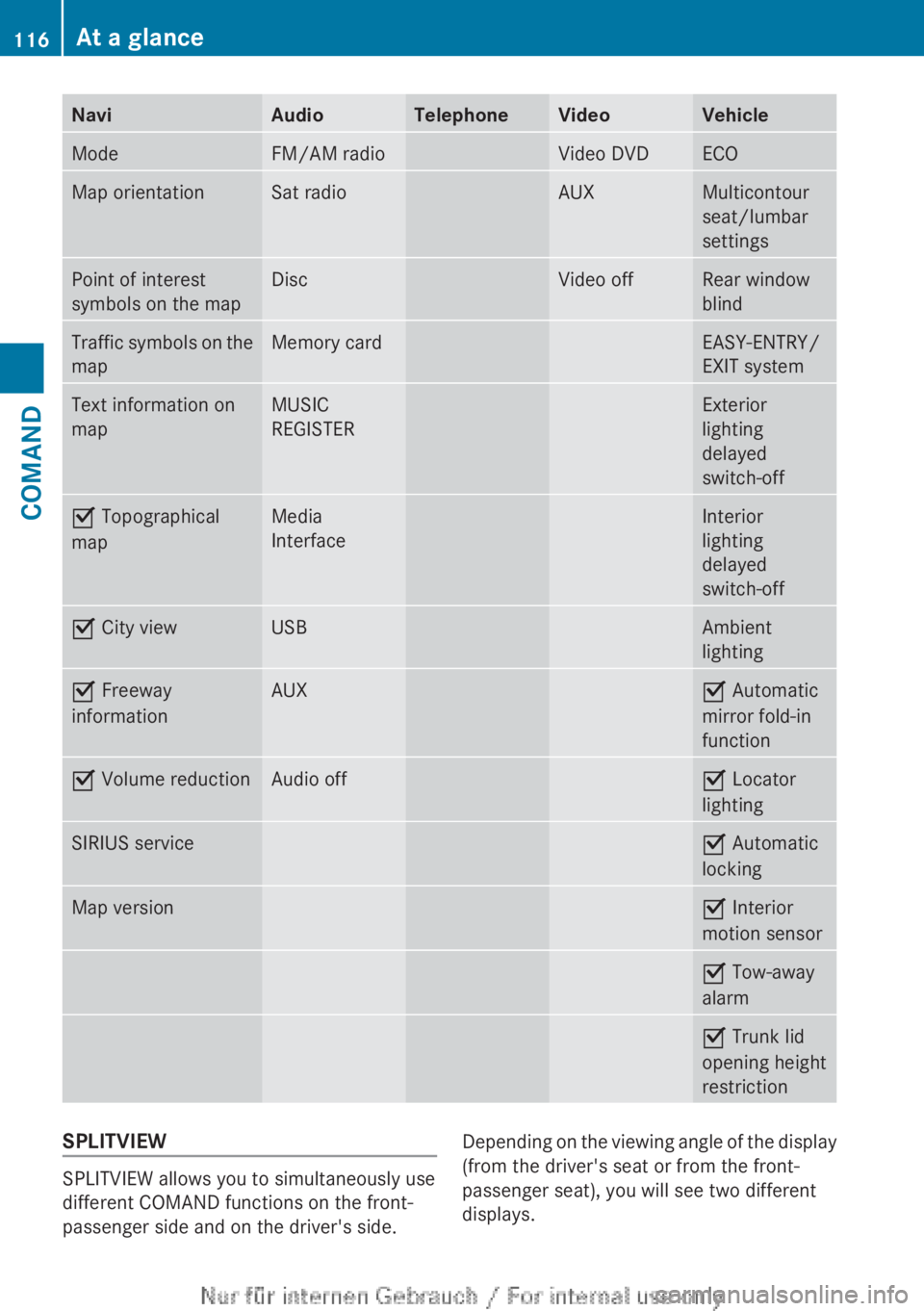
NaviAudioTelephoneVideoVehicleModeFM/AM radioVideo DVDECOMap orientationSat radioAUXMulticontour
seat/lumbar
settingsPoint of interest
symbols on the mapDiscVideo offRear window
blindTraffic symbols on the
mapMemory cardEASY-ENTRY/
EXIT systemText information on
mapMUSIC
REGISTERExterior
lighting
delayed
switch-offO Topographical
mapMedia
InterfaceInterior
lighting
delayed
switch-offO City viewUSBAmbient
lightingO Freeway
informationAUXO Automatic
mirror fold-in
functionO Volume reductionAudio offO Locator
lightingSIRIUS serviceO Automatic
lockingMap versionO Interior
motion sensorO Tow-away
alarmO Trunk lid
opening height
restrictionSPLITVIEW
SPLITVIEW allows you to simultaneously use
different COMAND functions on the front-
passenger side and on the driver's side.
Depending on the viewing angle of the display
(from the driver's seat or from the front-
passenger seat), you will see two different
displays.116At a glanceCOMAND
Page 125 of 496

You can enter the characters using either the
character bar or the number keypad. In the
selection list, you select an entry to copy it to
the address entry menu.
Option 1: city list with character barXCall up the city list with character bar
( Y page 140).
The alphabetically sorted city list shows the
first available entries.
Entering characters using the character
bar
XSelect N by turning COMAND controller
cVd and confirm with W.:N character entered by user;ANTICOKE characters automatically
added by COMAND=List entry that most closely resembles the
current entry by the user?To switch to the selection listATo delete an entryBCharacters not currently availableCCharacters currently availableDCurrently selected characterECharacter barFTo cancel an entryGList
The list G shows all available town names
beginning with N. The list entry that is best
suited to previous user entries is always
highlighted in the first position =,
NANTICOKE in the example.
All characters that have been entered are
displayed in black, the letter N in the
example :. The letters that are added
automatically by COMAND are displayed in
gray ;, ANTICOKE in the example.
Character bar E shows the letters still
available for selection in black C. These can
be selected; in the example, the letter O is
highlighted D. Which characters remain
available depends on the characters already
entered by the user and on the data stored in
the digital map. Characters that are no longer
available are shown in gray B.
XSelect E, W , space, Y in order and confirm
each with W.
Entering characters using the number
keypad
XPress the telephone keypad's number key
p twice in quick succession, to enter
the letter N.
The character appears at the bottom of the
display when the key is pressed. The first
available letter is highlighted.At a glance123COMANDZ
Page 182 of 496

Problems with the navigation systemProblemPossible causes/consequences and M SolutionsCOMAND is unable to
continue route
guidance after the
journey has been
interrupted.Route guidance is canceled if you interrupt the journey for more
than two hours.
"Interrupting the journey" refers to stopping the vehicle and
switching off COMAND. "Continuing route guidance" refers to
switching COMAND back on and driving on.XContinue route guidance ( Y page 157).
COMAND determines the vehicle's position. Depending on the
driving situation, this may take some time.
Route guidance may be restricted during the determination of
the vehicle's location.
When positioning is complete, route guidance is resumed with
navigation announcements and route guidance displays.COMAND is unable to
determine the vehicle's
position.COMAND has to redetermine the position of the vehicle if the
vehicle has been transported (e.g. by ferry, by motorail or after
towing).XStart the vehicle and pull away.
COMAND determines the vehicle's position. Depending on the
driving situation, this may take some time.
Route guidance may be restricted during the determination of
the vehicle's location.
When positioning is complete, route guidance is resumed with
navigation announcements and route guidance displays.The Navigation
function
unavailable message
appears.COMAND has an integrated hard drive on which the digital map is
stored.
To protect the hard drive from damage, COMAND switches it off
at very high temperatures. The navigation system will then be
temporarily unavailable.XLet the vehicle and COMAND cool down.XTo hide the message: switch COMAND off and then on again.If an area of the hard disk has a malfunction, COMAND can no
longer access the map data in this area, for example when
calculating a route.XTo hide the message: switch COMAND off and then on again.
The navigation system will be operational again until it has to
access the faulty area of the hard drive once more. The message
will then reappear.XConsult an authorized Mercedes-Benz Center.180NavigationCOMAND