Page 183 of 481
The power point can switch to a fault mode when it is overloaded,
overheated, or shorted. Unplug your device and turn the ignition off then
on for overloading and shorting conditions. Let the system cool off, then
turn the ignition off then on for an overheating condition.
The power point can provide power whenever the ignition is on and the
indicator light is on. The indicator light is located in the top left corner
of the power point.
When the indicator light is:
•on — power point is ready to supply power
•off — power point power supply is off; ignition is not on
•blinking — power point is in fault mode
Auxiliary Power Points183
2013 Navigator(nav)
Owners Guide gf, 1st Printing
USA(fus)
Page 269 of 481
Fuse/Relay
LocationFuse Amp
RatingProtected Circuits
32 40A** Blower motor relay
33 40A** 110 volt AC power point
34 30A** Auxiliary blower motor
35 30A** Powertrain control module relay
36 30A** Power liftgate
37 — Trailer tow left hand stop/turn
relay
38 — Trailer tow right hand stop/turn
relay
39 — Backup lamps relay
40 — Electronic fan 2 relay
41 10A* Powertrain control module
keep-alive power
42 — Not used
43 5A* Brake on/off switch
44 20A* Fuel pump relay
45 25A* Trailer tow stop/turn lamps relay
46 — Not used
47 — Not used
48 30A** Rear air suspension module
49 — Not used
50 30A** Front wiper motor relay
51 40A** Rear window defroster/heated
mirror relay
52 10A* Anti-lock brake system run/start
feed
53 10A* Rear air suspension module
54 — Not used
55 5A* Fuel pump relay coil run/start
feed
56 30A* Passenger compartment fuse
panel run/start feed
Fuses269
2013 Navigator(nav)
Owners Guide gf, 1st Printing
USA(fus)
Page 270 of 481
Fuse/Relay
LocationFuse Amp
RatingProtected Circuits
57 10A* Blower motor relay coil
58 15A* Trailer tow backup lamps
59 15A* Heated mirrors
60 — Not used
61 — Fuel pump diode
62 — Left high intensity discharge
headlamp relay
63 25A** Electronic fan
64 30A** Moonroof
65 20A** Auxiliary power point
(instrument panel)
66 20A** Auxiliary power point (rear of
center console)
67 40A** Front row climate controlled
seats
68 60A** Anti-lock brake system valves
69 60A** Anti-lock brake system pump
70 30A** Third row power fold seat
71 20A** Auxiliary power point/cigar
lighter
72 20A** Auxiliary power point (right rear
quarter panel)
73 — Not used
74 30A** Driver power seat
75 20A* Vehicle power 1 – powertrain
control module
76 20A* Vehicle power 2 – powertrain
control module
77 15A* Vehicle power4–ignition coils
78 — Not used
79 20A* Vehicle power 3 – powertrain
control module
270Fuses
2013 Navigator(nav)
Owners Guide gf, 1st Printing
USA(fus)
Page 274 of 481
Fuse/Relay
LocationFuse Amp
RatingProtective Circuits
38 20A Subwoofer, THX amplifier
39 20A Radio
40 20A THX amplifier
41 15A Power windows, Power vents,
Power moonroof, Auto dimming
rear view mirror, 110 volt AC
power point
42 10A Not used (spare)
43 10A Rear wiper logic, Rain sensor
44 10A Trailer tow battery charge relay
coil
45 5A Front wiper logic
46 7.5A Climate control, Auxiliary relay
control
47 30A Circuit
BreakerPower windows, Moonroof
48 — Delayed accessory relay
274Fuses
2013 Navigator(nav)
Owners Guide gf, 1st Printing
USA(fus)
Page 276 of 481
Working with the Engine Off
1. Set the parking brake and shift to P (Park).
2. Turn off the engine and remove the key (if equipped).
3. Block the wheels.
Working with the Engine On
WARNING:To reduce the risk of vehicle damage and/or personal
burn injuries, do not start your engine with the air cleaner
removed and do not remove it while the engine is running.
1. Set the parking brake and shift to P (Park).
2. Block the wheels.
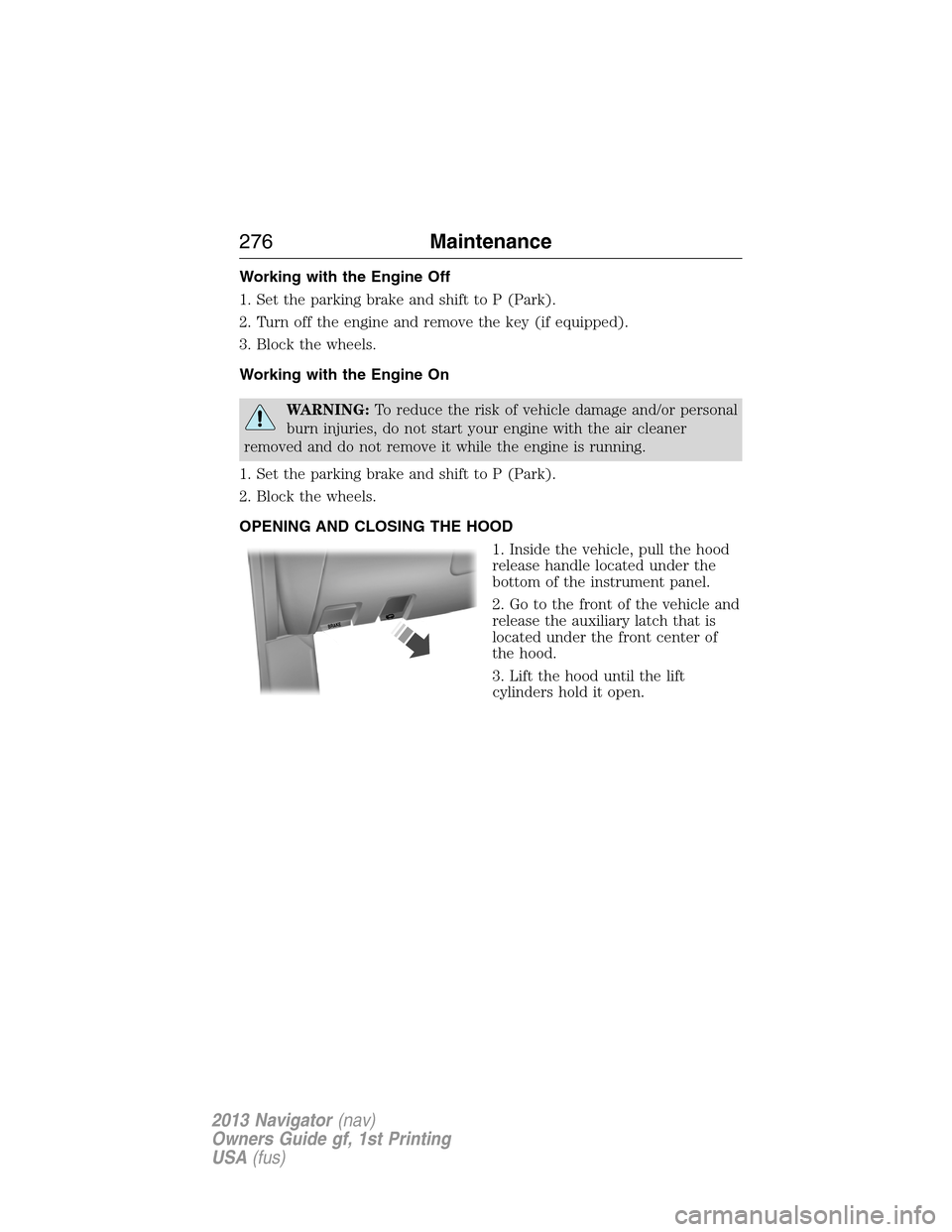
OPENING AND CLOSING THE HOOD
1. Inside the vehicle, pull the hood
release handle located under the
bottom of the instrument panel.
2. Go to the front of the vehicle and
release the auxiliary latch that is
located under the front center of
the hood.
3. Lift the hood until the lift
cylinders hold it open.
B
R
A
K
E
276Maintenance
2013 Navigator(nav)
Owners Guide gf, 1st Printing
USA(fus)
Page 340 of 481

TECHNICAL SPECIFICATIONS
Item Capacity Ford part nameFord part number / Ford
specification
Brake fluidBetween MIN
and MAX on
reservoirMotorcraft�High Performance
DOT 3 Motor Vehicle Brake
FluidPM-1-C /
WSS-M6C62-A or
WSS-M6C65-A1
Hinges, latches, striker
plates and rotors, seat
tracks, fuel filler door
hinge and spring—Multi-Purpose Grease
(Lithium grease)XG-4 or XL-5 or
equivalent /
ESB-M1C93-B
Lock cylinders —Motorcraft�Penetrating and
Lock LubricantXL-1 /
None
Engine coolant (Base
radiator without aux rear
heat)
1
16.4 quarts
(15.5L)
Motorcraft�Orange
Antifreeze/Coolant Prediluted•VC-3DIL-B (US)
•CVC-3DIL-B (Canada) /
WSS-M97B44-D2 Engine coolant (Heavy
duty trailer tow radiator
without aux rear heat)
1
16.9 quarts
(16.0L)
Engine coolant (Base
radiator with aux rear
heat)
1
19.0 quarts
(18.0L)
Engine coolant (Heavy
duty trailer tow radiator
with aux rear heat)
1
19.5 quarts
(18.5L)
340Capacities and Specifications
2013 Navigator(nav)
Owners Guide gf, 1st Printing
USA(fus)
Page 371 of 481

USING VOICE RECOGNITION
This system helps you control many features using voice commands. This
allows you to keep your hands on the wheel and focus on what is in
front of you.
Initiating a Voice Session
Push the voice icon; a tone sounds and Listening appears in the
display. Say any of the following:
Say: If you want to:
“Phone” Make calls.
“USB” Access the device connected to your USB
port.
“Bluetooth Audio” Stream audio from your phone.
“Line in” Access the device connected to the auxiliary
input jack.
“Cancel” Cancel the requested action.
“SYNC” Return to the main menu.
“Voice settings” Adjust the level of voice interaction and
feedback.
“Vehicle Health Report” Run a vehicle health report.
*
“Services” Access the SYNC Services portal.*
“Mobile apps” Access mobile applications.*
“Help” Hear a list of voice commands available in the
current mode.
*If equipped, U.S. only.
System Interaction and Feedback
The system provides feedback through audible tones, prompts, questions
and spoken confirmations depending on the situation and the chosen
level of interaction (voice settings). You can customize the voice
recognition system to provide more or less instruction and feedback.
The default setting is to a higher level of interaction in order to help you
learn to use the system. You can change these settings at any time.
SYNC�371
2013 Navigator(nav)
Owners Guide gf, 1st Printing
USA(fus)
Page 395 of 481

Note:The AppLink feature is not available if your vehicle is equipped
with the MyFord Touch�or MyLincoln Touch™ system.
Depending on your display type, you can access AppLink from the media
menu, the phone menu, or by using voice commands. Once an app is
running through AppLink, you can control main features of the app
through voice commands and steering wheel controls.
To Access Using the Phone Menu
1. Press the Phone button.
2. Browse to Mobile Applications and press OK.
3. Browse to your desired app and press OK.
4. Once an app is running through SYNC, you can access an app’s menu
by pressing the MENU button to first access the SYNC menu.
5. Scroll until “ Menu” is displayed (i.e., Pandora Menu),
then press OK. From here, you can access an application’s features,
such as Thumbs up, Thumbs down, etc. For more information, please
visit www.SYNCMyRide.com.
To Access Using the Media Menu
1. Press the AUX button to access the SYNC menu.
2. Press the Menu button to access the SYNC Media menu.
3. Browse to Mobile Applications and press OK.
4. Browse to your desired app and press OK.
5. Once an app is running through SYNC, you can access an app’s menu
by pressing the MENU button to first access the SYNC menu.
6. Scroll until “ Menu” is displayed (i.e., Pandora Menu),
then press OK. From here, you can access an application’s features,
such as Thumbs up, Thumbs down, etc. For more information, please
visit www.SYNCMyRide.com.
To Access Using the Navigation Screen (If Equipped)
1. Press the Phone button.
2. Press the SYNC Apps tab.
3. Press Mobile Apps.
4. Select the app to start it.
To Access Using Voice Commands
1. Press the voice icon.
2. When prompted, say “Mobile Apps”.
3. Say the name of the application after the tone.
4. The app should start. While an app is running through SYNC, you can
press the voice button and speak commands specific to the app, such
as “Play Station Quickmix”. Say “Help” to discover available voice
commands.
SYNC�395
2013 Navigator(nav)
Owners Guide gf, 1st Printing
USA(fus)