Page 78 of 481
Disarming the Alarm
To disarm the alarm, do any of the following:
•Press the power door unlock button within the 20-second pre-armed
mode.
•Press the unlock button on the remote control.
•Unlock the doors with the keyless entry pad.
•Turn the ignition on with a valid key.
•Press the panic button on the remote control. The alarm system will
still be armed, but this shuts off the horn and turn lamps when the
alarm is sounding.
Note:If the driver’s door is unlocked with a key, a chime will sound
when you open the door. You will have 12 seconds to disarm the alarm
using any of the actions above, otherwise the alarm will trigger.
78Security
2013 Navigator(nav)
Owners Guide gf, 1st Printing
USA(fus)
Page 81 of 481
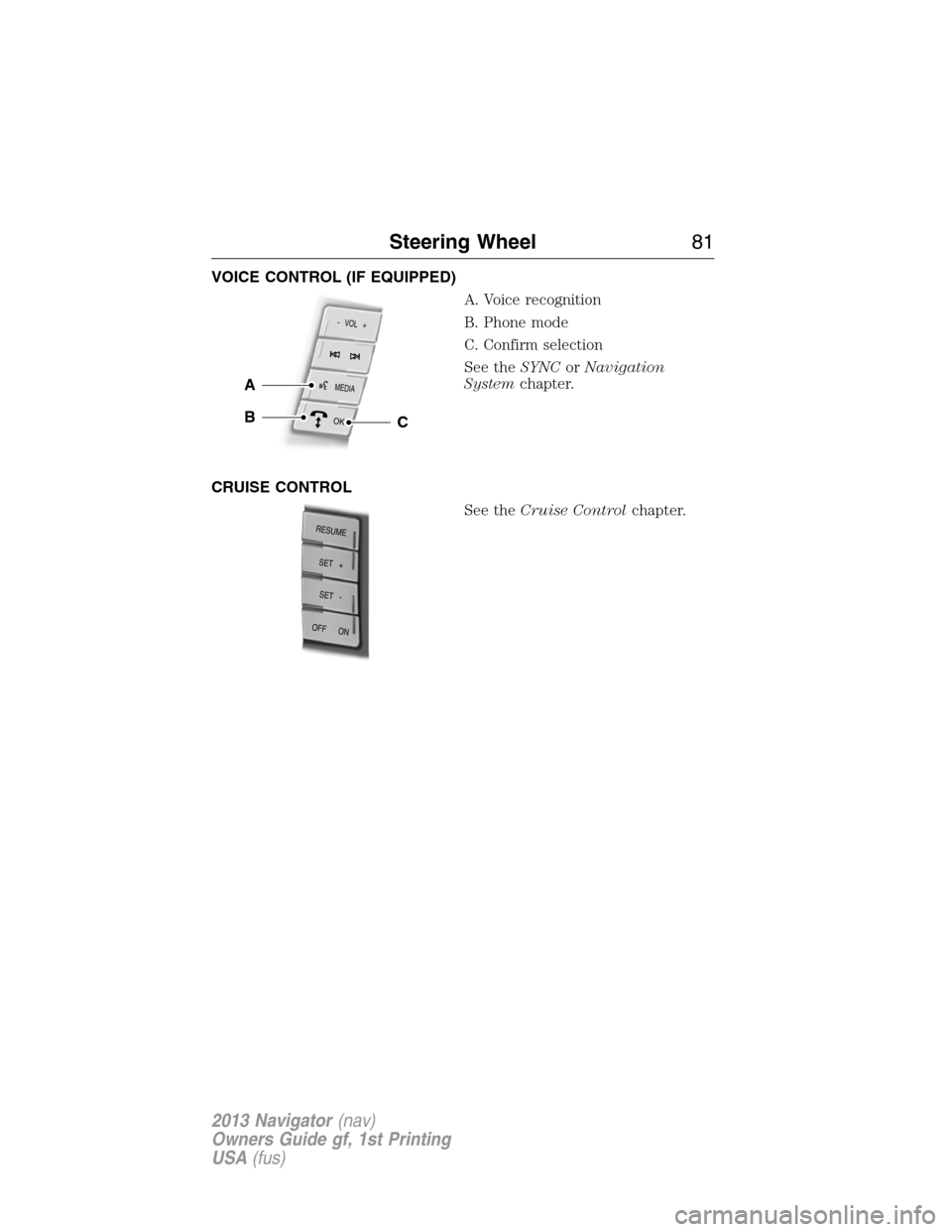
VOICE CONTROL (IF EQUIPPED)
A. Voice recognition
B. Phone mode
C. Confirm selection
See theSYNCorNavigation
Systemchapter.
CRUISE CONTROL
See theCruise Controlchapter.
MEDIA
- VOL +
OK
A
BC
RESUME
S
E
T
+
OFF ON
SET -
Steering Wheel81
2013 Navigator(nav)
Owners Guide gf, 1st Printing
USA(fus)
Page 102 of 481

Service Engine Soon
Theservice engine soonindicator light illuminates when the
ignition is first turned to the on position to check the bulb and
to indicate whether the vehicle is ready for
Inspection/Maintenance (I/M) testing. Normally, the “service engine soon”
light will stay on until the engine is cranked, then turn itself off if no
malfunctions are present. However, if after 15 seconds the “service
engine soon” light blinks eight times, it means that the vehicle is not
ready for I/M testing. See theReadiness for inspection/maintenance
(I/M) testingin theFuel and Refuelingchapter.
Solid illumination after the engine is started indicates the on-board
diagnostics system (OBD-II) has detected a malfunction. Refer to
On-board diagnostics (OBD-II)in theFuel and Refuelingchapter. If
the light is blinking, engine misfire is occurring which could damage your
catalytic converter. Drive in a moderate fashion (avoid heavy acceleration
and deceleration) and have your vehicle serviced immediately by your
authorized dealer.
WARNING:Under engine misfire conditions, excessive exhaust
temperatures could damage the catalytic converter, the fuel
system, interior floor coverings or other vehicle components, possibly
causing a fire.
Stability Control System
Displays when the AdvanceTrac�/Traction control is active. If
the light remains on, have the system serviced immediately.
Stability Control System Off
Illuminates when AdvanceTrac�/Traction control has been
disabled by the driver.
Transmission Tow/Haul
Illuminates when the Tow/Haul feature has been activated.
Refer to theTransmissionchapter for transmission function
and operation. If the light flashes steadily, have the system
serviced immediately, damage to the transmission could occur.
102Instrument Cluster
2013 Navigator(nav)
Owners Guide gf, 1st Printing
USA(fus)
Page 105 of 481

INFO
MPG (L/km)
TBC GAIN = XX.X (if equipped)
TIMER
•TRIP A/B: Registers the distance of individual journeys. Press and
release INFO button until the A or B trip appears in the display (this
represents the trip mode). Press the RESET button to reset. Refer to
UNITSlater in this section to switch the display from metric to
English.
•MYKEY MILES (km) (if programmed): For more information, refer to
theMyKey�chapter.
•MILES (km) TO E: This displays an estimate of approximately how far
you can drive with the fuel remaining in your tank under normal
driving conditions. Remember to turn the ignition off when refueling
to allow this feature to correctly detect the added fuel. Distance to
empty is calculated using a running average fuel economy, which is
based on your recent driving history of 500 miles (800 km). This value
is not the same as the average fuel economy display. The running
average fuel economy is re-initialized to a factory default value if the
battery is disconnected.
•AVG MPG (L/100km): Average fuel economy displays your average fuel
economy in miles/gallon or liters/100 km.
•MPG (L/km): This displays instantaneous fuel economy as a bar graph.
Your vehicle must be moving to calculate instantaneous fuel economy.
Instantaneous fuel economy cannot be reset.
•TBC GAIN (if equipped): Displays the level of trailer brake gain or if
the trailer is not connected.
•TIMER: Displays the trip elapsed drive time. Press and release RESET
to pause the timer. Press and hold RESET to reset the timer.
Information Displays105
2013 Navigator(nav)
Owners Guide gf, 1st Printing
USA(fus)
Page 107 of 481

SETUP
UNITS press the RESET
buttonEnglish or Metric
AUTOLAMP (SEC) 0 to 180 seconds
AUTOLOCK On or Off
AUTOUNLOCK On or Off
RUNNING BOARDS
(if equipped)Auto / Out / Off
POWER LIFTGATE
(if equipped)On or Off
EASY ENTRY /
EXITOn or Off
AIR SUSPENSION
(if equipped)On or Off
REAR PARK AID
(if equipped)On or Off
FRONT PARK AID
(if equipped)Disable/Enable
TRAILER SWAY
(if equipped)On or Off
TBC MODE
(if equipped)
CREATE MYKEY / MYKEY SETUP / CLEAR MYKEY
COMPASS
ENGLISH /
FRENCH /
SPANISH RESET
FOR NEWpress the RESET
buttonEnglish / Spanish / French
(press and hold to set)
•RESET FOR SYSTEM CHECK: The message center will begin to cycle
through the vehicle systems and provide a status of the item if
needed. Some systems show a message only if a condition is present.
•OIL LIFE: This displays the remaining oil life. An oil change is
required whenever indicated by the message center and according to
the recommended maintenance schedule. USE ONLY
RECOMMENDED ENGINE OILS.
Information Displays107
2013 Navigator(nav)
Owners Guide gf, 1st Printing
USA(fus)
Page 108 of 481

To reset the oil monitoring system to 100% after each oil change,
perform the following:
1. Press and release the SETUP button to display “OIL LIFE XXX%
HOLD RESET = NEW”.
2. Press and hold the RESET button for two seconds and release to reset
the oil life to 100%.
Note:To change oil life 100% value (if equipped with this feature) to
another value, proceed to Step 3.
3. Once “OIL LIFE SET TO XXX%” is displayed, release and press the
RESET button to change the Oil Life Start Value. Each release and press
will reduce the value by 10%.
•UNITS: Displays the current units in English or Metric.
•AUTOLAMP (SEC): This feature keeps your headlights on for up to
three minutes after the ignition is switched off.
•AUTOLOCK: This feature automatically locks all vehicle doors when
the vehicle is shifted into any gear, putting the vehicle in motion.
•AUTOUNLOCK: This feature automatically unlocks all vehicle doors
when the driver’s door is opened within 10 minutes of the ignition
being turned off.
•RUNNING BOARDS (if equipped): This feature automatically deploys
the side running boards for easy entry/exit from the vehicle or for
cleaning.
Auto: The running boards will automatically deploy when a door is
opened and automatically retract when the door is closed
Out: The running boards will remain deployed regardless of the doors
being open/closed. This setting can be used when washing the vehicle,
or accessing the roof rack. The running boards will stow and enter
AUTO mode when the vehicle speed exceeds 5 mph (8 km/h).
Off: The running boards will remain in regardless of the doors being
open/closed.
•POWER LIFTGATE (if equipped): This feature allows users to
open/close the rear liftgate at the touch of a button. If disabled, the
outside release handle and the rear cargo area control button are off.
The instrument panel button will continue to function the liftgate in
power mode.
•EASY ENTRY / EXIT: This feature automatically moves the driver’s
seat rearward and adjusts the steering column for easy exit/entry from
the vehicle.
108Information Displays
2013 Navigator(nav)
Owners Guide gf, 1st Printing
USA(fus)
Page 116 of 481

MP3 Track and Folder Structure
Audio systems capable of recognizing and playing MP3 individual tracks
and folder structures work as follows:
•There are two different modes for MP3 disc playback: MP3 track
mode (system default) and MP3 folder mode.
•MP3 track mode ignores any folder structure on the MP3 disc. The
player numbers each MP3 track on the disc (noted by the .mp3 file
extension) from T001 to a maximum of T255.Note:The maximum
number of playable MP3 files may be less depending on the structure
of the CD and exact model of radio present.
•MP3 folder mode represents a folder structure consisting of one level
of folders. The CD player numbers all MP3 tracks on the disc (noted
by the .mp3 file extension) and all folders containing MP3 files, from
F001 (folder) T001 (track) to F253 T255.
•Creating discs with only one level of folders helps with navigation
through the disc files.
If you are burning your own MP3 discs, it is important to understand
how the system reads the structures you create. While various files may
be present, (files with extensions other than mp3), only files with the
.mp3 extension are played; other files are ignored by the system. This
enables you to use the same MP3 disc for a variety of tasks on your work
computer, home computer and your in-vehicle system.
In track mode, the system displays and plays the structure as if it were
only one level deep (all .mp3 files are played, regardless of being in a
specific folder). In folder mode, the system only plays the .mp3 files in
the current folder.
11 6Audio System
2013 Navigator(nav)
Owners Guide gf, 1st Printing
USA(fus)
Page 117 of 481

AM/FM/CD WITH SYNC�
WARNING:Driving while distracted can result in loss of vehicle
control, accident and injury. Ford strongly recommends that you
use extreme caution when using any device or feature that may take
your focus off the road. Your primary responsibility is the safe operation
of the vehicle. We recommend against the use of any handheld device
while driving, encourage the use of voice-operated systems when
possible and that you become aware of applicable state and local laws
that may affect use of electronic devices while driving.
A.Memory presets:
•In radio mode, store your favorite stations for later access. When
tuned to any station, press and hold a preset button until sound
returns.
•In satellite radio mode, store up to six stations on each satellite band
(SAT1, SAT2 and SAT3).
B.Eject:
•Eject the current CD.
•To eject a specific CD, press the button, then the corresponding
memory preset button.
•Press and hold the eject the button to eject all CDs.
ML
R
P
O
N
Q
KJIHGF
BA
C
D
E
1LOAD
VOL
PUSH
AUX
CD
AM/FMSHUFFLEREV
FWDOK
SEEKMENUTUNE
SEEKTEXT
SCAN23 456
Audio System11 7
2013 Navigator(nav)
Owners Guide gf, 1st Printing
USA(fus)