Page 341 of 474

•
Street Address
• Intersection
• City Center
• Map
• Edit Route Cancel Route
• Freeway Entrance/Exit
ENTERTAINMENT
Press to select any of the following:
• AM
• FM
• SIRIUS
• CD
• USB
• BT Stereo
• SD Card
• A/V In
CLIMATE
Press to select any of the following:
• Driver Settings
• Recirculated Air
• Auto
• Dual
• Passenger Settings
• A/C
• Defrost HOME Press to access your home screen.
Depending on your vehicle
’s option
package and software, your screens
may vary in appearance from the
screens shown in this section. Your
features may also be limited
depending on your market. Check with
your authorized dealer for availability.
Using the Touch-Sensitive
Controls on Your System
To turn a feature on and off, just touch
the graphic with your finger. To get the
best performance from the
touch-sensitive controls:
• Make sure your hands are clean
and dry.
• Since the touchscreen operates
based on the touch of a finger, you
may have trouble using it if you are
wearing gloves.
• Use your bare finger to touch the
center of a touch-control graphic.
Touching off-center of the graphic
may cause a nearby control to turn
on or off.
• Do not press hard on the controls.
They are sensitive to light touch.
• Metal and other conductive
material should be kept away from
the surface of the touchscreen as
this may cause electronic
interference (i.e. control
activation).
338
MyLincoln Touch
™E142613
Page 342 of 474

Depending on your vehicle and option
package, you may also have these
controls on your bezel:
•
Power: Turn the media (or climate
features) on or off.
• VOL: Increase or decrease the
volume.
• Fan: Increase or decrease the fan
speed.
• Seek and Tune buttons: Use as you
normally would in media modes.
• Eject: Eject a CD.
• SOURCE: Touch the word
repeatedly to see all available
media modes. The screen does not
change, but you see the media
change in the lower left status bar.
• SOUND: Touch the word to access
the Sound menu where you can
make adjustments to settings such
as: Bass, Midrange, Treble, Balance
and Fade, THX Deep Note Demo
(if equipped), DSP (if equipped),
Occupancy Mode (if equipped)
and Speed Compensated Volume.
• Hazard flasher: Press the button
to turn the hazard flashers on or
off.
Cleaning the Touchscreen
Display
Clean the display with a clean, soft
cloth such as one used for cleaning
glasses. If dirt or finger prints are still
visible, apply a small amount of
alcohol to the cloth. Do not pour or
spray alcohol onto the display. Do not
use detergent or any type of solvent
to clean the display. Support
The SYNC support team is available
to help you with any questions you are
not able to answer on your own.
Monday-Saturday, 8:30am-8:00pm.
In the United States, call:
1-888-270-1055
In Canada, call: 1-800-565-3673
Times are subject to change due to
holidays.
SYNC Owner Account
Why do I need a SYNC owner
account?
•
Required to activate Vehicle
Health Report and to view the
reports online.
• Required to activate the
subscription-based SYNC Services
and to personalize your Saved
Points and Favorites.
• Essential for keeping up with the
latest software downloads
available for SYNC.
• Access to customer support for
any questions you may have.
339
MyLincoln Touch
™
Page 346 of 474
Accessing and Adjusting Modes Through Your Vehicle Information
Display
The display is located on the center
of your instrument cluster (A). It
allows you to view and make minor
adjustments to active modes without
taking your hands off the wheel. For
example:
•
In entertainment mode, you can
view what is now playing, change
the audio source, select presets
and make some adjustments.
• In phone mode, you can accept or
reject an incoming call.
• In navigation mode (if equipped),
you can view the current route or
activate a route.
• In climate mode, the driver side
temperature can bet set as well as
fan speed. Use the OK and arrow buttons on the
right side of your steering wheel to
scroll through the available modes:
Entertainment
Phone
Navigation
Climate Control
343
MyLincoln Touch
™E156609 E145982 E142611 E142609 E142610 E142612
Page 349 of 474
These commands can be said at any time during a voice session
"Main menu"
"List of commands" "What can I say?" "Next page"
"Previous page" "Go back""Cancel" "Exit"
"Help"
Accessing a List of Available
Commands
1. Using the touchscreen, press the Settings icon, Help, then Voice
Command List. 2. Using the steering wheel control,
press the voice icon. After the tone,
speak your command clearly. Available Voice Commands
"Radio list of commands"
"Audio list of commands"
"SD card list of commands"
"Bluetooth audio list of commands"
"Sirius satellite list of commands" *
"Browse list of commands"
"Travel link list of commands" *
"CD list of commands"
"USB list of commands"
"Climate control list of commands"
"Voice instructions list of commands"
"List of commands"
"Voice settings list of commands"
"Navigation list of commands" *
"Help"
"Phone list of commands"
* If equipped
346
MyLincoln Touch
™
Page 357 of 474

System
Select to have the touchscreen display in English,
Spanish or French.
Language
Select to display units in kilometers or miles.
Distance
Select to display units in Celsius or Fahrenheit.
Temperature
Adjust the volume of voice prompts from the
system.
System Prompt Volume
Select to have the system beep to confirm choices
made through the touchscreen.
Touch Screen Button
Beep
Select to have the system beep to confirm button
choices made through the climate or audio system.
Touch Panel Button
Beep
Have the touchscreen keyboard display in QWERTY
or ABC format.
Keyboard Layout
Install any downloaded applications or view the
current software licenses.
Install Applications
Select to restore factory defaults. This erases all
personal settings and personal data.
Master Reset
Voice Control
Press the Settings icon > Settings >
Voice Control, then select from the
following: Voice Control
Standard interaction mode provides more detailed
interaction and guidance. Advanced mode has less
audible interaction and more tone prompts.
Interaction Mode
Have the system ask you short questions if it has
not clearly heard or understood your request.
Confirmation Prompts
354
MyLincoln Touch
™
Page 407 of 474

Power: Touch to turn the climate control system on and off. When
the system is off, outside air is prevented from entering the vehicle.
A
Passenger settings:
Touch DUAL to switch passenger side
temperature controls on and off. Touch the + and - to adjust the
temperature. Touch the heated seat icon to control the heated seat
(if equipped). Touch the cooled seat icon to control the cooled seat
(if equipped).
B
Fan speed:
Touch + or - to increase or decrease the volume of air
circulated in your vehicle.
C
Recirculated air: Touch the button to switch between outside air and
recirculated air. When recirculated air is selected, the button illuminates
and the air currently in the passenger compartment recirculates. This
may reduce the time needed to cool the interior (when used with A/C)
and may also reduce unwanted odors from entering your vehicle.
Recirculated air may turn off automatically in all airflow modes except
MAX A/C to reduce the possibility of fogging.
D
MAX A/C:
Touch to switch on. Recirculated air is distributed through
the instrument panel air vents, air conditioning is automatically adjusted
to the highest speed and the temperature dial returns to the full cool
position. This re-cooling of the interior is more economical and efficient.
E
A/C:
Touch to turn air conditioning on or off. To improve air
conditioning when starting your vehicle, drive with the windows slightly
open for two to three minutes. Use A/C with recirculated air to improve
cooling performance and efficiency.
F
AUTO:
Touch to turn on fully automatic operation. Select the desired
temperature using the temperature control. The system automatically
adjusts fan speed, air distribution, A/C operation, and outside or
recirculated air, to heat or cool the vehicle to maintain the selected
temperature.
G
Rear defroster:
Touch to turn the rear window defroster and heated
mirrors (if equipped).
H
404
MyLincoln Touch
™
Page 408 of 474

Manual airflow distribution controls:Floor/Defrost: Distributes
air through the windshield defroster vents, demister vents, floor vents
and rear seat floor vents, and provides outside air to reduce window
fogging. Panel:
Distributes air through the instrument panel vents.
Panel/Floor: Distributes air through the instrument panel vents,
demister vents, floor vents and rear seat floor vents. Floor: Distributes
air through the demister vents, floor vents and rear seat floor vents.
Defrost:
Touch to clear the windshield of fog and thin ice. Touch again
to return to the previous airflow selection. When switched on, defrost
distributes outside air through the windshield defroster vents and
demister vents to reduce window fogging.
I
Driver settings:
Depending on your vehicle and option package, you
may have the following features: Touch the + and - to adjust the
temperature. Touch the heated seat icon to control the heated seat
(if equipped). Touch the cooled seat icon to control the cooled seat
(if equipped). Touch MyTemp to select your previously pre-set
temperature setpoint. Touch and hold MyTemp store a new pre-set
for temperature setpoint. Touch the heated steering wheel icon (if
equipped) to warm the steering wheel.
J
Note: If your vehicle is equipped with
a wood-trimmed steering wheel, it
does not heat between the 10 o'clock
and 2 o'clock positions. Climate Control Voice
Commands Press the voice button on the
steering wheel controls.
When prompted, say any of
the following commands: Climate Control Commands
"Climate automatic"
"Climate my temperature" "Climate off""Climate on"
"Climate temperature <15.5-29.5> degrees" "Climate temperature <60-85> degrees" "Help"
405
MyLincoln Touch
™E142599
Page 409 of 474
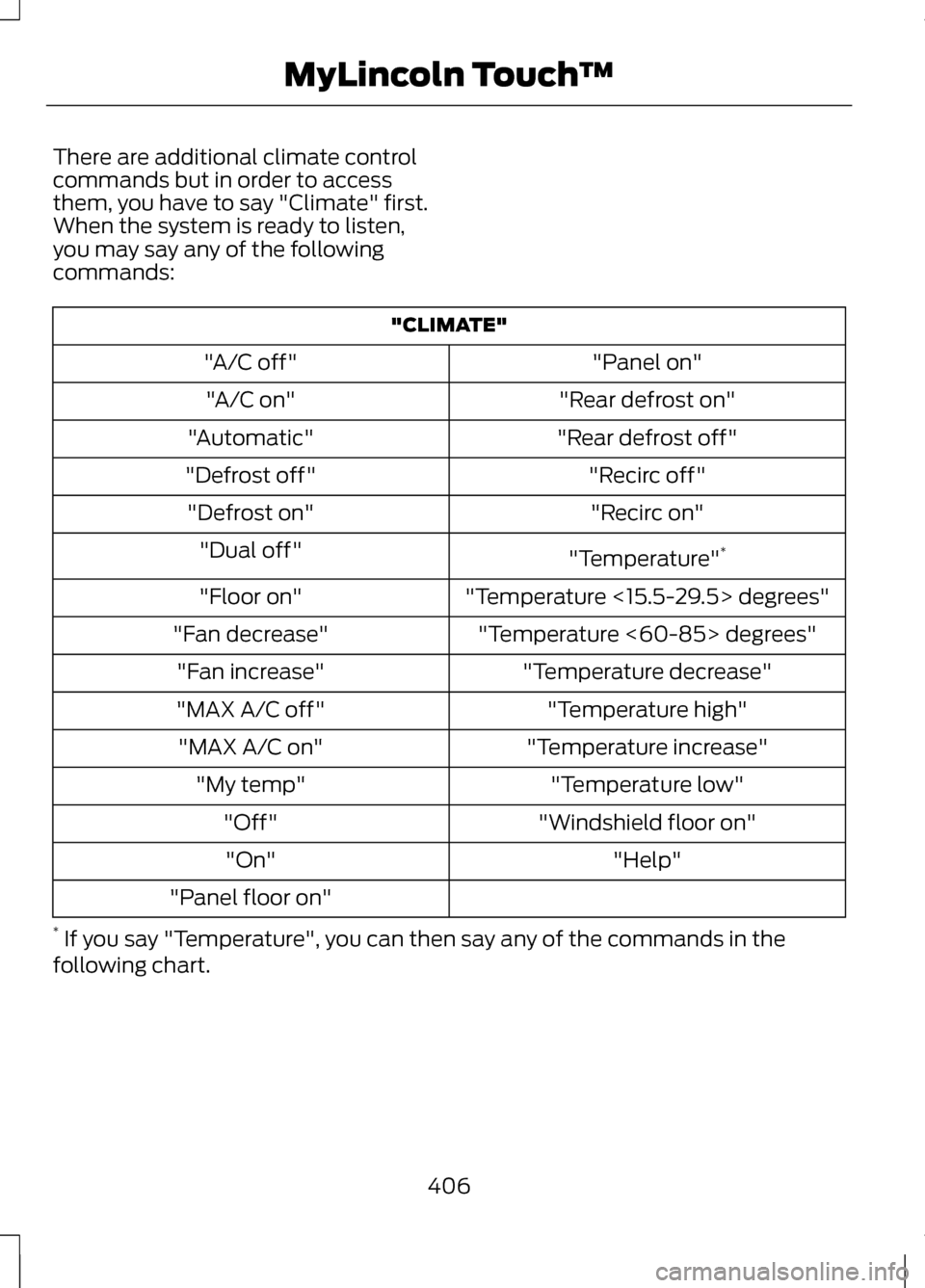
There are additional climate control
commands but in order to access
them, you have to say "Climate" first.
When the system is ready to listen,
you may say any of the following
commands:
"CLIMATE"
"Panel on"
"A/C off"
"Rear defrost on"
"A/C on"
"Rear defrost off"
"Automatic"
"Recirc off"
"Defrost off"
"Recirc on"
"Defrost on"
"Temperature"*
"Dual off"
"Temperature <15.5-29.5> degrees"
"Floor on"
"Temperature <60-85> degrees"
"Fan decrease"
"Temperature decrease"
"Fan increase"
"Temperature high"
"MAX A/C off"
"Temperature increase"
"MAX A/C on"
"Temperature low"
"My temp"
"Windshield floor on"
"Off"
"Help"
"On"
"Panel floor on"
* If you say "Temperature", you can then say any of the commands in the
following chart.
406
MyLincoln Touch
™