2013 LINCOLN MKZ HYBRID remote control
[x] Cancel search: remote controlPage 150 of 475

Saving a Pre-Set Position
1. Switch the ignition on.
2. Adjust the seat, exterior mirrors
and power steering column to your
desired position.
3. Press and hold the desired pre-set
button until you hear a single
chime.
Up to three pre-set memory positions
may be saved. A memory pre-set may
be saved at any time.
Recalling a Pre-Set Position
Press and release the pre-set button
associated with your desired driving
position. The seat, mirrors and
steering column will move to the
position stored for that pre-set.
Note: A pre-set memory position can
only be recalled when the ignition is off,
or when the transmission selector lever
is in position P or N (and your vehicle
is not moving) if the ignition is on.
A pre-set memory position can also
be recalled by pressing the unlock
button on your remote control or
intelligent access key if it is linked to
a pre-set position. Linking a Pre-Set Position to
your Remote Control or
Intelligent Access Key
Your vehicle can save the pre-set
memory positions for up to three
remote controls or intelligent access
(IA) keys.
1. With the ignition on, move the
memory positions to the desired
positions.
2. Press and hold the desired pre-set
button for about five seconds. A
chime will sound after about two
seconds. Continue holding until a
second chime is heard.
3. Within three seconds, press the lock button on the remote control
you are linking.
To unlink a remote control, follow the
same procedure – except in step 3,
press the unlock button on the remote
control.
Note: To stop seat movement during
a recall, press any driver seat
adjustment control, any of the memory
buttons, or any mirror control switch.
Seat movement will also stop if you
move your vehicle.
Note: If more than one linked remote
control or IA key is in range, the memory
function will move to the settings of
the first key stored.
148
MKZ (CC9) SeatsE142554
Page 155 of 475
HomeLink Wireless Control
System (If Equipped)
WARNING
Do not use the system with any
garage door opener that does
not have the safety stop and reverse
feature as required by U.S. Federal
Safety Standards (this includes any
garage door opener manufactured
before April 1, 1982). A garage door
opener which cannot detect an object,
signaling the door to stop and reverse,
does not meet current federal safety
standards. Using a garage door opener
without these features increases the
risk of serious injury or death. Note:
Make sure that the garage door
and security device are free from
obstruction when you are
programming. Do not program the
system with the vehicle in the garage.
Note: Make sure you keep the original
remote control transmitter for use in
other vehicles as well as for future
system programming.
Note: We recommend that upon the
sale or lease termination of your
vehicle, you erase the programmed
function buttons for security reasons.
See Erasing the function button codes
later in this section.
Note: You can program a maximum
of three devices. To change or replace
any of the three devices after it has
been initially programmed, you must
first erase the current settings. See
Erasing the function button codes later
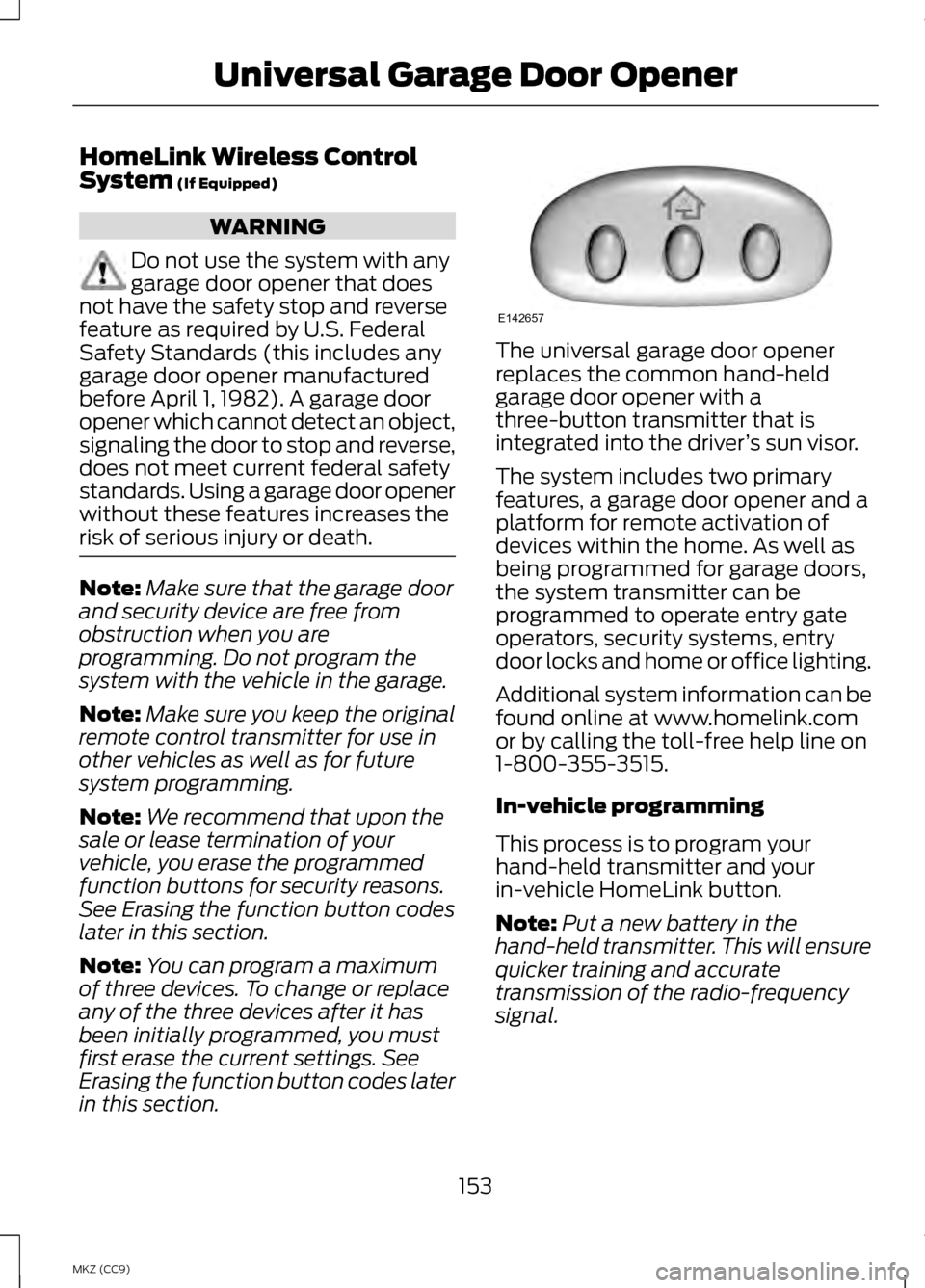
in this section. The universal garage door opener
replaces the common hand-held
garage door opener with a
three-button transmitter that is
integrated into the driver
’s sun visor.
The system includes two primary
features, a garage door opener and a
platform for remote activation of
devices within the home. As well as
being programmed for garage doors,
the system transmitter can be
programmed to operate entry gate
operators, security systems, entry
door locks and home or office lighting.
Additional system information can be
found online at www.homelink.com
or by calling the toll-free help line on
1-800-355-3515.
In-vehicle programming
This process is to program your
hand-held transmitter and your
in-vehicle HomeLink button.
Note: Put a new battery in the
hand-held transmitter. This will ensure
quicker training and accurate
transmission of the radio-frequency
signal.
153
MKZ (CC9) Universal Garage Door OpenerE142657
Page 219 of 475

A message displays if something
obstructs the radar signals from the
sensor. The sensor is located behind
a fascia cover near the driver side of
the lower grille. The system cannot
detect a vehicle ahead and will not
function when something obstructs
the radar signals. The following table
lists possible causes and actions for
this message displaying.
Action
Cause
Clean the grille surface in front of the
radar or remove the object causing the obstruction.
The surface of the radar in the grille is
dirty or obstructed in some way.
Wait a short time. It may take several
minutes for the radar to detect that it is no longer obstructed.
The surface of the radar in the grille is
clean but the message remains in the display.
Do not use the system in these condi-tions because it may not detect any vehicles ahead.
Heavy rain or snow is interfering with
the radar signals.
Do not use the system in these condi-tions because it may not detect any vehicles ahead.
Swirling water, or snow or ice on the
surface of the road may interfere with the radar signals.
Wait a short time or switch to normalcruise control.
You are in a desert or remote area with
no other vehicles and no roadside objects.
Due to the nature of radar technology,
it is possible to get a blockage warning
and not be blocked. This can happen,
for example, when driving in sparse
rural or desert environments. A false
blocked condition will either self clear
or clear after a key cycle. Switching to Normal Cruise
Control WARNING
Normal cruise control will not
brake due to slower vehicles.
Always be aware of which mode is
selected and apply the brakes when
necessary. 217
MKZ (CC9) Cruise ControlE145632
Page 259 of 475
Post-Incident
•
Do not store a severely damaged
vehicle with a lithium-ion battery
inside a structure or within 50 feet
(15 meters) of any structure or
vehicle.
• Make sure that passenger and
cargo compartments remain
ventilated (i.e., open window, door,
or trunk).
• For vehicles in the United States,
notify Ford Motor Company
1-800-392-3673 (then follow the
prompts on the voice response
menu), an authorized Ford dealer
or service center as soon as
possible as there may be other
steps to secure and discharge the
high-voltage battery.
• For vehicles in Canada, notify Ford
Motor Company 1-800-565-3673
(then follow the prompts on the
voice response menu), an
authorized Ford dealer or service
center as soon as possible as there
may be other steps to secure and
discharge the high-voltage battery.
• Call 911 if you observe leaking
fluids, sparks, smoke or flames, or
hear gurgling or bubbling from the
high-voltage battery. POST-CRASH ALERT
SYSTEM
The system flashes the turn signal
lamps and sounds the horn
(intermittently) in the event of a
serious impact that deploys an airbag
(front, side, side curtain or Safety
Canopy) or the safety belt
pretensioners.
The horn and lamps will turn off when:
•
The hazard control button is
pressed
• The panic button (if equipped) is
pressed on the remote entry
transmitter
• Your vehicle runs out of power
Spinout Detection
If a spinout is detected, the vehicle
comes to a stop and the hazard
warning flashers come on. The
message Spinout Detected Hazards
Activated will also appear on the
instrument cluster. The message may
not appear if your vehicle runs out of
power.
Once the hazard warning flashers
have been activated, you can turn
them off by:
• Pressing the hazard warning
flasher button
• Pressing the remote control unlock
button
• Pressing the remote control panic
button
• Cycling the ignition on and off
twice
257
MKZ (CC9) Roadside Emergencies
Page 327 of 475
WARNINGS
may be found on either the Safety
Compliance Certification Label
(affixed to either the door hinge
pillar, door-latch post, or the door
edge that meets the door-latch
post, next to the driver's seating
position), or the Tire Label which
is located on the B-Pillar or edge
of the driver ’s door. If this
information is not found on these
labels then you should contact
your authorized dealer as soon as
possible. Use of any tire or wheel
not recommended by Ford can
affect the safety and performance
of your vehicle, which could result
in an increased risk of loss of
vehicle control, vehicle rollover,
personal injury and death.
Additionally the use of
non-recommended tires and
wheels could cause steering,
suspension, axle, transfer case or
power transfer unit failure. If you
have questions regarding tire
replacement, contact your
authorized dealer as soon as
possible. To reduce the risk of injury,
when mounting replacement
tires and wheels, you should not
exceed the maximum pressure
indicated on the sidewall of the
tire to set the beads without
additional precautions listed
below. If the beads do not seat at
the maximum pressure indicated,
re-lubricate and try again WARNINGS
When inflating the tire for
mounting pressures up to 20 psi
(1.38 bar) greater than the
maximum pressure on the tire
sidewall, the following
precautions must be taken to
protect the person mounting the
tire:
1. Make sure that you have the
correct tire and wheel size.
2. Lubricate the tire bead and
wheel bead seat area again.
3. Stand at a minimum of 12 feet
(3.66 meters) away from the
wheel and tire assembly.
4. Use both eye and ear
protection.
For a mounting pressure more
than 20 psi (1.38 bar) greater than
the maximum pressure, a Ford
dealer or other tire service
professional should do the
mounting.
Always inflate steel carcass tires
with a remote air fill with the
person inflating standing at a
minimum of 12 feet (3.66 meters)
away from the wheel and tire
assembly 325
MKZ (CC9) Wheels and Tires
Page 467 of 475

Hill Start Assist....................................189
Using Hill Start Assist.............................189
Hints on Controlling the Interior Climate.................................................139
Cooling the Interior Quickly..................140
General Hints............................................. 139
Heating the Interior Quickly..................140
Recommended Settings for Cooling .................................................................... 140
Recommended Settings for Heating.................................................... 140
Side Window Defogging in Cold Weather................................................... 140
Hints on Driving With Anti-Lock Brakes...................................................192
Hood Lock See: Opening and Closing the
Hood......................................................... 278
Hybrid Electric Vehicle......................166 ........................................................................\
. 166
I
In California (U.S. Only)...................259
Information Display Control..............77 Cluster Display Control Features..........77
Information Displays..........................103
General Information................................103
Information..........................................400 911 Assist.................................................... 408
Alerts........................................................... 408
Calendar..................................................... 408
Sirius Travel Link......................................404
SYNC Services (If Equipped, United States Only)........................................... 401
Vehicle Health Report..............................411 Information Messages
........................117
Active Park................................................... 118
Adaptive Cruise Control..........................118
AdvanceTrac ™........................................... 119
Airbag............................................................. 119
Alarm.............................................................. 119
Automatic Engine Shutdown................119
Battery and Charging System (12 volt)........................................................... 120
Battery and Charging System (High Voltage)................................................... 120
Blind Spot Information and Cross Traffic Alert System..............................121
Collision Warning System.......................121
Doors and Locks........................................122
Driver Alert................................................... 122
Fuel................................................................. 122
Hill Start Assist.......................................... 123
Keys and Intelligent Access..................123
Lane Keeping System.............................124
Maintenance............................................... 125
MyKey............................................................ 126
Park Aid......................................................... 127
Park Brake................................................... 128
Power Steering.......................................... 129
Remote Start.............................................. 129
Starting System .......................................129
Tire Pressure Monitoring System.......130
Traction Control........................................130
Transmission............................................... 131
Installing Child Seats
............................21
Child Seats..................................................... 21
Using Lap and Shoulder Belts................21
Using Lower Anchors and Tethers for CHildren (LATCH)..................................26
Using Tether Straps...................................28
Instrument Cluster...............................95
Instrument Lighting Dimmer............83
Interior Lamps
........................................85
Front Interior Lamp...................................86
Rear Interior Lamp.....................................86
465
MKZ Hybrid (CC9) Index
Page 468 of 475

Interior Luggage Compartment
Release...................................................70
Interior Mirror...........................................91 Auto-Dimming Mirror................................91
Introduction...............................................7
J
Jump-Starting the Vehicle...............251 Connecting the Jumper Cables..........252
Jump Starting............................................ 254
Preparing Your Vehicle...........................252
Removing the Jumper Cables.............254
K
Keyless Entry...........................................67 SECURICODE™ KEYLESS ENTRY
KEYPAD..................................................... 67
Keyless Starting....................................161
Ignition Modes............................................ 161
Keys and Remote Controls................52
Knee Airbag
............................................44
L
Lane Keeping System
.......................220
Switching the System On and
Off.............................................................. 221
Lighting Control
.....................................82
Headlamp Flasher.....................................82
High Beams.................................................. 82
Lighting.....................................................82
Lincoln Credit
...........................................12
Load Carrying.......................................236
Load Limit.............................................236 Vehicle Loading - with and without a
Trailer....................................................... 236Locking and Unlocking.......................62
Activating Intelligent Access .................63
Autolock Feature........................................64
Auto Relock.................................................. 64
Battery Saver............................................... 65
Illuminated Entry........................................65
Illuminated Exit........................................... 65
Luggage Compartment...........................66
Power Decklid (If Equipped).................66
Power Door Locks......................................62
Remote Control.......................................... 62
Smart Unlocks ........................................... 64
Locks..........................................................62
M
Maintenance.........................................277 General Information................................277
Media Hub
..............................................136
Memory Function................................147
Easy Entry and Exit Function...............149
Linking a Pre-Set Position to your
Remote Control or Intelligent Access
Key............................................................. 148
Saving a Pre-Set Position.....................148
Message Center See: Information Displays.....................103
Mirrors See: Heated Windows and Mirrors.....140
See: Windows and Mirrors.....................88
Mobile Communications Equipment.............................................13
Moonroof.................................................92 Bounce-Back............................................... 93
Opening and Closing the Moonroof.................................................. 93
Retractable Panoramic Roof.................93
Venting the Moonroof..............................93
Motorcraft Parts
...................................331
MyKey Troubleshooting.....................59
MyKey ™....................................................57
Principle of Operation...............................57
466
MKZ Hybrid (CC9) Index
Page 470 of 475

Remote Control.....................................53
Car Finder...................................................... 54
Intelligent Access Key...............................53
Remote Start............................................... 54
Replacing the Battery...............................53
Sounding a Panic Alarm..........................54
Remote Start.........................................141 Automatic Settings...................................141
Heated and Cooled Devices.................142
Last Settings............................................... 142
Repairing Minor Paint Damage
...............................................295
Replacement Parts Recommendation
...............................12
Collision Repairs.......................................... 12
Scheduled Maintenance and Mechanical Repairs................................12
Warranty on Replacement Parts...........12
Replacing a Lost Key or Remote Control...................................................56
Reporting Safety Defects (Canada Only)....................................................264
Reporting Safety Defects (U.S. Only)....................................................264
Roadside Assistance........................250 Vehicles Sold In Canada : Getting
Roadside Assistance...........................251
Vehicles Sold In Canada : Using Roadside Assistance...........................251
Vehicles Sold In The U.S.: Getting Roadside Assistance.........................250
Vehicles Sold In The U.S. : Using Roadside Assistance.........................250
Roadside Emergencies
....................250
Running-In See: Breaking-In........................................247
Running Out of Fuel
............................173
Refilling With a Portable Fuel
Container................................................. 174S
Safety Belt Height Adjustment.......36
Safety Belt Minder
................................38
Belt-Minder®............................................... 38
Safety Belts
..............................................31
Principle of Operation................................31
Safety Belt Warning Lamp and Indicator Chime
...................................37
Conditions of operation...........................37
Safety Precautions
..............................172
Scheduled Maintenance.................444
Engine Coolant and Motor/Electronics
Coolant Change Record....................457
Exceptions.................................................. 457
General Maintenance Information........................................... 444
Normal Scheduled Maintenance.........................................448
Special Operating Conditions.............453
Seats........................................................143
Security.....................................................72
Settings..................................................355 Clock ............................................................. 356
Display......................................................... 356
Settings....................................................... 358
Sound........................................................... 357
Vehicle.......................................................... 357
Side Airbags
............................................47
Side Curtain Airbags............................48
Sitting in the Correct Position.........143
Snow Chains See: Using Snow Chains.......................328
Special Notices
.......................................13
New Vehicle Limited Warranty...............13
Special Instructions....................................13
Speed Control See: Cruise Control..................................210
Stability Control
...................................197
Principle of Operation.............................197
468
MKZ Hybrid (CC9) Index