Page 364 of 453
“TUNE”
“<530–1710>”
“AM”
“AM <530–1710>”
“AM Preset <#>”
“AM Autoset”
“AM Autoset Preset <#>”
“<87.9–107.9>”
“FM”
“FM1”
“FM2”
“FM <87.9–107.9>”
“FM Preset <#>”
“FM 1 Preset <#>”
“FM 2 Preset <#>”
“FM Autoset”
“FM Autoset Preset <#>”
“<87.9-107.9> HD <#>”*
“HD <#>”*
“FM <87.9-107.9> HD <#>”*
“Preset <#>”
“Help”
*If available
HD Radio�Information (If Available)
Note:HD Radio broadcasts are not available in all markets.
HD Radio™ technology is the digital evolution of analog AM/FM radio.
Your system has a special receiver which allows it to receive digital
broadcasts (where available) in addition to the analog broadcasts it
already receives. Digital broadcasts provide a better sound quality than
analog broadcasts with free, crystal clear audio and no static or
distortion. For more information, and a guide to available stations and
programming, please visit www.hdradio.com.
364MyLincoln Touch™
2013 MKX(mkx)
Owners Guide gf, 1st Printing
USA(fus)
Page 365 of 453

When this feature is enabled and you are tuned to a station broadcasting
HD Radio technology, you may notice the following indicators on your
screen:
HD) logoblinks when a digital
station is being acquired and is solid
when digital audio is playing. When
this logo is available, you may also
see Title and Artist fields on-screen.
Multicast indicatorappears in FM
mode (only) if the current station is
broadcasting multiple digital
broadcasts.
The numbers that are highlighted signify available digital channels where
new or different content is available. HD1 signifies the main programming
status and is available in analog and digital broadcasts. Any additional
multicast stations (HD2–HD7) are only broadcast digitally.
Taggingallows you to save a song to download later. When
you are on an acquired HD Radio station, the TAG button is
available (provided the feature has been turned on). To use
the tag feature:
1. Press AM/FM > Options > TAG On.
2. When you hear a song you like, touch TAG.
3. The system automatically saves the song’s information and transfers it
to your portable music player (if supported) when it is connected to
the system. If your music player is connected at the time, the system
automatically transfers the tag to your player and a pop-up confirms
the transfer.
4. When you access iTunes�with your portable music player, the tags
appear to you to be reminded of the song. The system allows you to
tag up to approximately 100 songs. For a list of devices that support
tagging, refer to www.SYNCMyRide.com or www.syncmaroute.ca.
MyLincoln Touch™365
2013 MKX(mkx)
Owners Guide gf, 1st Printing
USA(fus)
Page 369 of 453

See the following chart for potential station issues.
Potential station issues
Issue Cause Action
Echo, stutter, skip or
repeat in audio.
Increase or decrease
in audio volume.Poor time-alignment
by the radio
broadcaster.None - broadcast
issue.
Sound fading or
blending in and outThe radio is shifting
between analog and
digital audio.None - reception issue
that may clear up as
you continue to drive.
Audio mute delay
when selecting
HD2/HD3, multicast
preset or direct tune.The digital multicast is
not available until the
HD Radio broadcast is
decoded. Once
decoded, the audio is
available.None - this is normal
behavior. Wait until
the audio is available.
Cannot access
HD2/HD3 multicast
channel when recalling
a preset or from a
direct tuneThe previously stored
multicast preset or
direct tune is not
available in your
current reception area.None - the station is
not available in your
current location.
Text information does
not match currently
playing audioData service issue by
the radio broadcaster.Fill out the station
issue form at website
listed below.*
No text information
shown for currently
selected frequencyData service issue by
the radio broadcaster.Fill out the station
issue form at website
listed below.*
HD2–HD7 stations not
found when Scan is
pressed.Pressing Scan disables
HD2–HD7 channel
search.None - this is normal
behavior.
*http://www.ibiquity.com/automotive/report_radio_station_experiences
HD Radio™ Technology manufactured under license from iBiquity Digital
Corp. U.S. and foreign patents. HD Radio™ and the HD and HD Radio
logos are proprietary trademarks of iBiquity Digital Corp. Ford Motor
Company and iBiquity Digital Corp. are not responsible for the content
sent using HD Radio technology. Content may be changed, added or
deleted at any time at the station owner’s discretion.
MyLincoln Touch™369
2013 MKX(mkx)
Owners Guide gf, 1st Printing
USA(fus)
Page 373 of 453

“TUNE”
“<0–233>”
“”
“SAT”
“SAT 1”
“SAT 2”
“SAT 3”
“Preset <#>”
“ SAT 1 Preset <#>”
“SAT 2 Preset <#>”
“SAT 3 Preset <#>”
“Help”
SIRIUS�Satellite Radio Information
Note:SIRIUS�reserves the unrestricted right to change, rearrange, add
or delete programming including canceling, moving or adding particular
channels, and its prices, at any time, with or without notice to you. Ford
Motor Company shall not be responsible for any such programming
changes.
SIRIUS�satellite radio is a
subscription-based satellite radio
service that broadcasts a variety of
music, sports, news, weather, traffic
and entertainment programming.
Your factory-installed SIRIUS�
satellite radio system includes
hardware and a limited subscription term which begins on the date of sale
or lease of the vehicle. Refer to your authorized dealer for availability.
For more information on extended subscription terms (a service fee is
required), the online media player and a complete list of SIRIUS�
satellite radio channels, and other features, please visit
www.siriusxm.com in the United States, www.sirius.ca in Canada, or call
SIRIUS�at 1–888–539–7474.
Satellite radio electronic serial number (ESN):You need your ESN
to activate, modify or track your satellite radio account. The ESN is
found on the System Information Screen (SR ESN:XXXXXXXXXXXX). To
access your ESN, press the bottom left corner of the touchscreen, then
SIRIUS > Options > ESN.
MyLincoln Touch™373
2013 MKX(mkx)
Owners Guide gf, 1st Printing
USA(fus)
Page 376 of 453
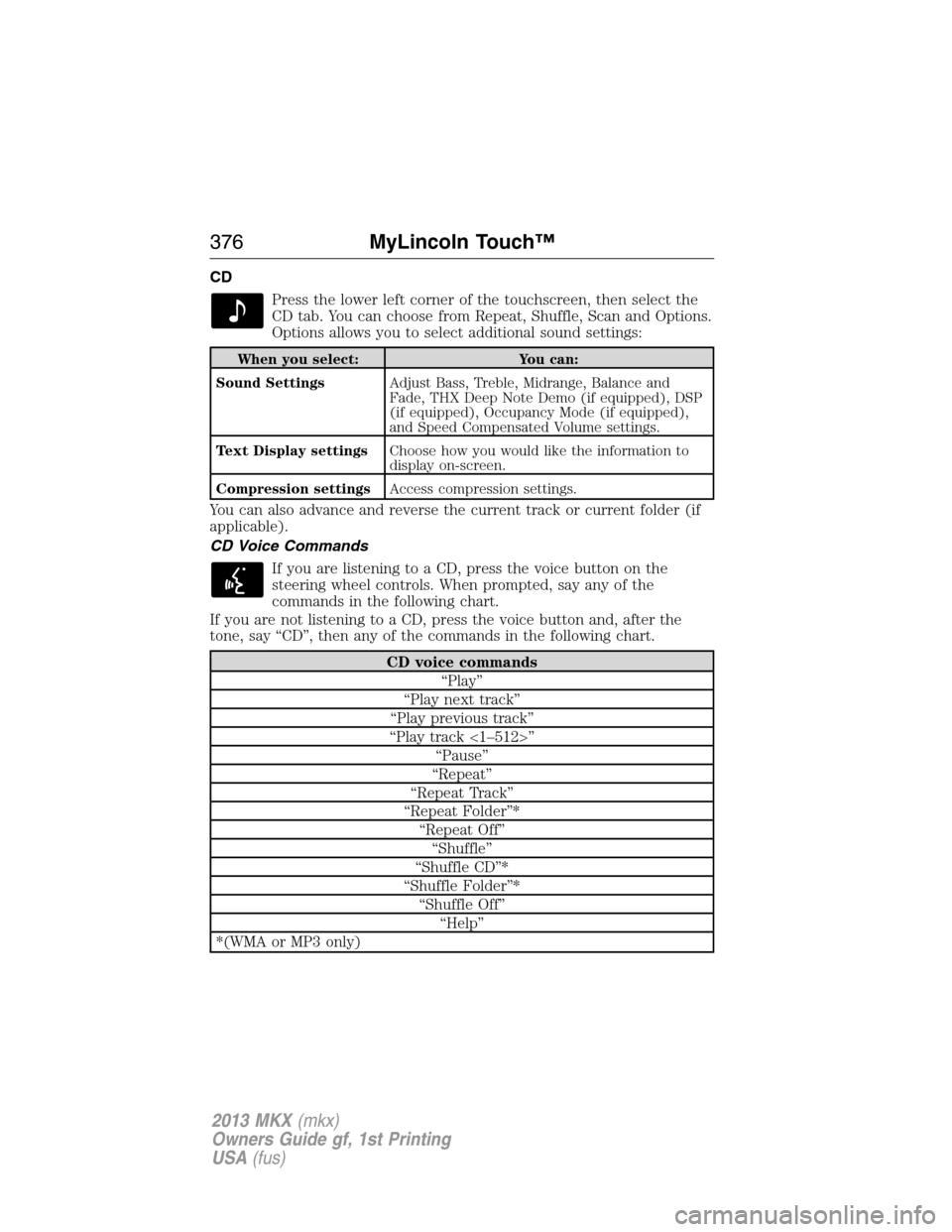
CD
Press the lower left corner of the touchscreen, then select the
CD tab. You can choose from Repeat, Shuffle, Scan and Options.
Options allows you to select additional sound settings:
When you select: You can:
Sound SettingsAdjust Bass, Treble, Midrange, Balance and
Fade, THX Deep Note Demo (if equipped), DSP
(if equipped), Occupancy Mode (if equipped),
and Speed Compensated Volume settings.
Text Display settingsChoose how you would like the information to
display on-screen.
Compression settingsAccess compression settings.
You can also advance and reverse the current track or current folder (if
applicable).
CD Voice Commands
If you are listening to a CD, press the voice button on the
steering wheel controls. When prompted, say any of the
commands in the following chart.
If you are not listening to a CD, press the voice button and, after the
tone, say “CD”, then any of the commands in the following chart.
CD voice commands
“Play”
“Play next track”
“Play previous track”
“Play track <1–512>”
“Pause”
“Repeat”
“Repeat Track”
“Repeat Folder”*
“Repeat Off”
“Shuffle”
“Shuffle CD”*
“Shuffle Folder”*
“Shuffle Off”
“Help”
*(WMA or MP3 only)
376MyLincoln Touch™
2013 MKX(mkx)
Owners Guide gf, 1st Printing
USA(fus)
Page 378 of 453

When you select: You can:
OptionsSelect more settings:
Sound Settingsallows you to adjust Bass,
Treble, Midrange, Balance and Fade, THX
Deep note demo (if equipped), DSP (if
equipped), Occupancy mode (if equipped),
and speed compensated volume.
Text Display Settingsallows you to set up
on-screen information displays.
Compression Settingsallows you to access
compression settings.
Media Player Settingsallows you to select
more settings.
Media Player Settings include:
Autoplay On/Off:When on, the system
automatically switches to the media source
when first connected so you can listen to
music that has been indexed. When off, the
system does not automatically switch to the
media source.
Bluetooth Devices:Connect, disconnect,
add or delete a device. Also set a device as
your favorite so the system automatically tries
to connect to it at every ignition cycle.
Gracenote Database Info:View the version
level of the Gracenote Database.
Gracenote Media Management On/Off:
When on, this feature gets metadata
information from the Gracenote Database for
your music files. This overrides information
from your device. The feature default is off.
Cover Art Priority: Device/Gracenote
When on, this feature gets cover art for your
music files from either your device or the
Gracenote Database. The feature default is
Device.
378MyLincoln Touch™
2013 MKX(mkx)
Owners Guide gf, 1st Printing
USA(fus)
Page 379 of 453
When you select: You can:
Media Device
InformationDisplays information about the device, if
connected and available.
Text DisplayAllows you to choose how you would like the
information to display on-screen.
To view song information such as Title, Artist, File, Folder, Album, and
Genre, touch the on-screen album art.
You can also pressWhat’s Playingto hear how the system pronounces
the current band and song. This can be helpful when using voice
commands to make sure the system correctly plays your request.
For a complete listing of available voice commands, refer toVoice
commands for USB and SD cardin the followingUSBsection.
SD logo is a trademark of SD-3C,
LLC.
MyLincoln Touch™379
2013 MKX(mkx)
Owners Guide gf, 1st Printing
USA(fus)
Page 381 of 453

When you select: You can:
OptionsSelect more settings:
Sound Settingsallows you to adjust Bass,
Treble, Midrange, Balance and Fade, THX
Deep note demo (if equipped), DSP (if
equipped), Occupancy mode (if equipped),
and speed compensated volume.
Media Player Settingsallows you to select
more settings.
Media Player Settings includes:
Autoplay on/off:When on, the system
automatically switches to the media source
when first connected so you can listen to
music that has been indexed. When off, the
system does not automatically switch to the
media source.
Bluetooth Devices:Connect, disconnect,
add or delete a device. Also set a device as
your favorite so the system automatically tries
to connect to it at every ignition cycle.
Gracenote Database Info:View the version
level of the Gracenote Database.
Gracenote Media Management on/off:
When on, this feature gets metadata
information from the Gracenote Database for
your music files. This overrides information
from your device. The feature default is off.
Cover Art Priority: Device/Gracenote
When on, this feature gets cover art for your
music files from either your device or the
Gracenote Database. The feature default is
Device..
Media Device
InformationDisplays information about the device, if
connected and available.
Text DisplayAllows you to choose how you would like the
information to display on-screen.
MyLincoln Touch™381
2013 MKX(mkx)
Owners Guide gf, 1st Printing
USA(fus)

