Page 412 of 494
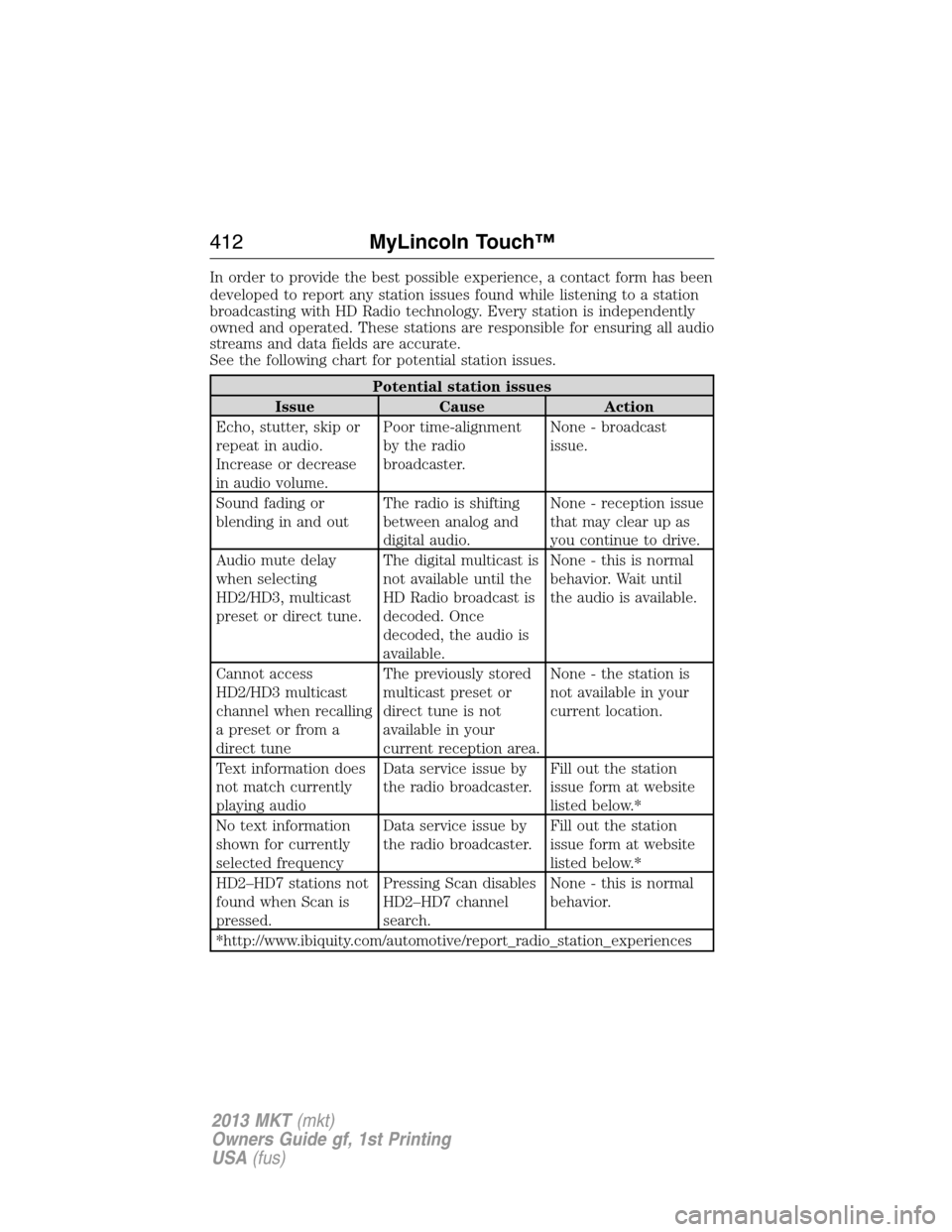
In order to provide the best possible experience, a contact form has been
developed to report any station issues found while listening to a station
broadcasting with HD Radio technology. Every station is independently
owned and operated. These stations are responsible for ensuring all audio
streams and data fields are accurate.
See the following chart for potential station issues.
Potential station issues
Issue Cause Action
Echo, stutter, skip or
repeat in audio.
Increase or decrease
in audio volume.Poor time-alignment
by the radio
broadcaster.None - broadcast
issue.
Sound fading or
blending in and outThe radio is shifting
between analog and
digital audio.None - reception issue
that may clear up as
you continue to drive.
Audio mute delay
when selecting
HD2/HD3, multicast
preset or direct tune.The digital multicast is
not available until the
HD Radio broadcast is
decoded. Once
decoded, the audio is
available.None - this is normal
behavior. Wait until
the audio is available.
Cannot access
HD2/HD3 multicast
channel when recalling
a preset or from a
direct tuneThe previously stored
multicast preset or
direct tune is not
available in your
current reception area.None - the station is
not available in your
current location.
Text information does
not match currently
playing audioData service issue by
the radio broadcaster.Fill out the station
issue form at website
listed below.*
No text information
shown for currently
selected frequencyData service issue by
the radio broadcaster.Fill out the station
issue form at website
listed below.*
HD2–HD7 stations not
found when Scan is
pressed.Pressing Scan disables
HD2–HD7 channel
search.None - this is normal
behavior.
*http://www.ibiquity.com/automotive/report_radio_station_experiences
412MyLincoln Touch™
2013 MKT(mkt)
Owners Guide gf, 1st Printing
USA(fus)
Page 413 of 494
HD Radio™ Technology manufactured under license from iBiquity Digital
Corp. U.S. and foreign patents. HD Radio™ and the HD and HD Radio
logos are proprietary trademarks of iBiquity Digital Corp. Ford Motor
Company and iBiquity Digital Corp. are not responsible for the content
sent using HD Radio technology. Content may be changed, added or
deleted at any time at the station owner’s discretion.
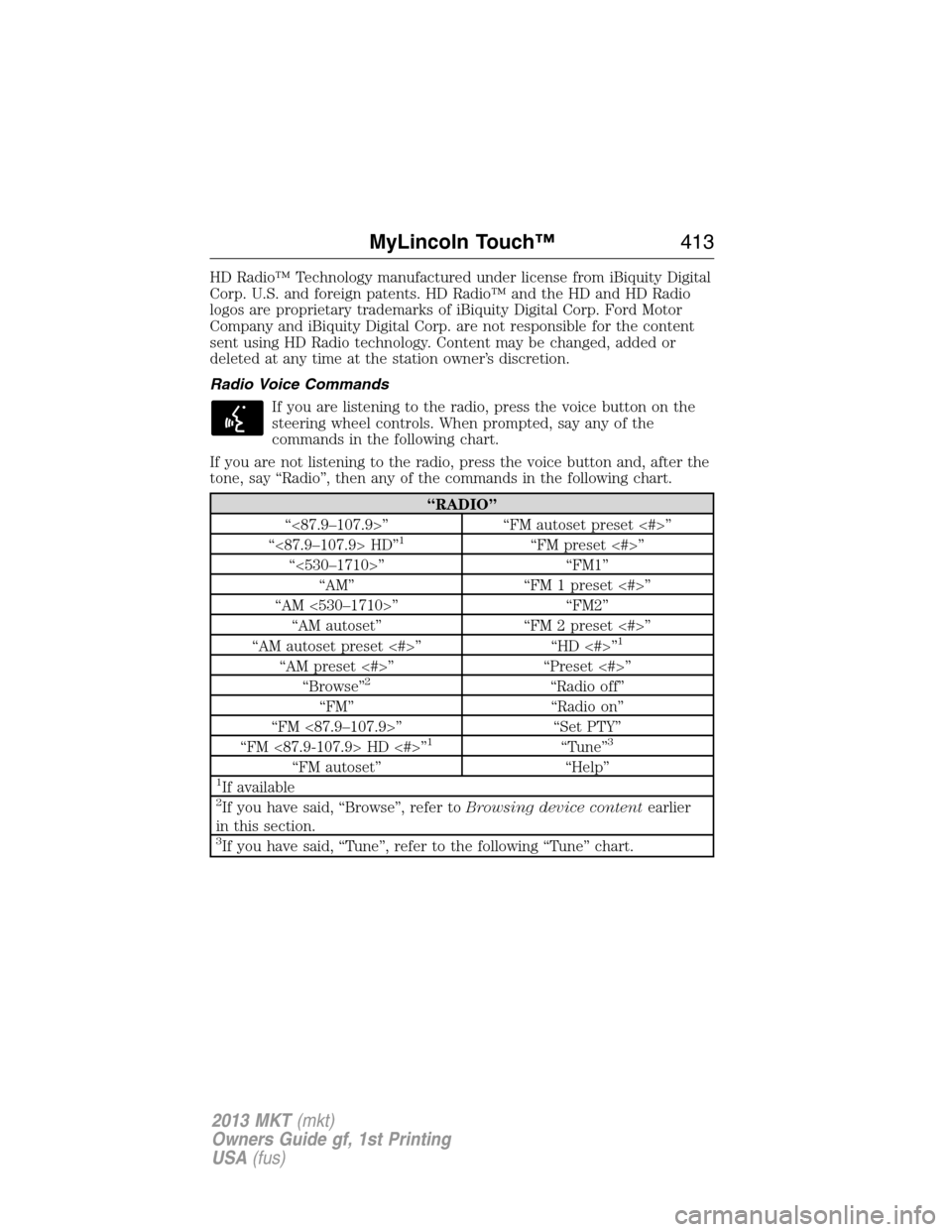
Radio Voice Commands
If you are listening to the radio, press the voice button on the
steering wheel controls. When prompted, say any of the
commands in the following chart.
If you are not listening to the radio, press the voice button and, after the
tone, say “Radio”, then any of the commands in the following chart.
“RADIO”
“<87.9–107.9>” “FM autoset preset <#>”
“<87.9–107.9> HD”
1“FM preset <#>”
“<530–1710>” “FM1”
“AM” “FM 1 preset <#>”
“AM <530–1710>” “FM2”
“AM autoset” “FM 2 preset <#>”
“AM autoset preset <#>” “HD <#>”
1
“AM preset <#>” “Preset <#>”
“Browse”2“Radio off”
“FM” “Radio on”
“FM <87.9–107.9>” “Set PTY”
“FM <87.9-107.9> HD <#>”
1“Tune”3
“FM autoset” “Help”1If available2If you have said, “Browse”, refer toBrowsing device contentearlier
in this section.
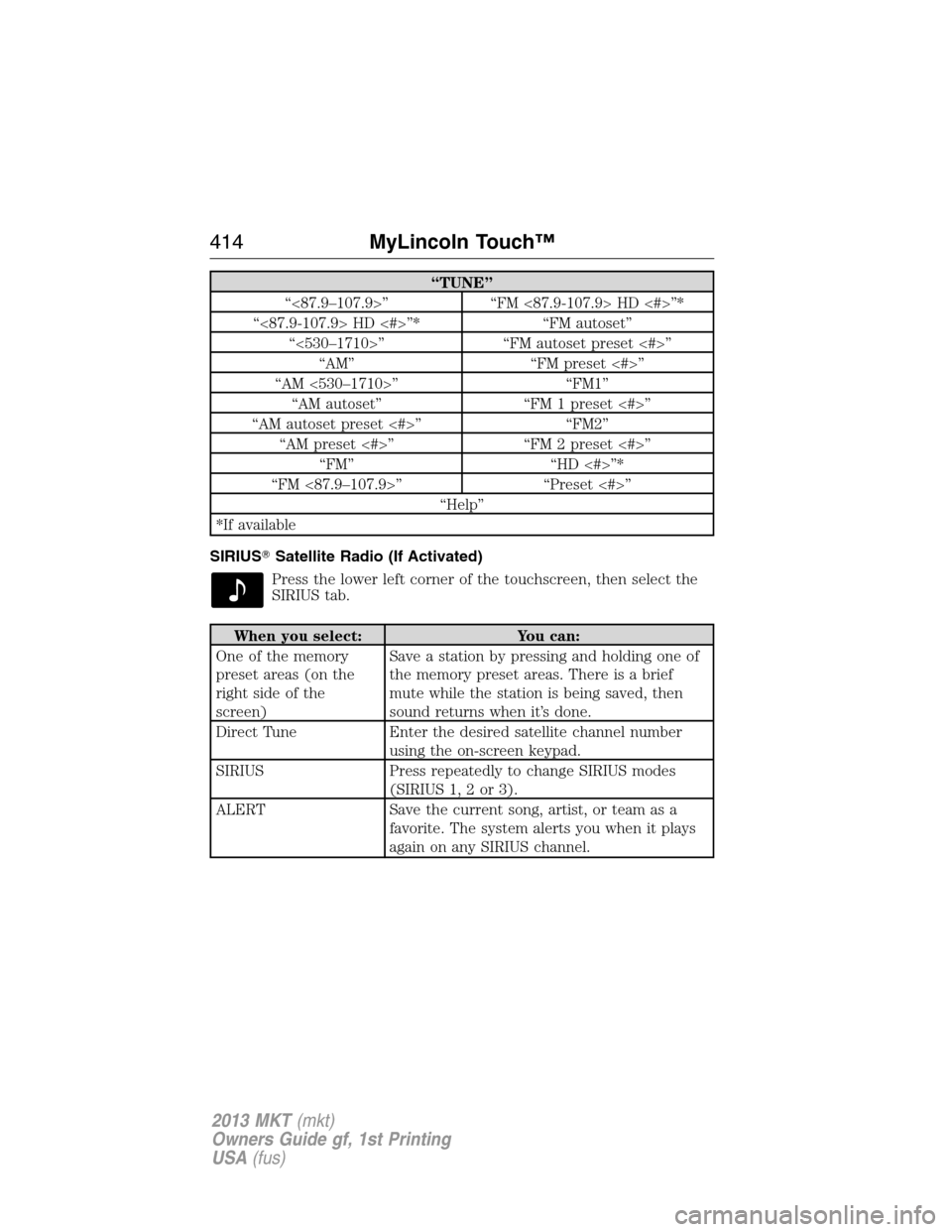
3If you have said, “Tune”, refer to the following “Tune” chart.
MyLincoln Touch™413
2013 MKT(mkt)
Owners Guide gf, 1st Printing
USA(fus)
Page 414 of 494
“TUNE”
“<87.9–107.9>” “FM <87.9-107.9> HD <#>”*
“<87.9-107.9> HD <#>”* “FM autoset”
“<530–1710>” “FM autoset preset <#>”
“AM” “FM preset <#>”
“AM <530–1710>” “FM1”
“AM autoset” “FM 1 preset <#>”
“AM autoset preset <#>” “FM2”
“AM preset <#>” “FM 2 preset <#>”
“FM” “HD <#>”*
“FM <87.9–107.9>” “Preset <#>”
“Help”
*If available
SIRIUS�Satellite Radio (If Activated)
Press the lower left corner of the touchscreen, then select the
SIRIUS tab.
When you select: You can:
One of the memory
preset areas (on the
right side of the
screen)Save a station by pressing and holding one of
the memory preset areas. There is a brief
mute while the station is being saved, then
sound returns when it’s done.
Direct Tune Enter the desired satellite channel number
using the on-screen keypad.
SIRIUS Press repeatedly to change SIRIUS modes
(SIRIUS 1, 2 or 3).
ALERT Save the current song, artist, or team as a
favorite. The system alerts you when it plays
again on any SIRIUS channel.
414MyLincoln Touch™
2013 MKT(mkt)
Owners Guide gf, 1st Printing
USA(fus)
Page 416 of 494
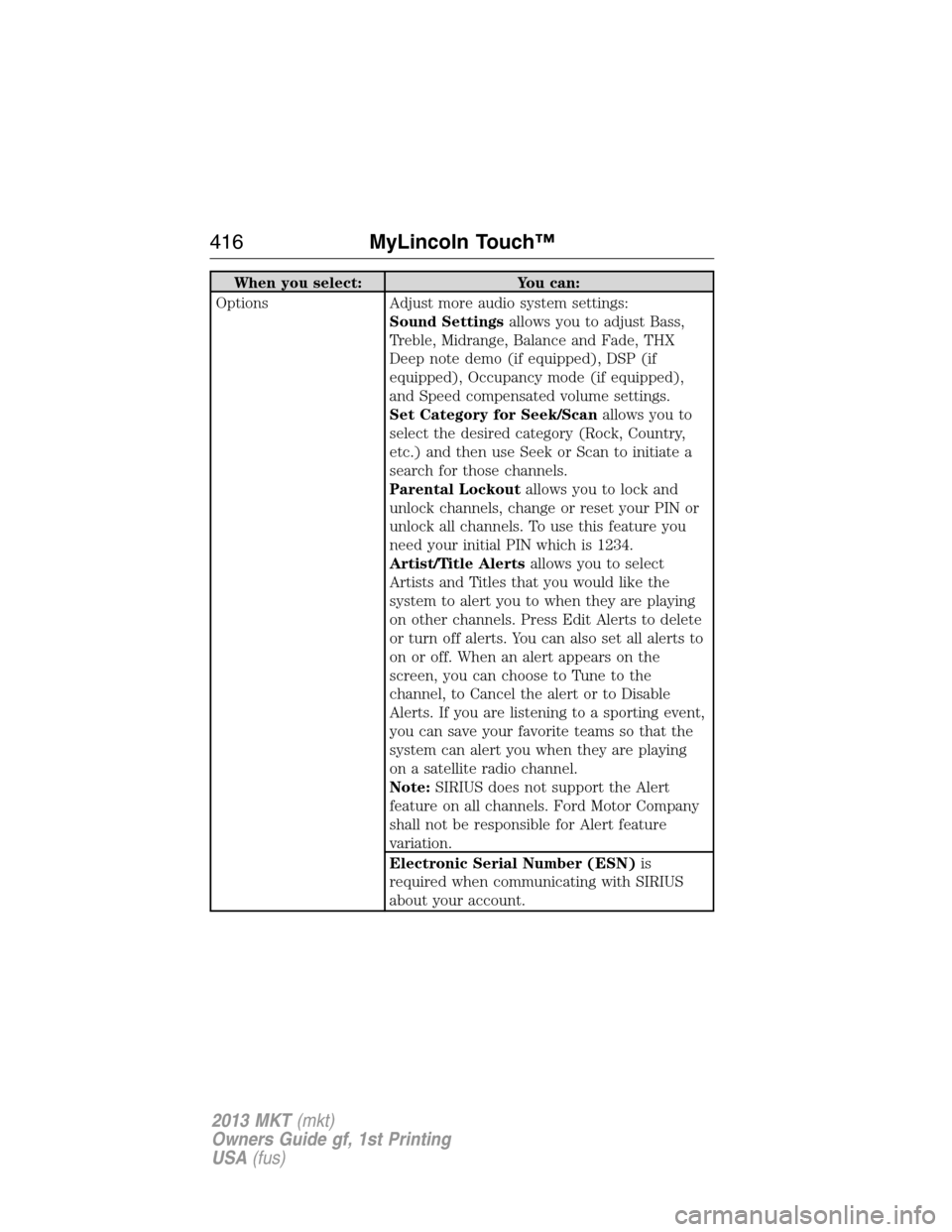
When you select: You can:
Options Adjust more audio system settings:
Sound Settingsallows you to adjust Bass,
Treble, Midrange, Balance and Fade, THX
Deep note demo (if equipped), DSP (if
equipped), Occupancy mode (if equipped),
and Speed compensated volume settings.
Set Category for Seek/Scanallows you to
select the desired category (Rock, Country,
etc.) and then use Seek or Scan to initiate a
search for those channels.
Parental Lockoutallows you to lock and
unlock channels, change or reset your PIN or
unlock all channels. To use this feature you
need your initial PIN which is 1234.
Artist/Title Alertsallows you to select
Artists and Titles that you would like the
system to alert you to when they are playing
on other channels. Press Edit Alerts to delete
or turn off alerts. You can also set all alerts to
on or off. When an alert appears on the
screen, you can choose to Tune to the
channel, to Cancel the alert or to Disable
Alerts. If you are listening to a sporting event,
you can save your favorite teams so that the
system can alert you when they are playing
on a satellite radio channel.
Note:SIRIUS does not support the Alert
feature on all channels. Ford Motor Company
shall not be responsible for Alert feature
variation.
Electronic Serial Number (ESN)is
required when communicating with SIRIUS
about your account.
416MyLincoln Touch™
2013 MKT(mkt)
Owners Guide gf, 1st Printing
USA(fus)
Page 417 of 494
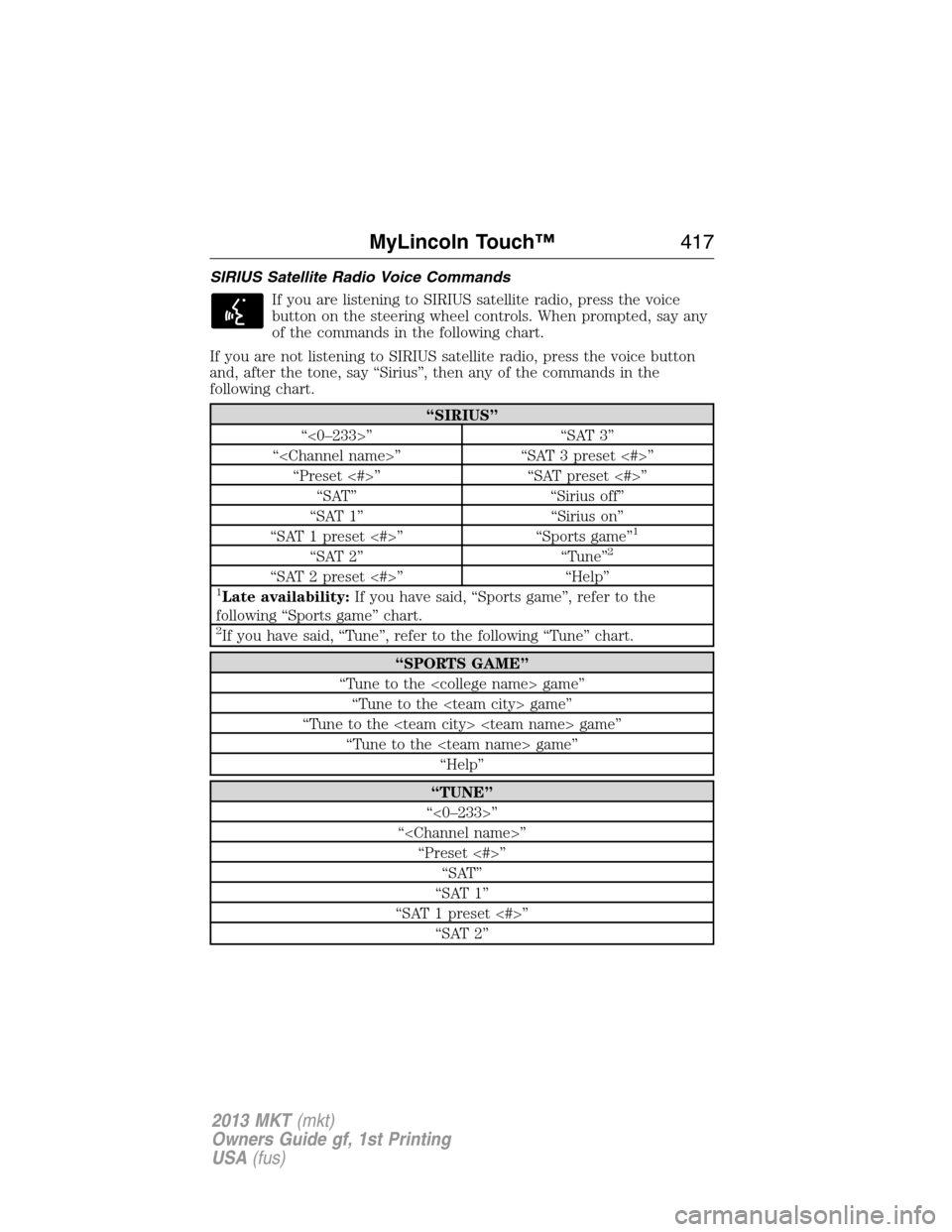
SIRIUS Satellite Radio Voice Commands
If you are listening to SIRIUS satellite radio, press the voice
button on the steering wheel controls. When prompted, say any
of the commands in the following chart.
If you are not listening to SIRIUS satellite radio, press the voice button
and, after the tone, say “Sirius”, then any of the commands in the
following chart.
“SIRIUS”
“<0–233>” “SAT 3”
“” “SAT 3 preset <#>”
“Preset <#>” “SAT preset <#>”
“SAT” “Sirius off”
“SAT 1” “Sirius on”
“SAT 1 preset <#>” “Sports game”
1
“SAT 2” “Tune”2
“SAT 2 preset <#>” “Help”1Late availability:If you have said, “Sports game”, refer to the
following “Sports game” chart.
2If you have said, “Tune”, refer to the following “Tune” chart.
“SPORTS GAME”
“Tune to the game”
“Tune to the game”
“Tune to the game”
“Tune to the game”
“Help”
“TUNE”
“<0–233>”
“”
“Preset <#>”
“SAT”
“SAT 1”
“SAT 1 preset <#>”
“SAT 2”
MyLincoln Touch™417
2013 MKT(mkt)
Owners Guide gf, 1st Printing
USA(fus)
Page 418 of 494

“TUNE”
“SAT 2 preset <#>”
“SAT 3”
“SAT 3 preset <#>”
“Help”
SIRIUS Satellite Radio Information
Note:SIRIUS reserves the unrestricted right to change, rearrange, add
or delete programming including canceling, moving or adding particular
channels, and its prices, at any time, with or without notice to you. Ford
Motor Company shall not be responsible for any such programming
changes.
SIRIUS satellite radio is a
subscription-based satellite radio
service that broadcasts a variety of
music, sports, news, weather, traffic
and entertainment programming.
Your factory-installed SIRIUS
satellite radio system includes
hardware and a limited subscription term which begins on the date of
sale or lease of the vehicle. Refer to your authorized dealer for
availability.
For more information on extended subscription terms (a service fee is
required), the online media player and a complete list of SIRIUS satellite
radio channels, and other features, please visit www.siriusxm.com in the
United States, www.sirius.ca in Canada, or call SIRIUS at
1–888–539–7474.
Satellite radio electronic serial number (ESN):You need your ESN
to activate, modify or track your satellite radio account. The ESN is
found on the System Information Screen (SR ESN:XXXXXXXXXXXX). To
access your ESN, press the bottom left corner of the touchscreen, then
SIRIUS > Options > ESN.
418MyLincoln Touch™
2013 MKT(mkt)
Owners Guide gf, 1st Printing
USA(fus)
Page 419 of 494

Potential satellite radio reception issues
Antenna obstructionsFor optimal reception performance, keep the
antenna clear of snow and ice build-up and
keep luggage and other material as far away
from the antenna as possible.
TerrainHills, mountains, tall buildings, bridges,
tunnels, freeway overpasses, parking garages,
dense tree foliage and thunderstorms can
interfere with your reception.
Station overloadWhen you pass a ground-based broadcast
repeating tower, a stronger signal may
overtake a weaker one and the audio system
may mute.
Satellite radio signal
interferenceYour display may show ACQUIRING...to
indicate the interference and the audio
system may mute.
SIRIUS troubleshooting tips
Radio Display Condition Possible Action
Acquiring Radio requires more
than two seconds to
produce audio for the
selected channel.No action required.
This message should
disappear shortly.
Sat Fault/SIRIUS
system failureInternal module or
system failure present.If this message does
not clear shortly, or
with an ignition key
cycle, your receiver
may have a fault. See
your authorized dealer
for service.
Invalid Channel Channel no longer
available.Tune to another
channel or choose
another preset.
MyLincoln Touch™419
2013 MKT(mkt)
Owners Guide gf, 1st Printing
USA(fus)
Page 448 of 494

Sound
Press Menu > Sound to access settings for:
Sound settings
Bass THX Deep Note Demo*
Treble DSP*
Midrange Occupancy Mode*
Balance and Fade Speed Compensated Volume
*If equipped
Ambient Lighting (If Equipped)
When activated, ambient lighting illuminates footwells and cupholders
with a choice of colors. To access and make adjustments:
1. Press Menu > Vehicle > Ambient Lighting.
2. Touch the desired color.
3. Use the scroll bar to increase or decrease the intensity.
To turn the feature on or off, press the power button.
Rear View Camera (If Equipped)
This menu allows you to access settings for your rear view camera.
Press Menu > Vehicle > Reverse camera, then select from the following
settings
•Rear Camera Delay
•Guideline
•Visual Park Aid Alert
Valet Mode
Note:If you are locked out and need to reset the PIN, you can enter
3681 and the system unlocks.
Valet mode allows you to lock the system so that none of your
information on the system can be accessed until it is unlocked with the
correct PIN.
1. Press Menu > Vehicle > Valet Mode.
2. Select Enable Valet Mode.
3. When prompted, enter a four-digit PIN.
After you press Continue, the system is locked until the correct PIN is
entered again.
448MyLincoln Touch™
2013 MKT(mkt)
Owners Guide gf, 1st Printing
USA(fus)