2013 LINCOLN MKT navigation
[x] Cancel search: navigationPage 462 of 494

When you are viewing additional information for hotels, cityseekr will
also tell you if the hotel has certain services and facilities using icons:
Hotel services and facilities
Restaurant24 Hr Room Service
Business CenterFitness Center
Handicap FacilitiesInternet Access
LaundryPool
RefrigeratorWi-Fi
For restaurants, cityseekr can provide information such as star rating,
average cost, review, handicap access, hours of operation, and website
address.
For hotels, cityseekr can provide information such as star rating, price
category, review, check in/out times, hotel service icons and website
address.
Setting Your Navigation Preferences
Select settings for the system to take into account when planning your
route. Press Menu > Settings > Navigation.
462MyLincoln Touch™
2013 MKT(mkt)
Owners Guide gf, 1st Printing
USA(fus)
Page 463 of 494

When you select: You can:
Map Preferences Turn breadcrumbs on and off.
Choose how you want to view the turn list
(top-to-bottom or bottom-to-top).
Set the automatic parking POI notification.
When parking POI notification is on, parking
POI icons display on the map when you get
close to your destination. (This may not be
very useful in dense areas, and may clutter
the map if other POIs are also set for display.)
Route Preferences Avoid freeways, toll roads, ferries and car
trains when planning your route.
Use HOV lanes (if available), and have the
system always select the shortest distance,
fastest time or most economical route.
Navigation Preferences Choose prompts to be either voice or tone
only.
Have the system automatically fill in the state
and province based on the information already
entered into the system.
Traffic Preferences Choose how you want the system to handle
traffic problems along your route.
Automatic: Have the system reroute you to
avoid traffic incidents that develop and impact
the current route (no notification is
provided).
Manual: Have the system always provide a
traffic alert notification for traffic incidents
along the planned route. You have a choice to
accept or ignore the notification before the
route deviation is made.
Turn on certain, or all, traffic icons on the
map (road work, incidents, accidents, closed
roads, etc.).
MyLincoln Touch™463
2013 MKT(mkt)
Owners Guide gf, 1st Printing
USA(fus)
Page 467 of 494
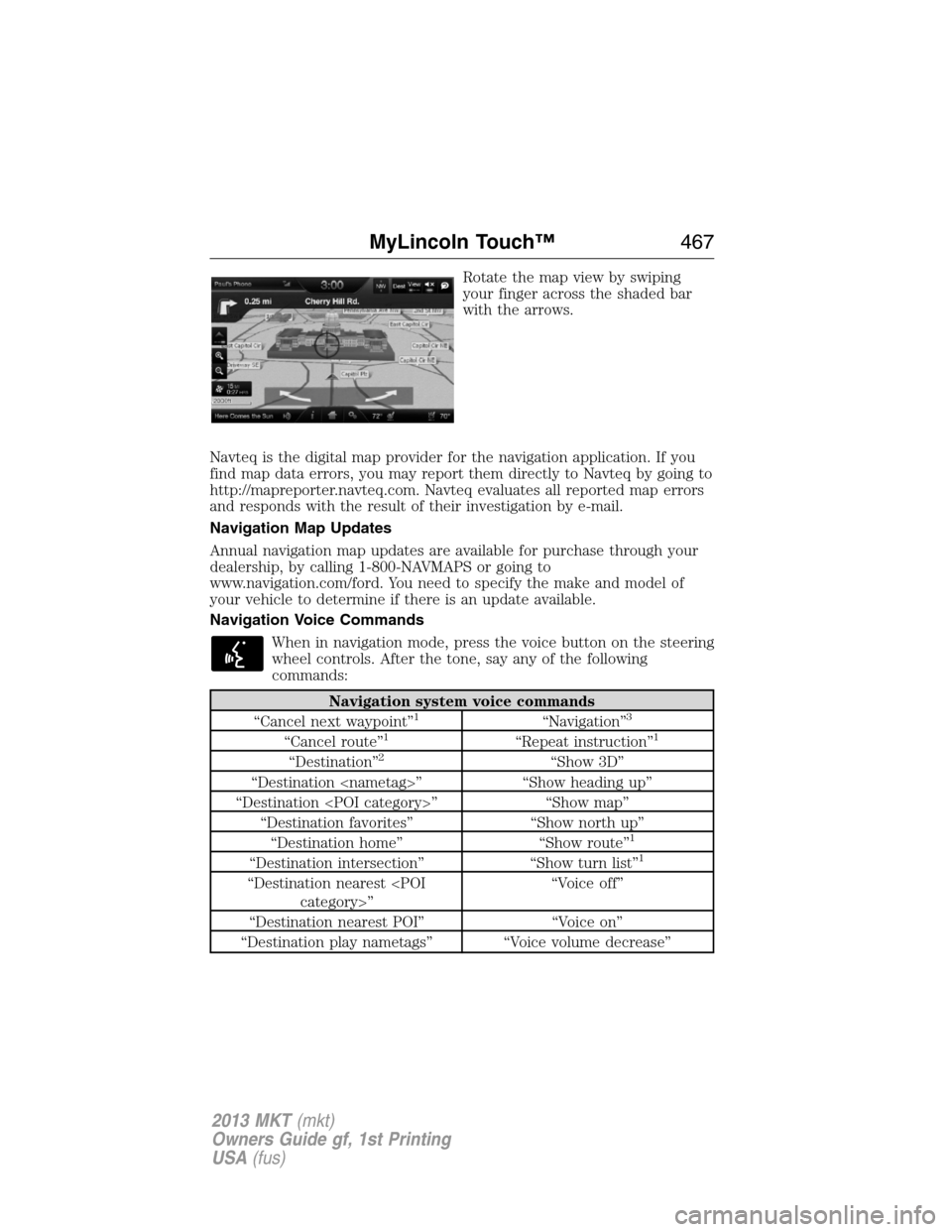
Rotate the map view by swiping
your finger across the shaded bar
with the arrows.
Navteq is the digital map provider for the navigation application. If you
find map data errors, you may report them directly to Navteq by going to
http://mapreporter.navteq.com. Navteq evaluates all reported map errors
and responds with the result of their investigation by e-mail.
Navigation Map Updates
Annual navigation map updates are available for purchase through your
dealership, by calling 1-800-NAVMAPS or going to
www.navigation.com/ford. You need to specify the make and model of
your vehicle to determine if there is an update available.
Navigation Voice Commands
When in navigation mode, press the voice button on the steering
wheel controls. After the tone, say any of the following
commands:
Navigation system voice commands
“Cancel next waypoint”1“Navigation”3
“Cancel route”1“Repeat instruction”1
“Destination”2“Show 3D”
“Destination
“Destination
“Destination favorites” “Show north up”
“Destination home” “Show route”
1
“Destination intersection” “Show turn list”1
“Destination nearest
“Destination nearest POI” “Voice on”
“Destination play nametags” “Voice volume decrease”
MyLincoln Touch™467
2013 MKT(mkt)
Owners Guide gf, 1st Printing
USA(fus)
Page 468 of 494

Navigation system voice commands
“Destination POI” “Voice volume increase”
“Destination nearest
“Destination previous destination” “Zoom in”
“Destination street address” “Zoom out”
“Detour”
1“Help”1These commands are only available when a navigation route is active.2If you have said the command, “Destination”, you may say any of the
above commands or commands in the following Destination chart.
3If you have said the command, “Navigation”, you may say any of the
above commands or commands in the following Navigation chart.
“DESTINATION”
“
“
“Favorites”
“Home”
“Intersection”
“Nearest
“Nearest POI”
“Play nametags”
“POI category”
“Previous destination”
“Street address”
“Help”
468MyLincoln Touch™
2013 MKT(mkt)
Owners Guide gf, 1st Printing
USA(fus)
Page 469 of 494

“NAVIGATION”
“Destination”*
“Zoom city”
“Zoom country”
“Zoom in minimum”
“Zoom out maximum”
“Zoom province”
“Zoom state”
“Zoom street”
“Zoom to
“Help”
*If you have said, “Destination”, you may say any of the commands in
the Destination chart.
If your vehicle is equipped with the SD card navigation feature, you have
the ability to enter in a street address using a new feature called
One-shot destination street address.When you say either “Navigation
destination street address” or “Destination street address”, the system
asks you to say the full address. The system displays an example
on-screen. You can then speak the address naturally, such as “One two
three four Main Street, Anytown”.
MyLincoln Touch™469
2013 MKT(mkt)
Owners Guide gf, 1st Printing
USA(fus)
Page 476 of 494

access a function of the system requiring prolonged attention. Even
occasional short scans to the screen may be hazardous if your attention
has been diverted away from your driving task at a critical time.
Volume Setting
Do not raise the volume excessively. Keep the volume at a level where
you can still hear outside traffic and emergency signals while driving.
Driving while unable to hear these sounds could cause an accident.
Use of Speech Recognition Functions
Speech recognition software is inherently a statistical process which is
subject to errors. It is your responsibility to monitor any speech
recognition functions included in the system and address any errors.
Navigation Features
Any navigation features included in the system are intended to provide
turn by turn instructions to get you to a desired destination. Please make
certain all persons using this system carefully read and follow
instructions and safety information fully.
Distraction Hazard
Any navigation features may require manual (non-verbal) setup.
Attempting to perform such set-up or insert data while driving can
seriously distract your attention and could cause an accident or other
serious consequences. Stop the vehicle in a safe and legal manner before
attempting these operations.
Let Your Judgment Prevail
Any navigation features are provided only as an aid. Make your driving
decisions based on your observations of local conditions and existing
traffic regulations. Any such feature is not a substitute for your personal
judgment. Any route suggestions made by this system should never
replace any local traffic regulations or your personal judgment or
knowledge of safe driving practices.
Route Safety
Do not follow the route suggestions if doing so would result in an unsafe
or illegal maneuver, if you would be placed in an unsafe situation, or if
you would be directed into an area that you consider unsafe. The driver
is ultimately responsible for the safe operation of the vehicle and
therefore, must evaluate whether it is safe to follow the suggested
directions.
Potential Map Inaccuracy
Maps used by this system may be inaccurate because of changes in
roads, traffic controls or driving conditions. Always use good judgment
and common sense when following the suggested routes.
476Appendices
2013 MKT(mkt)
Owners Guide gf, 1st Printing
USA(fus)
Page 477 of 494

Emergency Services
Do not rely on any navigation features included in the system to route
you to emergency services. Ask local authorities or an emergency
services operator for these locations. Not all emergency services such as
police, fire stations, hospitals and clinics are likely to be contained in the
map database for such navigation features.
TeleNav Software End User License Agreement
Please read these terms and conditions carefully before you use the
TeleNav Software. Your use of the TeleNav Software indicates that
you accept these terms and conditions. If you do not accept these
terms and conditions, do not break the seal of the package, launch,
or otherwise use the TeleNav Software.
TeleNav may revise this Agreement and the privacy policy at any time,
with or without notice to you. You agree to visit http://www.telenav.com
from time to time to review the then current version of this Agreement
and of the privacy policy.
1.Safe and Lawful Use
You acknowledge that devoting attention to the TeleNav Software may
pose a risk of injury or death to you and others in situations that
otherwise require your undivided attention, and you therefore agree to
comply with the following when using the TeleNav Software: (a) observe
all traffic laws and otherwise drive safely; (b) use your own personal
judgment while driving. If you feel that a route suggested by the TeleNav
Software instructs you to perform an unsafe or illegal maneuver, places
you in an unsafe situation, or directs you into an area that you consider
to be unsafe, do not follow such instructions; (c) do not input
destinations, or otherwise manipulate the TeleNav Software, unless your
vehicle is stationary and parked; (d) do not use the TeleNav Software for
any illegal, unauthorized, unintended, unsafe, hazardous, or unlawful
purposes, or in any manner inconsistent with this Agreement; (e)
arrange all GPS and wireless devices and cables necessary for use of the
TeleNav Software in a secure manner in your vehicle so that they will not
interfere with your driving and will not prevent the operation of any
safety device (such as an airbag).
You agree to indemnify and hold TeleNav harmless against all claims
resulting from any dangerous or otherwise inappropriate use of the
TeleNav Software in any moving vehicle, including as a result of your
failure to comply with the directions above.
Appendices477
2013 MKT(mkt)
Owners Guide gf, 1st Printing
USA(fus)
Page 478 of 494
2.Account Information
You agree: (a) when registering the TeleNav Software, to provide TeleNav
with true, accurate, current, and complete information about yourself,
and (b) to inform TeleNav promptly of any changes to such information,
and to keep it true, accurate, current and complete.
3.Software License
Subject to your compliance with the terms of this Agreement, TeleNav
hereby grants to you a personal, non-exclusive, non-transferable license
(except as expressly permitted below in connection with your permanent
transfer of the TeleNav Software license), without the right to sublicense,
to use the TeleNav Software (in object code form only) in order to
access and use the TeleNav Software. This license shall terminate upon
any termination or expiration of this Agreement. You agree that you will
use the TeleNav Software only for your personal business or leisure
purposes, and not to provide commercial navigation services to other
parties.
3.1 License limitations
You agree not to do any of the following: (a) reverse engineer, decompile,
disassemble, translate, modify, alter or otherwise change the TeleNav
Software or any part thereof; (b) attempt to derive the source code,
audio library or structure of the TeleNav Software without the prior
express written consent of TeleNav; (c) remove from the TeleNav
Software, or alter, any of TeleNav’s or its suppliers’ trademarks, trade
names, logos, patent or copyright notices, or other notices or markings;
(d) distribute, sublicense or otherwise transfer the TeleNav Software to
others, except as part of your permanent transfer of the TeleNav
Software; or (e) use the TeleNav Software in any manner that (i)
infringes the intellectual property or proprietary rights, rights of publicity
or privacy or other rights of any party, (ii) violates any law, statute,
ordinance or regulation, including but not limited to laws and regulations
related to spamming, privacy, consumer and child protection, obscenity
or defamation, or (iii) is harmful, threatening, abusive, harassing,
tortuous, defamatory, vulgar, obscene, libelous, or otherwise
objectionable; and (f) lease, rent out, or otherwise permit unauthorized
access by third parties to the TeleNav Software without advanced written
permission of TeleNav.
4.Disclaimers
To the fullest extent permissible pursuant to applicable law, in no event
will TeleNav, its licensors and suppliers, or agents or employees of any of
the foregoing, be liable for any decision made or action taken by you or
anyone else in reliance on the information provided by the TeleNav
478Appendices
2013 MKT(mkt)
Owners Guide gf, 1st Printing
USA(fus)