2013 LINCOLN MKS USB port
[x] Cancel search: USB portPage 409 of 453
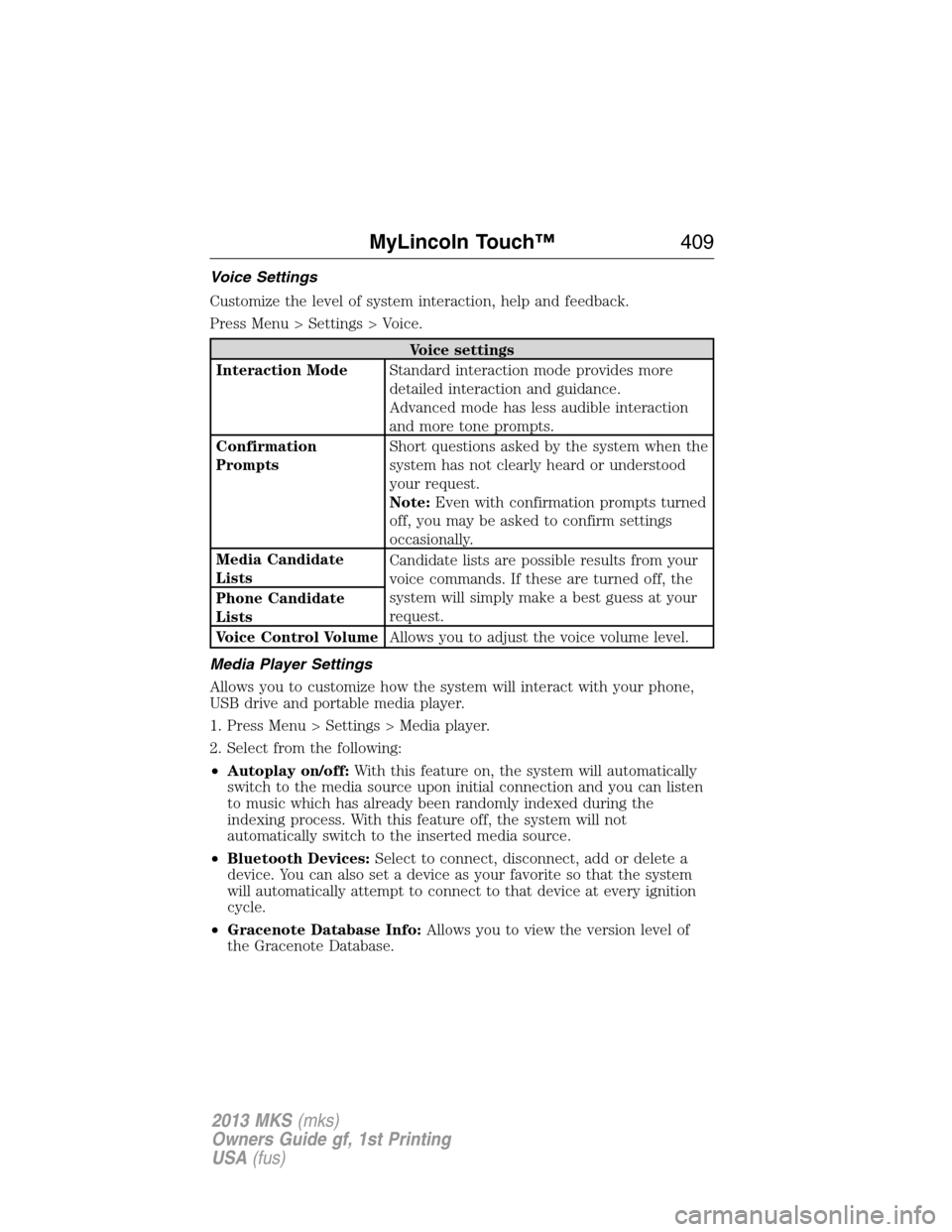
Voice Settings
Customize the level of system interaction, help and feedback.
Press Menu > Settings > Voice.
Voice settings
Interaction ModeStandard interaction mode provides more
detailed interaction and guidance.
Advanced mode has less audible interaction
and more tone prompts.
Confirmation
PromptsShort questions asked by the system when the
system has not clearly heard or understood
your request.
Note:Even with confirmation prompts turned
off, you may be asked to confirm settings
occasionally.
Media Candidate
ListsCandidate lists are possible results from your
voice commands. If these are turned off, the
system will simply make a best guess at your
request. Phone Candidate
Lists
Voice Control VolumeAllows you to adjust the voice volume level.
Media Player Settings
Allows you to customize how the system will interact with your phone,
USB drive and portable media player.
1. Press Menu > Settings > Media player.
2. Select from the following:
•Autoplay on/off:With this feature on, the system will automatically
switch to the media source upon initial connection and you can listen
to music which has already been randomly indexed during the
indexing process. With this feature off, the system will not
automatically switch to the inserted media source.
•Bluetooth Devices:Select to connect, disconnect, add or delete a
device. You can also set a device as your favorite so that the system
will automatically attempt to connect to that device at every ignition
cycle.
•Gracenote Database Info:Allows you to view the version level of
the Gracenote Database.
MyLincoln Touch™409
2013 MKS(mks)
Owners Guide gf, 1st Printing
USA(fus)
Page 411 of 453

If you select: You can:
Internet Data
Connection*Use this screen to make adjustments to your
internet data connection. Select to make your
connection profile with the PAN (personal
area network) or to turn off your connection.
You can also choose to make adjustments to
your settings or have the system always
connect, never connect when roaming or
query on connect. Press ? for additional
information.
Manage PhonebookAccess features such as automatic phonebook
download, re-download your phonebook, add
contacts from your phone as well as delete or
upload your phonebook.
Display Call HistoryDisplay call history.
*If compatible
Wireless & Internet
Your system is equipped with Wireless & Internet features and settings.
To access, press Menu > Settings > Wireless and Internet. From this
screen, you can select your:
•Wi-Fi settings
•Bluetooth settings
•USB mobile broadband
•Prioritize connection methods
Wi-Fi
Your system has a Wi-Fi feature which creates a wireless network within
your vehicle, thereby allowing other devices (i.e. personal computers or
phones) in your vehicle to speak to each other, share files, play games,
etc. Using this Wi-Fi feature, everyone in your vehicle can also gain
access the internet if:
•You have a USB mobile broadband connection inside the vehicle
•Your phone supports PAN (personal area networking)
•You are parked outside of a wireless hotspot
MyLincoln Touch™411
2013 MKS(mks)
Owners Guide gf, 1st Printing
USA(fus)
Page 447 of 453

911 Assist™ .............................. 402
A
ABS (see Brakes) ..................... 174
Accessing and using your
USB port .................................... 381
Accessing your calendar .......... 402
Accessory delay .......................... 94
Active Park Assist ..................... 182
Adaptive Cruise Control ........... 192
Adding (pairing) a phone ........ 389
Airbag supplemental restraint
system .......................................... 44
and child safety seats .............. 45
description ................................ 44
disposal ...................................... 54
driver airbag .............................. 44
passenger airbag ....................... 44
side airbag ........................... 44, 49
Air cleaner filter ....... 274–275, 321
All Wheel Drive (AWD),
driving off road ......................... 167
Ambient mood/lighting ............. 407
AM/FM ....................................... 364
Anti-lock brake system
(see Brakes) .............................. 174
Anti-theft system .................. 76, 78
arming the system .............. 76, 78
disarming a triggered system .. 78
Audio system
Single CD ................................ 123
Audio system (see Radio) ....... 123
Automatic transmission
driving an automatic
overdrive ................................. 163
fluid, adding ............................ 267fluid, checking ........................ 267
fluid, refill capacities .............. 317
fluid, specification .................. 317
Selectshift (SST) .................... 164
Auxiliary Input Jack ................. 375
Auxiliary powerpoint ................ 146
A/V inputs .......................... 124, 386
B
Battery ....................................... 272
acid, treating emergencies ..... 272
jumping a disabled battery .... 236
maintenance-free .................... 272
replacement, specifications ... 321
servicing .................................. 272
Blind Spot Information
System ....................................... 206
Booster seats ............................... 21
Brakes ........................................ 174
anti-lock ................................... 174
anti-lock brake system (ABS)
warning light ........................... 174
brake warning light ................ 174
fluid, checking and adding .... 271
fluid, refill capacities .............. 317
fluid, specifications ................. 317
lubricant specifications .......... 317
parking .................................... 175
shift interlock .......................... 165
trailer ....................................... 226
C
Capacities for refilling fluids .... 317
CD .............................................. 123
CD player .......................... 121, 377
CD voice commands ................. 378
Cell phone use ............................ 14
Index447
2013 MKS(mks)
Owners Guide gf, 1st Printing
USA(fus)
Page 453 of 453

care .......................................... 289
changing .......................... 309, 311
checking the pressure ............ 299
inflating ................................... 297
label ......................................... 296
replacing .................................. 300
rotating .................................... 303
safety practices ....................... 302
sidewall information ............... 291
snow tires and chains ............ 304
spare tire ................................. 309
terminology ............................. 290
tire grades ............................... 290
treadwear ........................ 289, 299
Touchscreen features
(climate) .................................... 415
Towing ....................... 225, 227–228
recreational towing ................. 228
trailer towing .......................... 225
wrecker .................................... 227
Traction control ........................ 176
Traffic preferences ................... 422
Transaxle
fluid, refill capacities .............. 317
lubricant specifications .......... 317
Transmission
brake-shift interlock (BSI) .... 165
fluid, checking and adding
(automatic) ............................. 267
Trunk ..................................... 74–75remote release .......................... 69
Turn signal .................................. 91
U
USB port ............................ 124, 381
V
Vehicle health report ................ 404
Vehicle Identification Number
(VIN) .......................................... 321
Vehicle loading .......................... 218
Ventilating your vehicle ........... 151
Voice recognition ...................... 356
W
Warning lights (see Lights) ..... 100
Washer fluid .............................. 271
Water, Driving through ............. 231
Wi-Fi .......................................... 411
Windows
power ......................................... 93
Windshield washer fluid and
wipers .......................................... 84
checking and adding fluid ..... 271
replacing wiper blades ........... 274
Wrecker towing ......................... 227
Index453
2013 MKS(mks)
Owners Guide gf, 1st Printing
USA(fus)