Page 173 of 628

1713-3. Adjusting the seats
3
Operation of each component
IS300h_EE(OM53B95E)
A desired driving position can be recalled linked with the unlocking of
the door.
Setting procedure
Record your driving position to button “1”, “2” or “3” before perform-
ing the following:
Carrying only the key (including the card key) to which you want to
link the driving position, shift the shift lever to P and then close the
driver’s door.
If 2 or more keys are in the vehicle, the driving position cannot be
linked properly.
Turn the power switch to ON mode and recall the position which
you want to link.
While pressing the button to
recall the position, press the
driver’s door lock switch
(either lock or unlock) until
the buzzer sounds.
The driving position is recalled
when the driver’s door is
unlocked using the entry function
or wireless remote control and the
driver’s door is opened.
Cancelation procedure
Carry only the key to which you want to cancel the linked door unlock
operation.
If 2 or more keys are in the vehicle, the driving position cannot be can-
celed properly.
Turn the power switch to ON mode.
While pressing the “SET” button, press the driver’s door lock switch
(either lock or unlock) until the buzzer sounds.
Linking driving position memory with door unlock operation
1
2
1
2
Page 174 of 628

1723-3. Adjusting the seats
IS300h_EE(OM53B95E)
When driving position memory is linked with door unlock operation
If the driver’s door is opened, the driver’s seat will move toward the memorized
position but stop slightly beforehand to allow easy access to the vehicle.
Turning the power switch to ACCESSORY or ON mode, or fastening the
driver’s seat belt moves the seat fully into the memorized position.
Operating the driving position memory after turning the power switch off
Memorized seat positions can be activated up to 180 seconds after the driver’s
door is opened and another 60 seconds after it is closed again. Memorized steer-
ing wheel position can be activated by pressing the power switch.
Correct seat position
When the seat is in the most forward or most backward position, and the seat is
being moved in those directions, the system may not correctly recognize the cur-
rent position and the memorized position will not be correctly recalled.
The auto away function for exiting
If the seat is already close to the rearmost position, the auto away function may
not operate when the driver exits the vehicle.
When the driving position is recalled by a memory linked door unlock operation
Since each memorized driving position is registered to a specific electronic key,
the driving position recalled may be different depending on the carried key.
When only doors other than the driver’s door are unlocked by the smart entry &
start system, the driving position will not be recalled. In this case, press a driv-
ing position memory button to recall the desired driving position.
Customization
The distance that the driver’s seat moves backward during the auto away func-
tion can be changed. (Customizable features: P. 575)
CAUTION
Seat adjustment caution
Take care during seat adjustment so that the seat does not strike the rear passen-
ger or squeeze your body against the steering wheel.
Page 175 of 628
1733-3. Adjusting the seats
3
Operation of each component
IS300h_EE(OM53B95E)
Up
Pull the head restraints up.
Down
Push the head restraint down while
pressing the lock release button.
Up
Pull the head restraints up.
Down
Push the head restraint down while
pressing the lock release button.
Head restraints
Head restraints are provided for all seats.
Front seats
Lock release but-
1
2
Rear seats
Lock release but-
1
2
Page 176 of 628
1743-3. Adjusting the seats
IS300h_EE(OM53B95E)
Removing the head restraints
Installing the head restraints
Front seats
Rear seats Pull the head restraint up while pressing the
lock release button.
If the head restraint touches the ceiling,
making the removal difficult, change the
seat height or angle.
Align the head restraint with the installation
holes and push it down to the lock position.
Press and hold the lock release button when
lowering the head restraint.
Align the head restraint with the installation
holes and push it down to the lowest lock
position while pressing the lock release but-
ton.
Lock release but-
Lock release but-
Lock release but-
Page 177 of 628
1753-3. Adjusting the seats
3
Operation of each component
IS300h_EE(OM53B95E)
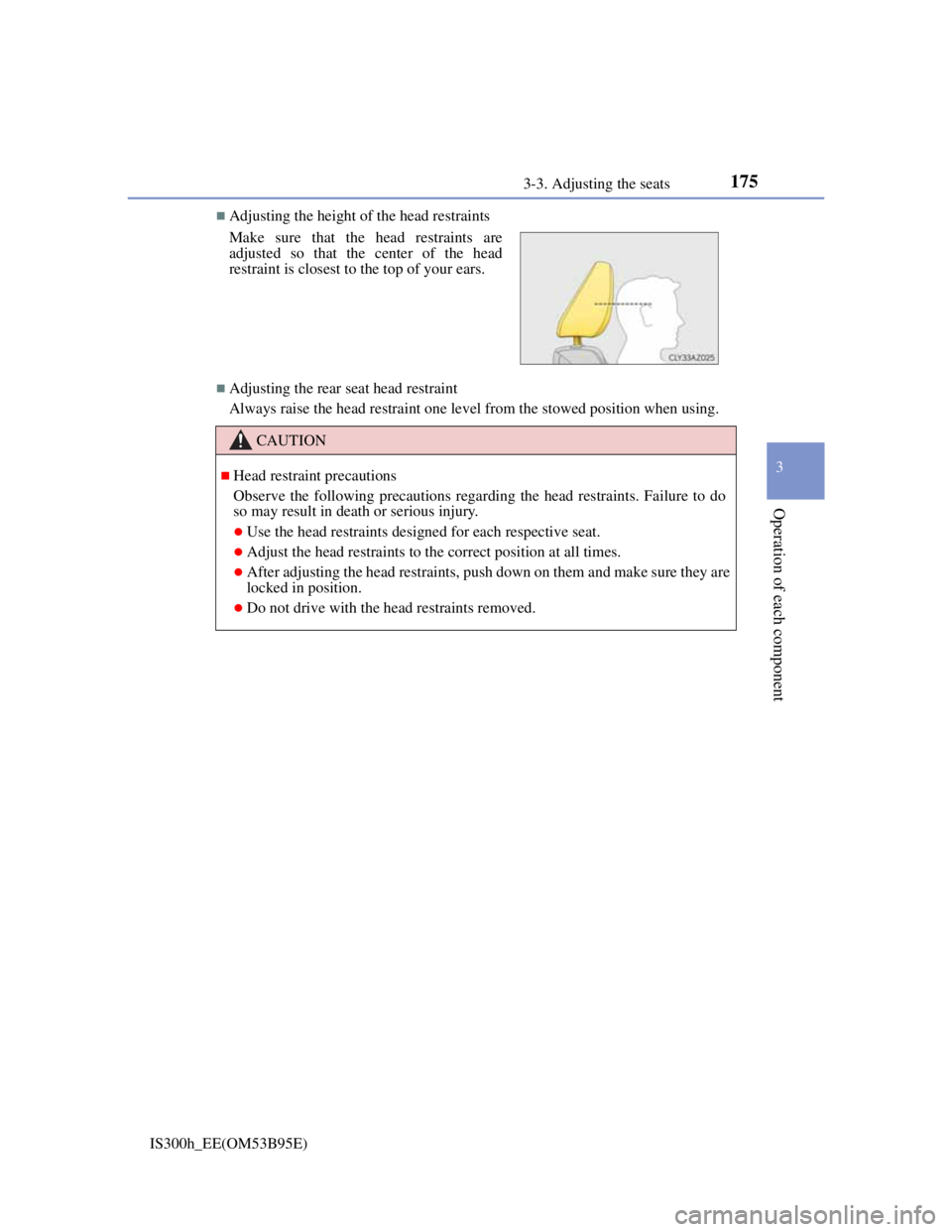
Adjusting the height of the head restraints
Adjusting the rear seat head restraint
Always raise the head restraint one level from the stowed position when using. Make sure that the head restraints are
adjusted so that the center of the head
restraint is closest to the top of your ears.
CAUTION
Head restraint precautions
Observe the following precautions regarding the head restraints. Failure to do
so may result in death or serious injury.
Use the head restraints designed for each respective seat.
Adjust the head restraints to the correct position at all times.
After adjusting the head restraints, push down on them and make sure they are
locked in position.
Do not drive with the head restraints removed.
Page 179 of 628

1773-4. Adjusting the steering wheel and mirrors
3
Operation of each component
IS300h_EE(OM53B95E)
To sound the horn, press on or close
to the mark.
The steering wheel can be adjusted when (power type)
The power switch is in ACCESSORY or ON mode
*.
*: If the driver’s seat belt is fastened, the steering wheel can be adjusted regard-
less of power switch mode.
Automatic adjustment of the steering position (if equipped)
A desired steering position can be entered to memory and recalled automatically
by the driving position memory system. (P. 168)
Power easy access system (if equipped)
The steering wheel and driver’s seat move in accordance with power switch
mode and the driver’s seat belt condition. (P. 170)
Horn
CAUTION
Caution while driving
Do not adjust the steering wheel while driving.
Doing so may cause the driver to mishandle the vehicle and cause an accident,
resulting in death or serious injury.
After adjusting the steering wheel (manual type)
Make sure that the steering wheel is securely locked.
Otherwise, the steering wheel may move suddenly, possibly causing an acci-
dent, and resulting in death or serious injury. Also, the horn may not sound if
the steering wheel is not securely locked.
Page 183 of 628
1813-4. Adjusting the steering wheel and mirrors
3
Operation of each component
IS300h_EE(OM53B95E)
Using the switch
Press the switch to fold the mir-
rors.
Press it again to extend them to
the original position.
Setting automatic mode (if equipped)
Automatic mode allows the folding or extending of the mirrors to be
linked to locking/unlocking of the doors.
Press the “AUTO” switch to set
automatic mode.
The indicator will come on.
Pressing the switch once more
will return to manual mode.
Automatically folding and extending the mirrors
Indicator
Page 186 of 628
184
IS300h_EE(OM53B95E)3-5. Opening, closing the windows and moon roof
The power windows can be opened and closed using the switches.
Operating the switch moves the windows as follows:
Closing
One-touch closing
*
Opening
One-touch opening
*
*
: To stop the window partway, operate
the switch in the opposite direction.
Press the switch to lock the passen-
ger window switches.
The indicator will come on.
Use this switch to prevent children
from accidentally opening or closing
a passenger window.
Power windows
Opening and closing procedures
1
2
3
4
Window lock switch
Indicator