Page 233 of 628

2314-3. Operating the lights and wipers
4
Driving
IS300h_EE(OM53B95E)
The Automatic High Beam can be operated when
The power switch is in ON mode.
Camera sensor detection information
High beam may not be automatically turned off in the following situations:
• When oncoming vehicles suddenly appear from a curve
• When the vehicle is cut in front of by another vehicle
• When oncoming or preceding vehicles are hidden from sight due to repeated
curves, road dividers or roadside trees
High beam may be turned off if an oncoming vehicle that is using fog lights
without using the headlights is detected.
House lights, street lights, red traffic signals, and illuminated billboards or signs
may cause the high beam to turn off.
The following factors may affect the amount of time taken to turn high beam on
or off:
• The brightness of headlights, fog lights, and tail lights of oncoming and pre-
ceding vehicles
• The movement and direction of oncoming and preceding vehicles
• When an oncoming or preceding vehicle only has operational lights on one
side
• When an oncoming or preceding vehicle is a two-wheeled vehicle
• The condition of the road (gradient, curve, condition of the road surface etc.)
• The number of passengers and amount of luggage
High beam may be turned on or off when unexpected by the driver.
Small vehicles, such as bicycles, may not be detected.
In the situations below, the system may not be able to correctly detect the sur-
rounding brightness levels, and may flash or expose nearby pedestrians to the
high beam. Therefore, you should consider turning the high beams on or off
manually rather than relying on the Automatic High Beam system.
• In bad weather (rain, snow, fog, sandstorms etc.)
• The windshield is obscured by fog, mist, ice, dirt etc.
• The windshield is cracked or damaged.
• The camera sensor is deformed or dirty.
• Surrounding brightness levels are equal to those of headlights, tail lights or
fog lights.
• Vehicles ahead have headlights or tail lights that are either switched off,
dirty, changing color, or have improperly adjusted aim.
• When driving through an area of intermittently changing brightness and
darkness.
• When frequently and repeatedly driving ascending/descending roads, or
roads with rough, bumpy or uneven surfaces (such as stone-paved roads,
gravel tracks etc.).
• When frequently and repeatedly taking curves or driving on a winding road.
• There is a highly reflective object ahead of the vehicle, such as a sign or a
mirror.
• The vehicle’s headlights are damaged or dirty.
• The vehicle is listing or titling, due to a flat tire, a trailer being towed etc.
• The driver believes that the high beam may be causing problems or distress
to other drivers or pedestrians nearby.
Page 239 of 628

2374-3. Operating the lights and wipers
4
Driving
IS300h_EE(OM53B95E)
Rain-sensing windshield wipers
Move the lever up by 2 lev-
els
Move the lever up by 1 level
Move the lever down by 1
level
Move the lever down by 2
levels
AUTO mode on/off switch
With AUTO mode selected, the wip-
ers will operate automatically when
the sensor detects falling rain. The
system automatically adjusts wiper
timing in accordance with rain vol-
ume and vehicle speed.
The AUTO mode indicator will turn
on when AUTO mode is selected.
*1: After temporary operation, the mode will return to AUTO mode.
*2: AUTO mode will be canceled.
AUTO mode
indicator
1
2
3
4
5
OffTemporary
operationTemporary
operationLow speed
operationHigh speed
operation
Low speed
operationOffOffHigh speed
operationHigh speed
operation
High speed
operationOffLow speed
operationNo changeNo change
AUTO
mode
Intermittent
operation
Off
Temporary
operation
*1Low speed
operation
*2High speed
operation
*2Continu-
ouslyNo change
Operation
Status
before
operation
Page 240 of 628

2384-3. Operating the lights and wipers
IS300h_EE(OM53B95E)
When AUTO mode is selected, the sensor sensitivity can be adjusted by
turning the switch ring.
Increases the sensitivity
Decreases the sensitivity
Washer/wiper dual operation
The wipers will automatically oper-
ate a couple of times after the washer
squirts.
When the headlights are on and the
lever is pulled and held, the head-
light cleaners will operate once.
After this, the headlight cleaners will
operate every 5th time the lever is
pulled.
The wipers can be used as intermittent windshield wipers, which operate
regardless of vehicle speed or amount of raindrops. The intermittent
windshield wiper operation can be switched when the vehicle is stopped
and the wiper is off. The wiper operation cannot be switched during
AUTO mode or while the intermittent windshield wipers are operating.
Press and hold until the AUTO
mode indicator stops flashing.
If is pressed and held until the
AUTO mode indicator stops flashing
again, it will return to its previous
state.
The wiper can be switched when the
vehicle is stopped and the wipers are
off.
6
7
8
Switching between the intermittent windshield wipers and rain-
sensing windshield wipers (vehicles with rain-sensing windshield
wipers)
Page 241 of 628

2394-3. Operating the lights and wipers
4
Driving
IS300h_EE(OM53B95E)
The windshield wiper and washer can be operated when
The power switch is in ON mode.
Dripping prevention wiper sweep
After performing a washing and wiping operation several times, the wipers oper-
ate one more time after a short delay to prevent dripping.
However, the last sweep will not happen if the vehicle is traveling above 170 km/
h (106 mph).
Effects of vehicle speed on wiper operation (vehicles with rain-sensing wind-
shield wipers)
Vehicle speed affects the following even when the wipers are not in AUTO
mode.
Intermittent wiper interval
Wiper operation when the washer is being used (delay until drip prevention
wiper sweep occurs)
With low speed windshield wiper operation selected, wiper operation will be
switched from low speed to intermittent wiper operation only when the vehicle is
stationary.
Raindrop sensor (vehicles with rain-sensing windshield wipers)
If the wiper is turned to AUTO mode while the power switch is in ON mode,
the wipers will operate once to show that AUTO mode is activated.
If the temperature of the raindrop sensor is 85°C (185°F) or higher, or -30°C (-
22°F) or lower, automatic operation may not occur. In this case, operate the
wipers in any mode other than AUTO mode.
When the windshield wipers are in temporary operation (vehicles with rain-sens-
ing windshield wipers)
AUTO mode cannot be activated even if is pressed.
If no windshield washer fluid sprays
Check that the washer nozzles are not blocked if there is washer fluid in the
windshield washer fluid reservoir.
Operation guide display (vehicles with rain-sensing windshield wipers only)
When the windshield wiper switch is operated to activate AUTO mode or when
the rain-sensing level is adjusted, the current status is displayed on the meters for
a few seconds. (P. 1 1 9 )
The raindrop sensor judges the amount of
raindrops.
An optical sensor is adopted. It may not
operate properly when sunlight from the
rising or setting of the sun intermittently
strikes the windshield, or if bugs etc. are
present on the windshield.
Page 242 of 628

2404-3. Operating the lights and wipers
IS300h_EE(OM53B95E)
CAUTION
Caution regarding the use of windshield wipers in AUTO mode
The windshield wipers may operate unexpectedly if the sensor is touched or the
windshield is subject to vibration in AUTO mode. Take care that your fingers
or anything else do not become caught in the windshield wipers.
Caution regarding the use of washer fluid
When it is cold, do not use the washer fluid until the windshield becomes
warm. The fluid may freeze on the windshield and cause low visibility. This
may lead to an accident, resulting in death or serious injury.
NOTICE
When the windshield is dry
Do not use the wipers, as they may damage the windshield.
When there is no washer fluid spray from the nozzle
Damage to the washer fluid pump may be caused if the lever is pulled toward
you and held continually.
When a nozzle becomes blocked
In this case, contact any authorized Lexus dealer or repairer, or another duly
qualified and equipped professional.
Do not try to clear it with a pin or other object. The nozzle will be damaged.
Page 251 of 628
2494-5. Using the driving support systems
4
Driving
IS300h_EE(OM53B95E)
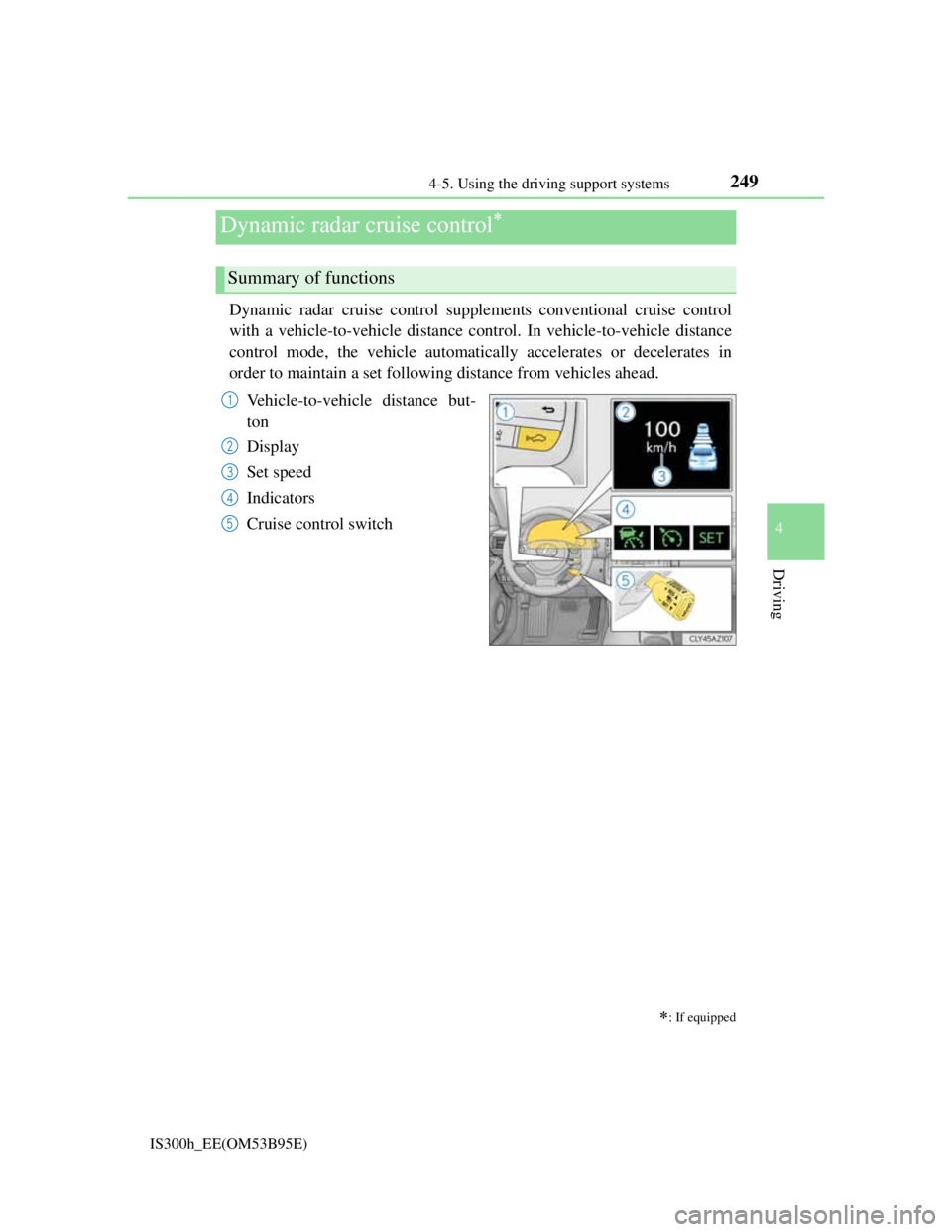
Dynamic radar cruise control supplements conventional cruise control
with a vehicle-to-vehicle distance control. In vehicle-to-vehicle distance
control mode, the vehicle automatically accelerates or decelerates in
order to maintain a set following distance from vehicles ahead.
Vehicle-to-vehicle distance but-
ton
Display
Set speed
Indicators
Cruise control switch
Dynamic radar cruise control
: If equipped
Summary of functions
1
2
3
4
5
Page 252 of 628
2504-5. Using the driving support systems
IS300h_EE(OM53B95E)
Press the “ON/OFF” button to
activate the cruise control.
Dynamic radar cruise control indica-
tor will come on.
Press the button again to deactivate
the cruise control.
Accelerate or decelerate the vehi-
cle to the desired speed, and push
the lever down to set the speed.
“SET” indicator will be displayed.
The vehicle speed at the moment the
lever is released becomes the set
speed.
Setting the vehicle speed (vehicle-to-vehicle distance control
mode)
1
2
Page 253 of 628

2514-5. Using the driving support systems
4
Driving
IS300h_EE(OM53B95E)
To change the set speed, operate the lever until the desired set speed is
displayed.
Increases the speed
Decreases the speed
Fine adjustment: Momentarily move
the lever in the desired direction.
Large adjustment: Hold the lever in
the desired direction.
In the vehicle-to-vehicle distance control mode, the set speed will be
increased or decreased as follows:
• When the set speed is shown in “MPH”
Fine adjustment: By approximately 8 km/h (5 mph) each time the lever is
operated
Large adjustment: By approximately 8 km/h (5 mph) for each 0.3 seconds
the lever is held
• When the set speed is shown in “km/h”
Fine adjustment: By approximately 5 km/h (3.1 mph) each time the lever is
operated
Large adjustment: By approximately 5 km/h (3.1 mph) for each 0.3 sec-
onds the lever is held
In the constant speed control mode (P. 254), the set speed will be increased
or decreased as follows:
Fine adjustment: By approximately 1.6 km/h (1 mph) each time the lever is
operated
Large adjustment: The set speed can be increased or decreased continually
until the lever is released.
Adjusting the set speed
1
2