Page 15 of 94
15
GS350_QG_U (OM30C68U)
Engine (Ignition) Switch
■Starting the engine
Check that the parking brake is set.
Check that the shift lever is set in P.
Firmly depress the brake pedal.
will be displayed on the multi-
information display. If it is not displayed,
the engine cannot be started.
Press the engine switch.
The engine will crank until it starts or
for up to 30 seconds, whichever is less.
Continue depressing the brake pedal
until the engine is completely started.
The engine can be started from any
engine switch mode.
Performing the following operations when ca rrying the electronic key on your person
starts the engine or changes engine switch modes.
1
2
3
4
Page 16 of 94
16
GS350_QG_U (OM30C68U)
■Stopping the engine
Stop the vehicle.
Shift the shift lever to P.
Set the parking brake.
Press the engine switch.
Release the brake pedal and check that “P OWER ON” on the multi-information dis-
play is off.
■ Changing engine switch modes
Modes can be changed by pressing the engine switch with the brake pedal released. (The
mode changes each time the switch is pressed.)
Off
*
The emergency flashers can be used.
The multi-information display will not be
displayed.
ACCESSORY mode Some electrical components such as the
audio system can be used.
“POWER ON” will be displayed on the
multi-information display.
IGNITION ON mode All electrical components can be used.
“POWER ON” will be displayed on the
multi-information display.
*: If the shift lever is in a position other than
P when turning off the engine, the
engine switch will be turned to ACCES-
SORY mode, not to off.
1
2
3
4
5
Page 38 of 94
38
GS350_QG_U (OM30C68U)
Intuitive Parking Assist (if equipped)
■Turning the system on and off
Turns the intuitive parking assist on/off
When on, the indicator light comes on
and the buzzer sounds to inform the
driver that the syst em is operational.
The distance from your vehicle to nearby ob stacles when parallel parking or maneuver-
ing into a garage is measured by the sens ors and communicated via the multi-informa-
tion display, Remote touch screen and a buzzer. Always check the surrounding area
when using this system.
Page 80 of 94

80
GS350_QG_U (OM30C68U)
Lexus Enform with Safety Connect (if equipped)
■Function achieved by using a cellular phone
■
Services
Of the functions included with Lexus Enform with Safety Connect, only Apps can be
achieved by using a cellular phone.
Apps is a service that enables the usable conten ts of a cellular phone to be displayed on and
operated from the navigation screen.
● APPS
Each time “Apps” is activated, the system checks for updates. When there are no updates
available, the main menu screen will be displayed right after a screen indicating that
updates are being checked for has been displayed.
■Subscription
Apps will be available on a trial period includ ed upon purchase of a new vehicle. User regis-
tration is required to start using the service.
When a trial period has elapsed after purchasing a new vehicle, a fee will be charged to
renew the contract. Services requiring a separa te contract can also be used. For details,
refer to http://www.lexus.com/enform/
or call 1-800-255-3987.
■ Function achieved by using DCM and the navigation system
■
Services
Of the functions included with Lexus Enform with Safety Connect, Destination Assist,
eDestination, and Lexus Insider can be achieved by making DCM cooperate with the
navigation system.
These are subscription-based telematics servic es that use Global Positioning System (GPS)
data, embedded cellular technology to provide safety and security as well as convenience
features to subscribers. The services are supported by Lexus’ designated response center,
which operates 24 hours per day, 7 days per week.
The services are available by subscription on select, telematics hardware-equipped vehi-
cles.
● Destination Assist
Destination Assist provides you with live assi stance for finding destinations via the Lexus
Enform with Safety Connect response center. You can request either a specific business,
address, or ask for help locat ing your desired destination by category, such as restau-
rants, gas stations, shop ping centers or other po ints of interest (POI).
After you tell the agent your choice of destinat ion, its coordinates are sent wirelessly to
your vehicle’s navigation system.
Lexus Enform with Safety Connect is a gene ric name for Apps, Destination Assist, eDes-
tination, Lexus Insider, and Safety Connect.
The functions included in Lexus Enform with Safety Connect are classified into the fol-
lowing three functions.
For details, refer to the “Owner’s Manual” and “Navigation System Owner’s Manual”.
Page 90 of 94
90
What to do if...
GS350_QG_U (OM30C68U)
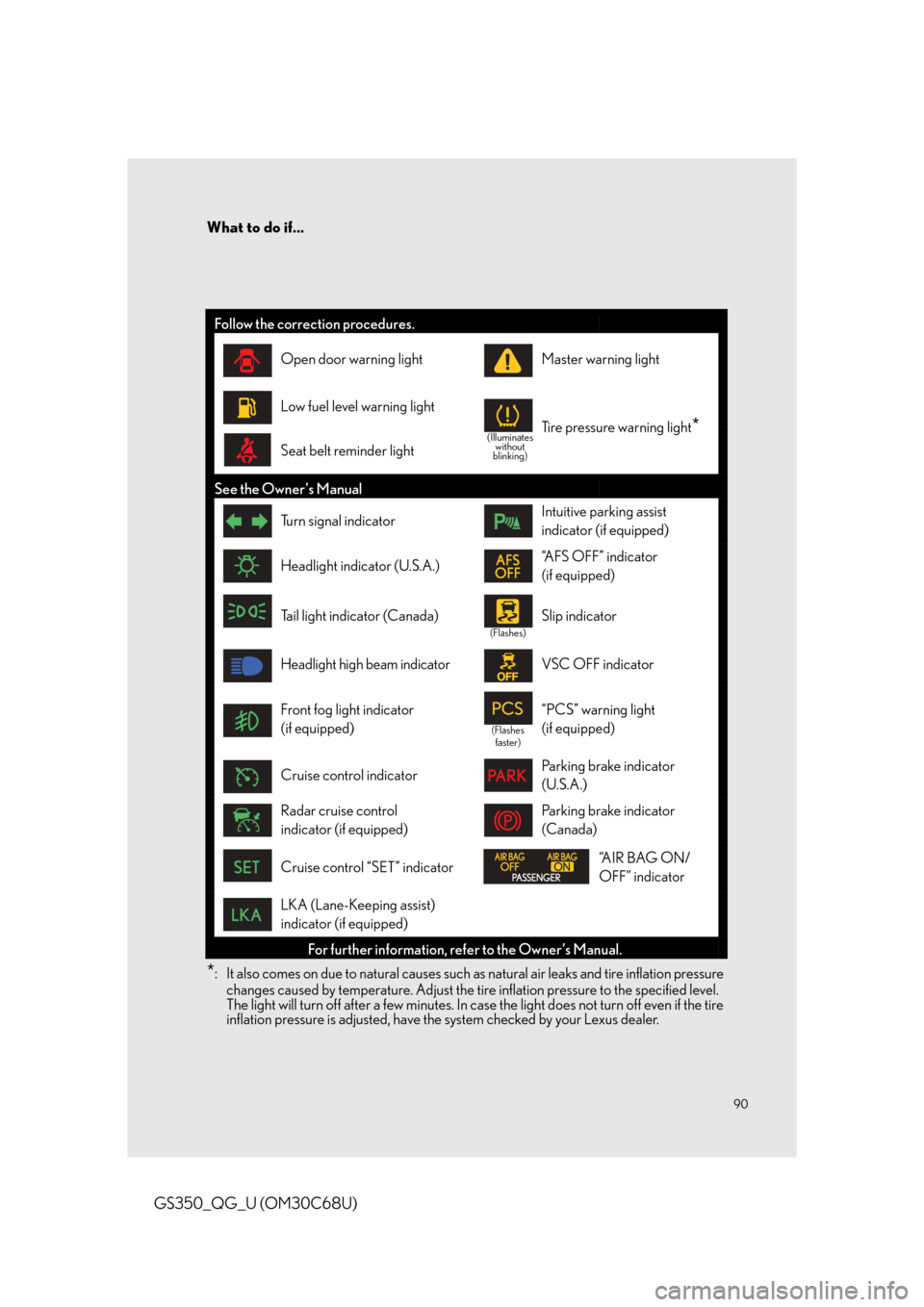
*: It also comes on due to natural causes such as natural air leaks and tire inflation pressure changes caused by temperature. Adjust the tire inflation pressure to the specified level.
The light will turn off after a few minutes. In case the light does not turn off even if the tire
inflation pressure is adjusted, have th e system checked by your Lexus dealer.
Follow the correction procedures.
Open door warning lightMaster warning light
Low fuel level warning light
(Illuminates
without
blinking)Tire pressure warning light*
Seat belt reminder light
See the Owner’s Manual
Tu r n s i g n a l i n d i c a t o rIntuitive parking assist
indicator (if equipped)
Headlight indicator (U.S.A.)“AFS OFF” indicator
(if equipped)
Tail light indicator (Canada)
(Flashes)
Slip indicator
Headlight high beam indicatorVSC OFF indicator
Front fog light indicator
(if equipped)
(Flashes faster)
“PCS” warning light
(if equipped)
Cruise control indicatorParking brake indicator
(U.S.A.)
Radar cruise control
indicator (if equipped)Parking brake indicator
(Canada)
Cruise control “SET” indicator“A I R B A G O N /
OFF” indicator
LKA (Lane-Keeping assist)
indicator (if equipped)
For further information, re fer to the Owner’s Manual.
Page 92 of 94

92
What to do if...
GS350_QG_U (OM30C68U)
■Starting the engine
Ensure that the shift lever is in P and
depress the brake pedal.
Touch the Lexus emblem side of the
electronic key to the engine switch.
The engine switch will turn to IGNI-
TION ON mode.
When the smart access system with
push-button start is deactivated in cus-
tomization setting, the engine switch
will turn to ACCESSORY mode.
Firmly depress the brake pedal and
check that is shown on the
multi-information display.
Press the engine switch.
In the event that the engine still cannot be operated, contact your Lexus dealer.
If the engine doesn’t start
Make sure that the correct operating procedures have been followed. Make sure that the brake pedal is firmly
depressed when attempting to start the
engine.
1
2
3
4
If the electronic key battery becomes depleted, replace it with a new battery. For instruc-
tions on replacing the battery, refer to the Ow ner’s Manual. If you need further assistance,
contact your Lexus dealer.
Brake pedal
If the engine still does not st art, see the Owner’s Manual fo r more information or contact
your Lexus dealer.


