Page 258 of 1014
2524-2. Driving procedures
GS450h_300h_OM_OM30D53E_(EE)P. 9 0 8
CAUTION
When starting the hybrid system
Always start the hybrid system while sitting in the driver’s seat. Do not
depress the accelerator pedal while starting the hybrid system under any
circumstances.
Doing so may cause an accident resulting in death or serious injury.
Caution while driving
If hybrid system failure occurs while the vehicle is moving, do not lock or
open the doors until the vehicle reaches a safe and complete stop. Activa-
tion of the steering lock in this circumstance may lead to an accident,
resulting in death or serious injury.
Stopping the hybrid system in an emergency
If you want to stop the hybrid system in an emergency while driving the
vehicle, press and hold the power switch for more than 2 seconds, or press
it briefly 3 times or more in succession. (P. 821)
However, do not touch the power switch while driving except in an emer-
gency. Turning the hybrid system off while driving will not cause loss of
steering or braking control, however, power assist to the steering will be
lost. This will make it more difficult to steer smoothly, so you should pull
over and stop the vehicle as soon as it is safe to do so.
Page 284 of 1014
2744-3. Operating the lights and wipers
GS450h_300h_OM_OM30D53E_(EE)
AFS (Adaptive Front-lighting System) secures excellent visibility
at intersections and on curves by automatically adjusting the direc-
tion of the light axis of the headlights according to vehicle speed
and the degree of the tire’s angle as controlled by steering input.
AFS operates at speeds of 10 km/h (6 mph) or higher.
Deactivating AFS
Turn on the AFS OFF switch.
The indicator turns on when the
AFS is deactivated.
AFS (Adaptive Front-lighting System) (if equipped)
Page 328 of 1014

3174-5. Using the driving support system
4
Driving
GS450h_300h_OM_OM30D53E_(EE)
CAUTION
When the sensor may not be correctly detecting the vehicle ahead
Apply the brakes as necessary when any of the following types of vehicles
are in front of you.
As the sensor may not be able to correctly detect these types of vehicles, the
approach warning (P. 308) will not be activated, and a fatal or serious
accident may result.
Vehicles that cut in suddenly
Vehicles traveling at low speeds
Vehicles that are not moving
Vehicles with small rear ends (trailers with no load on board etc.)
Motorcycles traveling in the same lane
Conditions under which the vehicle-to-vehicle distance control may not
function correctly
Apply the brakes as necessary in the following conditions as the radar sen-
sor may not be able to correctly detect vehicles ahead, and a fatal or serious
accident may result:
When water or snow thrown up by a the surrounding vehicles hinders the
functioning of the sensor
When your vehicle is pointing upwards (caused by a heavy load in the
trunk etc.)
When the road curves or when the lanes are narrow
When steering wheel operation or your position in the lane is unstable
When the vehicle ahead of you decelerates suddenly
Page 347 of 1014

3364-5. Using the driving support system
GS450h_300h_OM_OM30D53E_(EE)
CAUTION
When the radar sensor may not be correctly detecting the vehicle ahead
Apply the brakes as necessary when any of the following types of vehicles
are in front of you.
As the sensor may not be able to correctly detect these types of vehicles, the
approach warning (P. 308) will not be activated, and a fatal or serious
accident may result.
Vehicles that cut in suddenly
Vehicles traveling at low speeds
Vehicles that are not moving
Vehicles with small rear ends (trailers with no load on board etc.)
Motorcycles traveling in the same lane
Conditions under which the vehicle-to-vehicle distance control may not
function correctly
Apply the brakes as necessary in the following conditions as the radar sen-
sor may not be able to correctly detect vehicles ahead, and a fatal or serious
accident may result:
When water or snow thrown up by the surrounding vehicles hinders the
functioning of the radar sensor
When your vehicle is pointing upwards (caused by a heavy load in the
trunk etc.)
When the road curves or when the lanes are narrow
When steering wheel operation or your position in the lane is unstable
When the vehicle ahead of you decelerates suddenly
Page 350 of 1014
3394-5. Using the driving support system
4
Driving
GS450h_300h_OM_OM30D53E_(EE)
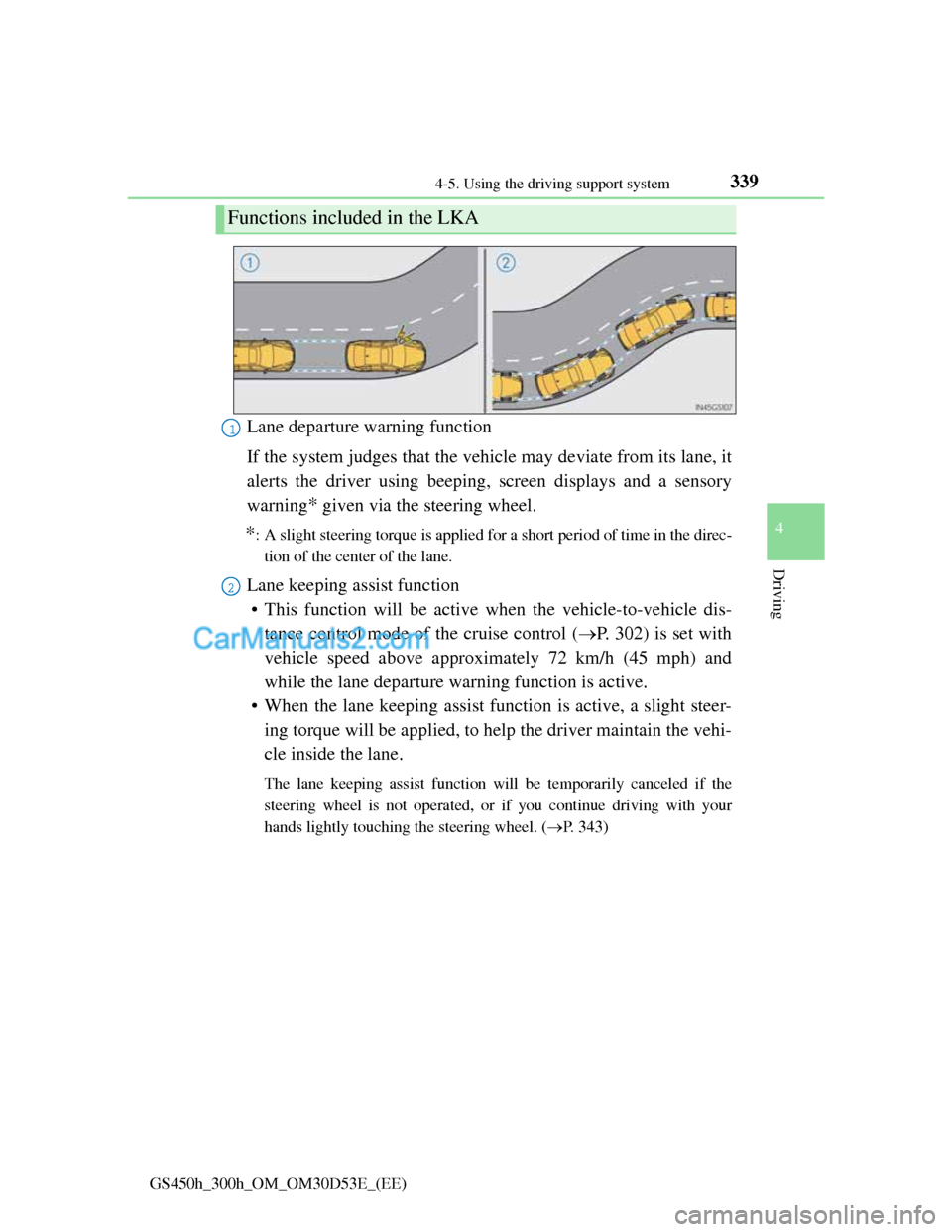
Lane departure warning function
If the system judges that the vehicle may deviate from its lane, it
alerts the driver using beeping, screen displays and a sensory
warning
* given via the steering wheel.
*: A slight steering torque is applied for a short period of time in the direc-
tion of the center of the lane.
Lane keeping assist function
• This function will be active when the vehicle-to-vehicle dis-
tance control mode of the cruise control (P. 302) is set with
vehicle speed above approximately 72 km/h (45 mph) and
while the lane departure warning function is active.
• When the lane keeping assist function is active, a slight steer-
ing torque will be applied, to help the driver maintain the vehi-
cle inside the lane.
The lane keeping assist function will be temporarily canceled if the
steering wheel is not operated, or if you continue driving with your
hands lightly touching the steering wheel. (P. 343)
Functions included in the LKA
1
2
Page 353 of 1014

3424-5. Using the driving support system
GS450h_300h_OM_OM30D53E_(EE)
When the LKA system is on, the lane line display and steering
wheel display are shown.
Lane keeping assist function
operation indication
Steering wheel displayed:
Indicates that the function is cur-
rently operating. (If the lane depar-
ture warning operates at this time,
the steering wheel flashes orange.)
Steering wheel not displayed:
Indicates that the function is not
currently operating. (When the
lane keeping assist function is can-
celed, the buzzer will beep twice.)
Dynamic radar cruise control
display
Lane departure warning func-
tion indication (when the
inside of the white line is
white):
The function has recognized lane
markers. (If the lane departure
warning operates at this time, the
lines flash orange.)
Lane departure warning func-
tion indication (when the
inside of the white line is
black):
A lane marker is not recognized by
the system, or the LKA system
functions are temporarily canceled.
Indication on the multi-information display
1
2
3
4
Page 354 of 1014

3434-5. Using the driving support system
4
Driving
GS450h_300h_OM_OM30D53E_(EE)
Temporary cancelation of the LKA system functions
If any of the following occurs, the LKA system functions will be temporarily
canceled. The functions will resume after the necessary operating conditions
have returned.
The steering wheel is turned as far as necessary to cause the vehicle to
change lanes.
When the system detects no-handed driving. (The lane keeping assist func-
tion will be temporarily canceled, but the lane departure warning function
will continue.)
The turn signal lever is operated.
The vehicle speed deviates from the operating range of the LKA system
functions. (The buzzer will beep twice when the lane keeping assist func-
tion is being canceled.)
When the lane lines cannot be recognized while driving. (The buzzer will
beep twice when the lane keeping assist function is being canceled.)
The wiper switch is set on high speed mode or is set on AUTO mode with
wipers operating at high speed. (The lane keeping assist function will be
temporarily canceled, but the lane departure warning function will con-
tinue.)
If the vehicle crosses a line for approximately half a minute or more. (The
lane keeping assist function will be temporarily canceled, but the lane
departure warning function will continue.)
When the lane departure warning function is activated.
The lane departure warning function will not operate again for a several
seconds after it has been activated, even if the vehicle leaves the lane again.
The lane departure warning
It may be difficult to feel the sensory warning depending on the road condi-
tions.
No-handed driving warning
If the steering wheel is not operated for approximately 15 seconds on a
straight road or approximately 5 seconds on a curve, the buzzer will beep
twice, indicators on the multi-information display will flash, and the lane
keeping assist function will be temporarily canceled. If you drive the vehicle
with your hands lightly touching the steering wheel, this may also be
detected as no-handed driving.
Page 356 of 1014

345
4 4-5. Using the driving support system
Driving
GS450h_300h_OM_OM30D53E_(EE)
When driving on roads that are branching or merging
When driving on a road surface that is wet due to rain, previous rainfall,
standing water, etc.
When the vehicle experiences strong up-and-down motion such as when
driving on an extremely rough road or on a seam in the pavement
When headlight brightness at nighttime is reduced due to dirt on the lenses,
or when the headlights are misaligned
When driving with a strong crosswind
When driving on winding roads or roads that are uneven
When driving on rough or unpaved roads
When changing the tires
Depending on the tires used, sufficient performance may not be maintain-
able.
Warning messages for LKA
Warning messages are used to indicate a system malfunction or to inform the
driver of the need for caution while driving. (P. 842, 854)
CAUTION
Before using the LKA system
Do not rely solely on the LKA system. The LKA system does not drive the
vehicle automatically, nor does it reduce the amount of care you need to
take. As such, the driver must always assume full responsibility for under-
standing his/her surroundings, for operating the steering wheel to correct
the driving line, and for driving safely.
Inappropriate or negligent driving could lead to an accident.
To avoid operating the LKA by mistake
Switch the LKA off using the “LKA” switch when not in use.
