Page 273 of 1014
2674-2. Driving procedures
4
Driving
GS450h_300h_OM_OM30D53E_(EE)
Turn signal lever
The lever will return to its original position immediately after oper-
ation.
Right turn
Lane change to the right
(move the lever partway and
release it)
The right hand signals will flash 3
times.
Lane change to the left (move
the lever partway and release
it)
The left hand signals will flash 3
times.
Left turn
If the turn signals do not stop flashing after turning left or right,
or if you want to stop them flashing
Operate the lever in the opposite direction to either position
or .
If you move the lever to either position or , the selected
turn signals will flash.
Operating instructions
1
2
3
4
2
3
14
Page 274 of 1014
2684-2. Driving procedures
GS450h_300h_OM_OM30D53E_(EE)
Turn signals can be operated when
The power switch is in ON mode.
If the indicator flashes faster than usual
Check that a light bulb in the front or rear turn signal lights has not burned
out.
If the turn signals stop flashing before a lane change has been performed
Operate the lever again.
Customization
The number of times the turn signals flash during a lane change can be
changed.
(Customizable feature P. 942)
Page 300 of 1014

2904-3. Operating the lights and wipers
GS450h_300h_OM_OM30D53E_(EE)
The wipers can be used as intermittent windshield wipers, which
operate regardless of vehicle speed or amount of raindrops. The
intermittent windshield wiper operation can be switched when the
vehicle is stopped and the wiper is off. The wiper operation cannot
be switched during AUTO mode or while the intermittent wind-
shield wipers are operating.
Press and hold until the
AUTO mode indicator stops
flashing.
If is pressed and held until the
AUTO mode indicator stops flash-
ing again, it will return to its previ-
ous state.
The windshield wiper and washer can be operated when
The power switch is in ON mode.
Dripping prevention wiper sweep
After washing and wiping operation several times, the wipers operate one
more time after a short delay to prevent dripping.
However, the last sweep will not happen while the vehicle is moving.
Effects of vehicle speed on wiper operation
Intermittent windshield wipers interval changes when the vehicle is
stopped.
With low speed operation selected, wiper operation will be switched from
low speed to intermittent operation only when the vehicle is stationary.
Switching between the intermittent windshield wipers and
rain-sensing windshield wipers (vehicles with rain-sensing
windshield wipers)
Page 310 of 1014
2994-5. Using the driving support system
4
Driving
GS450h_300h_OM_OM30D53E_(EE)
To change the set speed, operate the lever until the desired set speed
is obtained.
Increases the speed
Decreases the speed
Fine adjustment: Momentarily
move the lever in the desired direc-
tion.
Large adjustment: Hold the lever
in the desired direction.
The set speed will be increased or decreased as follows:
Fine adjustment: By approximately 1.6 km/h (1 mph) each time the lever
is operated.
Large adjustment: The set speed can be increased or decreased continually
until the lever is released.
Pulling the lever toward you
cancels the constant speed
control.
The speed setting is also canceled
when the brakes are applied.
Pushing the lever up resumes
the constant speed control.
Resuming is available when the
vehicle speed is more than approx-
imately 40 km/h (25 mph).
Adjusting the set speed
1
2
Canceling and resuming the constant speed control
1
2
Page 315 of 1014
3044-5. Using the driving support system
GS450h_300h_OM_OM30D53E_(EE)
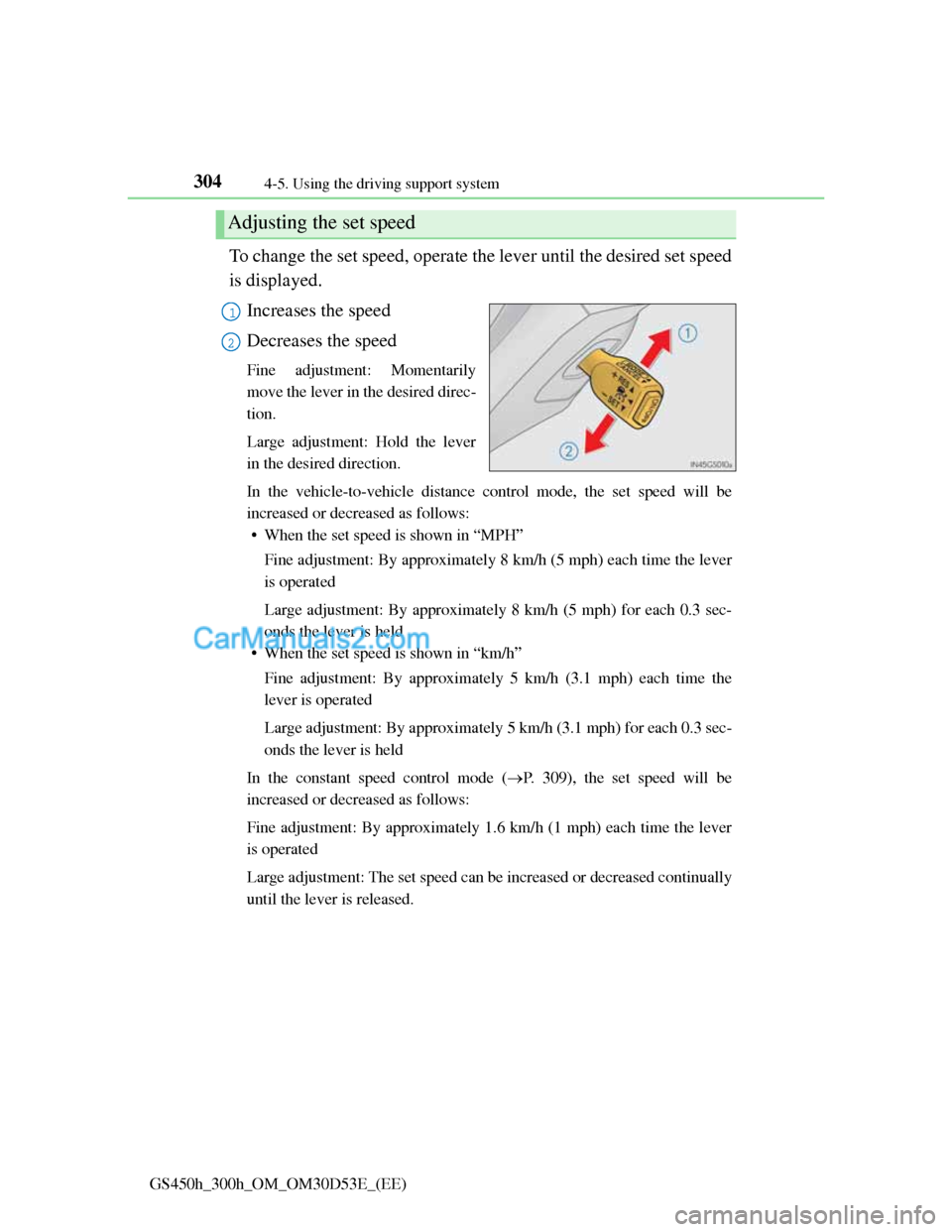
To change the set speed, operate the lever until the desired set speed
is displayed.
Increases the speed
Decreases the speed
Fine adjustment: Momentarily
move the lever in the desired direc-
tion.
Large adjustment: Hold the lever
in the desired direction.
In the vehicle-to-vehicle distance control mode, the set speed will be
increased or decreased as follows:
• When the set speed is shown in “MPH”
Fine adjustment: By approximately 8 km/h (5 mph) each time the lever
is operated
Large adjustment: By approximately 8 km/h (5 mph) for each 0.3 sec-
onds the lever is held
• When the set speed is shown in “km/h”
Fine adjustment: By approximately 5 km/h (3.1 mph) each time the
lever is operated
Large adjustment: By approximately 5 km/h (3.1 mph) for each 0.3 sec-
onds the lever is held
In the constant speed control mode (P. 309), the set speed will be
increased or decreased as follows:
Fine adjustment: By approximately 1.6 km/h (1 mph) each time the lever
is operated
Large adjustment: The set speed can be increased or decreased continually
until the lever is released.
Adjusting the set speed
1
2
Page 332 of 1014

3214-5. Using the driving support system
4
Driving
GS450h_300h_OM_OM30D53E_(EE)
To change the set speed, operate the lever until the desired set speed
is displayed.
Increases the speed
(Except when the vehicle has been
stopped by system control in vehi-
cle-to-vehicle distance control
mode)
Decreases the speed
Fine adjustment: Momentarily
move the lever in the desired direc-
tion.
Large adjustment: Hold the lever
in the desired direction.
In the vehicle-to-vehicle distance control mode, the set speed will be
increased or decreased as follows:
• When the set speed is shown in “MPH”
Fine adjustment: By approximately 8 km/h (5 mph) each time the lever
is operated
Large adjustment: By approximately 8 km/h (5 mph) for each 0.3 sec-
onds the lever is held
• When the set speed is shown in “km/h”
Fine adjustment: By approximately 5 km/h (3.1 mph) each time the
lever is operated
Large adjustment: By approximately 5 km/h (3.1 mph) for each 0.3 sec-
onds the lever is held
In the constant speed control mode (P. 309), the set speed will be
increased or decreased as follows:
Fine adjustment: By approximately 1.6 km/h (1 mph) each time the lever
is operated
Large adjustment: The set speed can be increased or decreased continually
until the lever is released.
Adjusting the set speed
1
2
Page 358 of 1014

3474-5. Using the driving support system
4
Driving
GS450h_300h_OM_OM30D53E_(EE)
NOTICE
Camera sensor (P. 338)
Observe the following to ensure that the LKA system functions correctly.
Keep the windshield clean at all times.
Performance could be affected if the windshield is dirty, or if raindrops,
condensation or ice are adhering to the windshield.
When adjusting the rear view mirror, make sure that it does not block the
camera lens.
Do not attach window tinting to the windshield.
Do not install an antenna in front of the camera lens.
If the windshield is fogged up, use the windshield defogger to remove fog
from the windshield.
When it is cold, using the heater with air blowing to the feet may allow the
upper part of the windshield to fog up. This will have a negative effect on
the images.
Do not place anything on the dashboard.
The camera sensor may recognize the image reflected on the windshield
as lane markers by mistake.
Do not scratch the camera lens, or let it get dirty.
When cleaning the inside of the windshield, be careful not to get any glass
cleaner etc. on the lens. Also, do not touch the lens.
For lens repair, contact any authorized Lexus dealer or repairer, or another
duly qualified and equipped professional.
Do not change the installation position or direction of the camera sensor
or remove it. The direction of the camera sensor is precisely adjusted.
Do not subject the camera sensor to strong impact or force, and do not dis-
assemble the camera sensor.
Do not attach a sticker or other items to
the windshield near the camera sensor.
Do not install or place anything near the
camera.
Page 413 of 1014

4024-5. Using the driving support system
GS450h_300h_OM_OM30D53E_(EE)
When the message is displayed on the multi-information display showing that
TRC has been disabled even if the VSC OFF switch has not been pressed
TRC cannot be operated. Contact any authorized Lexus dealer or repairer, or
another duly qualified and equipped professional.
VGRS is disabled when
VGRS may stop operating in the following situations.
In this event, the steering wheel may move from its straight forward position,
but it will return when the system restarts.
The steering wheel is operated for an extended period of time while the
vehicle is stopped or is moving very slowly.
When force is continuously applied for a long time with the steering wheel
turned as far as it will go.
The center position of the steering wheel may change when VGRS is dis-
abled. However, the position will return to normal after VGRS is reacti-
vated.
When the 12-volt battery is disconnected
The steering wheel may move from its straight forward position, but this will
be corrected automatically when driving.
Sounds and vibrations caused by the ABS, brake assist, VSC, TRC and
VGRS systems
A sound may be heard from the engine compartment when the brake pedal
is depressed repeatedly, when the hybrid system is started or just after the
vehicle begins to move. This sound does not indicate that a malfunction has
occurred in any of these systems.
Any of the following conditions may occur when the above systems are
operating. None of these indicates that a malfunction has occurred.
• Vibrations may be felt through the vehicle body and steering.
• A motor sound may be heard after the vehicle comes to a stop.
EPS, VGRS and DRS operation sound
When the steering wheel is operated, a motor sound (whirring sound) may be
heard. This does not indicate a malfunction.
Reactivation of the TRC/VSC systems
Even after the TRC/VSC systems have been turned off, turning the hybrid
system off and then on again will automatically reactivate the TRC/VSC sys-
tems.


