Page 255 of 908
ES350 300h_OM_OM33A01U_(U)
2554-5. Using the driving support systems
4
Driving
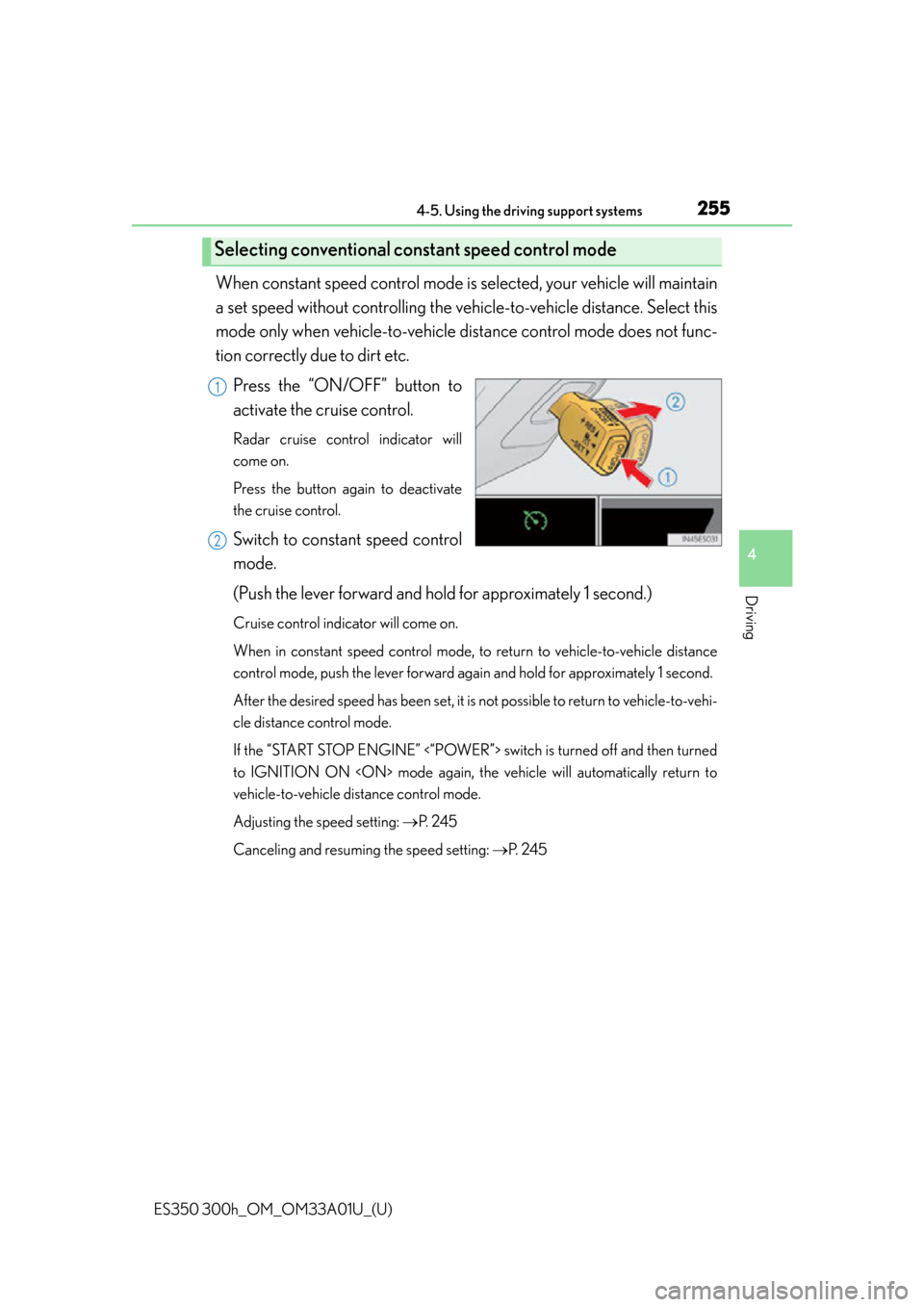
When constant speed control mode is selected, your vehicle will maintain
a set speed without controlling the vehi cle-to-vehicle distance. Select this
mode only when vehicle-to-vehicle distance control mode does not func-
tion correctly due to dirt etc.
Press the “ON/OFF” button to
activate the cruise control.
Radar cruise control indicator will
come on.
Press the button again to deactivate
the cruise control.
Switch to constant speed control
mode.
(Push the lever forward and hold for approximately 1 second.)
Cruise control indicator will come on.
When in constant speed control mode, to return to vehicle-to-vehicle distance
control mode, push the lever forward again and hold for approximately 1 second.
After the desired speed has been set, it is not possible to return to vehicle-to-vehi-
cle distance control mode.
If the “START STOP ENGINE” <“POWER”> switch is turned off and then turned
to IGNITION ON mode again, the vehicle will automatically return to
vehicle-to-vehicle distance control mode.
Adjusting the speed setting: P. 2 4 5
Canceling and resuming the speed setting: P. 2 4 5
Selecting conventional constant speed control mode
1
2
Page 280 of 908

280
ES350 300h_OM_OM33A01U_(U)
4-5. Using the driving support systems
■Alert volume setting
The alert volume can be adjusted.Select “1” to “5” on the “LEXUS Park Assist settings”.
Select “Save”.
■Display on/off setting
On or off can be selected for intuitive parking assist display.Select “Display Off”.
When the “Display Off” indicator is turned on, the display of intuitive parking
assist will be off. Select “Display Off” again to turn the display of intuitive park-
ing assist on.
Select “Save”.
■Alert distance setting
Front or rear center sensors display and tone indication can be set.Select “Front” or “Rear”.
Long distance or short distance can be selected.
Select “Save”.
■The intuitive parking assist can be operated when
●Front center sensors:
• The “START STOP ENGINE” <“POWER”> switch is in IGNITION ON mode.
• The shift lever is in a position other than P or R.
• The vehicle speed is less than about 6 mph (10 km/h).
●Front corner sensors:
• The “START STOP ENGINE” <“POWER”> switch is in IGNITION ON mode.
• The shift lever is in a position other than P.
• The vehicle speed is less than about 6 mph (10 km/h).
●Rear corner and rear center sensors:
• The “START STOP ENGINE” <“POWER”> switch is in IGNITION ON mode.
• The shift lever is in R.
1
2
1
2
1
2
Page 336 of 908
3365-1. Lexus Display Audio system
ES350 300h_OM_OM33A01U_(U)
If the “START STOP ENGINE”
<“POWER”> switch is turned to
ACCESSORY or IGNITION ON
mode, the initial screen will
be displayed for a few seconds as
the system starts up.
Images shown on the initial screen can
be changed to image1 or image2.
( P. 3 4 2 )
Initial screen
Page 342 of 908
3425-1. Lexus Display Audio system
ES350 300h_OM_OM33A01U_(U)
This screen is used for various settings.Display the “Setup” screen. ( P. 3 4 1 )
Select “General” on the “Setup” screen.
Select language ( P. 343)
Beep on/off
Select button color
Customize Startup Image
The initial screen displayed when the “START STOP ENGINE” <“POWER”>
switch is turned to ACCESSORY or IGNITION ON mode can be
changed to image 1, or image 2 which displays the vehicle screen.
Animation on/off
The animation effect for audio source se lection screen, screen transitions, etc.
can be set to “On” or “Off”.
Personal data can be deleted. ( P. 3 4 3 )
When you complete settings, select “Save”.
General settings
1
2
Pa g e 1Pa g e 2
1
2
3
4
5
6
3
Page 355 of 908

ES350 300h_OM_OM33A01U_(U)
3555-2. Using the air conditioning system and defogger
5
Interior features
■Registering air conditioning settings to electronic keys
●Unlocking the vehicle using an electronic key and turning the “START STOP
ENGINE” <“POWER”> switch to IGNITION ON mode will recall that key’s
registered air conditioning settings.
●When the “START STOP ENGINE” <“POWER”> is turned off, the current air con-
ditioning settings will automatically be re gistered to the electronic key that was
used to unlock the vehicle.
The system may not operate correctly if more than one electronic key is in the vicinity
or if the smart access system with push-button start is used to unlock a passenger
door.
■Air conditioning system settings
●When the “START STOP ENGINE” <“POWER”> switch is turned on, the air condi-
tioning system settings will be set to thos e that were in use the last time the “START
STOP ENGINE” <“POWER”> switch was turned off.
●Air conditioning system settings are me morized individually on each electronic
key, so the settings reproduced will be specific to the key that is used.
●This feature is customizable at your Lexus dealer.
■Using automatic mode
Fan speed is adjusted automatically according to the temperature setting and the
ambient conditions.
Therefore, the fan may stop for a while until warm or cool air is ready to flow immedi-
ately after is pressed.
■Fogging up of the windows
●The windows will easily fog up when the humidity in the vehicle is high. Selecting
on will dehumidify the air from the outlets and defog the windshield effec-
tively.
●If you turn off, the windows may fog up more easily.
●The windows may fog up if the recirculated air mode is used.
■Windshield fog detection function (if equipped)
When automatic mode is se t, the humidity sensor (P. 358) detects fog on the
windshield and controls the air conditioning system to prevent fog.
■Outside/recirculated air mode
●When driving on dusty roads such as tunn els or in heavy traffic, set the outside/
recirculated air mode button to the recirculated air mode. This is effective in pre-
venting outside air from entering the vehicl e interior. During cooling operation, set-
ting the recirculated air mode will also cool the vehicle interior effectively.
●Outside/recirculated air mode may automatically switch depending on the tem-
perature setting or the inside temperature.
Page 368 of 908

368
ES350 300h_OM_OM33A01U_(U)
5-2. Using the air conditioning system and defogger
■Registering air conditioning settings to electronic keys
●Unlocking the vehicle using an electronic key and turning the “START STOP
ENGINE” <“POWER”> switch to IGNITION ON mode will recall that key’s
registered air conditioning settings.
●When the “START STOP ENGINE” <“POWER”> is turned off, the current air con-
ditioning settings will automatically be re gistered to the electronic key that was
used to unlock the vehicle.
The system may not operate correctly if more than one electronic key is in the vicinity
or if the smart access system with push-button start is used to unlock a passenger
door.
■Air conditioning system settings
●When the “START STOP ENGINE” <“POWER”> switch is turned on, the air condi-
tioning system settings will be set to thos e that were in use the last time the “START
STOP ENGINE” <“POWER”> switch was turned off.
●Air conditioning system settings are me morized individually on each electronic
key, so the settings reproduced will be specific to the key that is used.
●This feature is customizable at your Lexus dealer.
■Using automatic mode
Fan speed is adjusted automatically according to the temperature setting and the
ambient conditions.
Therefore, the fan may stop for a while until warm or cool air is ready to flow immedi-
ately after is pressed.
■Fogging up of the windows
●The windows will easily fog up when the humidity in the vehicle is high. Selecting
on will dehumidify the air from the outlets and defog the windshield effectively.
●If you turn off, the windows may fog up more easily.
●The windows may fog up if the recirculated air mode is used.
■Windshield fog detection function (if equipped)
When automatic mode is se t, the humidity sensor (P. 371) detects fog on the wind-
shield and controls the air conditioning system to prevent fog.
■Outside/recirculated air mode
●When driving on dusty roads such as tunn els or in heavy traffic, set the outside/
recirculated air mode button to the recirculated air mode. This is effective in pre-
venting outside air from entering the vehicl e interior. During cooling operation, set-
ting the recirculated air mode will also cool the vehicle interior effectively.
●Outside/recirculated air mode may automatically switch depending on the tem-
perature setting or the inside temperature.
Page 431 of 908
ES350 300h_OM_OM33A01U_(U)
4315-3. Using the Lexus Display Audio system
5
Interior features
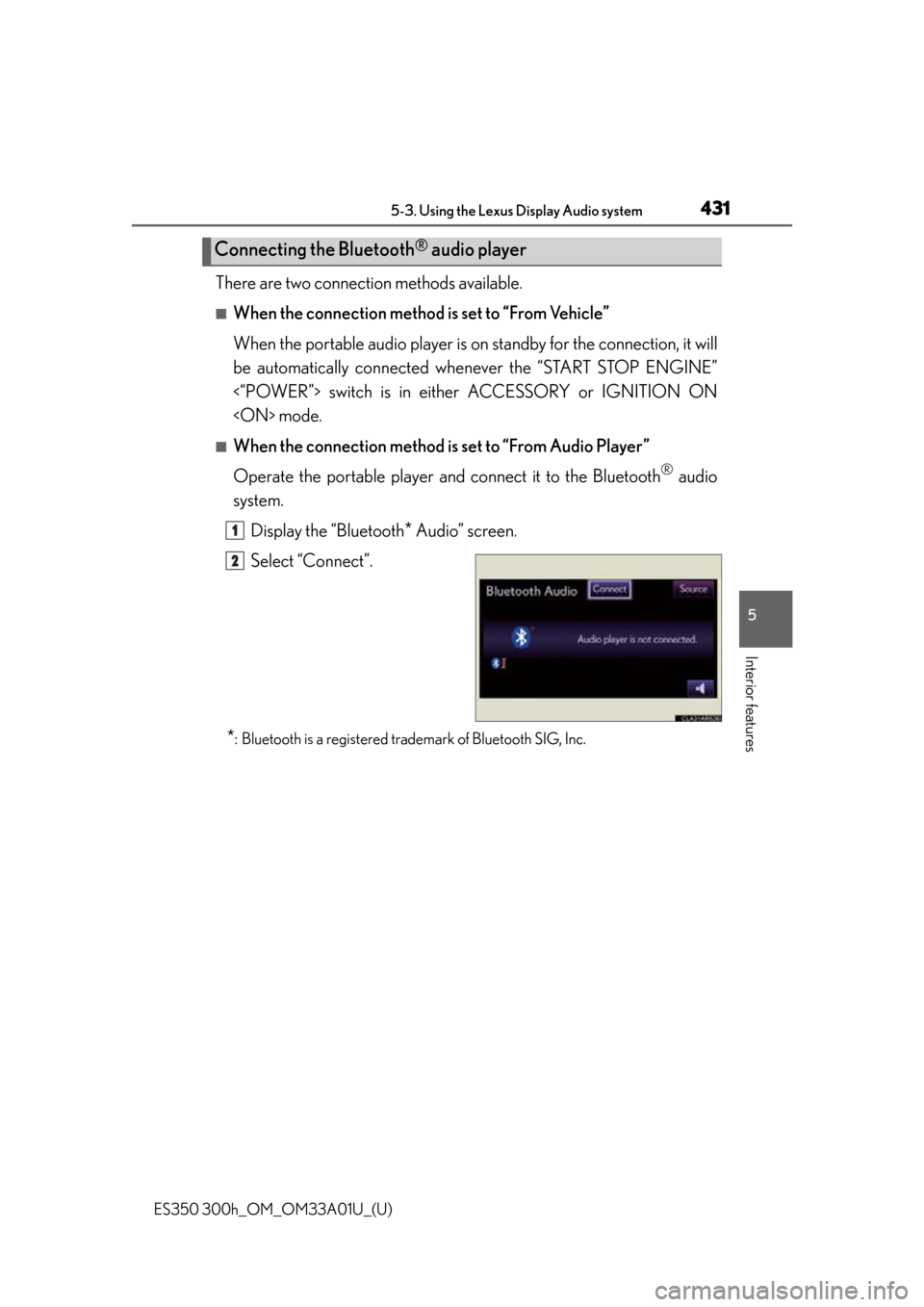
There are two connection methods available.
■When the connection method is set to “From Vehicle”
When the portable audio player is on standby for the connection, it will
be automatically connected whenever the “START STOP ENGINE”
<“POWER”> switch is in either ACCESSORY or IGNITION ON
mode.
■When the connection method is set to “From Audio Player”
Operate the portable player and connect it to the Bluetooth
® audio
system.
Display the “Bluetooth
* Audio” screen.
Select “Connect”.
*: Bluetooth is a registered trademark of Bluetooth SIG, Inc.
Connecting the Bluetooth® audio player
1
2
Page 436 of 908

436
ES350 300h_OM_OM33A01U_(U)
5-3. Using the Lexus Display Audio system
■Certification for the Bluetooth® audio system
FCC ID: AJDK046
IC ID: 775E-K046
This device complies with Part 15 of FCC Rules and Industry Canada licence-
exempt RSS standard(s). Operation is subjec t to the following two conditions: (1) this
device may not cause interference, and (2) this device must accept any interference,
including interference that may cause undesired operation of this device.
Le présent appareil est conforme aux la partie 15 des règles de la FCC et CNR
d’Industrie Canada applicable s aux appareils radio exempts de licence. L’exploita-
tion est autorisée aux deux conditions suivantes : (1) l’appareil ne doit pas produire
de brouillage, et (2) l’utilisateur de l’appareil doit accepter tout brouillage radioélec-
trique subi, même si le brouillage est susceptible d’en compromettre le fonctionne-
ment.
■Reconnecting the portable audio player
If the portable audio player is disconnected with a poor reception when the “START
STOP ENGINE” <“POWER”> switch is in ACCESSORY or IGNITION ON
mode, the system automatically reconnects the portable audio player.
If you have switched off the portable audi o player yourself, follow the instructions
below to reconnect:
●Select the portable audio player again
●Enter the portable audio player
■When you release your car
Be sure to initialize your data. ( P. 3 4 3 )