2013 KIA Sorento window
[x] Cancel search: windowPage 92 of 388

Features of your vehicle24D010100AUNRecord your key number
The key code number is
stamped on the tag
attached to the key set.
Should you lose your
keys, this number will
enable an authorized KIA dealer to dupli-
cate the keys easily. Remove the tag and
store it in a safe place. Also, record the
code number and keep it in a safe place
(not in the vehicle).
D010200AAMKey operations• Used to start the engine.
Used to lock and unlock the doors.
Used to lock and unlock the glove box. (if equipped)
KEYS
WARNING
- Ignition key
Leaving children unattended in a
vehicle with the ignition key is dan-
gerous even if the key is not in the
ignition switch. Children copy
adults and they could place the key
in the ignition switch. The ignition
key would enable children to oper-
ate power windows or other con-
trols, or even make the vehicle
move, which could result in serious
bodily injury or even death. Never
leave the keys in your vehicle with
unsupervised children.
WARNING
Use only KIA original parts for the
ignition key in your vehicle. If an
aftermarket key is used, the ignition
switch may not return to ON after
START. If this happens, the starter
will continue to operate causing
damage to the starter motor and
possible fire due to excessive cur-
rent in the wiring.
OFD047002-AOXM041200A
Type AType B
XM CAN (ENG) 4(~105).QXP 4/19/2011 10:35 AM Page 2
Page 105 of 388

415
Features of your vehicle
D050100AAM-EUOperating door locks from out-
side the vehicle Turn the key clockwise to unlock andcounterclockwise to lock.
If you lock the driver’s door with a key, all vehicle doors will lock automatically.
From the driver’s door, turn the key to the right once to unlock the door and
once more within 4 seconds to unlock
all doors. Doors can also be locked and
unlocked with the transmitter.
Once the doors are unlocked, they may be opened by pulling the door handle.
When closing the door, push the door by hand. Make sure the doors are
closed securely.
✽ ✽ NOTICE• In cold and wet climates, door lock
and door mechanisms may not work
properly due to freezing conditions.
• If the door is locked/unlocked multi- ple times in rapid succession with
either the vehicle key or door lock
switch, the system may stop operating
temporarily in order to protect the
circuit and prevent damage to system
components.
To lock a door without the key, push the
inside door lock button (1) or central
door lock switch (2 ) to the “Lock” posi-
tion and close the door (3).
If you lock the door with the central door lock switch (2), all vehicle doors
will lock automatically.✽ ✽ NOTICEAlways remove the ignition key, engage
the parking brake, close all windows
and lock all doors when leaving your
vehicle unattended.
DOOR LOCKS
OHM048002L
Lock
Unlock
OXM049006
WARNING
If you don’t close the door
securely, the door may open
again.
Be careful that someone’s body and hands are not trapped when
closing the door.
XM CAN (ENG) 4(~105).QXP 4/19/2011 10:35 AM Page 15
Page 106 of 388

Features of your vehicle16
4Operating door locks from inside
the vehicleD050201AHM-EUWith the door lock button To unlock a door, push the door lock
button (1) to the “Unlock” position. The
red mark (2) on the button will be visi-
ble.
To lock a door, push the door lock but- ton (1) to the “Lock” position. If the door
is locked properly, the red mark (2) on
the door lock button will not be visible.
To open a door, pull the door handle (3) outward. If the inner door handle of the driver’s
(or front passenger’s) door is pulled
when the door lock button is in the lock
position, the button will unlock and the
door will open. (if equipped)
Front doors cannot be locked if the ignition key is in the ignition switch and
any front door is opened.
WARNING
- Door lock mal-function
If a power door lock ever fails to
function while you are in the vehi-
cle, try one or more of the following
techniques to exit:
Operate the door unlock feature
repeatedly (both electronic and
manual) while simultaneously
pulling on the door handle.
Operate the other door locks and handles, front and rear.
Lower a front window and use the key to unlock the door from out-
side.
Move to the cargo area and open the tailgate.
OXM049007
Lock
Unlock
XM CAN (ENG) 4(~105).QXP 4/19/2011 10:35 AM Page 16
Page 107 of 388

417
Features of your vehicle
D050202AAM-EUWith central door lock switchOperate by pressing the central door lock
switch.
When pressing the front portion (1) ofthe switch, all vehicle doors will lock.
When pressing the rear portion (2) of the switch, all vehicle doors will unlock. If the key is in the ignition switch and
any front door is opened, the doors will
not lock even though the front portion
(1) of the central door lock switch is
pressed.
WARNING
- Unlocked
vehicles
Leaving your vehicle unlocked can
invite theft or possible harm to you
or others from someone hiding in
your vehicle while you are gone.
Always remove the ignition key,
engage the parking brake, close all
windows and lock all doors when
leaving your vehicle unattended.
WARNING
- Unattendedchildren
An enclosed vehicle can become
extremely hot, causing death or
severe injury to unattended chil-
dren or animals who cannot escape
the vehicle. Furthermore, children
might operate features of the vehi-
cle that could injure them, or they
could encounter other harm, possi-
bly from someone gaining entry to
the vehicle. Never leave children or
animals unattended in your vehicle.
WARNING -
Doors
The doors should always be fully
closed and locked while the vehi-
cle is in motion to prevent acci-
dental opening of the door.
Locked doors will also discour-
age potential intruders when the
vehicle stops or slows down.
Be careful when opening doors and watch for vehicles, motorcy-
cles, bicycles or pedestrians
approaching the vehicle in the
path of the door. Opening a door
when something is approaching
can cause damage or injury.
OXMA042008
Driver’s door
OXMA042009
Passenger’s door
XM CAN (ENG) 4(~105).QXP 4/19/2011 10:35 AM Page 17
Page 109 of 388

419
Features of your vehicle
D070100AAM-EEOpening the tailgate The tailgate is locked or unlockedwhen all doors are locked or unlocked
with the key, transmitter (or smart key)
or central door lock switch.
If unlocked, the tailgate can be opened by pressing the handle switch and then
pulling the handle up.
Only the tailgate is unlocked if the tail- gate unlock button on the smart key is
pressed (if equipped). Once the tail-
gate is opened and then closed, the
tailgate is locked automatically.
✽ ✽ NOTICEIn cold and wet climates, door lock and
door mechanisms may not work proper-
ly due to freezing conditions.
D070200AAMClosing the tailgateTo close the tailgate, lower and push
down the tailgate firmly. Make sure that
the tailgate is securely latched.
TAILGATE
WARNING
The tailgate swings upward. Make
sure no objects or people are near
the rear of the vehicle when open-
ing the tailgate.
CAUTION
Make certain that you close the tail-
gate before driving your vehicle. Possible damage may occur to thetailgate lift cylinders and attachedhardware if the tailgate is notclosed prior to driving.
WARNING
Make sure your hands, feet and
other parts of your body are safely
out of the way before closing the
tailgate.
WARNING
- Exhaust
fumes
If you drive with the tailgate open,
you may draw dangerous exhaust
fumes into your vehicle which can
cause serious injury or death to
vehicle occupants.
If you must drive with the tailgate
opened, keep the air vents and all
windows open so that additional
outside air comes into the vehicle.
OXM049011N
XM CAN (ENG) 4(~105).QXP 4/19/2011 10:36 AM Page 19
Page 111 of 388
421
Features of your vehicle
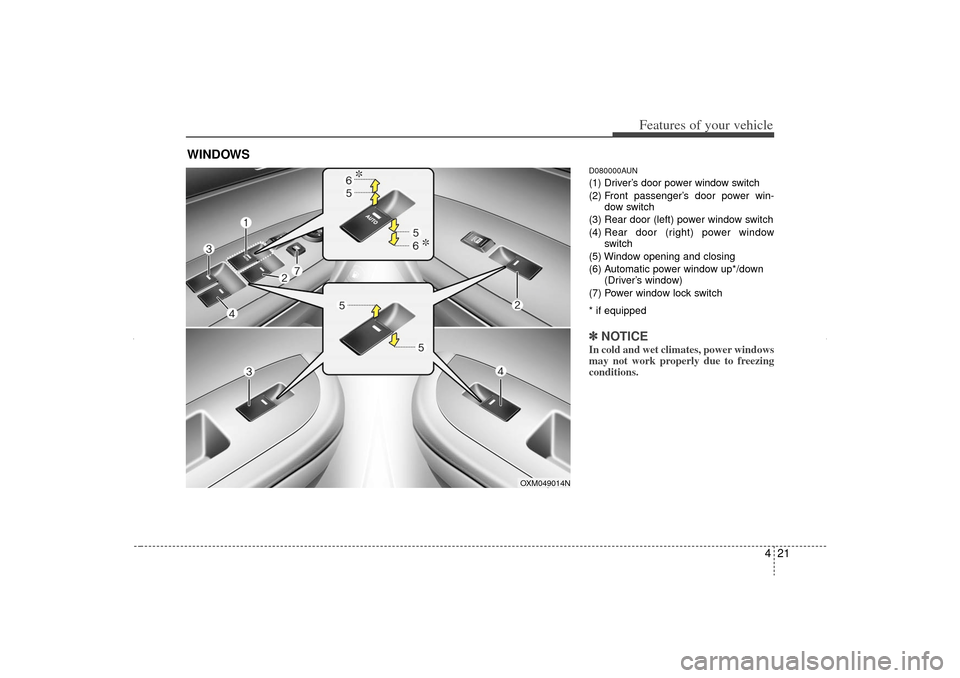
D080000AUN(1) Driver’s door power window switch
(2) Front passenger’s door power win-dow switch
(3) Rear door (left) power window switch
(4) Rear door (right) power window
switch
(5) Window opening and closing
(6) Automatic power window up*/down (Driver’s window)
(7) Power window lock switch
* if equipped✽ ✽ NOTICEIn cold and wet climates, power windows
may not work properly due to freezing
conditions.
WINDOWS
OXM049014N
XM CAN (ENG) 4(~105).QXP 4/19/2011 10:36 AM Page 21
Page 112 of 388

Features of your vehicle22
4D080100AAMPower windowsThe ignition switch must be in the ON
position for power windows to operate.
Each door has a power window switch
that controls the door's window. The driv-
er has a power window lock button which
can block the operation of passenger
windows. The power windows can be
operated for approximately 30 seconds
after the ignition key is removed or turned
to the ACC or LOCK position. However, if
the front doors are opened, the power
windows cannot be operated even within
the 30 second period.✽ ✽
NOTICEWhile driving with the rear windows
down or with the sunroof (if equipped)
in an open (or partially open) position,
your vehicle may demonstrate a wind
buffeting or pulsation noise. This noise
is a normal occurrence and can be
reduced or eliminated by taking the fol-
lowing actions. If the noise occurs with
one or both of the rear windows down,
partially lower both front windows
approximately one inch. If you experi-
ence the noise with the sunroof open,
slightly reduce the size of the sunroof
opening.
D080101AUNWindow opening and closingThe driver’s door has a master power
window switch that controls all the win-
dows in the vehicle.
To open or close a window, press down
or pull up the front portion of the corre-
sponding switch to the first detent posi-
tion (5).
D080102AAMAuto down window
(Driver’s window, if equipped)Pressing the power window switch
momentarily to the second detent posi-
tion (6) completely lowers the driver’s
window even when the switch is
released. To stop the window at the
desired position while the window is in
operation, momentarily pull the switch in
the direction opposite of the window’s
movement.
OXM049016
OXM049017
XM CAN (ENG) 4(~105).QXP 4/19/2011 10:36 AM Page 22
Page 113 of 388
423
Features of your vehicle
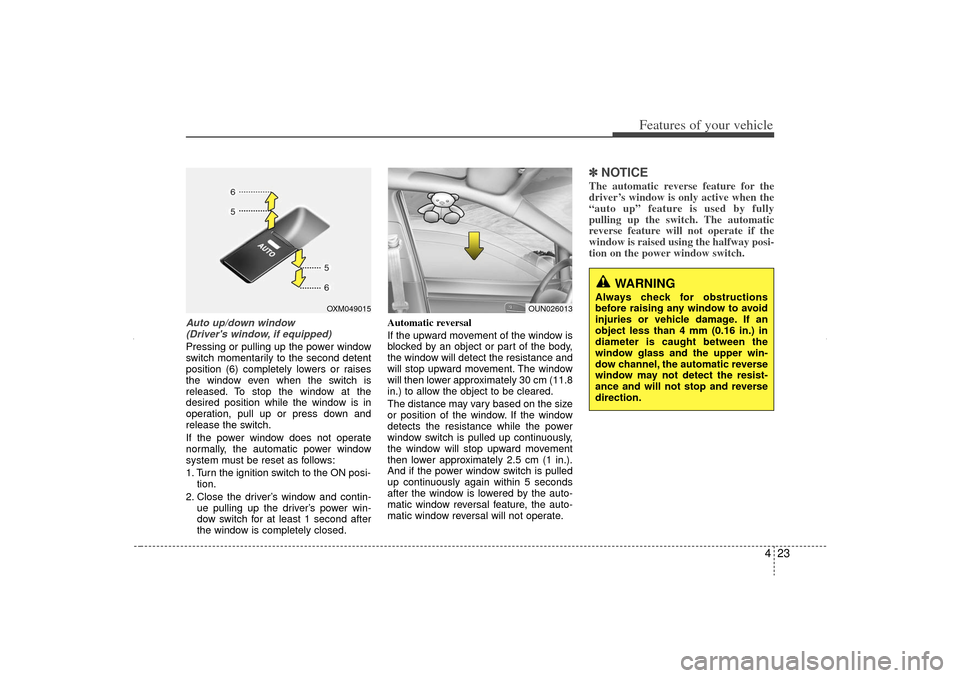
Auto up/down window (Driver's window, if equipped) Pressing or pulling up the power window
switch momentarily to the second detent
position (6) completely lowers or raises
the window even when the switch is
released. To stop the window at the
desired position while the window is in
operation, pull up or press down and
release the switch.
If the power window does not operate
normally, the automatic power window
system must be reset as follows:
1. Turn the ignition switch to the ON posi- tion.
2. Close the driver’s window and contin- ue pulling up the driver’s power win-
dow switch for at least 1 second after
the window is completely closed. Automatic reversal
If the upward movement of the window is
blocked by an object or part of the body,
the window will detect the resistance and
will stop upward movement. The window
will then lower approximately 30 cm (11.8
in.) to allow the object to be cleared.
The distance may vary based on the size
or position of the window. If the window
detects the resistance while the power
window switch is pulled up continuously,
the window will stop upward movement
then lower approximately 2.5 cm (1 in.).
And if the power window switch is pulled
up continuously again within 5 seconds
after the window is lowered by the auto-
matic window reversal feature, the auto-
matic window reversal will not operate.
✽ ✽
NOTICEThe automatic reverse feature for the
driver’s window is only active when the
“auto up” feature is used by fully
pulling up the switch. The automatic
reverse feature will not operate if the
window is raised using the halfway posi-
tion on the power window switch.
OXM049015
WARNING
Always check for obstructions
before raising any window to avoid
injuries or vehicle damage. If an
object less than 4 mm (0.16 in.) in
diameter is caught between the
window glass and the upper win-
dow channel, the automatic reverse
window may not detect the resist-
ance and will not stop and reverse
direction.
OUN026013
XM CAN (ENG) 4(~105).QXP 4/19/2011 10:36 AM Page 23