Page 181 of 338
Features of your vehicle
98
4
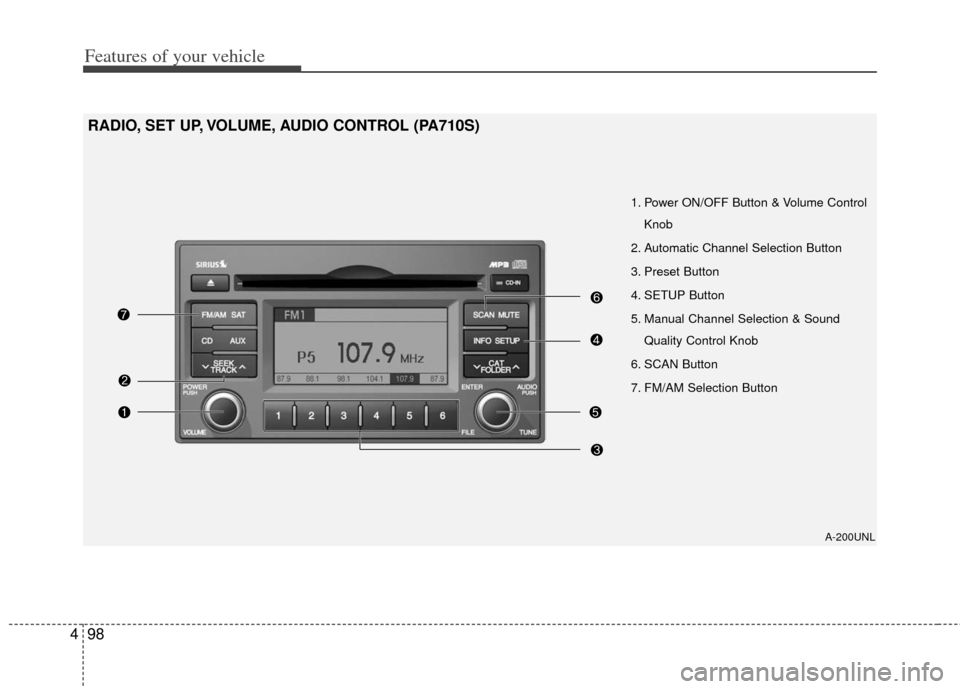
A-200UNL
1. Power ON/OFF Button & Volume Control
Knob
2. Automatic Channel Selection Button
3. Preset Button
4. SETUP Button
5. Manual Channel Selection & Sound Quality Control Knob
6. SCAN Button
7. FM/AM Selection Button
RADIO, SET UP, VOLUME, AUDIO CONTROL (PA710S)
Page 182 of 338
499
Features of your vehicle
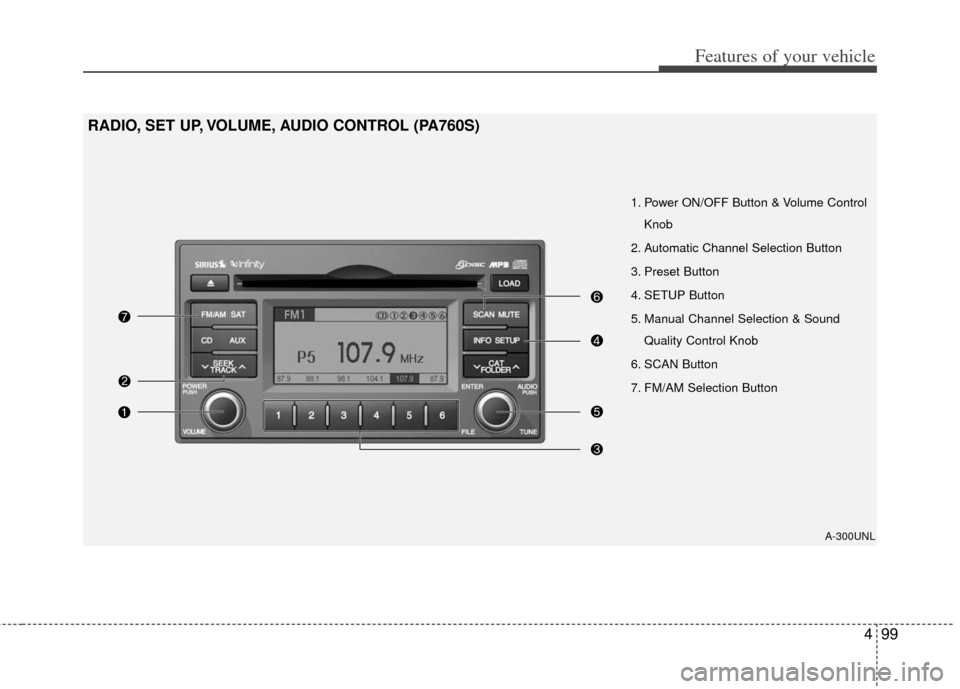
1. Power ON/OFF Button & Volume ControlKnob
2. Automatic Channel Selection Button
3. Preset Button
4. SETUP Button
5. Manual Channel Selection & Sound Quality Control Knob
6. SCAN Button
7. FM/AM Selection Button
RADIO, SET UP, VOLUME, AUDIO CONTROL (PA760S)
A-300UNL
Page 183 of 338

Features of your vehicle
100
4
1. Power ON/OFF Button &
Volume Control Knob
Turns the set on/off when the ignition
switch is on ACC or ON. If the button is
turned to the right, it increases the vol-
ume and left,decreases the volume.
2. Automatic Channel SelectionButton
When the [SEEK ] button is pressed,
it increases the band frequency to auto-
matically select a channel. Stops at the
previous frequency if no channel is
found.
When the [TRACK ] button is press- ed, it reduces the band frequency to
automatically select a channel. Stops
at the previous frequency if no channel
is found.
3. Preset Button
Push [1]~[6] buttons less than 0.8 sec-
ond to play the channel saved in each
button. Push Preset button for 0.8 sec-
ond or longer to save current channel to
the respective button with a beep.
4. SETUP Button
Press this button to turn to the SIRIUS®
Satellite Radio option, TEXT SCROLL,
SDVC and adjustment mode. If no action
is taken for 5 seconds after pressing the
button, it will return to the play
mode.(After entering SETUP mode,
move between items using the left, right
and PUSH functions of the [TUNE] but-
ton.)
The setup item changes from TEXT
SCROLL
➟SDVC ➟SATELLITE ➟RETURN ➟SIRIUS®Satellite Radio...
5. Manual Channel Selection & Sound Quality Control Knob
Turn this control while listening to a radio
channel to manually adjust frequency.
Turn clockwise to increase frequency and
counterclockwise to reduce frequency.
Pressing the button changes the BASS,
MIDDLE, TREBLE, FADER and BAL-
ANCE TUNE mode. The mode selected
is shown on the display. After selecting
each mode, rotate the Audio control knob
clockwise or counterclockwise.
BASS Control
To increase the BASS, rotate the knob
clockwise, while to decrease the BASS,
rotate the knob counterclockwise.
MIDDLE Control
To increase the MIDDLE, rotate the knob
clockwise, while to decrease the MID-
DLE, rotate the knob counterclockwise.
TREBLE Control
To increase the TREBLE, rotate the knob
clockwise, while to decrease the TRE-
BLE, rotate the knob counterclockwise.
Page 189 of 338

Features of your vehicle
106
4
CAUTION - Using USB
device
To use an external USB device,
make sure the device is not con-nected when starting up the vehi-cle and connect the device afterstarting up.
If you start the vehicle when the USB device is connected, it maydamage the USB device. (USBflash drives are very sensitive toelectric shock.)
If the vehicle is started up or turned off while the external USBdevice is connected, the externalUSB device may not work.
It may not play inauthentic MP3 or WMA files.
1) It can only play MP3 files with the compression rate between8Kbps~320Kbps.
2) It can only play WMA music files with the compression ratebetween 8Kbps~320Kbps.
Take precautions for static elec- tricity when counting or discount-ing the external USB device.
An encoded MP3 PLAYER is not recognizable.
(Continued)
(Continued) Depending on the condition of the external USB device, the con-nected external USB device canbe unrecognizable.
When the formatted byte/sector setting of External USB devices isnot either 512BYTE or 2048BYTE,then the device will not be recog-nized.
Use only a USB device formatted to FAT 12/16/32.
USB devices without USB IF authentication may not be recog-nizable.
Make sure the USB connection terminal does not come in contactwith the human body or anyobject.
If you repeatedly connecting or disconnecting USB device in ashort period of time, it may breakthe device.
You might hear a strange noise when connecting or disconnect-ing USB device.
(Continued)(Continued) If you disconnect the external USB device during playback in USBmode, the external USB device canbe damaged or malfunction. Therefore, disconnect the externalUSB device when the audic is turned off or in another mode.
Depending on the type and capac- ity of the external USB device orthe type of the files stored in thedevice, there is a difference in thetime taken for recognition of the device, but this is not an indicatorof trouble and you only have to wait.
Do not use the USB device for pur- pose other than playing music files.
Use of USB accessories such as recharger or heater using USB I/Fmay lower performance or causetrouble.
If you use devices such as a USB hub you purchased separately,the vehicle’s audio system may not recognize the USB device.Connect the USB device directlyto the multimedia terminal of the vehicle.
(Continued)
Page 190 of 338
4107
Features of your vehicle
(Continued) If the USB device is divided by logical drives, only the music fileson the highest-priority drive arerecognized by car audio.
Devices such as MP3 Player/ Cellular phone/Digital camera andthose that are not recognizable bystandard USB I/F can be unrecog-nizable.
USB devices other than standard- ized goods (METAL COVER TYPEUSB) can be unrecognizable.
USB flash memory reader (such as CF, SD, microSD, etc.) or exter-nal-HDD type devices can be unrecognizable.
Music files protected by DRM (DIGITAL RIGHTS MANAGEMENT)are not recognizalbe.
The data in the USB memory may lost while using this AUDIO, It isrecommeded to back up impor-tant data on a personal.
(Continued)(Continued) Please avoid using USB memory products which can be used askey chains or cellular phoneaccessories as they could causedamage to the USB jack. Pleasemake certain only to use plug type connector products asshown below.
Page 197 of 338

Features of your vehicle
114
4
✽
✽
NOTICE - Using the iPod®
device
• Some iPod®models might not support
the communication protocol and the
files will not be played. (iPod
®models
supported: Mini, 4G, Photo, Nano,
5G)
• The order of search or playback of songs in the iPod
®can be different
from the order searched in the audio
system.
• If the iPod
®crashes due to its own
trouble, reset the iPod®. (Reset: Refer
to iPod®manual)
• An iPod®may not operate normally
on low battery.
CAUTION IN USING THE
iPod®DEVICE
You need the power cable exclu-
sive for an iPod®in order to oper-
ate the iPod®with the buttons on
the audio system. The PC cable provided by Apple may cause amalfunction and should not beused in the vehicle.
When connecting the device with the iPod
®cable, push in the jack
fully.
When adjusting the sound effects of the iPod
®and the audio sys-
tem, the sound effects of both devices may overlap and distortthe quality of the sound.
Deactivate (turn off) the equalizer function of the iPod
®when adjust-
ing the audio system's volume, and turn off the equalizer of theaudio system when using the equalizer of the iPod
®.
(Continued)
(Continued) When the iPod®cable is connect-
ed, the system can be switched to the AUX mode even without theiPod
®device and may cause
noise. Disconnect the iPod®cable
when not using the iPod®device.
When the iPod®is not used with
the audio system, the iPod cable should be removed from theiPod
®.
Page 205 of 338

Driving your vehicle
45
E030100AUN
Illuminated ignition switch
(if equipped)
Whenever a front door is opened, the
ignition switch will be illuminated for your
convenience, provided the ignition switch
is not in the ON position. The light will go
off immediately when the ignition switch
is turned on or go off after about 10 sec-
onds when the door is closed.
WARNING- Driving under
the influence of alcohol or
drugs
Drinking and driving is dangerous.
Drunk driving is the number one
contributor to the highway death
toll each year. Even a small amount
of alcohol will affect your reflexes,
perceptions and judgment. Driving
while under the influence of drugs
is as dangerous or more dangerous
than driving drunk.
You are much more likely to have a
serious accident if you drink or
take drugs and drive.
If you are drinking or taking drugs,
don’t drive. Do not ride with a driv-
er who has been drinking or taking
drugs. Choose a designated driver
or call a cab.
OUN036001
KEY POSITIONS
WARNING
When you intend to park or stop
the vehicle with the engine on, be
careful not to depress the accel-
erator pedal for a long period of
time. It may overheat the engine
or exhaust system and cause fire.
When you make a sudden stop or turn the steering wheel rapidly,
loose objects may drop on the
floor and it could interfere with
the operation of the foot pedals,
possibly causing an accident.
Keep all things in the vehicle
safely stored.
If you do not focus on driving, it may cause an accident. Be care-
ful when operating what may dis-
turb driving such as audio or
heater. It is the responsibility of
the driver to always drive safely.
Page 300 of 338

Maintenance
30
7
G190300AUN
Reset items
Items should be reset after the battery
has been discharged or the battery has
been disconnected.
Auto up/down window (See section 4)
Sunroof (See section 4)
Trip computer (See section 4)
Climate control system
(See section 4)
Clock (See section 4)
Audio (See section 4)
WARNING
Before performing maintenance or recharging the battery, turn off
all accessories and stop the
engine.
The negative battery cable must be removed first and installed
last when the battery is discon-
nected.
WARNING- Rechargingbattery
When recharging the battery,
observe the following precautions:
The battery must be removed
from the vehicle and placed in an
area with good ventilation.
Do not allow cigarettes, sparks, or flame near the battery.
Watch the battery during charg- ing, and stop or reduce the charg-
ing rate if the battery cells begin
gassing (boiling) violently or if
the temperature of the electrolyte
of any cell exceeds 49°C (120°F).
Wear eye protection when check- ing the battery during charging.
Disconnect the battery charger in the following order.
1. Turn off the battery charger main switch.
2. Unhook the negative clamp from the negative battery terminal.
3. Unhook the positive clamp from the positive battery terminal.