2013 KIA QUORIS change time
[x] Cancel search: change timePage 286 of 485

543
Driving your vehicle
Cancel
1.To cancel the Auto Hold operation,press the Auto Hold switch while
depressing the brake pedal. The
AUTO HOLD indicator will go out.
2.If you want to release it manually, pull the EPB switch while depress-
ing the brake pedal. The AUTOHOLD indicator changes from
green to white and the system
changes to the standby position.
For your safety, release the AUTO
HOLD operation manually if the
vehicle ahead is too close or dur-
ing downhill driving.
✽✽ NOTICE
The Auto Hold does not operate when:
- The driver's seat belt is unfas-tened and driver's door is opened
- The engine hood is opened
- The trunk is opened
- The shift lever is in P (Park)
- The EPB is applied
For your safety, the Auto Hold automatically switches to EPB in
such cases:
- The driver's seat belt is unfas-tened and driver's door is opened
- The engine hood is opened
- The trunk is opened
- The vehicle is in a standstill for more than 10 minutes
- The vehicle is standing on a steep slope for a long period of time
- The vehicle moved several times
In these cases, the brake warning
light comes on, the AUTO HOLD
indicator changes from green to
white, and a warning sounds and a
message will appear to inform you
that EPB has been automatically
engaged. (Continued)(Continued)
Before driving off again, press foot
brake pedal, check the surround-
ing area near your vehicle and
release parking brake manually
with the EPB switch.
If the AUTO HOLD indicator lights up yellow, the Auto Hold is
not working properly. Take your
vehicle to an authorized Kia deal-
er and have the system checked.
WARNING
Press the accelerator pedal slowly when you start the
vehicle.
For your safety, cancel the Auto Hold when you drive
downhill or back up the vehi-
cle or park the vehicle.
Page 303 of 485

Driving your vehicle
60
5
SPORT mode
SPORT mode focuses on
dynamic driving by auto-matically controlling the
steering wheel, engine
and transaxle system.
button is pressed and
the SPORT mode is
selected, the SPROT
indicator (yellow) will illu-
minate.
is activated, and the
engine start/stop button
is turned off and on it willchange to NORMAL
mode. To turn on the
SPORT mode press
DRIVE MODE buttonagain.
ed:
- After speeding, it main- tains the gear and
RPM for some time
even though the accel-
erator pedal is notdepressed.
- Up-shifting is delayed.
✽✽
NOTICE
In Sport drive mode, the fuel effi-
ciency may decrease.SNOW mode (if equipped)
Snow mode helps the
driver to drive more effec-
tively on slippery roads
such as snowy or muddy
roads.
If the SNOW MODE but- ton is pressed, the
SNOW mode will operate
regardless of whicheverDRIVE mode (NOR-
MAL/SPORT/ECO) is
operating. If the button is
pressed once more, theDRIVE mode (NOR-
MAL/SPORT/ECO) that
was operating previously
will operate.
SNOWSPORT
Page 315 of 485
Driving your vehicle
72
5
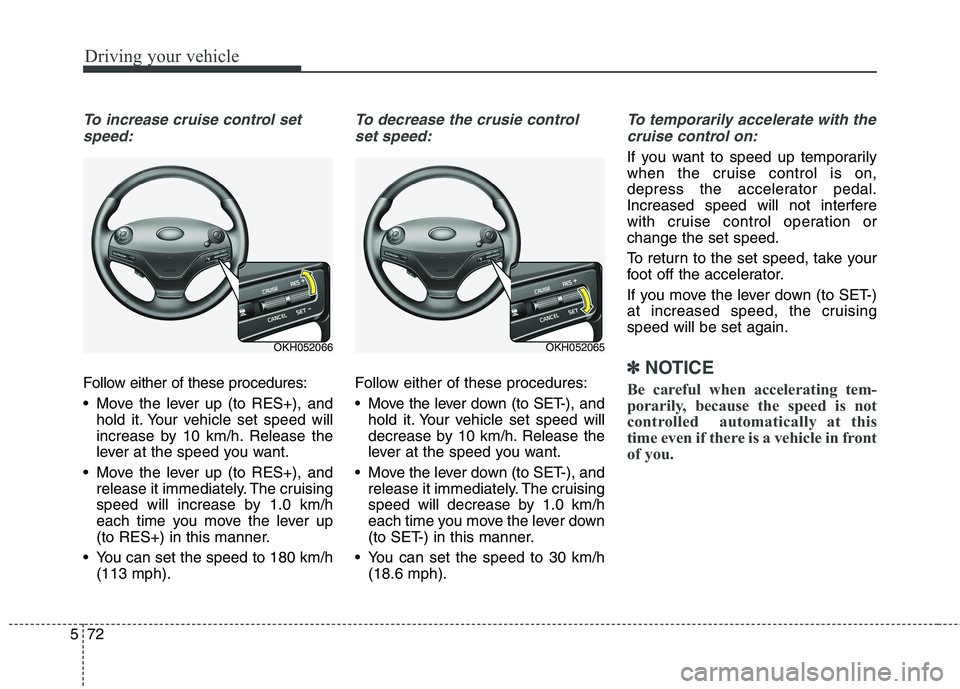
To increase cruise control set
speed:
Follow either of these procedures:
Move the lever up (to RES+), and hold it. Your vehicle set speed will
increase by 10 km/h. Release the
lever at the speed you want.
Move the lever up (to RES+), and release it immediately. The cruising
speed will increase by 1.0 km/h
each time you move the lever up
(to RES+) in this manner.
You can set the speed to 180 km/h (113 mph).
To decrease the crusie control
set speed:
Follow either of these procedures:
Move the lever down (to SET-), and hold it. Your vehicle set speed will
decrease by 10 km/h. Release the
lever at the speed you want.
Move the lever down (to SET-), and release it immediately. The cruising
speed will decrease by 1.0 km/h
each time you move the lever down
(to SET-) in this manner.
You can set the speed to 30 km/h (18.6 mph).
To temporarily accelerate with the
cruise control on:
If you want to speed up temporarily
when the cruise control is on,
depress the accelerator pedal.
Increased speed will not interfere
with cruise control operation orchange the set speed.
To return to the set speed, take your
foot off the accelerator.
If you move the lever down (to SET-)
at increased speed, the cruisingspeed will be set again.
✽✽ NOTICE
Be careful when accelerating tem-
porarily, because the speed is not
controlled automatically at this
time even if there is a vehicle in front
of you.
OKH052066OKH052065
Page 318 of 485

575
Driving your vehicle
To turn cruise control off:
Move the lever up (to CRUISE). (the
CRUISE indicator light in the instru-ment cluster will go off).Smart cruise control vehicle to
vehicle distance
To set vehicle to vehicle distance:
This function allows you to program
the vehicle to maintain relative dis-
tance to the vehicle ahead without
depressing the accelerator pedal or
brake pedal.The vehicle to vehicle distance will
automatically activate when the
smart cruise control system is on.
Select the appropriate distance according to road conditions and
vehicle speed.
Each time the button is pressed, the
vehicle to vehicle distance changes
as follows:
For example, if you drive at 90 km/h (56 mph), the distance maintain as
follows;
Distance 4 - approximately 52.5 m
Distance 3 - approximately 40 m
Distance 2 - approximately 32.5 m
Distance 1 - approximately 25 m
✽✽
NOTICE
The 'Distance 4' is always set when
the system is used for the first time
after starting the engine.
OKH052064
OKH052069 Distance 4 Distance 3 Distance 2
Distance 1
Page 336 of 485

593
Driving your vehicle
Non-operating condition
Driver's Attention
The driver must be cautious in the
below situations for the system may
not assist the driver and may not
work properly.
- Curved roads, tollgates, etc.
- The surrounding of the sensor ispolluted with rain, snow, mud, etc
- The rear bumper near the sensor is covered or hidden with a foreign
matter such as a sticker, bumperguard, bicycle stand etc.
- The rear bumper is damaged or the sensor is out of place.
- The height of the vehicle shows much change such as when the
trunk is loaded with heavy objects,
abnormal tire pressure etc.
- Due to bad weather such as heavy rain or snow.
- A fixed object is near such as a guardrail, etc.
- A lot of amount of metal sub- stances are near the vehicles such
as a construction area. - A big vehicle is near such as a bus
or truck.
- A motorcycle or bicycle is near.
- A flat trailer like vehicle is near.
- If the vehicle has started at the same time as the vehicle next to it
and has accelerated.
- When the other vehicle passes by very fast.
- When changing lanes.
- When going down or up a steep road where the height of the lane is
different.
- When the other vehicle drives at the rear very nearby or drives very
close.
- When a trailer or carrier is installed.
Outside rearview mirror may not alert the driver when:
- The outside rearview mirror hous- ing is severely polluted
- The window is severely polluted
- The windows are severely tinted.
Page 346 of 485

5103
Driving your vehicle
Use high quality ethylene gly- col coolant
Your vehicle is delivered with high
quality ethylene glycol coolant in the
cooling system. It is the only type ofcoolant that should be used because
it helps prevent corrosion in the cool-
ing system, lubricates the water
pump and prevents freezing. Be sure
to replace or replenish your coolantin accordance with the maintenance
schedule in section 7. Before winter,
have your coolant tested to assure
that its freezing point is sufficient for
the temperatures anticipated during
the winter.
Check battery and cables
Winter puts additional burdens on
the battery system. Visually inspect
the battery and cables as described
in section 7. We recommend that the
level of charge in your battery be
checked by an authorized Kia dealer.Change to "winter weight" oil
if necessary In some climates it is recommended
that a lower viscosity "winter weight"
oil be used during cold weather. See
section 8 for recommendations. If
you aren't sure what weight oil you
should use, we recommend that you
consult an authorized Kia dealer.
Check spark plugs and igni- tion system
Inspect your spark plugs as
described in section 7 and replace
them if necessary. Also check all
ignition wiring and components to be
sure they are not cracked, worn or
damaged in any way.
CAUTION
The AutoSock (fabric snow
chain) that are the wrong sizeor improperly installed can damage your vehicle's brakelines, suspension, body andwheels.
Stop driving and retighten the AutoSock (fabric snow chain)any time you hear them hittingthe vehicle.
WARNING - Tire chains
The use of the AutoSock (fab- ric snow chain) may adversely
affect vehicle handling.
Do not exceed 30 km/h (20 mph) or the AutoSock (fabric
snow chain) manufacturer’srecommended speed limit,
whichever is lower.
Drive carefully and avoid bumps, holes, sharp turns, and
other road hazards, which may
cause the vehicle to bounce.
Avoid sharp turns or locked- wheel braking.
Page 385 of 485

79
Maintenance
NORMAL MAINTENANCE SCHEDULE - EXCEPT EUROPE, FOR RUSSIA
The following maintenance services must be performed to ensure good emission control and performance. Keep
receipts for all vehicle emission services to protect your warranty. Where both mileage and time are shown, the fre-
quency of service is determined by whichever occurs first. *1
: Inspect drive belt tensioner, idler and alternator pulley and
if necessary correct or replace.
* 2
: Check the engine oil level and leak every 500 km (350
miles) or before starting a long trip.
* 3
: The engine oil level should be checked regularly and main-
tained properly. Operating with an insufficient amount of oil
can damage the engine, and such damage is not covered
by warranty.
* 4
: This maintenance schedule depends on fuel quality. It is
applicable only when using a qualified fuel <"EN590 or
equivalent">. If the diesel fuel specifications don't meet the
EN590, it must be replaced more frequently. Kia recom-
mends "every 7,500km inspection, every 15,000km replace-ment".
If there are some important safety matters like fuel flow
restriction, surging, loss of power, hard starting problem etc.,replace the fuel filter immediately regardless of maintenance
schedule and we recommand that you consult an authorized
Kia dealer for details
* 5
: For your convenience, it can be replaced prior to it's interval
when you do maintenance of other items.
* 6
: Inspect for excessive valve noise and/or engine vibration
and adjust if necessary. We recommended that the system
should be checked by an authorized Kia dealer. *
7
: The fuel filter is considered to be maintenance free but peri-
odic inspection is recommended for this maintenance
schedule depends on fuel quality. If there are some impor-
tant matters like fuel flow restriction, surging, loss of power,
hard starting problem etc, replace the fuel filter immediate-
ly regardless of maintenance schedule and we recommand
that you consult an authorized Kia dealer for details.
* 8
: When adding coolant, use only deionized water or soft
water for your vehicle and never mix hard water in the
coolant filled at the factory. An improper coolant mixture can
result in serious malfunction or engine damage.
* 9
: Inspect and if necessary correct or replace. Inspect drive
belt tensioner, idler and alternator pulley and if necessary
correct or replace.
* 10
: If good quality gasolines that meet Europe Fuel standards
(EN228) or equivalents including fuel additives is not avail-
able, one bottle of additive is recommended. Additives are
available from your authorized Kia dealer along with infor-
mation on how to use them. Do not mix other additives.
* 11
: Manual transaxle fluid, and differential oil should be
changed anytime they have been submerged in water.
Page 481 of 485

I7
Index
Label
Air bag warning label . . . . . . . . . . . . . . . . . . . . . . . . . 3-64
Air conditioner compressor label . . . . . . . . . . . . . . . . 8-10
Tire sidewall labeling . . . . . . . . . . . . . . . . . . . . . . . . . 7-49
Tire specification and pressure label . . . . . . . . . . . . . 8-10
Vehicle certification label . . . . . . . . . . . . . . . . . . . . . . . 8-9
Lane departure warning system (LDWS) . . . . . . . . . . . 5-85
Lap/shoulder belt . . . . . . . . . . . . . . . . . . . . . . . . . . . . . 3-21
LCD display (Type A) . . . . . . . . . . . . . . . . . . . . . . . . . 4-56 A/V Mode . . . . . . . . . . . . . . . . . . . . . . . . . . . . . . . . . . 4-60
LCD modes. . . . . . . . . . . . . . . . . . . . . . . . . . . . . . . . . 4-56
Turn By Turn Mode . . . . . . . . . . . . . . . . . . . . . . . . . . 4-60
User Settings Mode . . . . . . . . . . . . . . . . . . . . . . . . . . 4-57
LCD display (Type B) . . . . . . . . . . . . . . . . . . . . . . . . . 4-61 Cluster Settings. . . . . . . . . . . . . . . . . . . . . . . . . . . . . . 4-66
Feeling (Haptic switch feeling) . . . . . . . . . . . . . . . . . 4-67
HUD Settings . . . . . . . . . . . . . . . . . . . . . . . . . . . . . . . 4-65
LCD Menus . . . . . . . . . . . . . . . . . . . . . . . . . . . . . . . . 4-61
Vehicle Settings . . . . . . . . . . . . . . . . . . . . . . . . . . . . . 4-63
Warning Messages . . . . . . . . . . . . . . . . . . . . . . . . . . . 4-68
LCD Display Control . . . . . . . . . . . . . . . . . . . . . . . . . . 4-51
LCD Menus (Type B) . . . . . . . . . . . . . . . . . . . . . . . . . . 4-61
LCD modes (Type A) . . . . . . . . . . . . . . . . . . . . . . . . . . 4-56
Light bulbs . . . . . . . . . . . . . . . . . . . . . . . . . . . . . . . . . . 7-74 Lighting . . . . . . . . . . . . . . . . . . . . . . . . . . . . . . . . . . . . 4-110
AFLS (Adaptive Front Lighting System). . . . . . . . . 4-112
Auto light/AFLS position . . . . . . . . . . . . . . . . . . . . . 4-112
Battery saver function. . . . . . . . . . . . . . . . . . . . . . . . 4-110
Daytime running light. . . . . . . . . . . . . . . . . . . . . . . . 4-110
Front fog light . . . . . . . . . . . . . . . . . . . . . . . . . . . . . . 4-116
Headlight (Headlamp) escort function . . . . . . . . . . . 4-110
Headlight leveling device . . . . . . . . . . . . . . . . . . . . . 4-117
Headlight position. . . . . . . . . . . . . . . . . . . . . . . . . . . 4-113
Headlight washer . . . . . . . . . . . . . . . . . . . . . . . . . . . 4-117
High - beam operation . . . . . . . . . . . . . . . . . . . . . . . 4-114
Parking light position . . . . . . . . . . . . . . . . . . . . . . . . 4-113
Rear fog light . . . . . . . . . . . . . . . . . . . . . . . . . . . . . . 4-116
Traffic change . . . . . . . . . . . . . . . . . . . . . . . . . . . . . . 4-111
Turn signals . . . . . . . . . . . . . . . . . . . . . . . . . . . . . . . 4-115
Lubricants and capacities . . . . . . . . . . . . . . . . . . . . . . . . 8-6
Luggage net (holder) . . . . . . . . . . . . . . . . . . . . . . . . . 4-159
Luggage volume . . . . . . . . . . . . . . . . . . . . . . . . . . . . . . . 8-5
Main fuse . . . . . . . . . . . . . . . . . . . . . . . . . . . . . . . . . . . 7-56
Maintenance Explanation of scheduled maintenance items . . . . . . 7-20
Maintenance services . . . . . . . . . . . . . . . . . . . . . . . . . . 7-4
Owner maintenance . . . . . . . . . . . . . . . . . . . . . . . . . . . 7-6
Scheduled maintenance service . . . . . . . . . . . . . . . . . . 7-8
L
M