Page 279 of 485
Driving your vehicle
36
5
✽✽
NOTICE
When you jump start your vehicle
because of a drained battery, the
engine may not run as smoothly and
the ABS warning light may turn on
at the same time. This happens
because of the low battery voltage. It
does not mean your ABS is malfunc-
tioning.
Do not pump your brakes!
Have the battery recharged before driving the vehicle.Electric parking brake (EPB) (if equipped)
Applying the parking brake
To apply the EPB (electric parking
brake):
1. Depress the brake pedal.
2. Pull up the EPB switch. Make sure the warning light comes on.
Also, the EPB is applied automatical-
ly if the Auto Hold button is on when
the engine is turned off.
OKH052029
OKH052030L
CAUTION
Do not operate the parking
brake while the vehicle is mov-ing except in an emergency sit-uation. It could damage the vehicle system and endangerdriving safety.
Page 289 of 485

Driving your vehicle
46
5
Electronic Stability Control (ESC) (If equipped) The Electronic Stability Control (ESC) system is designed to stabi-
lize the vehicle during cornering
maneuvers. ESC checks where you
are steering and where the vehicle is
actually going. ESC applies the
brakes on individual wheels and
intervenes with the engine manage-
ment system to stabilize the vehicle. The Electronic Stability Control(ESC) system is an electronic sys-
tem designed to help the driver main-
tain vehicle control under adverse
conditions. It is not a substitute for
safe driving practices. Factors includ-
ing speed, road conditions and driv-
er steering input can all affect
whether ESC will be effective in pre-
venting a loss of control. It is still your
responsibility to drive and corner at
reasonable speeds and to leave a
sufficient margin of safety.
When you apply your brakes under
conditions which may lock the
wheels, you may hear a “tik-tik’’
sound from the brakes, or feel a cor-
responding sensation in the brake
pedal. This is normal and it means
your ESC is active.
OKH052043
WARNING
Never drive too fast according
to the road conditions or too
quickly when cornering.
Electronic Stability Control
(ESC) will not prevent acci-
dents. Excessive speed in
turns, abrupt maneuvers and
hydroplaning on wet surfacescan still result in serious acci-
dents. Only a safe and attentive
driver can prevent accidents by
avoiding maneuvers that cause
the vehicle to lose traction.
Even with ESC installed, always
follow all the normal precau-
tions for driving - including driv-
ing at safe speeds for the condi-tions.
Page 294 of 485

551
Driving your vehicle
Malfunction indicator
The VSM can be deactivated even if
you don’t cancel the VSM operation
by pressing the ESC OFF button. Itindicates that a malfunction has
been detected somewhere in the
EPS (Electronic Power Steering)
system or VSM system. If the ESC
indicator light ( ) or EPS warning
light remains on, we recommend that
you contact an authorized Kia dealer.
✽✽NOTICE
The VSM is designed to function above approximately 15 km/h (9
mph) on curves.
The VSM is designed to function above approximately 30 km/h (18
mph) when a vehicle is braking on
a split-mu road. The split-mu road
is made of surfaces which have dif-
ferent friction forces.
Hill-start assist control (HAC) (if equipped)
A vehicle has the tendency to slip
back on a steep hill when it starts to
go after stopping. The Hill-start
Assist Control (HAC) prevents the
vehicle from slipping back by operat-
ing the brakes automatically for
about 2 seconds. The brakes are
released when the accelerator pedalis depressed or after about 2 sec-
onds.WARNING
The Vehicle Stability Management system is not a
substitute for safe driving
practices but a supplemen-
tary function only. It is theresponsibility of the driver to
always check the speed and
the distance to the vehicle
ahead. Always hold the steer-
ing wheel firmly while driving.
Your vehicle is designed to activate according to the dri-
ver’s intention, even with the
VSM installed. Always follow
all the normal precautions for
driving at safe speeds for the
conditions – including driving
in inclement weather and on a
slippery road.
Driving with varying tire or wheel sizes may cause theVSM system to malfunction.
When replacing tires, make
sure they are the same size as
your original tires.
WARNING
The HAC is activated only for
about 2 seconds, so when the
vehicle is starting off alwaysdepress the accelerator pedal.
Page 295 of 485

Driving your vehicle
52
5
✽✽
NOTICE
The HAC does not operate when the transaxle shift lever is in the P
(Park) or N (Neutral) position.
The HAC activates even though the ESC is off but it does not acti-
vate when the ESC has malfunc-
tioned. Good braking practices After parking the vehicle, check to
be sure the parking brake is not
engaged and that the parking
brake indicator light is out before
driving away.
Driving through water may get the brakes wet. They can also get wet
when the car is washed. Wet
brakes can be dangerous! Your car
will not stop as quickly if the brakes
are wet. Wet brakes may cause the
car to pull to one side.
To dry the brakes, apply the brakes
lightly until the braking action
returns to normal, taking care to
keep the car under control at all
times. If the braking action does
not return to normal, stop as soon
as it is safe to do so and call an
authorized Kia dealer for assis-
tance.
Do not coast down hills with the car out of gear. This is extremely haz-
ardous. Keep the car in gear at all
times, use the brakes to slow
down, then shift to a lower gear so
that engine braking will help you
maintain a safe speed.
WARNING
Whenever leaving vehicle or parking, always set the park-
ing brake as far as possible
and fully engage the vehicle'stransmission into the park
position. Vehicles not fully
engaged in park with the park-
ing brake set are at risk for
moving inadvertently and
injuring yourself or others.
All vehicles should always have the parking brake fully
engaged when parking to
avoid inadvertent movement
of the car which can injureoccupants or pedestrians.
Page 296 of 485
553
Driving your vehicle
Do not "ride" the brake pedal.Resting your foot on the brake
pedal while driving can be danger-ous because it can result in the
brakes overheating and losing their
effectiveness. It also increases the
wear of the brake components.
If a tire goes flat while you are driv- ing, apply the brakes gently and
keep the car pointed straight
ahead while you slow down. When
you are moving slowly enough for it
to be safe to do so, pull off the road
and stop in a safe place.
If your car is equipped with an automatic transmission, don't let
your car creep forward. To avoid
creeping forward, keep your foot
firmly on the brake pedal when thecar is stopped. Be cautious when parking on a hill.
Firmly engage the parking brake
and place the shift lever in P
(Park). If your car is facing down-
hill, turn the front wheels into the
curb to help keep the car from
rolling. If your car is facing uphill,
turn the front wheels away from the
curb to help keep the car from
rolling. If there is no curb or if it is
required by other conditions to
keep the car from rolling, block the
wheels.
Under some conditions your park- ing brake can freeze in the
engaged position. This is most like-ly to happen when there is an
accumulation of snow or ice
around or near the rear brakes or if
the brakes are wet. If there is a risk
that the parking brake may freeze,
apply it only temporarily while you
put the shift lever in P (Park) and
block the rear wheels so the car
cannot roll. Then release the park-
ing brake. Do not hold the vehicle on the
upgrade with the accelerator
pedal. This can cause the trans-
mission to overheat. Always use
the brake pedal or parking brake.
Page 298 of 485
555
Driving your vehicle
Brake operating
If the AVSM senses the collision,the brake system comes to stan- dard mode to react promptly when
the driver operates the brakepedal.
If the driver releases the accelera- tor after warning in hazardous situ-
ations, the AVSM automatically
brakes the vehicle gently.
If the driver hits the brake to reduce vehicle speed, the brake assistant
system operates to raise efficiency
of braking.
If danger disappears, if the driver depresses the accelerator or if the
driver releases the brake pedal,
the brake operating stop.
Seat belt operating
The seat belt tightens when the vehi- cle senses a collision.
General cluster
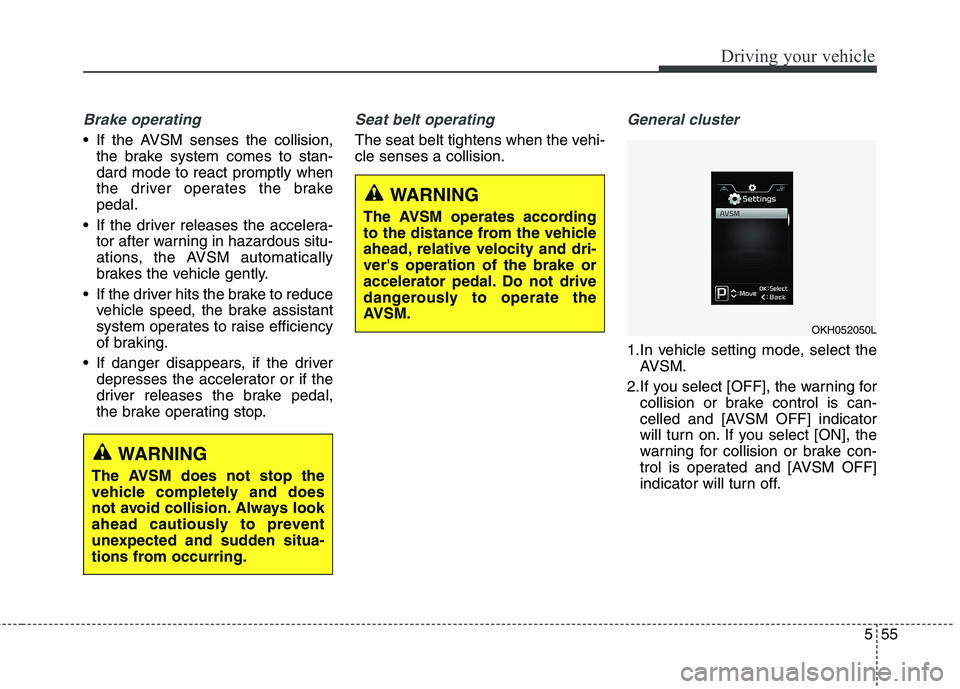
1.In vehicle setting mode, select theAVSM.
2.If you select [OFF], the warning for collision or brake control is can-
celled and [AVSM OFF] indicator
will turn on. If you select [ON], the
warning for collision or brake con-
trol is operated and [AVSM OFF]
indicator will turn off.
WARNING
The AVSM does not stop the
vehicle completely and does
not avoid collision. Always look
ahead cautiously to prevent
unexpected and sudden situa-
tions from occurring.
WARNING
The AVSM operates according
to the distance from the vehicle
ahead, relative velocity and dri-ver's operation of the brake or
accelerator pedal. Do not drive
dangerously to operate the
AVSM.
OKH052050L
Page 309 of 485
Driving your vehicle
66
5
✽✽
NOTICE
During normal cruise control operation, when the SET switch is
activated or reactivated after
applying the brakes, the cruise
control will energize after approx-
imately 3 seconds. This delay is
normal.
To activate cruise control, depress the brake pedal at least once after
turning the ignition switch to the
ON position or starting the engine.
This is to check if the brake switch
which is important part to cancel
cruise control is in normal condi-
tion.Cruise control switch
CRUISE : Turns cruise control sys- tem on or off.
CANCEL: Cancels cruise control
operation.
RES+: Resumes or increases cruise control speed.
SET-: Sets or decreases cruise con- trol speed. To set cruise control speed:
1.Move the lever up (to CRUISE), to
turn the system on. The CRUISE
indicator light will illuminate.
2.Accelerate to the desired speed, which must be more than 30 km/h(20 mph).
OKH052119LOKH052058
Page 326 of 485
583
Driving your vehicle
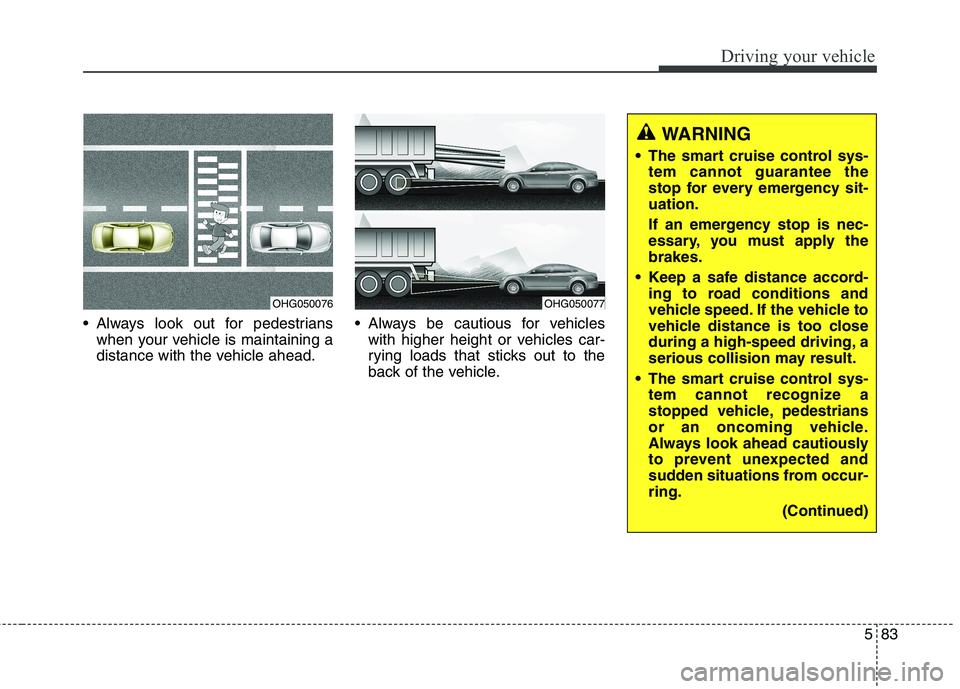
Always look out for pedestrianswhen your vehicle is maintaining a
distance with the vehicle ahead. Always be cautious for vehicles
with higher height or vehicles car-
rying loads that sticks out to the
back of the vehicle.
OHG050076OHG050077
WARNING
The smart cruise control sys- tem cannot guarantee the
stop for every emergency sit-uation.
If an emergency stop is nec-
essary, you must apply thebrakes.
Keep a safe distance accord- ing to road conditions and
vehicle speed. If the vehicle to
vehicle distance is too close
during a high-speed driving, a
serious collision may result.
The smart cruise control sys- tem cannot recognize a
stopped vehicle, pedestrians
or an oncoming vehicle.
Always look ahead cautiously
to prevent unexpected and
sudden situations from occur-ring.
(Continued)