Page 295 of 485

Driving your vehicle
52
5
✽✽
NOTICE
The HAC does not operate when the transaxle shift lever is in the P
(Park) or N (Neutral) position.
The HAC activates even though the ESC is off but it does not acti-
vate when the ESC has malfunc-
tioned. Good braking practices After parking the vehicle, check to
be sure the parking brake is not
engaged and that the parking
brake indicator light is out before
driving away.
Driving through water may get the brakes wet. They can also get wet
when the car is washed. Wet
brakes can be dangerous! Your car
will not stop as quickly if the brakes
are wet. Wet brakes may cause the
car to pull to one side.
To dry the brakes, apply the brakes
lightly until the braking action
returns to normal, taking care to
keep the car under control at all
times. If the braking action does
not return to normal, stop as soon
as it is safe to do so and call an
authorized Kia dealer for assis-
tance.
Do not coast down hills with the car out of gear. This is extremely haz-
ardous. Keep the car in gear at all
times, use the brakes to slow
down, then shift to a lower gear so
that engine braking will help you
maintain a safe speed.
WARNING
Whenever leaving vehicle or parking, always set the park-
ing brake as far as possible
and fully engage the vehicle'stransmission into the park
position. Vehicles not fully
engaged in park with the park-
ing brake set are at risk for
moving inadvertently and
injuring yourself or others.
All vehicles should always have the parking brake fully
engaged when parking to
avoid inadvertent movement
of the car which can injureoccupants or pedestrians.
Page 297 of 485
Driving your vehicle
54
5
AVSM detects the distance from the
vehicle ahead with the sensor, to
warn you before collision and protect
you in certain hazardous situations
by using warning message, warning
sound and seat belt vibration (ifequipped).
If the AVSM senses the objectahead too near the vehicle and if
driver's operating of the brake
pedal or the steering wheel should
be needed, the warning light illumi-
nates.
Immediately reduce your speed.
If the AVSM senses more danger- ous, the warning sound also oper-
ates and the accelerator
pedal/seat belt vibrates.
Immediately reduce your speed.
AVSM (IF EQUIPPED)CAUTION
Always check the road condi-
tions to prevent danger even ifthe warning light does not illu-minate, the warning sound does not operate or the acceleratorpedal/seat belt does not vibrate.
OKH052049L
Page 302 of 485

559
Driving your vehicle
ECO mode (Active ECO)
Active ECO helps improve
fuel efficiency by control-
ling certain engine and
transaxle system operat-
ing parameters. Fuel effi-ciency depends on the
driver's driving habit androad condition.
button is pressed and the ECO mode is select-ed, the ECO indicator
(green) will illuminate to
show that the Active
ECO is operating.
activated, and the
engine start/stop button
is turned off and on it willchange to NORMAL
mode. To turn on theECO mode press the
DRIVE MODE button tillit is selected. When Active ECO is activated:
The acceleration may slightly be
reduced eventhough you depress
the accelerator fully.
The air conditioner performance may be limited
The shift pattern of the automatic transaxle may change.
The engine noise may get louder.
The above situations are normal
conditions when the active eco sys-
tem is activated to improve fuel effi-
ciency. Limitation of Active ECO opera-tion:
If the following conditions occur while
Active ECO is operating, the system
operation is limited even thoughthere is no change in the ECO indi-
cator.
When the coolant temperature is
low:The system will be limited until
engine performance becomes nor-mal.
When driving up a hill: The system will be limited to gain
power when driving uphill because
the engine torque is restricted.
When using manual mode: The system will be limited accord-ing to the shift location.
When the accelerator pedal is deeply depressed for a few sec-onds: The system will be limited, judging
that the driver wants to speed up.
ECO
Page 304 of 485

561
Driving your vehicle
ECS controls the vehicle suspension
automatically to maximize passenger
comfort by using the air spring in thesuspension.
You can also control the vehicle sus-
pension manually in NORMAL mode
or HIGH mode.To control the vehicle height
Push the vehicle height control but-
ton to select the HIGH mode that
makes the vehicle height be higherthan the NORMAL mode and the
indicator light on the vehicle height
control button will illuminate. It isuseful in a rough road.
Push the vehicle height control but- ton again to select the NORMAL
mode that makes the vehicle
height lower than the HIGH mode.
The indicator light in the vehicle
height control button will go off.
When the vehicle stops with the shift lever in P(Park) or N(Neutral),
you may change the vehicle height.
When you drive under 70km/h, you may select the HIGH mode.
If the vehicle speed exceeds 70km/h while driving in the HIGH
mode, the NORMAL mode will be
selected automatically. If the vehicle speed exceeds
120km/h while driving in NORMAL
mode, the LOW mode that is lowerthan NORMAL mode will be select-
ed automatically. LOW mode can
not be selected manually.
When you drive under 80km/h in the LOW mode, the NORMALmode will be selected automatical-
ly.
When the engine start/stop button is turned off with the HIGH modeselected, the HIGH mode will bemaintained.
It is to prevent damage under the
vehicle when parked in rough
roads.
The height of the vehicle may be adjusted after the engine start/stop
button is turned off for
2hours/5hours/10hours.
It is to compensate vehicle height
affected by outside temperature.
ELECTRONIC CONTROLLED SUSPENSION (ECS) (IF EQUIPPED)
OKH052054
Page 305 of 485

Driving your vehicle
62
5
✽✽
NOTICE
When you drive over 70km/h, you may not select the HIGH mode.
Do not operate ECS when the air filter of the compressor in the
lower part of the vehicle sinks
under the water.
Indraft of water into the compres-
sor may happen, and ECS may not
operate normally.ECS (electronic controlled suspension) malfunction indi-cator The ECS malfunction indicator will
illuminate when the engine start/stop
button is turned to the ON position,
but should go off after approximately
3 seconds. If the warning light does
not come on, or continuously
remains on after coming on for about
3 seconds when you turn the engine
start/stop button to the ON position,
the ECS is not working properly. If ECS malfunction indicator comes
on while driving, ECS is not working
properly. We recommend that the system be
checked by an authorized Kia dealer.
The ECS malfunction indicator may illuminate when the ESC indicatorcomes on to indicate that the ESC is
not working properly, but it does not
indicate malfunction of the ECS.
OKH052055L
■
Type A■Type B
Page 308 of 485

565
Driving your vehicle
1. Cruise indicator
2. Cruise set indicator
The cruise control system allows you
to program the vehicle to maintain aconstant speed without depressing
the accelerator pedal. This system is designed to function
above approximately 30 km/h (20mph).CRUISE CONTROL SYSTEM (IF EQUIPPED)
WARNING
If the cruise control is left on, (CRUISE indicator light in the
instrument cluster is illumi-
nated), the cruise control can
be switched on accidentally.
Keep the cruise control sys-
tem off (CRUISE indicatorlight OFF) when the cruise
control is not in use, to avoid
inadvertently setting a speed.
Use the cruise control system only when driving on open
highways in good weather.
Do not use the cruise control when it may not be safe to
keep the vehicle at a constant
speed, for instance, driving in
heavy or varying traffic, or on
slippery (rainy, icy or snow-
covered) or winding roads or
over 6% up-hill or down-hill
roads.
Pay particular attention to the driving conditions whenever
using the cruise control sys-tem.
(Continued)(Continued)
Be careful when drivingdownhill using the cruise con-
trol system, which may
increase the vehicle speed.
OKH052057
Page 309 of 485
Driving your vehicle
66
5
✽✽
NOTICE
During normal cruise control operation, when the SET switch is
activated or reactivated after
applying the brakes, the cruise
control will energize after approx-
imately 3 seconds. This delay is
normal.
To activate cruise control, depress the brake pedal at least once after
turning the ignition switch to the
ON position or starting the engine.
This is to check if the brake switch
which is important part to cancel
cruise control is in normal condi-
tion.Cruise control switch
CRUISE : Turns cruise control sys- tem on or off.
CANCEL: Cancels cruise control
operation.
RES+: Resumes or increases cruise control speed.
SET-: Sets or decreases cruise con- trol speed. To set cruise control speed:
1.Move the lever up (to CRUISE), to
turn the system on. The CRUISE
indicator light will illuminate.
2.Accelerate to the desired speed, which must be more than 30 km/h(20 mph).
OKH052119LOKH052058
Page 310 of 485
567
Driving your vehicle
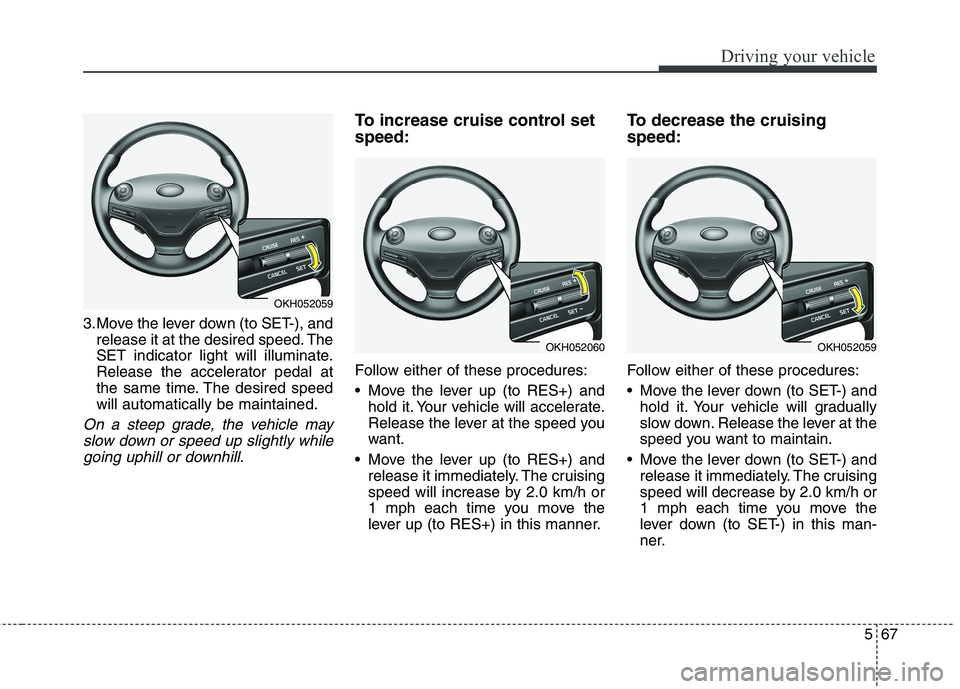
3.Move the lever down (to SET-), andrelease it at the desired speed. The
SET indicator light will illuminate.
Release the accelerator pedal at
the same time. The desired speedwill automatically be maintained.
On a steep grade, the vehicle may
slow down or speed up slightly whilegoing uphill or downhill.
To increase cruise control set speed:
Follow either of these procedures:
Move the lever up (to RES+) and hold it. Your vehicle will accelerate.
Release the lever at the speed you
want.
Move the lever up (to RES+) and release it immediately. The cruising
speed will increase by 2.0 km/h or
1 mph each time you move the
lever up (to RES+) in this manner. To decrease the cruising speed:
Follow either of these procedures:
Move the lever down (to SET-) and
hold it. Your vehicle will gradually
slow down. Release the lever at the
speed you want to maintain.
Move the lever down (to SET-) and release it immediately. The cruising
speed will decrease by 2.0 km/h or
1 mph each time you move the
lever down (to SET-) in this man-
ner.
OKH052059
OKH052060OKH052059

