Page 294 of 1168
4 215
Features of your vehicle
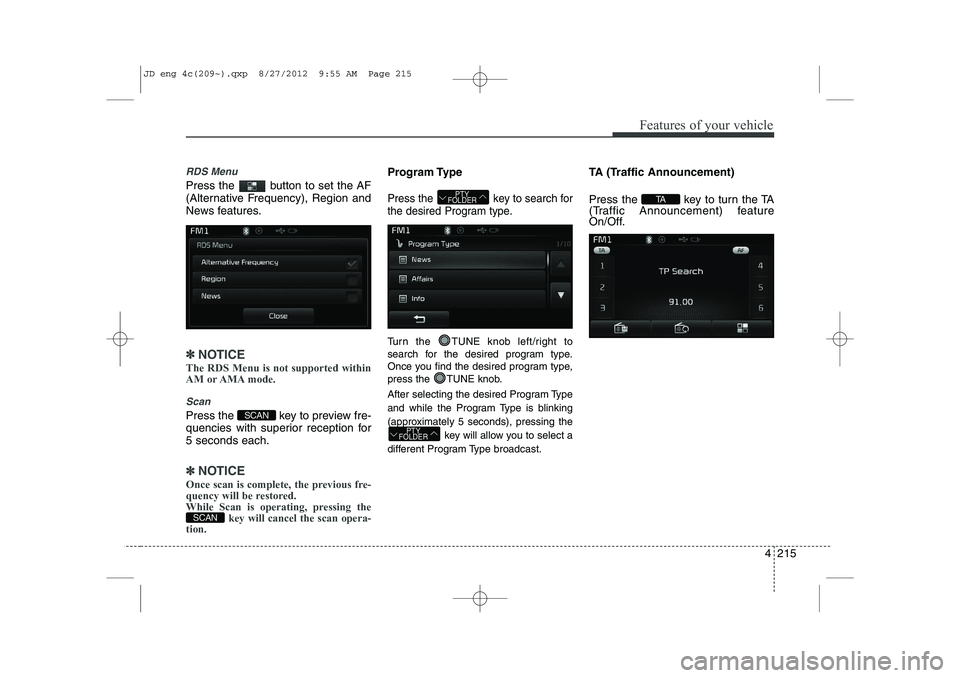
RDS Menu
Press the button to set the AF
(Alternative Frequency), Region and
News features.
✽✽NOTICE
The RDS Menu is not supported within
AM or AMA mode.
Scan
Press the key to preview fre-
quencies with superior reception for5 seconds each.
✽✽ NOTICE
Once scan is complete, the previous fre-
quency will be restored.
While Scan is operating, pressing the key will cancel the scan opera-
tion.
Program Type
Press the key to search for
the desired Program type.
Turn the TUNE knob left/right to
search for the desired program type.
Once you find the desired program type,
press the TUNE knob.
After selecting the desired Program Type
and while the Program Type is blinking
(approximately 5 seconds), pressing the
key will allow you to select a
different Program Type broadcast. TA (Traffic Announcement)
Press the key to turn the TA
(Traffic Announcement) feature
On/Off.
TA
PTY
FOLDER
PTY
FOLDER
SCAN
SCAN
JD eng 4c(209~).qxp 8/27/2012 9:55 AM Page 215
Page 300 of 1168
4 221
Features of your vehicle
Using MP3 CD Mode
Playing/Pausing MP3 Files
Once an MP3 disc is inserted the
mode will automatically start and
being playing.
While playing, press the button
to pause and press button to
play.
✽✽NOTICE
If there are numerous files and folders
within the disc, reading time could take
more than 10 seconds and the list may
not be displayed or song searches maynot operate. Once loading is complete,try again.
Changing Files
Press the key to move to
the previous or next file.
✽✽ NOTICE
Page 313 of 1168
Features of your vehicle
234
4
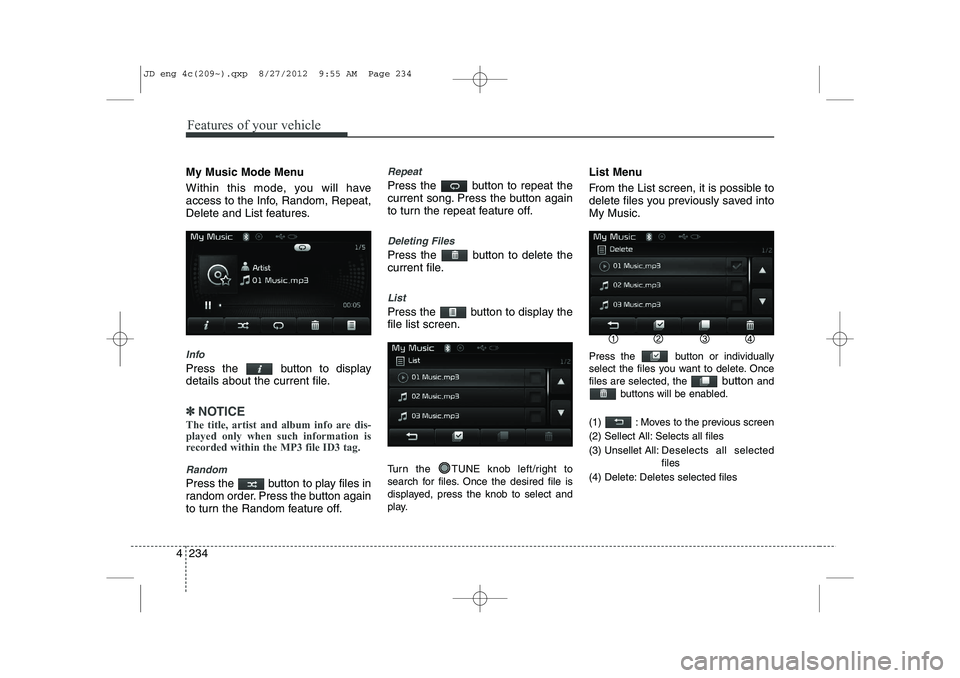
My Music Mode Menu
Within this mode, you will have
access to the Info, Random, Repeat,
Delete and List features.
Info
Press the button to display
details about the current file.
✽✽
NOTICE
The title, artist and album info are dis- played only when such information is
recorded within the MP3 file ID3 tag.
Random
Press the button to play files in
random order. Press the button again
to turn the Random feature off.
Repeat
Press the button to repeat the
current song. Press the button again
to turn the repeat feature off.
Deleting Files
Press the button to delete the
current file.
List
Press the button to display the file list screen.
Turn the TUNE knob left/right to
search for files. Once the desired file is
displayed, press the knob to select and
play. List Menu
From the List screen, it is possible to
delete files you previously saved intoMy Music.
Press the button or individually
select the files you want to delete. Oncefiles are selected, the
button and
buttons will be enabled.
(1) : Moves to the previous screen
(2) Sellect All: Selects all files
(3) Unsellet All: Des elects all selected
files
(4) Delete: Deletes selected files
JD eng 4c(209~).qxp 8/27/2012 9:55 AM Page 234
Page 327 of 1168

Features of your vehicle
248
4
VOICE RECOGNITION
Using Voice Recognition
Starting Voice Recognition
Shortly press the key on the
steering remote controller .Say acommand If voice recognition is in [Normal Mode],
then the system will say “Please say a
command. Beep~”
If voice recognition is in [Expert Mode],
then the system will only say a “Beep~”
To change the Normal Mode/Expert Mode setting, go to [System] [Prompt Feedback].
✽✽ NOTICE
For proper recognition, say the com-
mand after the voice instruction andbeep tone.
Skipping Prompt Messages
While prompt message is being stat-
ed Shortly press the key on the
steering remote controller (under 0.8seconds) The prompt message is immediately ended and the beep tone will sound.
After the “beep”, say the voice command.
Re-starting Voice Recognition
While system waits for a command
Shortly press the key on the
steering remote controller (under 0.8seconds)
The command wait state is immediately
ended and the beep ton will sound. After
the “beep”, say the voice command.
SETUP
JD eng 4c(209~).qxp 8/27/2012 9:56 AM Page 248
Page 335 of 1168
Features of your vehicle
256
4
System Setting
Memory Information
Press the key Select
[System] Select [Memory Information]
This feature displays information related
to system memory.
(1) Using : Displays capacity currently in
use
(2) Capacity : Displays total capacity
Voice Recognition Mode Setting
Press the key Select
[System] Select [Voice RecognitionSystem]
This feature is used to select the desired
prompt feedback option from Normal and
Expert. ( 1) Normal : When using voice recogni-
tion, provides detailed guidance prompts
( 2) Expert : When using voice recogni-
tion, omits some guidance prompts
✽✽NOTICE
Page 356 of 1168
515
Driving your vehicle
Your vehicle may be equipped with the ISG system, which reduces fuel con-
sumption by automatically shutting down
the engine, when the vehicle is at a
standstill. (For example : red light, stop
sign and traffic jam)
The engine starts automatically as soon
as the starting conditions are met.
The ISG system is ON whenever the
engine is running.
✽✽NOTICE
When the engine automatically starts by
the ISG system, some warning lights
(ABS, ESC, ESC OFF, EPS or Parking
brake warning light) may turn on for afew seconds.This happens because of low batteryvoltage. It does not mean the system hasmalfunctioned.
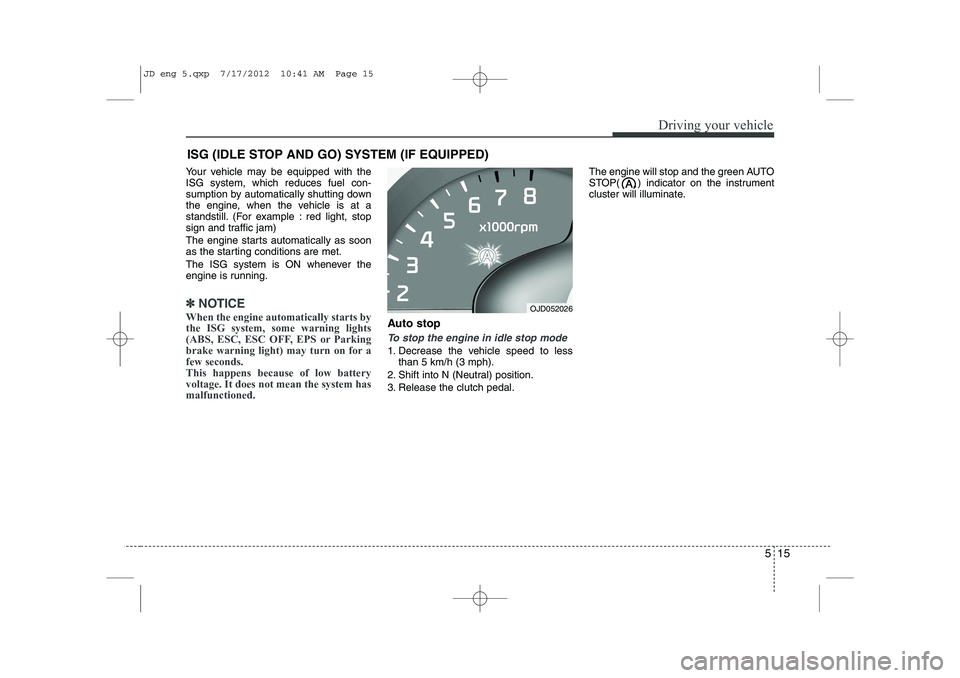
Auto stop
To stop the engine in idle stop mode
1. Decrease the vehicle speed to less than 5 km/h (3 mph).
2. Shift into N (Neutral) position.
3. Release the clutch pedal. The engine will stop and the green AUTO
STOP( ) indicator on the instrument
cluster will illuminate.
ISG (IDLE STOP AND GO) SYSTEM (IF EQUIPPED)
OJD052026
JD eng 5.qxp 7/17/2012 10:41 AM Page 15
Page 358 of 1168
517
Driving your vehicle
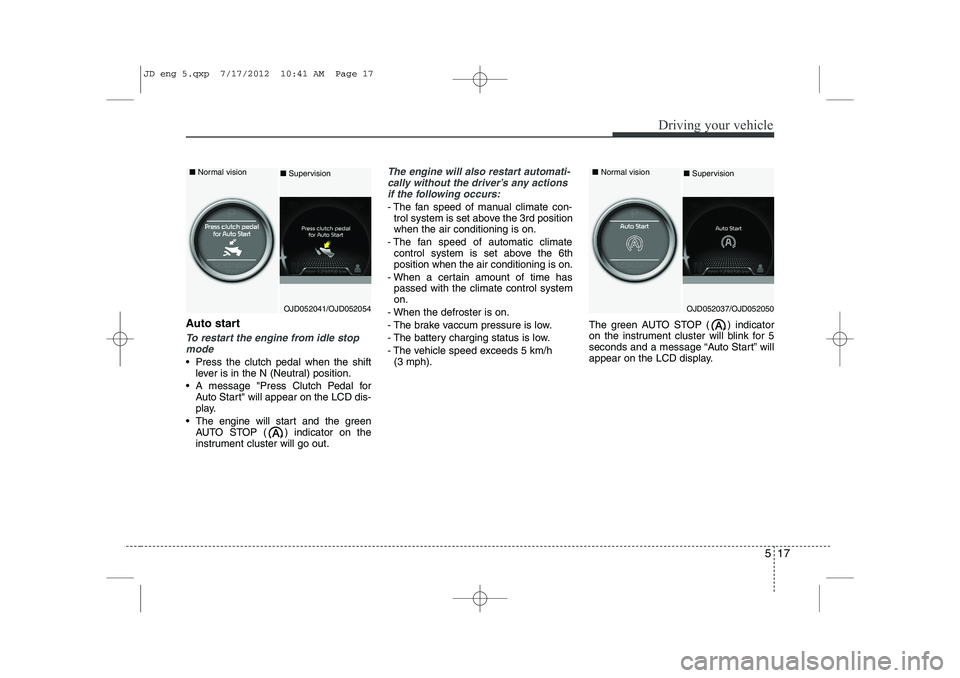
Auto start
To restart the engine from idle stopmode
Press the clutch pedal when the shift lever is in the N (Neutral) position.
A message "Press Clutch Pedal for Auto Start" will appear on the LCD dis-
play.
The engine will start and the green AUTO STOP ( ) indicator on the
instrument cluster will go out.
The engine will also restart automati-
cally without the driver’s any actions if the following occurs:
- The fan speed of manual climate con- trol system is set above the 3rd position when the air conditioning is on.
- The fan speed of automatic climate control system is set above the 6thposition when the air conditioning is on.
- When a certain amount of time has passed with the climate control systemon.
- When the defroster is on.
- The brake vaccum pressure is low.
- The battery charging status is low.
- The vehicle speed exceeds 5 km/h (3 mph). The green AUTO STOP ( ) indicator
on the instrument cluster will blink for 5
seconds and a message “Auto Start” will
appear on the LCD display.
OJD052041/OJD052054
■
Normal vision
■Supervision
OJD052037/OJD052050
■
Normal vision
■ Supervision
JD eng 5.qxp 7/17/2012 10:41 AM Page 17
Page 368 of 1168
527
Driving your vehicle
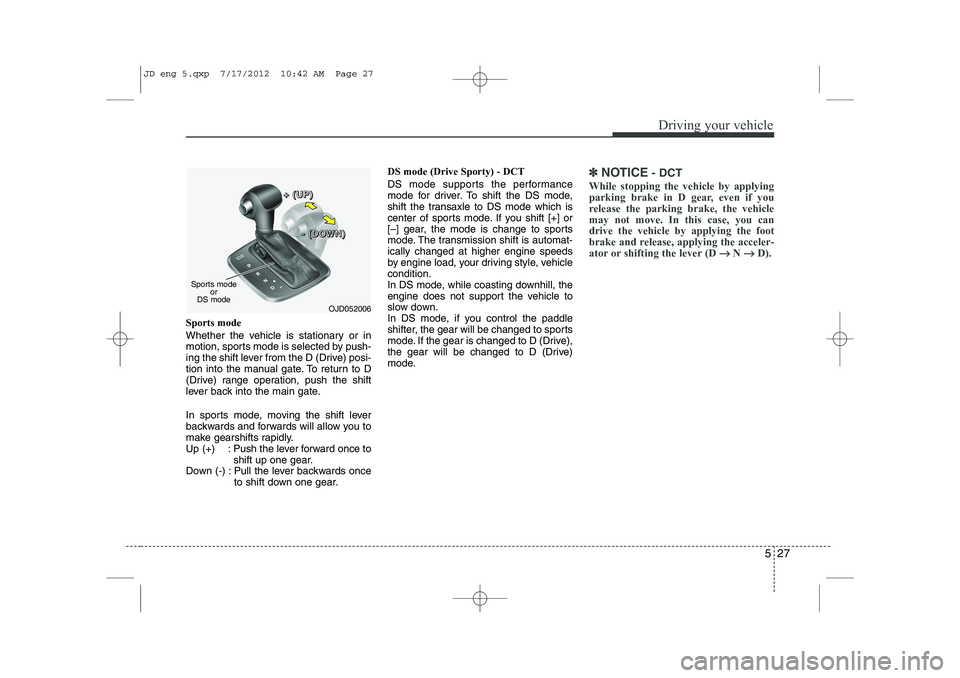
Sports mode
Whether the vehicle is stationary or in
motion, sports mode is selected by push-
ing the shift lever from the D (Drive) posi-
tion into the manual gate. To return to D
(Drive) range operation, push the shift
lever back into the main gate.
In sports mode, moving the shift lever
backwards and forwards will allow you to
make gearshifts rapidly.
Up (+) : Push the lever forward once toshift up one gear.
Down (-) : Pull the lever backwards once to shift down one gear. DS mode (Drive Sporty) - DCT
DS mode supports the performance
mode for driver. To shift the DS mode,
shift the transaxle to DS mode which is
center of sports mode. If you shift [+] or
[–] gear, the mode is change to sports
mode. The transmission shift is automat-ically changed at higher engine speeds
by engine load, your driving style, vehiclecondition.
In DS mode, while coasting downhill, the
engine does not support the vehicle to
slow down.
In DS mode, if you control the paddle
shifter, the gear will be changed to sports
mode. If the gear is changed to D (Drive),
the gear will be changed to D (Drive)
mode.
✽✽
NOTICE - DCT
While stopping the vehicle by applying
parking brake in D gear, even if you
release the parking brake, the vehiclemay not move. In this case, you candrive the vehicle by applying the foot
brake and release, applying the acceler-
ator or shifting the lever (D →
→
N →→
D).
OJD052006
Sports mode
or
DS mode +
+++ ((((UUUUPPPP))))
---- ((((DDDDOOOOWWWWNNNN))))
JD eng 5.qxp 7/17/2012 10:42 AM Page 27

![KIA CEED 2013 Owners Manual Features of your vehicle
256
4
System Setting
Memory Information
Press the key Select
[System] Select [Memory Information]
This feature displays information related
to system memory.
(1) Using : Di](/manual-img/2/57944/w960_57944-334.png "KIA CEED 2013 Owners Manual Features of your vehicle
256
4
System Setting
Memory Information
Press the key Select
[System] Select [Memory Information]
This feature displays information related
to system memory.
(1) Using : Di")