Page 782 of 1168

4 119
Features of your vehicle
AUTO (Automatic) control (if equipped)
The rain sensor located on the upper end of the windscreen glass senses the
amount of rainfall and controls the wiping
cycle for the proper interval. The more it
rains, the faster the wiper operates. When
the rain stops, the wiper stops. To vary the speed setting, turn the speedcontrol knob (1).
If the wiper switch is set in AUTO mode
when the ignition switch is ON, the wiper
will operate once to perform a self-check
of the system. Set the wiper to off posi-
tion when the wiper is not in use.
CAUTION
When the ignition switch is ON and
the windscreen wiper switch isplaced in the AUTO mode, use cau-
tion in the following situations toavoid any injury to the hands orother parts of the body:
Do not touch the upper end of the windscreen glass facing the rain
sensor.
Do not wipe the upper end of the windscreen glass with a damp orwet cloth.
Do not put pressure on the wind- screen glass.
OEL049900
Rain sensor
CAUTION
When washing the vehicle, set thewiper switch in the off position to
stop the auto wiper operation.
The wiper may operate and be dam-aged if the switch is set in the AUTOmode whilst washing the vehicle.
Do not remove the sensor coverlocated on the upper end of the driver side windscreen glass.
Damage to system parts couldoccur and may not be covered byyour vehicle warranty.
When starting the vehicle in winter,set the wiper switch in the off posi- tion. Otherwise, wipers may operateand ice may damage the wind-
screen wiper blades. Alwaysremove all snow and ice and defrost the windscreen properly prior tooperating the windscreen wipers.
JD RHD 4a(~168).QXP 7/21/2012 12:13 PM Page 119
Page 785 of 1168
Features of your vehicle
122
4
Interior lamp AUTO cut
When all entrances are closed, if you
lock the vehicle by using the transmit-
ter or the smart key, all interior lamp
will be off after a few seconds.
If you do not operate anything in the vehicle after turning off the engine, the
lights will turn off after 20 minutes. Map lamp
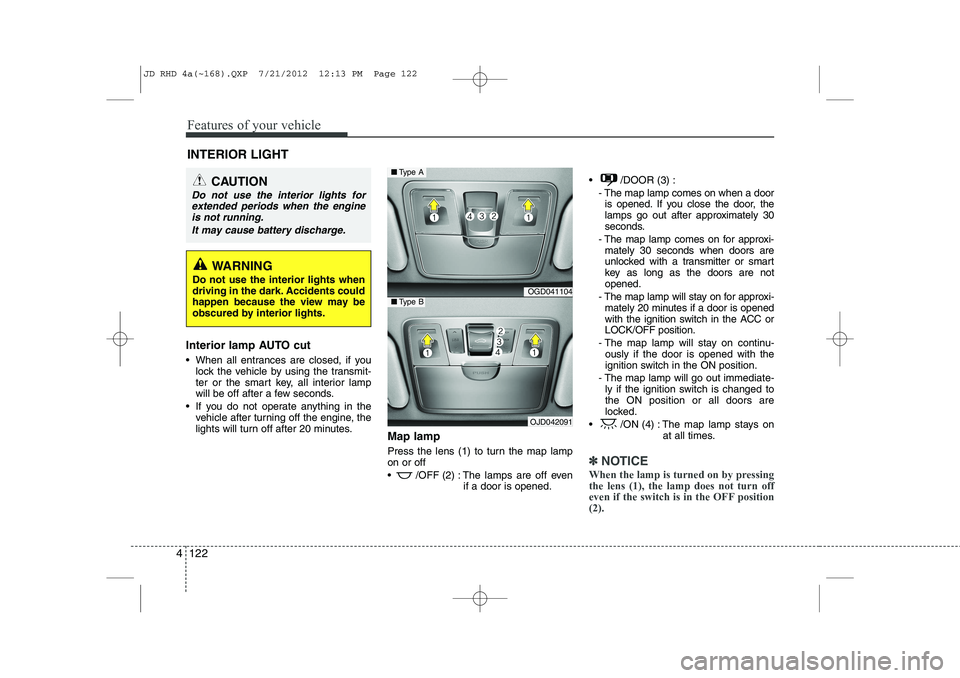
Press the lens (1) to turn the map lamp on or off
/OFF (2) : The lamps are off even
if a door is opened. /DOOR (3) :
- The map lamp comes on when a dooris opened. If you close the door, the
lamps go out after approximately 30
seconds.
- The map lamp comes on for approxi- mately 30 seconds when doors are
unlocked with a transmitter or smart
key as long as the doors are notopened.
- The map lamp will stay on for approxi- mately 20 minutes if a door is opened
with the ignition switch in the ACC orLOCK/OFF position.
- The map lamp will stay on continu- ously if the door is opened with the
ignition switch in the ON position.
- The map lamp will go out immediate- ly if the ignition switch is changed tothe ON position or all doors are
locked.
/ON (4) : The map lamp stays on at all times.
✽✽NOTICE
When the lamp is turned on by pressing the lens (1), the lamp does not turn off
even if the switch is in the OFF position(2).
INTERIOR LIGHT
CAUTION
Do not use the interior lights for extended periods when the engine
is not running.
It may cause battery discharge.
WARNING
Do not use the interior lights when
driving in the dark. Accidents could
happen because the view may be
obscured by interior lights.
OGD041104
OJD042091
■ Type A
■Type B
JD RHD 4a(~168).QXP 7/21/2012 12:13 PM Page 122
Page 788 of 1168
4 125
Features of your vehicle
Headlamp welcome
When the headlight(light switch in the
headlight or AUTO position) is on and all
doors (and tailgate) are locked andclosed, the headlight, position light and
tail light will come on for 15 seconds if
any of the below is performed.
Without smart key system- When the door unlock button is pressed on the transmitter.
With the smart key system - When the door unlock button is pressed on the smart key.
At this time, if you press the door lock but-
ton (on the transmitter or smart key), the
lights will turn off immediately. Interior light
When the interior light switch is in the DOOR position and all doors (and tail-
gate) are locked and closed, the room
lamp will come on for 30 seconds if any
of the below is performed.
Without smart key system
- When the door unlock button is pressed on the transmitter.
With the smart key system - When the door unlock button is pressed on the smart key.
- When the button of the outside door handle is pressed.
At this time, if you press the door lock but-
ton, the lamps will turn off immediately. Puddle lamp (if equipped)
When all doors are locked and closed,
the puddle lamp will come on for 15 sec-
onds if any of the below is performed.
Without smart key system
- When the door unlock button is pressed on the transmitter.
With the smart key system - When the door unlock button is pressed on the smart key.
- When the button of the outside door handle is pressed.
- When the vehicle is approached with the smart key in possession.
At this time, if you press the door lock but-
ton, the lamps will turn off immediately.
WELCOME SYSTEM (IF EQUIPPED)
JD RHD 4a(~168).QXP 7/21/2012 12:13 PM Page 125
Page 799 of 1168
Features of your vehicle
136
4
AUTOMATIC CLIMATE CONTROL SYSTEM (IF EQUIPPED)
OJD042109R
1. Passenger's temperature control knob
2. Dual temperature control selection button
3. Fan speed control button (Higher speed)
4. Fan speed control button (Lower speed)
5. Climate control display
6. Air conditioning button
7. Air intake control button 8. Driver's temperature control knob
9. AUTO (automatic control) button
10. Rear window defroster button
11. Mode selection button
12. Front windscreen defroster button
13. OFF button
JD RHD 4a(~168).QXP 7/21/2012 12:14 PM Page 136
Page 800 of 1168
4 137
Features of your vehicle
Automatic heating and air condi- tioning The automatic climate control system is
controlled by simply setting the desired
temperature.You can choose either the soft mode or
fast mode to select the fan speed.
Soft mode : The wind blows gently.
Fast mode : The wind blows heavier than the soft mode to reach the selected tem-
perature fast.
Each time you press the AUTO button,
the mode will change as follows:Soft mode ↔Fast mode The Full Automatic Temperature Control
(FATC) system automatically controls the
heating and cooling system as follows:
1. Press the AUTO button.
The modes, fan speeds, air intake and air-conditioning will be controlled auto-
matically according to the temperaturesetting.
OJD042110R
OJD042119R
Soft mode
Fast mode
n
JD RHD 4a(~168).QXP 7/21/2012 12:14 PM Page 137
Page 802 of 1168

4 139
Features of your vehicle
Manual heating and air condition- ing The heating and cooling system can be
controlled manually by pressing buttons
or turning knob(s) other than the AUTO
button. In this case, the system workssequentially according to the order of
buttons or knob(s) selected.
1. Start the engine.
2. Set the mode to the desired position.To improve the effectiveness of heat-ing and cooling:
- Heating:- Cooling:
3. Set the temperature control to the desired position.
4. Set the air intake control to the outside (fresh) air position.
5. Set the fan speed control to the desired speed.
6. If air conditioning is desired, turn the air conditioning system on.
Press the AUTO button in order to con-
vert to full automatic control of the sys-tem.
Mode selection
The mode selection button controls the direction of the airflow in the vehicle.
If you push the button once, the corresponding switch will turn on, and if you push the
button again, the switch will turn off.
OJD042102R((((iiiiffff eeeeqqqquuuuiiiippppppppeeeedddd))))
JD RHD 4a(~168).QXP 7/21/2012 12:15 PM Page 139
Page 803 of 1168
Features of your vehicle
140
4
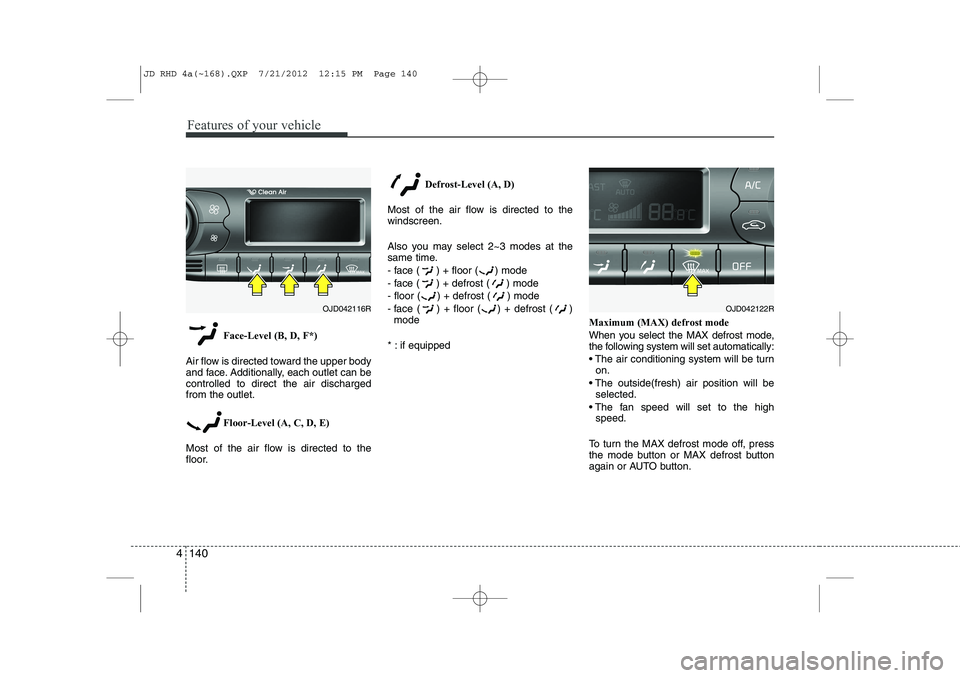
Face-Level (B, D, F*)
Air flow is directed toward the upper body
and face. Additionally, each outlet can becontrolled to direct the air dischargedfrom the outlet.
Floor-Level (A, C, D, E)
Most of the air flow is directed to the
floor. Defrost-Level (A, D)
Most of the air flow is directed to thewindscreen.
Also you may select 2~3 modes at the
same time.
- face ( ) + floor ( ) mode
- face ( ) + defrost ( ) mode
- floor ( ) + defrost ( ) mode
- face ( ) + floor ( ) + defrost ( ) mode
* : if equipped Maximum (MAX) defrost mode
When you select the MAX defrost mode,
the following system will set automatically:
The air conditioning system will be turn
on.
The outside(fresh) air position will be selected.
The fan speed will set to the high speed.
To turn the MAX defrost mode off, press
the mode button or MAX defrost button
again or AUTO button.
OJD042116ROJD042122R
JD RHD 4a(~168).QXP 7/21/2012 12:15 PM Page 140
Page 804 of 1168

4 141
Features of your vehicle
Instrument panel vents
The outlet vents can be opened or closed
separately using the thumbwheel or vent
control lever.
Also, you can adjust the direction of air
delivery from these vents using the vent
control lever as shown.
Temperature control
The temperature will increase to the
maximum (HI) by turning the knob to the
right extremely.
The temperature will decrease to the
minimum (Lo) by turning the knob to the
left extremely.
When turning the knob, the temperature
will increase or decrease by 0.5°C/1°F.
When set to the lowest temperature set-
ting, the air conditioning will operate con-
tinuously.
Operate the driver’s side temperature
control to adjust the driver side tempera-
ture. Operate the passenger’s side tem-
perature control to adjust the passenger
side temperature.Adjusting the driver and passenger sidetemperature individually
1. Press the DUAL button to operate the
driver and passenger side temperature
individually. Also, if the passenger side
temperature control knob is operated,it will automatically change to the
DUAL mode as well.
2. Operate the driver side temperature control to adjust the driver side tem-
perature. Operate the passenger side
temperature control to adjust the pas-
senger side temperature.
When the driver side temperature is set
to the highest (HIGH) or lowest (LOW)
temperature, the DUAL mode deacti-
vates for maximum heating or cooling.
OJD042113
■ Driver’s side■Passenger’s side
OJD042112
OJD042107R
OJD042108R
JD RHD 4a(~168).QXP 7/21/2012 12:15 PM Page 141