Page 51 of 1168

335
Safety system of your vehicle
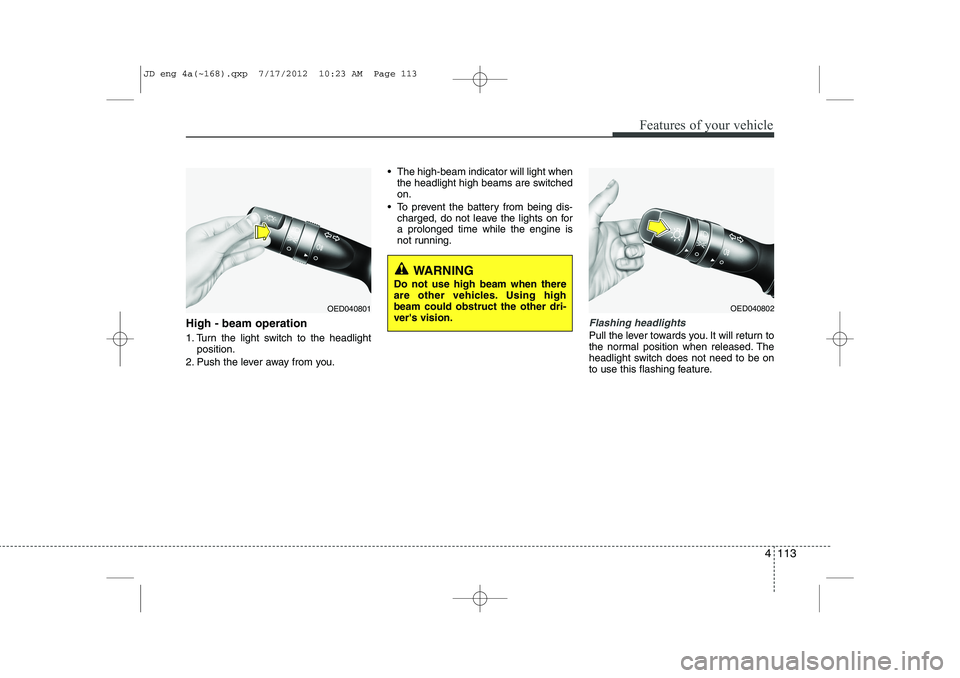
Securing a child restraint systemwith “ISOFIX” system and “Tether Anchorage” system (if equipped)
ISOFIX is a standardised method of fit- ting child seats that eliminates the needto use the standard adult seat belt to
secure the seat in the vehicle. This
enables a much more secure and posi-
tive location with the added benefit of
easier and quicker installation.
An ISOFIX-seat may only be installed if it
has vehicle-specific or universal approval in accordance with the requirements of ECE-R 44. ❈ ISOFIX: International Standards Origanisation FIX
OVI039060
WARNING - Child restraint
check
Check that the child restraint sys-
tem is secure by pushing and
pulling it in different directions.
Incorrectly fitted child restraints
may swing, twist, tip or separate
causing death or serious injury.
WARNING
- Child restraint anchorage
Child restraint anchorages are designed to withstand only those
loads imposed by correctly fitted
child restraints. Under no circum-
stances are they to be used foradult seat belts or harnesses or
for attaching other items or
equipment to the vehicle.
The tether strap may not work properly if attached somewhereother than the correct tether
anchor.
WARNING
Do not install a child restraint seat at the center of the rear seat using
the tether anchors. The tether
anchors are only provided for the
left and right outboard rear seatingpositions.
In a crash, the child restraint seat
tether anchor attachments may not
be strong enough to secure the
child restraint seat properly in the
center of the rear seat and may
break, causing serious injury ordeath.
JD eng 3.QXP 7/17/2012 11:08 AM Page 35
Page 73 of 1168
357
Safety system of your vehicle
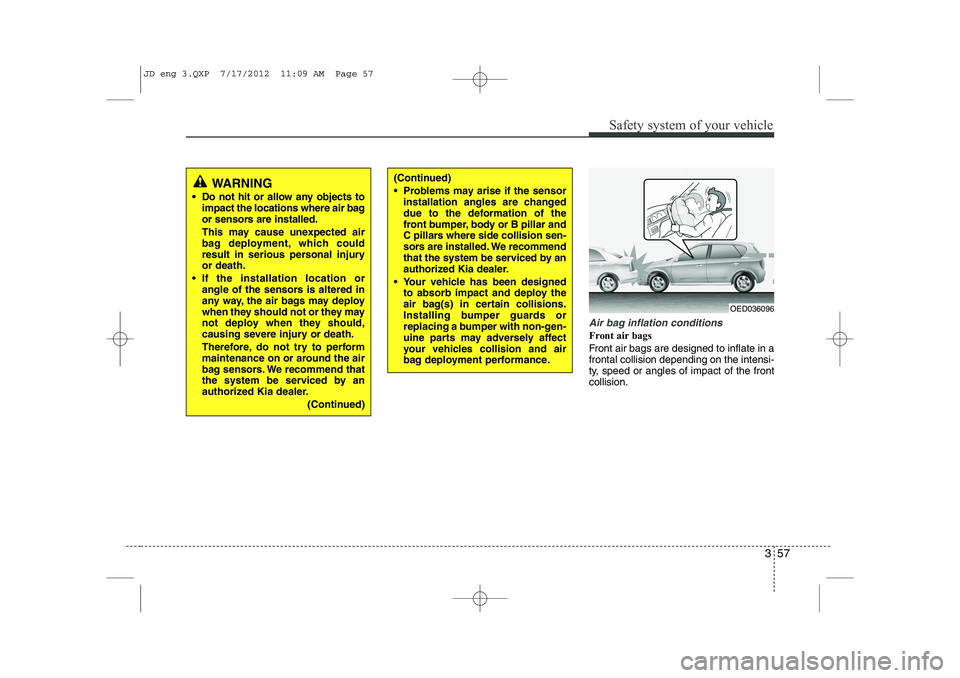
Air bag inflation conditions
Front air bags
Front air bags are designed to inflate in a frontal collision depending on the intensi-
ty, speed or angles of impact of the frontcollision.
WARNING
Do not hit or allow any objects to impact the locations where air bag
or sensors are installed.
This may cause unexpected air
bag deployment, which could
result in serious personal injuryor death.
If the installation location or angle of the sensors is altered in
any way, the air bags may deploy
when they should not or they may
not deploy when they should,
causing severe injury or death.
Therefore, do not try to perform
maintenance on or around the air
bag sensors. We recommend that
the system be serviced by an
authorized Kia dealer.
(Continued)(Continued)
Problems may arise if the sensorinstallation angles are changed
due to the deformation of the
front bumper, body or B pillar and
C pillars where side collision sen-
sors are installed. We recommend
that the system be serviced by an
authorized Kia dealer.
Your vehicle has been designed to absorb impact and deploy the
air bag(s) in certain collisions.
Installing bumper guards or
replacing a bumper with non-gen-
uine parts may adversely affect
your vehicles collision and air
bag deployment performance.
OED036096
JD eng 3.QXP 7/17/2012 11:09 AM Page 57
Page 93 of 1168
Features of your vehicle
14
4
Vehicles equipped with a theft alarm sys-
tem will have a label attached to the vehi-
cle with the following words:
1. WARNING
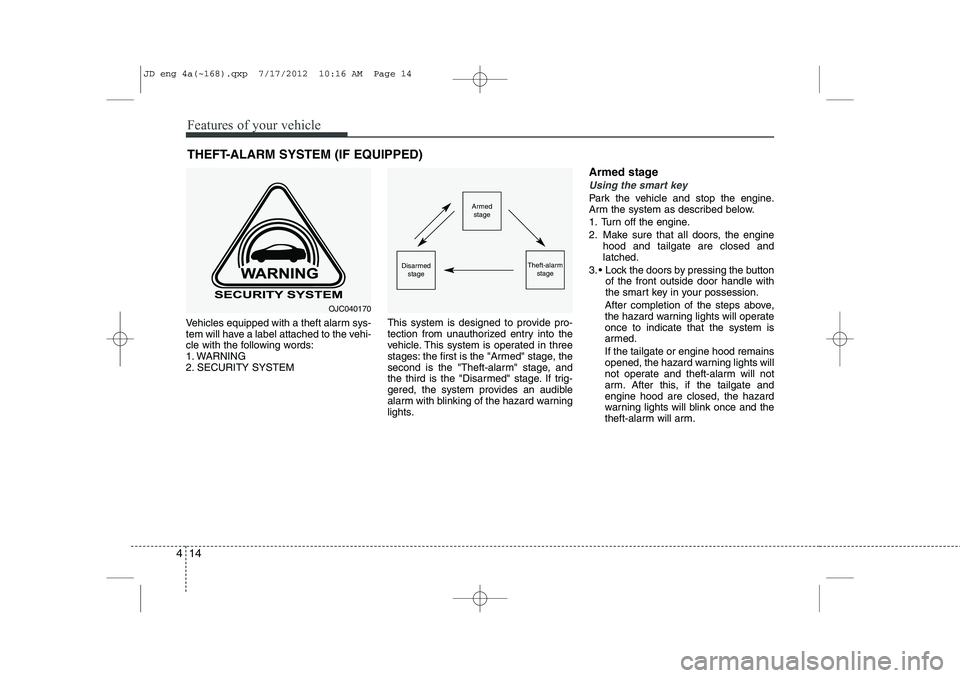
2. SECURITY SYSTEM This system is designed to provide pro-
tection from unauthorized entry into the
vehicle. This system is operated in three
stages: the first is the "Armed" stage, the
second is the "Theft-alarm" stage, and
the third is the "Disarmed" stage. If trig-
gered, the system provides an audible
alarm with blinking of the hazard warning
lights.Armed stage
Using the smart key
Park the vehicle and stop the engine.
Arm the system as described below.
1. Turn off the engine.
2. Make sure that all doors, the engine
hood and tailgate are closed and latched.
3. Lock the doors by pressing the button of the front outside door handle with
the smart key in your possession.
After completion of the steps above,
the hazard warning lights will operateonce to indicate that the system is
armed. If the tailgate or engine hood remains
opened, the hazard warning lights will
not operate and theft-alarm will not
arm. After this, if the tailgate andengine hood are closed, the hazard
warning lights will blink once and the
theft-alarm will arm.
THEFT-ALARM SYSTEM (IF EQUIPPED)Armed
stage
Theft-alarm stageDisarmedstage
OJC040170
JD eng 4a(~168).qxp 7/17/2012 10:16 AM Page 14
Page 190 of 1168
4 111
Features of your vehicle
Static bending light (if equipped)
While driving the corner, for your sight
and safety, the static bending light turns
on automatically. The system will operate
automatically as follows:
When vehicle speed is under 10km/hand steering wheel angle approximate-
ly 80 degrees.
When vehicle speed is over 10km/h and steering wheel angle approximate-
ly 35 degrees.
When the vehicle is at a standstill.
When moving rearwards with one of the above conditions satisfied the lights will light up the opposite direction. Lighting control
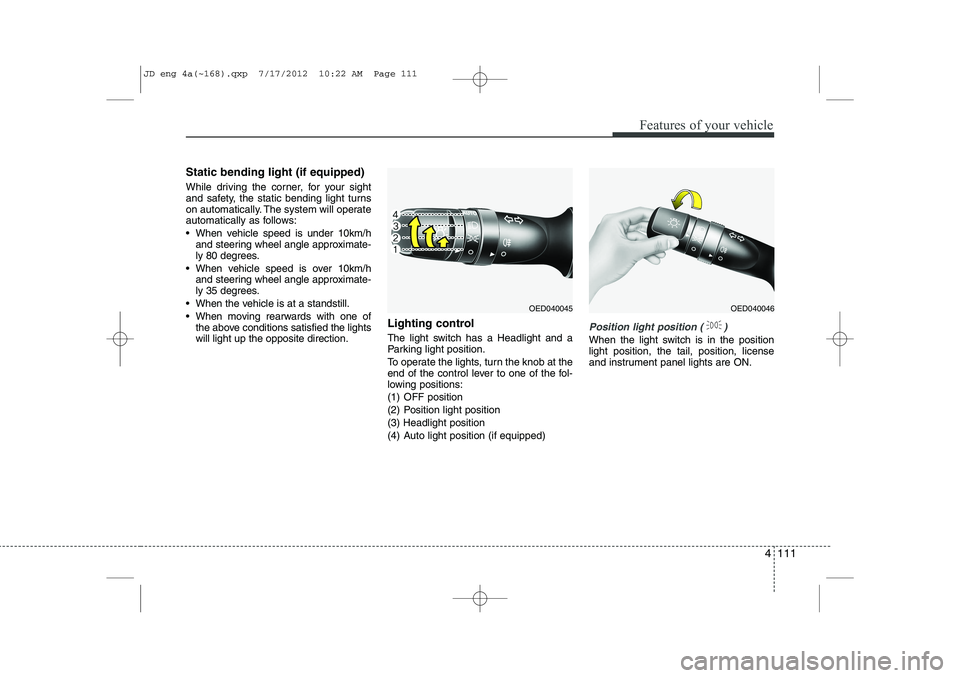
The light switch has a Headlight and a
Parking light position.
To operate the lights, turn the knob at the
end of the control lever to one of the fol-
lowing positions:
(1) OFF position
(2) Position light position(3) Headlight position
(4) Auto light position (if equipped)
Position light position ( )
When the light switch is in the position light position, the tail, position, license
and instrument panel lights are ON.
OED040045OED040046
JD eng 4a(~168).qxp 7/17/2012 10:22 AM Page 111
Page 192 of 1168
4 113
Features of your vehicle
High - beam operation
1. Turn the light switch to the headlightposition.
2. Push the lever away from you. The high-beam indicator will light when
the headlight high beams are switched on.
To prevent the battery from being dis- charged, do not leave the lights on fora prolonged time while the engine is
not running.Flashing headlights
Pull the lever towards you. It will return to
the normal position when released. The
headlight switch does not need to be on
to use this flashing feature.
WARNING
Do not use high beam when there
are other vehicles. Using highbeam could obstruct the other dri-ver's vision.
OED040801OED040802
JD eng 4a(~168).qxp 7/17/2012 10:23 AM Page 113
Page 208 of 1168
4 129
Features of your vehicle
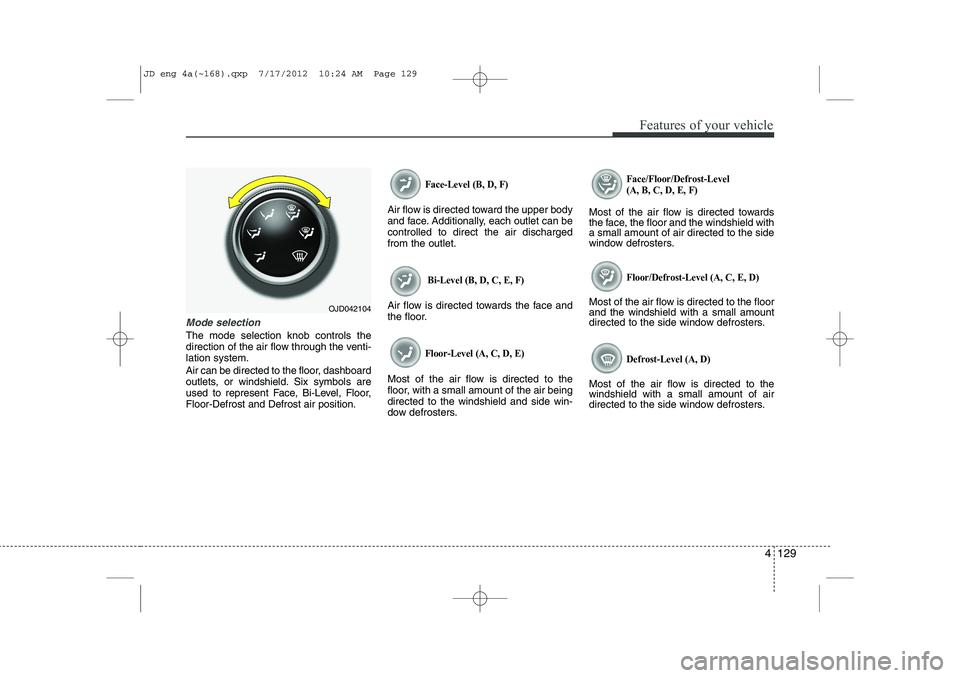
Mode selection
The mode selection knob controls the
direction of the air flow through the venti-lation system.
Air can be directed to the floor, dashboard
outlets, or windshield. Six symbols are
used to represent Face, Bi-Level, Floor,Floor-Defrost and Defrost air position.
Face-Level (B, D, F)
Air flow is directed toward the upper body
and face. Additionally, each outlet can becontrolled to direct the air dischargedfrom the outlet.
Bi-Level (B, D, C, E, F)
Air flow is directed towards the face and
the floor.
Floor-Level (A, C, D, E)
Most of the air flow is directed to the
floor, with a small amount of the air beingdirected to the windshield and side win-
dow defrosters.
Face/Floor/Defrost-Level (A, B, C, D, E, F)
Most of the air flow is directed towards
the face, the floor and the windshield witha small amount of air directed to the side
window defrosters.
Floor/Defrost-Level (A, C, E, D)
Most of the air flow is directed to the floorand the windshield with a small amount
directed to the side window defrosters.
Defrost-Level (A, D)
Most of the air flow is directed to thewindshield with a small amount of air
directed to the side window defrosters.
OJD042104
JD eng 4a(~168).qxp 7/17/2012 10:24 AM Page 129
Page 242 of 1168
4 163
Features of your vehicle
Cargo security screen (wagon) (if equipped)
Use the cargo security screen to hide items stored in the cargo area.To use the cargo security screen
1. Pull the cargo security screen towardsthe rear of the vehicle by the handle (1).
2. Insert the guide pin into the guide (2).
✽✽ NOTICE
Pull out the cargo security screen with
the handle in the center to prevent the
guide pin from falling out of the guide.
When the cargo security screen is not in use:
1. Pull the cargo security screen rear and down to release it from the guides.
2. The cargo security screen will auto- matically slide back in.
✽✽ NOTICE
The cargo security screen may not auto- matically slide back in if the cargo secu-
rity screen is not fully pulled out. Fullypull it out and then let go.
OGDE042304OGDE042305
JD eng 4a(~168).qxp 7/17/2012 10:27 AM Page 163
Page 254 of 1168

4 175
Features of your vehicle
Caring for disc
If the temperature inside the car is toohigh, open the car windows to ventilate
before using the system.
It is illegal to copy and use MP3/WMA files without permission. Use CDs that
are created only by lawful means.
Do not apply volatile agents, such as benzene and thinner, normal cleaners
and magnetic sprays made for ana-
logue disc onto CDs.
To prevent the disc surface from get- ting damaged, hold CDs by the edges
or the center hole only.
Clean the disc surface with a piece of soft cloth before playback (wipe it fromthe center to the outside edge).
Do not damage the disc surface or attach pieces of sticky tape or paper.
Make certain only CDs are inserted into the CD player (Do not insert morethan one CD at a time).
Keep CDs in their cases after use to protect them from scratches or dirt.
Depending on the type of CD-R/CD- RW CDs, certain CDs may not operate
normally according to manufacturingcompanies or making and recording
methods. In such circumstances, con-
tinued use may cause malfunctions to
your audio system.✽✽ NOTICE - Playing an
Incompatible Copy
Protected Audio CD
Some copy protected CDs, which do not comply with international audio CDstandards (Red Book), may not play on
your car audio. Please note that inabili-
ties to properly play a copy protectedCD may indicate that the CD is defec-
tive, not the CD player.
NOTE:
Order of playing files (folders) :
1. Song playing order : to sequen- tially. 2. Folder playing order :❋
If no song file is contained in the
folder, that folder is not displayed.
JD eng 4b(169~).qxp 7/19/2012 3:45 PM Page 175