Page 871 of 1168

Features of your vehicle
208
4
No phone paired. Empty phone paired.
Pair a phone?
No connected phone.No connected phone. Connect a
phone?
Phone book is empty.Phone book is empty
Available only when This is a warning, Do not enter
the MENU about BT Setup.
When vehicle is moving
Listening... Listen to instruction of audio
Phone book DownloadDownloading phone book from
phone paired to audio
Auto Download After pairing phone, audio sys- tem automatically download
phone book
Audio Streaming
After pairing phone, audio system
can support
Bluetooth®Wireless
Technology streaming mode
Outgoing Volume Set outoging volume "0 ~ 5"
Bluetooth System OffTurn off Bluetooth®Wireless
TechnologySystem
Bluetooth System ONTurn on Bluetooth®Wireless
TechnologySystem
Device :
Bluetooth®Wireless
Technologydevice name
Passkey Passkey for pairing a phone
Pairing complete Pair a
Bluetooth®Wireless
Technologyphone to the audio
Pairing failed Audio & Phone connection have
failed
Already 5 devices All 5 phones have already been paired. Delete a previously
paired phone to pair new phone
Connection completeAudio & Phone connection have
succeed
Connection failed. Audio & Phone connection have
failed
Priority changed Changed priority about the reg-
istered phones
Overwrite previous Overwrite previous phone book
information
Phone does not supportPhone does not support Phone
book download
No connected There are phone in the
connection list
Phone does not supportBut it was actually not connect-
ed BT pairing
Downloading stoppedDownloading stopped
paired. Delete a paired phone?
Phone book download
Bluetooth
audio
vehicle is stationary
Download?
Connect a phone?
Pair a phone?
phone book?Retry?
Bluetoothdevice
JD RHD 4b(169~).QXP 7/21/2012 1:00 PM Page 208
Page 902 of 1168
4 239
Features of your vehicle
Bluetooth® Wireless Technology
Pairing a Bluetooth®Wireless
Technology wireless technology
Device What is
Bluetooth®Wireless
Technology Pairing?
Pairing refers to the process of syn-
chronizing your
Bluetooth®Wireless
Technology phone or device with the
car audio system for connection.
Pairing is necessary to connect anduse the
Bluetooth®Wireless
Technology feature. Pairing Key / Key on
the Steering Remote Controller
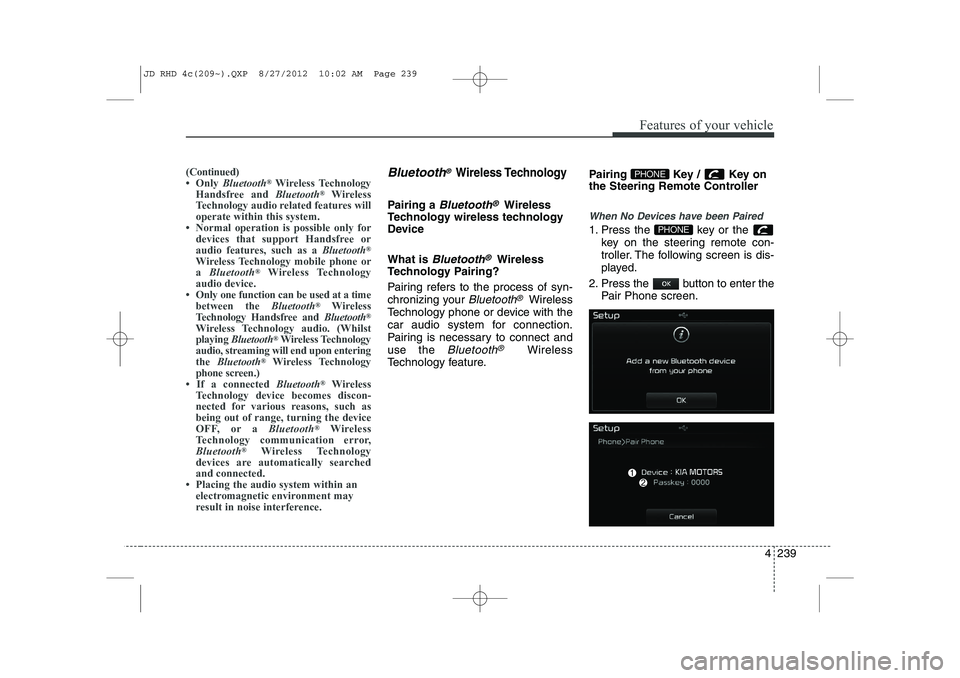
When No Devices have been Paired
1. Press the key or the
key on the steering remote con-
troller. The following screen is dis-
played.
2. Press the button to enter the Pair Phone screen.PHONE
PHONE(Continued)
Page 903 of 1168
Features of your vehicle
240
4
(1) Device : Name of device as shown
when searching from your
Bluetooth®
Wireless Technology device
(2) Passkey : Passkey used to pair the device
3. From your
Bluetooth®Wireless
Technology device (i.e. Mobile
Phone), search and select yourcar audio system.
4. After a few moments, a screen is displayed where the passkey isentered.
Here, enter the passkey “0000” to
pair your
Bluetooth®Wireless
Technology device with the caraudio system.
5. Once pairing is complete, the fol- lowing screen is displayed.
✽✽NOTICE
Page 916 of 1168
4 253
Features of your vehicle
Bluetooth®Wireless Technology
Setting
Pairing a New Device
Press the key Select
[Phone] Select [Pair Phone]
Bluetooth®Wireless Technology devices
can be paired with the audio system.
For more information, refer to the “Pairing
through Phone Setup” section within
Bluetooth®Wireless Technology.
Viewing Paired Phone List
Press the key Select
[Phone] Select [Paired Phone List]
This feature is used to view mobile
phones that have been paired with the
audio system. Upon selecting a paired
phone, the setup menu is displayed.
For more information, refer to the “Setting
Bluetooth®Wireless Technology
Connection” section within
Bluetooth®
Wireless Technology. ( 1) : Moves to the previous screen
( 2) Connect/Disconnect Phone :
Connect/ disconnects currently selected phone
( 3) Delete : Deletes the currently select-
ed phone (
4) Change Priority : Sets currently select-
ed phone to highest connection priority
✽✽NOTICE BEFORE DOWN-
LOADING PHONE BOOKS

![KIA CEED 2013 Owners Manual 4 253
Features of your vehicle
Bluetooth®Wireless Technology
Setting
Pairing a New Device
Press the key Select
[Phone] Select [Pair Phone]
Bluetooth®Wireless Technology devices
can be paired with](/manual-img/2/57944/w960_57944-915.png "KIA CEED 2013 Owners Manual 4 253
Features of your vehicle
Bluetooth®Wireless Technology
Setting
Pairing a New Device
Press the key Select
[Phone] Select [Pair Phone]
Bluetooth®Wireless Technology devices
can be paired with")