Page 234 of 1168
4 155
Features of your vehicle
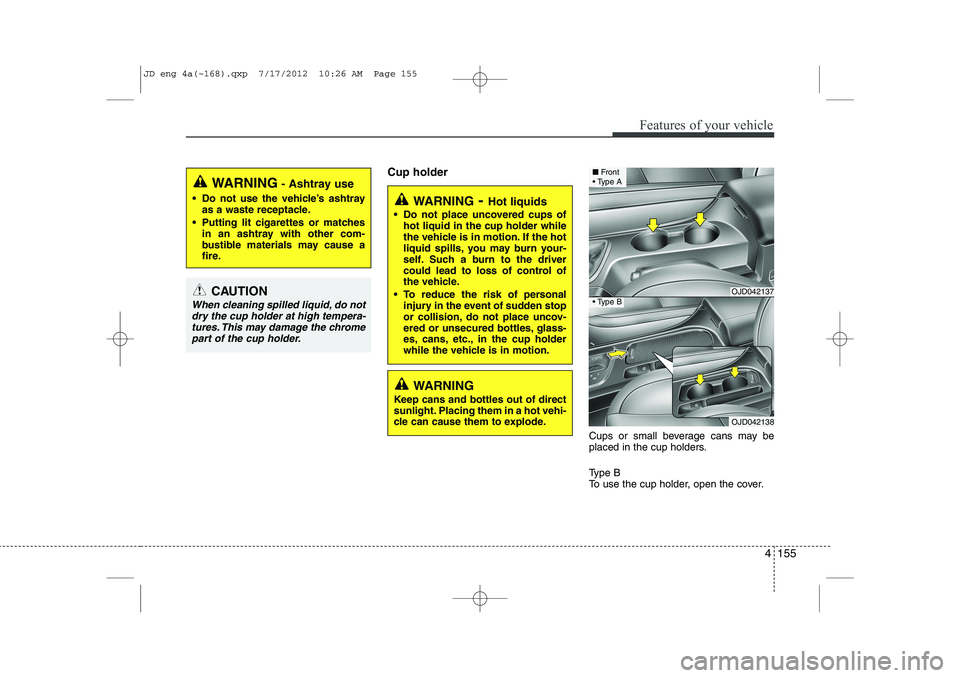
Cup holderCups or small beverage cans may be
placed in the cup holders.
Type B
To use the cup holder, open the cover.
WARNING- Hot liquids
Do not place uncovered cups of hot liquid in the cup holder while
the vehicle is in motion. If the hot
liquid spills, you may burn your-
self. Such a burn to the driver
could lead to loss of control of
the vehicle.
To reduce the risk of personal injury in the event of sudden stop
or collision, do not place uncov-
ered or unsecured bottles, glass-
es, cans, etc., in the cup holder
while the vehicle is in motion.
WARNING
Keep cans and bottles out of direct
sunlight. Placing them in a hot vehi-
cle can cause them to explode.
WARNING - Ashtray use
Do not use the vehicle’s ashtray as a waste receptacle.
Putting lit cigarettes or matches in an ashtray with other com-
bustible materials may cause a
fire.
CAUTION
When cleaning spilled liquid, do not
dry the cup holder at high tempera-tures. This may damage the chrome
part of the cup holder.
OJD042137
OJD042138
■ Front
Type A
Type B
JD eng 4a(~168).qxp 7/17/2012 10:26 AM Page 155
Page 236 of 1168
4 157
Features of your vehicle
✽✽NOTICE
Close the vanity mirror cover securely
and return the sunvisor to its original
position after use.
❈ To learn how to use the vanity mirror
lamp, refer to "Interior light" in this sec- tion.
CAUTION - Vanity mirror
lamp (if equipped)
Always have the switch in the off position when the vanity mirror lamp is not in use. If the sunvisor isclosed without the lamp off, it maydischarge the battery or damage
the sunvisor.
WARNING
For your safety, do not obstruct your
vision when using the sunvisor.
OJD042140
OJD042154
■ Type A
■Type B
FrontOJD042155
OJD042243
■ Rear, 5Door (if equipped)
■Rear, wagon (if equipped)
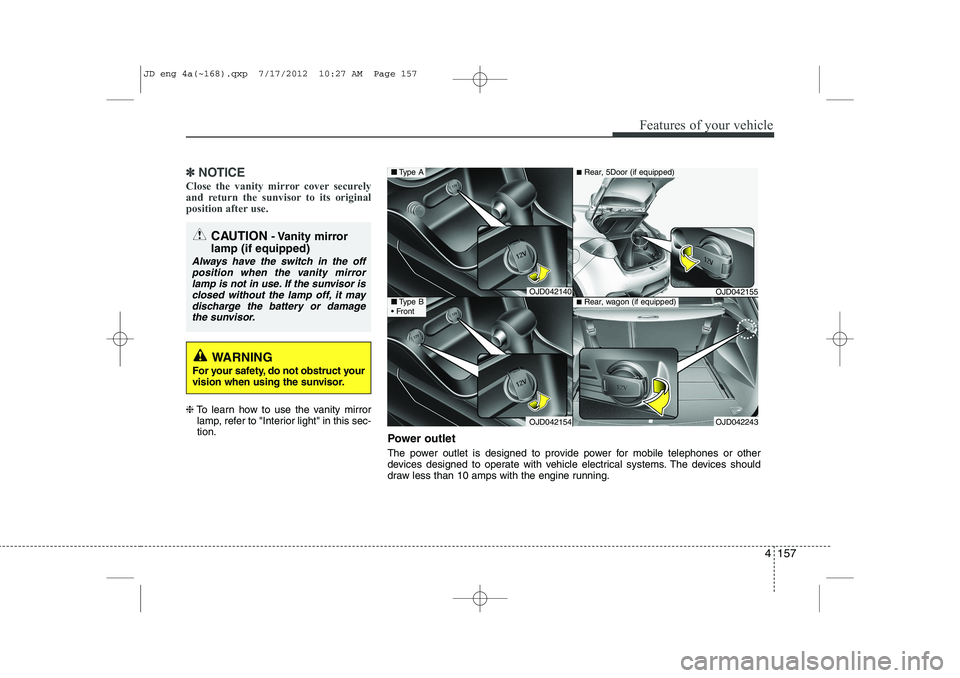
Power outlet
The power outlet is designed to provide power for mobile telephones or other
devices designed to operate with vehicle electrical systems. The devices should
draw less than 10 amps with the engine running.
JD eng 4a(~168).qxp 7/17/2012 10:27 AM Page 157
Page 237 of 1168
Features of your vehicle
158
4
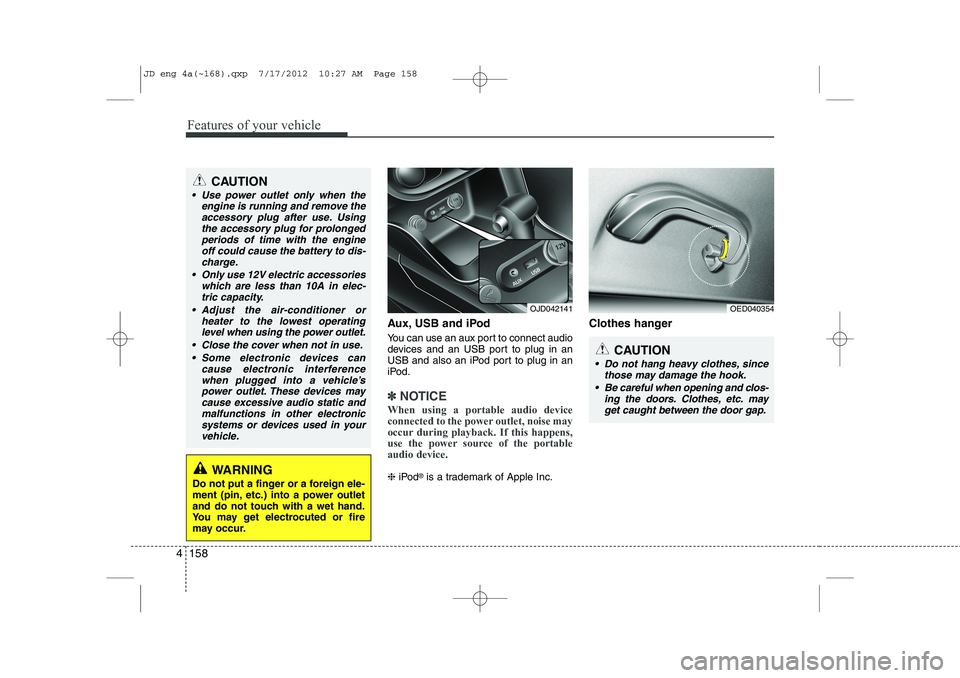
Aux, USB and iPod
You can use an aux port to connect audio
devices and an USB port to plug in an
USB and also an iPod port to plug in an
iPod.
✽✽
NOTICE
When using a portable audio device
connected to the power outlet, noise may
occur during playback. If this happens,
use the power source of the portableaudio device.
❈ iPod ®
is a trademark of Apple Inc. Clothes hanger
OED040354
CAUTION
Do not hang heavy clothes, since
those may damage the hook.
Be careful when opening and clos- ing the doors. Clothes, etc. mayget caught between the door gap.
OJD042141
WARNING
Do not put a finger or a foreign ele-
ment (pin, etc.) into a power outlet
and do not touch with a wet hand.
You may get electrocuted or fire
may occur.
CAUTION
Use power outlet only when the engine is running and remove the
accessory plug after use. Usingthe accessory plug for prolongedperiods of time with the engine off could cause the battery to dis-
charge.
Only use 12V electric accessories which are less than 10A in elec-tric capacity.
Adjust the air-conditioner or heater to the lowest operatinglevel when using the power outlet.
Close the cover when not in use. Some electronic devices can cause electronic interference
when plugged into a vehicle’spower outlet. These devices maycause excessive audio static and malfunctions in other electronic
systems or devices used in yourvehicle.
JD eng 4a(~168).qxp 7/17/2012 10:27 AM Page 158
Page 238 of 1168
4 159
Features of your vehicle
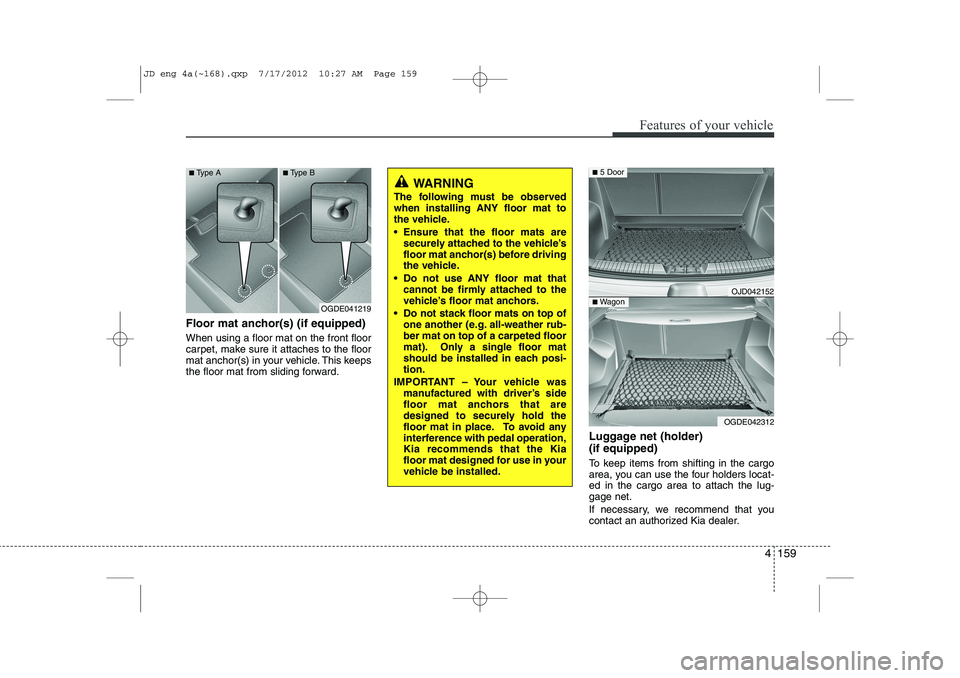
Floor mat anchor(s) (if equipped) When using a floor mat on the front floor
carpet, make sure it attaches to the floor
mat anchor(s) in your vehicle. This keeps
the floor mat from sliding forward.Luggage net (holder) (if equipped)
To keep items from shifting in the cargo
area, you can use the four holders locat-ed in the cargo area to attach the lug-gage net.
If necessary, we recommend that you
contact an authorized Kia dealer.
WARNING
The following must be observed when installing ANY floor mat to
the vehicle.
Ensure that the floor mats are securely attached to the vehicle’s
floor mat anchor(s) before driving
the vehicle.
Do not use ANY floor mat that cannot be firmly attached to the
vehicle’s floor mat anchors.
Do not stack floor mats on top of one another (e.g. all-weather rub-ber mat on top of a carpeted floor
mat). Only a single floor mat
should be installed in each posi-tion.
IMPORTANT – Your vehicle was manufactured with driver’s side
floor mat anchors that are
designed to securely hold the
floor mat in place. To avoid any
interference with pedal operation,Kia recommends that the Kia
floor mat designed for use in your
vehicle be installed.
OGDE041219
■
Type A ■Type B
OJD042152
OGDE042312
■ 5 Door
■Wagon
JD eng 4a(~168).qxp 7/17/2012 10:27 AM Page 159
Page 239 of 1168
Features of your vehicle
160
4
This symbol indicates the position of the front holders
(wagon).
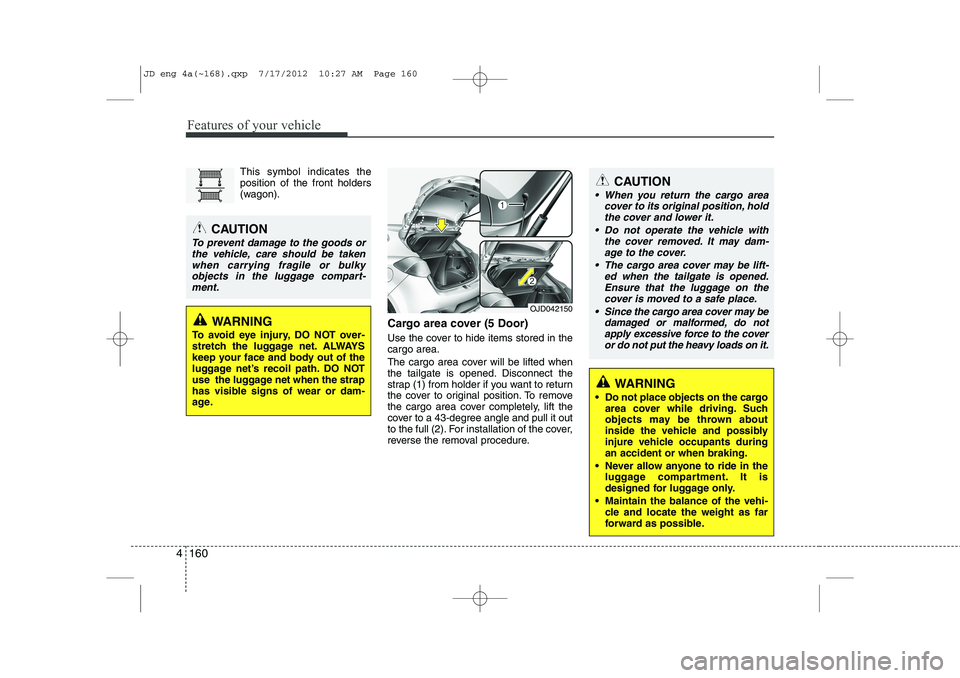
Cargo area cover (5 Door)
Use the cover to hide items stored in the cargo area.
The cargo area cover will be lifted when
the tailgate is opened. Disconnect the
strap (1) from holder if you want to return
the cover to original position. To remove
the cargo area cover completely, lift the
cover to a 43-degree angle and pull it out
to the full (2). For installation of the cover,
reverse the removal procedure.CAUTION
When you return the cargo areacover to its original position, hold
the cover and lower it.
Do not operate the vehicle with the cover removed. It may dam-age to the cover.
The cargo area cover may be lift- ed when the tailgate is opened.Ensure that the luggage on thecover is moved to a safe place.
Since the cargo area cover may be damaged or malformed, do not
apply excessive force to the cover or do not put the heavy loads on it.
OJD042150
CAUTION
To prevent damage to the goods or
the vehicle, care should be taken when carrying fragile or bulkyobjects in the luggage compart-ment.
WARNING
To avoid eye injury, DO NOT over-
stretch the luggage net. ALWAYS
keep your face and body out of the
luggage net’s recoil path. DO NOT
use the luggage net when the strap
has visible signs of wear or dam-
age.
WARNING
Do not place objects on the cargo area cover while driving. Such
objects may be thrown about
inside the vehicle and possibly
injure vehicle occupants duringan accident or when braking.
Never allow anyone to ride in the luggage compartment. It is
designed for luggage only.
Maintain the balance of the vehi- cle and locate the weight as far
forward as possible.
JD eng 4a(~168).qxp 7/17/2012 10:27 AM Page 160
Page 241 of 1168

Features of your vehicle
162
4
4. Fasten the straps, by using the
adjuster (1).
To remove the barrier net
1. Loosen the straps by using the strap adjusters and remove the strap hooks
from the hook holders.
2. Remove the net upper shaft by pulling it through the large holes.
3. Remove the barrier net.
OGDE042303
WARNING
Make sure that there is no slack in the barrier net by fastening the
strap securely when installing the
net. The strap should be fastenedafter confirming that the hook is
inserted into the upper hook
holder securely.
Make sure that the seatbacks are locked securely.
WARNING
Do not put passengers in the rear seat or cargo area behind the bar- rier net.
Do not put passenger in the rear centre seat when the barrier netis installed behind the rear seats.
The barrier net may interfere with
use of the rear centre safety belt.
Do not load cargo in the area higher than the barrier net'supper end.
Do not load heavy cargo in the area higher than the seatback to
avoid accident even if the barriernet is installed.
Do not load cargo which has sharp edge that can pass throughthe barrier net.
Do not apply excessive force to the barrier net by hanging on to
the net or by suspending heavy
cargo and so on.
JD eng 4a(~168).qxp 7/17/2012 10:27 AM Page 162
Page 243 of 1168
Features of your vehicle
164
4
To remove the cargo security screen
1. Push the guide pin inward.
2. While pushing the guide pin, pull out
the cargo security screen. Luggage rail system (wagon) (if equipped)
The luggage rail system may prevent the luggage from sliding around in the lug-
gage compartment.
WARNING
Do not place objects on the cargo security screen. Such objects
may be thrown about inside the
vehicle and possibly injure vehi-
cle occupants during an accidentor when braking.
Never allow anyone to ride in the luggage compartment. It is
designed for luggage only.
Maintain the balance of the vehi- cle and locate the weight as for-
ward as possible.
CAUTION
Since the cargo security screen
may be damaged or malformed, do
not put luggage on it when it is used.
OGDE042306OGDE042307
JD eng 4a(~168).qxp 7/17/2012 10:27 AM Page 164
Page 245 of 1168

Features of your vehicle
166
4
Mounting bracket for roof carrier (if equipped)
To install or remove a roof carrier, you
can use the mounting bracket and cover
on the roof.
When you install a roof carrier, use the
following procedure.
1. Insert a slim tool(coin or flat blade driv-
er) into the slot and slide the cover
toward the arrow on the cover. 2. Rotate the cover half way and insert
the cover on the roof hole as the illus-
tration.
✽✽ NOTICE
To prevent loosing the roof carrier
cover, install the cover on the roof before
you install the roof carrier.
3. After using the roof carrier, install the cover back on the roof in the reverse
order.
✽✽ NOTICE
If the vehicle is equipped with a sunroof,
be sure not to position cargo onto the
roof in such a way that it could interfere
with sunroof operation.
EXTERIOR FEATURES
OED046090OED046091
WARNING
Use a coin or flat blade driver when
you remove the roof carrier cover.
If you use your fingernail, it may
damage your fingernail.
CAUTION
When carrying cargo on the roof, take the necessary precautions to
make sure the cargo does notdamage the roof of the vehicle.
When carrying large objects on the roof, make sure they do not
exceed the overall roof length or width.
JD eng 4a(~168).qxp 7/17/2012 10:28 AM Page 166