Page 102 of 655

Exhaust Gas
WARNING!Exhaust gases can injure or kill. They contain carbon
monoxide (CO), which is colorless and odorless.
Breathing it can make you unconscious and can
eventually poison you. To avoid breathing (CO),
follow these safety tips:
• Do not run the engine in a closed garage or in
confined areas any longer than needed to move
your vehicle in or out of the area.
• If you are required to drive with the trunk/liftgate
open, make sure that all windows are closed and
the climate control BLOWER switch is set at high
speed. DO NOT use the recirculation mode. (Continued) WARNING! (Continued)• If it is necessary to sit in a parked vehicle with the
engine running, adjust your heating or cooling
controls to force outside air into the vehicle. Set the
blower at high speed.
The best protection against carbon monoxide entry into
the vehicle body is a properly maintained engine exhaust
system.
Whenever a change is noticed in the sound of the exhaust
system, when exhaust fumes can be detected inside the
vehicle, or when the underside or rear of the vehicle is
damaged, have a competent mechanic inspect the com-
plete exhaust system and adjacent body areas for broken,
damaged, deteriorated, or mispositioned parts. Open
seams or loose connections could permit exhaust fumes100 THINGS TO KNOW BEFORE STARTING YOUR VEHICLE
Page 161 of 655

Heated Seats — If Equipped
On some models, the front driver and passenger seats
may be equipped with heaters in both the seat cushions
and seatbacks.
There are two heated seat switches that allow the driver
and passenger to operate the seats independently. The
controls for each seat are located on a switch bank near
the bottom center of the instrument panel.
You can choose from HIGH, LOW or OFF heat settings.
Amber indicator lights in each switch indicate the level of
heat in use. Two indicator lights will illuminate for
HIGH, one for LOW and none for OFF.
Press the switch once to select HIGH-level
heating. Press the switch a second time to select
LOW-level heating. Press the switch a third
time to shut the heating elements OFF. When the HIGH-level setting is selected, the heater will
provide a boosted heat level during the first four minutes
of operation. Then, the heat output will drop to the
normal HIGH-level. If the HIGH-level setting is selected,
the system will automatically switch to LOW-level after
approximately 30 minutes of continuous operation. At
that time, the number of illuminated LEDs changes
from two to one, indicating the change. The LOW-level
setting will turn OFF automatically after approximately
30 minutes.
NOTE: When a heat setting is selected, heat will be felt
within two to five minutes.
3 UNDERSTANDING THE FEATURES OF YOUR VEHICLE 159
Page 184 of 655
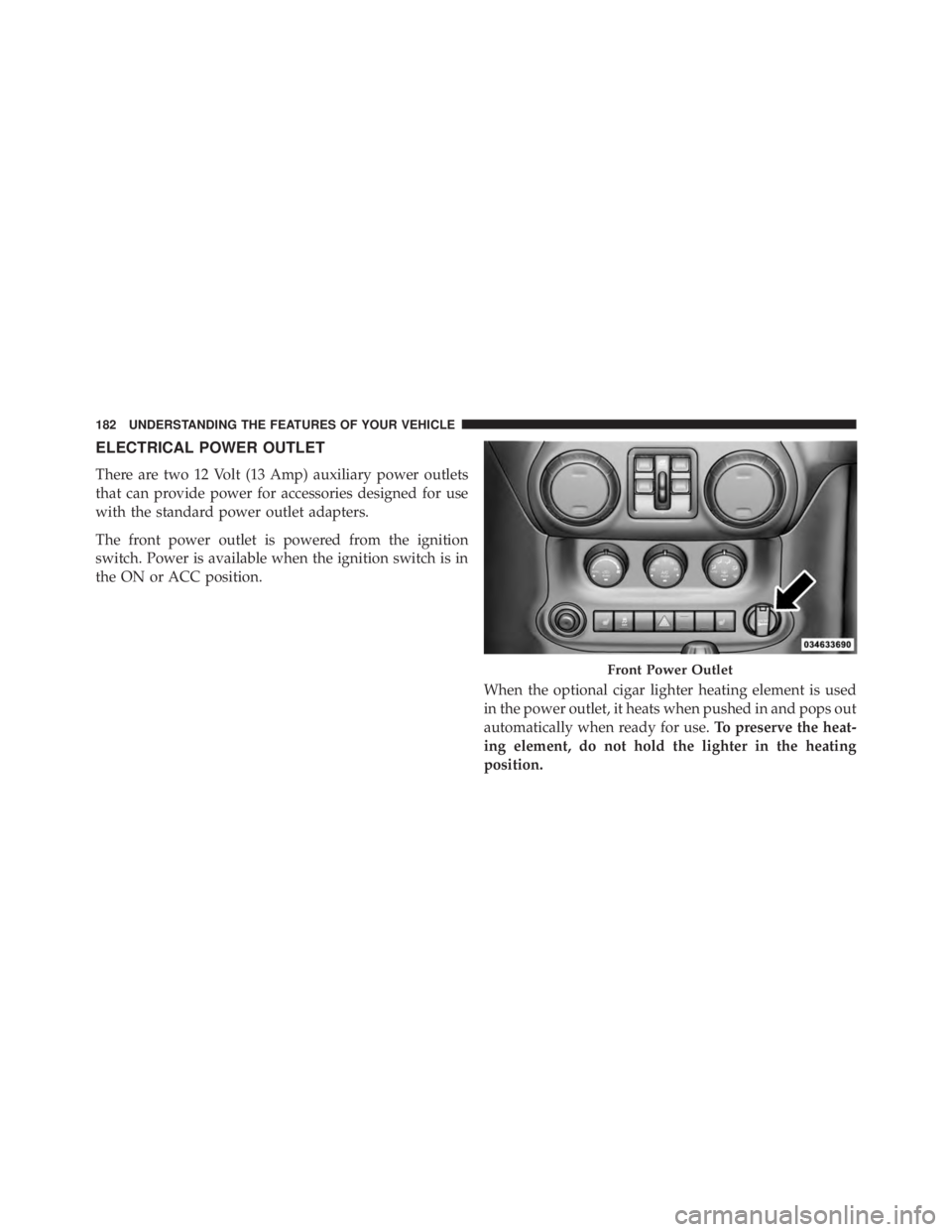
ELECTRICAL POWER OUTLET
There are two 12 Volt (13 Amp) auxiliary power outlets
that can provide power for accessories designed for use
with the standard power outlet adapters.
The front power outlet is powered from the ignition
switch. Power is available when the ignition switch is in
the ON or ACC position.
When the optional cigar lighter heating element is used
in the power outlet, it heats when pushed in and pops out
automatically when ready for use. To preserve the heat-
ing element, do not hold the lighter in the heating
position. Front Power Outlet182 UNDERSTANDING THE FEATURES OF YOUR VEHICLE
Page 296 of 655

Rear Window Defroster — If Equipped
The rear window defroster button is located on
the bottom right-side of the blower control knob.
Press this button to turn on the rear window defroster.
An indicator in the button will illuminate when the rear
window defroster is on. The rear window defroster
automatically turns off after approximately 10 minutes.
For an additional five minutes of operation, press the
button a second time.
NOTE: To prevent excessive battery drain, use the rear
window defroster only when the engine is operating. CAUTION!Failure to follow these cautions can cause damage to
the heating elements:
• Use care when washing the inside of the rear
window. Do not use abrasive window cleaners on
the interior surface of the window. Use a soft cloth
and a mild washing solution, wiping parallel to the
heating elements. Labels can be peeled off after
soaking with warm water.
• Do not use scrapers, sharp instruments, or abrasive
window cleaners on the interior surface of the
window.
• Keep all objects a safe distance from the window.294 UNDERSTANDING THE FEATURES OF YOUR VEHICLE
Page 299 of 655

▫ Operating Instructions — Radio Mode ...... .365
▫ Operation Instructions — CD MODE for
CD and MP3 Audio Play ............... .371
▫ Notes On Playing MP3 Files ............. .374
▫ LIST Button (CD Mode for MP3 Play) ...... .376
▫ INFO Button (CD Mode for MP3 Play) ..... .376
▫ Uconnect™ Multimedia (Satellite Radio)
— If Equipped ...................... .377
� iPod � /USB/MP3 CONTROL — IF EQUIPPED . .382
▫ Connecting The iPod � Or External USB
Device ............................ .382
▫ Using This Feature .................... .383
▫ Controlling The iPod � Or External USB Device
Using Radio Buttons .................. .384 ▫ Play Mode ......................... .384
▫ List Or Browse Mode .................. .386
▫ Bluetooth Streaming Audio (BTSA) ........ .388
� STEERING WHEEL AUDIO CONTROLS ..... .389
▫ Radio Operation ..................... .390
▫ CD Player .......................... .390
� CD/DVD DISC MAINTENANCE .......... .390
� RADIO OPERATION AND MOBILE PHONES . .391
� CLIMATE CONTROLS .................. .391
▫ Manual Heating And Air Conditioning ..... .392
▫ Automatic Temperature Control (ATC)
— If Equipped ...................... .396
▫ Operating Tips ...................... .4014 UNDERSTANDING YOUR INSTRUMENT PANEL 297
Page 306 of 655

13. Air Bag Warning Light
This light will turn on for four to eight seconds
as a bulb check when the ignition switch is first
turned to ON/RUN. If the light is either not on
during starting, stays on, or turns on while
driving, have the system inspected at an authorized
dealer as soon as possible. Refer to “Occupant Restraints”
in “Things To Know Before Starting Your Vehicle” for
further information.
14. Rear Axle Lock Indicator — If Equipped
This light indicates when the rear axle lock has
been activated.
15. Tachometer
Indicates the engine speed in revolutions per minute
(RPM x 1000). CAUTION!Do not operate the engine with the tachometer
pointer in the red area. Engine damage will occur.
16. Coolant Temperature Warning Light
This light warns of an overheated engine condition.
If the light turns on while driving, safely pull over
and stop the vehicle. If the A/C system is on, turn it off.
Also, shift the transmission into NEUTRAL and idle the
vehicle. If the temperature reading does not return to
normal, turn the engine off immediately and call for
service.
NOTE: As the coolant temperature gauge approaches
� H, � this indicator will illuminate and a single chime will
sound. Further overheating will cause the temperature304 UNDERSTANDING YOUR INSTRUMENT PANEL
Page 393 of 655

4. Do not use solvents such as benzene, thinner, cleaners,
or anti-static sprays.
5. Store the disc in its case after playing.
6. Do not expose the disc to direct sunlight.
7. Do not store the disc where temperatures may become
too high.
NOTE: If you experience difficulty in playing a particu-
lar disc, it may be damaged (i.e., scratched, reflective
coating removed, a hair, moisture or dew on the disc)
oversized, or have protection encoding. Try a known
good disc before considering disc player service. RADIO OPERATION AND MOBILE PHONES
Under certain conditions, the mobile phone being on in
your vehicle can cause erratic or noisy performance from
your radio. This condition may be lessened or eliminated
by relocating the mobile phone antenna. This condition is
not harmful to the radio. If your radio performance does
not satisfactorily “clear” by the repositioning of the
antenna, it is recommended that the radio volume be
turned down or off during mobile phone operation when
not using Uconnect™ (if equipped).
CLIMATE CONTROLS
The air conditioning and heating system is designed to
make you comfortable in all types of weather.
4 UNDERSTANDING YOUR INSTRUMENT PANEL 391
Page 394 of 655
Manual Heating And Air Conditioning
The Manual Temperature Controls consist of a series of
outer rotary dials and inner push knobs. Blower Control
Rotate this control to regulate the
amount of air forced through the venti-
lation system in any mode. The blower
speed increases as you move the control
to the right from the “O” (OFF) position.
There are seven blower speeds.
NOTE: For vehicles equipped with Remote Start, the
climate controls will not function during Remote Start
operation if the blower control is left in the “O” (Off)
position.Manual Temperature Control392 UNDERSTANDING YOUR INSTRUMENT PANEL