Page 16 of 655
A WORD ABOUT YOUR KEYS
The keys for your new vehicle are enclosed in a plastic
bag with the key code number on it. If you received your
keys without the bag, ask your authorized dealer to give
you the number. The key code can also be obtained by
your authorized dealer from your vehicle invoice.
Ignition Key Removal
1. Place the shift lever in PARK (if equipped with an
automatic transmission).
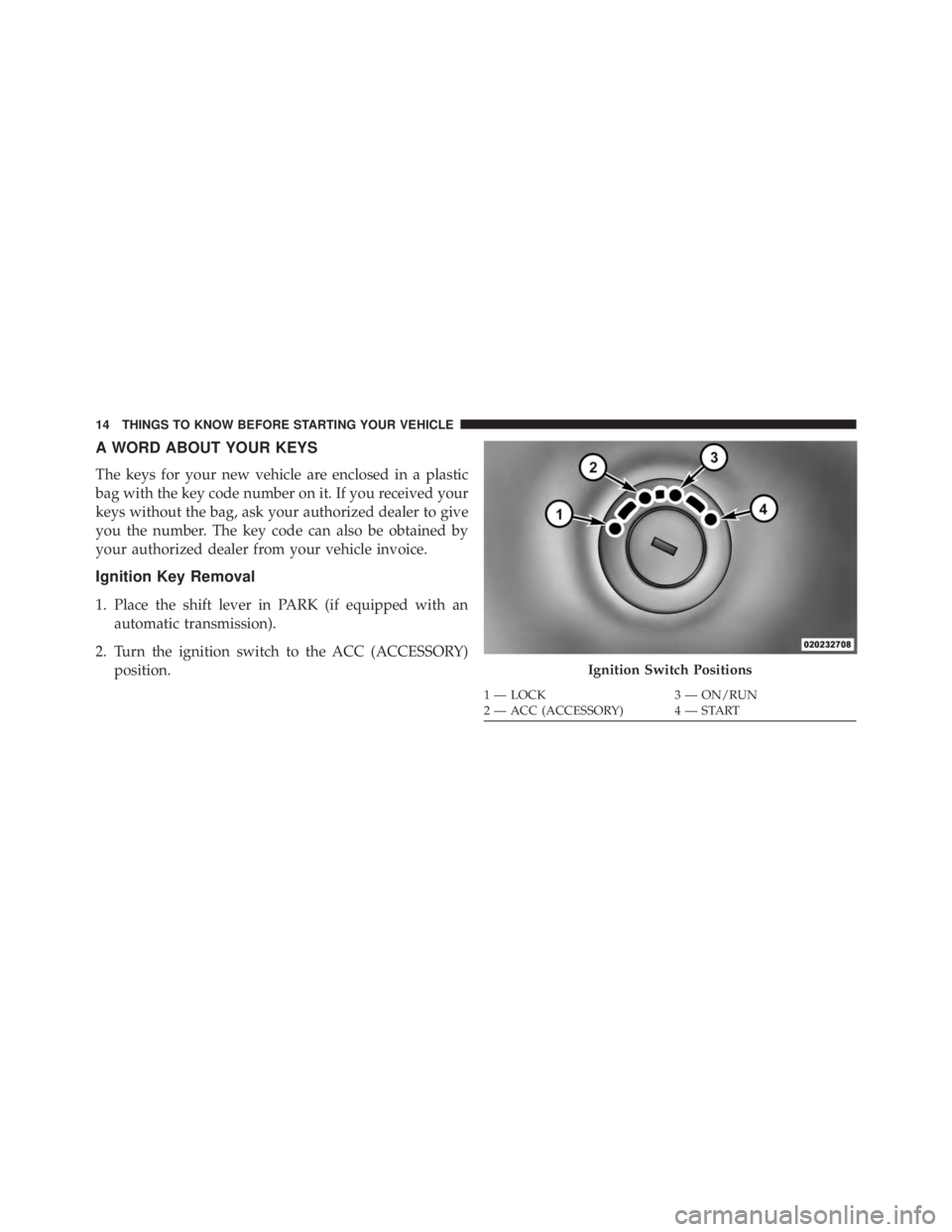
2. Turn the ignition switch to the ACC (ACCESSORY)
position. Ignition Switch Positions1 — LOCK 3 — ON/RUN
2 — ACC (ACCESSORY) 4 — START14 THINGS TO KNOW BEFORE STARTING YOUR VEHICLE
Page 30 of 655

REMOTE STARTING SYSTEM — IF EQUIPPED
This system uses the Remote Keyless Entry
(RKE) transmitter to start the engine conve-
niently from outside the vehicle while still
maintaining security. The system has a range of
approximately 300 ft (91 m).
NOTE:
• The vehicle must be equipped with an automatic
transmission to be equipped with Remote Start.
• Obstructions between the vehicle and RKE transmitter
may reduce this range.
How To Use Remote Start
All of the following conditions must be met before the
engine will remote start:
• Shift lever in PARK
• Doors closed • Hood closed
• Hazard switch off
• Brake switch inactive (brake pedal not pressed)
• Ignition key removed from ignition switch
• Battery at an acceptable charge level
• RKE PANIC button not pressed
• System not disabled from previous remote start event
• Vehicle theft alarm not active
WARNING!• Do not start or run an engine in a closed garage or
confined area. Exhaust gas contains Carbon Mon-
oxide (CO) which is odorless and colorless. Carbon
Monoxide is poisonous and can cause serious in-
jury or death when inhaled. (Continued)28 THINGS TO KNOW BEFORE STARTING YOUR VEHICLE
Page 41 of 655
Automatic Door Locks — If Equipped
When enabled, the door locks will lock automatically
when the vehicle’s speed exceeds 15 mph (24 km/h). The
auto door lock feature can be enabled or disabled by your
authorized dealer . Please see your authorized dealer for
service.
Automatic Unlock Doors On Exit
The doors will unlock automatically on vehicles with
power door locks if:
1. The “Automatic Unlock Doors On Exit” feature is
enabled.
2. The vehicle speed returned to 0 mph (0 km/h) and the
transmission shift lever is in NEUTRAL or PARK.
3. The driver door is opened.
4. The doors were not previously unlocked. Automatic Unlock Doors On Exit Programming
The “Automatic Unlock Doors On Exit” feature can be
enabled or disabled as follows:
1. Close all doors and place the key in the ignition.
2. Cycle the ignition switch between LOCK and ON/
RUN and then back to LOCK four times ending up in
the LOCK position.
3. Press the power door unlock switch to unlock the
doors.
4. A single chime will indicate the completion of the
programming.
5. Repeat these steps if you want to return this feature to
its previous setting.
NOTE: Use the “Automatic Unlock Doors On Exit”
feature in accordance with local laws. 2 THINGS TO KNOW BEFORE STARTING YOUR VEHICLE 39
Page 173 of 655

Rotate the center portion of the lever upward to the next
detent position to brighten the odometer and radio when
the parking lights or headlights are on.
Rotate the center portion of the lever upward to the last
detent to turn on the interior lighting. Daytime Running Lights — If Equipped
The headlights come on at a low intensity level when
shifted into any position other than PARK (auto trans-
mission) or when the vehicle begins to move (manual
transmission).
NOTE: The Daytime Running Light on the same side of
the vehicle as the active turn signal will turn off auto-
matically when a turn signal is in operation and turn on
again when the turn signal is not operating.
Interior Lights
The overhead light will turn on when a door is opened. It
may also be turned on by rotating the control for the
dimmer switch on the multifunction lever fully upward.
The overhead light will automatically turn off in approxi-
mately 10 minutes if a door is left open or the dimmer
control is left in the dome light position. Turn the ignition
switch ON to restore the overhead light operation.Dimmer Control
3 UNDERSTANDING THE FEATURES OF YOUR VEHICLE 171
Page 308 of 655

WARNING! (Continued)look under the hood yourself, see “Maintaining Your
Vehicle”. Follow the warnings under the Cooling
System Pressure Cap paragraph.
19. Cruise Indicator
This indicator shows when the electronic speed
control system is turned on.
20. 4WD Indicator Light — If Equipped
This light alerts the driver that the vehicle is in
the four-wheel drive mode, and the front and
rear driveshafts are mechanically locked to-
gether forcing the front and rear wheels to
rotate at the same speed. 21. Odometer/Trip Odometer/ECO (Fuel Saver Indica-
tor) Button
Press this button to change the display from odometer to
either of the two trip odometer settings or the “ECO”
display. Trip A or Trip B will appear when in the trip
odometer mode. Press and hold the button for two
seconds to reset the trip odometer to 0 miles or kilome-
ters. The odometer must be in trip mode to reset.
22. Shift Lever Indicator
The Shift Lever Indicator is self-contained within the
instrument cluster. It displays the gear position of the
automatic transmission.
23. Tire Pressure Monitoring Telltale Light
Each tire, including the spare (if provided),
should be checked monthly when cold and in-
flated to the inflation pressure recommended by306 UNDERSTANDING YOUR INSTRUMENT PANEL
Page 313 of 655

CHAngE OIL Message
Your vehicle is equipped with an engine oil change
indicator system. The “CHANgE OIL” message will flash
in the instrument cluster odometer for approximately
12 seconds after a single chime has sounded to indicate
the next scheduled oil change interval. The engine oil
change indicator system is duty-cycle based, which
means the engine oil change interval may fluctuate
dependent upon your personal driving style.
Unless reset, this message will continue to display each
time you turn the ignition switch to the ON/RUN position.
To turn off the message temporarily, press and release the
Trip Odometer button on the instrument cluster. To reset
the oil change indicator system (after performing the
scheduled maintenance), refer to the following procedure:
Turn the ignition switch to the ON/RUN position (do not
start the engine). Fully depress the accelerator pedal slowly three times
within 10 seconds.
Turn the ignition switch to the OFF/LOCK position.
NOTE: If the indicator message illuminates when you
start the vehicle, the oil change indicator system did not
reset. If necessary, repeat this procedure.
25. Malfunction Indicator Light (MIL)
The Malfunction Indicator Light (MIL) is a part of
an Onboard Diagnostic System called OBD II that
monitors engine and automatic transmission con-
trol systems. The light will illuminate when the ignition
is in the ON position before engine start. If the bulb does
not come on when turning the key from OFF to ON/
RUN, have the condition checked promptly.
4 UNDERSTANDING YOUR INSTRUMENT PANEL 311
Page 319 of 655
Compass/Temperature Display
NOTE: If the vehicle is equipped with a Chrysler
Uconnect™ gps (Navigation Radio), the NAV system will
provide the compass direction, and the variance and
calibration menus will be unavailable. The compass will
perform accurately, based on GPS signals instead of the
Earth’s magnetic field.
Compass Variance
Compass Variance is the difference between Magnetic
North and Geographic North. To compensate for the
differences, the variance should be set for the zone where
the vehicle is driven, per the zone map. Once properly
set, the compass will automatically compensate for the
differences and provide the most accurate compass head-
ing. To Set The Variance
Start the engine and leave the transmission gear selector
lever in the PARK position. Press and hold the RESET
button on the steering wheel (for approximately ten sec-
onds) until the current variance zone number is displayed. Compass Variance Map
4 UNDERSTANDING YOUR INSTRUMENT PANEL 317
Page 326 of 655

Electronic Vehicle Information Center (EVIC)
Displays
When the appropriate conditions exist, the EVIC displays
the following messages:
• Low Tire Pressure
• Service TPM System (refer to � Tire Pressure Monitor-
ing System � in � Starting and Operating � )
• Premium TPM System Graphic Display
• Damaged Key
• Key in Ignition
• Turn Signal On (with a continuous warning chime)
• Left Front Turn Signal Lamp Out (with a single chime)
• Left Rear Turn Signal Lamp Out (with a single chime) • Right Front Turn Signal Lamp Out (with a single
chime)
• Right Rear Turn Signal Lamp Out (with a single chime)
• Key Fob Battery Low (with a single chime)
• Personal Settings Not Avail. – Vehicle Not in Park —
automatic transmission
• Personal Settings Not Avail. – Vehicle in Motion —
manual transmission
• Door Ajar (with vehicle graphic showing which door is
open. A single chime sounds if the vehicle is in
motion).
• Gate Ajar (with vehicle graphic showing the Liftgate/
back door open and A single chime )324 UNDERSTANDING YOUR INSTRUMENT PANEL