Page 504 of 655
Tire Pressure Monitoring Low Pressure Warnings
The Tire Pressure Monitoring Telltale Light will
illuminate in the instrument cluster, and an au-
dible chime will be activated, when one or more of
the four active road tire pressures are low. In addition, the
EVIC will display a “LOW TIRE PRESSURE” message for
a minimum of five seconds, and a graphic display of the
pressure value(s) with the low tire(s) “flashing.” Refer to
“Electronic Vehicle Information Center (EVIC)” in “Un-
derstanding Your Instrument Panel” for further
information. NOTE: Your system can be set to display pressure units
in PSI, kPa, or BAR.
Should a low tire condition occur on any of the four
active road tire(s), you should stop as soon as possible,
and inflate the low tire(s) that is “flashing” on the graphic
display to the vehicle’s recommended cold tire pressure.502 STARTING AND OPERATING
Page 505 of 655
The system will automatically update, the graphic dis-
play of the pressure value(s) will stop “flashing,” and the
Tire Pressure Monitoring Telltale Light will extinguish
once the updated tire pressure(s) have been received. The
vehicle may need to be driven for up to 20 minutes above
15 mph (24 km/h) to receive this information.
SERVICE TPM SYSTEM Warning
The “Tire Pressure Monitoring Telltale Light” will flash
on and off for 75 seconds, and remain on solid when a
system fault is detected. The system fault will also sound
a chime. The EVIC will display a “SERVICE TPM SYS-
TEM” message for a minimum of five seconds. This
message is then followed by a graphic display, with “- -“
in place of the pressure value(s), indicating which Tire
Pressure Monitoring Sensor(s) is not being received. NOTE: Your system can be set to display pressure units
in PSI, kPa, or BAR.
5 STARTING AND OPERATING 503
Page 507 of 655

message to appear in the EVIC, and the graphic display
will still show the low tire pressure value “flashing.”
Driving the vehicle for up to 20 minutes above 15 mph
(24 km/h) will turn OFF the “Tire Pressure Monitoring
Telltale Light” as long as none of road tires are below the
low pressure warning threshold.
• If your vehicle is not equipped with a matching
full-size spare wheel and tire assembly, it does not
have a tire pressure monitoring sensor in the spare tire.
The TPMS will not be able to monitor the tire pressure.
If you install the spare tire in place of a road tire that
has a pressure below the low-pressure warning limit,
upon the next ignition switch cycle, the “Tire Pressure
Monitoring Telltale Light” will remain ON, a chime
will sound, and the EVIC will still display a “flashing”
pressure value in the graphic display. After driving the
vehicle for up to 20 minutes above 15 mph (24 km/h),
the “Tire Pressure Monitoring Telltale Light” will flash
on and off for 75 seconds and then remain on solid. In addition, the EVIC will display a “SERVICE TPM
SYSTEM � message for a minimum of five seconds and
then display dashes (- -) in place of the pressure value.
For each subsequent ignition switch cycle, a chime will
sound, the “Tire Pressure Monitoring Telltale Light”
will flash on and off for 75 seconds and then remain on
solid, and the EVIC will display a � SERVICE TPM
SYSTEM � message for a minimum of five seconds and
then display dashes (- -) in place of the pressure value.
Once you repair or replace the original road tire, and
reinstall it on the vehicle in place of the spare tire, the
TPMS will update automatically.
In addition, the “Tire Pressure Monitoring Telltale Light”
will turn OFF and the graphic in the EVIC will display a
new pressure value instead of dashes (- -), as long as no
tire pressure is below the low-pressure warning limit in
any of the four active road tires. The vehicle may need to
be driven for up to 20 minutes above 15 mph (24 km/h)
in order for the TPMS to receive this information. 5 STARTING AND OPERATING 505
Page 512 of 655

Carbon Monoxide Warnings
WARNING!Carbon monoxide (CO) in exhaust gases is deadly.
Follow the precautions below to prevent carbon
monoxide poisoning:
• Do not inhale exhaust gases. They contain carbon
monoxide, a colorless and odorless gas, which can
kill. Never run the engine in a closed area, such as
a garage, and never sit in a parked vehicle with the
engine running for an extended period. If the
vehicle is stopped in an open area with the engine
running for more than a short period, adjust the
ventilation system to force fresh, outside air into
the vehicle. (Continued) WARNING! (Continued)• Guard against carbon monoxide with proper main-
tenance. Have the exhaust system inspected every
time the vehicle is raised. Have any abnormal
conditions repaired promptly. Until repaired, drive
with all side windows fully open.
ADDING FUEL
Fuel Filler Cap (Gas Cap)
The gas cap is located on the driver’s side of the vehicle.
If the gas cap is lost or damaged, be sure the replacement
cap is the correct one for this vehicle.510 STARTING AND OPERATING
Page 513 of 655
CAUTION!• Damage to the fuel system or emission control
system could result from using an improper fuel (Continued) CAUTION! (Continued)cap (gas cap). A poorly fitting cap could let impu-
rities into the fuel system. Also, a poorly fitting
aftermarket cap can cause the “Malfunction Indi-
cator Light (MIL)” to illuminate, due to fuel vapors
escaping from the system.
• To avoid fuel spillage and overfilling, do not “top
off” the fuel tank after filling.
WARNING!• Never have any smoking materials lit in or near the
vehicle when the gas cap is removed or the tank is
being filled.
• Never add fuel when the engine is running. This is
in violation of most state and federal fire regula-
tions and may cause the MIL to turn on. (Continued)Fuel Filler Cap
5 STARTING AND OPERATING 511
Page 514 of 655

WARNING! (Continued)• A fire may result if gasoline is pumped into a
portable container that is inside of a vehicle. You
could be burned. Always place gas containers on
the ground while filling.
NOTE:
• When the fuel nozzle “clicks” or shuts off, the fuel tank
is full.
• Tighten the gas cap about 1/4 turn until you hear one
click. This is an indication that the cap is properly
tightened.
• If the gas cap is not tightened properly, the MIL will
come on. Be sure the gas cap is tightened every time
the vehicle is refueled. Loose Fuel Filler Cap Message
After fuel has been added, the vehicle diagnostic system
can determine if the fuel filler cap is possibly loose,
improperly installed, or damaged. If the system detects a
malfunction, the “gASCAP” message will display in the
odometer display. Tighten the gas cap until a � clicking �
sound is heard. This is an indication that the gas cap is
properly tightened. Press the odometer reset button to
turn the message off. If the problem persists, the message
will appear the next time the vehicle is started. This
might indicate a damaged cap. If the problem is detected
twice in a row, the system will turn on the MIL. Resolving
the problem will turn the MIL off.512 STARTING AND OPERATING
Page 518 of 655

exceed the GVWR. Refer to “Vehicle Loading/Vehicle
Certification Label” in “Starting and Operating” for
further information.
Gross Trailer Weight (GTW)
The GTW is the weight of the trailer plus the weight of all
cargo, consumables and equipment (permanent or tem-
porary) loaded in or on the trailer in its � loaded and
ready for operation � condition. The recommended way to
measure GTW is to put your fully loaded trailer on a
vehicle scale. The entire weight of the trailer must be
supported by the scale.
Gross Combination Weight Rating (GCWR)
The GCWR is the total permissible weight of your vehicle
and trailer when weighed in combination.
NOTE: The GCWR rating includes a 150 lbs (68 kg)
allowance for the presence of a driver. Gross Axle Weight Rating (GAWR)
The GAWR is the maximum capacity of the front and rear
axles. Distribute the load over the front and rear axles
evenly. Make sure that you do not exceed either front or rear
GAWR. Refer to “Vehicle Loading/Vehicle Certification
Label” in “Starting and Operating” for further information.
WARNING!It is important that you do not exceed the maximum
front or rear GAWR. A dangerous driving condition
can result if either rating is exceeded. You could lose
control of the vehicle and have a collision.
Tongue Weight (TW)
The tongue weight is the downward force exerted on the
hitch ball by the trailer. In most cases it should not be less
than 10% or more than 15% of the trailer load. You must
consider this as part of the load on your vehicle.516 STARTING AND OPERATING
Page 520 of 655
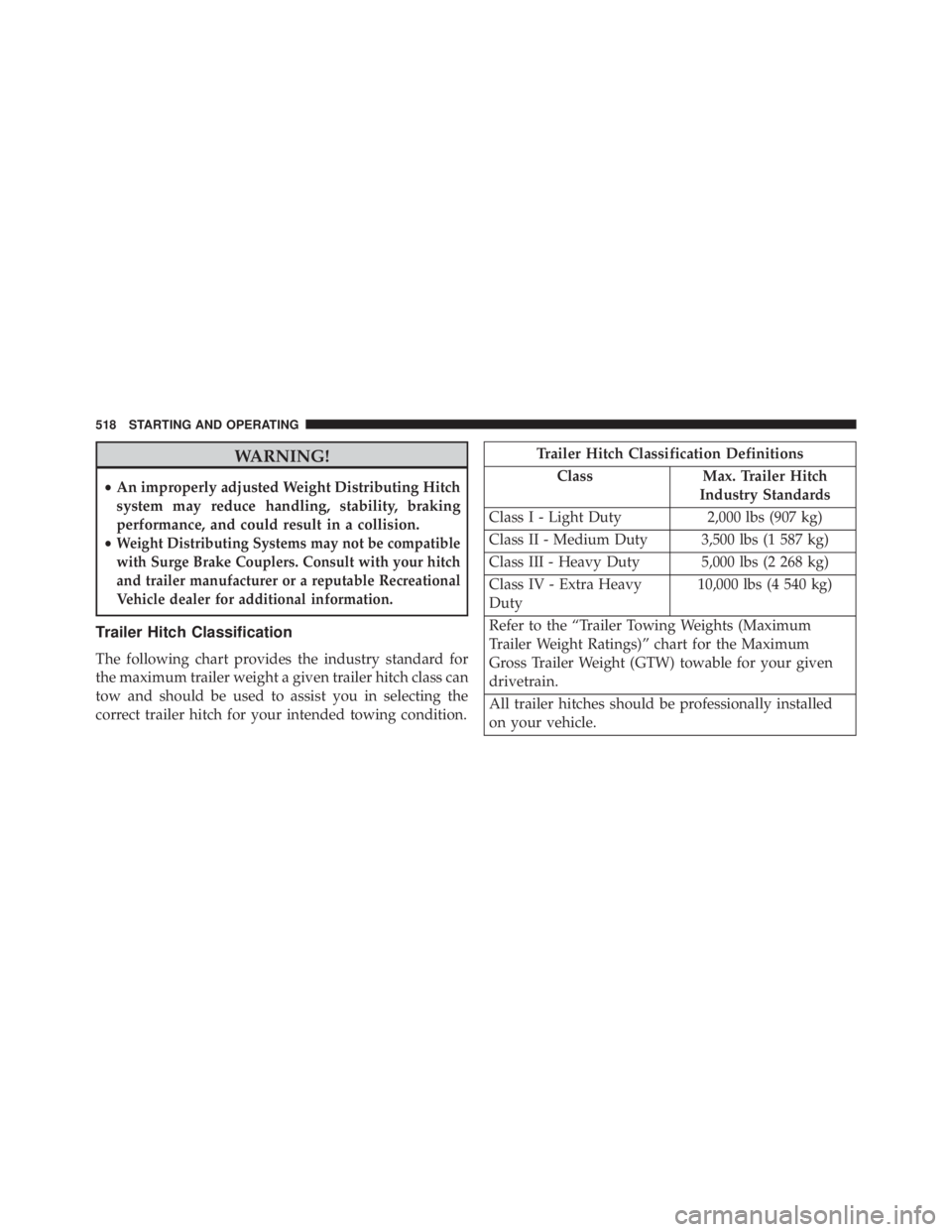
WARNING!• An improperly adjusted Weight Distributing Hitch
system may reduce handling, stability, braking
performance, and could result in a collision.
• Weight Distributing Systems may not be compatible
with Surge Brake Couplers. Consult with your hitch
and trailer manufacturer or a reputable Recreational
Vehicle dealer for additional information.
Trailer Hitch Classification
The following chart provides the industry standard for
the maximum trailer weight a given trailer hitch class can
tow and should be used to assist you in selecting the
correct trailer hitch for your intended towing condition. Trailer Hitch Classification Definitions
Class Max. Trailer Hitch
Industry Standards
Class I - Light Duty 2,000 lbs (907 kg)
Class II - Medium Duty 3,500 lbs (1 587 kg)
Class III - Heavy Duty 5,000 lbs (2 268 kg)
Class IV - Extra Heavy
Duty 10,000 lbs (4 540 kg)
Refer to the “Trailer Towing Weights (Maximum
Trailer Weight Ratings)” chart for the Maximum
Gross Trailer Weight (GTW) towable for your given
drivetrain.
All trailer hitches should be professionally installed
on your vehicle.518 STARTING AND OPERATING


