Page 504 of 704

Towing With HSA
HSA will provide assistance when starting on a grade
when pulling a trailer.
WARNING!
•If you use a trailer brake controller with your
trailer, your trailer brakes may be activated and
deactivated with the brake switch. If so, when the
brake pedal is released, there may not be enough
brake pressure to hold the vehicle and trailer on a
hill and this could cause a collision with another
vehicle or object behind you. In order to avoid
rolling down the hill while resuming acceleration,
manually activate the trailer brake prior to releas-
ing the brake pedal. Always remember the driver is
responsible for braking the vehicle.
(Continued)
WARNING!(Continued)
•HSA is not a parking brake. If you stop the vehicle
on a hill without putting the transmission in PARK
and using the parking brake, it will roll down the
hill and could cause a collision with another ve-
hicle or object. Always remember to use the park-
ing brake while parking on a hill, and that the
driver is responsible for braking the vehicle.
HSA Off
If you wish to turn off the HSA system, it can be done
using the Customer Programmable Features in the Elec-
tronic Vehicle Information Center (EVIC). Refer to “Elec-
tronic Vehicle Information Center (EVIC)” in “Under-
standing Your Instrument Panel” for further information.
502 STARTING AND OPERATING
Page 505 of 704

Ready Alert Braking – If Equipped
Ready Alert Braking may reduce the time required to
reach full braking during emergency braking situations.
It anticipates when an emergency braking situation may
occur by monitoring how fast the throttle is released by
the driver. When the throttle is released very quickly,
Ready Alert Braking applies a small amount of brake
pressure. This brake pressure will not be noticed by the
driver. The brake system uses this brake pressure to allow
a fast brake response if the driver applies the brakes.
Rain Brake Support – If Equipped
Rain Brake Support may improve braking performance
in wet conditions. It will periodically apply a small
amount of brake pressure to remove any water buildup
on the front brake rotors. It only functions when the
windshield wipers are in the LO or HI mode, it does not
function in the intermittent mode. When Rain Brake
Support is active, there is no notification to the driver and
no driver interaction is required.
5
STARTING AND OPERATING 503
Page 507 of 704

The HDC speed may be adjusted by the driver to suit the
driving conditions. The speed corresponds to the trans-
mission gear selected.
HDC operation can be overridden with brake application
to slow the vehicle down below the HDC control speed.
Conversely, if more speed is desired during HDC control,
the accelerator pedal will increase vehicle speed in the
usual manner. When either the brake or the accelerator is
released, HDC will control the vehicle back to the origi-
nal set speed.
HDC Operation In 4WD Low Range
To enable HDC, press the HDC switch or put the
Selec-Terrain™ system in the “ROCK” mode. The HDC
icon will be illuminated in the instrument cluster and
HDC will function. If the vehicle speed goes above 20
mph (32 km/h), the HDC icon will flash and HDC will
not function. To disable HDC, press the HDC switch.4WD Low Range Set Speeds
•1st = 1 mph (1.6 km/h)
•2nd = 2.5 mph (4 km/h)
•3rd = 4 mph (6 km/h)
•4th = 5.5 mph (9 km/h)
•5th, 6th or D (Drive) = 7.5 mph (12 km/h)
•REVERSE = 1 mph (1.6 km/h)
•NEUTRAL = 2.5 mph (4 km/h)
•PARK = HDC will not function
HDC is intended for low speed off-road driving only.
At vehicle speeds above 20 mph (32 km/h), HDC will no
longer function. When the vehicle speed drops below
20 mph (32 km/h), HDC function will automatically
resume and the vehicle speed will return to the chosen set
speed.
5
STARTING AND OPERATING 505
Page 508 of 704

WARNING!
HDC is only intended to assist the driver in control-
ling vehicle speed when descending hills. The driver
must remain attentive to the driving conditions and
is responsible for maintaining a safe vehicle speed.
ESC Activation/Malfunction Indicator Light And
ESC OFF Indicator Light
The “ESC Activation/Malfunction Indicator
Light” in the instrument cluster will come on
when the ignition switch is turned to the ON
position. It should go out with the engine
running. If the “ESC Activation/Malfunction Indicator
Light” comes on continuously with the engine running, a
malfunction has been detected in the ESC system. If thislight remains on after several ignition cycles, and the
vehicle has been driven several miles (kilometers) at
speeds greater than 30 mph (48 km/h), see your autho-
rized dealer as soon as possible to have the problem
diagnosed and corrected.
The “ESC Activation/Malfunction Indicator Light” (lo-
cated in the instrument cluster) starts to flash as soon as
the tires lose traction and the ESC system becomes active.
The “ESC Activation/Malfunction Indicator Light” also
flashes when TCS is active. If the “ESC Activation/
Malfunction Indicator Light” begins to flash during ac-
celeration, ease up on the accelerator and apply as little
throttle as possible. Be sure to adapt your speed and
driving to the prevailing road conditions.
506 STARTING AND OPERATING
Page 512 of 704
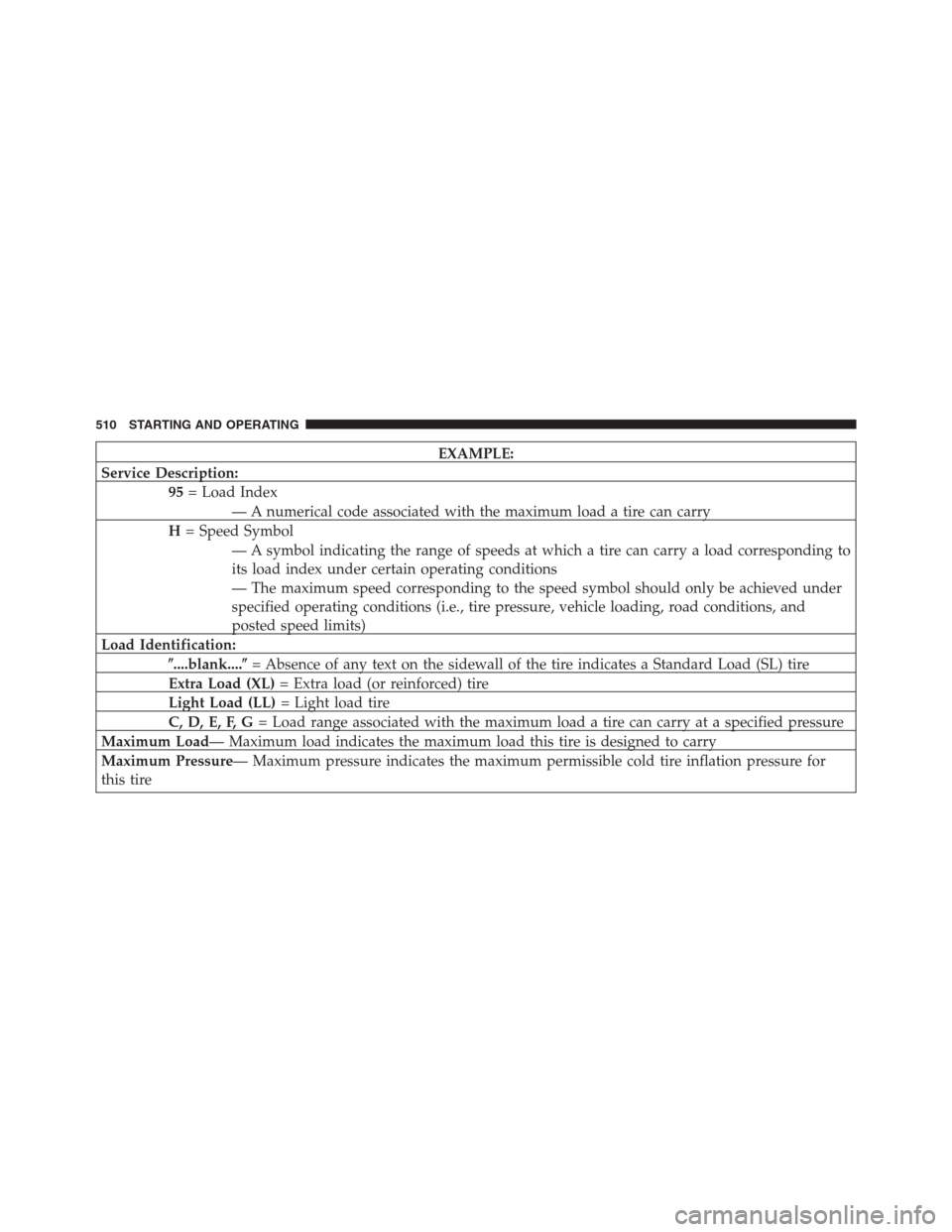
EXAMPLE:
Service Description:
95= Load Index
— A numerical code associated with the maximum load a tire can carry
H= Speed Symbol
— A symbol indicating the range of speeds at which a tire can carry a load corresponding to
its load index under certain operating conditions
— The maximum speed corresponding to the speed symbol should only be achieved under
specified operating conditions (i.e., tire pressure, vehicle loading, road conditions, and
posted speed limits)
Load Identification:
�....blank....�= Absence of any text on the sidewall of the tire indicates a Standard Load (SL) tire
Extra Load (XL)= Extra load (or reinforced) tire
Light Load (LL)= Light load tire
C, D, E, F, G= Load range associated with the maximum load a tire can carry at a specified pressure
Maximum Load— Maximum load indicates the maximum load this tire is designed to carry
Maximum Pressure— Maximum pressure indicates the maximum permissible cold tire inflation pressure for
this tire
510 STARTING AND OPERATING
Page 521 of 704

WARNING!(Continued)
•Unequal tire pressures from one side of the vehicle
to the other can cause the vehicle to drift to the
right or left.
•Always drive with each tire inflated to the recom-
mended cold tire inflation pressure.
Economy
Improper inflation pressures can cause uneven wear pat-
terns to develop across the tire tread. These abnormal wear
patterns will reduce tread life resulting in a need for earlier
tire replacement. Under-inflation also increases tire rolling
resistance resulting in higher fuel consumption.
Ride Comfort And Vehicle Stability
Proper tire inflation contributes to a comfortable ride.
Over-inflation produces a jarring and uncomfortable
ride. Both under-inflation and over-inflation affect thestability of the vehicle and can produce a feeling of
sluggish response or over responsiveness in the steering.
Unequal tire pressures can cause erratic and unpredict-
able steering response.
Unequal tire pressure from side to side may cause the
vehicle to drift left or right.
Tire Inflation Pressures
The proper cold tire inflation pressure is listed on the
driver’s side “B” Pillar or rear edge of the driver’s side
door.
The tire pressure should be checked and adjusted as well
as inspected for signs of tire wear or visible damage at
least once a month. Use a good quality pocket-type gauge
to check tire pressure. Do not make a visual judgement
when determining proper inflation. Radial tires may look
properly inflated even when they are under-inflated.5
STARTING AND OPERATING 519
Page 522 of 704

CAUTION!
After inspecting or adjusting the tire pressure, al-
ways reinstall the valve stem cap. This will prevent
moisture and dirt from entering the valve stem,
which could damage the valve stem.
Inflation pressures specified on the placard are always
“cold tire inflation pressure.” Cold tire inflation pressure
is defined as the tire pressure after the vehicle has not
been driven for at least three hours, or driven less than
1 mile (1.6 km) after a three hour period. The cold tire
inflation pressure must not exceed the maximum infla-
tion pressure molded into the tire sidewall.
Check tire pressures more often if subject to a wide range
of outdoor temperatures, as tire pressures vary with
temperature changes.Tire pressures change by approximately 1 psi (7 kPa) per
12°F (7°C) of air temperature change. Keep this in mind
when checking tire pressure inside a garage, especially in
the winter.
Example: If garage temperature = 68°F (20°C) and the
outside temperature = 32°F (0°C) then the cold tire
inflation pressure should be increased by 3 psi (21 kPa),
which equals 1 psi (7 kPa) for every 12°F (7°C) for this
outside temperature condition.
Tire pressure may increase from 2 to 6 psi (13 to 40 kPa)
during operation. DO NOT reduce this normal pressure
build up or your tire pressure will be too low.
520 STARTING AND OPERATING
Page 531 of 704

•Due to limited clearance, the Security Chain Company
(SCC) Super Z6 low profile traction device or equivalent
is recommended on P265/60R18 or 265/50R20 tires.
WARNING!
Using tires of different size and type (M+S, Snow)
between front and rear axles can cause unpredictable
handling. You could lose control and have a collision.
CAUTION!
To avoid damage to your vehicle or tires, observe the
following precautions:
•Because of restricted traction device clearance be-
tween tires and other suspension components, it is
important that only traction devices in good condi-
tion are used. Broken devices can cause serious
(Continued)
CAUTION!(Continued)
damage. Stop the vehicle immediately if noise
occurs that could indicate device breakage. Remove
the damaged parts of the device before further use.
•Install device as tightly as possible and then re-
tighten after driving about ½ mile (0.8 km).
•Do not exceed 30 mph (48 km/h).
•Drive cautiously and avoid severe turns and large
bumps, especially with a loaded vehicle.
•Do not drive for prolonged period on dry pave-
ment.
•Observe the traction device manufacturer ’s instruc-
tions on the method of installation, operating
speed, and conditions for use. Always use the
suggested operating speed of the device manufac-
turer ’s if it is less than 30 mph (48 km/h).
•Do not use traction devices on a compact spare tire.
5
STARTING AND OPERATING 529