2013 INFINITI M climate settings
[x] Cancel search: climate settingsPage 253 of 522

4-82Monitor, climate, audio, phone and voice recognition systems
Compatibility
The following models are available:
Models with navigation system:
.Fifth generation iPod
®(version 1.2.3 or
later)
. iPod Classic
®(version 1.1.1 or later)
. First generation iPod touch®(version
2.0.0 or later)
. Second generation iPod touch
®(firm-
ware version 1.2.3 or later)
. First generation iPod nano
®(firmware
version 1.3.1 or later)
. Second generation iPod nano
®(firm-
ware version 1.1.3 or later)
. Third generation iPod nano
®(firmware
version 1.1 or later)
. Fourth generation iPod nano
®(firmware
version 1.0.2 or later)
Models without navigation system:
. Fifth generation iPod
®(firmware ver-
sion 1.3)
. First generation iPod Classic
®(firmware
version 1.1.2 PC)
. Second generation iPod Classic
®(firm-
ware version 2.0 PC)
. First generation iPod touch
®(firmware
version 2.1) .
Second generation iPod touch
®(firm-
ware version 2.1.1)
. First generation iPod nano
®(firmware
version 1.3.1)
. Second generation iPod nano
®(firm-
ware version 1.1.3)
. Third generation iPod nano
®(firmware
version 1.1 PC)
. Third generation iPhone
®(firmware
version 2.1)
Make sure that the iPod
®version is
updated.
Audio main operation
Push the ignition switch to the ACC or ON
position. Then, push the DISC·AUX button
repeatedly to switch to the iPod
®mode.
If the system has been turned off while the
iPod
®was playing, pushing the ON·OFF
button will start the iPod®.
PLAY:
When the DISC·AUX button is pushed with
the system off and the iPod
®connected,
the system will turn on. If another audio
source is playing and the iPod
®is con-
nected, push the DISC·AUX button repeat-
edly until the center display changes to the
iPod
®mode. Interface:
The interface for iPod
®operation shown on
the vehicle center display is similar to the
iPod
®interface. Use the INFINITI controller
and the ENTER or BACK button to play the
iPod
®with your favorite settings.
The following items can be chosen from the
menu list screen. For further information
about each item, see the iPod
®Owner’s
Manual.
. Now Playing
. Playlists
. Artists
. Albums
. Songs
. Podcasts
. Genres
. Composers
. Audiobooks
. Shuffle Songs
. Play Mode
The following buttons shown on the screen
are also available:
.
: returns to the previous screen.
.
: plays/pauses the music selected.
Page 265 of 522

4-94Monitor, climate, audio, phone and voice recognition systems
SAA3587
DURING A CALL
There are some options available during a
call. Select one of the following displayed
on the screen if necessary.
.Hang up
Finish the call.
. Use Handset
Transfer the call to the cellular phone.
. Mute
Mute your voice to the person.
. Keypad
Using the touch tone, send digits to the
connected party for using services such
as voicemail. .
Cancel Mute
This will appear after “Mute”is se-
lected. Mute will be canceled.
. Switch Call*
Select “Switch Call” to answer another
incoming call. By selecting “Hang up”,
you can end a call and can speak to a
caller who is on hold again.
* This function may not be usable,
depending on the model of phone.
To adjust the person’s voice to be louder or
quieter, push the volume control switch (+
or −) on the steering wheel or turn the
volume control knob on the instrument
panel while talking on the phone. This
adjustment is also available in the SETTING
mode.
JVH0136M
PHONE SETTING
To set up the Bluetooth®Hands-Free
Phone System to your preferred settings,
push the SETTING button on the instrument
panel and select the “PHONE”key.
Edit Vehicle Phonebook
To edit the vehicle phonebook, use the
same procedure as described in “Vehicle
phonebook” earlier in this section.
Delete Phonebook
The vehicle phonebook entries can be
deleted all at the same time or one by one.
Page 266 of 522

Download Handset Phonebook
Download the contacts registered in a
Bluetooth®cellular phone. Availability of
this function depends on each cellular
phone. The memory downloading proce-
dure from the cellular phone also varies
according to each cellular phone. See
cellular phone Owner’s Manual for details.
When “Auto Downloaded” is active, the
system will automatically re-download the
entries registered in the phone everytime it
is paired with the vehicle, even after you
delete the entries from your vehicle’ s
Handset Memory.
Volume & Ringtone
The following kinds of phone volume can
be set. Pushing thebutton and
selecting the “Volume & Ringtone” key
can also operate the same settings.
. Ringtone/Incoming Call/Outgoing Call
To increase or decrease the volume,
select the “Ringtone”, “Incoming Call”
or “Outgoing Call” key and adjust it
with the INFINITI controller.
. Automatic Hold
When this function is activated, an
incoming phone call is automatically
held. .
Vehicle Ringtone
When this function is activated, a
specific ringtone that is different from
the cellular phone will sound when
receiving a call.
Auto Downloaded
When this item is activated, the phonebook
of a hands-free phone is automatically
downloaded at the same time that the
hands-free phone is connected.
When this item is active, the system will
automatically re-download the entries re-
gistered in the connected phone even if
you attempt to delete the entries.
Monitor, climate, audio, phone and voice recognition systems4-95
Page 278 of 522

call.
. “Mute on/off”— Use the Mute com-
mand to mute the user’s voice so the
other party cannot hear it.
Use the mute command again to
unmute the user’s voice.
. “Transfer Handset”— Use the Transfer
Handset command to transfer the call
from the Bluetooth
®Hands-Free Phone
System to a cellular phone when
privacy is desired. The system an-
nounces, “Transfer Handset. The call
is transferred to the handset only.” The
system then ends the VR session.
The Transfer Call command can also be
issued again to return to a hands-free
call through the vehicle.
. “Help”— The system announces the
available commands.
NOTE:
If the other party ends the call or the
cellular phone network connection is lost
while the Mute feature is on, the Mute
feature may need to be reset to “off.”
SAA2582
PHONE SETTINGS
Call
.(a name)
If there are entries stored in the Phone
Book, a number associated with a
name and location can be dialed. See
“Phone book registration” in this sec-
tion to learn how to store entries. When
prompted by the system, say the name
of the phone book entry to call.
The system acknowledges the name. If
there are multiple locations associated
with the name, the system asks the
user to choose the location. Once the name and location are con-
firmed, the system begins the call.
. Number
When prompted by the system, speak
the number to call.
. Redial
Use the Redial command to call the last
number of outgoing calls. The system
acknowledges the command, repeats
the number and begins dialing. If a
redial number does not exist, the
system announces, “There is no num-
ber to redial” and ends the VR session.
. Callback
Use the Callback command to call the
last number in incoming calls. The
system acknowledges the command,
repeats the number and begins dialing.
If an incoming call number does not
exist, the system announces, “There is
no number to call back” and ends the
VR session.
. Help
The system announces the available
commands.
Monitor, climate, audio, phone and voice recognition systems4-107
Page 304 of 522

SAA2547
Displaying user guide
You can confirm how to use voice com-
mands by accessing a simplified User
Guide, which contains basic instructions
and tutorials for several voice commands.
1. Push the INFO button on the instrumentpanel.
2. Select the “Others” key using the
INFINITI controller and push the ENTER
button.
3. Highlight the “Voice Recognition” key
using the INFINITI controller and push
the ENTER button. 4. Highlight the
“User Guide”key using
the INFINITI controller and push the
ENTER button.
5. Highlight an item using the INFINITI controller and push the ENTER button.
Available items:
. Getting Started
Describe the basics of how to operate
the INFINITI Voice Recognition system.
. Let’s Practice
Mode that allows practicing by follow-
ing the instructions of the system voice.
. Using the Address Book
Refer to Navigation System Owner’s
Manual.
. Finding a Street Address (if so
equipped)
Refer to Navigation System Owner’s
Manual.
. Placing Calls
Tutorial for making a phone call by
voice command operation.
. Help on Speaking
Displays useful tips for how to correctly
speak commands in order for them to
be properly recognized by the system. .
Voice Recognition Settings
Describes the available voice recogni-
tion settings.
. Adapting the System to Your Voice
Tutorial adapting the system to your
voice.
USING THE SYSTEM
Initialization
When the ignition switch is pushed to the
ON position, INFINITI Voice Recognition is
initialized, which may take up to one
minute. When completed, the system is
ready to accept voice commands. If the
TALK
switch is pushed before the
initialization completes the display will
show the message: “System not ready.”
or a beep sounds.
Before starting
To get the best performance from INFINITI
Voice Recognition, observe the following.
. Keep the interior of the vehicle as quiet
as possible. Close the windows to
eliminate the surrounding noises (traf-
fic noises, vibration sounds, etc.),
which may prevent the system from
recognizing the voice commands cor-
rectly.
Monitor, climate, audio, phone and voice recognition systems4-133
Page 308 of 522
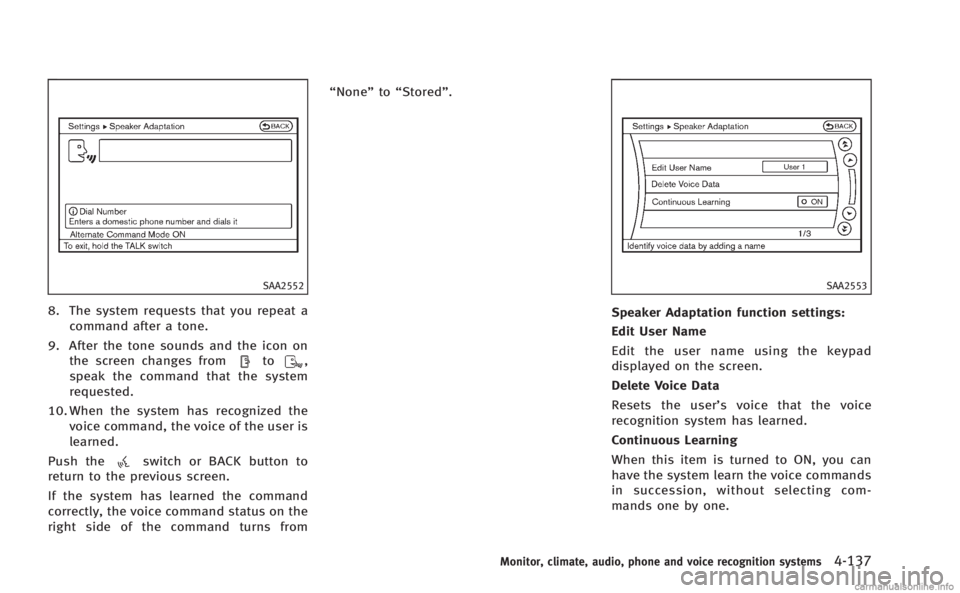
SAA2552
8. The system requests that you repeat acommand after a tone.
9. After the tone sounds and the icon on the screen changes from
to,
speak the command that the system
requested.
10. When the system has recognized the voice command, the voice of the user is
learned.
Push the
switch or BACK button to
return to the previous screen.
If the system has learned the command
correctly, the voice command status on the
right side of the command turns from “None”
to“Stored”.
SAA2553
Speaker Adaptation function settings:
Edit User Name
Edit the user name using the keypad
displayed on the screen.
Delete Voice Data
Resets the user’ s voice that the voice
recognition system has learned.
Continuous Learning
When this item is turned to ON, you can
have the system learn the voice commands
in succession, without selecting com-
mands one by one.
Monitor, climate, audio, phone and voice recognition systems4-137
Page 405 of 522

5-94Starting and driving
the tone will sound continuously.
Keep the corner/center sonar (located on
the bumper fascia) free from snow, ice and
large accumulations of dirt (do not clean
the sonar with sharp objects). If the sonar
is covered, it will affect the accuracy of the
sonar system.
The sensitivity level of the corner/center
sonar can be adjusted (higher or lower) in
the SONAR setting display. (See“How to
use SETTING button” in the“Monitor,
climate, audio, phone and voice recogni-
tion systems” for the“Sonar” settings.)
SSD0928
*1Rear view monitor display
*ACorner sonar indicator
*BCenter sonar indicator
SONAR INDICATOR
With the “Sonar Display” key ON in the
“Sonar” settings, when the corner/center
sonar detects obstacles near the bumper, a
tone will sound and the sonar indicator will
appear in the center display. When the rear
view monitor is displayed, the sonar
indicator will appear in the upper corner
of the display
*1.
The sonar indicators
*Aand*Bindicate
the position of the object and the distance to the object with its color and rate of
blinking.
When an object is detected, the indicator
(green) appears and blinks (the tone
sounds intermittently). When the vehicle
moves closer to the object, the color of the
indicator turns yellow and the rate of
blinking increases (the rate of the tone
increases). When the bumper is very close
to the object, less than 11.8 in (30 cm)
away, the indicator stops blinking and
turns red (the tone sounds continuously).
When the rear view monitor is displayed,
the colors of the sonar indicator and the
distance guide lines in the rear view
indicate different distances to the object.
The sonar indicator can be turned off in the
SONAR setting display. (See
“How to use
SETTING button” in the“Monitor, climate,
audio, phone and voice recognition sys-
tems” for the “Sonar” settings.) When the
sonar indicator is off, only a tone sounds
when the sonar detects obstacles.
Page 517 of 522

10-6
PrecautionsAudio operation ........................................... 4-49
Braking precautions ..................................... 5-95
Child restraints ............................................ 1-21
Cruise control .............................................. 5-46
Lane departure warning (LDW) system ......... 5-24
Maintenance .................................................. 8-5
Seat belt usage ........................................... 1-12 Supplemental restraint system ..................... 1-39
When starting and driving .............................. 5-3
Pre-crash seat belts with comfort function ........ 1-14
Predictive course line settings .......................... 4-32
Preview function ............................................... 5-96
Preview function (for Intelligent cruise
control system) ................................................. 5-69
Preview Function warning light .......................... 2-15
Push starting .................................................... 6-10
Push-button ignition switch ....................... 5-9, 5-10
R
Radio
Car phone or CB radio ................................. 4-86
FM-AM-SAT radio with Compact Disc
(CD) player ................................................... 4-64
Rain-sensing auto wiper system ........................ 2-33
Rapid air pressure loss ....................................... 5-7
Readiness for inspection/maintenance (I/M) test
(US only) .......................................................... 9-22 Rear door lock Child safety rear door lock ............................. 3-6
Rear pocket ...................................................... 2-52 Rear sunshade .................................................. 2-57
Rear window and outside mirror
defroster switch ................................................ 2-34
RearView monitor .............................................. 4-27
Recorders
Event data ................................................... 9-23
Registering your vehicle in another country ...... 9-11
Remote keyless entry system ............................ 3-14
Reporting safety defects ................................... 9-21
Rise-up and build-up ...................................... 5-101
Roadside assistance program ............................. 6-2
Rollover .............................................................. 5-7
Roof Moonroof ..................................................... 2-56
S
SafetyChild seat belts ........................................... 1-19
Reporting safety defects .............................. 9-21
Satellite radio operation ................................... 4-65
Seat adjustment
Front power seat adjustment .......................... 1-3
Front seats ..................................................... 1-3
Seat belt(s)
Child safety ................................................. 1-19
Infants ......................................................... 1-20
Injured persons ........................................... 1-14Larger children ............................................. 1-20
Precautions on seat belt usage .................... 1-12
Pre-crash seat belts with comfort function ... 1-14Pregnant women .......................................... 1-14 Seat belt cleaning .......................................... 7-6
Seat belt extenders ...................................... 1-18
Seat belt maintenance ................................. 1-18
Seat belt warning light and chime ............... 2-15
Seat belts .................................................... 1-12
Seat belts with pretensioners ...................... 1-51
Shoulder belt height adjustment .................. 1-18
Small children ............................................. 1-20
Three-point type .......................................... 1-15
Seat(s)
Climate controlled seats .............................. 2-43
Driver-side memory ...................................... 3-28
Heated seats ............................................... 2-42
Seats ............................................................. 1-2
Security system Vehicle security system ................................ 2-29
Security system
(INFINITI Vehicle Immobilizer System) Engine start ................................................. 2-30
Selector lever Shift lock release ......................................... 5-18
Servicing air conditioner (See automatic
climate control) ................................................. 4-34
Servicing climate control ................................... 4-48
SETTING button ................................................. 4-16
Shift lock release, Transmission ........................ 5-18
Shifting Automatic transmission ............................... 5-14
Shoulder belt height adjustment ....................... 1-18
SNOW mode ..................................................... 5-21