2013 INFINITI M mirror
[x] Cancel search: mirrorPage 335 of 522

5-24Starting and driving
The LDW and LDP systems monitor the lane
markers on the traveling lane using the
camera unit
*1located above the inside
mirror. When the camera unit detects that
the vehicle is traveling close to either the
left or the right of the traveling lane, the
lane departure warning light on the instru-
ment panel blinks in orange and a warning
chime sounds. When the LDP system is on,
it will automatically apply the brakes for a
short period of time, using the function of
the Vehicle Dynamic Control (VDC) system.
LANE DEPARTURE WARNING (LDW)
SYSTEM
Precautions on LDW system
WARNING
. This system is only a warning device to
inform the driver of a potential unin-
tended lane departure. It will not steer
the vehicle or prevent loss of control. It
is the driver’ s responsibility to stay
alert, drive safely, keep the vehicle in
the traveling lane, and be in control of
the vehicle at all times.
. The system will not operate at speeds below approximately 45 MPH or if it
cannot detect lane markers.
. If the LDW system malfunctions, it will
cancel automatically, and the lane de-
parture warning light (orange) will illu-
minate.
. If the lane departure warning light
(orange) illuminates, pull off the road
to a safe location and stop the vehicle.
Turn the engine off and restart the
engine. If the lane departure warning
light (orange) continues to illuminate,
have the system checked by an INFINITI
retailer.
. Excessive noise will interfere with the
warning chime sound, and the chime
may not be heard.The system may not function properly
under the following conditions:
.On roads where there are multiple
parallel lane markers; lane markers
that are faded or not painted clearly;
yellow painted lane markers; non-stan-
dard lane markers; or lane markers
covered with water, dirt, snow, etc.
. On roads where the discontinued lane
markers are still detectable. .
On roads where there are sharp curves.
. On roads where there are sharply
contrasting objects, such as shadows,
snow, water, wheel ruts, seams or lines
remaining after road repairs. (The LDW
system could detect these items as
lane markers.)
. On roads where the traveling lane
merges or separates.
. When the vehicle’s traveling direction
does not align with the lane marker.
. When traveling close to the vehicle in
front of you, which obstructs the lane
camera unit detection range.
. When rain, snow or dirt adheres to the
windshield in front of the lane camera
unit.
. When the headlights are not bright due
to dirt on the lens or if the aiming is not
adjusted properly.
. When strong light enters the lane
camera unit. (For example, the light
directly shines on the front of the
vehicle at sunrise or sunset.)
. When a sudden change in brightness
occurs. (For example, when the vehicle
enters or exits a tunnel or under a
bridge.)
Page 343 of 522

5-32Starting and driving
SSD0453
LANE CAMERA UNIT MAINTENANCE
The lane camera unit*1for the LDW/LDP
system is located above the inside mirror.
To keep the proper operation of the LDW/
LDP systems and prevent a system mal-
function, be sure to observe the following:
. Always keep the windshield clean.
. Do not attach a sticker (including
transparent material) or install an
accessory near the camera unit.
. Do not place reflective materials, such
as white paper or a mirror, on the
instrument panel. The reflection of
sunlight may adversely affect the cam- era unit’s capability of detecting the
lane markers.
. Do not strike or damage the areas
around the camera unit. Do not touch
the camera lens or remove the screw
located on the camera unit. If the
camera unit is damaged due to an
accident, contact an INFINITI retailer. The Blind Spot Warning (BSW) and Blind
Spot Intervention (BSI) systems can help
alert the driver of other vehicles in
adjacent lanes when changing lanes.
BLIND SPOT WARNING (BSW) SYSTEM/
BLIND SPOT INTERVENTIONTM(BSI)
SYSTEM (if so equipped)
Page 344 of 522
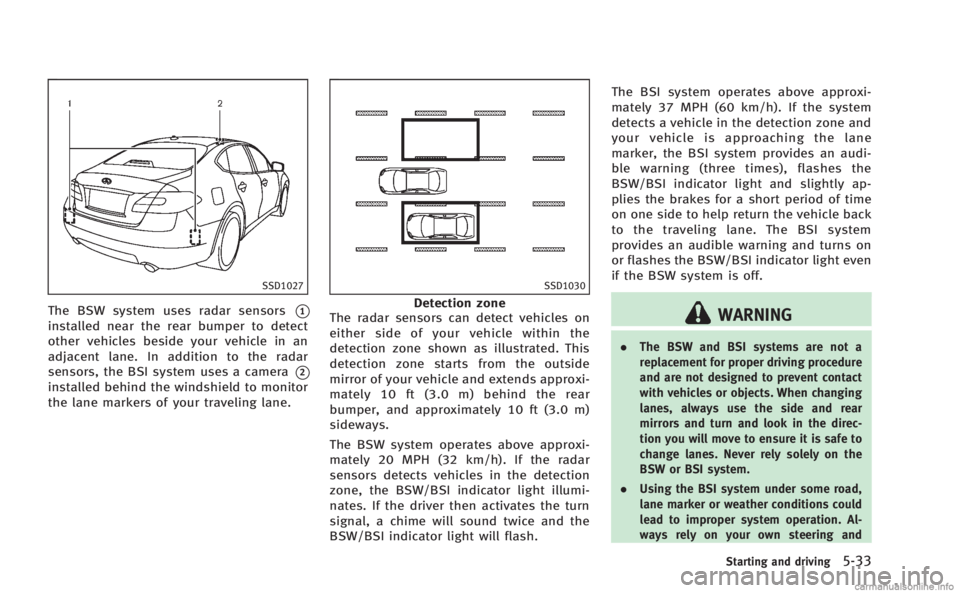
SSD1027
The BSW system uses radar sensors*1
installed near the rear bumper to detect
other vehicles beside your vehicle in an
adjacent lane. In addition to the radar
sensors, the BSI system uses a camera
*2
installed behind the windshield to monitor
the lane markers of your traveling lane.
SSD1030
Detection zone
The radar sensors can detect vehicles on
either side of your vehicle within the
detection zone shown as illustrated. This
detection zone starts from the outside
mirror of your vehicle and extends approxi-
mately 10 ft (3.0 m) behind the rear
bumper, and approximately 10 ft (3.0 m)
sideways.
The BSW system operates above approxi-
mately 20 MPH (32 km/h). If the radar
sensors detects vehicles in the detection
zone, the BSW/BSI indicator light illumi-
nates. If the driver then activates the turn
signal, a chime will sound twice and the
BSW/BSI indicator light will flash. The BSI system operates above approxi-
mately 37 MPH (60 km/h). If the system
detects a vehicle in the detection zone and
your vehicle is approaching the lane
marker, the BSI system provides an audi-
ble warning (three times), flashes the
BSW/BSI indicator light and slightly ap-
plies the brakes for a short period of time
on one side to help return the vehicle back
to the traveling lane. The BSI system
provides an audible warning and turns on
or flashes the BSW/BSI indicator light even
if the BSW system is off.WARNING
.
The BSW and BSI systems are not a
replacement for proper driving procedure
and are not designed to prevent contact
with vehicles or objects. When changing
lanes, always use the side and rear
mirrors and turn and look in the direc-
tion you will move to ensure it is safe to
change lanes. Never rely solely on the
BSW or BSI system.
. Using the BSI system under some road,
lane marker or weather conditions could
lead to improper system operation. Al-
ways rely on your own steering and
Starting and driving5-33
Page 345 of 522

5-34Starting and driving
braking operation to avoid accidents.
. The BSW and BSI systems may not
provide a warning or brake control for
vehicles that pass through the detection
zone quickly.
SSD1028
BSW/BSI indicator light
BSW SYSTEM OPERATION
If the radar sensors detect vehicles in the
detection zone, the BSW/BSI indicator
light located inside the outside mirrors
illuminates. If the turn signal is then
activated, the BSW/BSI indicator light
flashes and a chime sounds twice. The
indicator light continues to flash until the
detected vehicles leave the detection zone.
The BSW/BSI indicator lights illuminate for
a few seconds when the ignition switch is
pushed to the ON position.
The brightness of the BSW/BSI indicator
lights is adjusted automatically depending on the brightness of the ambient light.
A chime sounds if the radar sensors have
already detected vehicles when the driver
activates the turn signal. If a vehicle comes
into the detection zone after the driver
activates the turn signal, then only the
BSW/BSI indicator light flashes and no
chime sounds. (See
“BSW/BSI driving
situations” later in this section.)
Page 348 of 522

SSD0938
Dynamic driver assistance switch
BSI SYSTEM OPERATION
If the radar sensors detect vehicles in the
detection zone, the BSW/BSI indicator
light located inside the outside mirrors
illuminates. If your vehicle is approaching
a lane marker, the BSW/BSI indicator light
flashes and an audible warning will sound
three times. Then the system applies the
brakes on one side of the vehicle for a
short period of time to help return the
vehicle back to the center of the lane. BSI
operates regardless of turn signal usage.NOTE:
.
Warning and brake control will only be
activated if the BSW/BSI indicator light
is already illuminated when your vehi-
cle approaches a lane marker. If
another vehicle comes into the detec-
tion zone after your vehicle has
crossed a lane marker, no warning or
brake control will be activated. (See
“BSW/BSI driving situations” later in
this section.)
. The BSI system is typically activated
earlier than the Lane Departure Pre-
vention (LDP) system when your vehi-
cle is approaching a lane marker.
The BSI system turns on when the dynamic
driver assistance switch on the steering
wheel is pushed when the “Blind Spot
Intervention” is enabled in the settings
menu on the center display. The BSI ON
indicator light (green) on the instrument
panel illuminates when the BSI system is
turned on.
The BSI system provides an audible warn-
ing and flashes the indicator light when
BSI is activated even if the BSW system is
off.
SSD0939
With navigation system
SSD1001
Starting and driving5-37
Page 351 of 522

5-40Starting and driving
SSD1026
BSW/BSI DRIVING SITUATIONS
Another vehicle approaching from
behind
The BSW/BSI indicator light illuminates if a
vehicle enters the detection zone from
behind in an adjacent lane.
However, if the overtaking vehicle is
traveling much faster than your vehicle,
the indicator light may not illuminate
before the detected vehicle is beside your
vehicle. Always use the side and rear
mirrors and turn and look in the direction
your vehicle will move to ensure it is safe
to change lanes.
SSD1031
If the driver activates the turn signal, then
the BSW/BSI indicator light flashes and a
chime will sound twice.
NOTE:
If the driver activates the turn signal
before a vehicle enters the detection zone,
the BSW/BSI indicator light will flash but
no chime will sound when the other
vehicle is detected.
SSD1044
If the BSI system is on and your vehicle is
approaching a lane marker, the BSW/BSI
indicator light flashes and a chime will
sound three times. Then the BSI system
slightly applies the brakes on one side to
help return the vehicle back to the center of
the driving lane.
Page 356 of 522

BSW/BSI MALFUNCTION
When the BSW/BSI systems malfunction,
they will be turned off automatically, a
beep will sound and the BSW/BSI system
warning light (orange) will illuminate.
Action to take:
Stop the vehicle in a safe location, turn the
engine off and restart the engine.
If the warning light (orange) continues to
illuminate, have the BSW/BSI systems
checked by an INFINITI retailer.
SSD1027
SYSTEM MAINTENANCE
.The two radar sensor units*1for the
BSW and BSI systems are located near
the rear bumper. Always keep the area
near the radar sensors clean. Do not
attach stickers (including transparent
material), install accessories or apply
additional paint near the radar sensors.
Do not strike or damage the area
around the radar sensors. Consult an
INFINITI retailer if the area around the
radar sensors is damaged due to a
collision.
. The BSI system uses the same camera
*2that is used by the LDW/LDP system located in front of the inside mirror.
For maintenance of the camera, see “Lane
Departure Warning (LDW) system/Lane
Departure Prevention (LDP) system” earlier
in this section.
Radio frequency statement
This device complies with part 15 of the
FCC Rules and RSS-310 of Industry Canada.
Operation is subject to the following two
conditions:
1. This device may not cause harmful interference.
2. This device must accept any interfer- ence received, including interference
that may cause undesired operation.
Frequency of operation: 24.05GHz —
24.25GHz
Field Strength: Not greater than 2.5V/m
peak (0.25V/m average) at a distance of 3
m
The manufacturer is not responsible for
any radio or TV interference caused by
unauthorized modifications to this equip-
ment. Such modifications could void the
user’s authority to operate the equipment.
Starting and driving5-45
Page 473 of 522

8-32Maintenance and do-it-yourself
replaced at an INFINITI retailer. For addi-
tional information, see“Headlight and turn
signal switch” in the“2. Instruments and
controls” section.
Use the same number and wattage shown
in the following chart as originally in-
stalled.
If replacement is required, see an INFINITI
retailer.
Fog may temporarily form inside the lens of
the exterior lights in the rain or in a car
wash. A temperature difference between
the inside and the outside of the lens
causes the fog. This is not a malfunction. If
large drops of water collect inside the lens,
contact an INFINITI retailer.
EXTERIOR AND INTERIOR LIGHTS
Item Wattage (W)Bulb No.
Headlight*
High/Low beams (xenon) 35D2S
Front turn signal light* 21WY21W
Front fog light* 35H8
Parking light* 5W5W
Side marker light* 5W5W
Rear combination light*
back-up 16W16W
turn signal 21WY21W
stop/tail/side marker LED—
License plate light* 5W5W
Map light 8—
Rear personal light 8—
Vanity mirror light 2—
Step light* 5—
Trunk light* 3.4—
Courtesy light* LED—
High-mounted stop light* LED—
*: See an INFINITI retailer for replacement.
NOTE: Always check with the Parts Department at an INFINITI retailer for the latest
information about parts.